AllMCPs
BrowseBestCategoriesStackCompareToolsGuidesBlog
Log in Submit MCP

Stay in the loop

Get new MCP servers and top picks in your inbox.

AllMCPs

The open directory for discovering and installing Model Context Protocol servers.

Follow AllMCPs on X (opens in a new tab)AllMCPs on GitHub (opens in a new tab)
Launched onTiny Startupstinystartups.com
Explore
  • Browse servers
  • Best MCP servers
  • Categories
  • MCP clients
  • Agent prompts
  • Stack Builder
  • Compare servers
  • Random discovery New
  • Submit a server
  • Pricing & Boost Boost
Learn
  • Guides hub
  • What is MCP?
  • Install guide
  • Build an MCP server
  • Deploy an MCP server
  • Security guide
  • Troubleshooting
  • MCP for SEO & AEO
  • Protocol versioning
  • Blog & updates
Tools
  • All developer tools
  • Config generator
  • Config validator
  • Config auditor
  • MCP playground
  • Token calculator
  • OpenAPI β†’ MCP
  • Badge generator
For agents
  • REST API docs
  • Trust & traffic Live
  • Remote MCP server SSE β†— (opens in a new tab)
  • llms.txt β†— (opens in a new tab)
  • Catalog JSON β†— (opens in a new tab)
Company
  • About
  • Advertise Sponsor
  • Contact
  • X (@AllMCPs) β†— (opens in a new tab)
  • GitHub β†— (opens in a new tab)
  • Terms
  • Privacy
AllMCPs VerifiedAllMCPs VerifiedFeatured on Nick LaunchesFeatured on Nick LaunchesLaunch Llama NewsletterLaunch Llama NewsletterVerified DR - allmcps.comVerified DR - allmcps.comFeatured on SaaSGrowFeatured on SaaSGrowFeatured on Twelve ToolsFeatured on Twelve ToolsFeatured on Saaspa.geFeatured on Saaspa.geFeatured on Findly.toolsFeatured on Findly.toolsFeatured on Startup FameFeatured on Startup FameFeatured on LaunchKiwiFeatured on LaunchKiwiFeatured on ScrollLaunchFeatured on ScrollLaunchFeatured on DailyPingsFeatured on DailyPingsFazier badgeFazier badgeFeatured on NewTool.siteFeatured on NewTool.siteFeatured on saasfame.comFeatured on saasfame.comDR Checker - Domain RatingDR Checker - Domain RatingListed on Turbo0Listed on Turbo0Launched on LaunchBoard - Product Launch PlatformLaunched on LaunchBoard - Product Launch PlatformList on SimilarlabsList on Similarlabshttps://codetrendy.comhttps://codetrendy.comListed on DevTool.ioFeatured on BuildlistFeatured on BuildlistLaunched on Tiny StartupsFeatured on ShowMeBestAIFeatured on ShowMeBestAIFind us on LaunchZoneFind us on LaunchZoneAllMCPs VerifiedAllMCPs VerifiedFeatured on Nick LaunchesFeatured on Nick LaunchesLaunch Llama NewsletterLaunch Llama NewsletterVerified DR - allmcps.comVerified DR - allmcps.comFeatured on SaaSGrowFeatured on SaaSGrowFeatured on Twelve ToolsFeatured on Twelve ToolsFeatured on Saaspa.geFeatured on Saaspa.geFeatured on Findly.toolsFeatured on Findly.toolsFeatured on Startup FameFeatured on Startup FameFeatured on LaunchKiwiFeatured on LaunchKiwiFeatured on ScrollLaunchFeatured on ScrollLaunchFeatured on DailyPingsFeatured on DailyPingsFazier badgeFazier badgeFeatured on NewTool.siteFeatured on NewTool.siteFeatured on saasfame.comFeatured on saasfame.comDR Checker - Domain RatingDR Checker - Domain RatingListed on Turbo0Listed on Turbo0Launched on LaunchBoard - Product Launch PlatformLaunched on LaunchBoard - Product Launch PlatformList on SimilarlabsList on Similarlabshttps://codetrendy.comhttps://codetrendy.comListed on DevTool.ioFeatured on BuildlistFeatured on BuildlistLaunched on Tiny StartupsFeatured on ShowMeBestAIFeatured on ShowMeBestAIFind us on LaunchZoneFind us on LaunchZone
Β© 2026 Jackalope Digital LLC. All rights reserved.
  1. Home
  2. πŸš€ Aerospace & Astrodynamics
  3. Orbit
O
Health: Not checked yetWe have not completed a health check for this listing yet.No health check has run yet.

Orbit

User RatingsBe the first to rate and review this MCP server! Enrichment pendingWe haven’t run our AI enrichment pass on this listing yet, so the overview, use cases, and FAQ below may be sparse or missing. We work through the catalog over time β€” check back soon.
View Repository

Orbit's local-first task and workflow registry for coding agents.

Quick Install

Automated & IDE Setup

Copy the AI prompt to install this server into Claude Code, Cursor, or another agent β€” or use 1-click editor setup below.

Add to CursorAdd to VS Code
Manual Client & Custom JSON ConfigExpand JSON β–Ύ

Client Config & Setup

Choose your client or environment
Target File:~/Library/Application Support/Claude/claude_desktop_config.json
claude_desktop_config.json
{
  "mcpServers": {
    "orbit-4": {
      "command": "npx",
      "args": [
        "-y",
        "orbit-4"
      ]
    }
  }
}

πŸ’‘ Paste the JSON block into your client's configuration file under mcpServers, then restart the application.

Install Directory Badge Claim listing AlternativesπŸš€ More in Aerospace & Astrodynamics

Documentation Overview

Orbit β€” The engineering framework for your AI coding agents
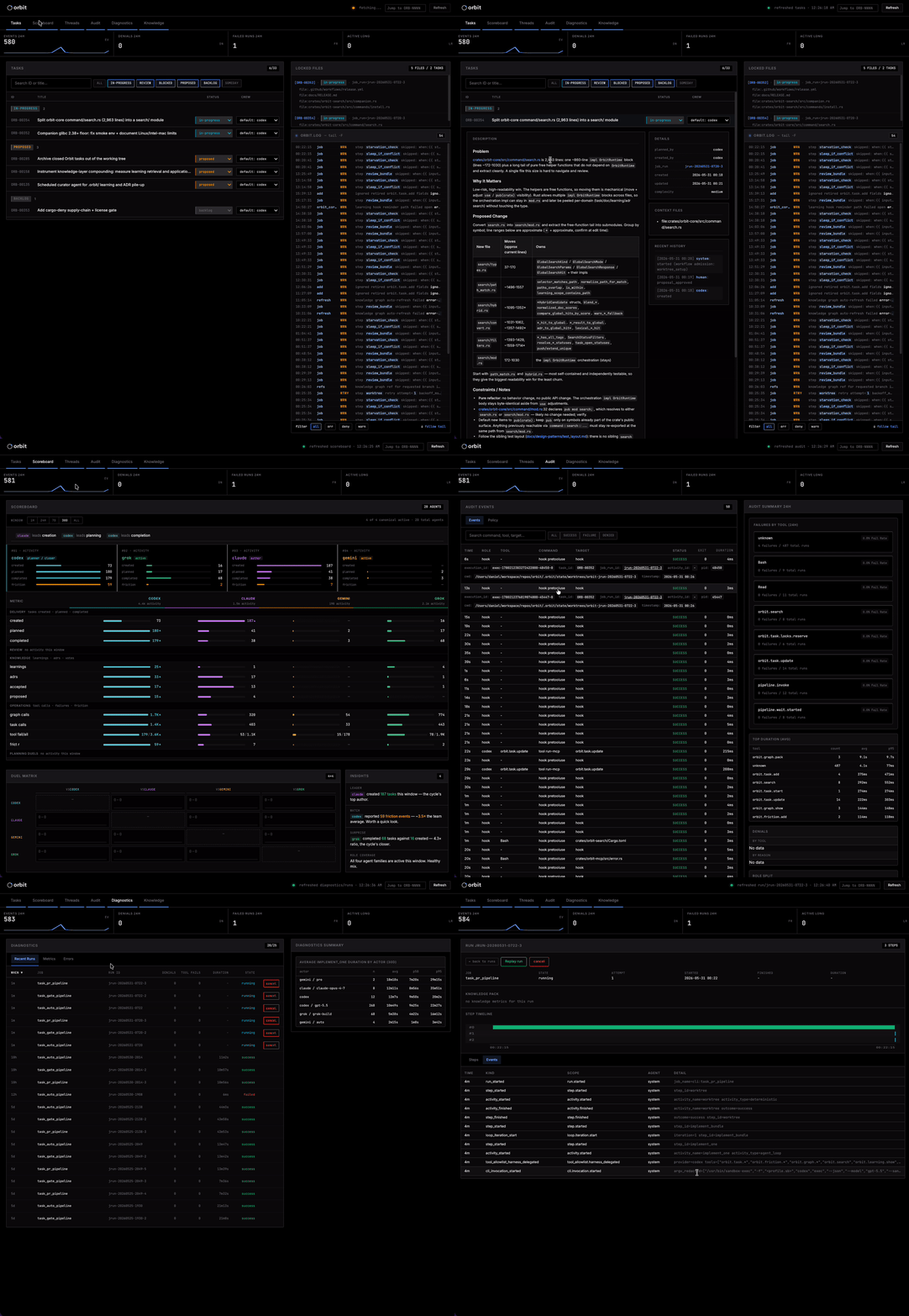
Orbit dashboard: task backlog, agent execution, and live audit log

The Orbit dashboard (orbit web serve) β€” task backlog, live audit log, per-agent scoreboard.

Orbit takes review off the critical path, so throughput and rigor stop trading against each other. A durable task for every change, structured audit of every tool call and provider exchange, conflict-aware parallel dispatch, and continuous review sweeps that file what they find straight back into the backlog β€” local-first.

You drive Claude Code, Codex, Grok Build, or Gemini CLI against real code, often in parallel. Agents make it easy to skip the disciplines that keep code maintainable, and six months later nobody can reconstruct why an agent wrote a given line. Orbit makes those disciplines cheap: tasks before edits, every tool call in a structured audit log, parallel runs sandboxed into worktrees with file-level locks, and your own design docs retrievable by the agents doing the work.

Conventional practice buys safety with blocking gates, which caps how many agents you can run at once. Orbit merges on a quick direction check, then scheduled code-review, qa-sweep, and security-review passes read the merged window and file every confirmed finding back into the backlog as an ordinary task. Every commit carries its task ID, so the history stays reconstructable.


Features

  • Durable, intent-tracked task layer. Lifecycle (proposed β†’ backlog β†’ in-progress β†’ review β†’ done) survives sessions and branches; every commit carries the task_id, so orbit task show reconstructs prompt, plan, execution trace, and review threads months later. β†’ docs/design/task-artifacts/
  • Structured audit log. Every tool call, provider exchange, and task transition is a queryable, append-only event with agent identity attached. β†’ docs/design/auditability/
  • Conflict-aware parallel execution. orbit run ship gives each run its own git worktree and reserves task context_files as locks before fanning out, rejecting overlapping reservations up front instead of producing merge conflicts later. β†’ docs/design/activity-job/
  • Continuous review, not blocking review. Shipped code-review, qa-sweep, and security-review auto-tasks read the window since their last cursor, verify findings against live code, and file confirmed ones as tasks with file:line evidence. A clean window is a successful no-op. β†’ docs/design/auto-tasks/
  • Sandboxed-by-default execution. Dispatched agent CLIs run under sandbox-exec on macOS and Bubblewrap on Linux; the Linux boundary enforces writes only, leaving host reads and network open. Unsupported platforms keep the in-process filesystem guards. β†’ docs/design/policy-sandbox/
  • A searchable docs corpus β€” your conventions, not Orbit's. Register the markdown you already write with orbit docs add; agents retrieve it by concept via orbit search --kind doc, with --hybrid adding embedding recall. β†’ docs/design/orbit-docs/
  • A friction ledger for what made the work harder than it should have been. A confusing error, a missing flag, an undocumented convention β€” Orbit's own tooling being one case among many β€” the agent files it (orbit friction add) instead of silently working around it. A task carrying a resolves relation closes its friction on reaching done.
  • Dependency-ordered execution. Tasks carry dependencies and typed relations; the pipeline gates admission on them, so declare the order once and let the queue enforce it.
  • Recurring work as data. orbit auto-task defines .orbit/auto_tasks/*.yaml templates with a cron or interval schedule and a dedupe policy; a seeded scheduler mints tasks from the due ones, and orbit auto-task mint <name> mints one on demand.

Everything is incremental: the task layer and audit log work on day one; the docs corpus, friction ledger, auto-tasks, and parallel dispatch switch on as you adopt them.


Quick Start

Prerequisites: at least one supported agent CLI (Claude Code, Codex, Cursor, or Gemini CLI), authenticated. orbit run ship in its default --mode pr needs gh authenticated; otherwise use --mode local. On Linux, complete the Linux sandbox runbook after orbit init.

Terminal
curl -sSf https://raw.githubusercontent.com/constellation-works/orbit/main/install.sh | sh
# or: brew install constellation-works/tap/orbit

orbit init                                 # global state (~/.orbit)
cd <repo> && orbit workspace init --mcp    # workspace state + operator-authorized MCP integration

TASK_ID=$(orbit task add --title "..." --description "..." \
  --acceptance-criteria "..." --complexity medium --workspace .)
orbit task update "$TASK_ID" --status backlog   # approve into the backlog

orbit run ship                             # conflict-aware parallel flush of the backlog to PRs
orbit run show <RUN_ID>                    # step-by-step progress
orbit web serve                            # dashboard over every registered workspace
orbit web connect my-server                # ...or a remote workspace over an SSH tunnel

Or ask your agent: "create an orbit task to refactor the authentication logic in …". Full command reference: orbit --help and orbit-cli.com. Crews (which provider-model runs a task) and the base branch: docs/CONFIG.md.

Agent plugins

Use a plugin to attach Orbit's MCP tools and orbit skill to one agent without the CLI on $PATH; use the CLI install for the dashboard and cross-agent workspace setup. All three load plugin/skills/orbit and launch the npm CLI pinned to that release (npx -y @orbit-tools/cli@<version> mcp serve). Cursor's public marketplace listing is a separate human-reviewed catalog update; a git tag does not publish it.

bash
# Claude Code
/plugin marketplace add constellation-works/orbit
/plugin install orbit

# Codex CLI
codex plugin marketplace add constellation-works/orbit --ref main
codex plugin add orbit@orbit

# Cursor (local plugin from a checkout)
mkdir -p ~/.cursor/plugins/local && ln -sfn "$(pwd)/plugin" ~/.cursor/plugins/local/orbit

Clone and customize

Cloning gives you a framework to mold to your team's conventions; everything under .orbit/ carries over from a binary install. Paste the prompt below into your agent from inside the repo where you want Orbit.

Agent setup prompt (click to expand)

You are helping me set up Orbit, a local governance and audit layer for coding agents, inside this repository so I keep my existing agents while gaining durable tasks, structured audit, a searchable docs corpus, and safe parallel execution.

  1. Ask me where to clone the Orbit repository (suggest ~/code/orbit).
  2. Verify the Rust toolchain: Orbit's MSRV is rust-version = "1.89". If cargo is missing or older, stop and ask me before installing anything (rustup modifies the shell profile).
  3. Clone https://github.com/constellation-works/orbit into that location and run make install (copies orbit to $INSTALL_BIN_DIR, default ~/.cargo/bin). Confirm the install path with me first. Verify with orbit --version.
  4. Run orbit init for global state at ~/.orbit. On Linux, follow docs/runbooks/linux-sandbox.md and require its probe to pass before dispatching agents.
  5. From this repository, run orbit workspace init --mcp. It creates .orbit/ and registers an operator-authorized MCP server with installed agent CLIs. Tell me first if you'd rather it stay agent-only (orbit mcp init).
  6. Ask me whether to enable semantic search (optional): orbit semantic install downloads an embedder companion plus the default model under ~/.orbit/embed/ (macOS arm64 or Linux x86_64/aarch64 with glibc >= 2.38). If I accept and tasks already exist, run orbit semantic index.
  7. Read README.md, docs/POSITIONING.md, CLAUDE.md, ARCHITECTURE.md, docs/design/CONVENTIONS.md, and docs/CONFIG.md.
  8. Run orbit task list and orbit semantic stats and show me the output.
  9. Ask me what my first real task should be and create it with the orbit skill.

Rules: never run destructive commands, install rustup, install outside ~/.cargo/bin, or modify a shell profile without confirmation. If anything is unclear or fails, stop and ask. Do not simplify or hide Orbit's conventions; I am choosing this because I want the discipline.


Search

orbit search queries tasks, docs, and frictions (--kind task|doc|friction|all), lexical by default. --hybrid adds embedding ranking over tasks and indexed docs, and orbit search similar <task-id> finds cosine-neighbor tasks. The embedder is a separate companion subprocess, so semantic search costs nothing when unused.

bash
orbit semantic install    # one-time: companion + default model (bge-small)
orbit semantic index      # backfill existing tasks; later task writes embed automatically
orbit docs index          # backfill docs for --kind doc --hybrid
orbit search "race in the scheduler when locks overlap" --hybrid --kind task

The companion is released for macOS arm64 and Linux x86_64/aarch64 (glibc >= 2.38); Intel macOS runs the CLI without semantic search. Frictions are never embedded.


Agent Skills

Read the full README β†’View source on GitHub β†’

Related MCP Servers

View all in Aerospace & Astrodynamics View all alternatives
  • O
    Orbit

    Turn any task into the right API calls: discover, evaluate, and integrate public APIs.

    πŸš€ Aerospace & Astrodynamics0 views
    Compare vs Orbit β†’
  • Open Ephemeris logoOpen Ephemeris

    Sub-arcsecond ephemeris and astrology on NASA JPL DE440: natal, transits, eclipses, Human Design.

    πŸš€ Aerospace & Astrodynamics0 views
    Compare vs Open Ephemeris β†’
  • Orbit Sentinel MCP logoOrbit Sentinel MCP

    Search 419,000+ space regulatory filings from FCC, ITU, UNOOSA, and FAA β€” semantic search, entity dossiers, spectrum holdings, launch licenses, and filing alerts, powered by Orbit Sentinel. brew install --cask viventine-space/tap/orbit-sentinel-mcp

    πŸš€ Aerospace & Astrodynamics2 views
    Compare vs Orbit Sentinel MCP β†’
  • O
    Orbit

    Task management for people and AI agents, with scoped OAuth access to issues, projects, and docs.

    πŸš€ Aerospace & Astrodynamics0 views
    Compare vs Orbit β†’

Reviews

No reviews yet β€” be the first to share how this listing worked for you.

Frequently Asked Questions about Orbit

Add the following block to your claude_desktop_config.json under mcpServers: "mcpServers": { "orbit": { "command": "npx", "args": ["-y", "orbit"] } }

AllMCPs Directory Badge

Full Badge Customizer

Showcase your server listing on GitHub or your project documentation. Embed this dynamic SVG badge to highlight official listing status and live engagement.

Badge Style:
Live Dynamic SVG PreviewOrbit AllMCPs Directory Badge

Markdown (GitHub README)
[![AllMCPs](https://allmcps.com/api/badge/orbit-4?style=directory)](https://allmcps.com/mcp/orbit-4)
HTML Embed
<a href="https://allmcps.com/mcp/orbit-4"><img src="https://allmcps.com/api/badge/orbit-4?style=directory" alt="Orbit on AllMCPs" /></a>

Technical Specs & Signals

CategoryπŸš€Aerospace & Astrodynamics
More technical detailsExpand β–Ύ
TransportSTDIO
RuntimeNode.js
Last updatedSep 7, 2026
Views0
Unique ViewsTotal visits recorded for this listing page on AllMCPs.
Installs0
Installs & Copy ActionsTotal times users copied install commands or configuration snippets for this server.
25Quality signal: Emerging Β· 25/100How this signal is calculated β–Ύ
Server availabilityNot measured

Not scored for repo-hosted servers β€” we can't reach the running server, only its GitHub page. Hosted MCP endpoints are health-checked live.

Verified ownership8/20
Documentation & tools10/30
Adoption & activity1/15
Community engagement0/10

A guidance signal from public completeness & health data β€” not a user rating. New listings start lower and rise as they add docs, get verified, and grow adoption. Signals we can't observe for a listing are skipped, not counted against it.

β˜… Spotlight Slot

Feature Your MCP Server

Get maximum visibility for your server across our directory, search results, and detail pages.

Spotlight Your Server

Own this project?

This directory is pre-filled from public sources. Claim via GitHub README, site badge, or DNS TXT to unlock edit access and the Official badge and attach your website β€” proof is checked automatically, then reviewed by our team.

Free dofollow backlink: add your website and place the AllMCPs badge on it β€” no claim needed. We detect it automatically and keep it verified as long as the badge stays live.

Claim & get free dofollow

Share & Embed

Add our SVG badge (dark/light directory styles) or embeddable widget to your site.

Explore more

More in πŸš€ Aerospace & Astrodynamics β†’Alternatives to Orbit β†’Install in Claude DesktopInstall in CursorInstall in VS Code
