Read and write one codebase ontology kept as Markdown in the repository.
Quick Install
Automated & IDE SetupCopy the AI prompt to install this server into Claude Code, Cursor, or another agent — or use 1-click editor setup below.
One-click editor setup isn’t available for this listing yet — we don’t have a confirmed install command, and we’d rather show nothing than point your editor at the wrong package or host. Follow the project’s own setup instructions, linked above.
Manual Client & Custom JSON ConfigExpand JSON ▾
No confirmed setup config for this listing yet. We only publish a config block when the install details come from the project itself — its README, its docs, or a verified owner. We haven’t found those for Ontology Atlas, and we’d rather show nothing than a guess you’d paste into your client. Follow the project’s own setup instructions for the current steps.
Documentation Overview
Ontology Atlas

Understand your system as AI agents change its code.
Give agents task context. Inspect the meaning, evidence, and unknowns yourself.
Download for macOS · Windows x64 beta unsigned · Live demo · Guide · Status

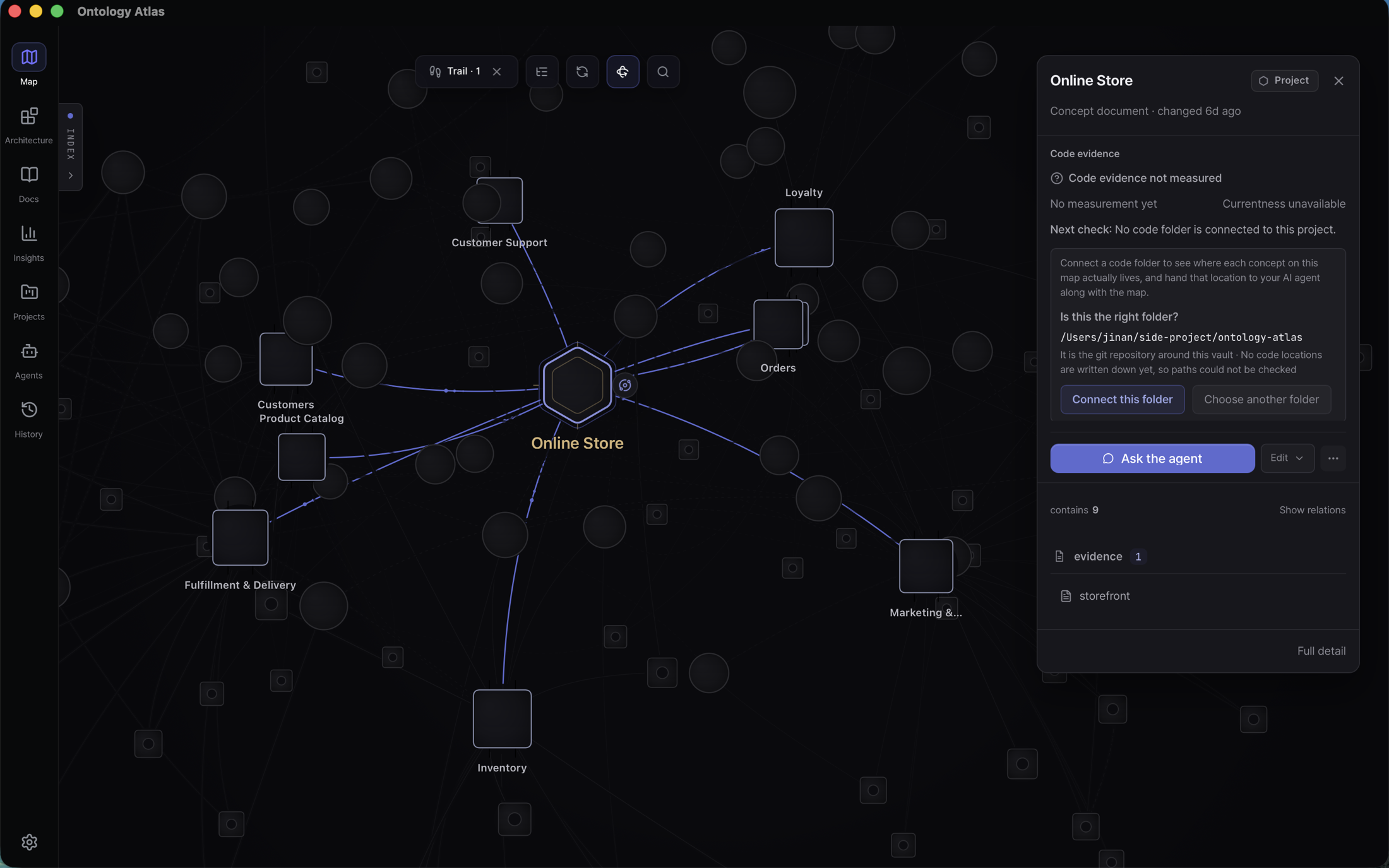
The installed macOS app reading
samples/storefront — an online
store described by Markdown files in a folder. Meaning changes remain visible
in files and Git diffs for a person to inspect, correct, reject, or keep; the
feature inventory is the current behavior
contract.




The optional companion is a device-local pixel mini-game powered by your project. Recorded ontology concepts, resolved relations, implementation links, wiki pages, and written detail contribute to character levels and skills as the folder updates. Move with WASD, interact with E, and open inventory (I), skills (K), the expedition map (M), your journal (J), quests (L), or the creature field guide (N) over the persistent world. The fox studies, rests, and travels through 36 destinations across six fictional regions, meeting 108 original creatures. Five-floor expeditions offer three-way blessings, an active dodge, and a final guardian. A closer pixel combat floor keeps the fox and creature on the same ground; a visible incoming strike gives Space dodge a timing cue. The first destination also has a direct, top-down pixel sector. Choose Explore on foot on the map, move with WASD or arrows, investigate with E, and scan with Q. Meet Curio, follow a friendly signal mote, and read and reflect on a current project concept to open the exit. Only this first sector has direct traversal; the other destinations retain the existing automatic expedition loop. Sector position and encounters save separately by project, while the evidence gate rechecks that the saved reflection still names a current, uniquely resolved concept rather than trusting an old clear. Click or tap a creature to cast a ready knowledge wave; action slots show the remaining cooldown turns, and Space moves the fox immediately during a warning. Opening an in-game panel pauses combat until it closes; leaving the game still uses bounded offline catch-up. Archive Grove, Clockglass Foundry, and Inkwell Marsh have 54 region-specific dark pixel creatures, with a small overhead target mark and attack warning instead of large rings across the floor. Plan a rest, supply, or elite path for the next floor. Twelve one-time quests reward recorded project work with materials for guaranteed personal equipment enhancement. Ordinary activities can unlock every forge tier; verified ACP work offers optional quests with explicit assistance requests. Quest completion records activity, never meaning acceptance. At camp, learning expeditions (T) follow a real concept's responsibility and boundaries, inspect a recorded direct dependency in its declaring document, and save your own explanation or open question. Sources remain readable inside the game; completion rechecks their saved identity and version. Learning activity reuses the existing once-per-concept reading and reflection XP, without certifying understanding. Topics with a saved field note open that note directly, including its original date and any uncertainty. Re-exploration reads the current evidence again; viewing a past note grants no additional XP. Project and reading XP unlock destinations; combat XP does not. Optional auto retry continues while away, with at most four hours of catch-up. A camp constellation shows the records you have built. Original personal memories remain intact. Game progress does not judge correctness, accepted meaning, or coding hours. ACP quest evidence uses current correlated write receipts; it does not infer live agent status.
In 30 seconds
When an agent finishes a change, you still need to judge what it understood, which rules matter, and what needs your attention. File lists and the producing agent's summary are starting points; they do not by themselves establish that the system's meaning or boundaries were preserved.
Atlas keeps those answers in an atlas/ folder of Markdown inside the
repository, so meaning is cloned, branched, and reviewed with the code. Each
file's frontmatter declares what it is — project, domain, capability,
element, or a linked document — and what it points at. That folder is the
whole database.
Atlas compiles that folder into a typed graph. Your coding agent can request context for a task: recorded capabilities, implementation anchors, declared dependencies, evidence, and unknowns. You can inspect those same records and relations in the workbench, open their evidence, and decide which proposed meaning changes to keep. The files remain available to the next person or agent, alongside the code in Git.
The goal is understanding and actionable control, with confidence proportionate to the evidence. A graph path is a declared relationship, not proof of a complete runtime blast radius. A current source path does not prove its recorded meaning is correct. Atlas keeps those distinctions visible so missing evidence can lead to further inspection rather than automatic reassurance. Its five-kind discriminator and standards boundary live in the vault specification.
The Analysis tab opens with visible loading feedback before preparing its views. In the Mac app, Automations owns recurring review schedules, with the next run and latest result on each row. Ontology reviews are read-only; document rounds retain their approved scope. Library → Check history shows document pass results and links back to Automations to manage a schedule. See the feature inventory for the full execution and review boundaries.
Use it in the next task
With a populated vault and an MCP connection, ask your agent for the context of
the change you want to make. The current task-aware entry is
query_ontology with operation: "agent_brief", detail: "compact", a selected
project, and your task. It supplies bounded context and follow-up reads;
the coding agent still inspects source and verifies its work.
When meaning changes, review the exact proposal and its evidence, then keep the accepted Markdown change with the code's Git history. You need not open Atlas for every task; its map, documents, and change review are there when you need to understand or correct the recorded meaning. Meaning acceptance, code review, merge, and deployment are separate decisions. Host support and configured permissions determine how agent writes reach review; an MCP connection alone does not enforce every agent's behavior.
What still needs proof: reliable meaning reconstruction from unfamiliar legacy code, a complete task-bound Meaning Diff, and improved outcomes across successive real tasks remain development and validation work. Current graph, write-review, and task-context features do not guarantee that an agent's code change is safe. See the quality authority map and development priorities.
Status — read this before installing
The download page is the release authority: a generated record of the published tag, real asset sizes, checksums, platforms, and signing state. This README pins no tag, so it cannot contradict the files you are about to install. GitHub Releases is the second direct source.
Related MCP Servers
Reviews
No reviews yet — be the first to share how this listing worked for you.
Frequently Asked Questions about Ontology Atlas
AllMCPs Directory Badge
Showcase your server listing on GitHub or your project documentation. Embed this dynamic SVG badge to highlight official listing status and live engagement.
Badge Style:
Live Dynamic SVG Preview
Markdown (GitHub README)
[](https://allmcps.com/mcp/ontology-atlas)HTML Embed
<a href="https://allmcps.com/mcp/ontology-atlas"><img src="https://allmcps.com/api/badge/ontology-atlas?style=directory" alt="Ontology Atlas on AllMCPs" /></a>