AllMCPs
BrowseBestCategoriesStackCompareToolsGuidesBlog
Log in Submit MCP

Stay in the loop

Get new MCP servers and top picks in your inbox.

AllMCPs

The open directory for discovering and installing Model Context Protocol servers.

AllMCPs on GitHub (opens in a new tab)
Launched onTiny Startupstinystartups.com
Explore
  • Browse servers
  • Best MCP servers
  • Categories
  • MCP clients
  • Agent prompts
  • Stack Builder
  • Compare servers
  • Random discovery New
  • Submit a server
  • Pricing & Boost Boost
Learn
  • Guides hub
  • What is MCP?
  • Install guide
  • Build an MCP server
  • Deploy an MCP server
  • Security guide
  • Troubleshooting
  • MCP for SEO & AEO
  • Protocol versioning
  • Blog & updates
Tools
  • All developer tools
  • Config generator
  • Config validator
  • Config auditor
  • MCP playground
  • Token calculator
  • OpenAPI β†’ MCP
  • Badge generator
For agents
  • REST API docs
  • Trust & traffic Live
  • Remote MCP server SSE β†— (opens in a new tab)
  • llms.txt β†— (opens in a new tab)
  • Catalog JSON β†— (opens in a new tab)
Company
  • About
  • Advertise Sponsor
  • Contact
  • GitHub β†— (opens in a new tab)
  • Terms
  • Privacy
AllMCPs VerifiedAllMCPs VerifiedFeatured on Nick LaunchesFeatured on Nick LaunchesLaunch Llama NewsletterLaunch Llama NewsletterVerified DR - allmcps.comVerified DR - allmcps.comFeatured on SaaSGrowFeatured on SaaSGrowFeatured on Twelve ToolsFeatured on Twelve ToolsFeatured on Saaspa.geFeatured on Saaspa.geFeatured on Findly.toolsFeatured on Findly.toolsFeatured on Startup FameFeatured on Startup FameFeatured on LaunchKiwiFeatured on LaunchKiwiFeatured on ScrollLaunchFeatured on ScrollLaunchFeatured on DailyPingsFeatured on DailyPingsFazier badgeFazier badgeFeatured on NewTool.siteFeatured on NewTool.siteFeatured on saasfame.comFeatured on saasfame.comDR Checker - Domain RatingDR Checker - Domain RatingListed on Turbo0Listed on Turbo0Launched on LaunchBoard - Product Launch PlatformLaunched on LaunchBoard - Product Launch PlatformList on SimilarlabsList on Similarlabshttps://codetrendy.comhttps://codetrendy.comListed on DevTool.ioFeatured on BuildlistFeatured on BuildlistLaunched on Tiny StartupsFeatured on ShowMeBestAIFeatured on ShowMeBestAIFind us on LaunchZoneFind us on LaunchZoneAllMCPs VerifiedAllMCPs VerifiedFeatured on Nick LaunchesFeatured on Nick LaunchesLaunch Llama NewsletterLaunch Llama NewsletterVerified DR - allmcps.comVerified DR - allmcps.comFeatured on SaaSGrowFeatured on SaaSGrowFeatured on Twelve ToolsFeatured on Twelve ToolsFeatured on Saaspa.geFeatured on Saaspa.geFeatured on Findly.toolsFeatured on Findly.toolsFeatured on Startup FameFeatured on Startup FameFeatured on LaunchKiwiFeatured on LaunchKiwiFeatured on ScrollLaunchFeatured on ScrollLaunchFeatured on DailyPingsFeatured on DailyPingsFazier badgeFazier badgeFeatured on NewTool.siteFeatured on NewTool.siteFeatured on saasfame.comFeatured on saasfame.comDR Checker - Domain RatingDR Checker - Domain RatingListed on Turbo0Listed on Turbo0Launched on LaunchBoard - Product Launch PlatformLaunched on LaunchBoard - Product Launch PlatformList on SimilarlabsList on Similarlabshttps://codetrendy.comhttps://codetrendy.comListed on DevTool.ioFeatured on BuildlistFeatured on BuildlistLaunched on Tiny StartupsFeatured on ShowMeBestAIFeatured on ShowMeBestAIFind us on LaunchZoneFind us on LaunchZone
Β© 2026 Jackalope Digital LLC. All rights reserved.
  1. Home
  2. 🧠 Knowledge & Memory
  3. On Board
O
Health: Not checked yetWe have not completed a health check for this listing yet.No health check has run yet.

On Board

User RatingsBe the first to rate and review this MCP server! Enrichment pendingWe haven’t run our AI enrichment pass on this listing yet, so the overview, use cases, and FAQ below may be sparse or missing. We work through the catalog over time β€” check back soon.
View RepositoryVisit Website

Cross-platform shared memory and ticket coordination for AI agents across MCP clients.

Quick Install

Automated & IDE Setup

Copy the AI prompt to install this server into Claude Code, Cursor, or another agent β€” or use 1-click editor setup below.

Add to CursorAdd to VS Code
Manual Client & Custom JSON ConfigExpand JSON β–Ύ

Client Config & Setup

Choose your client or environment
Target File:~/Library/Application Support/Claude/claude_desktop_config.json
claude_desktop_config.json
{
  "mcpServers": {
    "on-board": {
      "command": "npx",
      "args": [
        "-y",
        "on-board"
      ]
    }
  }
}

πŸ’‘ Paste the JSON block into your client's configuration file under mcpServers, then restart the application.

Install Directory Badge Claim listing Alternatives🧠 More in Knowledge & Memory

Documentation Overview

On Board

Shared project memory for agents. One MCP server, one project memory folder, many IDEs and agent clients. New in v4.0.0: agents wake each other. The human stops being the message pump.

License: Apache 2.0 MCP MCP Badge Release A2A


What this is

On Board is a local MCP server for coordinating AI agents across a project. It gives Claude Desktop, Claude Code, Codex, Cursor, Antigravity, and other MCP clients the same project memory, ticket queue, and handoff history.

The goal is simple: when one agent stops and another agent continues, the next agent should not need the human to explain the project again.

Code
onboard β†’ read memory β†’ claim work β†’ write progress β†’ hand off

Everything stays local to the project unless you choose to connect other tools.


πŸš€ v4.0.0 β€” agents now wake each other

Until v4 this board was pull-only: an agent found out about new work when a human told it to look. v4 ships memory_wait_for_event β€” an agent parks inside one tool call and wakes the moment a peer creates a ticket, submits work, or delivers a verdict.

This is not a demo claim. In the launch trial, a GPT agent (Codex) and a Claude agent closed a full reject β†’ fix β†’ resubmit cycle on this board with zero human relay β€” the reviewer's fix instructions travelled inside the wake payload, the worker re-read the file, attached a sha256, and resubmitted; the reviewer reproduced the hash byte-for-byte before approving:
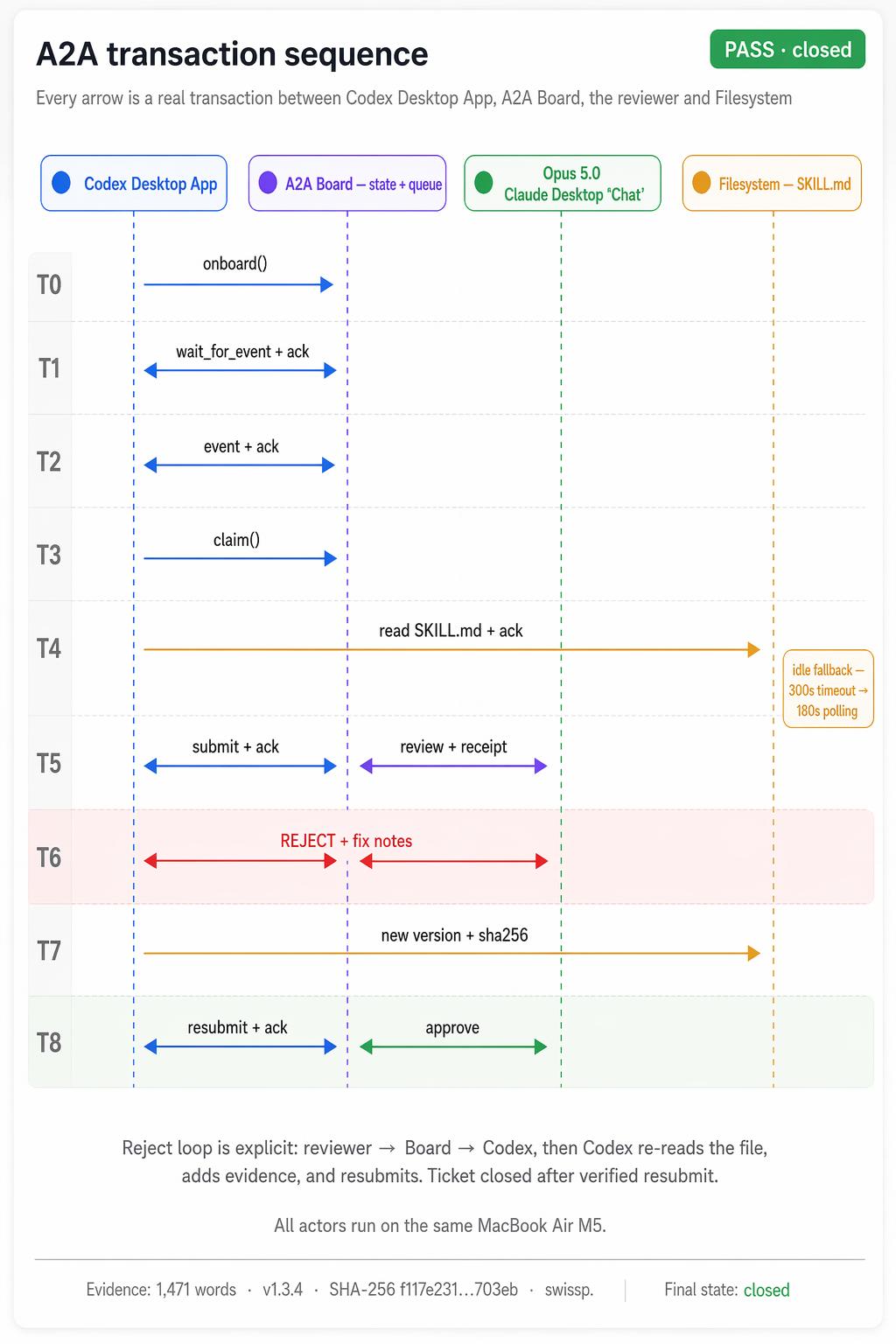
A2A transaction sequence β€” every arrow is a real transaction from the launch trial

Full mechanics in Agent-to-agent: the listening half Β· breaking changes in CHANGELOG.md Β· release notes.

Why this exists

Most agent workflows break for boring reasons:

  • The next chat does not know what the last chat did.
  • Parallel agents overwrite or redo each other's work.
  • Important decisions live only in conversation history.
  • Handoffs are informal, so review and follow-up work drift.

On Board keeps those facts in project-local files under .agent-mem/. The MCP tools expose that memory to any supported client.

Who this is for

  • Solo developers using more than one agent or IDE
  • Teams experimenting with multi-agent coding workflows
  • Projects where handoffs, tickets, and review notes matter
  • Local-first MCP users who want shared context without a hosted service

It is not an autonomous project manager. Humans still decide what matters, review important changes, and accept the final result.


Quick start

Install the server

The server is published as onboard-memory-mcp. Install it with whichever tool you prefer:

bash
# Homebrew (tap once, then the short name works: brew install onboard-memory)
brew install swisspra/tap/onboard-memory

# pipx
pipx install onboard-memory-mcp

# uv
uv tool install onboard-memory-mcp

All three provide the onboard-memory-mcp command (Homebrew also adds a short onboard-memory alias). Homebrew covers macOS and Linux; on Windows use pipx or uv (the command is onboard-memory-mcp.exe). Point your MCP client's command at it instead of python3 onboard_server.py. You can also skip this and run from a clone using the setup paths below. (On Homebrew 6+, approve the one-time tap-trust prompt, or run brew trust swisspra/tap.)

Headless config (no clone)

With the server installed, wire your MCP client to it directly β€” no repo checkout, no setup-project.sh:

config.json
{
  "mcpServers": {
    "agent-memory": {
      "command": "onboard-memory-mcp",
      "env": { "AGENT_PROJECT_DIR": "/full/path/to/your/project" }
    }
  }
}
  • CLI clients (Claude Code, Codex) inherit your shell PATH, so the bare onboard-memory-mcp works.
  • GUI clients (Claude Desktop, Cursor) launch with a minimal PATH. Use the absolute path from which onboard-memory-mcp (where on Windows) as command β€” typically /opt/homebrew/bin/onboard-memory-mcp (Homebrew, Apple Silicon), /usr/local/bin/onboard-memory-mcp (Homebrew, Intel), /home/linuxbrew/.linuxbrew/bin/onboard-memory-mcp (Homebrew, Linux), ~/.local/bin/onboard-memory-mcp (pipx / uv on macOS/Linux), or %USERPROFILE%\.local\bin\onboard-memory-mcp.exe (pipx / uv on Windows).

AGENT_PROJECT_DIR is required β€” it decides which project owns .agent-mem/. In your first chat, call memory_init once (creates .agent-mem/), then memory_onboard each session. Nothing to create by hand.

The pipx/uv path installs from prebuilt wheels (no compiler) on Python 3.11+ for Linux, Windows, and Apple-Silicon macOS; on Python 3.10 or Intel macOS a couple of Rust/C dependencies may build from source, so prefer brew there. Template: configs/binary-mcp.json; full detail and platform notes in docs/SETUP.md.

Set up a project

Choose one setup path:

Option 1: Agent setup

Ask an agent to read AGENT_SETUP.md and help you set up the project. This is the easiest path if you already have an agent available.

Option 2: Script setup

bash
git clone https://github.com/swisspra/On_Board.git
cd On_Board
bash setup-project.sh /full/path/to/your/project
bash doctor.sh /full/path/to/your/project

Add the generated MCP config to your client:

text
/full/path/to/your/project/.onboard/mcp.generated.json

Some clients accept this JSON directly. Others require you to merge it into their own MCP settings file.

After memory is initialized, open the dashboard with:

bash
bash /full/path/to/your/project/.onboard/run-dashboard.sh

On Board is installed once. Each project points to the same On Board folder, but gets separate memory through AGENT_PROJECT_DIR.

Each setup-project.sh run also registers the project locally in .onboard/linked-projects.json inside the On Board checkout. This file is gitignored and only helps updates remember which projects point here.

The setup script uses uv sync --inexact to install/update dependencies without pruning local test/dev extras. MCP clients run python3 onboard_server.py; the launcher uses the local .venv directly and rebuilds it only if the venv is missing. This keeps normal startup fast, avoids uv run startup timeouts, and makes a shared central checkout more durable.

On Board does not write memory from end-turn hooks. Current Stop hooks in several agent clients run every turn, which creates noisy memory and can force agents to re-onboard too often.

Optional: add AGENT_MEM_CONTEXT_DIRS to the generated MCP config when agents should read shared docs/specs outside the project folder.

Option 3: Advanced manual setup

If you do not want to run the setup script, install with uv sync, write the MCP config yourself, and add project rules/hooks manually. See docs/SETUP.md.

In your first chat with any MCP-aware agent (Claude Desktop, Claude Code, Cursor, Codex, Antigravity):

Code
memory_bootstrap(
  agent_name="dev-main",
  description="Existing project using On Board",
  current_task="Set up shared project memory"
)

memory_onboard(
  agent_name="dev-main",
  agent_platform="claude-code",
  agent_role="main"
)

That's it. The agent now sees the project briefing, the open tickets, the recent memory, and the protocol it should follow. Every subsequent action is stamped with its identity.

Full setup details and manual setup: see docs/SETUP.md.

To update an existing install, run bash update.sh in the central On Board checkout. It will show known linked projects. Refresh all of them with bash update.sh --refresh-linked, or inspect them with bash setup-project.sh --list-linked.


The loop in one example

Code
1. SPEC
   opus-testcase reads requirement β†’ writes 5–20 acceptance tickets
   with explicit pre/post conditions.

2. BUILD
   dev-track-2 claims a ticket β†’ implements in src/ β†’ submits with
   file diff + test plan.

3. TEST
   Jonhny-tester picks up submission β†’ runs UI in Chromium β†’ captures
   screenshots β†’ submits PASS or FAIL with evidence.

4. REVIEW
   desktop-opus4.7 (or the human) checks evidence β†’ approves OR rejects
   with concrete fix instructions.

   If rejected β†’ ticket reopens β†’ dev-track-2 patches β†’ Jonhny retests
   β†’ loop closes.

When this loop runs cleanly, a single ticket goes from open to "shipped to production" in 4–15 minutes of agent time. The human checks in at the end, not in the middle.


Agent-to-agent: the listening half (v4)

Everything above still works pull-style. v4 adds the missing edge: agents can now wake each other instead of waiting for a human to relay messages.

Code
worker:  memory_wait_for_event(agent_name="dev-track-2", timeout_s=180)
         β†’ parks inside one tool call until the board changes
lead:    memory_create_ticket(..., assigned_to="dev-track-2")
worker:  wakes in seconds, claims, works,
         memory_submit_ticket(..., stay_active=True)
lead:    wakes on the submission, reviews
worker:  wakes on the verdict β€” approve closes the loop;
         a rejection arrives WITH the review notes and fix
         instructions in the wake payload, so it re-claims,
         fixes, and resubmits without asking anyone

Read the full README β†’View source on GitHub β†’

Related MCP Servers

View all in Knowledge & Memory View all alternatives
  • Moxie Docs MCP logoMoxie Docs MCP
    β˜… Featured

    MCP & Agent Skills for Automated Documentation, and codebase conventions + context

    🧠 Knowledge & Memory21 views
    Compare vs Moxie Docs MCP β†’
  • Scrivener MCP logoScrivener MCP

    Connect Scrivener 3 writing projects to Claude and other AI assistants. 47 tools for document management, writing analysis, semantic search, character/plot memory, and content enhancement. Progressive skill loading, relationship engine with HMS triplets, and JS fallback for offline semantic search. npm i -g scrivener-mcp

    🧠 Knowledge & Memory16 views
    Compare vs Scrivener MCP β†’
  • O
    Octopus Blackboard

    Shared memory & coordination for AI coding agents β€” a blackboard, not an orchestrator.

    🧠 Knowledge & Memory0 views
    Compare vs Octopus Blackboard β†’
  • M
    MemoryRouter

    Persistent AI memory shared across Claude, ChatGPT, coding agents, and compatible MCP clients.

    🧠 Knowledge & Memory1 views
    Compare vs MemoryRouter β†’

Reviews

No reviews yet β€” be the first to share how this listing worked for you.

Frequently Asked Questions about On Board

Add the following block to your claude_desktop_config.json under mcpServers: "mcpServers": { "on-board": { "command": "npx", "args": ["-y", "On Board"] } }

AllMCPs Directory Badge

Full Badge Customizer

Showcase your server listing on GitHub or your project documentation. Embed this dynamic SVG badge to highlight official listing status and live engagement.

Badge Style:
Live Dynamic SVG PreviewOn Board AllMCPs Directory Badge

Markdown (GitHub README)
[![AllMCPs](https://allmcps.com/api/badge/on-board?style=directory)](https://allmcps.com/mcp/on-board)
HTML Embed
<a href="https://allmcps.com/mcp/on-board"><img src="https://allmcps.com/api/badge/on-board?style=directory" alt="On Board on AllMCPs" /></a>

Technical Specs & Signals

Category🧠Knowledge & Memory
More technical detailsExpand β–Ύ
TransportSTDIO
RuntimeNode.js
Last updatedSep 7, 2026
Views0
Unique ViewsTotal visits recorded for this listing page on AllMCPs.
Installs0
Installs & Copy ActionsTotal times users copied install commands or configuration snippets for this server.
27Quality signal: Emerging Β· 27/100How this signal is calculated β–Ύ
Server availabilityNot measured

Not scored for repo-hosted servers β€” we can't reach the running server, only its GitHub page. Hosted MCP endpoints are health-checked live.

Verified ownership8/20
Documentation & tools11/30
Adoption & activity1/15
Community engagement0/10

A guidance signal from public completeness & health data β€” not a user rating. New listings start lower and rise as they add docs, get verified, and grow adoption. Signals we can't observe for a listing are skipped, not counted against it.

β˜… FeaturedAllMCPs Server logo

AllMCPs Server

The official MCP server for AllMCPs.com - submit and manage tools directly from your AI. The open directory for MCP servers. Connect Claude, Cursor, Windsurf, and AI agents to databases, tools, files, and APIs. Explore 10,000+ servers. AllMCPs is the premier, open directory for discovering, evaluating, and installing Model Context Protocol (MCP) servers to equip AI agents and LLMs with real-world superpowers.

Explore Server β†’

Own this project?

This directory is pre-filled from public sources. Claim via GitHub README, site badge, or DNS TXT to unlock edit access and the Official badge β€” proof is checked automatically, then reviewed by our team.

Free dofollow backlink: add your website and place the AllMCPs badge on it β€” no claim needed. We detect it automatically and keep it verified as long as the badge stays live.

Claim & get free dofollow

Share & Embed

Add our SVG badge (dark/light directory styles) or embeddable widget to your site.

Explore more

More in 🧠 Knowledge & Memory β†’Best MCP servers for Memory & Knowledge β†’Alternatives to On Board β†’Install in Claude DesktopInstall in CursorInstall in VS Code

