AllMCPs
BrowseBestCategoriesStackCompareToolsGuidesBlog
Log in Submit MCP

Stay in the loop

Get new MCP servers and top picks in your inbox.

AllMCPs

The open directory for discovering and installing Model Context Protocol servers.

AllMCPs on GitHub (opens in a new tab)
Launched onTiny Startupstinystartups.com
Explore
  • Browse servers
  • Best MCP servers
  • Categories
  • MCP clients
  • Agent prompts
  • Stack Builder
  • Compare servers
  • Random discovery New
  • Submit a server
  • Pricing & Boost Boost
Learn
  • Guides hub
  • What is MCP?
  • Install guide
  • Build an MCP server
  • Deploy an MCP server
  • Security guide
  • Troubleshooting
  • MCP for SEO & AEO
  • Protocol versioning
  • Blog & updates
Tools
  • All developer tools
  • Config generator
  • Config validator
  • Config auditor
  • MCP playground
  • Token calculator
  • OpenAPI โ†’ MCP
  • Badge generator
For agents
  • REST API docs
  • Trust & traffic Live
  • Remote MCP server SSE โ†— (opens in a new tab)
  • llms.txt โ†— (opens in a new tab)
  • Catalog JSON โ†— (opens in a new tab)
Company
  • About
  • Advertise Sponsor
  • Contact
  • GitHub โ†— (opens in a new tab)
  • Terms
  • Privacy
AllMCPs VerifiedAllMCPs VerifiedFeatured on Nick LaunchesFeatured on Nick LaunchesLaunch Llama NewsletterLaunch Llama NewsletterVerified DR - allmcps.comVerified DR - allmcps.comFeatured on SaaSGrowFeatured on SaaSGrowFeatured on Twelve ToolsFeatured on Twelve ToolsFeatured on Saaspa.geFeatured on Saaspa.geFeatured on Findly.toolsFeatured on Findly.toolsFeatured on Startup FameFeatured on Startup FameFeatured on LaunchKiwiFeatured on LaunchKiwiFeatured on ScrollLaunchFeatured on ScrollLaunchFeatured on DailyPingsFeatured on DailyPingsFazier badgeFazier badgeFeatured on NewTool.siteFeatured on NewTool.siteFeatured on saasfame.comFeatured on saasfame.comDR Checker - Domain RatingDR Checker - Domain RatingListed on Turbo0Listed on Turbo0Launched on LaunchBoard - Product Launch PlatformLaunched on LaunchBoard - Product Launch PlatformList on SimilarlabsList on Similarlabshttps://codetrendy.comhttps://codetrendy.comListed on DevTool.ioFeatured on BuildlistFeatured on BuildlistLaunched on Tiny StartupsFeatured on ShowMeBestAIFeatured on ShowMeBestAIFind us on LaunchZoneFind us on LaunchZoneAllMCPs VerifiedAllMCPs VerifiedFeatured on Nick LaunchesFeatured on Nick LaunchesLaunch Llama NewsletterLaunch Llama NewsletterVerified DR - allmcps.comVerified DR - allmcps.comFeatured on SaaSGrowFeatured on SaaSGrowFeatured on Twelve ToolsFeatured on Twelve ToolsFeatured on Saaspa.geFeatured on Saaspa.geFeatured on Findly.toolsFeatured on Findly.toolsFeatured on Startup FameFeatured on Startup FameFeatured on LaunchKiwiFeatured on LaunchKiwiFeatured on ScrollLaunchFeatured on ScrollLaunchFeatured on DailyPingsFeatured on DailyPingsFazier badgeFazier badgeFeatured on NewTool.siteFeatured on NewTool.siteFeatured on saasfame.comFeatured on saasfame.comDR Checker - Domain RatingDR Checker - Domain RatingListed on Turbo0Listed on Turbo0Launched on LaunchBoard - Product Launch PlatformLaunched on LaunchBoard - Product Launch PlatformList on SimilarlabsList on Similarlabshttps://codetrendy.comhttps://codetrendy.comListed on DevTool.ioFeatured on BuildlistFeatured on BuildlistLaunched on Tiny StartupsFeatured on ShowMeBestAIFeatured on ShowMeBestAIFind us on LaunchZoneFind us on LaunchZone
ยฉ 2026 Jackalope Digital LLC. All rights reserved.
  1. Home
  2. ๐Ÿง  Knowledge & Memory
  3. Octopus Blackboard
O
Health: Not checked yetWe have not completed a health check for this listing yet.No health check has run yet.

Octopus Blackboard

User RatingsBe the first to rate and review this MCP server! Enrichment pendingWe havenโ€™t run our AI enrichment pass on this listing yet, so the overview, use cases, and FAQ below may be sparse or missing. We work through the catalog over time โ€” check back soon.
View Repository

Shared memory & coordination for AI coding agents โ€” a blackboard, not an orchestrator.

Quick Install

Automated & IDE Setup

Copy the AI prompt to install this server into Claude Code, Cursor, or another agent โ€” or use 1-click editor setup below.

Add to CursorAdd to VS Code
Manual Client & Custom JSON ConfigExpand JSON โ–พ

Client Config & Setup

Choose your client or environment
Target File:~/Library/Application Support/Claude/claude_desktop_config.json
claude_desktop_config.json
{
  "mcpServers": {
    "octopus-blackboard": {
      "command": "npx",
      "args": [
        "-y",
        "octopus-blackboard"
      ]
    }
  }
}

๐Ÿ’ก Paste the JSON block into your client's configuration file under mcpServers, then restart the application.

Install Directory Badge Claim listing Alternatives๐Ÿง  More in Knowledge & Memory

Documentation Overview

Octopus Blackboard

Octopus Blackboard

A shared memory and coordination layer for AI coding agents.

Agents do not need another boss. They need a shared blackboard.

็ฎ€ไฝ“ไธญๆ–‡

Part of Octopus Core โ€” the open infrastructure stack for governed AI. One job per repo, along the agent lifecycle: Scout ยท Observe ยท Experience ยท Blackboard ยท Workstate ยท Runtime ยท Replay โ€” with Inspect governing every stage. The whole stack rides one root primitive โ€” Evidence, the canonical, tamper-evident atom that is the root category everything is built on.

This repo โ€” Blackboard ยท Coordinate: Shared cognition for coding agents.
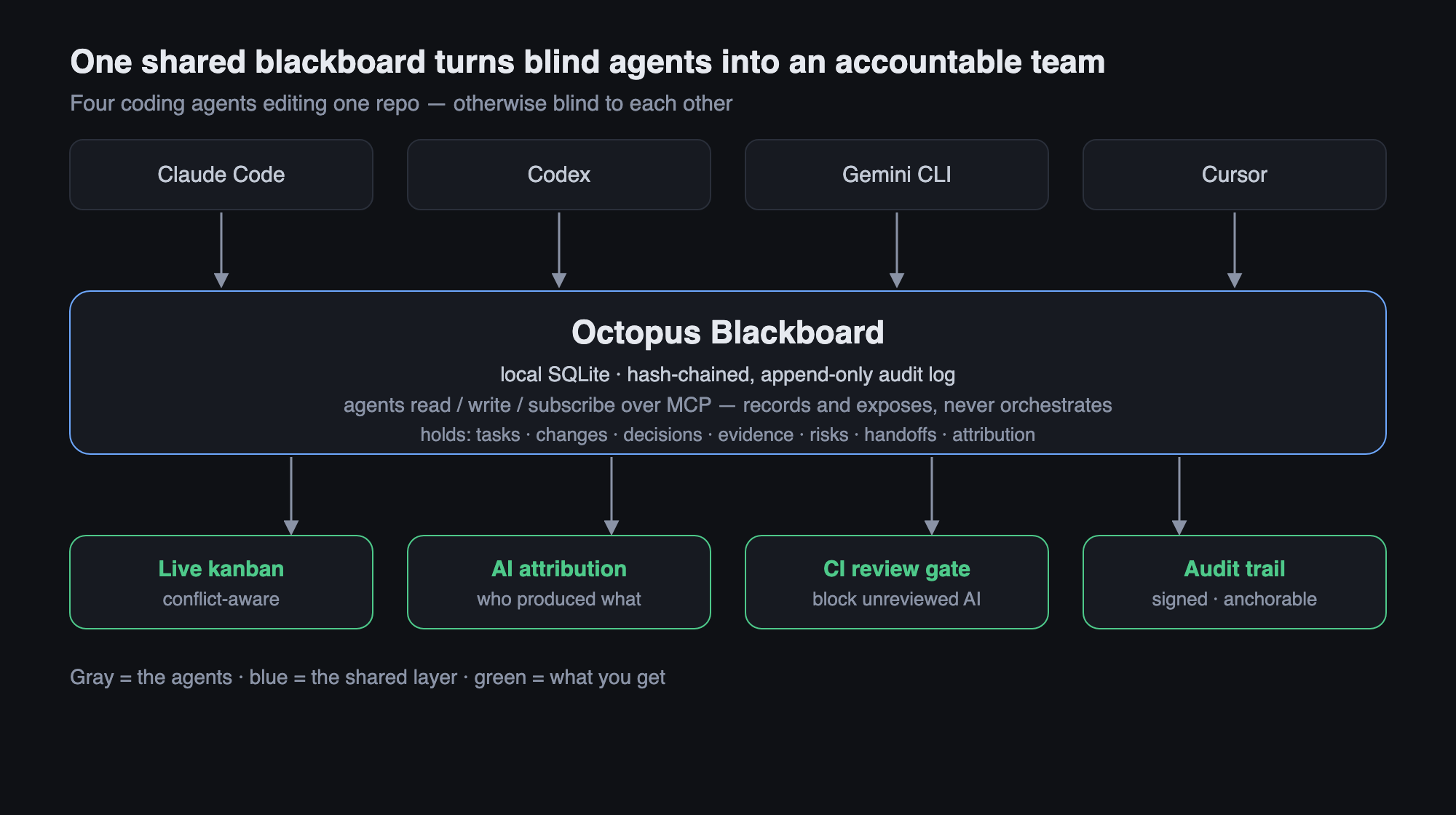
How it works: agents connect over MCP to a shared blackboard that records and exposes but never orchestrates, producing a conflict-aware kanban, AI attribution, a CI review gate, and a tamper-evident audit trail


Claude Code, Codex, Gemini CLI, Cursor, and your local agents all work on the same repo โ€” but they are blind to each other. One refactors auth while another rewrites the same file. Context is scattered across CLIs. Nobody can replay what happened.

Octopus Blackboard is not an orchestrator. It does not schedule agents, trigger them, or decide anything on their behalf. It is a passive, local-first shared memory that answers six questions:

text
Who is working on what      โ†’  agents, tasks, claims
What changed                โ†’  files_changed
What was decided            โ†’  decisions
What evidence exists        โ†’  evidence
What risks are open         โ†’  risks
What was left for whom       โ†’  messages, handoffs

Every agent only needs to be able to read the board, write the board, leave messages, and attach evidence. That's the whole contract.

Why
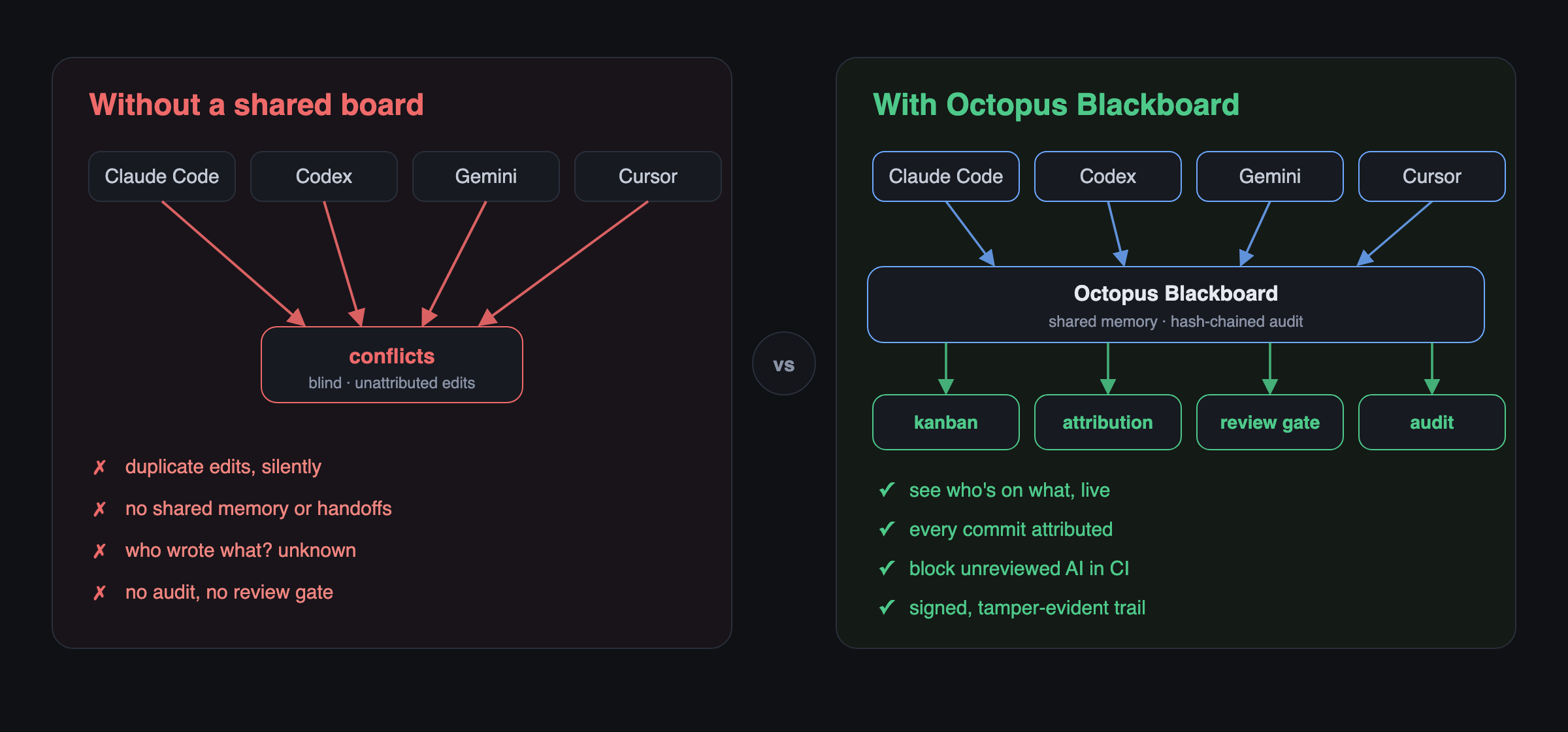
Without a shared board, agents work blind โ€” duplicate edits, no attribution, unseen conflicts. With Octopus Blackboard they share memory and produce a conflict-aware kanban, attribution, a review gate, and an audit trail

Enterprises are not primarily afraid that agents aren't smart enough. They are afraid that:

  • Multiple AI tools edit the same code simultaneously
  • Context is scattered across different CLIs
  • There is no shared memory, no audit, no handoff
  • There is no conflict awareness and no way to replay

The blackboard cuts straight through this. Every write appends a tamper-evident, hash-chained entry to an append-only timeline, so the entire history is auditable and replayable โ€” and any after-the-fact edit to an earlier entry breaks verification.

Get Started in 2 Minutes

Blackboard is the easiest way into the Octopus stack โ€” pure coordination memory that works today with just Claude Code and Cursor, no orchestrator required. One command sets everything up:

Terminal
npx octopus-blackboard quickstart

That single command: creates the local board (.octoboard/) if it isn't there, auto-detects your MCP client (.claude/ โ†’ Claude Code, .cursor/ โ†’ Cursor, โ€ฆ otherwise a generic snippet), prints the exact paste-ready config for it, and proves the board works with one write + one read.

Then just:

  1. Paste the printed config block into the file it names.
  2. Reload your MCP client (restart it, or reopen the project).
  3. You're done. Ask your agent to call board_status, then board_note "hello" โ€” that's your first board action, on a shared, tamper-evident timeline.

Re-running quickstart is always safe: it never clobbers an existing board or its history. New to the idea of adopting a coordination layer first? See Why adopt Blackboard first.

Install

Terminal
npm install
npm run build      # compiles to dist/

Requires Node โ‰ฅ 22. The board is a single SQLite file under .octoboard/, discovered by walking up from your working directory (like .git).

See it in action

examples/two-agents.sh plays out the flagship scenario โ€” Claude Code and Codex sharing one board on the same repo: a claim conflict, a live same-file collision, a decision, attribution, a handoff that lands in the other agent's inbox, an AI review, the human-approval CI gate (blocked โ†’ passes), the accountability scorecard, blameโ†’narrative, and a verified hash chain with session signatures. Run it in an empty directory:

bash
bash examples/two-agents.sh          # needs `octoboard` on PATH

CLI

bash
octoboard init                                   # create .octoboard/ here
octoboard status                                 # who's on the board, right now

octoboard note "Codex is refactoring auth middleware"
octoboard claim trust-layer-policy-schema        # claim work; warns on conflict
octoboard message claude "Review policy edge cases before merge"
octoboard decision "Use hash-chain audit log" --why "tamper-evidence"
octoboard risk "Migration may break audit replay" --severity high
octoboard file src/auth.ts --change modified --task trust-layer-policy-schema
octoboard handoff claude "Tests pass except policy replay" --task trust-layer-policy-schema

octoboard timeline                               # the full hash-chained history
octoboard verify                                 # confirm the chain is intact

Identity is set with --as <agent> or the OCTOBOARD_AGENT environment variable. Point at a specific board with --board <dir> or OCTOBOARD_DIR.

Conflict awareness

The board never blocks โ€” it surfaces. If two agents claim the same key, or touch the same task's files, both writes are recorded and the second agent is warned:

text
โš  CONFLICT: "trust-layer-policy-schema" is also held by codex. Both claims recorded.

AI attribution & shared development memory

Git records who pushed a commit. It does not record which AI agent produced the code, in which session, on which machine, whether another AI reviewed it, or whether a human approved it. As AI-native development becomes common, accountability must move beyond Git authorship.

The blackboard adds an attribution layer on top of Git โ€” it never rewrites history. Git stays the source of code; the blackboard becomes the source of attribution.

Sessions

A session is one continuous execution of an agent, and the unit attribution hangs off. Starting one makes every subsequent write attribute to it (the active session is remembered across CLI invocations, per agent):

server.ts
export OCTOBOARD_AGENT=claude OCTOBOARD_PROVIDER=anthropic \
       OCTOBOARD_MODEL=claude-opus-4-8 OCTOBOARD_CLI=claude-code

blackboard session start --label "auth work"   # captures machine, branch, repo
blackboard claim policy-engine
blackboard file src/policy.ts --change modified
# ... make a git commit ...
blackboard link HEAD                            # attribute the commit's files
blackboard session stop

Identity is fully provider-independent โ€” --provider, --model, --cli, or the matching OCTOBOARD_* env vars. Any AI CLI (local or cloud) can register itself with no assumptions about a specific vendor.

Linking commits

blackboard link <rev> reads the files a commit touched (via Git) and records one attribution per file for the active session. Optionally it writes an additive git notes entry under refs/notes/blackboard:

bash
blackboard link HEAD --note
blackboard attribute <sha> --file src/x.ts --actor human --name Ran  # manual

Reviews

bash
blackboard review HEAD --by ai   --name codex --outcome approved --note "tests pass"
blackboard review HEAD --by human --name Ran   --outcome approved

Querying the shared memory

bash
blackboard who src/auth.ts             # git authors + AI sessions that touched it
blackboard who src/auth.ts --line 42   # which session introduced this line
blackboard explain HEAD                # attribution + reviews + related decisions
blackboard commits claude-code         # which commits came from an AI / CLI
blackboard unreviewed                  # AI commits never reviewed by a human
blackboard joint claude codex          # files modified by BOTH agents
blackboard timeline --session <id>     # per-session HH:MM timeline

Example explain:

text
commit 5fa3095โ€ฆ  Human Dev <a@b.c>  add auth
  produced by:
    ai claude [claude-opus-4-8] โ€” src/auth.ts
  reviews:
    human Ran: approved
  git note: blackboard: produced by claude-code (claude-opus-4-8), session 75b2b7e7โ€ฆ

Every attribution, review, session, and decision is also recorded in the hash-chained timeline, so the full accountability history is tamper-evident and replayable. blackboard and octoboard are the same command.

Governance & accountability chain

The accountability chain: agent does work โ†’ attribute the commit โ†’ export/import โ†’ CI gate blocks unreviewed AI โ†’ human approves โ†’ merge, all recorded on the tamper-evident timeline

The point of attribution is to enforce something. The chain from work to a merge gate:

server.ts
agent work โ†’ commit attribution โ†’ export/import โ†’ CI check โ†’ human-review gate

CI gate (check)

Turn queries into an enforceable gate. Read-only โ€” it reports pass/fail and exits non-zero; the CI system decides what to do. The blackboard never blocks.

Read the full README โ†’View source on GitHub โ†’

Related MCP Servers

View all in Knowledge & Memory View all alternatives
  • Moxie Docs MCP logoMoxie Docs MCP
    โ˜… Featured

    MCP & Agent Skills for Automated Documentation, and codebase conventions + context

    ๐Ÿง  Knowledge & Memory21 views
    Compare vs Moxie Docs MCP โ†’
  • Knownissue logoKnownissue

    Shared debugging memory for AI coding agents

    ๐Ÿง  Knowledge & Memory0 views
    Compare vs Knownissue โ†’
  • Scrivener MCP logoScrivener MCP

    Connect Scrivener 3 writing projects to Claude and other AI assistants. 47 tools for document management, writing analysis, semantic search, character/plot memory, and content enhancement. Progressive skill loading, relationship engine with HMS triplets, and JS fallback for offline semantic search. npm i -g scrivener-mcp

    ๐Ÿง  Knowledge & Memory16 views
    Compare vs Scrivener MCP โ†’
  • AIMEAT logoAIMEAT

    Persistent memory, identity, shared workspaces, skills and tasks for AI agents

    ๐Ÿง  Knowledge & Memory0 views
    Compare vs AIMEAT โ†’

Reviews

No reviews yet โ€” be the first to share how this listing worked for you.

Frequently Asked Questions about Octopus Blackboard

Add the following block to your claude_desktop_config.json under mcpServers: "mcpServers": { "octopus-blackboard": { "command": "npx", "args": ["-y", "octopus-blackboard"] } }

AllMCPs Directory Badge

Full Badge Customizer

Showcase your server listing on GitHub or your project documentation. Embed this dynamic SVG badge to highlight official listing status and live engagement.

Badge Style:
Live Dynamic SVG PreviewOctopus Blackboard AllMCPs Directory Badge
Markdown (GitHub README)
[![AllMCPs](https://allmcps.com/api/badge/octopus-blackboard?style=directory)](https://allmcps.com/mcp/octopus-blackboard)
HTML Embed
<a href="https://allmcps.com/mcp/octopus-blackboard"><img src="https://allmcps.com/api/badge/octopus-blackboard?style=directory" alt="Octopus Blackboard on AllMCPs" /></a>

Technical Specs & Signals

Category๐Ÿง Knowledge & Memory
More technical detailsExpand โ–พ
TransportSTDIO
RuntimeNode.js
Last updatedSep 7, 2026
Views0
Unique ViewsTotal visits recorded for this listing page on AllMCPs.
Installs0
Installs & Copy ActionsTotal times users copied install commands or configuration snippets for this server.
27Quality signal: Emerging ยท 27/100How this signal is calculated โ–พ
Server availabilityNot measured

Not scored for repo-hosted servers โ€” we can't reach the running server, only its GitHub page. Hosted MCP endpoints are health-checked live.

Verified ownership8/20
Documentation & tools11/30
Adoption & activity1/15
Community engagement0/10

A guidance signal from public completeness & health data โ€” not a user rating. New listings start lower and rise as they add docs, get verified, and grow adoption. Signals we can't observe for a listing are skipped, not counted against it.

โ˜… FeaturedAllMCPs Server logo

AllMCPs Server

The official MCP server for AllMCPs.com - submit and manage tools directly from your AI. The open directory for MCP servers. Connect Claude, Cursor, Windsurf, and AI agents to databases, tools, files, and APIs. Explore 10,000+ servers. AllMCPs is the premier, open directory for discovering, evaluating, and installing Model Context Protocol (MCP) servers to equip AI agents and LLMs with real-world superpowers.

Explore Server โ†’

Own this project?

This directory is pre-filled from public sources. Claim via GitHub README, site badge, or DNS TXT to unlock edit access and the Official badge and attach your website โ€” proof is checked automatically, then reviewed by our team.

Free dofollow backlink: add your website and place the AllMCPs badge on it โ€” no claim needed. We detect it automatically and keep it verified as long as the badge stays live.

Claim & get free dofollow

Share & Embed

Add our SVG badge (dark/light directory styles) or embeddable widget to your site.

Explore more

More in ๐Ÿง  Knowledge & Memory โ†’Best MCP servers for Memory & Knowledge โ†’Alternatives to Octopus Blackboard โ†’Install in Claude DesktopInstall in CursorInstall in VS Code