faissvector-databasesemantic-searchragdocument-ingestion
Local MCP server providing FAISS vector storage with document ingestion, semantic search, re-ranking, and CLI tools.
Quick Install
Automated & IDE SetupCopy the AI prompt to install this server into Claude Code, Cursor, or another agent — or use 1-click editor setup below.
Not yet automatically verified
We haven't yet run this listing's install command through our automated sandbox check. This isn't a red flag — we're steadily working through the catalog.
Manual Client & Custom JSON ConfigExpand JSON ▾
Client Config & Setup
Choose your client or environment
Target File:
💡 Paste the JSON block into your client's configuration file under mcpServers, then restart the application.
Overview
Use cases
Ingest and index documents in PDF, TXT, MD, DOCX, HTML, EPUB formats
Perform semantic search queries over ingested document content
Use re-ranking to improve search result relevance
Integrate with MCP-compatible AI agents for RAG applications
Run CLI commands for standalone indexing and searching
Key features
Local FAISS-based vector storage with persistent disk saving
Automatic document chunking and embedding
Supports native PDF, TXT, MD and extended formats via pandoc
Two-stage retrieve and re-rank search with cross-encoder models
Customizable Hugging Face embedding and reranking models
CLI tool for indexing and querying documents
Capabilities & Tool Schemas (4)
Inspect callable tools, capabilities, and parameters exposed to AI agents by Local Faiss MCP.
documentCallable MCP tool function
sourceCallable MCP tool function
queryCallable MCP tool function
top_kCallable MCP tool function
Documentation Overview
Local FAISS MCP Server



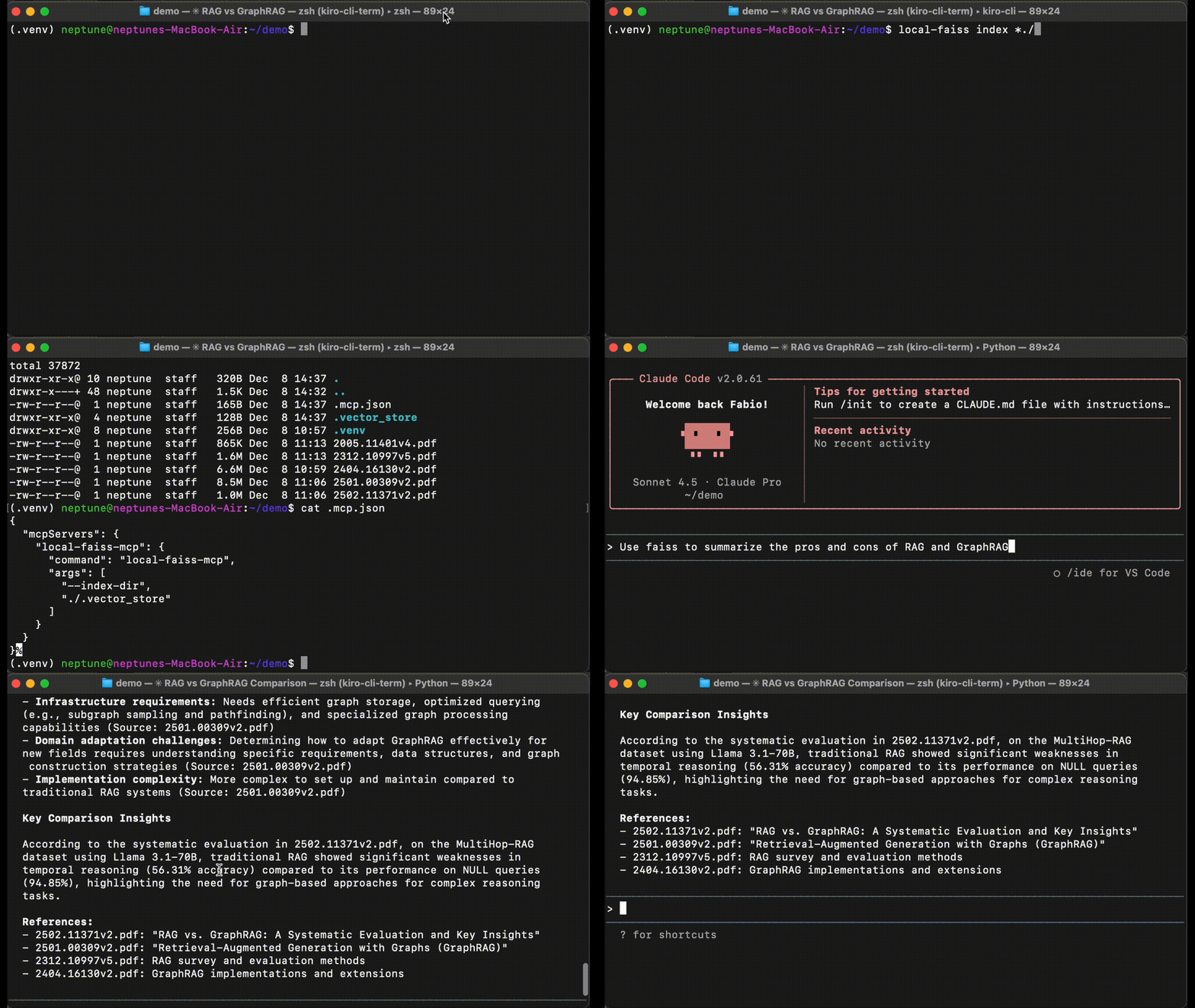
A Model Context Protocol (MCP) server that provides local vector database functionality using FAISS for Retrieval-Augmented Generation (RAG) applications.
Features
Core Capabilities
- Local Vector Storage: Uses FAISS for efficient similarity search without external dependencies
- Document Ingestion: Automatically chunks and embeds documents for storage
- Semantic Search: Query documents using natural language with sentence embeddings
- Persistent Storage: Indexes and metadata are saved to disk
- MCP Compatible: Works with any MCP-compatible AI agent or client
v0.2.0 Highlights
- CLI Tool:
local-faisscommand for standalone indexing and search - Document Formats: Native PDF/TXT/MD support, DOCX/HTML/EPUB with pandoc
- Re-ranking: Two-stage retrieve and rerank for better results
- Custom Embeddings: Choose any Hugging Face embedding model
- MCP Prompts: Built-in prompts for answer extraction and summarization
Quickstart
Or use with Claude Code - configure MCP client (see Configuration) and try:
Claude will retrieve relevant document chunks from your vector store and use them to answer your question.
Installation
⚡️ Upgrading? Run pip install --upgrade local-faiss-mcp
From PyPI (Recommended)
Optional: Extended Format Support
For DOCX, HTML, EPUB, and 40+ additional formats, install pandoc:
Note: PDF, TXT, and MD work without pandoc.
From Source
Usage
Running the Server
After installation, you can run the server in three ways:
1. Using the installed command (easiest):
2. As a Python module:
3. For development/testing:
Command-line Arguments:
--index-dir: Directory to store FAISS index and metadata files (default: current directory)--embed: Hugging Face embedding model name (default:all-MiniLM-L6-v2)--rerank: Enable re-ranking with specified cross-encoder model (default:BAAI/bge-reranker-base)
Using a Custom Embedding Model:
Using Re-ranking for Better Results:
Re-ranking uses a cross-encoder model to reorder FAISS results for improved relevance. This two-stage "retrieve and rerank" approach is common in production search systems.
How Re-ranking Works:
- FAISS retrieves top candidates (10x more than requested)
- Cross-encoder scores each candidate against the query
- Results are re-sorted by relevance score
- Top-k most relevant results are returned
Popular re-ranking models:
BAAI/bge-reranker-base- Good balance (default)cross-encoder/ms-marco-MiniLM-L-6-v2- Fast and efficientcross-encoder/ms-marco-TinyBERT-L-2-v2- Very fast, smaller model
The server will:
- Create the index directory if it doesn't exist
- Load existing FAISS index from
{index-dir}/faiss.index(or create a new one) - Load document metadata from
{index-dir}/metadata.json(or create new) - Listen for MCP tool calls via stdin/stdout
Available Tools
The server provides two tools for document management:
1. ingest_document
Ingest a document into the vector store.
Parameters:
document(required): Text content OR file path to ingestsource(optional): Identifier for the document source (default: "unknown")
Auto-detection: If document looks like a file path, it will be automatically parsed.
Supported formats:
- Native: TXT, MD, PDF
- With pandoc: DOCX, ODT, HTML, RTF, EPUB, and 40+ formats
Examples:
2. query_rag_store
Query the vector store for relevant document chunks.
Parameters:
query(required): The search query texttop_k(optional): Number of results to return (default: 3)
Example:
Available Prompts
The server provides MCP prompts to help extract answers and summarize information from retrieved documents:
1. extract-answer
Extract the most relevant answer from retrieved document chunks with proper citations.
Arguments:
query(required): The original user query or questionchunks(required): Retrieved document chunks as JSON array with fields:text,source,distance
Use Case: After querying the RAG store, use this prompt to get a well-formatted answer that cites sources and explains relevance.
Example workflow in Claude:
- Use
query_rag_storetool to retrieve relevant chunks - Use
extract-answerprompt with the query and results - Get a comprehensive answer with citations
2. summarize-documents
Create a focused summary from multiple document chunks.
Arguments:
topic(required): The topic or theme to summarizechunks(required): Document chunks to summarize as JSON arraymax_length(optional): Maximum summary length in words (default: 200)
Use Case: Synthesize information from multiple retrieved documents into a concise summary.
Example Usage:
In Claude Code, after retrieving documents with query_rag_store, you can use the prompts like:
The prompts will guide the LLM to provide structured, citation-backed answers based on your vector store data.
Command-Line Interface
The local-faiss CLI provides standalone document indexing and search capabilities.
Index Command
Index documents from the command line:
Configuration: The CLI automatically uses MCP configuration from:
./.mcp.json(local/project-specific)~/.claude/.mcp.json(Claude Code config)~/.mcp.json(fallback)
If no config exists, creates ./.mcp.json with default settings (./.vector_store).
Supported formats:
- Native: TXT, MD, PDF (always available)
- With pandoc: DOCX, ODT, HTML, RTF, EPUB, etc.
- Install:
brew install pandoc(macOS) orapt install pandoc(Linux)
- Install:
Search Command
Search the indexed documents:
Results show:
- Source file path
- FAISS distance score
- Re-rank score (if enabled in MCP config)
- Text preview (first 300 characters)
CLI Features
- ✅ Incremental indexing: Adds to existing index, doesn't overwrite
- ✅ Progress output: Shows indexing progress for each file
- ✅ Shared config: Uses same settings as MCP server
- ✅ Auto-detection: Supports glob patterns and recursive folders
- ✅ Format support: Handles PDF, TXT, MD natively; DOCX+ with pandoc
Configuration with MCP Clients
Claude Code
Add this server to your Claude Code MCP configuration (.mcp.json):
User-wide configuration (~/.claude/.mcp.json):
With custom index directory:
Related MCP Servers
Adoption & maintenance
Factual signals from GitHub, npm, and our automated checks — not a rating.
GitHub stars
33
Stargazers on the source repository.
Last commit
4mo ago
Most recent push to the default branch.
Tools exposed
4
Callable tools this server registers over MCP.
Directory activity
1 views
Config copies, upvotes, and views on AllMCPs.
Reviews
No reviews yet — be the first to share how this listing worked for you.
Frequently Asked Questions about Local Faiss MCP
AllMCPs Directory Badge
Showcase your server listing on GitHub or your project documentation. Embed this dynamic SVG badge to highlight official listing status and live engagement.
Badge Style:
Live Dynamic SVG Preview
Markdown (GitHub README)
[](https://allmcps.com/mcp/nonatofabio-local-faiss-mcp)HTML Embed
<a href="https://allmcps.com/mcp/nonatofabio-local-faiss-mcp"><img src="https://allmcps.com/api/badge/nonatofabio-local-faiss-mcp?style=directory" alt="Local Faiss MCP on AllMCPs" /></a>