Undetected, anti-bot-resistant Chrome automation. 57 tools. Stealth chrome-devtools-mcp alternative.
Quick Install
Automated & IDE SetupCopy the AI prompt to install this server into Claude Code, Cursor, or another agent — or use 1-click editor setup below.
Not yet automatically verified
We haven't yet run this listing's install command through our automated sandbox check. This isn't a red flag — we're steadily working through the catalog.
Manual Client & Custom JSON ConfigExpand JSON ▾
Client Config & Setup
Choose your client or environment
Target File:
💡 Paste the JSON block into your client's configuration file under mcpServers, then restart the application.
Documentation Overview

nodriver-mcp-server
An undetected, anti-bot-resistant browser automation MCP server — a drop-in, stealth alternative to chrome-devtools-mcp for AI agents like Claude, Claude Code, Cursor, Windsurf, and any Model Context Protocol client. Powered by nodriver so your agent can browse, scrape, and automate real Chrome without tripping Cloudflare, hCaptcha, or WebDriver fingerprint detection.





Keywords: MCP server · browser automation · undetected chromedriver · anti-bot · Cloudflare bypass · web scraping · Claude · Cursor · nodriver · chrome-devtools-mcp alternative · Playwright/Puppeteer alternative · AI agent tools.
Is this the problem you have?
If you drive a browser from an AI agent, you have probably run into one of these:
- The page sits on "Just a moment…" or "Checking your browser before accessing" and never loads
- A "Verify you are human" checkbox that reappears every single time you click it
- "Unusual Activity Detected", "Access Denied", or a plain HTTP 403 — from a site that opens perfectly in your normal browser
navigator.webdriverreturnstrue, and the site quietly serves you different content because of it- The login works when you do it by hand, and fails the moment automation does the same steps
- It all worked for weeks, then the site started returning an empty page or a captcha wall
None of that is your script being wrong. It is anti-bot detection — Cloudflare, DataDome, PerimeterX, Akamai, hCaptcha — recognising the automation stack itself. It shows up with chrome-devtools-mcp, playwright-mcp, Puppeteer, Selenium and browser-use alike, because they all drive Chrome in ways that leave a detectable signature: a ChromeDriver binary, WebDriver markers, CDP artifacts.
Why this fixes it
nodriver is the successor of undetected-chromedriver. It speaks the CDP protocol directly — no ChromeDriver binary, no Selenium/WebDriver markers — so navigator.webdriver reads false rather than true, and a session looks like a person using Chrome.
This server exposes that through the same tool surface as chrome-devtools-mcp (65 tools), so your agent keeps a familiar API and simply stops getting blocked. Swapping is a config change, not a rewrite.
What it will not do, so you can judge before installing: it does not solve image or text captchas for you, it cannot defeat every protection on every site, and it will not rescue a scraper that hammers a server. If a site blocks you for what you do rather than what you are, no driver fixes that. cf_verify handles the common Cloudflare checkbox challenge; it is not a captcha-solving service.
Does it actually pass? Here is the evidence
Claiming "undetected" is easy, so here is what the standard fingerprint suite reports when this server drives the page itself. Reproduce it in one line: point your agent at https://bot.sannysoft.com and take a snapshot.
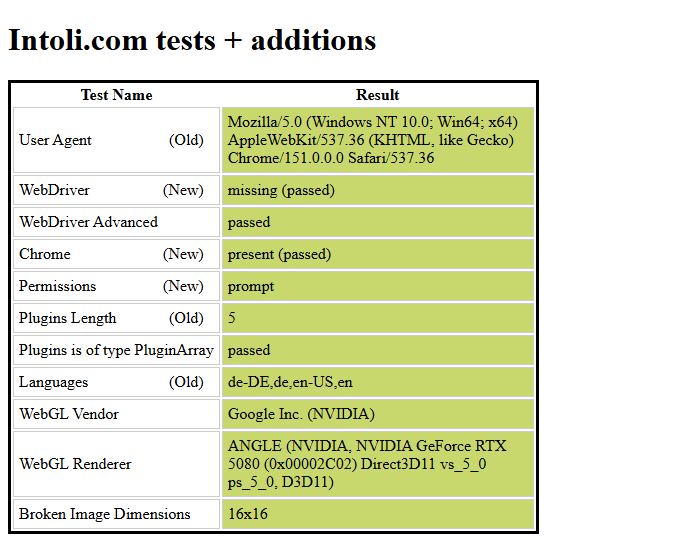
| Check | Result |
|---|---|
bot.sannysoft.com — Intoli + fingerprint suite | 58 checks, 0 failed |
navigator.webdriver | false — a boolean on Navigator.prototype, not an own property, exactly as in a normal browser |
window.chrome | present |
navigator.plugins | 5 |
navigator.languages | 4 entries |
| User agent | no Headless token |
What this does and does not prove. It shows the browser presents no automation artifacts to client-side fingerprinting, which is what these suites test and what most blocks key off. It does not prove any particular site will let you in: server-side signals such as IP reputation and request rate are outside what any driver controls, and captchas are not solved (see above). Measured on Chrome 151 / Windows 11, headful, with the default profile.
Features
- 🕵️ Undetected by design —
navigator.webdriverreadsfalse, exactly as in a browser a person is using, and there are no CDP or WebDriver artifacts to find. - ☁️ Built-in Cloudflare challenge solver (
cf_verify, needs the[cf]extra). - 🖼️ Frames are not a blind spot —
list_framesplus aframeargument on the readers, andtake_snapshotsplices each iframe's tree in under the element hosting it, so a payment field or consent wall inside one gets a uid and can be clicked and filled like anything else. - 🔍 A network log that says what happened — status, response headers, timing, transfer size, redirect hops and failures, plus WebSocket frames in both directions. A 500, a 404, a redirect and a DNS failure are different lines, not the same one.
- 👥 Several isolated browsers at once — pass
browser: "agent-a"to any tool and that name gets its own Chrome, in its own process, with its own cookies, tabs and uids. Parallel agents stop stealing each other's selected tab. Omit it and nothing changes: the default browser runs in the server process, exactly as before. How it works - 🧩 65 tools covering navigation, input, snapshots, screenshots, content/PDF export, network + console inspection, device emulation, cookies/storage, sessions, profiles, and performance tracing.
- 🧠 Schemas written for the agent, not just the compiler — every parameter carries a description, fixed-value options are real enums, and each tool declares read-only/destructive hints. See why this matters.
- 📄 Compact accessibility-tree snapshots (
take_snapshot) — searchable page text with a uid per element. Measured on the Hacker News front page: 27 KB against 97 KB unfiltered, 72% smaller, with every link, URL and text preserved. Same-origin URLs are printed relative to the page, which is lossless because the root node keeps the absolute one. That saving lands on every single agent step. - 🔗 Attach to a browser you are already signed into (
use_running_browser) — drive your real Chrome profile over its debugging port instead of rebuilding logins in a fresh one. - 📱 Device emulation (Pixel 7, iPad) with correct UA / client hints.
- ✅ Actions that verify themselves —
fillreads the value back,set_checkedreads the checked state back, andclick,press_keyandtype_textreport when no input event reached the page. A tool that cannot confirm what it did says so instead of reporting success. - 💾 Session save/restore — persist logins across runs.
- 🧬 Ephemeral by default, run many at once — each session gets its own temp Chrome profile (auto-deleted), so Claude Desktop, Claude Code and VS Code can all drive nodriver simultaneously without colliding. Named persistent profiles are available on demand for reusable logins.
- ⚡ One-command setup for 15+ MCP clients.
Installation
Requires uv for the first and third form. To track the development branch instead of a release:
Also listed in the official MCP Registry as io.github.andresolbach/nodriver-mcp-server, so clients and marketplaces that read the registry can find and install it directly.
Uses upstream
nodriver>=0.50.3, which contains the Chrome 146+ CDP fixes (samePartyremoved fromCookie,privateNetworkRequestPolicy→localNetworkAccessRequestPolicy) — verified working against Chrome 151.pip installalso works, butuv tool installkeeps it isolated.
You'll also need a local installation of Google Chrome (auto-detected).
Upgrade
Requirements & tested versions
Every tool in this server was tested end-to-end against Google Chrome 151 with nodriver 0.50.3 on Python 3.12.11 / Windows 11 (macOS and Linux are supported too). Because nodriver talks to Chrome directly over CDP and tracks upstream Chrome changes, it keeps working as Chrome auto-updates.
| Component | Requirement | Verified version |
|---|---|---|
| Python | 3.12+ | 3.12.11 |
| Google Chrome | any recent stable | 151.0.7922.174 |
| Operating system | Windows / macOS / Linux | Windows 11 |
nodriver | >= 0.50.3 | 0.50.3 |
mcp (MCP SDK) | >= 1.26.0, < 2 | 1.26.0 |
pillow | >= 12.1.1 | 12.1.1 |
tomli-w | >= 1.0.0 | 1.2.0 |
Related MCP Servers
Adoption & maintenance
Factual signals from GitHub, npm, and our automated checks — not a rating.
GitHub stars
4
Stargazers on the source repository.
Last commit
1mo ago
Most recent push to the default branch.
Directory activity
1 views
Config copies, upvotes, and views on AllMCPs.
Reviews
No reviews yet — be the first to share how this listing worked for you.
Frequently Asked Questions about Nodriver — undetected browser automation
AllMCPs Directory Badge
Showcase your server listing on GitHub or your project documentation. Embed this dynamic SVG badge to highlight official listing status and live engagement.
Badge Style:
Live Dynamic SVG Preview
Markdown (GitHub README)
[](https://allmcps.com/mcp/nodriver-undetected-browser-automation)HTML Embed
<a href="https://allmcps.com/mcp/nodriver-undetected-browser-automation"><img src="https://allmcps.com/api/badge/nodriver-undetected-browser-automation?style=directory" alt="Nodriver — undetected browser automation on AllMCPs" /></a>Technical Specs & Signals
CategoryBrowser Automation
11/14 checks healthy over the last 45d
40Quality signal: Fair · 40/100How this signal is calculated ▾
Server availabilityNot measured
Not scored for repo-hosted servers — we can't reach the running server, only its GitHub page. Hosted MCP endpoints are health-checked live.
Verified ownership10/20
Documentation & tools16/30
Adoption & activity4/15
Community engagement0/10
A guidance signal from public completeness & health data — not a user rating. New listings start lower and rise as they add docs, get verified, and grow adoption. Signals we can't observe for a listing are skipped, not counted against it.
Supply-chain signal
No high-severity advisories surfaced by our automated scan.
Critical 0High 0Medium 0Low 0
Scanned 6d ago via OSV.dev · nodriver-mcp (PyPI)
Own this project?
This directory is pre-filled from public sources. Claim via GitHub README, site badge, or DNS TXT to unlock edit access and the Official badge — proof is checked automatically, then reviewed by our team.
Free dofollow backlink: add your website and place the AllMCPs badge on it — no claim needed. We detect it automatically and keep it verified as long as the badge stays live.
Claim & get free dofollowShare & Embed
Add our SVG badge (dark/light directory styles) or embeddable widget to your site.