Dynamically discovers and executes relevant OpenAPI endpoints using semantic search and dependency graphs without loading full specs.
Quick Install
Automated & IDE SetupCopy the AI prompt to install this server into Claude Code, Cursor, or another agent — or use 1-click editor setup below.
Not yet automatically verified
We haven't yet run this listing's install command through our automated sandbox check. This isn't a red flag — we're steadily working through the catalog.
Manual Client & Custom JSON ConfigExpand JSON ▾
Client Config & Setup
Choose your client or environment
Target File:
💡 Paste the JSON block into your client's configuration file under mcpServers, then restart the application.
Overview
Use cases
Register OpenAPI specs for dynamic API interaction
Find and call relevant endpoints from natural language queries
Chain API calls across multiple registered APIs
Manage API authentication and execute calls with parameters
List and delete registered APIs programmatically
Key features
Semantic search over endpoints using natural language
Dependency graph to resolve multi-step API call workflows
Support for multiple registered APIs and cross-API orchestration
Local embeddings by default with optional cloud embedding providers
Tools for registering, listing, searching, and calling APIs
Authentication configuration for API keys and bearer tokens
Capabilities & Tool Schemas (8)
Inspect callable tools, capabilities, and parameters exposed to AI agents by Jitapi.
register_apiRegister an API from an OpenAPI spec URL
list_apisList all registered APIs and their endpoint counts
search_endpointsSemantic search across endpoints using natural language
get_workflowFind relevant endpoints with dependency resolution and full schemas
get_endpoint_schemaGet the complete schema for a specific endpoint
call_apiExecute a single API call with auth, path params, query params, and body
Documentation Overview
JitAPI




Point Claude at any API. JitAPI figures out which endpoints to call and in what order — automatically.
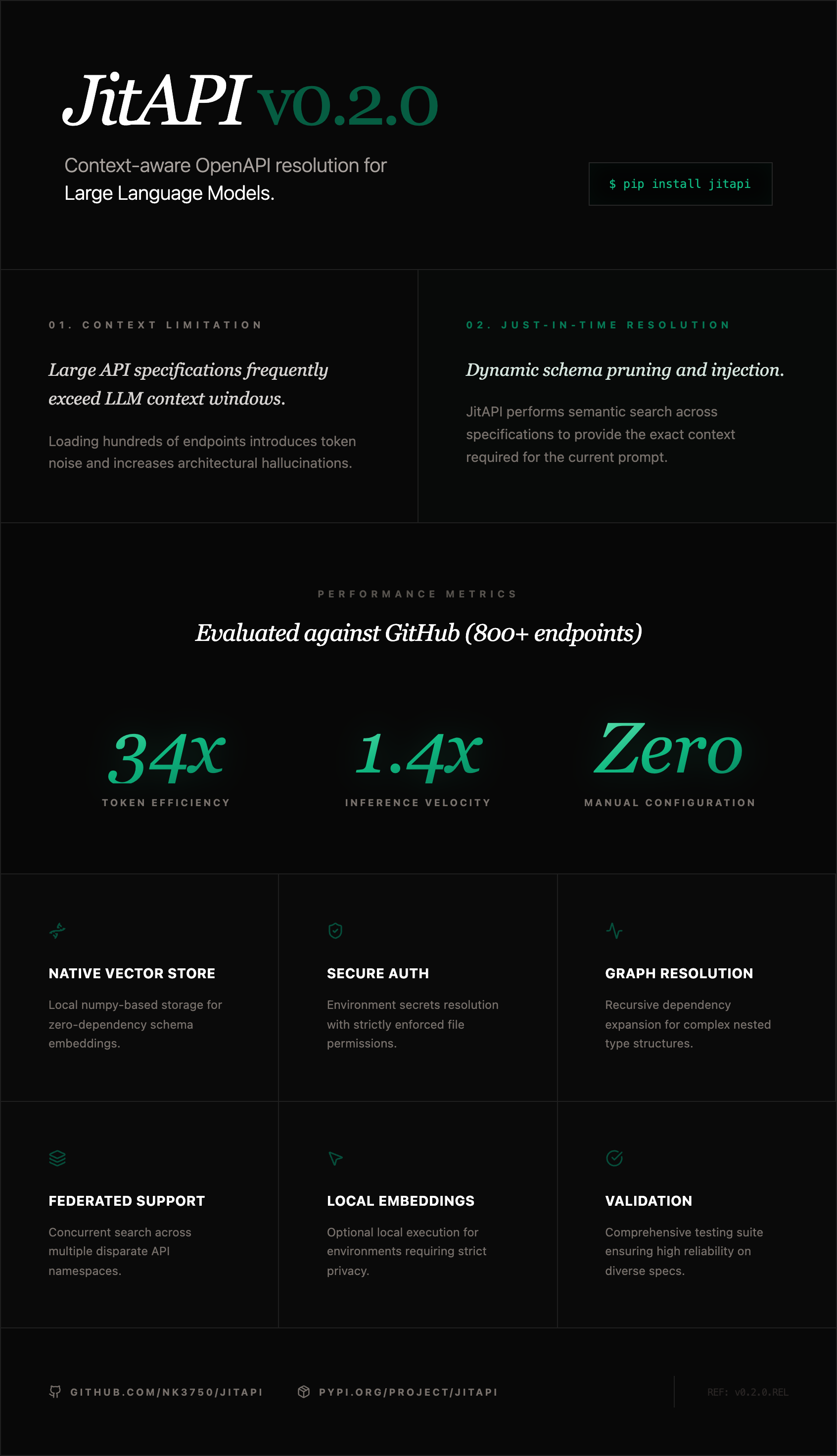
JitAPI is an MCP server that lets Claude interact with any API from its OpenAPI spec. Instead of dumping hundreds of endpoints into context, JitAPI uses semantic search and a dependency graph to surface only what's needed — then Claude plans and executes the calls.
https://github.com/user-attachments/assets/53f72f89-a41a-4a9c-a688-ec876ea05fbd
The Problem
Stripe has 300+ endpoints. GitHub has 800+. Loading the full spec into Claude's context wastes tokens and causes hallucinations. Writing a custom MCP server for every API you use doesn't scale.
JitAPI solves this: register any OpenAPI spec once, then ask for what you need in plain English. It finds the right endpoints, resolves dependencies between them, and lets Claude execute the calls.
Quick Start
Add to your Claude Code config (.mcp.json):
That's it. No API keys required — JitAPI uses local embeddings out of the box.
Then in Claude:
Multi-API Orchestration
The killer feature: register multiple APIs and ask questions that span them. JitAPI searches across all registered APIs and Claude chains the calls.
How It Works
- Register — Parse an OpenAPI spec, build a dependency graph (which endpoints need data from which other endpoints), and create searchable embeddings for all endpoints
- Search — When you ask a question, JitAPI embeds your query and finds the most relevant endpoints via cosine similarity
- Expand — The dependency graph adds any prerequisite endpoints (e.g., "you need to call GET /users first to get the user_id for POST /orders")
- Execute — Claude gets the endpoint schemas and makes the API calls, passing data between steps
MCP Tools
| Tool | Description |
|---|---|
register_api | Register an API from an OpenAPI spec URL |
list_apis | List all registered APIs and their endpoint counts |
search_endpoints | Semantic search across endpoints using natural language |
get_workflow | Find relevant endpoints with dependency resolution and full schemas |
get_endpoint_schema | Get the complete schema for a specific endpoint |
call_api | Execute a single API call with auth, path params, query params, and body |
set_api_auth | Configure authentication (API key header, API key query param, or bearer token) |
delete_api | Remove a registered API and all its data |
Setup
Claude Code
Create .mcp.json in your project directory (or ~/.claude.json for global access):
Claude Desktop
Add to your Claude Desktop config:
| OS | Config path |
|---|---|
| macOS | ~/Library/Application Support/Claude/claude_desktop_config.json |
| Windows | %APPDATA%\Claude\claude_desktop_config.json |
| Linux | ~/.config/Claude/claude_desktop_config.json |
Embedding Providers
JitAPI works out of the box with local embeddings (fastembed) — no API keys needed. For better search quality on large APIs, you can add a cloud embedding provider:
| Provider | Quality | Setup |
|---|---|---|
| Local (default) | Good | Nothing — works immediately |
| Voyage AI (recommended) | Excellent | pip install jitapi[voyage] + set VOYAGE_API_KEY |
| OpenAI | Excellent | pip install jitapi[openai] + set OPENAI_API_KEY |
| Cohere | Very good | pip install jitapi[cohere] + set COHERE_API_KEY |
Set the API key in your MCP config's env block:
Provider is auto-detected from available environment variables. Priority: Voyage AI > OpenAI > Cohere > local.
Authentication
Configure API authentication after registering. Supported auth types: bearer, api_key (custom header), and api_key_query (query parameter). The recommended approach uses environment variables so secrets are never written to disk:
Then tell Claude to use the env var:
With env_var, JitAPI reads the secret from the environment at request time — only the env var name is persisted, never the credential itself.
You can also pass credentials directly (they'll be stored in ~/.jitapi/auth.json with 0600 permissions):
Supported auth types: bearer, api_key (custom header, default X-API-Key), api_key_query (query parameter).
Security note: When using
env_var, credentials are resolved at runtime and never touch the filesystem. When passingcredentialdirectly, secrets are stored as plaintext JSON at~/.jitapi/auth.json(file permissions0600, directory0700). For production use, prefer theenv_varapproach.
Environment Variables
| Variable | Required | Description |
|---|---|---|
VOYAGE_API_KEY | No | Voyage AI API key (recommended cloud provider) |
OPENAI_API_KEY | No | OpenAI API key (alternative cloud provider) |
COHERE_API_KEY | No | Cohere API key (alternative cloud provider) |
JITAPI_STORAGE_DIR | No | Data directory (default: ~/.jitapi) |
JITAPI_LOG_LEVEL | No | DEBUG, INFO, WARNING, ERROR (default: INFO) |
Development
License
MIT
Built by Neelabh Kumar — AI engineer and builder.
Related MCP Servers
Adoption & maintenance
Factual signals from GitHub, npm, and our automated checks — not a rating.
GitHub stars
7
Stargazers on the source repository.
Last commit
2mo ago
Most recent push to the default branch.
Tools exposed
8
Callable tools this server registers over MCP.
Reviews
No reviews yet — be the first to share how this listing worked for you.
Frequently Asked Questions about Jitapi
AllMCPs Directory Badge
Showcase your server listing on GitHub or your project documentation. Embed this dynamic SVG badge to highlight official listing status and live engagement.
Badge Style:
Live Dynamic SVG Preview
Markdown (GitHub README)
[](https://allmcps.com/mcp/nk3750-jitapi)HTML Embed
<a href="https://allmcps.com/mcp/nk3750-jitapi"><img src="https://allmcps.com/api/badge/nk3750-jitapi?style=directory" alt="Jitapi on AllMCPs" /></a>Technical Specs & Signals
CategoryFinance & Fintech
11/11 checks healthy over the last 32d
55Quality signal: Good · 55/100How this signal is calculated ▾
Server availabilityNot measured
Not scored for repo-hosted servers — we can't reach the running server, only its GitHub page. Hosted MCP endpoints are health-checked live.
Verified ownership10/20
Documentation & tools27/30
Adoption & activity4/15
Community engagement0/10
A guidance signal from public completeness & health data — not a user rating. New listings start lower and rise as they add docs, get verified, and grow adoption. Signals we can't observe for a listing are skipped, not counted against it.
Supply-chain signal
No high-severity advisories surfaced by our automated scan.
Critical 0High 0Medium 0Low 0
Scanned 14d ago via OSV.dev · jitapi (PyPI)
Own this project?
This directory is pre-filled from public sources. Claim via GitHub README, site badge, or DNS TXT to unlock edit access and the Official badge — proof is checked automatically, then reviewed by our team.
Free dofollow backlink: add your website and place the AllMCPs badge on it — no claim needed. We detect it automatically and keep it verified as long as the badge stays live.
Claim & get free dofollowShare & Embed
Add our SVG badge (dark/light directory styles) or embeddable widget to your site.