Mindbase README
The full upstream README, mirrored here for reference. Install config, tool schemas, adoption signals, and an original overview live on the Mindbase listing page.
MindBase — Karpathy's LLM Wiki, as a product






An open-source implementation of Andrej Karpathy's LLM Wiki idea: an AI that builds and maintains a wiki from your sources. Not RAG-in-a-vector-DB. A real markdown wiki on your disk, that an LLM gardens for you between conversations.
One command: starts the local server, opens the web app, and walks you through picking a free local model that fits your RAM. No API key, nothing leaves your machine. (Node 20+)

MindBase implements Andrej Karpathy's LLM-Wiki pattern: you feed it sources (papers, articles, thoughts); the LLM reads, cross-references, flags contradictions, and writes structured wiki pages. Later, when you ask a question, the wiki already has the synthesized answer — no vector-search re-derivation at query time.
Status: Early access, actively developed. What's new: CHANGELOG · Releases
Why MindBase
You read a lot. Papers, articles, tweets, docs. You want to remember them, connect them, form opinions from them. Today you have two bad options:
- Notion / Obsidian / Roam: Passive containers. You do all the organizing. AI features are bolted-on generation, not maintenance.
- NotebookLM / Perplexity Pages / ChatGPT search: RAG-based. Nothing accumulates. Every question re-derives the answer from raw sources.
MindBase is the third option: the LLM actively maintains a persistent, structured wiki as you feed it sources. Knowledge compounds. Your context.md gets sharper every time you contribute. The AI remembers you across sessions because your beliefs are written down in markdown files — not stored in a chat history that gets summarized away.
Think of it as a personal Wikipedia that an AI intern writes for you, kept up to date, cross-referenced, and honest about what it doesn't know.
How it works (30 seconds)
Three physical layers on disk (Karpathy's model):

| Layer | Who owns it | What lives there |
|---|---|---|
sources/ | You — append-only, the AI never rewrites it | Quick captures, full notes, PDFs, URLs |
context.md + sources/research/ | The AI — every change human-approved | The maintained wiki: synthesis, concept pages, [[wikilinks]] |
state/ · logs/ · artifacts/ | Derived — always rebuildable | Search index, snapshots, lint findings, op history |
Three operations run the loop: ingest (AI reads a source, discusses takeaways, you approve the wiki updates), build (regenerate context.md from everything unbuilt), lint (the AI audits its own wiki for contradictions, stale claims, and orphans).
What makes it different
- The AI asks before writing. Every ingest shows takeaways + a checkbox plan; only what you approve gets written. No black-box edits to your knowledge.
- You can watch the wiki absorb your notes. Every note carries a status chip — ✨ Add to wiki until digested, ✓ In wiki after.
- It audits its own knowledge. One command re-reads the whole wiki and reports contradictions with the exact conflicting sentences quoted. Notion and NotebookLM structurally cannot do this.
- Free and local by default. Hardware-detect wizard installs the best Ollama model for your RAM. Cloud keys optional.
- Plain markdown on disk. Grep it, git it, open it in Obsidian, leave anytime.
Install
Browser (fastest): npx mindbase-app — shown above. Everything runs locally at localhost:4321.
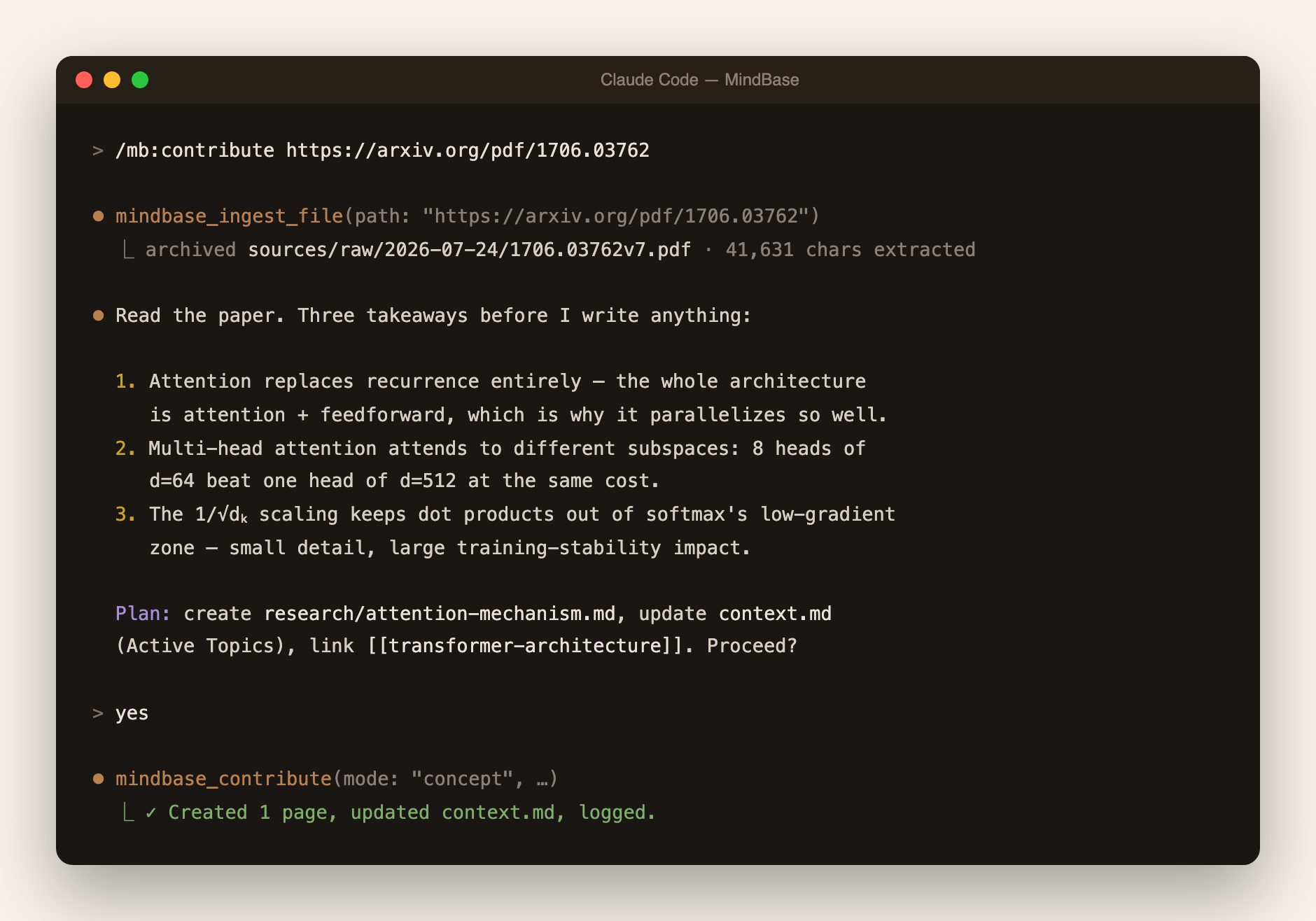
Claude Code (flagship): the full Karpathy 8-step ingest with sub-agents, slash commands, and per-agent tool boundaries:
Restart when prompted, then type / — you should see /mb:contribute, /mb:build, /mb:ask, /mb:lint and 8 more. You get 5 sub-agents with strict tool allowlists (the builder has no file-write tool at all — only an atomic-write MCP call), plus a SessionStart hook that auto-injects your project context.
Cursor
Add to ~/.cursor/mcp.json:
Restart Cursor — the tool picker should list mindbase_contribute and 48 others. Recommended: add a conventions block to ~/.cursor/rules.md so the LLM reliably routes "add to mindbase X" to the tools — copy it from the guide.
Windsurf
Cascade settings → MCP → add:
Same rules-file approach as Cursor works for Cascade.
Cline (VSCode)
Cline settings → MCP Servers:
Cline auto-detects; every tool call gets a confirmation dialog by default.
Continue.dev
~/.continue/config.json, under experimental.modelContextProtocolServers:
MCP tools appear under @ in chat.
Any other MCP client (Zed, Aider, Goose, Claude Agent SDK…)
Point it at npx -y mindbase-mcp as a stdio server. See your client's MCP docs for the config location.
Next: create your first project and learn the four daily workflows in the Guide →
The web UI
Since 0.3 the browser app stands on its own — write notes in a full WYSIWYG editor (Cmd+N), quick-capture from anywhere (Cmd+I), and run the AI operations with approval cards: /contribute, /build, /lint, /research. Live demos on the website.
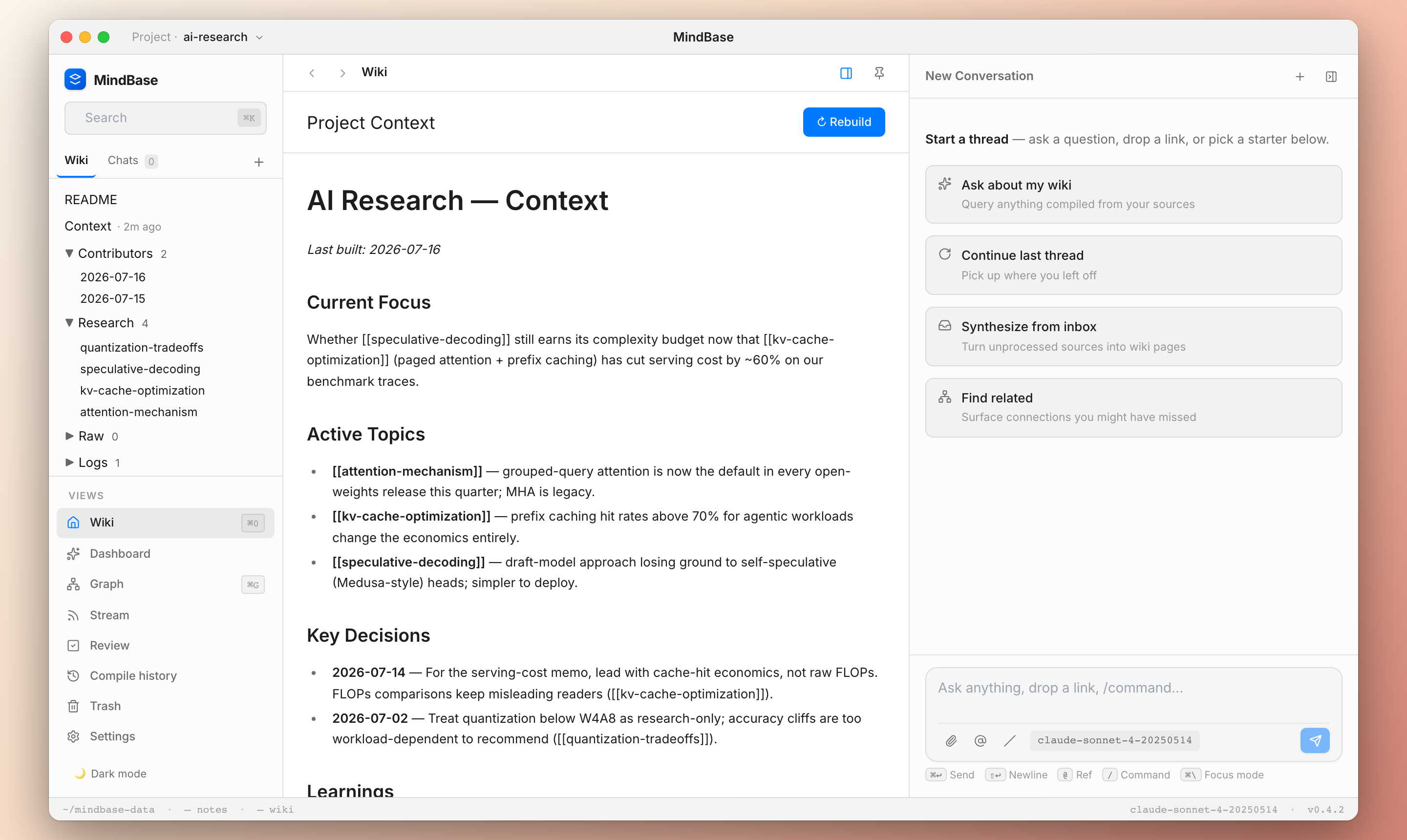
Free local models: the setup wizard detects your hardware and installs what fits — llama3.2:3b (8GB), qwen3:14b (24GB+), or Meta's Muse Glimmer 30B (32GB+ Apple Silicon, Ollama ≥ 0.32.7). Measured guidance: qwen3:14b for interactive work (~30s), Glimmer for background lint/build — slower, but its findings quote the exact conflicting sentences. The model switcher on the chat composer flips between them in two clicks.
Feature matrix by editor
| Feature | Claude Code | Cursor / Windsurf / Cline / Continue | Web UI |
|---|---|---|---|
Slash commands (/mb:*) | ✅ | ❌ (use natural language) | ✅ (/contribute, /build, /lint, /research) |
| MCP tools directly | ✅ | ✅ | ❌ |
| Karpathy 8-step ingest with approval | ✅ (sub-agents) | ⚠️ Manual via prompt | ✅ (approval cards) |
| Contribute / ingest PDF & URL | ✅ | ✅ | ✅ (upload + ✨ Process) |
| Ask wiki with cited answers | ✅ | ✅ | ✅ |
| Build / health check | ✅ | ✅ | ✅ |
| Wiki tree browsing + rich editor | ❌ | ❌ | ✅ |
-p project-id routing | ✅ | ⚠️ natural language | ✅ (switcher) |
Where your data lives
Everything is plain markdown under ~/mindbase-data/ (override: MINDBASE_DATA_DIR):
No proprietary database — what you see on disk is what MindBase knows. git init it, back it up with anything, delete a project with rm -rf.
Architecture at a glance
Monorepo: packages/core (TS strict library) · apps/mcp (49-tool MCP server) · apps/server + apps/web (Express + React UI) · apps/app (npx launcher) · apps/plugin (Claude Code bundle).
Docs & help
- Guide — first project, the four daily workflows, multi-project routing, troubleshooting
- Website — live demos
- CHANGELOG · Issues — I reply to every issue same-day during beta
- The idea: Karpathy's LLM Wiki gist
Roadmap
Next: browser extension for one-click page capture · audio input via Whisper · unified meta-tool for Cursor/Windsurf slash-like UX. Later: team projects with human-in-the-loop review · audio digests · desktop app · mobile capture.
Feedback
Beta through 2026-Q4. If you tried MindBase and gave up — please tell me why: issues or haobing0304@gmail.com. The blockers you hit are gold.
License
MIT — do what you want, no warranty. If you build something interesting on top, I'd love to hear about it.
Built with the belief that AI's most valuable gift is not "generation on demand" but "gardening of a persistent artifact you own."