AllMCPs
BrowseBestCategoriesStackCompareToolsGuidesBlog
Log in Submit MCP

Stay in the loop

Get new MCP servers and top picks in your inbox.

AllMCPs

The open directory for discovering and installing Model Context Protocol servers.

AllMCPs on GitHub (opens in a new tab)
Launched onTiny Startupstinystartups.com
Explore
  • Browse servers
  • Best MCP servers
  • Categories
  • MCP clients
  • Agent prompts
  • Stack Builder
  • Compare servers
  • Random discovery New
  • Submit a server
  • Pricing & Boost Boost
Learn
  • Guides hub
  • What is MCP?
  • Install guide
  • Build an MCP server
  • Deploy an MCP server
  • Security guide
  • Troubleshooting
  • MCP for SEO & AEO
  • Protocol versioning
  • Blog & updates
Tools
  • All developer tools
  • Config generator
  • Config validator
  • Config auditor
  • MCP playground
  • Token calculator
  • OpenAPI β†’ MCP
  • Badge generator
For agents
  • REST API docs
  • Trust & traffic Live
  • Remote MCP server SSE β†— (opens in a new tab)
  • llms.txt β†— (opens in a new tab)
  • Catalog JSON β†— (opens in a new tab)
Company
  • About
  • Advertise Sponsor
  • Contact
  • GitHub β†— (opens in a new tab)
  • Terms
  • Privacy
AllMCPs VerifiedAllMCPs VerifiedFeatured on Nick LaunchesFeatured on Nick LaunchesLaunch Llama NewsletterLaunch Llama NewsletterVerified DR - allmcps.comVerified DR - allmcps.comFeatured on SaaSGrowFeatured on SaaSGrowFeatured on Twelve ToolsFeatured on Twelve ToolsFeatured on Saaspa.geFeatured on Saaspa.geFeatured on Findly.toolsFeatured on Findly.toolsFeatured on Startup FameFeatured on Startup FameFeatured on LaunchKiwiFeatured on LaunchKiwiFeatured on ScrollLaunchFeatured on ScrollLaunchFeatured on DailyPingsFeatured on DailyPingsFazier badgeFazier badgeFeatured on NewTool.siteFeatured on NewTool.siteFeatured on saasfame.comFeatured on saasfame.comDR Checker - Domain RatingDR Checker - Domain RatingListed on Turbo0Listed on Turbo0Launched on LaunchBoard - Product Launch PlatformLaunched on LaunchBoard - Product Launch PlatformList on SimilarlabsList on Similarlabshttps://codetrendy.comhttps://codetrendy.comListed on DevTool.ioFeatured on BuildlistFeatured on BuildlistLaunched on Tiny StartupsFeatured on ShowMeBestAIFeatured on ShowMeBestAIFind us on LaunchZoneFind us on LaunchZoneAllMCPs VerifiedAllMCPs VerifiedFeatured on Nick LaunchesFeatured on Nick LaunchesLaunch Llama NewsletterLaunch Llama NewsletterVerified DR - allmcps.comVerified DR - allmcps.comFeatured on SaaSGrowFeatured on SaaSGrowFeatured on Twelve ToolsFeatured on Twelve ToolsFeatured on Saaspa.geFeatured on Saaspa.geFeatured on Findly.toolsFeatured on Findly.toolsFeatured on Startup FameFeatured on Startup FameFeatured on LaunchKiwiFeatured on LaunchKiwiFeatured on ScrollLaunchFeatured on ScrollLaunchFeatured on DailyPingsFeatured on DailyPingsFazier badgeFazier badgeFeatured on NewTool.siteFeatured on NewTool.siteFeatured on saasfame.comFeatured on saasfame.comDR Checker - Domain RatingDR Checker - Domain RatingListed on Turbo0Listed on Turbo0Launched on LaunchBoard - Product Launch PlatformLaunched on LaunchBoard - Product Launch PlatformList on SimilarlabsList on Similarlabshttps://codetrendy.comhttps://codetrendy.comListed on DevTool.ioFeatured on BuildlistFeatured on BuildlistLaunched on Tiny StartupsFeatured on ShowMeBestAIFeatured on ShowMeBestAIFind us on LaunchZoneFind us on LaunchZone
Β© 2026 Jackalope Digital LLC. All rights reserved.
  1. Home
  2. πŸ’» Developer Tools
  3. Mindbase
Mindbase logo
Health: ActiveRecent health check succeeded.Last checked 9/7/2026, 8:03:44 PM

Mindbase

User RatingsBe the first to rate and review this MCP server! Enrichment pendingWe haven’t run our AI enrichment pass on this listing yet, so the overview, use cases, and FAQ below may be sparse or missing. We work through the catalog over time β€” check back soon.
View Repository95 GitHub StarsTotal stargazers on GitHub for the source repository (95 stars).Visit Website

LLM-maintained personal wiki: cross-references sources, flags contradictions. Local markdown.

Quick Install

Automated & IDE Setup

Copy the AI prompt to install this server into Claude Code, Cursor, or another agent β€” or use 1-click editor setup below.

Add to CursorAdd to VS Code
Not yet automatically verified

We haven't yet run this listing's install command through our automated sandbox check. This isn't a red flag β€” we're steadily working through the catalog.

Manual Client & Custom JSON ConfigExpand JSON β–Ύ

Client Config & Setup

Choose your client or environment
Target File:~/Library/Application Support/Claude/claude_desktop_config.json
claude_desktop_config.json
{
  "mcpServers": {
    "mindbase": {
      "command": "npx",
      "args": [
        "-y",
        "mindbase-app"
      ]
    }
  }
}

πŸ’‘ Paste the JSON block into your client's configuration file under mcpServers, then restart the application.

Install Directory Badge Claim listing AlternativesπŸ’» More in Developer Tools

Documentation Overview

MindBase β€” Karpathy's LLM Wiki, as a product

npm npm downloads CI License: MIT Website Glama score

An open-source implementation of Andrej Karpathy's LLM Wiki idea: an AI that builds and maintains a wiki from your sources. Not RAG-in-a-vector-DB. A real markdown wiki on your disk, that an LLM gardens for you between conversations.

Terminal
npx mindbase-app

One command: starts the local server, opens the web app, and walks you through picking a free local model that fits your RAM. No API key, nothing leaves your machine. (Node 20+)

Demo: /contribute in the MindBase web UI β€” the AI shows takeaways and a checkbox plan, and writes to the LLM wiki only after approval

MindBase implements Andrej Karpathy's LLM-Wiki pattern: you feed it sources (papers, articles, thoughts); the LLM reads, cross-references, flags contradictions, and writes structured wiki pages. Later, when you ask a question, the wiki already has the synthesized answer β€” no vector-search re-derivation at query time.

Status: Early access, actively developed. What's new: CHANGELOG Β· Releases


Why MindBase

You read a lot. Papers, articles, tweets, docs. You want to remember them, connect them, form opinions from them. Today you have two bad options:

  • Notion / Obsidian / Roam: Passive containers. You do all the organizing. AI features are bolted-on generation, not maintenance.
  • NotebookLM / Perplexity Pages / ChatGPT search: RAG-based. Nothing accumulates. Every question re-derives the answer from raw sources.

MindBase is the third option: the LLM actively maintains a persistent, structured wiki as you feed it sources. Knowledge compounds. Your context.md gets sharper every time you contribute. The AI remembers you across sessions because your beliefs are written down in markdown files β€” not stored in a chat history that gets summarized away.

Think of it as a personal Wikipedia that an AI intern writes for you, kept up to date, cross-referenced, and honest about what it doesn't know.

How it works (30 seconds)

Three physical layers on disk (Karpathy's model):

MindBase: you feed sources, the LLM gardens them into a wiki that compounds β€” plain markdown on your disk

LayerWho owns itWhat lives there
sources/You β€” append-only, the AI never rewrites itQuick captures, full notes, PDFs, URLs
context.md + sources/research/The AI β€” every change human-approvedThe maintained wiki: synthesis, concept pages, [[wikilinks]]
state/ Β· logs/ Β· artifacts/Derived β€” always rebuildableSearch index, snapshots, lint findings, op history

Three operations run the loop: ingest (AI reads a source, discusses takeaways, you approve the wiki updates), build (regenerate context.md from everything unbuilt), lint (the AI audits its own wiki for contradictions, stale claims, and orphans).

What makes it different

  • The AI asks before writing. Every ingest shows takeaways + a checkbox plan; only what you approve gets written. No black-box edits to your knowledge.
  • You can watch the wiki absorb your notes. Every note carries a status chip β€” ✨ Add to wiki until digested, βœ“ In wiki after.
  • It audits its own knowledge. One command re-reads the whole wiki and reports contradictions with the exact conflicting sentences quoted. Notion and NotebookLM structurally cannot do this.
  • Free and local by default. Hardware-detect wizard installs the best Ollama model for your RAM. Cloud keys optional.
  • Plain markdown on disk. Grep it, git it, open it in Obsidian, leave anytime.

Install

Browser (fastest): npx mindbase-app β€” shown above. Everything runs locally at localhost:4321.

Claude Code (flagship): the full Karpathy 8-step ingest with sub-agents, slash commands, and per-agent tool boundaries:

Code
/plugin marketplace add frankchu91/mindbase-llm-wiki
/plugin install mb@mindbase

Restart when prompted, then type / β€” you should see /mb:contribute, /mb:build, /mb:ask, /mb:lint and 8 more. You get 5 sub-agents with strict tool allowlists (the builder has no file-write tool at all β€” only an atomic-write MCP call), plus a SessionStart hook that auto-injects your project context.
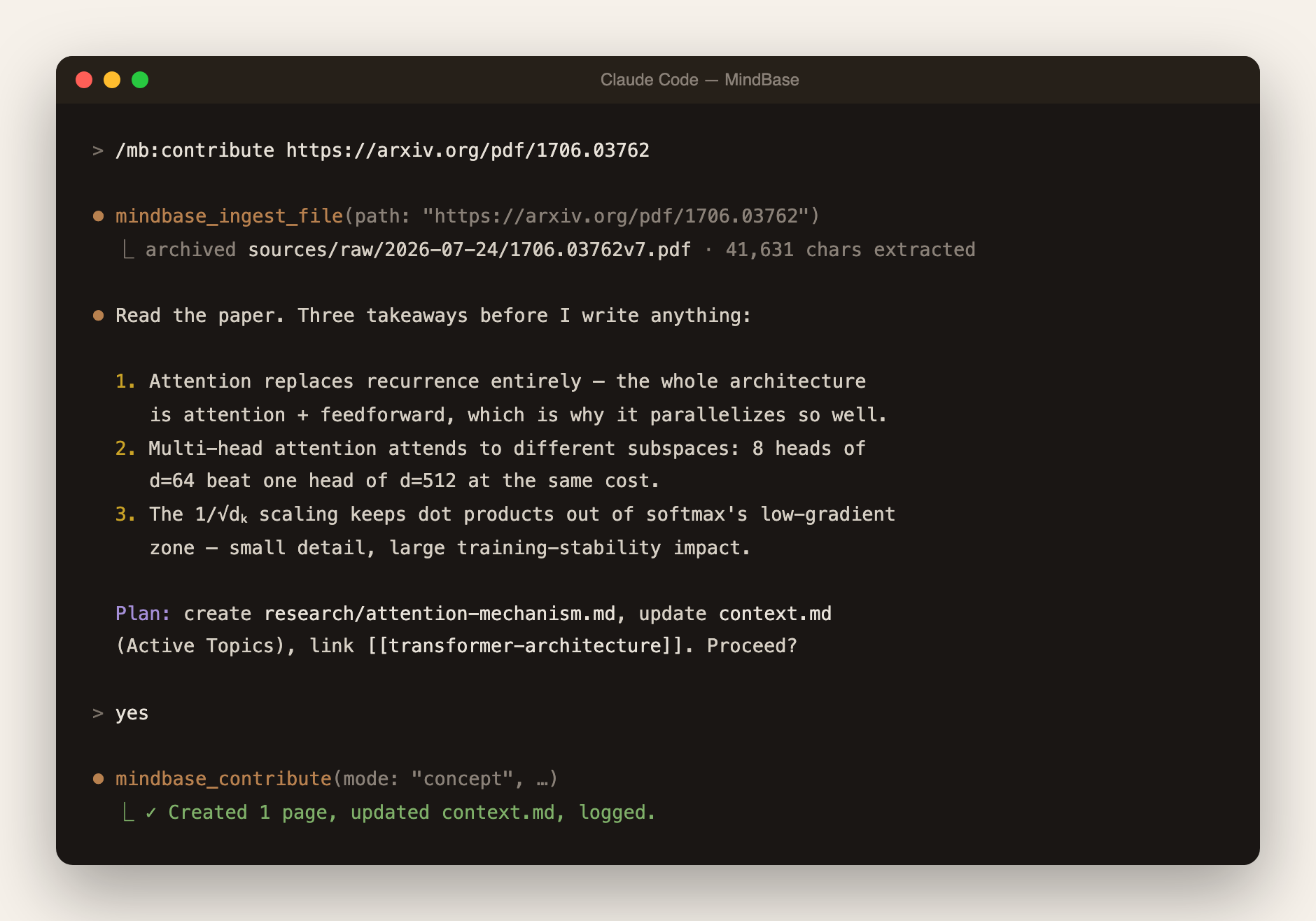
The core flow in Claude Code: /mb:contribute with an arXiv link β€” download, archive, discuss takeaways, approve, commit

Cursor

Add to ~/.cursor/mcp.json:

config.json
{ "mcpServers": { "mindbase": { "command": "npx", "args": ["-y", "mindbase-mcp"] } } }

Restart Cursor β€” the tool picker should list mindbase_contribute and 48 others. Recommended: add a conventions block to ~/.cursor/rules.md so the LLM reliably routes "add to mindbase X" to the tools β€” copy it from the guide.

Windsurf

Cascade settings β†’ MCP β†’ add:

config.json
{ "mcpServers": { "mindbase": { "command": "npx", "args": ["-y", "mindbase-mcp"] } } }

Same rules-file approach as Cursor works for Cascade.

Cline (VSCode)

Cline settings β†’ MCP Servers:

config.json
{ "mcpServers": { "mindbase": { "command": "npx", "args": ["-y", "mindbase-mcp"] } } }

Cline auto-detects; every tool call gets a confirmation dialog by default.

Continue.dev

~/.continue/config.json, under experimental.modelContextProtocolServers:

config.json
{ "experimental": { "modelContextProtocolServers": [ { "transport": { "type": "stdio", "command": "npx", "args": ["-y", "mindbase-mcp"] } } ] } }

MCP tools appear under @ in chat.

Any other MCP client (Zed, Aider, Goose, Claude Agent SDK…)

Point it at npx -y mindbase-mcp as a stdio server. See your client's MCP docs for the config location.

Next: create your first project and learn the four daily workflows in the Guide β†’

The web UI

Since 0.3 the browser app stands on its own β€” write notes in a full WYSIWYG editor (Cmd+N), quick-capture from anywhere (Cmd+I), and run the AI operations with approval cards: /contribute, /build, /lint, /research. Live demos on the website.
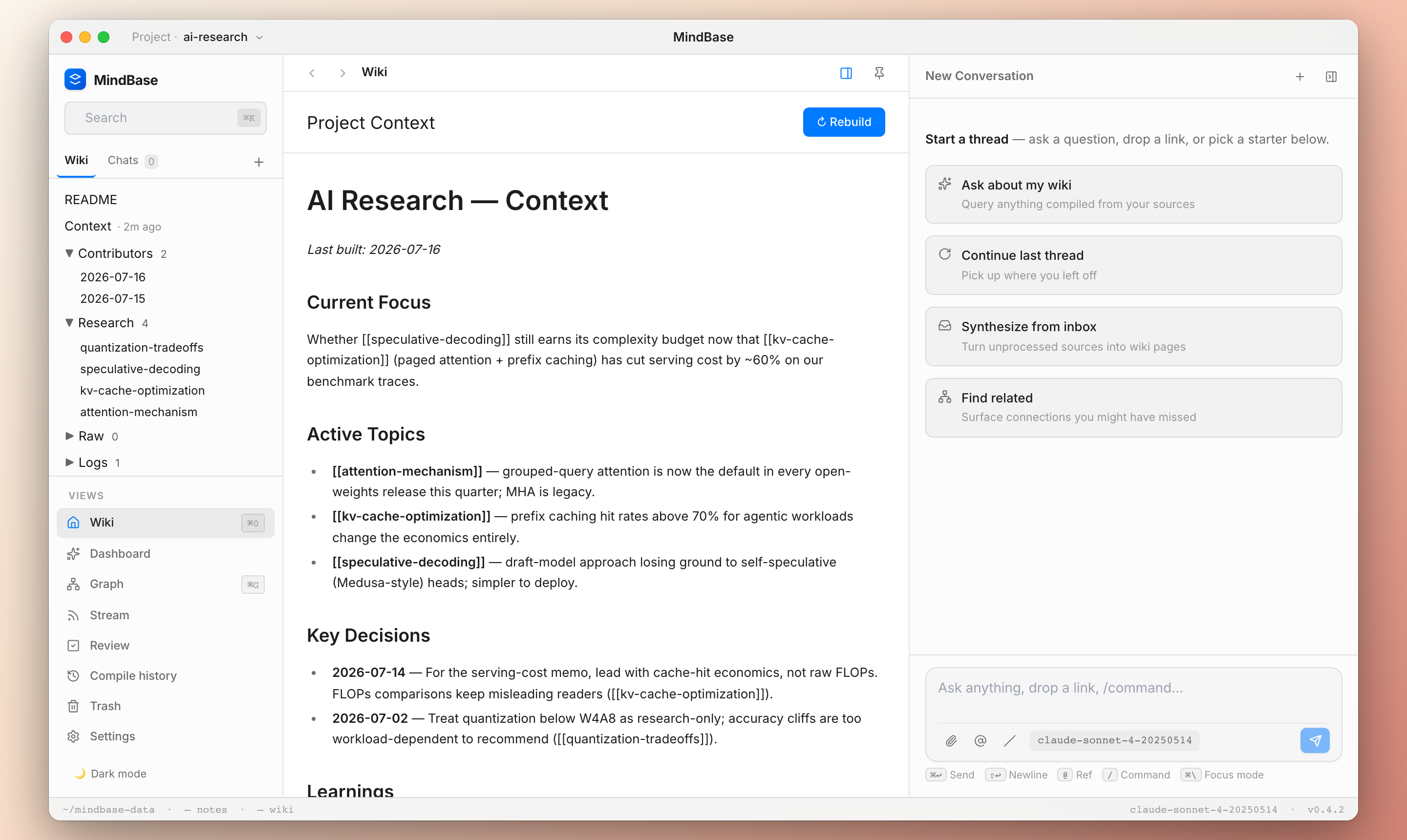
MindBase web UI β€” category tree on the left, the LLM-maintained context.md in the center, chat starters on the right

Free local models: the setup wizard detects your hardware and installs what fits β€” llama3.2:3b (8GB), qwen3:14b (24GB+), or Meta's Muse Glimmer 30B (32GB+ Apple Silicon, Ollama β‰₯ 0.32.7). Measured guidance: qwen3:14b for interactive work (~30s), Glimmer for background lint/build β€” slower, but its findings quote the exact conflicting sentences. The model switcher on the chat composer flips between them in two clicks.

Feature matrix by editor
FeatureClaude CodeCursor / Windsurf / Cline / ContinueWeb UI
Slash commands (/mb:*)βœ…βŒ (use natural language)βœ… (/contribute, /build, /lint, /research)
MCP tools directlyβœ…βœ…βŒ
Karpathy 8-step ingest with approvalβœ… (sub-agents)⚠️ Manual via promptβœ… (approval cards)
Contribute / ingest PDF & URLβœ…βœ…βœ… (upload + ✨ Process)
Ask wiki with cited answersβœ…βœ…βœ…
Build / health checkβœ…βœ…βœ…
Wiki tree browsing + rich editorβŒβŒβœ…
-p project-id routingβœ…βš οΈ natural languageβœ… (switcher)

Where your data lives

Everything is plain markdown under ~/mindbase-data/ (override: MINDBASE_DATA_DIR):

Code
~/mindbase-data/projects/my-research/
β”œβ”€β”€ README.md                 # Ops manual β€” you edit, LLM reads
β”œβ”€β”€ context.md                # Synthesized truth β€” LLM writes, you approve
β”œβ”€β”€ index.yaml                # Auto-generated catalog
β”œβ”€β”€ sources/
β”‚   β”œβ”€β”€ contributors/<you>/   # Your dated entries + notes (append-only)
β”‚   β”œβ”€β”€ research/             # LLM-authored wiki pages
β”‚   └── raw/                  # PDFs, HTML captures
β”œβ”€β”€ logs/                     # Chronological operation log
β”œβ”€β”€ artifacts/                # Briefs, exports, lint findings
└── state/builder/snapshots/  # context.md snapshots for rollback

No proprietary database β€” what you see on disk is what MindBase knows. git init it, back it up with anything, delete a project with rm -rf.

Architecture at a glance

Read the full README β†’View source on GitHub β†’

Related MCP Servers

View all in Developer Tools View all alternatives
  • PraisonAI logoPraisonAI

    AI Agents Framework with Self Reflection and MCP support

    πŸ’» Developer Tools1 views
    Compare vs PraisonAI β†’
  • Labelhead Artist Momentum logoLabelhead Artist Momentum

    Trending hip-hop artist momentum scores across four cultural dimensions.

    πŸ’» Developer Tools0 views
    Compare vs Labelhead Artist Momentum β†’
  • Link logoLink

    Personal knowledge wiki as MCP tools β€” search, context, graph traversal.

    πŸ’» Developer Tools0 views
    Compare vs Link β†’
  • Funplay Cocos MCP logoFunplay Cocos MCP

    stdio bridge for the local Cocos Creator Editor MCP server from FunplayAI/funplay-cocos-mcp.

    πŸ’» Developer Tools1 views
    Compare vs Funplay Cocos MCP β†’

Reviews

No reviews yet β€” be the first to share how this listing worked for you.

Frequently Asked Questions about Mindbase

Add the following block to your claude_desktop_config.json under mcpServers: "mcpServers": { "mindbase": { "command": "npx", "args": ["-y", "mindbase"] } }

AllMCPs Directory Badge

Full Badge Customizer

Showcase your server listing on GitHub or your project documentation. Embed this dynamic SVG badge to highlight official listing status and live engagement.

Badge Style:
Live Dynamic SVG PreviewMindbase AllMCPs Directory Badge

Markdown (GitHub README)
[![AllMCPs](https://allmcps.com/api/badge/mindbase?style=directory)](https://allmcps.com/mcp/mindbase)
HTML Embed
<a href="https://allmcps.com/mcp/mindbase"><img src="https://allmcps.com/api/badge/mindbase?style=directory" alt="Mindbase on AllMCPs" /></a>

Technical Specs & Signals

CategoryπŸ’»Developer Tools
More technical detailsExpand β–Ύ
TransportSTDIO
RuntimeNode.js
Last updatedSep 7, 2026
Views0
Unique ViewsTotal visits recorded for this listing page on AllMCPs.
Installs0
Installs & Copy ActionsTotal times users copied install commands or configuration snippets for this server.
GitHub stars95
GitHub Star CountTotal stargazers on GitHub representing community popularity (95 stars).
41Quality signal: Fair Β· 41/100How this signal is calculated β–Ύ
Server availabilityNot measured

Not scored for repo-hosted servers β€” we can't reach the running server, only its GitHub page. Hosted MCP endpoints are health-checked live.

Verified ownership10/20
Documentation & tools16/30
Adoption & activity5/15
Community engagement0/10

A guidance signal from public completeness & health data β€” not a user rating. New listings start lower and rise as they add docs, get verified, and grow adoption. Signals we can't observe for a listing are skipped, not counted against it.

β˜… Spotlight Slot

Feature Your MCP Server

Get maximum visibility for your server across our directory, search results, and detail pages.

Spotlight Your Server

Own this project?

This directory is pre-filled from public sources. Claim via GitHub README, site badge, or DNS TXT to unlock edit access and the Official badge β€” proof is checked automatically, then reviewed by our team.

Free dofollow backlink: add your website and place the AllMCPs badge on it β€” no claim needed. We detect it automatically and keep it verified as long as the badge stays live.

Claim & get free dofollow

Share & Embed

Add our SVG badge (dark/light directory styles) or embeddable widget to your site.

Explore more

More in πŸ’» Developer Tools β†’Best MCP servers for Developers β†’Alternatives to Mindbase β†’Install in Claude DesktopInstall in CursorInstall in VS Code



