Persistent memory for AI tools. Local-first knowledge graph with hybrid search.
Quick Install
Automated & IDE SetupCopy the AI prompt to install this server into Claude Code, Cursor, or another agent — or use 1-click editor setup below.
Manual Client & Custom JSON ConfigExpand JSON ▾
Client Config & Setup
Choose your client or environment
Target File:
💡 Paste the JSON block into your client's configuration file under mcpServers, then restart the application.
Documentation Overview
Memento
Give your AI tools a persistent memory — so every session starts where the last one left off.





Your AI starts fresh every session. Memento fixes that.
It runs on your machine, connects to any MCP-compatible AI tool, and builds a persistent knowledge graph from your conversations — entities, relationships, decisions, and context that survive every session restart.
No cloud. No API keys required. No subscriptions. Your data stays on your machine.
Quick Start
Prerequisites: Docker — or — Go 1.23+ + Node.js 18+ + Ollama
The script detects your environment, runs preflight checks, builds everything, and prints the exact command to connect your AI tool at the end. First run downloads Ollama models (~5 GB). After that, starts in seconds.
Your first memory
Once connected, try this in Claude:
Close the tab. Open a new session. Ask:
Your AI already knows. No re-explaining. No context window tricks.
Close the tab. Open a new session.
Behind the scenes, Memento built this automatically:
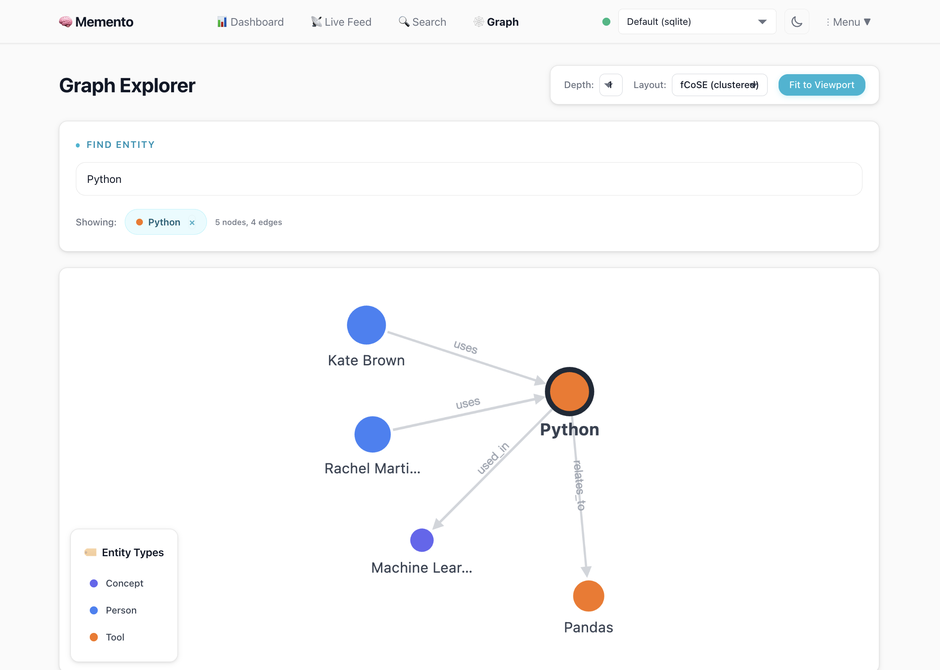
Every entity gets wired into a knowledge graph — people, tools, projects, decisions — with confidence scores and timestamps.
Connect Your Tools
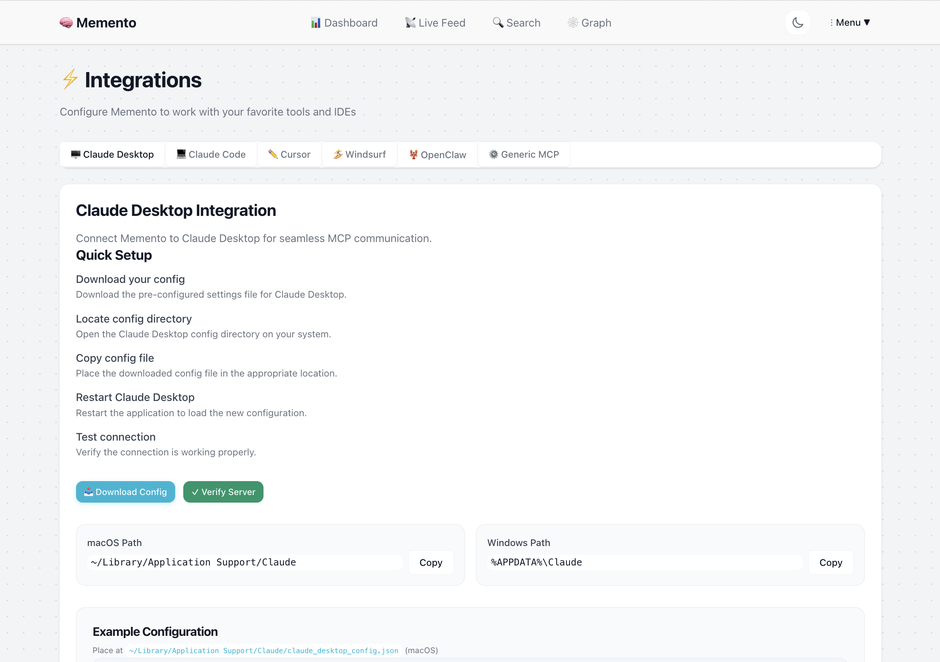
Open http://localhost:6363/integrations — the web UI generates configs, download buttons, and connection testing for every client:
| Client | Setup |
|---|---|
| Claude Code | Run ./launch.sh — it prints the exact copy-paste command at the end. Example form: claude mcp add memento -- `pwd`/memento-mcp |
| Claude Desktop | Download config → drop in ~/Library/Application Support/Claude/ |
| Cursor | Download config → drop in .cursor/mcp.json + optional Cursor Rules file |
| Windsurf | Download config → drop in .codeium/windsurf/mcp_config.json |
| OpenClaw | Add to ~/.openclaw/mcp.json under mcpServers — same pattern as Claude Desktop |
| Generic MCP | Any MCP client — same pattern: command path + MEMENTO_DATA_PATH env var |
The integrations page generates ready-to-paste configs with your actual binary paths and data directories. It also has connection testing, troubleshooting, and per-project workspace scoping.
Make Claude Code proactive (recommended)
The MCP connection makes tools available, but Claude won't use them automatically. Add this to ~/.claude/CLAUDE.md to make Claude store decisions and recall context without being asked:
The web UI at Integrations → Claude Code → Make it proactive generates a version with your specific paths and connection settings, plus a download button.
See the full integration guides: Claude Code | Claude Desktop | Cursor & Windsurf | OpenClaw
Team memory — shared knowledge across your whole engineering team
Point everyone's AI tools at the same Memento instance and your team's decisions, conventions, and context become shared knowledge — queryable by anyone, attributable to anyone.
Every memory is tagged with who stored it. Memento auto-detects this from your git config, or you can set it explicitly:
Or in your MCP config:
Once set, you can ask:
Setup: Each teammate runs Memento pointing at the same PostgreSQL database. Personal context stays personal (use a separate personal connection). Shared architectural decisions, conventions, and project context go into the shared connection.
See the team setup guide for full PostgreSQL configuration.
What Your AI Gets
Once connected, your AI has 20 tools it can call — no prompting required:
Core memory operations
| Tool | What it does |
|---|---|
store_memory | Persist a decision or piece of context — enrichment happens async, returns in <10ms |
recall_memory | Retrieve memories by ID, natural-language query, or paginated list with filters |
find_related | Hybrid search: full-text + semantic vector + RRF ranking |
update_memory | Edit content, tags, or metadata of an existing memory |
forget_memory | Soft-delete a memory (with grace period) or hard-delete permanently |
Search and intelligence
| Tool | What it does |
|---|---|
traverse_memory_graph | Follow entity relationships to discover contextually connected memories (multi-hop BFS) |
detect_contradictions | Find conflicting relationships, superseded-but-active memories, temporal impossibilities |
explain_reasoning | Surface why specific memories were retrieved for a query |
get_session_context | "Where did I leave off?" — recent memories grouped by topic |
Memory lifecycle
| Tool | What it does |
|---|---|
update_memory_state | Move through lifecycle: planning → active → paused / blocked / completed → archived |
evolve_memory | Create a new version that supersedes the old one — preserves full history |
consolidate_memories | LLM-assisted merge of multiple related memories into one coherent record |
get_evolution_chain | View the full version history of a memory from original to latest |
Soft delete and recovery
| Tool | What it does |
|---|---|
restore_memory | Recover a soft-deleted memory |
list_deleted_memories | Browse soft-deleted memories that can still be restored |
retry_enrichment | Re-run entity extraction on a memory that previously failed |
Project management
| Tool | What it does |
|---|---|
create_project | Create a project memory with optional pre-created phases |
add_project_item | Add epics, phases, tasks, steps, or milestones under a project |
get_project_tree | Retrieve the full nested hierarchy of a project |
list_projects | List all projects, optionally filtered by lifecycle state |
Store returns in <10ms. Enrichment — entity extraction, relationship mapping, embedding generation — runs asynchronously. Your AI is never blocked.
What It Looks Like
Auto-extracted entities — zero manual input
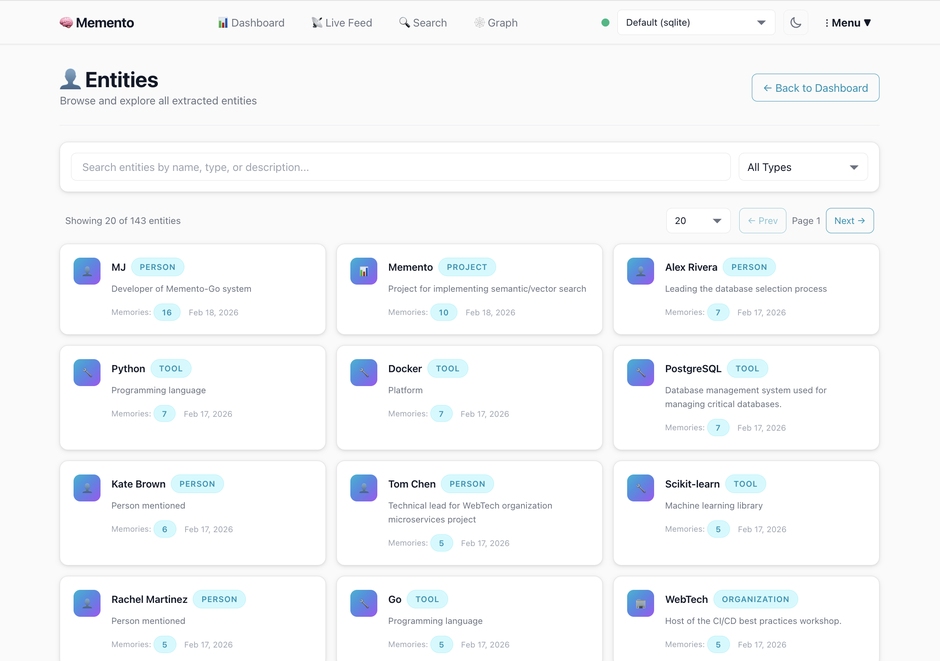
People, projects, tools, organizations, languages, APIs — extracted automatically from your AI conversations. No tagging required.
Relationship intelligence
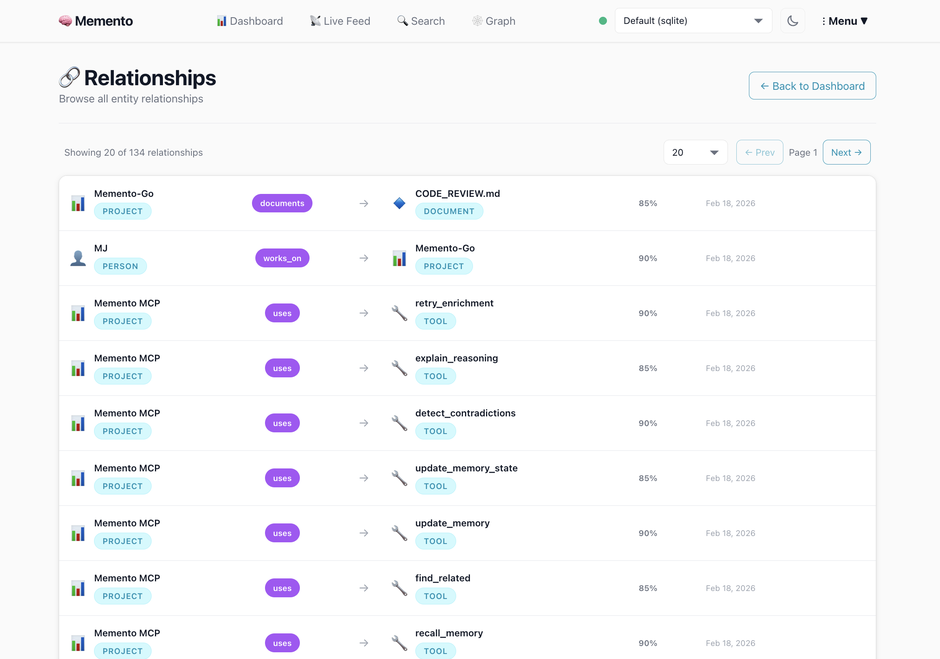
Your AI knows who works_on what, which tools depend_on which services, and what the current state of each decision is — with confidence scores and timestamps.
The dashboard
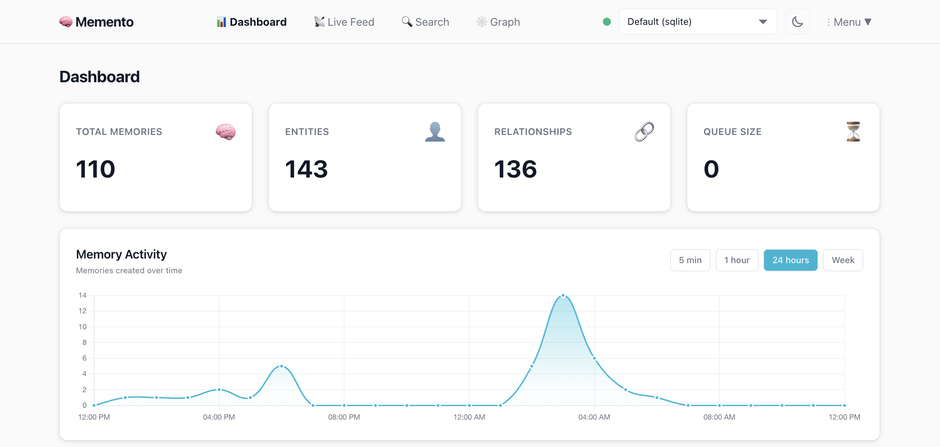
Live enrichment queue, entity browser, relationship explorer, and graph visualizer — all in the web UI.
Why Memento
vs. Mem0
Mem0 requires cloud API keys and a paid plan for production use. Memento runs entirely on your machine with Ollama — no API keys, no cloud, no per-memory pricing. Memento also ships a full web UI with graph visualization, entity browser, and one-click integration setup. Mem0 has no web interface.
vs. Zep / Graphiti
Zep requires Neo4j or FalkorDB for its knowledge graph. Memento uses SQLite (zero deps) or PostgreSQL — no graph database to manage. Zep's open-source version is limited; the full feature set requires Zep Cloud.
vs. Built-in AI memory (ChatGPT, Claude)
Built-in memory is a flat list of facts with no relationships, no search, no graph, and no way to export or control your data. Memento gives you a structured knowledge graph you own, with hybrid search and full lifecycle management.
vs. Writing docs or wikis
Related MCP Servers
Reviews
No reviews yet — be the first to share how this listing worked for you.
Frequently Asked Questions about Memento
AllMCPs Directory Badge
Showcase your server listing on GitHub or your project documentation. Embed this dynamic SVG badge to highlight official listing status and live engagement.
Badge Style:
Live Dynamic SVG Preview
Markdown (GitHub README)
[](https://allmcps.com/mcp/memento-3)HTML Embed
<a href="https://allmcps.com/mcp/memento-3"><img src="https://allmcps.com/api/badge/memento-3?style=directory" alt="Memento on AllMCPs" /></a>Technical Specs & Signals
CategoryKnowledge & Memory
27Quality signal: Emerging · 27/100How this signal is calculated ▾
Server availabilityNot measured
Not scored for repo-hosted servers — we can't reach the running server, only its GitHub page. Hosted MCP endpoints are health-checked live.
Verified ownership8/20
Documentation & tools11/30
Adoption & activity1/15
Community engagement0/10
A guidance signal from public completeness & health data — not a user rating. New listings start lower and rise as they add docs, get verified, and grow adoption. Signals we can't observe for a listing are skipped, not counted against it.
Own this project?
This directory is pre-filled from public sources. Claim via GitHub README, site badge, or DNS TXT to unlock edit access and the Official badge and attach your website — proof is checked automatically, then reviewed by our team.
Free dofollow backlink: add your website and place the AllMCPs badge on it — no claim needed. We detect it automatically and keep it verified as long as the badge stays live.
Claim & get free dofollowShare & Embed
Add our SVG badge (dark/light directory styles) or embeddable widget to your site.