AllMCPs
BrowseBestCategoriesStackCompareToolsGuidesBlog Log in Submit MCP

Stay in the loop

Get new MCP servers and top picks in your inbox.

AllMCPs

The open directory for discovering and installing Model Context Protocol servers.

Explore

  • Browse servers
  • Best MCP servers
  • Categories
  • MCP clients
  • Agent prompts
  • Stack Builder
  • Compare servers
  • Tags index
  • Submit a server
  • Pricing

Learn

  • Guides hub
  • What is MCP?
  • Install guide
  • Troubleshooting
  • Security
  • Blog
  • Blog RSS

Tools

  • All tools
  • Config generator
  • Config validator
  • MCP playground
  • OpenAPI β†’ MCP
  • Badge generator

For agents

  • API docs
  • Trust & traffic
  • llms.txt β†— (opens in a new tab)
  • Catalog JSON β†— (opens in a new tab)
  • Remote MCP β†— (opens in a new tab)

Company

  • About
  • Contact
  • X (@AllMCPs) β†— (opens in a new tab)
  • GitHub β†— (opens in a new tab)
  • Terms
  • Privacy
AllMCPs VerifiedAllMCPs VerifiedFeatured on Nick LaunchesFeatured on Nick LaunchesLaunch Llama NewsletterLaunch Llama NewsletterVerified DR - allmcps.comVerified DR - allmcps.comFeatured on SaaSGrowFeatured on SaaSGrowFeatured on Twelve ToolsFeatured on Twelve ToolsFeatured on Saaspa.geFeatured on Saaspa.geFeatured on Findly.toolsFeatured on Findly.toolsFeatured on Startup FameFeatured on Startup FameFeatured on LaunchKiwiFeatured on LaunchKiwiFeatured on ScrollLaunchFeatured on ScrollLaunchFeatured on DailyPingsFeatured on DailyPingsFazier badgeFazier badgeFeatured on NewTool.siteFeatured on NewTool.siteFeatured on saasfame.comFeatured on saasfame.comDR Checker - Domain RatingDR Checker - Domain RatingListed on Turbo0Listed on Turbo0Launched on LaunchBoard - Product Launch PlatformLaunched on LaunchBoard - Product Launch PlatformList on SimilarlabsList on Similarlabshttps://codetrendy.comhttps://codetrendy.comListed on DevTool.ioFeatured on BuildlistFeatured on BuildlistAllMCPs VerifiedAllMCPs VerifiedFeatured on Nick LaunchesFeatured on Nick LaunchesLaunch Llama NewsletterLaunch Llama NewsletterVerified DR - allmcps.comVerified DR - allmcps.comFeatured on SaaSGrowFeatured on SaaSGrowFeatured on Twelve ToolsFeatured on Twelve ToolsFeatured on Saaspa.geFeatured on Saaspa.geFeatured on Findly.toolsFeatured on Findly.toolsFeatured on Startup FameFeatured on Startup FameFeatured on LaunchKiwiFeatured on LaunchKiwiFeatured on ScrollLaunchFeatured on ScrollLaunchFeatured on DailyPingsFeatured on DailyPingsFazier badgeFazier badgeFeatured on NewTool.siteFeatured on NewTool.siteFeatured on saasfame.comFeatured on saasfame.comDR Checker - Domain RatingDR Checker - Domain RatingListed on Turbo0Listed on Turbo0Launched on LaunchBoard - Product Launch PlatformLaunched on LaunchBoard - Product Launch PlatformList on SimilarlabsList on Similarlabshttps://codetrendy.comhttps://codetrendy.comListed on DevTool.ioFeatured on BuildlistFeatured on Buildlist
Β© 2026 Jackalope Digital LLC. All rights reserved.
  1. Home
  2. 🧠 Knowledge & Memory
  3. Memento
M
Health: Not checked yetWe have not completed a health check for this listing yet.Last checked 8/10/2026, 11:32:00 PM

Memento

Enrichment pendingWe haven’t run our AI enrichment pass on this listing yet, so the overview, use cases, and FAQ below may be sparse or missing. We work through the catalog over time β€” check back soon.
View RepositoryVisit Website

Local-first, LLM-agnostic memory layer for AI assistants.

Quick Install

Automated & IDE Setup

Copy the AI prompt to install this server into Claude Code, Cursor, or another agent β€” or use 1-click editor setup below.

Add to CursorAdd to VS Code
Manual Client & Custom JSON ConfigExpand JSON β–Ύ

Install Config Generator

Choose your client
claude_desktop_config.json
{
  "mcpServers": {
    "memento": {
      "command": "npx",
      "args": [
        "-y",
        "memento"
      ]
    }
  }
}

πŸ’‘ Paste into ~/Library/Application Support/Claude/claude_desktop_config.json (macOS) or %APPDATA%\Claude\claude_desktop_config.json (Windows)

Install Directory Badge Claim listing Alternatives🧠 More in Knowledge & Memory

Documentation Overview

Memento

CI CodeQL npm MCP Registry License: Apache-2.0 Node.js: 22.11+

A local-first, LLM-agnostic memory layer for AI assistants
runmemento.com

Every AI session starts the same way: re-explaining your preferences, your project's conventions, the decisions you made last week, the dead-ends to avoid. Each tool solves this in its own siloed way (CLAUDE.md, .cursorrules, copilot-instructions.md, ChatGPT Memory) β€” but you, the human, are the one constant. Your memory shouldn't fragment across vendors.

Memento is one place where that memory lives. It runs an MCP server over a local SQLite file, so any MCP-capable AI assistant β€” Claude Desktop, Claude Code, Cursor, GitHub Copilot, Cline, OpenCode, Aider, a research bot, a custom agent β€” can read and write durable, structured memory about you, your work, and your decisions. Local-first, no outbound network calls by default, no vendor lock-in.
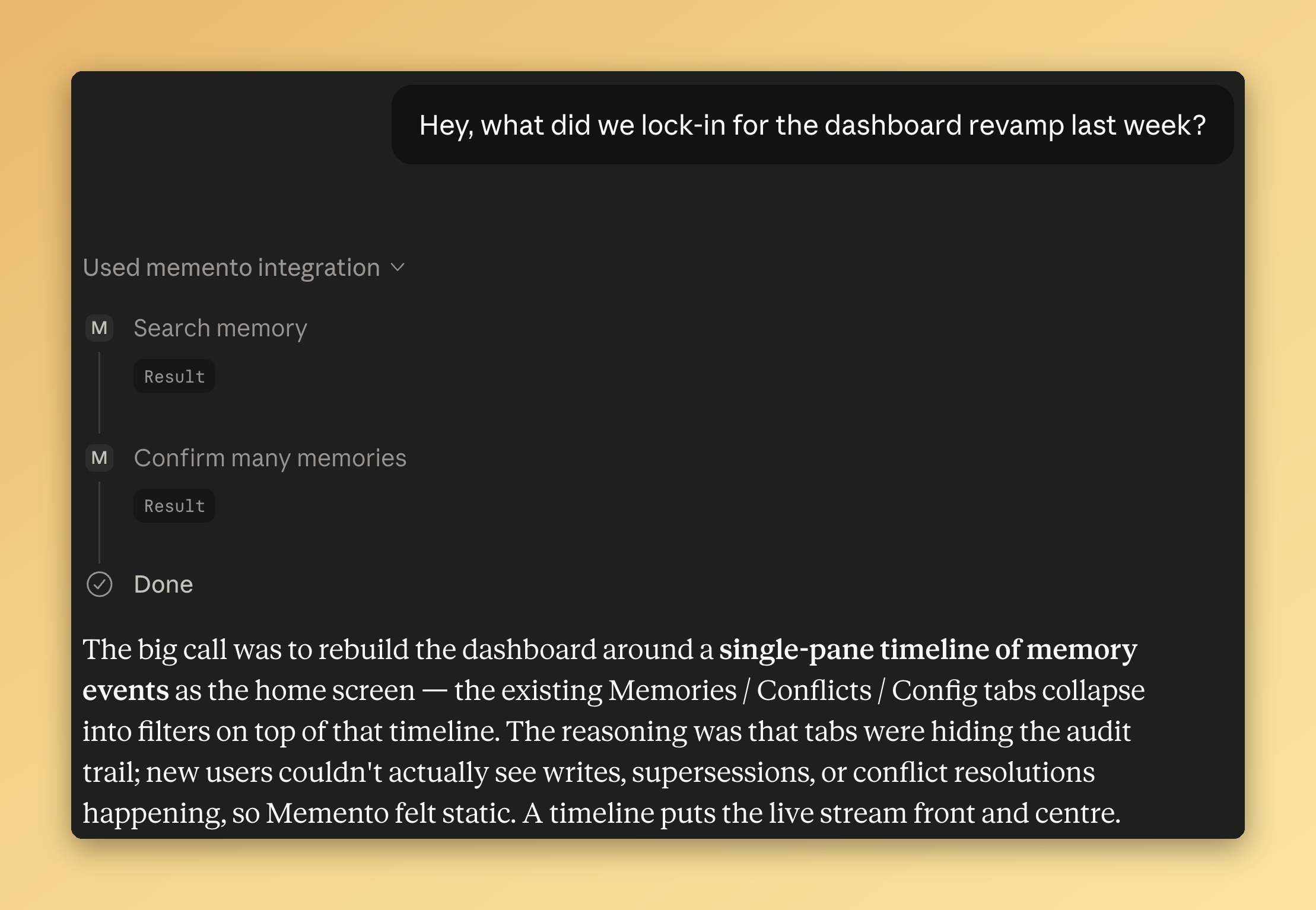
Claude Chat answering 'what did we lock-in for the dashboard revamp last week?' by recalling memories from Memento β€” the assistant uses the Memento integration, calls search and confirm, and returns a structured answer with no re-explanation from the user

A fresh chat with no prior context β€” Memento supplies the memory of what was decided last week.

Quickstart

Three steps from zero to a working memory layer:

1. Run init (interactive on a TTY)

Terminal
npx @psraghuveer/memento init

Creates the database under the XDG default ($XDG_DATA_HOME/memento/memento.db, typically ~/.local/share/memento/memento.db on POSIX), runs migrations, and β€” on a TTY β€” walks you through four one-keystroke setup questions:

  • Your preferred name. Stored as the user.preferredName config key so memories read "Raghu prefers …" instead of "The user prefers …".
  • Install the bundled skill? One y/N. Copies skills/memento/ into ~/.claude/skills/ for clients that load Anthropic-format skills.
  • Seed with a starter pack? Pick one of four bundled packs (engineering-simplicity, pragmatic-programmer, twelve-factor-app, google-sre) so your store has useful memories on day one. Skip to start empty.
  • Auto-install the persona snippet? Detects AI clients on your machine and writes a marker-wrapped block to each one's user-scope custom-instructions file (~/.claude/CLAUDE.md for Claude Code, ~/.config/opencode/AGENTS.md for OpenCode, ~/Documents/Cline/Rules/memento.md for Cline). Idempotent and removable. UI-only clients (Cowork, Claude Desktop, Claude Chat, Cursor User Rules) get printed paste instructions instead.

Then prints copy-paste MCP snippets for every supported client. Idempotent β€” re-run any time to reprint the snippets and re-ask anything you skipped. Pass --no-prompt to suppress the interactive flow (CI, scripts).

2. Connect your AI client

init prints either a one-line subcommand (where the client ships one) or a JSON snippet to merge into the client's MCP config. Pick the one for your client, paste it, then restart the client so it loads the new MCP server.

The full per-client walkthrough lives in docs/guides/mcp-client-setup.md.

3. Confirm the persona snippet reaches your assistant

Memento ships three teaching surfaces β€” an MCP instructions spine on the wire, a bundled skill for skill-capable clients, and the persona snippet. Of the three, only the persona snippet is guaranteed to reach the assistant's system prompt on every message β€” the MCP spec leaves instructions optional and client implementations vary in whether they surface it; the skill is intent-triggered so it doesn't fire on neutral first messages.

If you said Y to the persona auto-install prompt in Step 1, this is already done for every file-based AI client detected on your machine β€” the snippet was written to ~/.claude/CLAUDE.md, ~/.config/opencode/AGENTS.md, and/or ~/Documents/Cline/Rules/memento.md as applicable. For UI-only clients (Cowork, Claude Desktop, Claude Chat at claude.ai, Cursor User Rules) and for any client you have where the auto-installer didn't fire, copy the persona snippet from docs/guides/teach-your-assistant.md and paste it into the client's custom-instructions / system-prompt slot (the field's name varies β€” "Custom Instructions" in the client's settings UI, etc.).

That's it. Verify the wire works end-to-end with npx @psraghuveer/memento verify-setup β€” a write/search/cleanup round-trip that proves your assistant can actually call Memento.

Then try a fresh session: "Remember that I prefer pnpm over npm for Node projects." In the next session, ask "What's my preferred package manager?" and the assistant should recall it without you re-explaining.

Seed your store with a pack

A fresh Memento install is empty. Packs are curated YAML bundles of memories you can install in one step β€” a stack guide (Rust + Axum, TypeScript + pnpm, Python + uv…), a team's conventions, or a personal set you authored on another machine.

bash
memento pack install engineering-simplicity

That command installs one of the bundled packs β€” eleven memories distilled from John Maeda's The Laws of Simplicity. Four bundled packs ship out of the box: engineering-simplicity, pragmatic-programmer (Hunt & Thomas's tips), twelve-factor-app (Wiggins / Heroku), and google-sre (Google's SRE books). Preview before installing with memento pack preview <id-or-path>; list what's installed with memento pack list; remove any time with memento pack uninstall <id> --confirm (dry-run by default).

Packs are also how you share. Author one from your existing memories with memento pack create, then distribute it as a file, an HTTPS URL, or a community contribution. The reserved pack:<id>:<version> tag stamps every pack-installed memory so provenance never drifts. Full guide: docs/guides/packs.md. Design rationale: ADR-0020.

Getting started

Prerequisites. Node.js β‰₯ 22.11, and a C/C++ toolchain so better-sqlite3 can compile on platforms without a prebuild (Xcode command-line tools on macOS, build-essential on Debian/Ubuntu).

Run init once to set things up:

Terminal
npx @psraghuveer/memento init

init defaults the database to the XDG data dir; pass --db /custom/path/memento.db (or set MEMENTO_DB=/custom/path/memento.db) if you want a non-default location.

To run the server directly (e.g. for debugging):

Terminal
npx @psraghuveer/memento serve

The server listens on stdio for MCP requests. To pass extra flags (e.g. a custom database location):

Terminal
npx @psraghuveer/memento serve --db ~/.local/share/memento/memento.db

You can also point at an existing database with the MEMENTO_DB environment variable.

Verify the install by running npx @psraghuveer/memento doctor (add --quick to skip the DB and embedder probes; add --mcp to also scan known MCP client config files). For a one-screen summary of what's in your store, npx @psraghuveer/memento status. To inspect what your install can do β€” registered commands, current config, database location β€” without speaking MCP, run npx @psraghuveer/memento context. To smoke-test the MCP transport end-to-end, npx @psraghuveer/memento ping.

Wiring Memento into an MCP client (Claude Desktop, Claude Code, Cursor, Cline, OpenCode, VS Code Agent mode, …) is covered step by step in docs/guides/mcp-client-setup.md. The TL;DR is the three-step quickstart above: init (which auto-installs the persona snippet into detected file-based clients if you say Y), paste the MCP-server snippet into your client, then for UI-only clients paste the persona snippet manually.

Vector retrieval (paraphrase matching on top of FTS) is on by default. The first search triggers a one-time model download (~110 MB) into $XDG_CACHE_HOME/memento/models (or ~/.cache/memento/models / %LOCALAPPDATA%\memento\Cache\models); after that, both FTS and vector arms run automatically. If the model has not yet downloaded, search degrades gracefully to FTS-only. For configuration options and library-wiring details, see docs/guides/embeddings.md.

Operating the store day-to-day β€” compact, backup, status, scheduling β€” is covered in docs/guides/operations.md. The conflict workflow is in docs/guides/conflicts.md. To prime an AI assistant on how to use Memento well, see docs/guides/teach-your-assistant.md β€” and, if your client loads Anthropic-format skills, install the bundled skill as on-intent enrichment over the persona snippet.

See and curate your store in a browser. npx @psraghuveer/memento dashboard launches a local-first web UI that reads against your MEMENTO_DB: memory counts by kind and scope, audit trail, conflict triage, config inspection, installed packs. Localhost-only, gated by a per-launch random token in the URL the launcher hands the browser, no telemetry. The dashboard is a sibling package (@psraghuveer/memento-dashboard) shipped under ADR-0018; see docs/guides/dashboard.md for the full walkthrough.

Stuck? Common failure modes (better-sqlite3 build errors, command not found: memento, STORAGE_ERRORs, missing embedder dependency) are covered in docs/guides/troubleshooting.md.

For the contributor workflow (branching, commit conventions, PR checklist) see CONTRIBUTING.md. AI agents working on the codebase must also read AGENTS.md.

Guiding principles

These are the four principles every design decision is judged against. They are documented at length in ARCHITECTURE.md.

  1. First principles. Every construct exists because we proved we need it, not because it's how things are usually done.
  2. Modular. Any component can be replaced without rewriting the rest.
  3. Extensible. New variants don't require breaking changes.
  4. Config-driven by the user. Behavior is shaped by configuration, not by code.

What Memento is

Four pillars. Same four words used everywhere else this is described.

  • Local. One SQLite file under your home directory. No cloud, no telemetry, no outbound network calls by default. Fully offline.
  • Typed. Five memory kinds β€” fact, preference, decision, todo, snippet β€” with kind-specific fields (a decision carries its rationale, a todo its due date, a snippet its language). The assistant can reason about what's still true, not just retrieve text blobs.
  • Audited. Every write produces an event in an append-only log. Conflicts surface for triage instead of silently coexisting. Memories decay if you don't confirm them. You can answer "why is this here?" and "when did it change?" at any time.
  • Yours. Configurable behavior (every retrieval weight, every decay half-life, every scrubber rule), JSONL export and import, Apache-2.0. Carry your memory between machines, leave any time. No vendor lock-in.

Plus: LLM-agnostic (works with whatever model your client talks to), MCP-native (Claude Desktop, Claude Code, Cursor, GitHub Copilot, Cline, OpenCode, Aider, custom agents), privacy-conscious (regex scrubber strips secrets before persistence; patterns are user-configurable).

What Memento is not

  • Not a chat history store. It records distilled, structured memory β€” preferences, facts, episodes, lessons β€” not raw transcripts.
  • Not a knowledge graph or semantic database. Use the right tools for that.
  • Not a cloud service. Memory lives on your machine; cloud embedders, sync across machines, and team-shared memory are not part of the product.
  • Not a plugin platform. The architecture leaves the door open, but Memento ships with a fixed surface to hold the line on quality.

The full list of out-of-scope and current limitations is in KNOWN_LIMITATIONS.md.

How it fits together

text
β”Œβ”€β”€β”€β”€β”€β”€β”€β”€β”€β”€β”€β”€β”€β”€β”€β”€β”€β”€β”€β”€β”€β”€β”€β”€β”€β”€β”€β”€β”€β”€β”€β”€β”€β”€β”€β”€β”€β”€β”€β”€β”€β”€β”€β”€β”€β”€β”€β”€β”€β”€β”€β”€β”€β”€β”€β”€β”€β”
β”‚  Clients: Claude Desktop, Claude Code, Cursor, Copilot, β”‚
β”‚           OpenCode, custom agents, …                    β”‚
β””β”€β”€β”€β”€β”€β”€β”€β”€β”€β”€β”€β”€β”€β”€β”€β”€β”€β”€β”€β”€β”€β”€β”¬β”€β”€β”€β”€β”€β”€β”€β”€β”€β”€β”€β”€β”€β”€β”€β”€β”€β”€β”€β”€β”€β”€β”€β”€β”€β”€β”€β”€β”€β”€β”€β”€β”€β”€β”˜
                       β”‚ MCP (stdio)
β”Œβ”€β”€β”€β”€β”€β”€β”€β”€β”€β”€β”€β”€β”€β”€β”€β”€β”€β”€β”€β”€β”€β”€β–Όβ”€β”€β”€β”€β”€β”€β”€β”€β”€β”€β”€β”€β”€β”€β”€β”€β”€β”€β”€β”€β”€β”€β”€β”€β”€β”€β”€β”€β”€β”€β”€β”€β”€β”€β”
β”‚  memento-server (MCP adapter)                           β”‚
β””β”€β”€β”€β”€β”€β”€β”€β”€β”€β”€β”€β”€β”€β”€β”€β”€β”€β”€β”€β”€β”€β”€β”¬β”€β”€β”€β”€β”€β”€β”€β”€β”€β”€β”€β”€β”€β”€β”€β”€β”€β”€β”€β”€β”€β”€β”€β”€β”€β”€β”€β”€β”€β”€β”€β”€β”€β”€β”˜
                       β”‚ Command registry
β”Œβ”€β”€β”€β”€β”€β”€β”€β”€β”€β”€β”€β”€β”€β”€β”€β”€β”€β”€β”€β”€β”€β”€β–Όβ”€β”€β”€β”€β”€β”€β”€β”€β”€β”€β”€β”€β”€β”€β”€β”€β”€β”€β”€β”€β”€β”€β”€β”€β”€β”€β”€β”€β”€β”€β”€β”€β”€β”€β”
β”‚  memento-core: services, scope resolver, scrubber,      β”‚
β”‚                conflict detector, decay engine          β”‚
β””β”€β”€β”€β”€β”€β”€β”€β”€β”€β”€β”€β”€β”€β”€β”€β”€β”€β”€β”€β”€β”€β”€β”¬β”€β”€β”€β”€β”€β”€β”€β”€β”€β”€β”€β”€β”€β”€β”€β”€β”€β”€β”€β”€β”€β”€β”€β”€β”€β”€β”€β”€β”€β”€β”€β”€β”€β”€β”˜
                       β”‚ Repository interfaces
β”Œβ”€β”€β”€β”€β”€β”€β”€β”€β”€β”€β”€β”€β”€β”€β”€β”€β”€β”€β”€β”€β”€β”€β–Όβ”€β”€β”€β”€β”€β”€β”€β”€β”€β”€β”€β”€β”€β”€β”€β”€β”€β”€β”€β”€β”€β”€β”€β”€β”€β”€β”€β”€β”€β”€β”€β”€β”€β”€β”
β”‚  SQLite (better-sqlite3) + FTS5 + optional sqlite-vec   β”‚
β””β”€β”€β”€β”€β”€β”€β”€β”€β”€β”€β”€β”€β”€β”€β”€β”€β”€β”€β”€β”€β”€β”€β”€β”€β”€β”€β”€β”€β”€β”€β”€β”€β”€β”€β”€β”€β”€β”€β”€β”€β”€β”€β”€β”€β”€β”€β”€β”€β”€β”€β”€β”€β”€β”€β”€β”€β”€β”˜

A full architectural walkthrough lives in ARCHITECTURE.md. Each significant decision has an Architecture Decision Record.

For contributors (human or AI)

Contributions are welcome from both human and AI-assisted authors. We treat them with the same standards.

  • Read AGENTS.md if you are an AI agent or working with one. It is the canonical instruction set; CLAUDE.md and .github/copilot-instructions.md are thin pointers to it.
  • Read CONTRIBUTING.md for development setup, branching, commit conventions, and the PR lifecycle.
  • Open a design proposal issue before any non-trivial change.
  • Use the PR template. It asks you to justify, not just describe, the change.

We use GitHub Discussions for questions and ideas; the issue tracker is for bugs and accepted work.

License

Apache-2.0. See NOTICE for attribution.

Packages

Memento is a small workspace of focused packages. The architecture is documented in docs/architecture/ and the design decisions in docs/adr/; both are the source of truth for what Memento does and why.

PackageNotes
@psraghuveer/memento-schemaMemory / event / scope / scrubber / conflict / config / result schemas, plus per-ConfigKey value schemas.
@psraghuveer/memento-coreStorage and migrations, memory + event repositories, scope resolver, scrubber, decay engine with compact archival pass, conflict detection + supersession workflow, embedding hook + bulk re-embed driver, EmbeddingProvider interface, FTS + brute-force vector retrieval pipeline + ranker, and the command registry with validating execute path (ADR 0003).
@psraghuveer/memento-serverMCP adapter β€” buildMementoServer projects the @psraghuveer/memento-core command registry as MCP tools; serveStdio wires it to stdio. Used by memento serve.
@psraghuveer/memento-embedder-localLocal EmbeddingProvider backed by transformers.js + bge-base-en-v1.5. Ships as a regular dependency; lazy single-flight init downloads the model on first use. See ADR 0006.
@psraghuveer/memento (CLI)The published memento binary (npx @psraghuveer/memento or npm i -g @psraghuveer/memento). Lifecycle commands (init, serve, dashboard, context, doctor, verify-setup, status, ping, backup, export, import, pack, store migrate, completions, explain, skill-path, uninstall) plus a generic projection of the registry surface (memento <namespace> <verb>). See docs/reference/cli.md.
@psraghuveer/memento-dashboardLocal-first web dashboard. Hono server in-process with the engine + Vite-built React SPA. Launched by memento dashboard; binds 127.0.0.1 only. See ADR-0018 and docs/guides/dashboard.md.
@psraghuveer/memento-landingMarketing landing page. Static SPA, deployed to GitHub Pages on every push to main that touches packages/landing/**. Mirrors the dashboard's design tokens; light/dark toggle. Private (not published to npm).

Related MCP Servers

View all in Knowledge & Memory View all alternatives
  • Moxie Docs MCP logoMoxie Docs MCP
    β˜… Featured

    MCP & Agent Skills for Automated Documentation, and codebase conventions + context

    🧠 Knowledge & Memory17 views
    Compare vs Moxie Docs MCP β†’
  • Mcp logoMcp

    AI memory layer β€” one shared, persistent memory across every AI tool you connect.

    🧠 Knowledge & Memory0 views
    Compare vs Mcp β†’
  • Knowtis logoKnowtis

    Create, search and manage Knowtis collaborative notes from AI assistants.

    🧠 Knowledge & Memory0 views
    Compare vs Knowtis β†’
  • Mcp Server logoMcp Server

    Apple Developer Documentation with Semantic Search, RAG, and AI reranking for MCP clients

    🧠 Knowledge & Memory0 views
    Compare vs Mcp Server β†’

Frequently Asked Questions about Memento

Add the following block to your claude_desktop_config.json under mcpServers: "mcpServers": { "memento": { "command": "npx", "args": ["-y", "memento"] } }

AllMCPs Directory Badge

Full Badge Customizer

Showcase your server listing on GitHub or your project documentation. Embed this dynamic SVG badge to highlight official listing status and live engagement.

Badge Style:
Live Dynamic SVG PreviewMemento AllMCPs Directory Badge

Markdown (GitHub README)
[![AllMCPs](https://allmcps.com/api/badge/memento?style=directory)](https://allmcps.com/mcp/memento)
HTML Embed
<a href="https://allmcps.com/mcp/memento"><img src="https://allmcps.com/api/badge/memento?style=directory" alt="Memento on AllMCPs" /></a>

Technical Specs & Signals

Category🧠Knowledge & Memory
More technical detailsExpand β–Ύ
TransportSTDIO
RuntimeNode.js
Views0
Unique ViewsTotal visits recorded for this listing page on AllMCPs.
Installs0
Installs & Copy ActionsTotal times users copied install commands or configuration snippets for this server.
25Quality signal: Emerging Β· 25/100How this signal is calculated β–Ύ
Server availabilityNot measured

Not scored for repo-hosted servers β€” we can't reach the running server, only its GitHub page. Hosted MCP endpoints are health-checked live.

Verified ownership8/20
Documentation & tools10/30
Adoption & activity1/15
Community engagement0/10

A guidance signal from public completeness & health data β€” not a user rating. New listings start lower and rise as they add docs, get verified, and grow adoption. Signals we can't observe for a listing are skipped, not counted against it.

β˜… FeaturedMoxie Docs MCP logo

Moxie Docs MCP

MCP & Agent Skills for Automated Documentation, and codebase conventions + context

Explore Server β†’

Own this project?

This directory is pre-filled from public sources. Claim via GitHub README, site badge, or DNS TXT to get the verified badge.

Free dofollow backlink: after claiming, verify your product site and place a dofollow AllMCPs badge β€” we recheck it stays live.

Claim & get free dofollow

Share & Embed

Add our SVG badge (dark/light directory styles) or embeddable widget to your site.

Explore more

More in 🧠 Knowledge & Memory β†’Best MCP servers for Memory & Knowledge β†’Alternatives to Memento β†’Install in Claude DesktopInstall in CursorInstall in VS Code