MCP server enabling AI assistants to build, test, and debug Zotero plugins
Quick Install
Automated & IDE SetupCopy the AI prompt to install this server into Claude Code, Cursor, or another agent — or use 1-click editor setup below.
Not yet automatically verified
We haven't yet run this listing's install command through our automated sandbox check. This isn't a red flag — we're steadily working through the catalog.
Manual Client & Custom JSON ConfigExpand JSON ▾
Client Config & Setup
Choose your client or environment
Target File:
💡 Paste the JSON block into your client's configuration file under mcpServers, then restart the application.
Documentation Overview
MCP Server Zotero Dev
Give your AI assistant superpowers for Zotero plugin development


Architecture · Getting Started · Available Tools
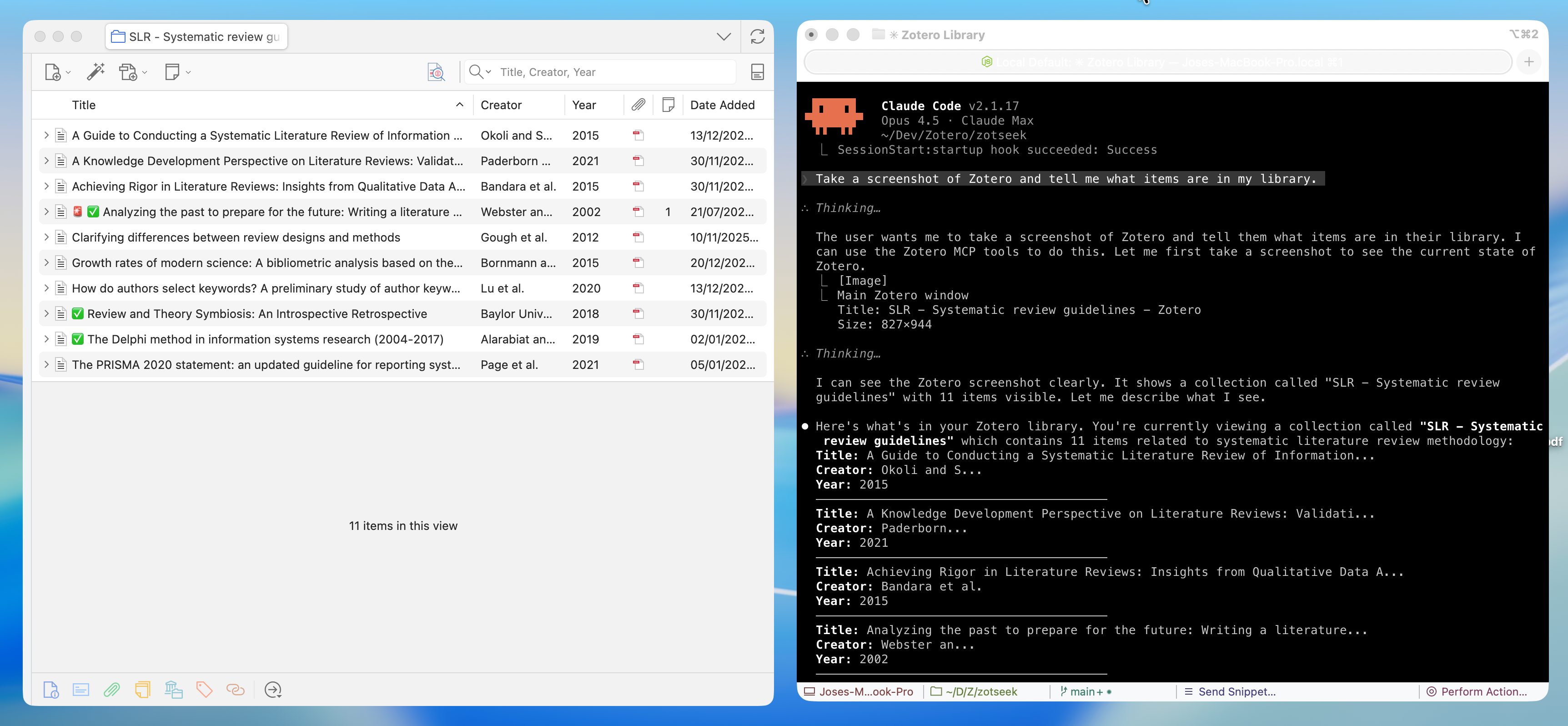
A Model Context Protocol (MCP) server that enables AI assistants like Claude, Cursor, and Windsurf to build, test, and debug Zotero 7, 8, 9, and 10 plugins. Screenshots, DOM state, debug logs, and JavaScript execution give the AI rich context to understand what's happening—and tools to help you fix it.
✨ Features
| Category | Capabilities |
|---|---|
| 🎯 UI Inspection | Screenshots, DOM tree, element finding, computed styles |
| 🖱️ UI Interaction | Click elements and type text (shadow-DOM aware) |
| 💻 JS Execution | Run code in Zotero context, inspect APIs, test snippets |
| 🔧 Build Tools | Scaffold integration for build, serve, hot reload |
| 📋 Logs & Errors | Stream debug output, error console, watch for issues |
| 🗃️ Database | Read-only access to zotero.sqlite for debugging |
| 🔌 Plugin Management | Install, reload, list plugins |
🚀 Quick Start
Prerequisites
- Node.js 20+ and npm
- Zotero 7+ — Works on all Zotero 7, 8, 9, and 10 builds (release, beta, dev)
- For plugin development: zotero-plugin-scaffold
1. Install MCP Server
Use install-mcp to add the server to your AI assistant:
Supported clients: claude-code, cursor, windsurf, vscode, cline, roo-cline, claude, zed, goose, warp, codex
Claude Code
Cursor
VS Code / Copilot
Windsurf
Manual Configuration
Add to your MCP client config:
Version & updates: pin an exact version as shown above. A bare
npx <pkg>(no version) keeps running whatevernpxcached and won't pick up new releases, so always include a version and-y(without-y,npxhangs waiting for an install prompt). Bump the pinned version to upgrade, or use@latestto always fetch the newest at launch (auto-updates, but a bad release would run automatically and it adds a registry check on every start). Note thatinstall-mcpmay write a config without-yor a version, so the manual configuration above is the most robust path.
Restart your AI assistant after adding the configuration.
2. Install MCP Bridge Plugin in Zotero
Download zotero-mcp-bridge.xpi and install:
- In Zotero: Tools → Plugins
- Click ⚙️ → Install Plugin From File
- Select the downloaded
.xpifile - Restart Zotero
This lightweight plugin enables the Remote Debugging Protocol when Zotero starts. It only needs to be installed once and works on all Zotero 7+ builds (release, beta, and dev).
3. Start Developing!
Just open Zotero normally and ask your AI assistant:
"Take a screenshot of Zotero and list installed plugins"
That's it! No special launch flags, no configuration. 🎉
🧰 Available Tools (28 total)
UI Inspection — Screenshots, DOM, styles
| Tool | Description |
|---|---|
zotero_screenshot | Capture window, element, or region screenshots |
zotero_inspect_element | Find elements by CSS selector |
zotero_get_dom_tree | Get DOM structure of a window/panel |
zotero_get_styles | Get computed CSS styles for element |
zotero_list_windows | List all open Zotero windows |
Screenshot Targets: Main window, preferences, PDF reader, dialogs, or any element by selector. Use
highlightSelectorto add a red border before capture.
UI Interaction — Click and type in the Zotero UI
| Tool | Description |
|---|---|
zotero_click_element | Click an element by CSS selector (toolbar/menu button, preference control, list row). Pierces shadow DOM; index picks among multiple matches; mouseEvents synthesizes a full mouse sequence. |
zotero_send_keys | Type text into an input/textarea/contenteditable (focuses it first, fires input/change). Optional clear and pressEnter. |
Resolution tries light DOM first, then pierces open shadow roots (Zotero's XUL custom elements keep internals in shadow DOM). Limitation: cannot dismiss a blocking native modal dialog (
Services.prompt.confirmEx) — its nested modal loop blocks the eval thread these tools run on.
JavaScript Execution — Run code in Zotero context
| Tool | Description |
|---|---|
zotero_execute_js | Execute JavaScript in Zotero's privileged context. Auto-wraps code with top-level return statements in IIFE. |
zotero_inspect_object | Explore Zotero APIs - list methods and properties of any object (e.g., Zotero.Items) |
zotero_open_preferences | Open Zotero's settings window, optionally to a specific pane (built-in or plugin) |
zotero_search_prefs | Search/discover preferences by pattern (e.g., find all prefs containing "debug") |
zotero_get_pref | Get a preference value |
zotero_set_pref | Set a preference value |
Examples:
Zotero.Items.getAll(1),Zotero.Prefs.get('export.quickCopy.setting'),ZoteroPane.getSelectedItems()Tip: Use
zotero_inspect_objectto explore APIs before writing code. Usezotero_search_prefsto discover preference keys.
Build & Scaffold — Integration with zotero-plugin-scaffold
| Tool | Description |
|---|---|
zotero_scaffold_build | Build plugin (dev or production mode) |
zotero_scaffold_serve | Start dev server with hot reload |
zotero_scaffold_lint | Run ESLint on plugin source |
zotero_scaffold_typecheck | Run TypeScript type checking |
Logs & Debugging — Error console and debug output
| Tool | Description |
|---|---|
zotero_read_logs | Read debug output (Zotero.debug) |
zotero_read_errors | Read error console entries |
zotero_watch_logs | Stream logs in real-time |
zotero_clear_logs | Clear log buffer |
Plugin Management — Install, reload, inspect
| Tool | Description |
|---|---|
zotero_plugin_reload | Hot reload your dev plugin |
zotero_plugin_install | Install plugin from XPI path |
zotero_plugin_list | List installed plugins with version/status |
Database Access — Read-only SQLite access
| Tool | Description |
|---|---|
zotero_db_query | Execute SELECT query on zotero.sqlite |
zotero_db_schema | Get table schema information |
zotero_db_stats | Get database statistics (items, attachments, collections, size) |
Note: Database access is read-only and requires Zotero to be closed, or uses a copy of the database.
🏗️ Architecture
Related MCP Servers
Reviews
No reviews yet — be the first to share how this listing worked for you.
Frequently Asked Questions about MCP Server Zotero Dev
AllMCPs Directory Badge
Showcase your server listing on GitHub or your project documentation. Embed this dynamic SVG badge to highlight official listing status and live engagement.
Badge Style:
Live Dynamic SVG Preview
Markdown (GitHub README)
[](https://allmcps.com/mcp/mcp-server-zotero-dev)HTML Embed
<a href="https://allmcps.com/mcp/mcp-server-zotero-dev"><img src="https://allmcps.com/api/badge/mcp-server-zotero-dev?style=directory" alt="MCP Server Zotero Dev on AllMCPs" /></a>Technical Specs & Signals
CategoryKnowledge & Memory
39Quality signal: Fair · 39/100How this signal is calculated ▾
Server availabilityNot measured
Not scored for repo-hosted servers — we can't reach the running server, only its GitHub page. Hosted MCP endpoints are health-checked live.
Verified ownership10/20
Documentation & tools15/30
Adoption & activity4/15
Community engagement0/10
A guidance signal from public completeness & health data — not a user rating. New listings start lower and rise as they add docs, get verified, and grow adoption. Signals we can't observe for a listing are skipped, not counted against it.
Own this project?
This directory is pre-filled from public sources. Claim via GitHub README, site badge, or DNS TXT to unlock edit access and the Official badge — proof is checked automatically, then reviewed by our team.
Free dofollow backlink: add your website and place the AllMCPs badge on it — no claim needed. We detect it automatically and keep it verified as long as the badge stays live.
Claim & get free dofollowShare & Embed
Add our SVG badge (dark/light directory styles) or embeddable widget to your site.