AllMCPs
BrowseBestCategoriesStackCompareToolsGuidesBlog Log in Submit MCP

Stay in the loop

Get new MCP servers and top picks in your inbox.

AllMCPs

The open directory for discovering and installing Model Context Protocol servers.

Explore

  • Browse servers
  • Best MCP servers
  • Categories
  • MCP clients
  • Agent prompts
  • Stack Builder
  • Compare servers
  • Tags index
  • Submit a server
  • Pricing

Learn

  • Guides hub
  • What is MCP?
  • Install guide
  • Troubleshooting
  • Security
  • Blog
  • Blog RSS

Tools

  • All tools
  • Config generator
  • Config validator
  • MCP playground
  • OpenAPI β†’ MCP
  • Badge generator

For agents

  • API docs
  • Trust & traffic
  • llms.txt β†— (opens in a new tab)
  • Catalog JSON β†— (opens in a new tab)
  • Remote MCP β†— (opens in a new tab)

Company

  • About
  • Contact
  • X (@AllMCPs) β†— (opens in a new tab)
  • GitHub β†— (opens in a new tab)
  • Terms
  • Privacy
AllMCPs VerifiedAllMCPs VerifiedFeatured on Nick LaunchesFeatured on Nick LaunchesLaunch Llama NewsletterLaunch Llama NewsletterVerified DR - allmcps.comVerified DR - allmcps.comFeatured on SaaSGrowFeatured on SaaSGrowFeatured on Twelve ToolsFeatured on Twelve ToolsFeatured on Saaspa.geFeatured on Saaspa.geFeatured on Findly.toolsFeatured on Findly.toolsFeatured on Startup FameFeatured on Startup FameFeatured on LaunchKiwiFeatured on LaunchKiwiFeatured on ScrollLaunchFeatured on ScrollLaunchFeatured on DailyPingsFeatured on DailyPingsFazier badgeFazier badgeFeatured on NewTool.siteFeatured on NewTool.siteFeatured on saasfame.comFeatured on saasfame.comDR Checker - Domain RatingDR Checker - Domain RatingListed on Turbo0Listed on Turbo0Launched on LaunchBoard - Product Launch PlatformLaunched on LaunchBoard - Product Launch PlatformList on SimilarlabsList on Similarlabshttps://codetrendy.comhttps://codetrendy.comListed on DevTool.ioFeatured on BuildlistFeatured on BuildlistAllMCPs VerifiedAllMCPs VerifiedFeatured on Nick LaunchesFeatured on Nick LaunchesLaunch Llama NewsletterLaunch Llama NewsletterVerified DR - allmcps.comVerified DR - allmcps.comFeatured on SaaSGrowFeatured on SaaSGrowFeatured on Twelve ToolsFeatured on Twelve ToolsFeatured on Saaspa.geFeatured on Saaspa.geFeatured on Findly.toolsFeatured on Findly.toolsFeatured on Startup FameFeatured on Startup FameFeatured on LaunchKiwiFeatured on LaunchKiwiFeatured on ScrollLaunchFeatured on ScrollLaunchFeatured on DailyPingsFeatured on DailyPingsFazier badgeFazier badgeFeatured on NewTool.siteFeatured on NewTool.siteFeatured on saasfame.comFeatured on saasfame.comDR Checker - Domain RatingDR Checker - Domain RatingListed on Turbo0Listed on Turbo0Launched on LaunchBoard - Product Launch PlatformLaunched on LaunchBoard - Product Launch PlatformList on SimilarlabsList on Similarlabshttps://codetrendy.comhttps://codetrendy.comListed on DevTool.ioFeatured on BuildlistFeatured on Buildlist
Β© 2026 Jackalope Digital LLC. All rights reserved.
  1. Home
  2. πŸ”’ Security
  3. Mcp Scan
M
Health: ActiveRecent health check succeeded.Last checked 8/10/2026, 11:54:31 PM

Mcp Scan

Enrichment pendingWe haven’t run our AI enrichment pass on this listing yet, so the overview, use cases, and FAQ below may be sparse or missing. We work through the catalog over time β€” check back soon.
View Repository

Passive security scanner: audits MCP servers against the OWASP MCP Top 10, graded A-F.

Quick Install

Automated & IDE Setup

Copy the AI prompt to install this server into Claude Code, Cursor, or another agent β€” or use 1-click editor setup below.

Add to CursorAdd to VS Code
Not yet automatically verified

We haven't yet run this listing's install command through our automated sandbox check. This isn't a red flag β€” we're steadily working through the catalog.

Manual Client & Custom JSON ConfigExpand JSON β–Ύ

Install Config Generator

Choose your client
claude_desktop_config.json
{
  "mcpServers": {
    "mcp-scan": {
      "command": "npx",
      "args": [
        "-y",
        "owasp-mcp-scan"
      ]
    }
  }
}

πŸ’‘ Paste into ~/Library/Application Support/Claude/claude_desktop_config.json (macOS) or %APPDATA%\Claude\claude_desktop_config.json (Windows)

Install Directory Badge Claim listing AlternativesπŸ”’ More in Security

Documentation Overview

πŸ›‘οΈ mcp-scan

Passive security scanner for Model Context Protocol servers. Point it at any running MCP server; it audits the live server against the OWASP MCP Top 10 and grades it A–F. Read-only, so it is safe to run against production.

npm License: MIT Node CI Tests OWASP MCP Top 10

Terminal
npx owasp-mcp-scan --stdio "npx -y @modelcontextprotocol/server-filesystem /tmp"
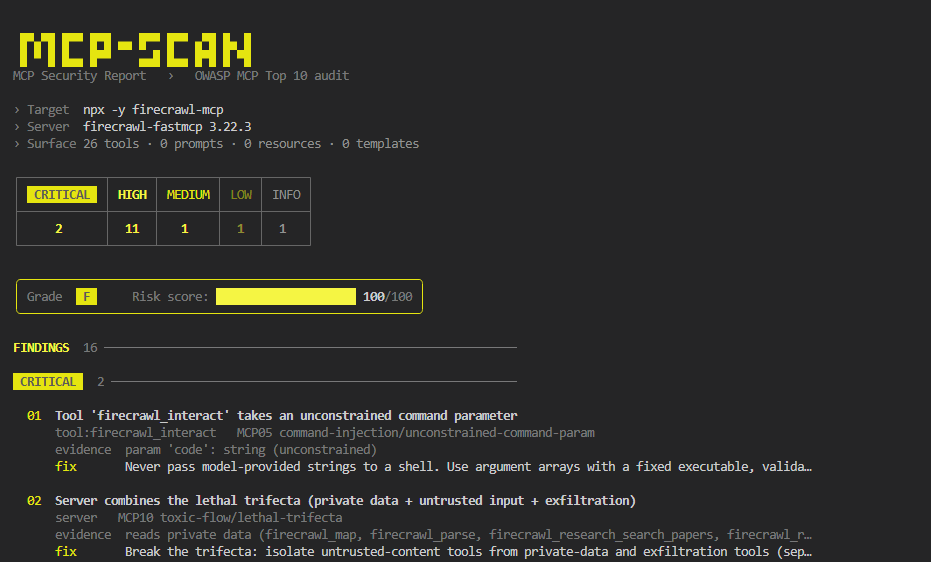
mcp-scan console report: firecrawl-mcp graded F with critical findings

I ran it against the 12 most-installed MCP servers. 9 of them failed. No install, no config, no exploiting anything.


Why

MCP tool descriptions are fed straight into your model's context, and most public servers were never security-reviewed. A bad one can hide instructions in a description, expose a raw-shell tool, or leak a key; and your agent acts on it. Endor Labs found 82% of servers prone to path traversal, 34% to command injection.

mcp-scan is the gut-check before you wire a server in. It's passive: it reads advertised capabilities and analyzes them statically, never invoking tools, so it's safe against production servers.

How it works

  1. Connects to the server over stdio or Streamable HTTP and enumerates every advertised tool, prompt, and resource.
  2. Runs 12 static checks across that surface: secrets, injection, SSRF, path traversal, tool poisoning, excessive scope, and more.
  3. toxic-flow reasons across the whole toolset for the lethal trifecta (reads private data + ingests untrusted content + can exfiltrate), the shape single-tool scanners miss.
  4. Scores 0-100 and grades A-F (any critical forces F). Emits console, JSON, or SARIF.

It never calls a tool, never fuzzes, and never sends an exploit. The worst it does is read what the server already tells everyone.

Real findings on real servers

12 popular npm servers, actual output (snapshot 2026-07-11, full benchmark):

ServerToolsGradeπŸ”΄πŸŸ πŸŸ‘Notable
firecrawl-mcp26F2111lethal trifecta (MCP10) + code exec (MCP05)
@modelcontextprotocol/server-filesystem14F0111unconstrained path params (MCP01)
@modelcontextprotocol/server-puppeteer7F120script param executes JS (MCP05)
tavily-mcp5F031untrusted-input + exfiltration (MCP10)
@modelcontextprotocol/server-memory9F030delete_* tools, no confirmation (MCP02)
@modelcontextprotocol/server-github26D002state-changing tools (MCP02)
@modelcontextprotocol/server-slack8C010reads + posts = data + exfil (MCP10)
@modelcontextprotocol/server-everything13A000clean βœ“
@kazuph/mcp-fetch1A000clean βœ“

9 of 12 flagged, 3 clean, every row audited finding-by-finding, false positives stripped rather than padded. Reproduce any row yourself:

Terminal
npx owasp-mcp-scan --stdio "npx -y firecrawl-mcp"     # F: lethal trifecta + code exec
npx owasp-mcp-scan --stdio "npx -y @modelcontextprotocol/server-everything"   # A: clean

Use it

CLI

Terminal
npx owasp-mcp-scan --stdio "<command>"                                  # local stdio server
npx owasp-mcp-scan --url https://host/mcp --header "Authorization: Bearer $TOKEN"
npx owasp-mcp-scan --config ~/.cursor/mcp.json --format sarif --output mcp.sarif

As an MCP server, let your agent scan servers on demand ("scan this MCP server before I add it"). Add to any client; this mcpServers shape works in Claude Code, Claude Desktop, Cursor, Windsurf, VS Code, and Gemini CLI:

config.json
{ "mcpServers": { "mcp-scan": { "command": "npx", "args": ["-y", "owasp-mcp-scan", "--serve"] } } }

OpenAI Codex (~/.codex/config.toml):

toml
[mcp_servers.mcp-scan]
command = "npx"
args = ["-y", "owasp-mcp-scan", "--serve"]

Exposes two tools: scan_mcp_server (audit a stdio/HTTP target) and list_checks.

Claude Code plugin

Code
/plugin marketplace add CodingSelim/mcp-scan
/plugin install mcp-scan@mcp-scan

Also on the official MCP registry as io.github.CodingSelim/mcp-scan. Publishing steps: PUBLISHING.md.

What it checks

Full OWASP MCP Top 10 (2025) coverage, 12 checks:

CheckOWASPCatches
secret-exposureMCP01AWS / OpenAI / Anthropic / GitHub / GitLab / Stripe / SendGrid / npm / HF / DB URIs / JWT / private keys in advertised text
transportMCP01Plaintext http:// to a non-loopback host
path-traversalMCP01file:///{path} templates and unconstrained path params
excessive-scopeMCP02Destructive tools (delete, drop, transfer) with no confirmation
tool-poisoningMCP03Instruction overrides, hidden exfiltration directives, zero-width / Unicode-tag smuggling
tool-shadowingMCP03 / MCP09Duplicate tool-name collisions and "call me first" precedence injection
supply-chainMCP04 / MCP09Unpinned/placeholder versions and homoglyph server names
command-injectionMCP05Unconstrained command / shell / code params, raw SQL, advertised execution
ssrfMCP05Arbitrary url / host params with no allowlist
tool-poisoning (dynamic)MCP06Injection in resource contents and server instructions
authnMCP07HTTP servers that complete an unauthenticated handshake
telemetryMCP08High-impact tools with no audit trail (advisory, unscored)
toxic-flowMCP10Lethal trifecta: one server that reads private data, ingests untrusted content, and can exfiltrate

toxic-flow is the standout, it reasons across the whole toolset, catching the GitHub-MCP / email-agent injection shape that per-tool checks miss.

Output & CI

console (default) Β· json Β· sarif (GitHub Code Scanning). Exit code is non-zero at/above --fail-on (default high), so it gates CI:

yaml
- run: npx owasp-mcp-scan --url ${{ secrets.MCP_URL }} --format sarif --output mcp.sarif
- uses: github/codeql-action/upload-sarif@v3
  with: { sarif_file: mcp.sarif }

Limitations (read these)

  • Static analysis can't see runtime sandboxing, a server that safely confines paths still flags them. Verify against actual enforcement.
  • Auth and transport checks apply to HTTP targets only.
  • Heuristics favor recall, so triage findings in context. When a rule is tightened to kill a false positive, a test pins the intended behavior.
  • Scanning a stdio target spawns that command, so run it only on servers you trust.

Develop

Terminal
npm install && npm run build && npm test   # 48 tests, incl. live end-to-end fixture scans

Checks are pure and isolated (src/checks/), reusing detectors in src/detectors/. See CONTRIBUTING.md.

References

OWASP MCP Top 10 Β· MCP Security Cheat Sheet Β· Vulnerable MCP Project Β· MCPTox

MIT Β© CodingSelim

Related MCP Servers

View all in Security View all alternatives
  • M
    Mcp Spec Compliance Mcp

    MCP Spec Compliance MCP β€” audits any MCP server.json against the official Model Context Protocol

    πŸ”’ Security0 views
    Compare vs Mcp Spec Compliance Mcp β†’
  • Checkmcp logoCheckmcp

    Audit any MCP server's security & quality β€” OWASP MCP Top 10 + explainable 0-100 MCP Score

    πŸ”’ Security0 views
    Compare vs Checkmcp β†’
  • S
    ScanLabsAI Security Scanner

    Scan a website for vulnerabilities: OWASP Top 10, CVEs, SSL, headers - with plain-English fixes

    πŸ”’ Security0 views
    Compare vs ScanLabsAI Security Scanner β†’
  • Mcp Maigret logoMcp Maigret

    MCP server for maigret, a powerful OSINT tool that collects user account information from various public sources. This server provides tools for searching usernames across social networks and analyzing URLs.

    πŸ”’ Security3 views
    Compare vs Mcp Maigret β†’

Frequently Asked Questions about Mcp Scan

Add the following block to your claude_desktop_config.json under mcpServers: "mcpServers": { "mcp-scan": { "command": "npx", "args": ["-y", "mcp-scan"] } }

AllMCPs Directory Badge

Full Badge Customizer

Showcase your server listing on GitHub or your project documentation. Embed this dynamic SVG badge to highlight official listing status and live engagement.

Badge Style:
Live Dynamic SVG PreviewMcp Scan AllMCPs Directory Badge

Markdown (GitHub README)
[![AllMCPs](https://allmcps.com/api/badge/mcp-scan?style=directory)](https://allmcps.com/mcp/mcp-scan)
HTML Embed
<a href="https://allmcps.com/mcp/mcp-scan"><img src="https://allmcps.com/api/badge/mcp-scan?style=directory" alt="Mcp Scan on AllMCPs" /></a>

Technical Specs & Signals

CategoryπŸ”’Security
More technical detailsExpand β–Ύ
TransportSTDIO
RuntimeNode.js
5/5 checks healthy over the last 6h
Views0
Unique ViewsTotal visits recorded for this listing page on AllMCPs.
Installs0
Installs & Copy ActionsTotal times users copied install commands or configuration snippets for this server.
GitHub stars0
GitHub Star CountTotal stargazers on GitHub representing community popularity (0 stars).
Last commit9d ago
Last Repository CommitThe most recent commit or push recorded for this server's GitHub repository.Last commit on Aug 1, 2026
npm downloads466/mo
Monthly npm DownloadsAverage monthly package installs recorded from npm registry statistics.
43Quality signal: Fair Β· 43/100How this signal is calculated β–Ύ
Server availabilityNot measured

Not scored for repo-hosted servers β€” we can't reach the running server, only its GitHub page. Hosted MCP endpoints are health-checked live.

Verified ownership10/20
Documentation & tools16/30
Adoption & activity6/15
Community engagement0/10

A guidance signal from public completeness & health data β€” not a user rating. New listings start lower and rise as they add docs, get verified, and grow adoption. Signals we can't observe for a listing are skipped, not counted against it.

β˜… Spotlight Slot

Feature Your MCP Server

Get maximum visibility for your server across our directory, search results, and detail pages.

Spotlight Your Server

Own this project?

This directory is pre-filled from public sources. Claim via GitHub README, site badge, or DNS TXT to get the verified badge and attach your website.

Free dofollow backlink: after claiming, verify your product site and place a dofollow AllMCPs badge β€” we recheck it stays live.

Claim & get free dofollow

Share & Embed

Add our SVG badge (dark/light directory styles) or embeddable widget to your site.

Explore more

More in πŸ”’ Security β†’Best MCP servers for Security β†’Alternatives to Mcp Scan β†’Install in Claude DesktopInstall in CursorInstall in VS Code