MCP proxy adding security scanning, behavioral profiling, risk gating, and safe tool call execution.
Quick Install
Automated & IDE SetupCopy the AI prompt to install this server into Claude Code, Cursor, or another agent — or use 1-click editor setup below.
Manual Client & Custom JSON ConfigExpand JSON ▾
Client Config & Setup
Choose your client or environment
Target File:
💡 Paste the JSON block into your client's configuration file under mcpServers, then restart the application.
Documentation Overview
MCP safety warden is a proxy server that wraps any MCP server and adds behavioral profiling, security scanning, risk gating, and safe execution to its tools.









Contents
- Overview
- Prerequisites
- Installation
- Configuration
- MCP Integration
- CLI Reference
- Auxiliary Integrations
- Development
- Testing
- Further reading
[!IMPORTANT] MCP security is an active research area. Recent surveys catalog a lot of protocol-specific threat categories spanning tool poisoning, prompt injection, rug-pull attacks, supply chain compromise, credential exfiltration, and composition attacks across the full server lifecycle. See Securing the MCP (OpenReview), Landscape & Threats (arXiv), When MCP Servers Attack (arXiv), and MCP-38 Taxonomy (arXiv).
Overview
Use as a proxy to add safety gating to any MCP server, or point it at a server you don't own and run a full security audit without making a single tool call.
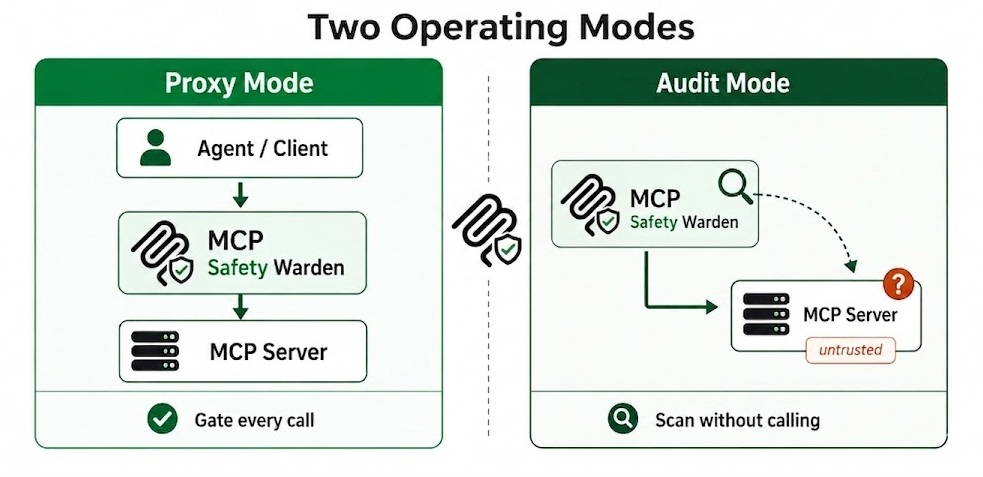
Fig 1. Two operating modes: proxy and audit
Behavioral profiling: Effect class, retry safety, destructiveness. LLM-assisted (Anthropic, OpenAI, Gemini, Ollama) with rule-based fallback. Observed stats (latency p50/p95, failure rate, output size) updated after every proxied call.
Security scanning: mcpsafety+ five-stage pipeline (Recon, Planner, Hacker, Auditor, Supervisor). Cisco AI Defense (AST/YARA). Snyk (metadata analysis). Kali and Burp Suite integrations enrich the pipeline with real network data and HTTP-layer probes. Source code scanning from GitHub with entropy, AST, taint flow, and rug-pull detection.
Fig 2. mcpsafety+ five-stage pipeline, triggered when you run a full security audit on any MCP server
Safe execution: Argument scanning (20+ attack categories, LLM second-pass). Two-layer output injection scanning. Risk gating with alternatives and per-tool policies. Drift detection on every call and standalone check.
Fig 3. Safe execution pipeline: the five checks every proxied tool call passes through
CLI: 24 subcommands, interactive risk menu, --json flag on every command, --yes for CI.
What it detects
- Prompt injection: tool outputs trying to hijack the agent: role hijacking, jailbreaks, fake system prompts, instruction overrides. Detects 11 obfuscation techniques including Unicode lookalikes, zero-width characters, and base64-encoded payloads.
- Malicious tool metadata: descriptions containing injection strings, hardcoded secrets, suspicious download URLs, tool impersonation (shadowing), direct financial execution, system service modification, and untrusted external dependencies. Backed by 19 Snyk checks.
- Argument injection: 20+ attack categories checked on every tool call before the call is forwarded: SSRF to cloud metadata endpoints (AWS, GCP, Azure, Alibaba), path traversal, credential file access (.aws, .ssh, .kube, .env), command injection, SQL/NoSQL/LDAP/XPath injection, XXE, template injection (SSTI), CRLF, null byte, deserialization payloads (Java, Python pickle, PHP, .NET), Windows UNC/ADS attacks, and base64-obfuscated variants of all of the above.
- Source code risks: fetches the server's GitHub source and runs 6 analysis layers: entropy scanning for hardcoded secrets, AST taint flow tracking (parameter to dangerous sink), description-vs-implementation mismatch, Bandit and Semgrep SAST, and LLM cross-function reasoning. Supports Python and TypeScript/JavaScript.
- Rug-pull and drift: stores a SHA-256 hash of the server's source on first scan and alerts if it changes. Catches description swaps, schema changes, and tool removal live on every call via a per-call drift guard.
- Behavior anomalies: classifies every tool by effect class, destructiveness, and 7 risk tags: credential exposure, arbitrary execution, data exfiltration, filesystem access, lateral movement, privilege escalation, and prompt injection surface.
- Composition attacks: analyzes tool sets for chaining risks: IDOR chains, read-write pairs, auth flow exploitation, write-then-execute sequences, and data accumulation + exfiltration paths across multiple tools.
- Network and host risks: when Kali Linux MCP is registered: open ports, running services, OS fingerprint via nmap. When Burp Suite MCP is registered: HTTP-layer active probing and blind SSRF via out-of-band callbacks.
- Credential exposure in outputs: redacts secrets from tool responses before storage. Injection-flagged responses are quarantined and never returned to the calling agent - stored under a run ID for forensic review.
- CVE research and Arxiv findings: the mcpsafety+ Auditor stage cross-references discovered capabilities against known vulnerabilities and recent security research.
Prerequisites
- Python 3.10 or later
- At least one wrapped MCP server to proxy (stdio, SSE, or streamable_http)
- Recommended: an LLM API key (Anthropic, OpenAI, or Gemini)
Without a key the wrapper operates in rule-based-only mode: lower confidence tool classification, regex-only injection scanning, no alternatives in the risk gate, no mcpsafety+ pipeline. For a fully local setup, run Ollama, set OLLAMA_MODEL, and pass --provider ollama explicitly (Ollama is not auto-detected).
[!NOTE] stdio servers that require local setup (
stdioservers that need local configuration before starting - missing config files, credentials, data directories, or OS-specific dependencies) cannot be inspected by the wrapper - tool discovery will fail and 0 tools will be stored. You can still run a full source-code security scan without spawning the server by passing--github-urltoscan/onboard, or thegithub_urlparameter tosecurity_scan_server. The mcpsafety+ pipeline will fetch and analyze the source directly from GitHub.sseandstreamable_httpservers are not affected.
Installation
With all optional extras:
Or specific extras:
From source:
The SQLite database is created automatically on first run in the platform user data directory (~/.local/share/mcpsafetywarden/ on Linux, ~/Library/Application Support/mcpsafetywarden/ on macOS, %APPDATA%\mcpsafetywarden\ on Windows). Override with MCP_DB_PATH.
Credential protection (automatic, no action required)
Secret values passed to register_server or onboard_server (Bearer tokens, API keys in headers or env) are automatically detected and replaced with opaque cref_ identifiers before anything touches the model context. The real credential is stored encrypted in the database and resolved silently at connection time. The model, conversation history, and logs only ever see cref_<id>.
Optional: at-rest encryption for stored credentials
Set the printed key as MCP_DB_ENCRYPTION_KEY before starting the server. This encrypts both server credentials and cref_ values at rest.
Configuration
Related MCP Servers
Reviews
No reviews yet — be the first to share how this listing worked for you.
Frequently Asked Questions about MCP Safety Warden
AllMCPs Directory Badge
Showcase your server listing on GitHub or your project documentation. Embed this dynamic SVG badge to highlight official listing status and live engagement.
Badge Style:
Live Dynamic SVG Preview
Markdown (GitHub README)
[](https://allmcps.com/mcp/mcp-safety-warden)HTML Embed
<a href="https://allmcps.com/mcp/mcp-safety-warden"><img src="https://allmcps.com/api/badge/mcp-safety-warden?style=directory" alt="MCP Safety Warden on AllMCPs" /></a>Technical Specs & Signals
CategoryDeveloper Tools
28Quality signal: Emerging · 28/100How this signal is calculated ▾
Server availabilityNot measured
Not scored for repo-hosted servers — we can't reach the running server, only its GitHub page. Hosted MCP endpoints are health-checked live.
Verified ownership8/20
Documentation & tools12/30
Adoption & activity1/15
Community engagement0/10
A guidance signal from public completeness & health data — not a user rating. New listings start lower and rise as they add docs, get verified, and grow adoption. Signals we can't observe for a listing are skipped, not counted against it.
Own this project?
This directory is pre-filled from public sources. Claim via GitHub README, site badge, or DNS TXT to unlock edit access and the Official badge and attach your website — proof is checked automatically, then reviewed by our team.
Free dofollow backlink: add your website and place the AllMCPs badge on it — no claim needed. We detect it automatically and keep it verified as long as the badge stays live.
Claim & get free dofollowShare & Embed
Add our SVG badge (dark/light directory styles) or embeddable widget to your site.