AllMCPs
BrowseBestCategoriesStackCompareToolsGuidesBlog
Log in Submit MCP

Stay in the loop

Get new MCP servers and top picks in your inbox.

AllMCPs

The open directory for discovering and installing Model Context Protocol servers.

AllMCPs on GitHub (opens in a new tab)
Launched onTiny Startupstinystartups.com
Explore
  • Browse servers
  • Best MCP servers
  • Categories
  • MCP clients
  • Agent prompts
  • Stack Builder
  • Compare servers
  • Random discovery New
  • Submit a server
  • Pricing & Boost Boost
Learn
  • Guides hub
  • What is MCP?
  • Install guide
  • Build an MCP server
  • Deploy an MCP server
  • Security guide
  • Troubleshooting
  • MCP for SEO & AEO
  • Protocol versioning
  • Transports: stdio vs HTTP
  • State of MCP (stats)
  • Blog & updates
Tools
  • All developer tools
  • Config generator
  • Config validator
  • Config auditor
  • MCP playground
  • Token calculator
  • OpenAPI → MCP
  • Badge generator
For agents
  • REST API docs
  • Trust & traffic Live
  • Remote MCP server SSE ↗ (opens in a new tab)
  • llms.txt ↗ (opens in a new tab)
  • Catalog JSON ↗ (opens in a new tab)
Company
  • About
  • Advertise Sponsor
  • Contact
  • GitHub ↗ (opens in a new tab)
  • Terms
  • Privacy
AllMCPs VerifiedAllMCPs VerifiedFeatured on Nick LaunchesFeatured on Nick LaunchesLaunch Llama NewsletterLaunch Llama NewsletterVerified DR - allmcps.comVerified DR - allmcps.comFeatured on SaaSGrowFeatured on SaaSGrowFeatured on Twelve ToolsFeatured on Twelve ToolsFeatured on Saaspa.geFeatured on Saaspa.geFeatured on Findly.toolsFeatured on Findly.toolsFeatured on Startup FameFeatured on Startup FameFeatured on LaunchKiwiFeatured on LaunchKiwiFeatured on ScrollLaunchFeatured on ScrollLaunchFeatured on DailyPingsFeatured on DailyPingsFazier badgeFazier badgeFeatured on NewTool.siteFeatured on NewTool.siteFeatured on saasfame.comFeatured on saasfame.comDR Checker - Domain RatingDR Checker - Domain RatingListed on Turbo0Listed on Turbo0Launched on LaunchBoard - Product Launch PlatformLaunched on LaunchBoard - Product Launch PlatformList on SimilarlabsList on Similarlabshttps://codetrendy.comhttps://codetrendy.comListed on DevTool.ioFeatured on BuildlistFeatured on BuildlistLaunched on Tiny StartupsFeatured on ShowMeBestAIFeatured on ShowMeBestAIFind us on LaunchZoneFind us on LaunchZoneAllMCPs VerifiedAllMCPs VerifiedFeatured on Nick LaunchesFeatured on Nick LaunchesLaunch Llama NewsletterLaunch Llama NewsletterVerified DR - allmcps.comVerified DR - allmcps.comFeatured on SaaSGrowFeatured on SaaSGrowFeatured on Twelve ToolsFeatured on Twelve ToolsFeatured on Saaspa.geFeatured on Saaspa.geFeatured on Findly.toolsFeatured on Findly.toolsFeatured on Startup FameFeatured on Startup FameFeatured on LaunchKiwiFeatured on LaunchKiwiFeatured on ScrollLaunchFeatured on ScrollLaunchFeatured on DailyPingsFeatured on DailyPingsFazier badgeFazier badgeFeatured on NewTool.siteFeatured on NewTool.siteFeatured on saasfame.comFeatured on saasfame.comDR Checker - Domain RatingDR Checker - Domain RatingListed on Turbo0Listed on Turbo0Launched on LaunchBoard - Product Launch PlatformLaunched on LaunchBoard - Product Launch PlatformList on SimilarlabsList on Similarlabshttps://codetrendy.comhttps://codetrendy.comListed on DevTool.ioFeatured on BuildlistFeatured on BuildlistLaunched on Tiny StartupsFeatured on ShowMeBestAIFeatured on ShowMeBestAIFind us on LaunchZoneFind us on LaunchZone
© 2026 Jackalope Digital LLC. All rights reserved.
  1. Home
  2. Developer Tools
  3. MCP Pihole
  4. README

MCP Pihole README

The full upstream README, mirrored here for reference. Install config, tool schemas, adoption signals, and an original overview live on the MCP Pihole listing page.

Back to MCP Pihole View source on GitHub

MCP Pi-hole Server

npm version CI License: MIT MCP

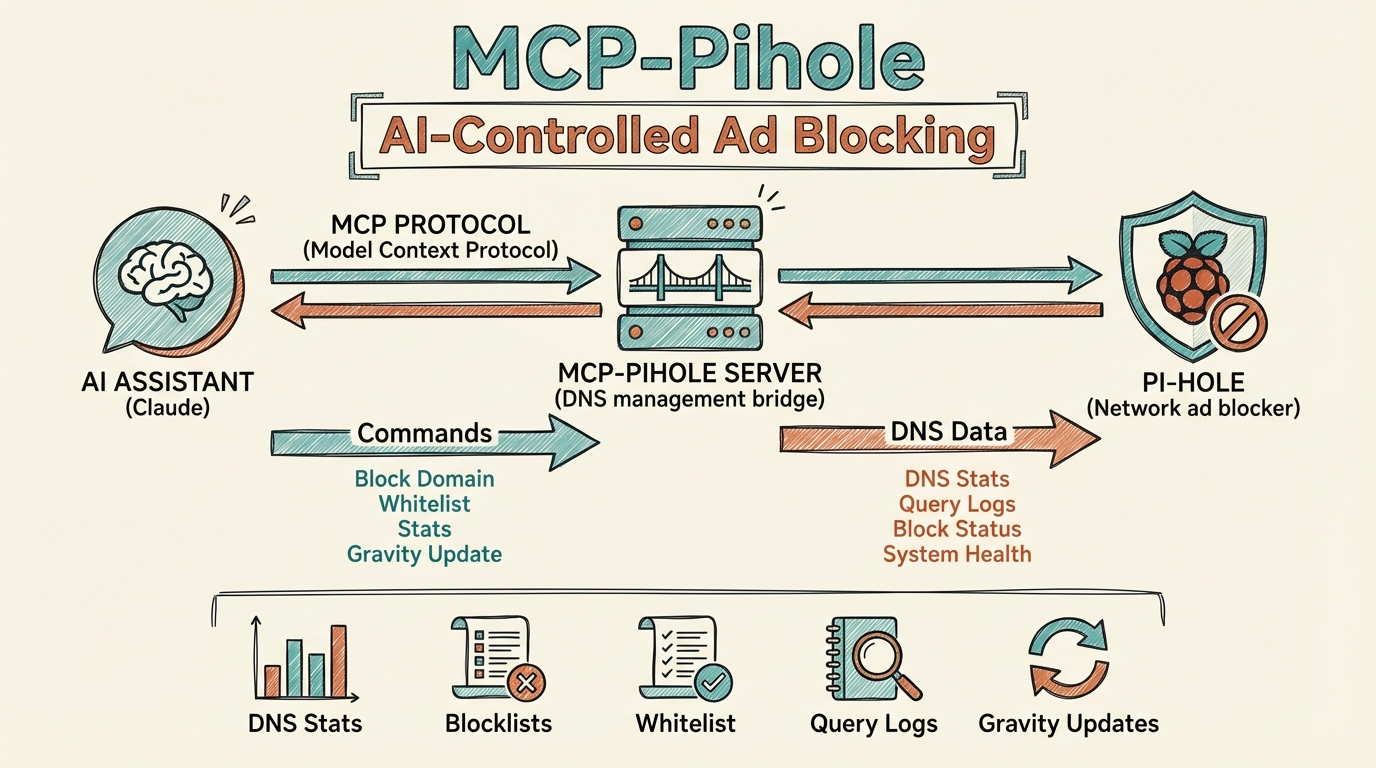
Architecture

An MCP (Model Context Protocol) server that connects AI assistants like Claude to your Pi-hole network-wide ad blocker. Manage DNS blocking, view statistics, control whitelists/blacklists, and more through natural language.

Why Use This?

If you're running Pi-hole on your network, this MCP server lets you:

  • Monitor DNS traffic - View query statistics, top blocked domains, and client activity
  • Control blocking - Enable/disable Pi-hole blocking instantly or with a timer
  • Manage lists - Add or remove domains from whitelist and blacklist without opening the web UI
  • View query logs - See recent DNS queries with detailed information
  • Maintain your Pi-hole - Update gravity (blocklists) and flush DNS cache

Features

CategoryTools
StatisticsQuery totals, blocking percentage, top domains, top clients
Blocking ControlEnable, disable (with optional timer), check status
Domain ListsWhitelist/blacklist CRUD operations
Query LogRecent DNS queries with client, status, response time
MaintenanceUpdate gravity, flush cache
VisualizationsASCII art dashboards and bar charts with ANSI colors

Prerequisites

  • Node.js 18+
  • Pi-hole v6 with API enabled
  • Pi-hole app password (generated in Pi-hole settings)
  • Network access to Pi-hole from your machine

Installation

Option 1: Install from npm (recommended)

Terminal
npx mcp-pihole-server

Or install globally:

Terminal
npm install -g mcp-pihole-server

Option 2: Clone and Build

bash
git clone https://github.com/aplaceforallmystuff/mcp-pihole.git
cd mcp-pihole
npm install
npm run build

Configuration

1. Get Your Pi-hole App Password

  1. Open your Pi-hole web interface
  2. Go to Settings > API
  3. Generate a new app password
  4. Copy the password (it's only shown once)

2. Configure Your MCP Client

For Claude Desktop

Add to your Claude Desktop config file:

macOS: ~/Library/Application Support/Claude/claude_desktop_config.json Windows: %APPDATA%\Claude\claude_desktop_config.json

config.json
{
  "mcpServers": {
    "pihole": {
      "command": "npx",
      "args": ["-y", "mcp-pihole-server"],
      "env": {
        "PIHOLE_URL": "http://your-pihole-address:8080",
        "PIHOLE_PASSWORD": "your-app-password"
      }
    }
  }
}

For Claude Code

Add to ~/.claude.json:

config.json
{
  "mcpServers": {
    "pihole": {
      "command": "npx",
      "args": ["-y", "mcp-pihole-server"],
      "env": {
        "PIHOLE_URL": "http://your-pihole-address:8080",
        "PIHOLE_PASSWORD": "your-app-password"
      }
    }
  }
}

Environment Variables

VariableDescriptionExample
PIHOLE_URLPi-hole web interface URLhttp://pihole.local:8080
PIHOLE_PASSWORDPi-hole app passwordYour app password from settings

Usage Examples

Once configured, you can interact with Pi-hole through natural language:

View Statistics

"Show me Pi-hole stats"

"What are the top blocked domains?"

"Which clients are making the most queries?"

Control Blocking

"Is Pi-hole blocking enabled?"

"Disable Pi-hole for 5 minutes"

"Re-enable Pi-hole blocking"

Manage Domain Lists

"Add example.com to the whitelist"

"Block ads.trackersite.com"

"Show me all whitelisted domains"

View Query Log

"Show me the last 50 DNS queries"

"What domains has my phone been querying?"

Visual Dashboards

"Show me Pi-hole stats with visualize: true"

"Get top blocked domains with visualization"

Available Tools

Statistics

  • pihole_get_stats - Get comprehensive Pi-hole statistics
  • pihole_get_top_blocked - Get top blocked domains
  • pihole_get_top_permitted - Get top permitted domains
  • pihole_get_top_clients - Get top clients by query count
  • pihole_get_query_log - Get recent DNS queries

Blocking Control

  • pihole_get_blocking_status - Check if blocking is enabled
  • pihole_enable_blocking - Enable DNS blocking
  • pihole_disable_blocking - Disable blocking (optionally with timer)

Domain Management

  • pihole_get_whitelist - List all whitelisted domains
  • pihole_get_blacklist - List all blacklisted domains
  • pihole_add_to_whitelist - Add domain to whitelist
  • pihole_add_to_blacklist - Add domain to blacklist
  • pihole_remove_from_whitelist - Remove domain from whitelist
  • pihole_remove_from_blacklist - Remove domain from blacklist

Maintenance

  • pihole_update_gravity - Update blocklists (gravity)
  • pihole_flush_cache - Flush DNS cache

ASCII Visualizations

This server supports colorful ASCII art visualizations rendered directly in your terminal using ANSI escape codes.

Supported Tools

The following tools support the optional visualize: true parameter:

ToolVisualization
pihole_get_statsFull dashboard with summary stats, top clients, blocked domains, and permitted domains
pihole_get_top_blockedRed bar chart of blocked domains
pihole_get_top_permittedGreen bar chart of permitted domains
pihole_get_top_clientsBlue bar chart of client activity

Usage

Pass visualize: true to any supported tool:

config.json
{
  "name": "pihole_get_stats",
  "arguments": {
    "visualize": true
  }
}

When visualize is not set or false, tools return JSON data as usual.

Example Output

Code
╔════════════════════════════════════════════════════════════════════════════╗
║                         🛡️  PI-HOLE DASHBOARD                          ║
╠════════════════════════════════════════════════════════════════════════════╣
║                                                                            ║
║ 📊 SUMMARY                                                                 ║
║ ────────────────────────────────────────────────────────────────────────── ║
║ Total Queries:      73K             Domains Blocked:    2.4M               ║
║ Blocked:            22K             Active Clients:     28                 ║
║ Block Rate:         29.7%           Total Clients:      115                ║
╠════════════════════════════════════════════════════════════════════════════╣
║ 🔝 TOP CLIENTS                                                             ║
║ ────────────────────────────────────────────────────────────────────────── ║
║ 192.168.1.52     ████████████████████████████████████████   28K (38%)      ║
║ 192.168.1.51     ███████████████████▋                       14K (19%)      ║
╚════════════════════════════════════════════════════════════════════════════╝

(Colors appear in terminals that support ANSI escape codes)

Development

bash
# Run in development mode (auto-reloads)
npm run watch

# Build for production
npm run build

# Run the built version
node dist/index.js

Troubleshooting

"PIHOLE_URL and PIHOLE_PASSWORD environment variables are required"

Ensure both environment variables are set in your MCP config.

"Authentication failed"

Your app password is invalid or expired. Generate a new one from Pi-hole Settings > API.

"API request failed: 401"

Session expired. The server will automatically re-authenticate, but if issues persist, check your password.

Connection refused

Ensure Pi-hole is running and the URL is correct. Check that you can access the Pi-hole web interface from your machine.

Contributing

Contributions are welcome! Please see CONTRIBUTING.md for guidelines.

License

MIT License - see LICENSE for details.

Links

  • Pi-hole
  • Pi-hole Documentation
  • Model Context Protocol
  • MCP Specification