Pi-hole v6 MCP server - manage DNS blocking, stats, whitelists/blacklists
Quick Install
Automated & IDE SetupCopy the AI prompt to install this server into Claude Code, Cursor, or another agent — or use 1-click editor setup below.
Not yet automatically verified
We haven't yet run this listing's install command through our automated sandbox check. This isn't a red flag — we're steadily working through the catalog.
Manual Client & Custom JSON ConfigExpand JSON ▾
Client Config & Setup
Choose your client or environment
Target File:
💡 Paste the JSON block into your client's configuration file under mcpServers, then restart the application.
Capabilities & Tool Schemas (16)
Inspect callable tools, capabilities, and parameters exposed to AI agents by MCP Pihole.
pihole_get_statsGet comprehensive Pi-hole statistics
pihole_get_top_blockedGet top blocked domains
pihole_get_top_permittedGet top permitted domains
pihole_get_top_clientsGet top clients by query count
pihole_get_query_logGet recent DNS queries
pihole_get_blocking_statusCheck if blocking is enabled
Documentation Overview
MCP Pi-hole Server



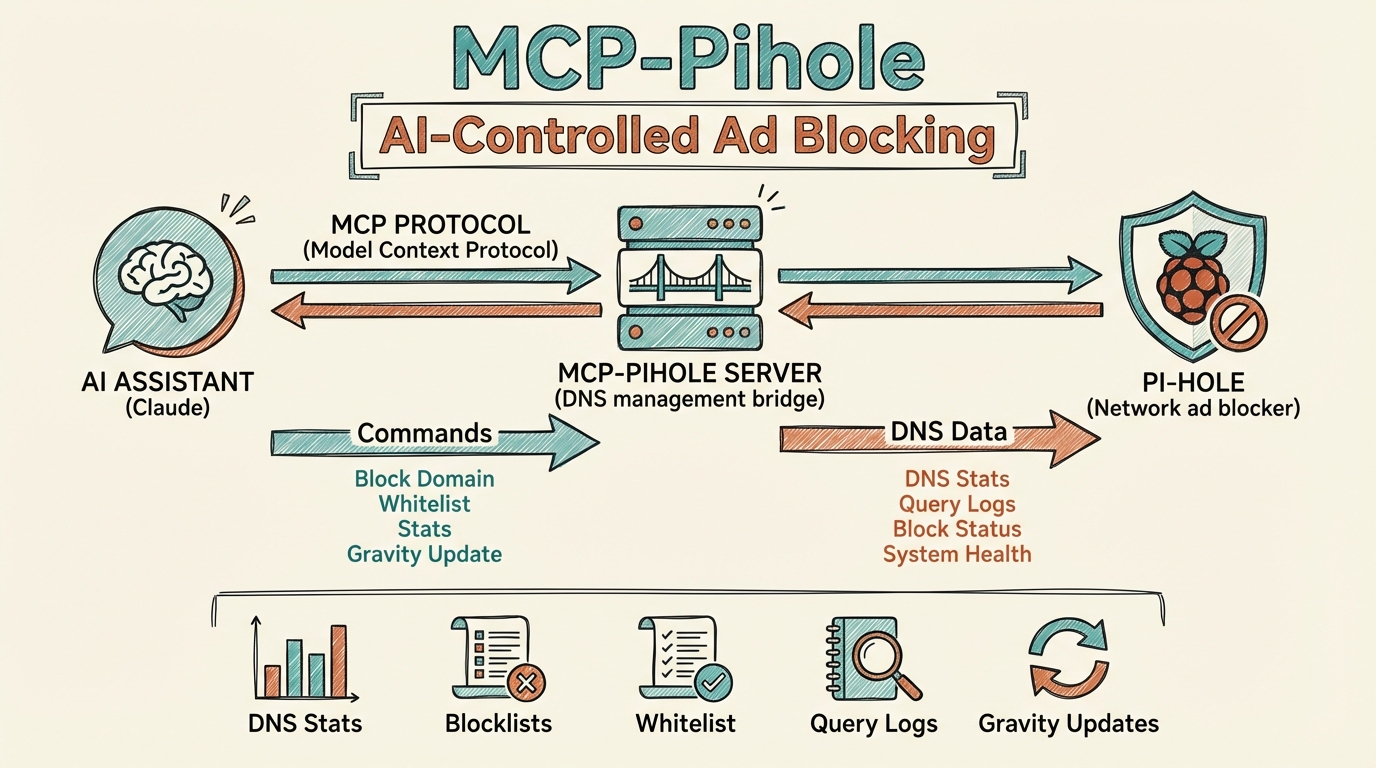
An MCP (Model Context Protocol) server that connects AI assistants like Claude to your Pi-hole network-wide ad blocker. Manage DNS blocking, view statistics, control whitelists/blacklists, and more through natural language.
Why Use This?
If you're running Pi-hole on your network, this MCP server lets you:
- Monitor DNS traffic - View query statistics, top blocked domains, and client activity
- Control blocking - Enable/disable Pi-hole blocking instantly or with a timer
- Manage lists - Add or remove domains from whitelist and blacklist without opening the web UI
- View query logs - See recent DNS queries with detailed information
- Maintain your Pi-hole - Update gravity (blocklists) and flush DNS cache
Features
| Category | Tools |
|---|---|
| Statistics | Query totals, blocking percentage, top domains, top clients |
| Blocking Control | Enable, disable (with optional timer), check status |
| Domain Lists | Whitelist/blacklist CRUD operations |
| Query Log | Recent DNS queries with client, status, response time |
| Maintenance | Update gravity, flush cache |
| Visualizations | ASCII art dashboards and bar charts with ANSI colors |
Prerequisites
- Node.js 18+
- Pi-hole v6 with API enabled
- Pi-hole app password (generated in Pi-hole settings)
- Network access to Pi-hole from your machine
Installation
Option 1: Install from npm (recommended)
Or install globally:
Option 2: Clone and Build
Configuration
1. Get Your Pi-hole App Password
- Open your Pi-hole web interface
- Go to Settings > API
- Generate a new app password
- Copy the password (it's only shown once)
2. Configure Your MCP Client
For Claude Desktop
Add to your Claude Desktop config file:
macOS: ~/Library/Application Support/Claude/claude_desktop_config.json
Windows: %APPDATA%\Claude\claude_desktop_config.json
For Claude Code
Add to ~/.claude.json:
Environment Variables
| Variable | Description | Example |
|---|---|---|
PIHOLE_URL | Pi-hole web interface URL | http://pihole.local:8080 |
PIHOLE_PASSWORD | Pi-hole app password | Your app password from settings |
Usage Examples
Once configured, you can interact with Pi-hole through natural language:
View Statistics
"Show me Pi-hole stats"
"What are the top blocked domains?"
"Which clients are making the most queries?"
Control Blocking
"Is Pi-hole blocking enabled?"
"Disable Pi-hole for 5 minutes"
"Re-enable Pi-hole blocking"
Manage Domain Lists
"Add example.com to the whitelist"
"Block ads.trackersite.com"
"Show me all whitelisted domains"
View Query Log
"Show me the last 50 DNS queries"
"What domains has my phone been querying?"
Visual Dashboards
"Show me Pi-hole stats with visualize: true"
"Get top blocked domains with visualization"
Available Tools
Statistics
pihole_get_stats- Get comprehensive Pi-hole statisticspihole_get_top_blocked- Get top blocked domainspihole_get_top_permitted- Get top permitted domainspihole_get_top_clients- Get top clients by query countpihole_get_query_log- Get recent DNS queries
Blocking Control
pihole_get_blocking_status- Check if blocking is enabledpihole_enable_blocking- Enable DNS blockingpihole_disable_blocking- Disable blocking (optionally with timer)
Domain Management
pihole_get_whitelist- List all whitelisted domainspihole_get_blacklist- List all blacklisted domainspihole_add_to_whitelist- Add domain to whitelistpihole_add_to_blacklist- Add domain to blacklistpihole_remove_from_whitelist- Remove domain from whitelistpihole_remove_from_blacklist- Remove domain from blacklist
Maintenance
pihole_update_gravity- Update blocklists (gravity)pihole_flush_cache- Flush DNS cache
ASCII Visualizations
This server supports colorful ASCII art visualizations rendered directly in your terminal using ANSI escape codes.
Supported Tools
The following tools support the optional visualize: true parameter:
| Tool | Visualization |
|---|---|
pihole_get_stats | Full dashboard with summary stats, top clients, blocked domains, and permitted domains |
pihole_get_top_blocked | Red bar chart of blocked domains |
pihole_get_top_permitted | Green bar chart of permitted domains |
pihole_get_top_clients | Blue bar chart of client activity |
Usage
Pass visualize: true to any supported tool:
When visualize is not set or false, tools return JSON data as usual.
Example Output
(Colors appear in terminals that support ANSI escape codes)
Development
Troubleshooting
"PIHOLE_URL and PIHOLE_PASSWORD environment variables are required"
Ensure both environment variables are set in your MCP config.
"Authentication failed"
Your app password is invalid or expired. Generate a new one from Pi-hole Settings > API.
"API request failed: 401"
Session expired. The server will automatically re-authenticate, but if issues persist, check your password.
Connection refused
Ensure Pi-hole is running and the URL is correct. Check that you can access the Pi-hole web interface from your machine.
Contributing
Contributions are welcome! Please see CONTRIBUTING.md for guidelines.
License
MIT License - see LICENSE for details.
Links
Related MCP Servers
Adoption & maintenance
Factual signals from GitHub, npm, and our automated checks — not a rating.
GitHub stars
8
Stargazers on the source repository.
Last commit
1mo ago
Most recent push to the default branch.
Tools exposed
16
Callable tools this server registers over MCP.
Reviews
No reviews yet — be the first to share how this listing worked for you.
Frequently Asked Questions about MCP Pihole
AllMCPs Directory Badge
Showcase your server listing on GitHub or your project documentation. Embed this dynamic SVG badge to highlight official listing status and live engagement.
Badge Style:
Live Dynamic SVG Preview
Markdown (GitHub README)
[](https://allmcps.com/mcp/mcp-pihole)HTML Embed
<a href="https://allmcps.com/mcp/mcp-pihole"><img src="https://allmcps.com/api/badge/mcp-pihole?style=directory" alt="MCP Pihole on AllMCPs" /></a>Technical Specs & Signals
CategoryDeveloper Tools
11/15 checks healthy over the last 46d
51Quality signal: Good · 51/100How this signal is calculated ▾
Server availabilityNot measured
Not scored for repo-hosted servers — we can't reach the running server, only its GitHub page. Hosted MCP endpoints are health-checked live.
Verified ownership10/20
Documentation & tools24/30
Adoption & activity4/15
Community engagement0/10
A guidance signal from public completeness & health data — not a user rating. New listings start lower and rise as they add docs, get verified, and grow adoption. Signals we can't observe for a listing are skipped, not counted against it.
Supply-chain signal
No high-severity advisories surfaced by our automated scan.
Critical 0High 0Medium 0Low 0
Scanned 7d ago via OSV.dev · mcp-pihole-server (npm)
Own this project?
This directory is pre-filled from public sources. Claim via GitHub README, site badge, or DNS TXT to unlock edit access and the Official badge — proof is checked automatically, then reviewed by our team.
Free dofollow backlink: add your website and place the AllMCPs badge on it — no claim needed. We detect it automatically and keep it verified as long as the badge stays live.
Claim & get free dofollowShare & Embed
Add our SVG badge (dark/light directory styles) or embeddable widget to your site.