MCP for Adobe Premiere Pro README
The full upstream README, mirrored here for reference. Install config, tool schemas, adoption signals, and an original overview live on the MCP for Adobe Premiere Pro listing page.
MCP for Adobe Premiere Pro

Adobe Premiere Pro MCP server for reviewable, local-first workflows with compatible AI assistants.
Premiere Pro automation for Claude, Cursor, Codex, and other MCP clients: AI-assisted editing, project organization, and export checks through Adobe's documented UXP and CEP/ExtendScript APIs.
Free, MIT licensed, local-first, and published to npm as premiere-pro-mcp — the only package name that installs this project.
Website · Recorded demo · Compare servers · Setup guides · Search tools · Troubleshooting · Release facts
Development source: 384 core tools across 57 modules, 4 resources, and 19 guided workflows. A connected UXP host adds 96 capability-gated tools.
The completed AE render handoff previews and confirms importing one finished render into an existing Premiere bin, with host and file rechecks and an import receipt.











Table of contents
- What is this?
- For editors evaluating an AI workflow
- Quick Start
- Clients and capability coverage
- Architecture
- Tools
- MCP Resources
- Remote Deployment (Fly.io)
- Environment Variables
- Project Structure
- Technical Details
- Frequently asked questions
- Troubleshooting
- Star history
- Support the project
- Contributing · License
What is this?
An MCP (Model Context Protocol) server that lets AI assistants like Claude, Windsurf, Cursor, GitHub Copilot, or any MCP-compatible client directly control Adobe Premiere Pro — importing media, editing timelines, applying effects, managing keyframes, exporting, and more.
At a glance
| Display name | MCP for Adobe Premiere Pro |
| npm package | premiere-pro-mcp |
| Install (npm route) | npm install -g premiere-pro-mcp |
| Connector install | premiere-pro-mcp --install-cep |
| MCP server name | io.github.leancoderkavy/premiere-pro |
| Repository | https://github.com/leancoderkavy/premiere-pro-mcp |
| Website | https://premiere-pro-mcp.com |
| License | MIT |
| Hosts | Windows and macOS, Premiere Pro 2020-2026 |
This project is independent and is not affiliated with or endorsed by Adobe Inc.
It is also separate from other MCP servers for Premiere Pro. The only npm package
published from this repository is premiere-pro-mcp, and no other package name
installs it.
Comparing similarly named packages? Both this package and
adobe-premiere-pro-mcp declare a premiere-pro-mcp executable. Verify the package
and repository before configuring a client. The new
local configuration helper prints Claude, Cursor,
VS Code, or Codex settings that point directly to this installation. It is a
feature included in v1.15.1 and later.
The current source exposes 384 core tools for supported workflow steps spanning the supported ExtendScript, QE DOM, local media and interchange analysis, revisioned project-context retrieval, safe edit-planning, project-intake preview, review handoff, connection verification, and guarded After Effects MOGRT authoring, batch, library, render-queue, inspection, and Premiere-handoff workflows. A compatible, authenticated UXP panel adds 96 documented, capability-gated tools without replacing the production CEP bridge.
Latest release: 1.18.2
The published v1.18.2 npm artifact contains 384 core tools, 382 in its default profile, and 478 with a compatible UXP connection. The development catalog above can include unreleased work. See the versioned facts and package provenance.
Try a bounded workflow
Choose a setup guide: Claude Desktop, Codex, other local MCP clients, or ChatGPT connection options.
Download the workflow starter kit for synthetic media and three evaluation recipes: a read-only sequence check, an explicitly confirmed review-frame export, and a product-spot preview. No email is required. The kit has no recorded Premiere demo or verified host result. Start with a disposable project and use setup and recovery if the connection is unavailable.
Release highlights
-
Editorial planning: film evidence, transcript cleanup, caption authoring, shorts and chapter planning, rhythm and speaker layouts, timeline QA, and platform delivery plans.
-
Cross-app handoff: capability-aware workflow routes and guarded After Effects render-to-Premiere handoff.
-
Editing correctness: verified readback and explicit capability or committed-but-unverified failures across transition, import, effects, source identity, and track operations. Insert edits ripple QE sync-locked tracks instead of silently desyncing neighbours.
-
MOGRT studio: an optional, separate After Effects CEP connector can author approval-gated title, callout, quote, and social recipes; constrain them with local brand kits; batch, publish, queue, inspect, and hand them to Premiere without claiming visual or completed-render proof.
-
Global-update handoff: a global npm installation can show its server and connector update state in the Windows CEP panel and, after explicit confirmation, update only after Premiere has been quit; it never changes a project, client configuration, source checkout, or custom npm prefix.
-
Local review planning: caption timing previews parse caller-supplied SRT/VTT without writing or importing it, while revision-bound editorial evidence stays in the opt-in local context index without provider calls.
-
Repair preview:
premiere-pro-mcp --doctor --plan-fixesproduces a privacy-safe, no-write repair plan; the narrowly eligible connector repair still requires an explicit confirmation that Premiere is closed. -
Auditable guidance: the universal setup guide, generated public workflow manifest, and proof runbook make workflow and verification boundaries inspectable without claiming a licensed-host walkthrough occurred.
-
Faster, clearer delivery: immutable MCP registration work is reused safely across stateless requests, and the landing now has a lighter, mobile-first workflow view plus current machine-readable facts and crawl guidance for its public pages.
-
Explicit boundary: the hosted endpoint remains an operator-managed MCP service; unauthenticated callers are rejected and it does not pair users to local Premiere processes. See the generated supported action catalog for individual capability and verification contracts.
See the v1.18.2 release notes for complete details. Live installation in Premiere Pro still requires host verification.
Current MCP protocol support
The server uses the stable TypeScript SDK v2 and serves the 2026-07-28
stateless protocol over HTTP and stdio, while retaining legacy MCP compatibility
through 2025-11-25. Modern clients receive discovery, validated routing headers,
cache hints, subscription-stream support, and the formal Premiere extension
capability. See the complete MCP capability and boundary report.
If an MCP client cannot complete its server/discover probe, set
PREMIERE_MCP_PROTOCOL_MODE=legacy in that client's server environment and restart
the client. This uses the SDK's base stdio transport and the legacy initialization
handshake only; leave it unset (or auto) for modern MCP capabilities.
For editors evaluating an AI workflow
Before an assistant changes an active project, use the Premiere Pro AI workflow checklist to define the target and no-change boundaries, verify the local connection, request a bounded plan, and inspect the returned result. It is a practical starting point for assistant editors and post leads testing a repeatable workflow on a duplicate project or small test sequence.
For product context, see the Adobe Premiere AI Assistant and MCP comparison and the Claude Desktop setup guide.
If you are deciding between a single local project, an Adobe Production on shared storage, or a remote Team Project, use the Premiere Pro collaboration workflow guide before you evaluate an MCP path. It links the relevant Adobe guidance, makes no project inspection request, and ends with the same read-only connection check.
For a concrete first Project Intake preview, choose one of the three schema-checked, no-sensitive-data starter templates. They are evaluation samples only: a human policy owner must review and replace their bins, media rules, and organization rules before a facility uses one.
Quick Start
Install the published package (verify the name)
This repository publishes only
premiere-pro-mcp. A differently named package (adobe-premiere-pro-mcp) may also declare apremiere-pro-mcpexecutable. Before configuring a client, confirm:
Check Expected Package name premiere-pro-mcp(notadobe-premiere-pro-mcp)Version 1.18.2Homepage / repo https://premiere-pro-mcp.com/ · https://github.com/leancoderkavy/premiere-pro-mcp Then continue with
--install-cep,--doctor, and the read-onlyverify_premiere_connectionprompt.
Easiest supported path: Claude Desktop
- Download the current Claude Desktop bundle (
.mcpb). - In Claude Desktop, open Settings > Extensions > Advanced settings > Install Extension, select the downloaded bundle, and restart Claude Desktop.
- Download the separate signed Premiere connector (
.zxp). Open it with your trusted ZXP installer. If your computer has no ZXP installer, use the npm connector installer in Advanced setup below. - Restart Premiere, open a project, then open Window > Extensions > MCP for Adobe Premiere Pro.
- In Claude, enter:
Safely check my Premiere connection with verify_premiere_connection. Make no changes.
The Claude bundle contains the local MCP server, so this route does not require Node.js. The Premiere connector is a separate required install. The first prompt is read-only and reports whether the server is installed, configured, connected, and live-verified.
First proof, before the first edit
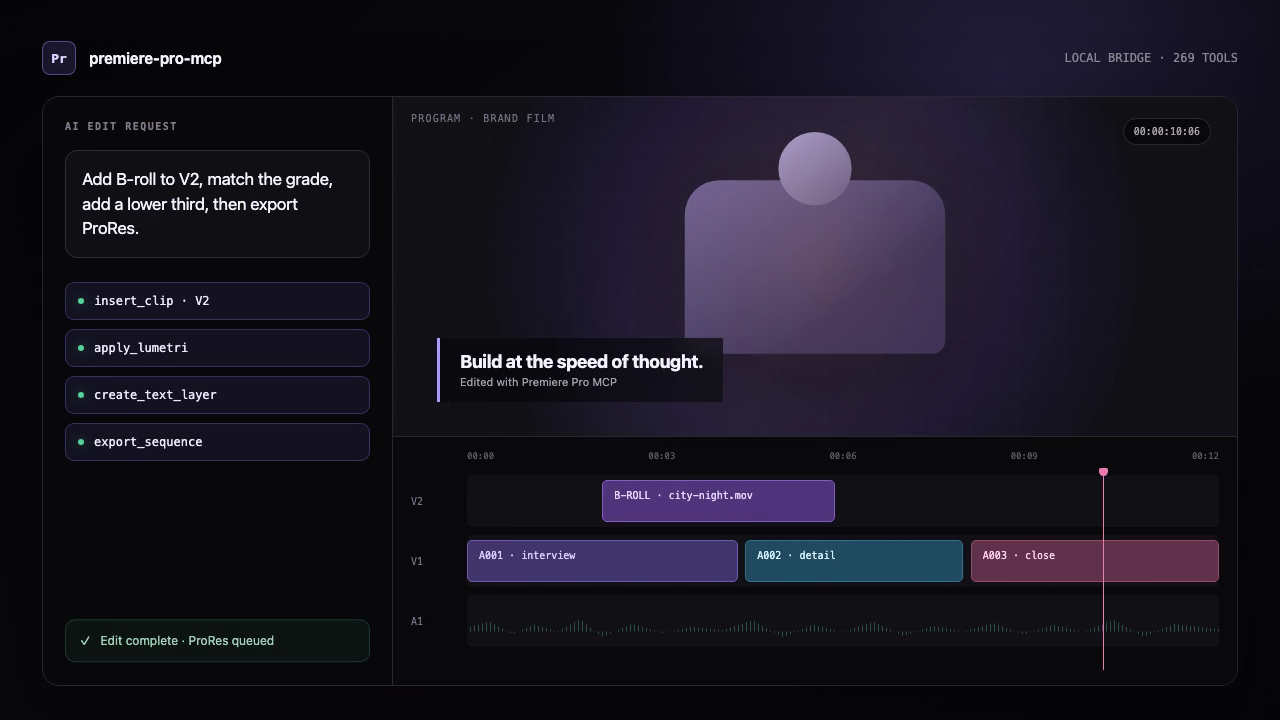
This is an illustrated workflow, not a Premiere panel screenshot or licensed-host proof.
- Open a copied test project and an active sequence in Premiere.
- Open Window > Extensions > MCP for Adobe Premiere Pro. “Running” means the local panel bridge is available; it does not show that an edit completed.
- Run
premiere-pro-mcp --doctorto check only local package/configuration readiness. - Ask the AI client:
Run verify_premiere_connection. Make no changes.The returned check is read-only and avoids project names, paths, and media details.
If a bridge, project, or active sequence is missing, fix that setup state before allowing a mutation. For a concise, translatable version of this path, see quick starts in English, Spanish, and Japanese. The translations are machine-assisted drafts and retain command names in English.
Other AI assistants
Cursor, VS Code/Copilot, Windsurf, and other MCP clients do not currently have a project-provided one-click installer. Use their MCP settings with the advanced npm route below. Keep the assistant, server, connector, and Premiere on the same computer.
For a portable reference users can download and attach to any AI assistant, see the MCP for Adobe Premiere Pro setup guide for AI assistants. Attaching the guide provides assistant context; the local server and Premiere connector still need to be installed separately.
Advanced setup: npm or source
Before you begin
- Node.js 20.19 or newer on Windows or macOS.
- Adobe Premiere Pro 2020–2026. Keep Premiere, the CEP bridge, and your MCP client on the same computer for the recommended local setup.
- Optional: ffmpeg on
PATHfordetect_silence(brew install ffmpegon macOS orwinget install Gyan.FFmpegon Windows). The production Docker image already includes it.
1. Install
Option A — npm:
Option B — Clone from source:
2. Install the CEP plugin
If installed via npm:
If cloned from source:
This installs the plugin into Premiere Pro's per-user extensions folder and enables debug mode.
3. Check the setup
Then ask your MCP client to run verify_premiere_connection. The check is read-only.
Update an existing installation
New releases update the local server and Premiere connector; a deployment of the hosted MCP service does not replace software on your computer. Fully quit Premiere before updating the connector.
Installed globally from npm:
--update only changes a global npm installation. It installs the published
latest package, refreshes the bundled CEP connector, and leaves your MCP
client configuration and projects untouched. Restart Premiere and your MCP
client afterward, then run verify_premiere_connection before editing.
From the MCP for Adobe Premiere Pro panel (Windows global npm install):
The MCP updates card compares the installed global server and connector
with npm latest. Choose Update after quit, review the confirmation, then
quit Premiere normally. A per-user helper waits for Premiere to exit; it never
force-quits the app, then installs the published npm package and refreshes its
matching connector. This also supports older global installs that predate the
--update command.
When you reopen Premiere, the panel reports the result and reminds you to
restart your MCP client and verify the connection. This flow never changes a
project or MCP client configuration. It deliberately will not update a Git
checkout, a custom npm prefix, or a Claude Desktop .mcpb bundle.
Installed from a Git clone:
The source updater refuses a checkout with uncommitted files or local commits,
fast-forwards only to its configured upstream, runs npm ci and the production
build, then refreshes the CEP connector. This avoids silently overwriting local
code. If you installed the Claude Desktop .mcpb bundle, download and install
the newer bundle from the GitHub release instead; Claude controls extension
updates.
Remove the CEP connector
Fully quit Premiere, then remove only this connector:
The uninstaller intentionally leaves Adobe's shared PlayerDebugMode setting in place so it does not disrupt other CEP extensions. Remove the MCP server from your AI client's configuration and uninstall the npm package separately if you no longer use it. On macOS, --uninstall-cep removes the per-user npm/source install; the signed system-wide .pkg route has a separate privileged removal command in distribution readiness.
Publishing to npm
The easiest repeatable path is the token-free GitHub Actions workflow:
- In the npm package settings, configure GitHub Actions as the trusted publisher for
leancoderkavy/premiere-pro-mcpand workflow filenpm-publish.yml. - Allow the
npm publishaction. - Open Actions -> Publish npm -> Run workflow and keep the default
latesttag.
The workflow installs dependencies, builds, runs tests, verifies the packed files, refuses to republish an existing version, then publishes through short-lived OIDC credentials with automatic provenance. No npm token or recurring OTP is required.
For local publishing, use the guided helper:
Useful local variants:
Manual installation (macOS)
Manual installation (Windows)
- Copy the
cep-pluginfolder to%APPDATA%\Adobe\CEP\extensions\MCPBridgeCEP - Open Registry Editor and set these String (
REG_SZ) values to1(not DWORD):HKEY_CURRENT_USER\Software\Adobe\CSXS.12\PlayerDebugMode- (repeat for CSXS.9 through CSXS.14)
3. Configure your MCP client
If you installed from npm, configure the client to run the global command:
If you cloned the repository instead, use the source-build configuration shown below for your client.
Claude Desktop
Edit ~/Library/Application Support/Claude/claude_desktop_config.json (macOS) or %APPDATA%\Claude\claude_desktop_config.json (Windows):
Windsurf / Cascade
Add to your MCP server configuration:
Cursor
Add to .cursor/mcp.json in your project or global config:
After the server is enabled, select Claude Fable 5.1 in Cursor when you want a longer-horizon session. See Claude Fable 5.1 workflows.
GitHub Copilot (VS Code)
Add to your VS Code MCP server configuration:
4. Verify the bridge in Premiere Pro
- Open (or restart) Premiere Pro
- The bridge starts automatically using the default temp directory (or its previously saved setting)
- Optionally go to Window > Extensions > MCP for Adobe Premiere Pro to confirm the green "Running" status or change the Temp Directory to match your MCP client config
- Ask your AI assistant to run
get_capabilities, thenping, with Premiere open. - For a safe first request, ask: "What is my current Premiere Pro project and active sequence? Do not make changes."
The default bridge directory is derived from the operating system on both sides, so most local setups should not set PREMIERE_TEMP_DIR. On macOS, the server resolves the per-user system temporary directory even when a GUI-launched client strips TMPDIR, keeping it aligned with Premiere's CEP panel. If you override it, use the same absolute path in the MCP server and CEP panel; Windows and macOS paths are not interchangeable.
Codex plugin
This repository includes an installable Codex plugin that bundles the local MCP server with a safety-oriented Premiere editing skill.
From a clone of this repository:
Restart Premiere Pro and start a new Codex session after installation. The plugin
launches premiere-pro-mcp@1.18.2 through npx; the separate CEP installation is
required because the MCP server communicates with the running Premiere host through
the local bridge.
The plugin source lives in plugins/premiere-pro, and the
repository marketplace manifest lives in
.agents/plugins/marketplace.json.
GPT-6 Astra and agent tool discovery
Use the Codex plugin with codex --model gpt-6-astra when your account has access.
The server supplies session-aware workflow instructions and bounded tool discovery:
call get_capabilities with {"tool_query":"transcript","tool_limit":10} to
find relevant operations, their descriptions, and backend requirements. Searches
default to tools registered under the current authority and tool packs.
See GPT-6 Astra workflows for evidence retrieval, visual review, execution ordering, and the division between MCP and client capabilities.
GPT-6 Sol and GPT-6 Luna
Use the Codex plugin with codex --model gpt-6-sol for multi-step agentic edits,
or codex --model gpt-6-luna for focused, high-volume inspection passes, when
your account has access. Both call the same MCP tools under the same authority,
preview, and readback rules. See GPT-6 Sol and Luna workflows.
Claude
For Claude Code, add this repository as a marketplace and install the plugin:
Then install the Premiere bridge and start a new Claude Code session:
The Claude Code package lives in
claude-plugins/premiere-pro, with its marketplace
at .claude-plugin/marketplace.json.
Claude Desktop uses the self-contained MCP Bundle (.mcpb) format. Build and
validate the current bundle with:
Install the resulting file from artifacts/ through Settings > Extensions >
Advanced settings > Install Extension. The Premiere CEP bridge must still be
installed separately.
Claude Fable 5.1
Use Cursor, Claude Desktop, or Claude Code with Claude Fable 5.1
(claude-fable-5-1) when your account has access. Model selection belongs to the
client; this server does not run an Anthropic model. Fable 5.1 is optional:
other Claude models can call the same MCP tools. If Cursor Privacy Mode or an
Enterprise plan is enabled, an admin must approve Anthropic's Fable data-retention
policy before the model is available.
The server supplies session-aware workflow instructions and bounded tool discovery:
call get_capabilities with {"tool_query":"transcript","tool_limit":10} to
find relevant operations, their descriptions, and backend requirements. Keep
Premiere mutations serialized even in a long Fable 5.1 session. Image review of
returned frames is not playback or delivery proof.
See Claude Fable 5.1 workflows for connection order, privacy boundaries, evidence retrieval, Cursor's Opus fallback, and the division between MCP and client capabilities. The public walkthrough is How to Use Claude Fable 5.1 with MCP for Adobe Premiere Pro.
Claude Opus 5.5
Use Claude Code, Claude Desktop, or Cursor with Claude Opus 5.5
(claude-opus-5-5) when your account has access. Model selection belongs to the
client; this server does not run an Anthropic model. Opus 5.5 is optional. Keep
Premiere mutations serialized and preview before apply. See
Claude Opus 5.5 workflows.
Windows and macOS capability coverage
| Surface | Windows | macOS | Verification boundary |
|---|---|---|---|
| CEP production bridge | Premiere Pro 2020–2026 | Premiere Pro 2020–2026 | Run get_capabilities, then ping with Premiere open |
| UXP preview bridge | Premiere Pro 25.6+ | Premiere Pro 25.6+ | Live loopback WebSocket and host API verification required |
| npm CEP installer | Copies plugin and verifies REG_SZ debug keys | Copies plugin and verifies the installed manifest/debug settings | Restart Premiere after installation |
| AE MOGRT authoring CEP bridge | After Effects 2018+ | After Effects 2018+ | Opens only a saved, workspace-contained AE project; a local ZIP check is not import, playback, or visual verification |
| CI build and unit tests | Node 20, 22, and 24 | Node 20, 22, and 24 | GitHub-hosted OS runners; no Adobe host is available in CI |
get_capabilities reports the current operating system, temp directory, CEP/UXP coverage, enabled authority profile, and any live-host verification still required. It also includes the full tools catalog generated from the tools registered by the server, including tools disabled by the active profile. Every entry identifies:
- the execution backend (
local, CEP/ExtendScript, QE, or orchestrator); - static support status (
supported,limited,experimental, orunsupported); - the minimum Premiere version known to the server;
- the required authority and whether the current profile enables it;
- the verification boundary and whether a live Premiere host is required; and
- relevant operational notes.
QE-backed tools are reported as experimental because QE is undocumented and can vary between Premiere builds. Authority availability is reported separately from implementation support, so disabling edit, for example, does not incorrectly label editing tools as unsupported. Static metadata never claims that a Premiere operation succeeded; use ping and inspect each tool result for runtime evidence.
MCP tools/list is filtered to the active authority profile. The default
inspect,edit,export,filesystem profile advertises 367 of the 369 registered
tools and omits execute_extendscript and evaluate_expression, which require
explicit unsafe-script authority. ping and get_capabilities remain visible
under every profile so a restricted or misconfigured server can still explain
its state. The call-time capability guard remains authoritative even if listing
metadata is wrong.
Workflow-scoped discovery packs and structured outputs
By default, the full permitted catalog remains available. Set
PREMIERE_MCP_TOOL_PACKS to essential, inspection, delivery, captions,
or a comma-separated combination such as inspection,captions to reduce the
tool discovery and registered session surface for a focused client. full is the explicit
full-catalog mode and cannot be combined with another pack. ping and
get_capabilities remain listed for diagnosis, and every registered call still
passes through the same capability guard; a pack never grants authority.
Every listed tool now declares the same machine-readable result envelope through
MCP outputSchema: ok, tool, plus data on success or error on failure.
The tool-specific data shape remains versioned by the individual tool result,
so clients can reliably distinguish transport success from a Premiere or local
operation failure without parsing the text block.
After Effects MOGRT studio
This is a narrow authoring path, not an arbitrary After Effects script runner. Install the separate local connector, fully restart After Effects, and open Window > Extensions > MCP for Adobe After Effects:
Then open a saved .aep project inside an approved workspace and use this order:
verify_after_effects_connection— read-only connector and saved-project check.preview_mogrt_recipe— produces an expiring, one-time plan for one of five supported recipes:lower_third,title_card,callout,quote_card, orsocial_end_card; it never creates directories or contacts Adobe.create_mogrt_recipewith that token andconfirm_export: true— creates one composition, saves the open project, and requests one.mogrtexport.verify_mogrt_artifact— checks only local file existence and its ZIP header.
Optional studio paths retain the same preview-and-confirm boundary:
validate_mogrt_brand_kitvalidates local name-prefix, accent/text colors, font request, safe-margin, and workspace-contained logo values before they are passed into a recipe.preview_mogrt_batch/create_mogrt_batchexport up to 20 JSON/CSV rows serially; batches stop on a host error and do not promise rollback.preview_mogrt_library_publish/publish_mogrt_to_librarywrite a new, immutablev001,v002, … copy under an already-existing local library.inspect_after_effects_template_sourcereturns source-comp dimensions, duration, fonts, layer kinds, and controller names on AE 16.1+, whileinspect_after_effects_render_templateslists host template names from an existing queue item.preview_after_effects_render/enqueue_after_effects_renderqueue one exact render but never start it.preview_mogrt_premiere_handoff/apply_mogrt_premiere_handoffimport into an explicitly named emptyMOGRT Verify - …Premiere sequence and read back insertion/control descriptors.
The authoring connector uses AFTER_EFFECTS_MCP_TEMP_DIR (default: the OS temp
directory plus after-effects-mcp-bridge), completely separate from
PREMIERE_TEMP_DIR. The tool will not create, replace, or switch projects; it
requires the already-open AE project and output directory to be contained by the
same approved workspace. An import/control readback still needs rendered-frame
review before delivery; use capture_frame or a separate approved export path.
inspect_sequence_review_report creates one read-only handoff report from
Premiere timeline readback: sequence structure, primary-track gaps, disabled
clips, muted tracks, marker timing, and offline-source evidence. It never
returns media paths; marker comments are omitted unless explicitly requested.
The report is not proof of rendered pixels, audio quality, caption accuracy,
rights, or editorial approval.
The MCP handshake reads serverInfo.version from the installed package.json,
so clients receive the package version that is actually running rather than a
separately maintained literal.
Tools with mixed execution boundaries can provide explicit operational metadata at registration. This is used for local file verification, static feature-support reports, and hybrid local-plus-Premiere validation so the capability catalog does not infer a host dependency from naming alone.
Collaboration and AI feature boundaries
get_advanced_feature_support returns a machine-readable matrix for Productions,
Team Projects, Frame.io, Media Intelligence, Generative Extend, Object Mask,
caption translation, Speech-to-Text, Enhance Speech, Remix, editorial plans,
Premiere AI Assistant, Generative Media, and a future local semantic index. Each
entry includes an explicit access mode: direct, observable-only, artifact-import,
external-provider, user-assisted, unavailable, or planned. Pass an optional
Premiere version, intended backend, confirmed entitlements, and network state to
evaluate prerequisites without conflating them with API availability. It
distinguishes documented APIs from entitlements, network prerequisites, separate
service APIs, and user-assisted operations without using menu automation or
private APIs.
The report tool itself is local: it does not contact Premiere and is callable through the current MCP server. Each feature entry separately reports whether its operations are callable through the production CEP transport. Productions reports only static backend/version eligibility until a UXP host performs live capability negotiation.
- Productions exposes documented read-only state through UXP, but the production MCP transport is still CEP.
- Frame.io needs a separately authenticated Frame.io API integration; an account entitlement alone does not make it callable through Premiere's DOM.
- Transcript JSON import/export is documented in UXP. Starting Speech-to-Text is not.
preview_transcript_edit_uxpandplan_transcript_rough_cut_uxpprovide a revision-locked transcript-edit workflow. The planner maps selected transcript ranges to verified 1x placements in a duplicate sequence and emits descending split/remove instructions; it does not claim that Adobe exposes native transcript text deletion or perform an unverified destructive edit.- The remaining AI operations are user-assisted or unsupported by documented public APIs. The tool explains what can be inspected after a user completes the operation and where artifact provenance cannot be established safely.
- The server never uses menu automation, private APIs, clip-name heuristics, or duration changes as proof that an AI operation occurred.
Reusable project context
For projects where repeatedly inspecting clips, transcripts, audio, and timeline
placements is expensive, call manage_project_context with action: "capture".
The local context engine indexes a bounded active-sequence snapshot, hashes native
project/media paths before persistence, and returns independent source, timeline,
and combined context revisions. Add transcript passages, shot descriptions, audio
observations, or editor notes once with action: "enrich"; ordinary trims and moves
update the timeline revision without discarding unchanged source analysis.
Use search_project_context to retrieve only evidence relevant to the current
editing intent. create_context_edit_plan returns a non-mutating candidate scaffold
and stale-state guards; create_editorial_plan adds reviewed organization,
stringout, rough-cut, and caption-artifact routes without calling an LLM or
changing Premiere. Exact identities must still be resolved and passed through the
routed operation's preview/confirmation flow before any application. See the
project context engine guide for storage
controls, privacy boundaries, and invalidation behavior; see
local-first AI editorial workflows for the
complete review-and-route workflow.
Authenticated UXP connection
The MCP server can accept a local UXP panel connection and invoke the UXP commands that are currently implemented:
Generate that secret yourself and enter the same value in the UXP panel (Window → UXP Plugins, not the CEP Connector). CEP-only setups do not use a token. The listener binds only to 127.0.0.1:7777, authenticates the WebSocket upgrade, requires a versioned capability handshake, correlates concurrent requests, and fails pending work on timeout or disconnect. Set PREMIERE_UXP_PORT to use another loopback port.
When enabled, MCP discovery includes 91 capability-gated UXP additions. The first expansion covers effects, deterministic timeline selection, selection batches, scene detection, proxy/ingest, relink, metadata, color conformance, read-only Premiere/After Effects environment inspection, Source Monitor audition, storage, and least-privilege workspace access. The second adds Project-panel selection, marker CRUD, single-transaction undoable beat-grid marker application, bin organization, sequence settings, imports, typed effect parameters/keyframes, track-item transforms, atomic J/L split edits, SequenceEditor timeline edits, sequence lifecycle, and AME encoding. The third wave begins with a redacted event journal, conservative AME terminal receipts, explicit host-readiness gates, safe multi-project sessions, lease-based growing-media control, namespaced workflow checkpoints, bounded media-health maintenance, caption-aware track mute state, transactional source trim/framing, guarded sequence-range updates, guarded source-media start timing, and guarded source-media frame-rate/pixel-aspect overrides documented in the third-wave workflow matrix. The bounded migration surface also includes a non-ripple selected-item lift, native video-transition listing and guarded transactions, native active and explicit-GUID sequence timing inspection, opt-in installed-MOGRT directory inspection without filesystem enumeration, bounded native timeline structure inspection with opt-in source IDs, classification, and broad content category, guarded sequence display-format updates, a capped native Project-panel tree, a double-read Project-panel insertion-bin snapshot, guarded empty/default sequence creation, bounded native Project-panel schema/item-column metadata inspection, guarded direct Project-panel metadata replacements with exact state/readback guards, guarded typed Project metadata schema-field creation with non-field-level readback, guarded direct updates to three named application preferences, guarded transcript JSON replacement for one exact source clip, direct active-track-item identity readback, guarded source-only slips, guarded contiguous three-item slides, guarded append-only timeline duplicates, guarded contiguous same-track ripple deletes, guarded source-project-item color labels resolved from one timeline coordinate, guarded explicit-sequence preview-frame rectangle updates, explicit opt-in source-media provenance paths with bounded double resolution, bounded source-proxy readiness with an explicit attached-path disclosure, guarded static effect-parameter PointF x/y updates, bounded effect-parameter descriptor catalogs, bounded project/sequence Object Mask audits, native FrameRate/TickTime frame-alignment inspection with caller-owned inputs and tick readback, and native TickTime arithmetic over caller-owned canonical tick strings; it does not claim direct empty-track create/delete, global redo support, playback proof, Object Mask counts or visual validity, an atomic Project-panel metadata compare-and-set, app-preference Undo, installed-template availability or compatibility, imported transcript persistence, override-presence/clear semantics, path existence, source lineage or rights, proxy compatibility, general or keyframed effect-parameter value readback, rendered-frame correctness, linked-item sync, or licensed-host validation. A separate hybrid benchmark gate keeps native acceleration disabled until reproducible cross-platform evidence exists. See also the first stable workflow matrix, the next-ten workflow matrix, the guarded-slip workflow notes, the guarded-slide workflow notes, the guarded-duplicate workflow notes, and the guarded-ripple-delete workflow notes. Commands are advertised only while the authenticated local UXP bridge is connected; the host capability handshake remains the authority for support in the running Premiere build. A failed UXP command is never silently retried through CEP because the first operation may have partially succeeded.
The bounded UXP migration surface also exposes a read-only animated-PointF endpoint-displacement inspection through automate_effect_parameters_uxp. It requires one exact component and parameter target plus a strictly increasing time interval, double-reads native endpoint values and their distance, and refuses static, malformed, or changed parameter state. It does not modify Premiere or prove rendered appearance, playback, persistence, Undo, or licensed-host behavior.
The bounded UXP migration surface also exposes guarded static Color effect-parameter RGBA updates through automate_effect_parameters_uxp. They require a complete double-read snapshot, explicit confirmation, a valid operation ID, per-parameter serialization, one native transaction, and exact raw-component readback. They reject time-varying parameters and do not claim keyframed Color edits, color management, rendered appearance, playback, persistence, Undo, or licensed-host validation.
The bounded UXP migration surface also exposes guarded typed Project metadata schema-field creation. It requires the exact inspected active-project identity and 12 KiB-bounded panel XML, an explicit confirmation and operation ID, and serializes this bridge's schema and panel-replacement calls per project. Adobe provides no atomic compare-and-set or field-level schema getter: native acceptance and a changed panel XML are evidence only, so the command always returns committed_unverified and does not claim field presence, persistence, UI results, Undo, cancellation, or licensed-host validation.
The panel now requests access to one operator-selected workspace instead of declaring full filesystem access. Choose the folder in the panel before invoking a path-based UXP workflow. Media, relink, preset, export, and Source Monitor file paths must remain inside it; the persistent capability token and native root path are never returned over MCP. After a folder is granted, path-based commands resolve each native path through that folder's Entry tree and compare the host nativePath against the approved root, so symlink or junction targets outside the workspace still fail closed. If the host Entry cannot be walked and no resolver is supplied, those commands stay unsupported and the CEP fallback remains the path-based compatibility route.
Native transcript editing starts with a read-only, revision-locked planning flow. Use
get_clip_transcript_uxp to export the transcript Premiere generated for a source
clip, select source-time ranges from that JSON, and pass its SHA-256 revision to
preview_transcript_edit_uxp. The preview sorts and merges ranges and returns a
confirmation token without changing the timeline. Premiere does not expose a
documented operation that directly turns deleted transcript text into timeline cuts,
so automatic application remains withheld until the source-to-sequence mapping and
documented reconstruction path pass live-host validation. search_clip_transcript_uxp
provides read-only discovery without substituting an external transcription engine.
Premiere 26.2-26.3 hosts also expose documented UXP workflows for revisioned project inspection, verified project saves, preset-based sequence creation, OTIO/FCP XML interchange, transcript-language discovery, Object Mask detection, Adobe Media Encoder control, track renaming, subclip creation, stable marker inspection, Source Monitor positioning, and clip transcript detection. Mutations accept optional idempotency keys and return explicit verification outcomes. See the Adobe UXP 26.3 coverage matrix and the UXP capability foundation for the command matrix and live-host validation boundary.
The Premiere surface registry separately tracks the Premiere DOM, general UXP JavaScript, HTML/CSS, Spectrum, plugin guides, UXP Hybrid C++, the standalone Premiere C++ PrSDK, CEP/ExtendScript, the CEP platform, QE, and pinned competitor sources. The exhaustive general UXP JavaScript inventory is generated from Adobe's pinned declarations, while the exhaustive Premiere documentation inventory tracks every page in Adobe's live sitemap. This keeps declaration and documentation inventory distinct from implementation and licensed-host coverage.
The stable workflow expansion adds native component-chain effects, deterministic timeline selection, compound selection batches, scene-edit detection, proxy/ingest control, guarded offline relink, transactional project/XMP metadata, color and footage-conformance preflight, full Source Monitor audition, and project/Production storage checks. See the stable UXP workflow matrix for exact argument, undo, confirmation, and live-host boundaries.
Architecture
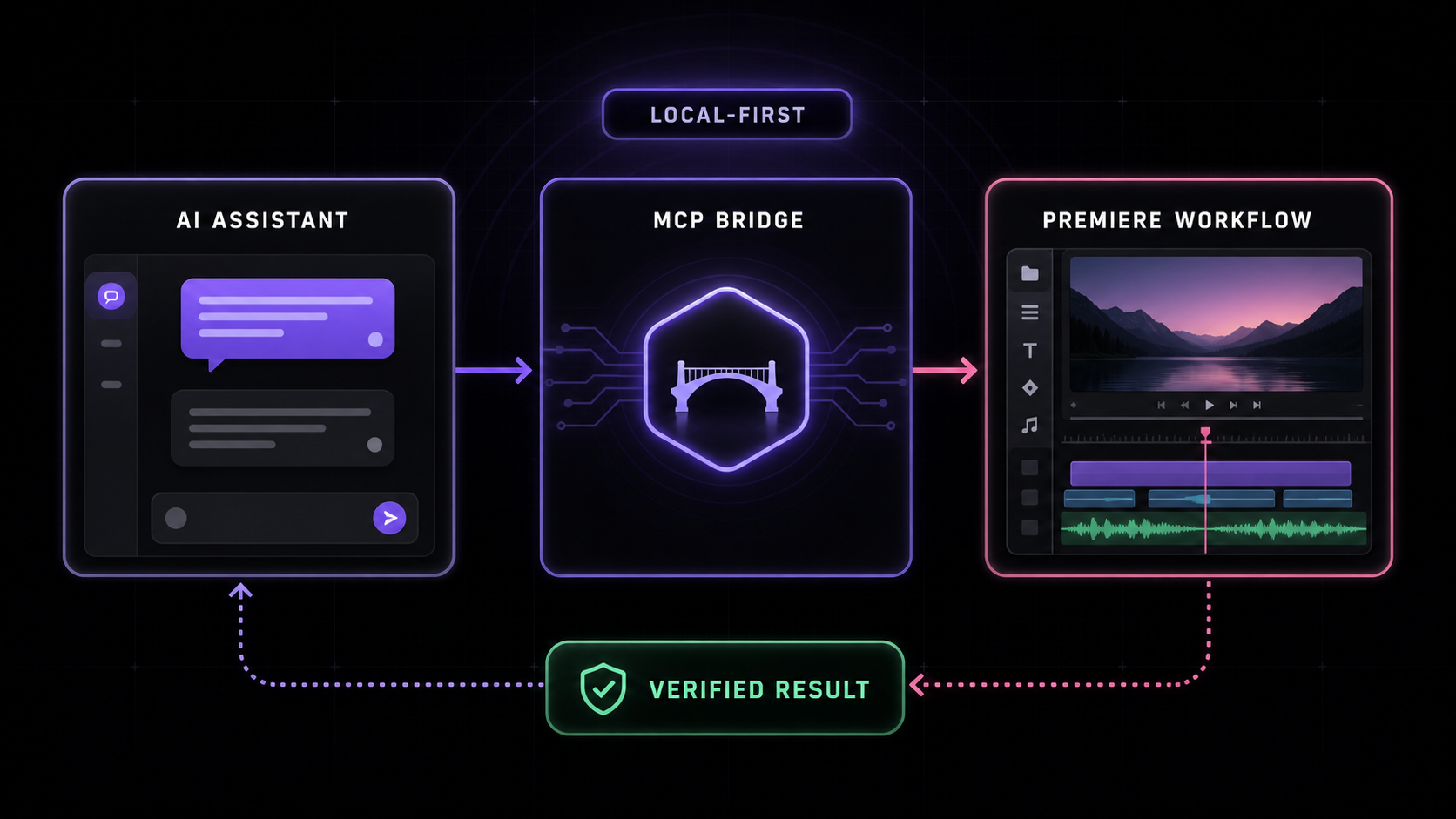
Local (stdio):
Remote (HTTP/SSE — Fly.io):
- AI client invokes an MCP tool (e.g.,
add_to_timeline) - MCP server generates ES3-compatible ExtendScript with helper functions prepended
- Script is written to a
.jsxcommand file in a shared temp directory - CEP plugin polls for command files, executes via
CSInterface.evalScript() - Result JSON is written to a response file and returned to the AI
The file-based IPC bridge is simple, reliable, and works across macOS and Windows without network sockets.
inspect_unique_object_identity_uxp is a separate read-only native identity
inspection route. It resolves exactly one project item or sequence, reads the
opaque UniqueSerializeable identity twice, and rejects drift without retaining
the value or treating it as edit authority. See the unique-identity workflow
notes for its bounds and proof boundary.
Film editorial review
inspect_film_editorial_workflow validates captured identities and explicit
source/scene coverage, builds marker/stringout/line/beat review artifacts, and
reports revision-bound notes, VFX state, change impact and turnover exceptions.
It performs local inspection; host edits and exports use separate guarded tools.
See usage, example and remaining execution adapters.
Tools (384 core total; 382 under the default profile; 478 with a connected UXP bridge)
The complete supported-actions catalog lists every
registered core tool, the two tools restricted behind explicit unsafe-script
authority, and all 96 authenticated UXP additions with their current action or mode
values. It is generated from the same MCP registration surface returned to clients;
the tables below are a shorter workflow-oriented overview.
Discovery & Inspection (10 + 10)
| Tool | Description |
|---|---|
get_project_info | Current project name, path, sequences, items |
get_active_sequence | Detailed active sequence with all clips |
list_project_items | All items in the project panel |
get_full_project_overview | Comprehensive snapshot: bin tree, sequences, media types |
get_full_sequence_info | Exhaustive sequence data: tracks, clips, effects, markers |
get_full_clip_info | Everything about a clip: effects, keyframes, metadata |
get_timeline_summary | Human-readable overview: duration, coverage %, effects |
search_project_items | Filter by name, extension, offline status, color label |
get_premiere_state | Full snapshot: project, sequence, playhead, selection |
inspect_dom_object | Explore any Premiere Pro DOM object interactively |
get_advanced_feature_support | Collaboration/AI API support, prerequisites, entitlements, and user-assisted boundaries |
create_editorial_plan | Create a review-only local editorial plan from captured project context |
preview_editorial_plan | Revalidate a local editorial plan and return a review receipt without changing Premiere |
apply_editorial_organization_plan | Apply a confirmed organization plan through guarded UXP bin transactions only |
Project Management (26)
| Tool | Description |
|---|---|
save_project / save_project_as / open_project | File operations |
create_project / close_project | Project lifecycle |
import_media / import_folder / import_ae_comps | Import media and AE comps |
create_bin / delete_bin / rename_bin / create_smart_bin | Bin management |
import_sequences / import_fcp_xml | Import from other projects |
create_bars_and_tone | Generate bars & tone media |
set_scratch_disk_path | Configure scratch disks |
consolidate_and_transfer | Project Manager consolidation |
Timeline & Editing (11 + 27 advanced)
| Tool | Description |
|---|---|
add_to_timeline / overwrite_clip | Insert and overwrite edits |
ripple_delete | Remove clip and close gap (QE) |
roll_edit / slide_edit / slip_edit | Professional trim modes (QE) |
move_clip_to_track | Move between tracks (QE) |
reverse_clip / speed_change / set_clip_speed_qe | Unavailable: Premiere's documented ExtendScript and UXP APIs have no setter for a timeline clip's speed or direction; use set_clip_duration for timeline length |
split_clip / trim_clip / move_clip | Basic edits; trim verifies source points and visible timeline edges |
set_clip_duration | Set a clip's timeline duration or absolute end (extends still images); refuses next-clip overlaps and restores the original end if Premiere clamps |
set_clip_properties | Opacity, scale, rotation, position (speed requests fail before mutation) |
link_selection / unlink_selection | Link/unlink A/V |
Premiere Pro 26.3 compatibility: some installations silently ignore QE structural edits (
ripple_delete, razor/split) and existing effect-parameter writes. These tools now verify the resulting sequence state and return an error instead of a false success. For structural edits, rebuild the wanted source ranges into a new sequence withcreate_sequenceandadd_to_timeline. The legacy CEP transition path targetsqeClip.addTransition(not the QE track) and reports success only after DOM transition-count readback. Prefer the connected UXP transition tools where available; overlay clips remain a workaround when a legacy QE write is rejected or not verified. See issue #21.
Speed, caption, and visual-keyframe boundaries: Premiere Pro 26.3 may reflect legacy QE speed/direction methods, but exposes no supported scripting setter or Time Remapping component for timeline-clip speed or direction (documented UXP through 26.3 has only
getSpeed/isSpeedReversed).reverse_clip,speed_change,set_clip_speed_qe, andset_clip_propertieswithspeednow stop before host mutation; useset_clip_durationto change timeline length, or the Speed/Duration UI or pre-rendered media to retime.add_text_overlaylikewise stops before mutation because a raw-text-to-caption API is not exposed; import an.srt/.vttand usecreate_caption_track, or use a MOGRT/PNG overlay. Keyframe and caption-track responses can prove parameter/structure readback only—not rendered pixels—so verify playback or exported frames before delivery. On macOS, AME preset discovery scans each installed app bundle'sContents/MediaIO/systempresets; prefer a Match Source preset for vertical projects.
Verified track edits:
add_trackandadd_tracksvalidate requested counts and return success only when the active sequence's track counts exactly match the request.overwrite_clipvalidates both selected track indices and confirms the requested source item appears at the requested frame on a target track. On a Premiere 26.x build that ignores any of these calls, the MCP response is an error with the observed state rather than a false success. These are automated CEP contracts, not proof of a particular licensed host configuration.
trim_clip accepts exactly one source-relative new_in_seconds or new_out_seconds per
call. It refuses retimed clips because CEP cannot prove their source-to-timeline mapping, then
reads both source points and visible timeline start/end/duration before reporting success. The
default keyframe_policy: "reject" stops before a trim that would leave effect keyframes beyond
the visible clip; keyframe_policy: "preserve" is an explicit opt-in and reports the remaining
count. split_clip verifies a spanning clip, the expected count increase, and the left/right
cut boundaries. Its QE path cannot prove effect-keyframe redistribution, so a successful result
labels those semantics unverified. These are CEP contract checks, not validation in a licensed
Premiere Pro 26.x host.
set_clip_duration changes a placed clip's timeline length without touching source in/out
directly: pass exactly one of duration_seconds (from the current start) or end_seconds
(absolute timeline end). It writes the documented TrackItem.end as a tick-based Time, refuses
an end that would overlap the next clip on the same track, applies the same keyframe_policy
guard as trim_clip when shortening, and reads start/end back. If Premiere clamps the end (for
example, video media with no remaining handle, or a still whose project item has in/out points),
the original end is restored and the tool returns an error. Linked audio/video partners are not
adjusted. This is a CEP contract check, not validation in a licensed Premiere Pro host.
Effects & Color (8)
| Tool | Description |
|---|---|
apply_effect / apply_audio_effect | Apply by name (QE) |
remove_effect / remove_all_effects | Remove effects |
color_correct | Lumetri: exposure, contrast, temperature, etc. |
apply_lut | Apply LUT files |
stabilize_clip | Warp Stabilizer with configurable settings |
Premiere 26.x component removal:
remove_effectandremove_effect_by_namerequire the CEPComponent.remove()method. Some 26.x components, including Essential Sound's Amplify, do not expose that method. The tools return an actionable capability error and leave the component unchanged; use Effect Controls to remove it manually. The QE DOM has no safe targeted-removal fallback.
Essential Sound audio automation: Essential Sound can write ducking or level automation to an Amplify component rather than the clip's Volume > Level.
adjust_audio_levels,set_clip_volume, andget_clip_volumeoperate only on Volume > Level, so they do not read, change, or verify Amplify automation. Inspect the clip's components (or Effect Controls) before treating a Volume readback as the clip's final gain.
Keyframes (8)
| Tool | Description |
|---|---|
add_keyframe / get_keyframes | Create and read keyframes |
remove_keyframe / remove_keyframe_range | Delete keyframes |
set_keyframe_interpolation | Linear / Hold / Bezier |
get_value_at_time | Query interpolated value at any time |
set_color_value | Set color properties on effects |
Export & Encoding (17)
| Tool | Description |
|---|---|
export_sequence | Export via Adobe Media Encoder |
validate_export_preset | Validate an .epr file and resolve its output extension in Premiere |
verify_delivery_file | Verify output size and calculate SHA-256/SHA-512 checksums |
capture_frame | Export frame as PNG, return as base64 image |
export_as_fcp_xml / export_aaf / export_omf | Interchange formats |
export_sequence_edl | CMX 3600 EDL for one track, generated from timeline readback and self-validated (cuts, reels, drop/non-drop timecode, M2 lines for retimed clips) |
encode_project_item / encode_file | Direct encoding |
start_batch_encode | Start render queue |
Premiere's documented automation surfaces do not currently expose OTIO or native
EDL interchange, Render and Replace, cloud publishing, or Content Credentials
export configuration. export_sequence_edl therefore builds the CMX 3600 list
locally from the clips Premiere reads back and validates it with the same parser
used by inspect_cmx3600_edl; it is not a Premiere-native export.
get_capabilities reports the remaining delivery gaps explicitly rather than
presenting UI-only operations as available tools.
Source Monitor & Playback (7 + 4)
| Tool | Description |
|---|---|
open_in_source / close_source_monitor | Source monitor control |
insert_from_source / overwrite_from_source | 3-point editing |
play_timeline / stop_playback | Playback control (QE) |
play_source_monitor | Play in source monitor |
Selection & Clipboard (7 + 7)
| Tool | Description |
|---|---|
select_clips_by_name / select_clips_in_range | Smart selection |
copy_effects_between_clips | Copy effects via QE |
paste_clip_attributes | Paste Attributes: effect stack, values, and keyframes with per-property readback; masks and differing Blend Mode are reported, not copied |
batch_apply_effect | Apply effect to multiple clips |
set_blend_mode | 27 blend modes |
Media Properties (16)
| Tool | Description |
|---|---|
set_offline / has_proxy / detach_proxy | Offline/proxy management |
set_override_frame_rate | Override FPS |
set_scale_to_frame_size | Auto-scale to sequence frame |
get_xmp_metadata / set_xmp_metadata | Raw XMP access; writes merge a well-formed patch without removing unrelated fields |
get_color_space | Color space info |
Sequence Management (11)
| Tool | Description |
|---|---|
create_sequence / create_sequence_from_preset | Create sequences from .sqpreset files without opening Premiere's modal dialog |
duplicate_sequence / delete_sequence | Manage sequences |
auto_reframe_sequence | Auto-reframe for social media |
attach_custom_property | FCP XML custom properties |
unnest_sequence | Replace nested sequence with its clips |
Workspace & Captions (2 + 1)
| Tool | Description |
|---|---|
get_workspaces / set_workspace | Switch workspace layouts |
create_caption_track | Create caption/subtitle tracks |
Timeline QA (2)
| Tool | Description |
|---|---|
diff_sequence_snapshots | Added / removed / moved / trimmed / retimed / renamed / enabled changes between two sequence snapshots with frame deltas and EDL-like lines |
audit_timeline_health | Health score with flash-frame, gap, overlap, repeated-shot, coverage, overlength, and speed findings plus review-frame suggestions |
Editor Requests: markers, selection, checkpoints, navigation (5)
| Tool | Description |
|---|---|
add_markers_batch | Up to 200 sequence or clip markers in one verified request; feed it beat grids from detect_beats, chapters from plan_chapter_markers, or client notes from plan_client_notes_checklist |
select_clips_by_pattern | "Select every other clip": every-Nth selection with offset, name/regex, duration, range, track, and enabled filters, read back after selecting |
create_sequence_checkpoint / list_sequence_checkpoints | Named [checkpoint] sequence clone before a risky edit, plus a diff_sequence_snapshots-ready snapshot of the original |
navigate_playhead | Start, end, in/out, work area, next/previous edit or marker, or frame stepping with position readback |
Review and Conversation Planning (2)
| Tool | Description |
|---|---|
plan_client_notes_checklist | Pasted client or reviewer feedback → prioritized checklist (category, must/should/nice, approvals, questions, timecodes and ranges) and an add_markers_batch payload |
plan_multicam_angle_switches | Active-speaker angle switching for stacked camera tracks: minimum holds, crosstalk cover shots, lead-in cuts, cutaways, razor times, per-camera enable ranges, and markers |
Both planners are local and deterministic. Premiere exposes no scripting API
for switching angles inside a multicam source sequence, so the multicam plan
targets synced clips stacked on separate video tracks and is applied through
razor_all_tracks, select_clips_in_range, batch_enable_disable, and
add_markers_batch on a checkpointed sequence. See
editor requests for the community and competitor
evidence behind these tools and their verification boundaries.
Speaker Layout (2)
| Tool | Description |
|---|---|
plan_speaker_checkerboard | Per-speaker segments, split points, and track assignments for checkerboarded dialogue |
plan_active_speaker_reframe | Active-speaker vertical reframe keyframes, or static stacked / side-by-side two-speaker layouts |
Mask Fit (1)
| Tool | Description |
|---|---|
compute_mask_fit_motion | Inspect only: Motion Scale and Position that place a still's subject box (source-image fractions) inside an existing Rounded Crop, Crop, or similar mask, with the math inputs and warnings. Apply with set_clip_scale / set_clip_position, then check with capture_frame. No image analysis. |
Rhythm Plans (2)
| Tool | Description |
|---|---|
plan_emphasis_zoom_keyframes | Punch-in zoom keyframes (Motion Scale + subject-anchored Position) from sentence starts, emphasis words, intervals, or supplied triggers |
plan_beat_montage | Beat-grid shot assignment for a clip list with add_to_timeline_batch chunks, trim plan, and beat markers |
Shorts Intelligence (2)
| Tool | Description |
|---|---|
rank_short_form_candidates | Rank sentence-aligned windows as short-form candidates with explainable hook, completeness, density, evidence, and duration-fit scores |
plan_chapter_markers | Lexical-cohesion chapter segmentation with titles, YouTube timestamps, and ready Chapter marker payloads |
Caption Authoring (2)
| Tool | Description |
|---|---|
build_caption_artifact | Word-grouped SRT/VTT captions with karaoke timestamps, emphasis markup, speaker prefixes, and style presets, written inside an approved workspace |
check_caption_safe_zone | Overlap check for caption and graphic rectangles against approximate platform UI zones, with a suggested clear position |
Reaction Shorts (3)
| Tool | Description |
|---|---|
plan_reaction_captions | Stacked speaker-colored caption plan from a word timeline and explicit palette; flash words merge, overlaps stack, unknown speakers stay uncolored |
plan_short_subscribe_cta | Brief subscribe overlay placed about two-thirds through a Short, after an optional hook, with brand-safe styling notes |
plan_short_export_folder | Series-named export path under an approved Shorts root; create the folder when it is missing and keep Cafe and Watch Club assets separate |
Transcript Word Edits (4)
| Tool | Description |
|---|---|
plan_filler_word_removal | Word-level filler removal plan (um, uh, you know…) with frame-snapped removal and keep ranges |
plan_pause_tightening | Shorten long pauses to a target length without deleting speech |
plan_word_mute_ranges | Mute or bleep listed words: padded ranges, ready audio keyframes, redacted text |
detect_repeated_takes | Group near-duplicate retakes and plan removal of all but the kept take |
Platform Delivery Planning (2)
| Tool | Description |
|---|---|
plan_platform_delivery_matrix | Per-platform sequence settings, fit/fill reframe math, duration and file-size fit, caption safe zones, and an ordered clone → reframe → caption → export → verify route |
validate_platform_publish_package | Validate a rendered file plus title, description, hashtags, and content flags against approximate TikTok, Reels, Shorts, YouTube, LinkedIn, X, and Facebook limits |
Scripting (2)
| Tool | Description |
|---|---|
execute_extendscript | Run arbitrary ExtendScript (ES3); requires explicit unsafe-script authority |
evaluate_expression | Evaluate a one-line expression; requires explicit unsafe-script authority |
...and 100+ more
Track targeting, batch operations, markers, audio levels, motion/transform, metadata, sequence settings, navigation, project analysis, and more. Run get_project_info to get started — the AI will discover what it needs.
MCP Resources
The server exposes fourteen LLM context resources and nineteen workflow prompts:
| Resource URI | Description |
|---|---|
config://premiere-instructions | Best practices: workflow order, metadata layers, timeline rules, error handling |
config://extendscript-reference | Complete ExtendScript API reference for writing custom scripts |
config://premiere-workflows | Machine-readable catalog for rough cuts, metadata review, dialogue cleanup, captions, and delivery |
config://premiere-project-context | Revisioned local project-context indexing and retrieval workflow |
premiere://project/info | Fresh, path-redacted current-project and active-sequence summary |
premiere://project/sequences | Bounded sequence inventory with stable Premiere IDs |
premiere://project/media | Bounded, path-redacted project-media inventory |
premiere://project/bins | Bounded, path-redacted project-bin inventory |
premiere://timeline/active | Bounded active-timeline tracks, clips, and markers snapshot |
premiere://effects/available | Bounded video/audio effect catalog for planning |
premiere://effects/applied | Bounded active-timeline component inventory |
premiere://transitions/available | Bounded video/audio transition catalog for planning |
premiere://export/presets | Bounded export-preset names and formats, without native paths |
premiere://project/metadata | Path-redacted project and active-timeline summary — not XMP or Project Metadata XML |
The ten premiere:// snapshots are read-only CEP bridge requests. They include a
revision token for stale-state detection and omit native media, project-tree, preset,
and output paths. A successful snapshot proves bridge readback only—not licensed-host
feature coverage, playback, rendering, or editorial correctness.
Remote Deployment (Fly.io)
The server includes an HTTP/SSE transport (src/http-server.ts) for remote access via mcp-remote or any MCP client that supports Streamable HTTP.
A live operator-managed instance is running at https://premiere-pro-mcp.fly.dev. It is not a public desktop relay: it cannot connect an authenticated user to Premiere on that user's computer. Public users should use the local stdio setup until the separate device-pairing relay is available.
Connect to an operator-managed instance
The instance must either provision an operator bearer token or use the OAuth
resource-server configuration below. The production endpoint intentionally
returns 401 to callers who have not been authorized.
Self-host on Fly.io
Then connect with:
Trusted-operator OAuth resource-server mode
For an identity-aware operator deployment, configure a real OAuth/OIDC authorization
server rather than distributing MCP_AUTH_TOKEN. The authorization server must
support the MCP client's registration model and issue signed access tokens with
an exact audience for this MCP resource.
OAuth mode validates the token signature, algorithm, issuer, exact audience,
expiry, issued-at time, subject, and required scopes. It publishes protected
resource metadata at /.well-known/oauth-protected-resource/mcp and includes
that URL in the WWW-Authenticate challenge. Configuration is fail-closed:
partial OAuth settings, non-HTTPS production URLs, ambiguous OAuth/shared-token
settings, and missing credentials all prevent startup.
MCP_OAUTH_ALLOWED_SUBJECTS is mandatory and restricts this single-bridge
deployment to explicitly trusted operator identities. This is an enforcement
boundary, not a public-user device model.
This mode authenticates trusted operators but does not yet implement device ownership, desktop pairing, or per-user Premiere routing. Do not expose editor mutations as a public multi-user service until an outbound desktop relay and durable user/device authorization are implemented.
Note: The file bridge still requires the CEP plugin to share the same
PREMIERE_TEMP_DIR. For cloud deployments this means running a sync agent or usingfly proxy/ WireGuard to reach your local machine.detect_silencecan analyze only media paths available inside the server filesystem; a desktop-only path is not automatically available to a remote Fly machine. For a shared or multi-user remote deployment, put a managed identity-aware edge in front of the server and replace the shared bearer secret with per-user authorization. The built-in limiter is intentionally process-local defense in depth, not a substitute for an edge/WAF or account system.
Environment Variables
| Variable | Description | Default |
|---|---|---|
PREMIERE_TEMP_DIR | Shared temp directory for MCP ↔ CEP communication | OS user temp dir + /premiere-mcp-bridge (macOS fallback is independent of TMPDIR) |
PREMIERE_TIMEOUT_MS | Command timeout in milliseconds | 30000 |
PREMIERE_DEFAULT_SEQUENCE_PRESET | Override the auto-discovered .sqpreset used by create_sequence | auto-discovered |
PREMIERE_MCP_CAPABILITIES | Comma-separated authority profile; add unsafe-script only when raw scripting is required | inspect,edit,export,filesystem |
PREMIERE_MCP_DEBUG | Set to 1 (or true) to emit verbose server diagnostics to stderr | unset |
PREMIERE_CONTEXT_BACKEND | Local project-context store: auto, sqlite, json, or memory | auto |
PREMIERE_CONTEXT_DIR | Override the local project-context storage directory | OS application-data directory |
PORT | HTTP port (HTTP/SSE transport only) | 3000 |
MCP_AUTH_TOKEN | Operator bearer token for controlled HTTP deployments; mutually exclusive with OAuth mode | unset |
MCP_OAUTH_ISSUER | Exact trusted OAuth/OIDC token issuer URL | unset |
MCP_OAUTH_JWKS_URI | HTTPS JWKS URL used to verify access-token signatures | unset |
MCP_OAUTH_AUDIENCE | Exact MCP resource audience, normally the public /mcp URL | unset |
MCP_PUBLIC_URL | Canonical HTTPS origin used in protected-resource discovery | unset |
MCP_OAUTH_REQUIRED_SCOPES | Space- or comma-separated scopes required for /mcp | premiere:mcp |
MCP_OAUTH_ALLOWED_SUBJECTS | Mandatory comma-separated token-subject allowlist for the single operator bridge | unset |
ALLOW_UNAUTHENTICATED | Set to 1 only for local/test HTTP harnesses; it is rejected when NODE_ENV=production | unset |
MCP_MAX_REQUEST_BYTES | Maximum HTTP MCP request body size | 1048576 |
MCP_HEADERS_TIMEOUT_MS | Maximum time to receive request headers | 10000 |
MCP_REQUEST_TIMEOUT_MS | Maximum time to receive an HTTP request | 60000 |
MCP_KEEP_ALIVE_TIMEOUT_MS | Idle keep-alive socket timeout | 5000 |
MCP_MAX_REQUESTS_PER_SOCKET | Requests permitted on one keep-alive socket | 100 |
MCP_MAX_CONCURRENT_REQUESTS | In-flight authenticated MCP request ceiling | 8 |
MCP_MAX_CONCURRENT_STREAMS | Open authenticated SSE stream ceiling; isolated from operation capacity | 32 |
MCP_MAX_CONCURRENT_LANDING_DOCUMENTS | Concurrent HTML reads, nonce injection and asynchronous compression; excess work returns 503 | 4 |
MCP_LANDING_MAX_HTML_BYTES | Maximum source HTML document bytes | 4194304 (4 MiB) |
MCP_LANDING_HTML_CACHE_BYTES | Source HTML cache memory budget; must be at least the document byte limit | 16777216 (16 MiB) |
PREMIERE_MCP_PROJECT_BACKUP_MAX_BYTES | Positive integer byte budget for one project backup | 2147483648 (2 GiB) |
MCP_RATE_LIMIT_PER_MINUTE | Per-credential token-bucket refill rate | 120 |
MCP_RATE_LIMIT_BURST | Per-credential short burst allowance | 30 |
MCP_MAX_RATE_LIMIT_KEYS | In-memory rate-limit identity ceiling | 2048 |
MCP_TRUST_PROXY | Set to 1 only behind a proxy that overwrites X-Forwarded-For | unset |
POSTHOG_API_KEY | PostHog project token; enables privacy-safe MCP usage telemetry | unset |
POSTHOG_HOST | PostHog ingestion host | https://us.i.posthog.com |
POSTHOG_ENVIRONMENT | Environment property attached to telemetry events | production |
POSTHOG_DISTINCT_ID | Optional stable anonymous server identifier | Fly machine ID or random boot ID |
When PostHog is enabled, the server records mcp_connection_attempt,
mcp_request, mcp_request_rejected, and mcp_tool_call. It also records
premiere_mcp_activation_completed only after the read-only
verify_premiere_connection check confirms the selected bridge, an open
project, and an active sequence. Events contain bounded operational fields such
as method, tool name, outcome, status code, duration, and selected bridge.
Authentication tokens, IP addresses, MCP arguments, project paths, media names,
and tool results are never sent. Person profiles are disabled for these events.
This signal is an aggregate emission, not proof that an analytics provider received it, a count of unique people or editors, or evidence that an editing workflow succeeded. It does not carry a person or editor identifier, so it cannot safely infer "first value."
Project Structure
Technical Details
CEP and UXP backends
CEP remains the production backend because it provides broad ExtendScript access and the undocumented QE DOM used for effects, ripple deletes, and advanced trims across Premiere Pro 2020–2026. The packaged uxp-plugin is a Premiere 25.6+ preview backend for supported frame export, capability discovery, and state events. It does not silently retry failed UXP mutations through CEP.
ExtendScript Compatibility
All generated scripts use ES3 syntax (var, manual for loops, no arrow functions, no let/const) since ExtendScript is based on ECMAScript 3. The bridge writes a versioned helper library to the shared temp directory and loads it once per ExtendScript engine via $.evalFile; each command then sends only its tool-specific script.
Security
Understand the trust model before deploying this: any client that can reach the MCP
server can control Premiere Pro. execute_extendscript and evaluate_expression are
arbitrary-code-execution tools by design and are omitted from discovery and denied at call time
by default. Enable them only by setting
PREMIERE_MCP_CAPABILITIES=inspect,edit,export,filesystem,unsafe-script.
- Run it locally over stdio unless you have a specific reason not to. That's the safe default.
- The HTTP transport (
http-server) requiresMCP_AUTH_TOKENand refuses to start without it in production. It binds0.0.0.0and is remotely reachable, so never expose it publicly without a strong token and edge controls.ALLOW_UNAUTHENTICATED=1is limited to non-production local/test use. - The HTTP transport admits only exact
/mcpStreamable HTTP requests, enforces body/socket/request limits, and applies a bounded in-process per-credential rate and concurrency limit before MCP request parsing or Premiere bridge work begins. It returns413,429, or503on containment failures. Configure an upstream rate limit and request-size limit too; process-local counters do not protect a multi-machine deployment. - The landing CSP uses a per-response nonce for scripts, and its static assets use explicit cache policies. Keep the server in front of the exported landing so those controls are not bypassed by a separate static host. Source HTML is cached as immutable build output; restart the HTTP process after replacing an export. Each response still gets a fresh nonce. HEAD requests skip body rendering.
- Media scans yield between asynchronous filesystem operations and bound total traversal:
25,000 entries, 5,000 matching files, 2,000 directories, depth 32, a 1,000-directory
pending queue, and a cooperative five-second budget. A stalled OS call can exceed that
elapsed budget. Inspect
scan_incompleteandscan_limit_reasonsbefore treating a watch baseline as complete; import previews also reportincomplete. - Project backups stream their copy and checksum work with a configurable byte budget. Only one backup runs per process; concurrent requests fail promptly. Failed or cancelled copies are removed without replacing an existing backup.
- The Docker runner uses the unprivileged
nodeuser (UID 1000). Custom bridge or context volume mounts must be writable by that user and private to the operator. The default context directory is under/home/node/.local/state/premiere-pro-mcp. - Dependency audits run in CI for both lockfiles. Keep local
.env*,.npmrc, and private key/certificate files out of commits and Docker build contexts; only placeholder.env.exampleand.env.templatefiles are eligible for Git tracking. - Both CEP panels validate the bridge directory before writing a heartbeat or polling
commands. Symlinks and directories owned by another user are refused. On POSIX,
directories writable by group/other users are refused by both the server and panels;
tightening permissions alone cannot make previously staged commands trustworthy.
On Windows, only the current user, SYSTEM and Administrators may have write access,
including inherited grants. Windows capability and app-container SIDs (
S-1-15-*) are ignored: they are not logon principals and appear as inherited FullControl on stock%LOCALAPPDATA%paths. ACL inspection failures also stop startup. Ancestors must also prevent other users from replacing the bridge path; a private child inside a broadly writable parent is insufficient (POSIX sticky temp directories are supported). Choose a new directory under a private user-owned location if the connector rejects a shared temp folder, and configure the same path on the server and panel. Do not copy pending commands from the rejected folder into the new one. Windows checks invoke PowerShell synchronously before publishing commands, with a five-second timeout and 64 KiB output cap; this adds command latency rather than caching a permission decision that could become stale. - There is a 500 KB script size limit, and a small regex check that rejects
eval(),new Function(), andSystem.callSystem()in tool-generated scripts. This is a guard rail, not a sandbox — it is trivially bypassable and is not a security boundary. Do not rely on it to contain untrusted input; the real boundary is who can reach the server.
QE DOM
Many tools use the undocumented QE DOM (enabled via app.enableQE()). These tools are marked with "Uses QE DOM" in their descriptions. The QE DOM provides capabilities unavailable through the standard ExtendScript API:
- Apply effects and transitions by name
- Ripple delete, roll/slide/slip edits
- Set clip speed and reverse
- Frame blending and time interpolation
- Remove all effects from a clip
Frequently asked questions
What is an MCP server for Adobe Premiere Pro?
It is a Model Context Protocol server that gives a
compatible AI assistant structured, reviewable control over supported Adobe Premiere
Pro workflows on your own computer. This project's display name is MCP for Adobe
Premiere Pro; its npm package is premiere-pro-mcp.
How do I use it with Claude?
Install the Claude Desktop bundle, install
the separate signed Premiere connector, restart Premiere, then ask Claude to run
verify_premiere_connection with no changes. That first prompt is read-only.
Claude Fable 5.1 is an optional client model for Cursor, Claude Desktop, or Claude
Code; see Claude Fable 5.1 workflows.
Where is the GitHub repository?
https://github.com/leancoderkavy/premiere-pro-mcp. Releases, the signed .zxp
connector, and the Claude .mcpb bundle are on that repository's
Releases page.
What is the bridge panel in Premiere Pro?
A local CEP panel (Window > Extensions > MCP for Adobe Premiere Pro) that connects
the server to a running Premiere Pro instance. "Running" in the panel means the local
bridge is available; it does not by itself show that an edit completed. An
authenticated UXP panel is an additional, capability-gated route.
Is there a setup guide?
Yes - premiere-mcp-setup-guide.md is a portable guide
you can attach to any AI assistant, and https://premiere-pro-mcp.com/docs/ hosts the
published documentation.
Does it run on Windows and macOS? Both. Node.js 20.19 or newer and Premiere Pro 2020-2026 are required, and the assistant, server, connector, and Premiere should stay on the same computer. Individual tool support remains capability- and host-dependent.
Is this Adobe's AI Assistant?
No. This is an independent MIT-licensed project, not an Adobe product and not Adobe's
native AI Assistant. It is also distinct from other MCP servers for Premiere Pro;
premiere-pro-mcp is the only npm package published from this repository.
Is it free? Yes. The server, the CEP connector, and the documentation are MIT licensed and free to use.
Troubleshooting
CEP plugin doesn't appear in Premiere Pro
- Verify debug mode:
- macOS:
defaults read com.adobe.CSXS.12 PlayerDebugModeshould return1 - Windows:
reg query "HKCU\SOFTWARE\Adobe\CSXS.12" /v PlayerDebugModeshould reportREG_SZ 1(aREG_DWORDvalue is not valid for unsigned CEP discovery)
- macOS:
- Check the plugin exists:
- macOS:
ls ~/Library/Application\ Support/Adobe/CEP/extensions/MCPBridgeCEP - Windows:
dir "%APPDATA%\Adobe\CEP\extensions\MCPBridgeCEP"
- macOS:
- Completely restart Premiere Pro (not just close/reopen the project)
- Check the CSXS version matches your Premiere Pro version
- Run
premiere-pro-mcp --diagnose-cepto check installation metadata and recent Premiere logs.
Version 1.3.0 and newer installs the signed artifacts/MCPBridgeCEP.zxp included in the npm
package on Windows. If diagnostics report Signature verification failed, reinstall the latest
npm version, fully quit every Premiere process, run premiere-pro-mcp --install-cep, and relaunch.
Commands timeout or hang
- Open the CEP panel and verify it shows "Running" with a green dot (the bridge normally starts automatically)
- Ensure temp directories match between MCP client config and CEP panel
- Read the timeout error: if it reports an in-flight heartbeat, dismiss any open Premiere modal dialog; without a heartbeat, verify the bridge is running and using the same temp directory
- Increase timeout: set
PREMIERE_TIMEOUT_MSto60000or higher - Try
pingtool to test basic connectivity
AI client can't see tools
- Restart the AI client after editing config
- Verify the path to
dist/index.jsis absolute and correct - Run
node dist/index.jsin a terminal to check for startup errors - Ensure
npm run buildcompleted without errors
QE DOM tools fail
- QE tools require an active sequence — open one first
- Some QE operations are index-based and can fail if clips have been reordered
- Re-query the sequence structure after QE operations
Star history
If this project saves you time in Premiere, a star helps other editors find it.
Support the project
This is an independently maintained, MIT-licensed project with no company behind it. Every release is tested against real Premiere versions on both Windows and macOS, which takes hardware, licenses, and time.

Free ways to help, in order of usefulness:
- ⭐ Star the repo — the main way editors discover it
- 🐛 File a bug with your Premiere version, OS, and the tool name that failed
- 📝 Report what worked on a host version not yet in the capability coverage table
- 🔧 Open a PR — see CONTRIBUTING.md
Sponsorship funds host verification, signing certificates, and hosting. It does not buy prioritized support, roadmap influence, or any claim about unverified host behavior.
Contributing
Contributions are welcome! See CONTRIBUTING.md for guidelines. AI agents and IDE assistants should read AGENTS.md.
The evidence-backed next improvement pull-request roadmap breaks the proposed feature, protocol, reliability, and performance work into ten reviewable changes with explicit dependencies and live-host acceptance gates.
License
MIT — free for personal and commercial use.