Handles 10M+ token contexts with chunking, sub-queries, and local Ollama inference.
Quick Install
Automated & IDE SetupCopy the AI prompt to install this server into Claude Code, Cursor, or another agent — or use 1-click editor setup below.
Not yet automatically verified
We haven't yet run this listing's install command through our automated sandbox check. This isn't a red flag — we're steadily working through the catalog.
Manual Client & Custom JSON ConfigExpand JSON ▾
Client Config & Setup
Choose your client or environment
Target File:
💡 Paste the JSON block into your client's configuration file under mcpServers, then restart the application.
Documentation Overview
Massive Context MCP









Handle massive contexts (10M+ tokens) with chunking, sub-queries, and free local inference via Ollama.
Based on the Recursive Language Model pattern. Inspired by richardwhiteii/rlm.
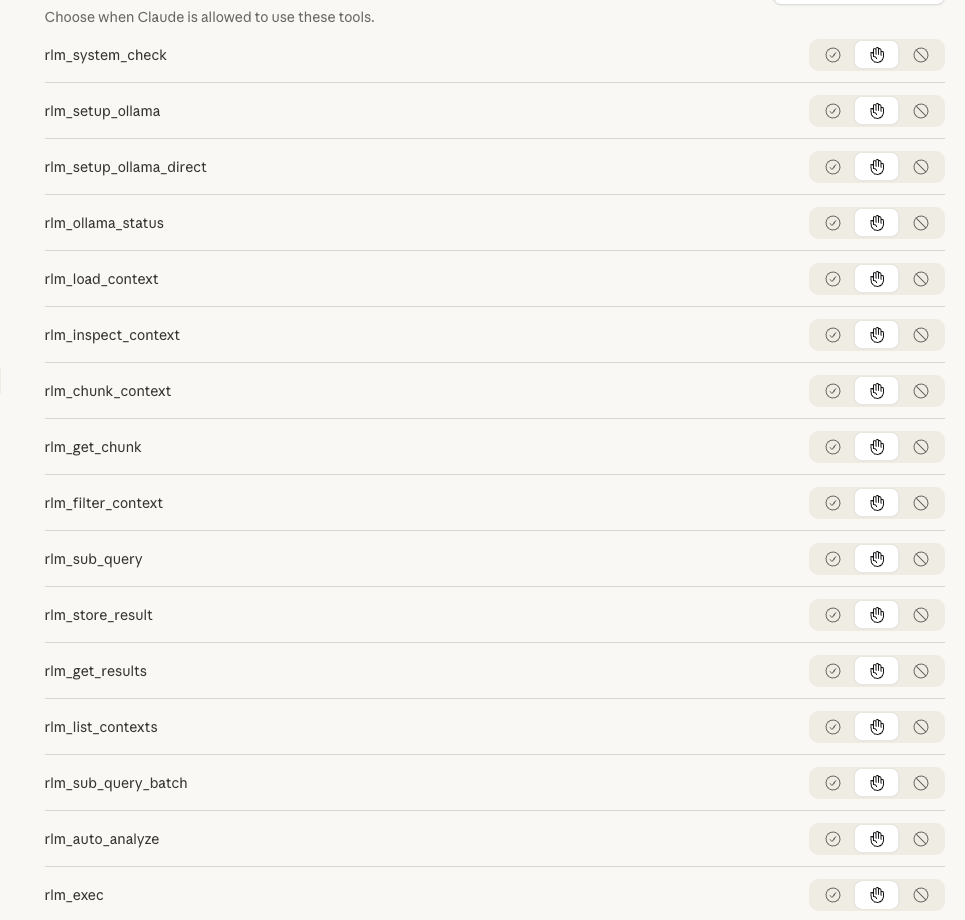
📸 Screenshots
Core Idea
Instead of feeding massive contexts directly into the LLM:
- Load context as external variable (stays out of prompt)
- Inspect structure programmatically
- Chunk strategically (lines, chars, or paragraphs)
- Sub-query recursively on chunks
- Aggregate results for final synthesis
Quick Start
Installation
Option 1: PyPI (Recommended)
With Optional Extras:
Option 2: Claude Desktop One-Click
Download the .mcpb from Releases and double-click to install.
Option 3: From Source
Wire to Claude Code / Claude Desktop
Add to ~/.claude/.mcp.json (Claude Code) or claude_desktop_config.json (Claude Desktop):
Tools
Setup & Status Tools
| Tool | Purpose |
|---|---|
rlm_system_check | Check system requirements — verify macOS, Apple Silicon, 16GB+ RAM, Homebrew |
rlm_setup_ollama | Install via Homebrew — managed service, auto-updates, requires Homebrew |
rlm_setup_ollama_direct | Install via direct download — no sudo, fully headless, works on locked-down machines |
rlm_ollama_status | Check Ollama availability — detect if free local inference is available |
Analysis Tools
| Tool | Purpose |
|---|---|
rlm_auto_analyze | One-step analysis — auto-detects type, chunks, and queries |
rlm_load_context | Load context as external variable |
rlm_inspect_context | Get structure info without loading into prompt |
rlm_chunk_context | Chunk by lines/chars/paragraphs |
rlm_get_chunk | Retrieve specific chunk |
rlm_filter_context | Filter with regex (keep/remove matching lines) |
rlm_exec | Execute Python code against loaded context (sandboxed) |
rlm_sub_query | Make sub-LLM call on chunk |
rlm_sub_query_batch | Process multiple chunks in parallel |
rlm_store_result | Store sub-call result for aggregation |
rlm_get_results | Retrieve stored results |
rlm_list_contexts | List all loaded contexts |
Quick Analysis with rlm_auto_analyze
For most use cases, just use rlm_auto_analyze — it handles everything automatically:
What it does automatically:
- Detects content type (Python, JSON, Markdown, logs, prose, code)
- Selects optimal chunking strategy
- Adapts the query for the content type
- Runs parallel sub-queries
- Returns aggregated results
Supported goals:
| Goal | Description |
|---|---|
summarize | Summarize content purpose and key points |
find_bugs | Identify errors, issues, potential problems |
extract_structure | List functions, classes, schema, headings |
security_audit | Find vulnerabilities and security issues |
answer:<question> | Answer a custom question about the content |
Programmatic Analysis with rlm_exec
For deterministic pattern matching and data extraction, use rlm_exec to run Python code directly against a loaded context. This is closer to the paper's REPL approach and provides full control over analysis logic.
Tool: rlm_exec
Purpose: Execute arbitrary Python code against a loaded context in a sandboxed subprocess.
Parameters:
code(required): Python code to execute. Set theresultvariable to capture output.context_name(required): Name of a previously loaded context.timeout(optional, default 30): Maximum execution time in seconds.
Features:
- Context available as read-only
contextvariable - Pre-imported modules:
re,json,collections - Subprocess isolation (won't crash the server)
- Timeout enforcement
- Works on any system with Python (no Docker needed)
Example — Finding patterns in a loaded context:
Example Response:
Example — Extracting structured data:
When to use rlm_exec vs rlm_sub_query:
| Use Case | Tool | Why |
|---|---|---|
| Extract all dates, IDs, amounts | rlm_exec | Regex is deterministic and fast |
| Find security vulnerabilities | rlm_sub_query | Requires reasoning and context |
| Parse JSON/XML structure | rlm_exec | Standard libraries work perfectly |
| Summarize themes or tone | rlm_sub_query | Natural language understanding needed |
| Count word frequencies | rlm_exec | Simple computation, no AI needed |
| Answer "Why did X happen?" | rlm_sub_query | Requires inference and reasoning |
Tip: For large contexts, combine both — use rlm_exec to filter/extract, then rlm_sub_query for semantic analysis of filtered results.
Code Firewall Integration (Optional)
For enhanced security, integrate code-firewall-mcp to filter dangerous code patterns before execution:
When installed, rlm_exec can automatically check code against a blacklist of known dangerous patterns (e.g., os.system(), eval(), subprocess with shell=True). The firewall uses structural similarity matching — normalizing code to its skeleton and comparing against blacklisted patterns via embeddings.
Related MCP Servers
Reviews
No reviews yet — be the first to share how this listing worked for you.
Frequently Asked Questions about Massive Context MCP
AllMCPs Directory Badge
Showcase your server listing on GitHub or your project documentation. Embed this dynamic SVG badge to highlight official listing status and live engagement.
Badge Style:
Live Dynamic SVG Preview
Markdown (GitHub README)
[](https://allmcps.com/mcp/massive-context-mcp)HTML Embed
<a href="https://allmcps.com/mcp/massive-context-mcp"><img src="https://allmcps.com/api/badge/massive-context-mcp?style=directory" alt="Massive Context MCP on AllMCPs" /></a>Technical Specs & Signals
CategoryFinance & Fintech
36Quality signal: Fair · 36/100How this signal is calculated ▾
Server availabilityNot measured
Not scored for repo-hosted servers — we can't reach the running server, only its GitHub page. Hosted MCP endpoints are health-checked live.
Verified ownership10/20
Documentation & tools16/30
Adoption & activity1/15
Community engagement0/10
A guidance signal from public completeness & health data — not a user rating. New listings start lower and rise as they add docs, get verified, and grow adoption. Signals we can't observe for a listing are skipped, not counted against it.
Own this project?
This directory is pre-filled from public sources. Claim via GitHub README, site badge, or DNS TXT to unlock edit access and the Official badge — proof is checked automatically, then reviewed by our team.
Free dofollow backlink: add your website and place the AllMCPs badge on it — no claim needed. We detect it automatically and keep it verified as long as the badge stays live.
Claim & get free dofollowShare & Embed
Add our SVG badge (dark/light directory styles) or embeddable widget to your site.