web-searchresearchcrawlerrerankingmcp
Self-hosted MCP web research that searches, crawls, reranks, and returns compact cited evidence.
Quick Install
Automated & IDE SetupCopy the AI prompt to install this server into Claude Code, Cursor, or another agent — or use 1-click editor setup below.
Not yet automatically verified
We haven't yet run this listing's install command through our automated sandbox check. This isn't a red flag — we're steadily working through the catalog.
Manual Client & Custom JSON ConfigExpand JSON ▾
Client Config & Setup
Choose your client or environment
Target File:
💡 Paste the JSON block into your client's configuration file under mcpServers, then restart the application.
Overview
Use cases
Search the web without a paid search API
Crawl selected pages for relevant passages
Rerank research results with dense and BM25 retrieval
Reduce webpage content to cited evidence for an agent
Key features
DDGS search backend
SearXNG support in the Docker stack
Local ONNX embeddings
Dense and BM25 hybrid reranking
Content filtering and deduplication
Compact evidence with source URLs
Capabilities & Tool Schemas
Inspect callable tools, capabilities, and parameters exposed to AI agents by TinySearch.
Extracted Tool Capabilities
DDGS search backend
SearXNG support in the Docker stack
Local ONNX embeddings
Dense and BM25 hybrid reranking
Content filtering and deduplication
Compact evidence with source URLs
Documentation Overview
TinySearch

Spend tokens on answers, not webpages.
TinySearch searches, crawls, and reranks the web locally, then gives your agent only the evidence worth putting in its context.
Documentation · Quick start · Python · Discord










TinySearch is a self-hosted web-research tool for AI agents. It searches the web, reads the best pages, removes low-value content, and returns compact evidence with source URLs.
Your model receives the useful passages instead of paying to process entire webpages.
TinySearch is part of TinySuite, a suite of focused tools designed to make agentic operations cheaper by minimizing token usage through smart retrieval, selection, and context-management techniques.

Choose a tier
| Tier | Use it when | Entry point | Search backend |
|---|---|---|---|
| 1. Python library | You are building with TinySuite or Python | pip install tinysuite-search | DDGS |
| 2. One-command MCP | An MCP client should launch TinySearch for you | uvx --from "tinysuite-search[server]" tinysearch | DDGS |
| 3. Docker + SearXNG | You want the full self-hosted stack and HTTP MCP | docker compose ... up -d | Bundled SearXNG |
Tiers 1 and 2 need no search service. Tier 3 adds a dedicated SearXNG service, persistent model storage, and a network MCP endpoint. See the installation guide for the Docker setup.
The expensive part of agent research is context
A search result is not yet useful evidence. Agents often have to open several pages, ingest navigation and boilerplate, and spend paid input tokens deciding which passages matter.
TinySearch moves that work in front of the model:
That lowers cost in three ways:
- Smaller model context. Only the best-ranked evidence chunks are returned, within a controlled evidence budget.
- No metered search API required by default. TinySearch can search through DDGS without a paid search provider.
- Local retrieval by default. ONNX embeddings and hybrid reranking run on your machine instead of creating embedding API charges.
Search broadly. Read locally. Pay the model only for the evidence that matters.
This is retrieval, not summarization: TinySearch selects the passages worth keeping with local BM25 and embedding rerank, it doesn't run a model over the page to rewrite or condense it. Every returned chunk is the original page text, unedited, so what you cite is what the page actually said. That keeps the pipeline fast and free to run locally, at the cost of not compacting as aggressively as a dedicated reduction model could. A learned reduction step is a direction we may explore later; it isn't part of TinySearch today.
Actual savings depend on the pages, evidence limits, client model, and provider pricing. TinySearch reduces the web content sent to the model; it does not control what the client does with that evidence afterward.
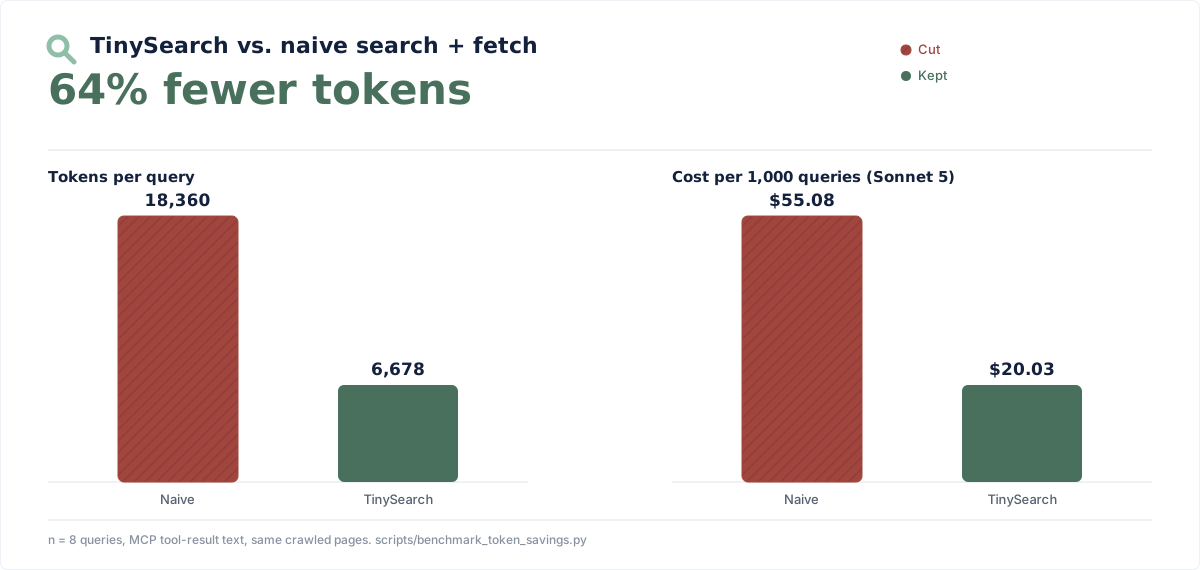
The cost panel uses an illustrative $3.00 per million input-token rate and excludes search, crawling, model output, and downstream agent use.
The naive baseline isn't a strawman product, it's the same pages TinySearch
crawled for each query, fed to the model unfiltered, the way a generic
"search, then fetch the page" tool (a plain web-search-plus-fetch loop, the
kind built into most coding agents) would. Measured against the current
recommended flow (search then scrape_urls) and counted on the actual MCP
tool-result text, TinySearch's primary interface. Reproduce or rerun it
yourself:
Quick start
With uv installed, add TinySearch to any MCP
client:
The client launches TinySearch over stdio when it needs it. No repository clone, hosted account, or paid search key is required.
Fast search starts without Chromium or an embedding model. The first scrape
initializes Chromium; focused scraping also initializes the configured
embedding model. Pre-warm both ahead of time if you will use those workflows:
The MCP and FastAPI servers keep the scraper browser warm between nearby
requests, then close it after browser_idle_shutdown_seconds. Direct Python
calls retain their short-lived, caller-owned lifecycle.
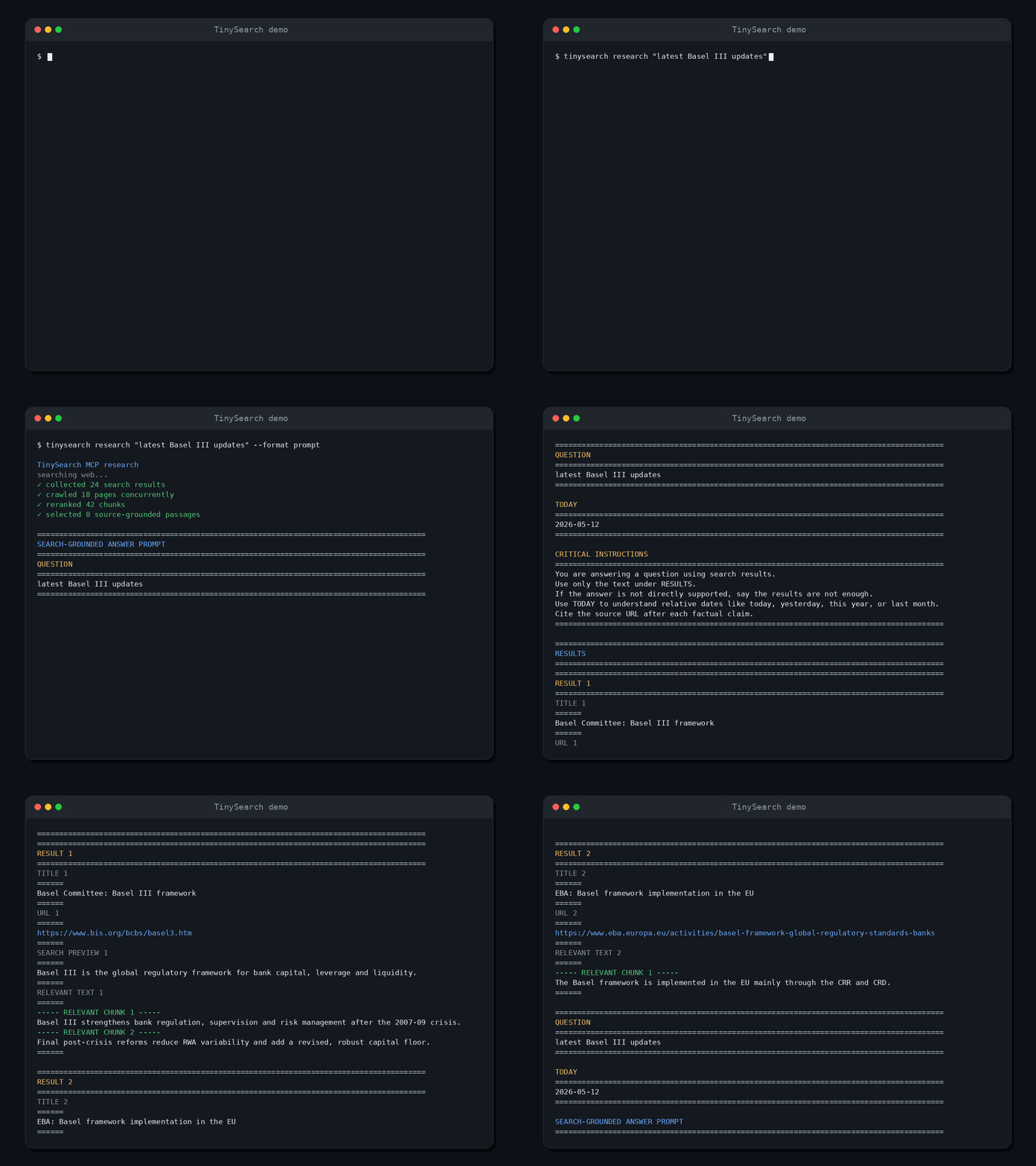
Prefer Docker, a remote MCP endpoint, or a source checkout? Follow the installation guide.
The MCP tools
| Tool | Use it when |
|---|---|
search(items) | You need fast, backend-ordered discovery without crawling or reranking; batch independent subquestions when useful |
scrape_urls(items) | You know one to five pages; each item may use * for its configured clean page-order token budget |
browser_navigate / browser_act | A page needs interaction before it can be read; see Browser automation |
get_current_datetime() | A question depends on the current date or time |
TinySearch deliberately stays focused. It is a retrieval layer, not another agent, chat interface, hosted search product, or permanent web index.
See the complete MCP tool reference for parameters and response contracts.
What your agent gets
TinySearch does not spend another model call writing the final answer. The
recommended flow is search for lightweight discovery, then scrape_urls for
the pages worth reading.
Search returns structured JSON. Use one item for a simple lookup; add multiple
items only for independent subquestions or source strategies. domains is a
hard positive source restriction and accepts a domain plus its subdomains:
Each search item reports its own results and compact backend attempts. A zero
result response is distinct from a blocked, unavailable, or invalid backend.
scrape_urls returns selected Markdown evidence and separate related-link
navigation candidates, each with independent configured token ceilings.
MCP still uses its standard JSON-RPC transport envelope, including
protocol-level errors and optional structuredContent. Python and FastAPI keep
their structured JSON contracts for applications that need to store, inspect,
or transform the evidence.
How it works
searchreturns backend-ordered titles, URLs, previews, upstream dates, and backend outcomes without starting Chromium or an embedding model.scrape_urlsreads one to five known pages concurrently. Omit an item's query or use"*"to keep clean Markdown in page order within the configured token budget.- Supply a focused item query when TinySearch should chunk and hybrid-rank that page before returning evidence.
- The
browser_*tools step in only whenscrape_urlscan't reach the content because it needs interaction. See Browser automation.
Python library
TinySearch also works as a regular Python package:
Optional OpenTelemetry export
Related MCP Servers
Adoption & maintenance
Factual signals from GitHub, npm, and our automated checks — not a rating.
GitHub stars
227
Stargazers on the source repository.
Last commit
6d ago
Most recent push to the default branch.
Directory activity
2 views
Config copies, upvotes, and views on AllMCPs.
Reviews
No reviews yet — be the first to share how this listing worked for you.
Frequently Asked Questions about TinySearch
AllMCPs Directory Badge
Showcase your server listing on GitHub or your project documentation. Embed this dynamic SVG badge to highlight official listing status and live engagement.
Badge Style:
Live Dynamic SVG Preview
Markdown (GitHub README)
[](https://allmcps.com/mcp/marcellm01-tinysearch)HTML Embed
<a href="https://allmcps.com/mcp/marcellm01-tinysearch"><img src="https://allmcps.com/api/badge/marcellm01-tinysearch?style=directory" alt="TinySearch on AllMCPs" /></a>Technical Specs & Signals
CategorySearch & Data Extraction
PricingFree
9/10 checks healthy over the last 32d
56Quality signal: Good · 56/100How this signal is calculated ▾
Server availabilityNot measured
Not scored for repo-hosted servers — we can't reach the running server, only its GitHub page. Hosted MCP endpoints are health-checked live.
Verified ownership10/20
Documentation & tools24/30
Adoption & activity8/15
Community engagement0/10
A guidance signal from public completeness & health data — not a user rating. New listings start lower and rise as they add docs, get verified, and grow adoption. Signals we can't observe for a listing are skipped, not counted against it.
Supply-chain signal
No high-severity advisories surfaced by our automated scan.
Critical 0High 0Medium 0Low 0
Scanned 23d ago via OSV.dev · --from (PyPI)
Own this project?
This directory is pre-filled from public sources. Claim via GitHub README, site badge, or DNS TXT to unlock edit access and the Official badge — proof is checked automatically, then reviewed by our team.
Free dofollow backlink: add your website and place the AllMCPs badge on it — no claim needed. We detect it automatically and keep it verified as long as the badge stays live.
Claim & get free dofollowShare & Embed
Add our SVG badge (dark/light directory styles) or embeddable widget to your site.