Cut, zoom, caption and export Lumae screen demos from an agent. Requires Lumae for macOS.
Quick Install
Automated & IDE SetupCopy the AI prompt to install this server into Claude Code, Cursor, or another agent — or use 1-click editor setup below.
One-click editor setup isn’t available for this listing yet — we don’t have a confirmed install command, and we’d rather show nothing than point your editor at the wrong package or host. Follow the project’s own setup instructions, linked above.
Manual Client & Custom JSON ConfigExpand JSON ▾
No confirmed setup config for this listing yet. We only publish a config block when the install details come from the project itself — its README, its docs, or a verified owner. We haven’t found those for Lumae, and we’d rather show nothing than a guess you’d paste into your client. Follow the project’s own setup instructions for the current steps.
Documentation Overview

Lumae
A free Mac screen recorder and screenshot tool for polished software demos,
with an MCP server built in so AI agents can record, edit and export them too.






Download for macOS · Website · MCP guide · Changelog · Feedback
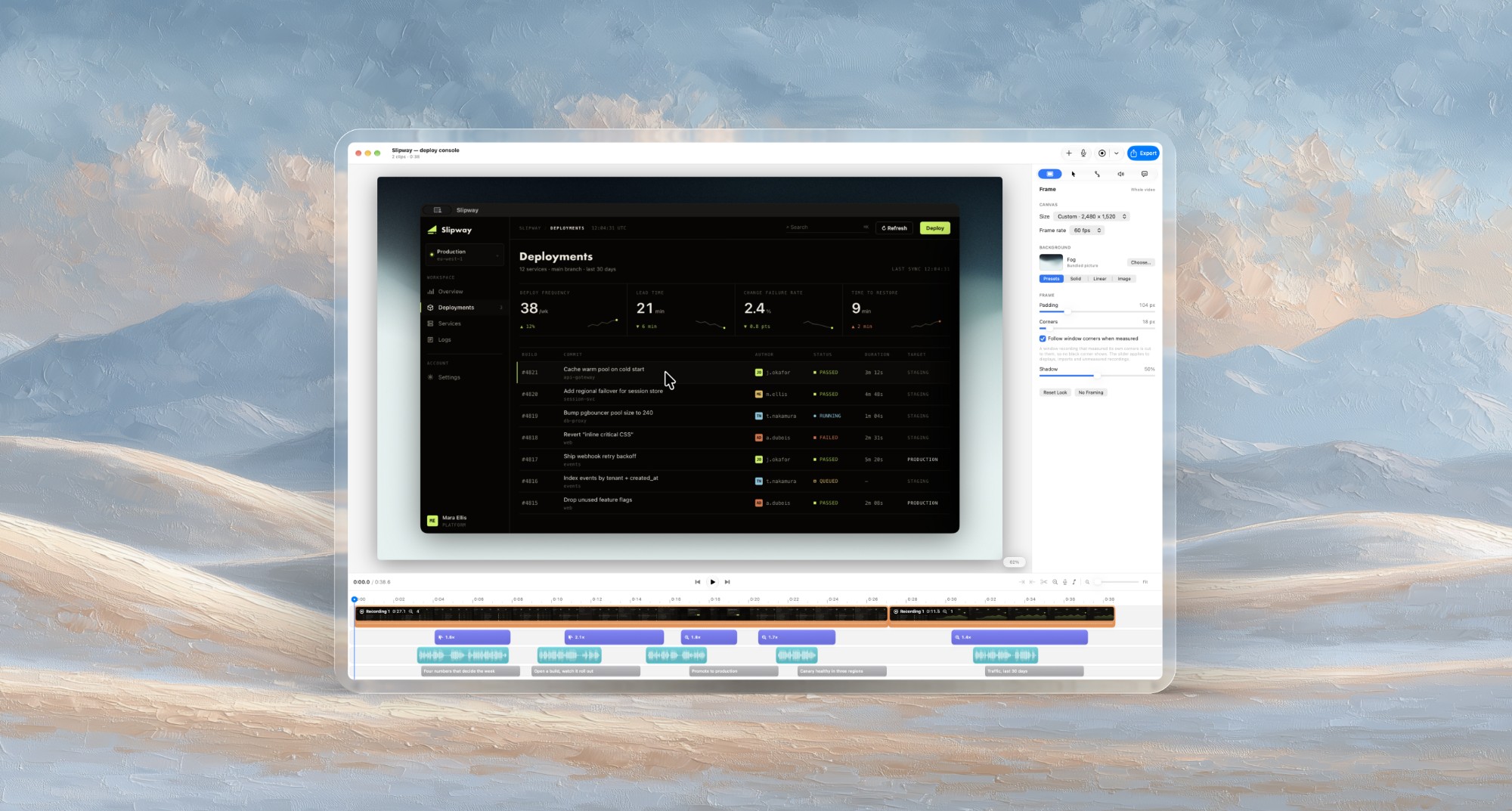
Lumae turns a raw screen recording into a product demo that looks edited by hand. Record a display, a window or an area of your Mac; Lumae zooms in where you clicked, redraws the cursor so it glides, frames the video on a background, and transcribes your voice into captions. Add your camera, a voiceover, music and title cards on one timeline, then export MP4, MOV, ProRes or GIF. Screenshots get the same treatment: capture, annotate, frame, copy.
It is native (SwiftUI, AppKit, ScreenCaptureKit, AVFoundation), everything runs on your Mac, and it is free: no account, no watermark, no export limits.
And because Lumae is also a Model Context Protocol server, Claude Code, Claude Desktop, Codex, Cursor or any MCP client can film a demo, cut it, zoom it, caption it and export it for you, working live in the same editor you use.
Contents
- Install
- Features
- Let an AI agent record and edit your demos (MCP)
- Privacy
- Keyboard shortcuts
- FAQ
- Feedback and support
Install
Disk image. Download Lumae-<version>.dmg from the
latest release, open it and drag
Lumae into Applications. Every build is signed with a Developer ID and notarized by Apple.
Homebrew.
Requirements. macOS 26.0 or later, on Apple silicon or Intel (Lumae is a universal app).
On first launch Lumae asks once for the Screen Recording permission. The microphone and camera are asked for only when you first record with them.
Updates arrive inside the app through Sparkle: Lumae checks once a day, downloads a small signed delta, and installs when you say so. Lumae › Check for Updates… checks right away. Homebrew leaves an installed copy alone, so the app stays the one updater.
Features
Screen recording
- Record a display, a window or an area with Lumae's own selector: drag an area, press Space to pick a window, or take the whole display. Start from the menu bar, the library or a global shortcut in any app.
- System audio and the microphone are one toggle each, and you choose the microphone.
- Film your camera at the same time. It lands on a lane of its own as a bubble: circle, squircle, square or widescreen, any corner, with a ring, a shadow and mirroring. A floating preview shows you on screen while you record, and fades when the pointer comes near it so you can see what you are clicking.
- Keep the recording controls out of the shot. Drag the recording pill anywhere; the next recording opens it in the same spot.
- Retake one clip without touching the rest of the project, or record a new clip onto the end.
Automatic zoom, smooth cursor, motion blur
- Automatic zoom reads the clicks in your recording and zooms in on them. Clicks close together become one move, leading in before the first and holding after the last. Every zoom stays editable: move it, resize it, change its scale, or add your own.
- Zooms can follow the cursor, panning to keep the pointer in view, or be aimed by hand on a focus map of the frame. Set the scale new zooms start at, how long they ease and the shape of the ease (Gentle, Standard or Snappy) once for the whole video.
- A cursor worth watching. Lumae hides the real pointer and redraws it from macOS's own vector artwork: a smoothed path, sharp at any zoom, with a ripple on every click. Choose per clip between that arrow, a touch circle for showing taps, the pointer as recorded, or none.
- Motion blur on zooms and pans, sampled across a virtual shutter the way a camera lens blurs.
Timeline editing
- One timeline for everything: clips, zooms, camera takes, narration, music and captions. Every lane moves, trims, splits (⌘B) and snaps by the same rules.
- Cut, copy and paste anything on the timeline, across lanes and between projects. A pasted recording keeps its drawn cursor and its clicks.
- Title cards. Press T for a title with its own font (Default, Rounded, Serif or Mono), weight, colour and alignment, revealed all at once or by line, word or letter with Fade, Slide, Rise, Focus, Pop or Type, and an exit of its own.
- Pictures on the timeline for an opening or closing card, framed, zoomed and faded like any clip.
- Fades between clips, one at a time or on every cut at once.
- Crop a clip after recording it (C): free, to the canvas, the original shape, 16:9, 4:3 or square. Its zooms keep looking at the same thing, and one click gives the same crop to the other clips of that recording.
- Clip speed from 0.25× to 24× with the pitch kept, for turning a long wait into a few seconds.
- Nondestructive. Edits never touch your media; nothing is re-encoded until you export, every change is one step in Undo, and projects save as you go.
Backgrounds and framing
- Put the recording on a colour, a gradient, one of more than fifty bundled pictures, or an image of your own. Lumae remembers the one you used last and keeps the pictures you add.
- Padding, shadow and corner radius, with corners matched to the recorded window's own, so the frame lands exactly on its edges. A full-screen recording fills the frame with square corners.
- A look per video or per clip. Any clip can depart from the video's look and come back to it in one click.
- Canvas sizes for every destination: 1080p, 720p, 4K, square, vertical 1080 × 1920 for Shorts, Reels and TikTok, or a custom size.
Voiceover, music and captions
- Narrate over the timeline while it plays. The clips' own sound ducks under your voice, and a take lines up with the picture it was recorded against. Each narration segment has its own level and fades.
- A music track with its own level, fades and ducking under narration, so the voice stays on top without riding a slider.
- Captions transcribed on your Mac with Apple's on-device speech recognition, split into lines people can read, every word editable inline. Or write a caption by hand at the playhead (⌥⌘T).
Screenshots and annotation
- Capture a display, a window or an area from a global shortcut, the menu bar or the File menu. Add ⌃ to the shortcut to send the picture straight to the clipboard.
- Annotate with arrows, rectangles, ellipses, highlights, blur, text and numbered steps, and crop. None of it is painted onto the pixels, so every mark stays editable later.
- Frame a screenshot like a video, on the same backgrounds, with padding, corners and shadow.
- Copy Image (⇧⌘C) or export a PNG (⌘E) at the picture's own pixel density.
Export
- H.264 or HEVC in MP4 or MOV, with a Quality of Good, High or Best that means the same look at 720p as at 4K.
- ProRes 422 LT, 422, 422 HQ and 4444 for handing the video to an editor such as Final Cut Pro or Premiere.
- Animated GIF for READMEs, docs and chat, with its own frame rate, palette, dithering and looping.
- The preview and the export share one renderer, so what you see is what you get.
Let an AI agent record and edit your demos (MCP)
Related MCP Servers
Reviews
No reviews yet — be the first to share how this listing worked for you.
Frequently Asked Questions about Lumae
AllMCPs Directory Badge
Showcase your server listing on GitHub or your project documentation. Embed this dynamic SVG badge to highlight official listing status and live engagement.
Badge Style:
Live Dynamic SVG Preview
Markdown (GitHub README)
[](https://allmcps.com/mcp/lumae)HTML Embed
<a href="https://allmcps.com/mcp/lumae"><img src="https://allmcps.com/api/badge/lumae?style=directory" alt="Lumae on AllMCPs" /></a>