whatsappcommunicationmediasqlitestreamable-http
WhatsApp MCP server using Streamable HTTP transport with web admin UI, bidirectional media upload/download, and SQLite persistence.
Quick Install
Automated & IDE SetupCopy the AI prompt to install this server into Claude Code, Cursor, or another agent — or use 1-click editor setup below.
One-click editor setup isn’t available for this listing yet — we don’t have a confirmed install command, and we’d rather show nothing than point your editor at the wrong package or host. Follow the project’s own setup instructions, linked above.
Manual Client & Custom JSON ConfigExpand JSON ▾
No confirmed setup config for this listing yet. We only publish a config block when the install details come from the project itself — its README, its docs, or a verified owner. We haven’t found those for loglux/whatsapp-mcp-stream, and we’d rather show nothing than a guess you’d paste into your client. Follow the project’s own setup instructions for the current steps.
Overview
Use cases
Authenticate WhatsApp sessions via QR code scanning
Send and receive WhatsApp text messages and media
Search and retrieve contacts, chats, and messages
Upload and serve media files for WhatsApp messaging
Audit and analyze WhatsApp group memberships
Key features
Streamable HTTP MCP transport at /mcp endpoint
Web admin UI with QR code, status, settings, and chat viewer
Bidirectional media upload and download with HTTP hosting
SQLite database persistence for session and chat data
Media staging and sending via local files or URLs
Multiple MCP tools for contacts, chats, messages, and media
Capabilities & Tool Schemas (27)
Inspect callable tools, capabilities, and parameters exposed to AI agents by Whatsapp MCP Stream.
get_qr_codeGet the latest WhatsApp QR code as an image for authentication.
check_auth_statusCheck if the WhatsApp client is authenticated and ready.
logoutLogout from WhatsApp and clear the current session.
search_contactsSearch contacts by name or phone number.
resolve_contactResolve a contact by name or phone number (best matches).
get_contact_by_idGet contact details by JID.
Documentation Overview
WhatsApp MCP Stream

A WhatsApp MCP server built around Streamable HTTP transport, using Baileys for WhatsApp connectivity, with a web admin UI and bidirectional media flow (upload + download).
Key points:
- Transport: Streamable HTTP at
/mcp - Engine: Baileys
- Admin UI: QR, status, logout, runtime settings, chat history viewer
- Media: upload endpoints +
/mediahosting + MCP download tool
Quick Start (Docker)
The server will be available at:
- Admin UI:
http://localhost:3003/admin - MCP endpoint:
http://localhost:3003/mcp - Media files:
http://localhost:3003/media/<filename>
DNS on hosts with --iptables=false
On some NAS / hardened hosts (e.g. Synology with dockerd --iptables=false), Docker's embedded DNS proxy (127.0.0.11) has no iptables DNAT rules and refuses connections inside containers.
Fix: copy resolv.conf.example to resolv.conf and add a volume override:
Then add to a local docker-compose.override.yml (not committed):
docker compose up picks up the override automatically.
Runtime Settings
Settings can be edited in the admin UI and are persisted to SETTINGS_PATH (defaults to MEDIA_DIR/settings.json).
Admin UI
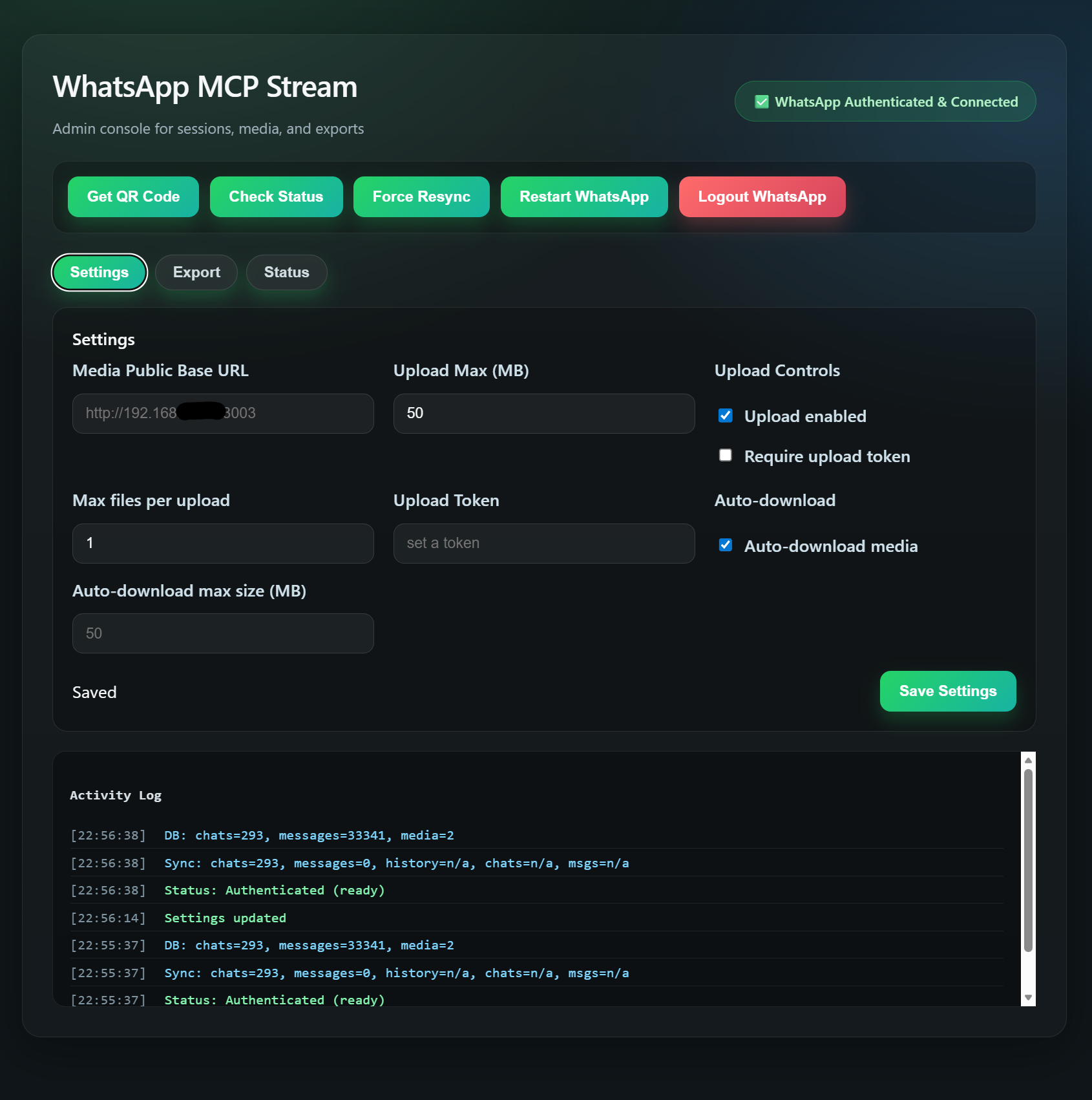 Admin console with runtime settings, QR linking, chat history viewer, export, and status.
Supported settings:
media_public_base_urlupload_max_mbupload_enabledmax_files_per_uploadrequire_upload_tokenupload_tokenauto_download_mediaauto_download_max_mb
Authentication
Built-in authentication is not implemented yet. In production, use a gateway that enforces auth. This project works well behind authmcp-gateway:
Media Upload API
Base64 JSON:
Multipart (recommended for large files):
Both return url and (if configured) publicUrl.
Sending Local Files via send_media
The ./files/ directory in the project root is bind-mounted into the container at /app/files. Drop any file there and reference it immediately — no container restart needed:
For a URL source, pass media_url directly to send_media or stage_media — the server downloads the file itself without base64.
Upload Auth (Optional)
If require_upload_token=true, provide a token with either:
x-upload-token: <token>Authorization: Bearer <token>
MCP Transport
The server exposes Streamable HTTP at /mcp.
Typical flow:
POST /mcpwith JSON-RPCinitialize- Use the returned
mcp-session-idheader for subsequent requests POST /mcpfor tool calls
Note: clients must send Accept: application/json, text/event-stream on initialize.
Smoke Test
Quick regression smoke for MCP tools:
Optional custom target:
MCP Tools
Auth
| Tool | Description |
|---|---|
get_qr_code | Get the latest WhatsApp QR code as an image for authentication. |
check_auth_status | Check if the WhatsApp client is authenticated and ready. |
logout | Logout from WhatsApp and clear the current session. |
Contacts
| Tool | Description |
|---|---|
search_contacts | Search contacts by name or phone number. |
resolve_contact | Resolve a contact by name or phone number (best matches). |
get_contact_by_id | Get contact details by JID. |
get_profile_pic | Get profile picture URL for a JID. |
get_group_info | Get group metadata and participants by group JID. |
Chats
| Tool | Description |
|---|---|
list_chats | List chats with metadata and optional last message. |
get_chat_by_id | Get chat metadata by JID. |
list_groups | List group chats only. |
get_direct_chat_by_contact_number | Resolve a direct chat JID by phone number. |
get_chat_by_contact | Resolve a contact by name or phone number and return chat metadata. |
analyze_group_overlaps | Find members that appear across multiple groups. |
find_members_without_direct_chat | Find group members with no direct chat. |
find_members_not_in_contacts | Find group members missing from contacts. |
run_group_audit | Run combined group audit as one routine operation. |
Messages
| Tool | Description |
|---|---|
list_messages | Get messages from a specific chat. |
search_messages | Search messages by text (optionally scoped to a chat). |
get_message_by_id | Get a specific message by ID (jid:id). |
get_message_context | Get recent messages around a specific message. |
get_last_interaction | Get the most recent message for a JID. |
send_message | Send a text message to a person or group. Supports optional idempotency_key. |
Media
| Tool | Description |
|---|---|
send_media | Send media (image/video/document/audio). Accepts media_path, media_url, or media_content (base64). Supports optional idempotency_key. |
stage_media | Save a file to the server's media directory and return its local path. Use the returned saved_path in send_media (media_path) — avoids base64 when the source is a URL (server downloads directly), or allows sending the same file to multiple recipients without re-uploading. |
download_media | Download media from a message. |
Utility
| Tool | Description |
|---|---|
ping | Health check tool. |
Recovery Notes
This service contains an intentional recovery workaround for Baileys/WhatsApp session-state corruption.
Why it exists:
- In production we observed cases where the container stayed alive and MCP still answered, but the WhatsApp session was functionally broken.
- The most common indicators were Baileys errors like
failed to find key ... to decode mutationandfailed to sync state from version. - In that state, a manual container restart often restored service.
Current behavior:
- On app-state corruption signals, the service first tries a soft recovery with
forceResync(). - If the same class of failure repeats within a time window, it escalates to an internal WhatsApp client restart.
- On disconnects such as
Connection Terminated, the service schedules a disconnect watchdog and escalates to an internal restart if the socket does not return toopenin time. - The reconnect lifecycle is guarded against nested lock deadlocks, so disconnect recovery can complete without requiring a manual container restart.
- Recent production observations show repeated socket disconnects (
428 Connection Terminated,503 Stream Errored) being auto-recovered back toopen. - A dedicated
/healthzendpoint reports503only when the service is genuinely stuck outside the allowed recovery window. - Docker health checks use
/healthz, so the container is restarted only after in-process recovery has had a chance to work.
These recovery mechanisms reduce operator intervention and improve resilience against common WhatsApp/Baileys session failures.
License
MIT
Persistence
Chats and messages are persisted to a local SQLite database stored in the session volume.
Environment variables:
Related MCP Servers
Adoption & maintenance
Factual signals from GitHub, npm, and our automated checks — not a rating.
GitHub stars
5
Stargazers on the source repository.
Last commit
2mo ago
Most recent push to the default branch.
Tools exposed
27
Callable tools this server registers over MCP.
Directory activity
2 views
Config copies, upvotes, and views on AllMCPs.
Reviews
No reviews yet — be the first to share how this listing worked for you.
Frequently Asked Questions about Whatsapp MCP Stream
AllMCPs Directory Badge
Showcase your server listing on GitHub or your project documentation. Embed this dynamic SVG badge to highlight official listing status and live engagement.
Badge Style:
Live Dynamic SVG Preview
Markdown (GitHub README)
[](https://allmcps.com/mcp/loglux-whatsapp-mcp-stream)HTML Embed
<a href="https://allmcps.com/mcp/loglux-whatsapp-mcp-stream"><img src="https://allmcps.com/api/badge/loglux-whatsapp-mcp-stream?style=directory" alt="Whatsapp MCP Stream on AllMCPs" /></a>