discordcommunicationmoderationmessagingcommunity-management
MCP server that lets AI assistants manage Discord channels, messages, members, roles, threads, webhooks, forums, and moderation.
Quick Install
Automated & IDE SetupCopy the AI prompt to install this server into Claude Code, Cursor, or another agent — or use 1-click editor setup below.
Automated check passed— started and listed 44 tools correctly (1mo ago).
Manual Client & Custom JSON ConfigExpand JSON ▾
Client Config & Setup
Choose your client or environment
Target File:
💡 Paste the JSON block into your client's configuration file under mcpServers, then restart the application.
Overview
Use cases
List servers, channels, categories, members, and roles
Send, search, edit, delete, and react to messages
Create and manage channels, forums, threads, webhooks, and roles
Moderate members with kicks, bans, unbans, timeouts, and nickname changes
Send direct messages through the Discord bot
Key features
Channel and category management
Message retrieval, sending, editing, deletion, search, and reactions
Forum post and thread management
Webhook creation and message delivery
Member and role management
Moderation actions and standalone slash commands
Capabilities & Tool Schemas (44)
Inspect callable tools, capabilities, and parameters exposed to AI agents by MCP Discord Bridge.
list_guildsList all Discord servers the bot is in
list_channelsList all channels and categories in a Discord server
create_categoryCreate a new category in a Discord server
create_channelCreate a text or voice channel, optionally inside a category
delete_channelDelete a channel or category by ID
move_channelMove a channel into a different category
Documentation Overview
Discord MCP Server




Control your Discord server using AI — 44 tools, no cloning required. Works with any MCP-compatible app: Claude Desktop, Cursor, Windsurf, Continue.dev, Zed, Claude Code, and more.
What is MCP? Model Context Protocol is an open standard that lets AI apps talk to external tools. This project is one of those tools — it gives any AI assistant the power to manage your Discord server.
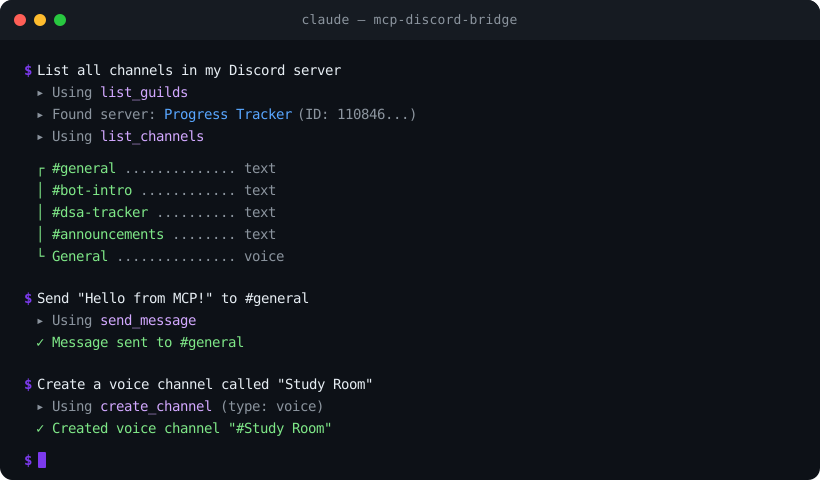
Install in one line
That's it — no clone, no npm install. Just add it to your AI app's MCP config (see Quick Start below).
What Can It Do?
Once connected, your AI assistant can:
- Channels — create, delete, rename, move channels and categories
- Messages — read, send, edit, delete, search messages, send DMs, add/remove reactions
- Forum Channels — list forums, create/read/reply/delete forum posts
- Webhooks — create, send via, edit, and delete webhooks
- Members — list members, view profiles, check roles
- Roles — list, create, edit, delete, assign, and remove roles
- Moderation — kick, ban, unban, timeout members, set nicknames
- Threads — create, list, archive, unarchive, join, and delete threads
- Server — list all servers the bot is in, view channel layouts
It also runs as a standalone Discord bot with /ping, /info, and /serverinfo slash commands.
Quick Start (3 minutes)
Step 1: Create a Discord Bot
- Go to the Discord Developer Portal
- Click New Application — give it a name
- Go to Bot tab — click Reset Token — copy and save the token somewhere safe
Step 2: Invite the Bot to Your Server
- In the Developer Portal, go to OAuth2 > URL Generator
- Check these scopes:
bot,applications.commands - Check these permissions:
Send Messages,Read Message History,Manage Channels,Manage Roles,Manage Webhooks,Kick Members,Ban Members,Moderate Members,Manage Nicknames - Open the generated URL — select your server — authorize
Step 3: Add to Your AI App
Add this to your app's MCP config — no cloning or installing needed:
Where is the config file?
| App | Config Location |
|---|---|
| Claude Desktop | Windows: %APPDATA%\Claude\claude_desktop_config.json · macOS: ~/Library/Application Support/Claude/claude_desktop_config.json |
| Claude Code | ~/.claude.json (or run /mcp in Claude Code) |
| Cursor | Settings > search "MCP" > Edit MCP Settings |
| Windsurf | ~/.codeium/windsurf/mcp_settings.json |
| Continue.dev | ~/.continue/config.json |
| Zed | ~/.config/zed/settings.json |
Step 4: Done!
Restart your AI app. You should now see Discord tools available. Try asking:
"List all channels in my Discord server"
All Available Tools (44)
| Tool | What It Does |
|---|---|
| Server | |
list_guilds | List all servers the bot is in |
list_channels | List all channels and categories |
| Channels | |
create_category | Create a new category |
create_channel | Create a text or voice channel |
delete_channel | Delete a channel or category |
move_channel | Move a channel to a different category |
rename_channel | Rename a channel or category |
| Messages | |
get_channel_messages | Fetch recent messages (up to 100) |
send_message | Send a message to a channel |
delete_message | Delete a message |
edit_message | Edit a bot message |
search_messages | Search messages by keyword |
send_dm | Send a direct message to a user |
add_reaction | Add an emoji reaction to a message |
remove_reaction | Remove the bot's reaction from a message |
add_multiple_reactions | Add multiple reactions at once |
| Forum Channels | |
list_forum_channels | List all forum channels in a server |
create_forum_post | Create a new forum post |
get_forum_post | Fetch a forum post and its messages |
reply_to_forum_post | Reply to a forum post |
delete_forum_post | Delete a forum post |
| Webhooks | |
create_webhook | Create a webhook for a channel |
send_webhook_message | Send a message via webhook |
edit_webhook | Edit a webhook |
delete_webhook | Delete a webhook |
| Members | |
list_members | List server members with roles |
get_member | Get detailed info about a member |
| Roles | |
list_roles | List all roles in a server |
assign_role | Give a role to a member |
remove_role | Take a role from a member |
create_role | Create a new role with name, color, mentionable |
edit_role | Edit a role's name or color |
delete_role | Delete a role from the server |
| Moderation | |
kick_member | Kick a member from the server |
ban_member | Ban a user (with optional message cleanup) |
unban_member | Unban a previously banned user |
timeout_member | Timeout (mute) a member for a duration |
set_nickname | Set or reset a member's nickname |
| Threads | |
create_thread | Create a thread in a text channel |
list_threads | List active and archived threads |
archive_thread | Archive a thread (optionally lock it) |
unarchive_thread | Unarchive a thread |
join_thread | Make the bot join a thread |
delete_thread | Delete a thread |
Install from Source (for contributors)
If you want to modify the code or run the standalone bot:
Then use ts-node to run directly:
Running as a Standalone Bot
If you just want the slash commands without MCP:
| Command | Description |
|---|---|
/ping | Check bot latency |
/info | Show bot uptime and stats |
/serverinfo | Show server details |
Docker Deployment
The image defaults to the MCP server (stdio). To run the standalone bot 24/7 instead, uncomment the command: ["node", "dist/index.js"] line in docker-compose.yml, then:
Architecture
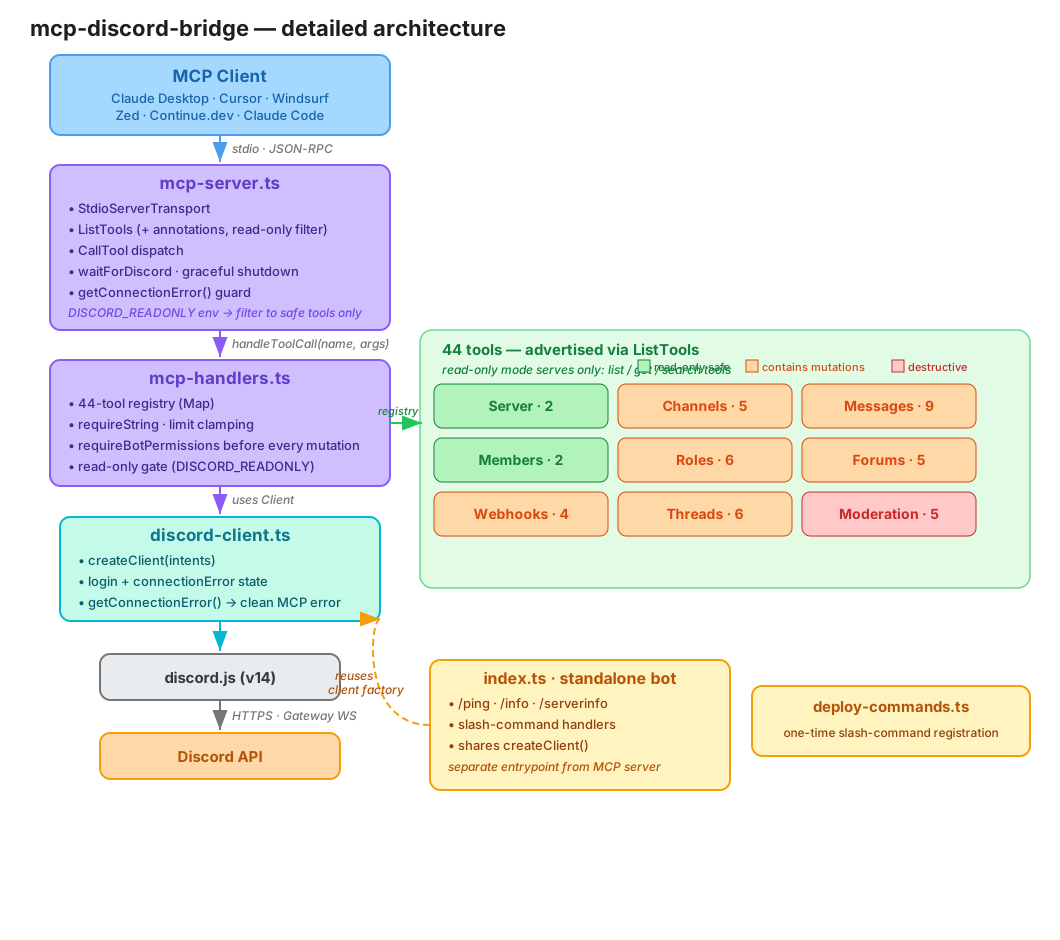
An MCP client talks to mcp-server.ts over stdio (JSON-RPC). The server advertises tools (with read-only/destructive annotations), then dispatches each call through mcp-handlers.ts — a 44-tool registry that validates args, checks bot permissions, and enforces read-only mode. Handlers act through the shared client from discord-client.ts, which owns login and connection state. The standalone bot (index.ts) is a separate entrypoint that reuses the same client factory.
Editable source:
assets/architecture.excalidraw— open it at excalidraw.com.
Development
CI runs automatically on every push and PR via GitHub Actions.
Project Structure
Read-Only Mode
This server can delete channels, ban members, and remove roles. If you only want
the AI to read your server, set DISCORD_READONLY in the env block:
In read-only mode only the 10 read tools (list_*, get_*, search_messages)
are advertised and callable; every write/destructive tool is refused.
All tools also carry MCP annotations (readOnlyHint / destructiveHint), so
compatible clients can flag or confirm destructive actions before running them.
Security
Related MCP Servers
Adoption & maintenance
Factual signals from GitHub, npm, and our automated checks — not a rating.
GitHub stars
3
Stargazers on the source repository.
npm downloads
79
Package downloads in the last 30 days.
Last commit
3mo ago
Most recent push to the default branch.
Availability
100%
Our rolling endpoint + install checks that succeeded.
Install check
Passed
Our sandbox started it and listed its tools.
Tools exposed
44
Callable tools this server registers over MCP.
Directory activity
1 views
Config copies, upvotes, and views on AllMCPs.
Reviews
No reviews yet — be the first to share how this listing worked for you.
Frequently Asked Questions about MCP Discord Bridge
AllMCPs Directory Badge
Showcase your server listing on GitHub or your project documentation. Embed this dynamic SVG badge to highlight official listing status and live engagement.
Badge Style:
Live Dynamic SVG Preview
Markdown (GitHub README)
[](https://allmcps.com/mcp/iprashantraj-mcp-discord-bridge)HTML Embed
<a href="https://allmcps.com/mcp/iprashantraj-mcp-discord-bridge"><img src="https://allmcps.com/api/badge/iprashantraj-mcp-discord-bridge?style=directory" alt="MCP Discord Bridge on AllMCPs" /></a>Technical Specs & Signals
CategoryCommunication
PricingFree
11/11 checks healthy over the last 33d
69Quality signal: Great · 69/100How this signal is calculated ▾
Server availability25/25
Verified ownership10/20
Documentation & tools30/30
Adoption & activity4/15
Community engagement0/10
A guidance signal from public completeness & health data — not a user rating. New listings start lower and rise as they add docs, get verified, and grow adoption. Signals we can't observe for a listing are skipped, not counted against it.
Supply-chain signal
No high-severity advisories surfaced by our automated scan.
Critical 0High 0Medium 0Low 0
Scanned 27d ago via OSV.dev · mcp-discord-bridge (npm)
Own this project?
This directory is pre-filled from public sources. Claim via GitHub README, site badge, or DNS TXT to unlock edit access and the Official badge — proof is checked automatically, then reviewed by our team.
Free dofollow backlink: add your website and place the AllMCPs badge on it — no claim needed. We detect it automatically and keep it verified as long as the badge stays live.
Claim & get free dofollowShare & Embed
Add our SVG badge (dark/light directory styles) or embeddable widget to your site.