AllMCPs
BrowseBestCategoriesStackCompareToolsGuidesBlog Log in Submit MCP

Stay in the loop

Get new MCP servers and top picks in your inbox.

AllMCPs

The open directory for discovering and installing Model Context Protocol servers.

Explore

  • Browse servers
  • Best MCP servers
  • Categories
  • MCP clients
  • Agent prompts
  • Stack Builder
  • Compare servers
  • Tags index
  • Submit a server
  • Pricing

Learn

  • Guides hub
  • What is MCP?
  • Install guide
  • Troubleshooting
  • Security
  • Blog
  • Blog RSS

Tools

  • All tools
  • Config generator
  • Config validator
  • MCP playground
  • OpenAPI β†’ MCP
  • Badge generator

For agents

  • API docs
  • Trust & traffic
  • llms.txt β†— (opens in a new tab)
  • Catalog JSON β†— (opens in a new tab)
  • Remote MCP β†— (opens in a new tab)

Company

  • About
  • Contact
  • X (@AllMCPs) β†— (opens in a new tab)
  • GitHub β†— (opens in a new tab)
  • Terms
  • Privacy
AllMCPs VerifiedAllMCPs VerifiedFeatured on Nick LaunchesFeatured on Nick LaunchesLaunch Llama NewsletterLaunch Llama NewsletterVerified DR - allmcps.comVerified DR - allmcps.comFeatured on SaaSGrowFeatured on SaaSGrowFeatured on Twelve ToolsFeatured on Twelve ToolsFeatured on Saaspa.geFeatured on Saaspa.geFeatured on Findly.toolsFeatured on Findly.toolsFeatured on Startup FameFeatured on Startup FameFeatured on LaunchKiwiFeatured on LaunchKiwiFeatured on ScrollLaunchFeatured on ScrollLaunchFeatured on DailyPingsFeatured on DailyPingsFazier badgeFazier badgeFeatured on NewTool.siteFeatured on NewTool.siteFeatured on saasfame.comFeatured on saasfame.comDR Checker - Domain RatingDR Checker - Domain RatingListed on Turbo0Listed on Turbo0Launched on LaunchBoard - Product Launch PlatformLaunched on LaunchBoard - Product Launch PlatformList on SimilarlabsList on Similarlabshttps://codetrendy.comhttps://codetrendy.comListed on DevTool.ioFeatured on BuildlistFeatured on BuildlistAllMCPs VerifiedAllMCPs VerifiedFeatured on Nick LaunchesFeatured on Nick LaunchesLaunch Llama NewsletterLaunch Llama NewsletterVerified DR - allmcps.comVerified DR - allmcps.comFeatured on SaaSGrowFeatured on SaaSGrowFeatured on Twelve ToolsFeatured on Twelve ToolsFeatured on Saaspa.geFeatured on Saaspa.geFeatured on Findly.toolsFeatured on Findly.toolsFeatured on Startup FameFeatured on Startup FameFeatured on LaunchKiwiFeatured on LaunchKiwiFeatured on ScrollLaunchFeatured on ScrollLaunchFeatured on DailyPingsFeatured on DailyPingsFazier badgeFazier badgeFeatured on NewTool.siteFeatured on NewTool.siteFeatured on saasfame.comFeatured on saasfame.comDR Checker - Domain RatingDR Checker - Domain RatingListed on Turbo0Listed on Turbo0Launched on LaunchBoard - Product Launch PlatformLaunched on LaunchBoard - Product Launch PlatformList on SimilarlabsList on Similarlabshttps://codetrendy.comhttps://codetrendy.comListed on DevTool.ioFeatured on BuildlistFeatured on Buildlist
Β© 2026 Jackalope Digital LLC. All rights reserved.
  1. Home
  2. πŸ’» Developer Tools
  3. Logic Pro MCP
L
Health: Not checked yetWe have not completed a health check for this listing yet.Last checked 8/11/2026, 12:08:04 AM

Logic Pro MCP

Enrichment pendingWe haven’t run our AI enrichment pass on this listing yet, so the overview, use cases, and FAQ below may be sparse or missing. We work through the catalog over time β€” check back soon.
View RepositoryVisit Website

Local MCP server for stateful, fail-closed Logic Pro control and live project readback.

Quick Install

Automated & IDE Setup

Copy the AI prompt to install this server into Claude Code, Cursor, or another agent β€” or use 1-click editor setup below.

Add to CursorAdd to VS Code
Manual Client & Custom JSON ConfigExpand JSON β–Ύ

Install Config Generator

Choose your client
claude_desktop_config.json
{
  "mcpServers": {
    "logic-pro-mcp": {
      "command": "npx",
      "args": [
        "-y",
        "logic-pro-mcp"
      ]
    }
  }
}

πŸ’‘ Paste into ~/Library/Application Support/Claude/claude_desktop_config.json (macOS) or %APPDATA%\Claude\claude_desktop_config.json (Windows)

Install Directory Badge Claim listing AlternativesπŸ’» More in Developer Tools

Documentation Overview

Logic Pro MCP Server for Claude, Cursor, and AI Agents

MCP Toplist

A local Model Context Protocol (MCP) server that lets Claude Code, Claude Desktop, Cursor, VS Code, and custom AI agents control Logic Pro for AI music production: create tracks, write MIDI, operate transport and mixer state, inspect live project data, and verify results.

Install Β· Watch demo Β· What it controls

πŸ† Selected for Anthropic's Claude for Open Source program

Logic Pro MCP has been officially selected for Anthropic's Claude for Open Source program β€” recognition from the makers of Claude that this project is open-source work worth supporting. This server is built with Claude, for Claude-powered agents β€” and is now officially supported by the program.

Logic Pro MCP Server

Claude for Open Source β€” Selected CI

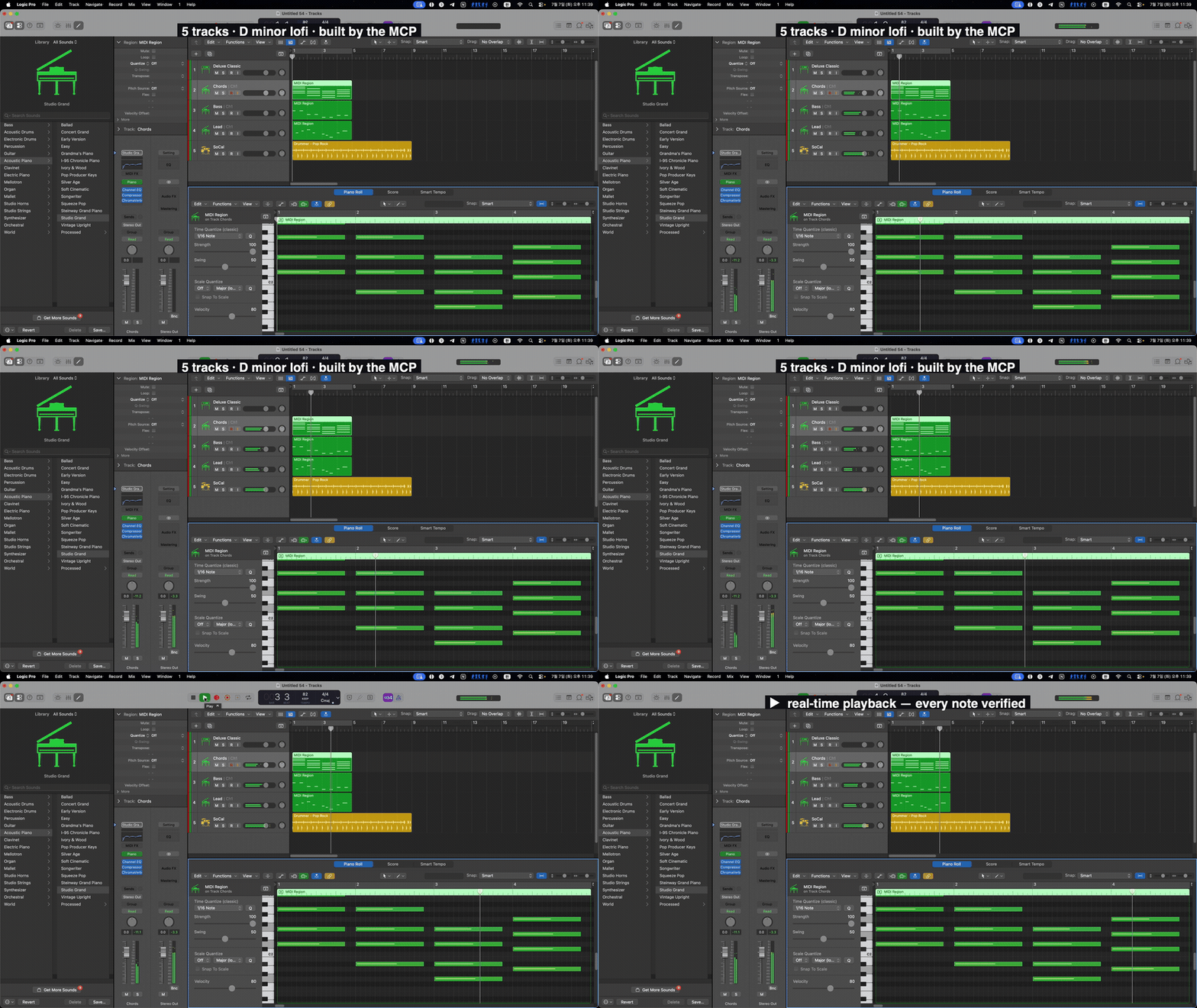
Actual Logic Pro 12.3 screen capture: an 82 BPM D-minor lofi loop composed live by the MCP β€” Chords, Bass, Lead, and Drummer tracks with MIDI regions, an open piano roll, and real-time playback with a moving playhead and meters

An 82 BPM D-minor lofi loop composed live in Logic Pro 12.3 by the MCP β€” tempo, three MIDI parts, a Drummer, and playback, all from prompts.
β–Ά Watch the 36-sec demo (with sound)


Logic Pro MCP Server gives Claude, Cursor, and custom AI agents a structured way to control Logic Pro without brittle keyboard macros. Logic Pro does not ship a first-party API for agentic composition, session setup, mixer operations, or live project readback, so Logic Pro MCP fills that gap by combining 7 native macOS control channels behind one MCP interface, then wrapping every high-risk operation in explicit state, confirmation, and verification contracts.

The result is not "screen automation with prompts." It is a structured server for DAW agents: tools mutate, resources read, evidence is labeled, and uncertain outcomes stay uncertain instead of being reported as success.

Code
You: "Make a 4-bar techno loop in A minor at 140 BPM"

MCP client β†’ logic_tracks.record_sequence {
  bar: 1, tempo: 140,
  notes: "45,0,95;57,107,95;45,214,95;..."
}
MCP client β†’ logic_tracks.set_instrument {
  index: 0, path: "Electronic Drums/Roland TR-909"
}

Logic Pro MCP: region imported, instrument routed, readback exposed through resources.

At a Glance

SurfaceCurrent source tree
MCP tools10 tools covering transport, tracks, mixer, MIDI, edit, navigation, project lifecycle, audio artifact analysis, system health, and verified plugin apply-back
Read resources18 static resources for health, transport, tracks, mixer, markers, project metadata, project audit/cleanup planning, MIDI ports, MCU state, library inventory, stock plugin/instrument intelligence, Session Players, and workflow skills
Resource templates12 templates for the generated operation catalog, track, region, mixer-strip, stock plugin detail/search, stock instrument detail/search, Session Player detail, session-plan dry run, and workflow detail/search lookup
Control channelsMCU, Accessibility, AppleScript, CoreMIDI, CGEvent, Scripter, MIDI Key Commands
Supported Logic ProLatest Logic Pro first β€” desktop Logic Pro (com.apple.logic10, /Applications/Logic Pro.app) and Apple Creator Studio Logic Pro Creator Studio (com.apple.mobilelogic, /Applications/Logic Pro Creator Studio.app). Same MCP server controls both; bundle ID and process name differ. Set LOGIC_PRO_BUNDLE_ID to force a variant when both are installed. Logic Pro 12.3 is the first-class, actively-validated target (macOS 15.6+); older versions down to 12.0.1 are best-effort
Verification lineCurrent source tree: 3211 Swift tests; the last reproducible release build + repo-wide live qualification E2E (every registered operation against real Logic 12.3 with independent readback) ran green on the v3.12.0 release tree (2026-07-21, clean session). The last full strict live E2E ran on the v3.8.0 line (372/373); v3.9.0's two live-only surfaces (MIDI export read-back, Channel EQ verified params) were spike-tested against live Logic 12.3 and honestly deferred β€” see the CHANGELOG Deferred section. v3.12.0 adds live-verified coordinate-free actuation (menu AXPress toggle proof), consent-gated record-arm auto-setup with functional flip/restore verification, and the locale-neutral modal classifier
Release statePublished stable v3.13.0; previous stable v3.12.0 remains available for pinned installs (note: v3.11.0 Homebrew bounce/export is broken by a packaging omission fixed in v3.12.0 β€” #427)

If this project helps you make music with Claude, Cursor, or any MCP client, star the repo. It helps the project reach more Logic Pro users and maintainers.

Want to contribute? Start with the Contributing Guide and the open issues. Many docs, examples, validation tests, and CLI-message improvements do not require Logic Pro.

Why It Exists

Most Logic Pro automation attempts fall into one of three traps:

  1. Prompt-only recipes that drift away from the real tool surface.
  2. Keyboard macro automation that can click the wrong target and still look successful.
  3. Single-channel control that can write to Logic but cannot reliably read what Logic actually did.

Logic Pro MCP uses a different model. It routes each operation to the strongest available channel, exposes live state through MCP resources, and forces callers to handle three outcomes: confirmed, uncertain, or failed.

What It Controls

AreaWhat agents can doSafety/readback model
TransportPlay, stop, record, locate, cycle, metronome, tempoCoreMIDI/AX routing with live logic://transport/state readback
TracksCreate, delete, duplicate, select, rename, mute, solo, arm, set instrumentsMutating targets require explicit index/name; uncertain selection fails closed before writes
MIDI compositionGenerate SMF server-side, import MIDI, send notes/CC/MMC, create virtual ports.mid imports are constrained to server-managed temp files and must create a live track
MixerVolume, pan, plugin snapshots, guarded stock plugin insertionAX writes with same-surface readback for volume/pan (since #83); set_master_volume uses MCU echo; set_send is not exposed (State C command_not_exposed); occupied plugin slots refuse replacement
LibraryScan Logic's instrument library and load patches by pathDisk/AX inventory is cached; disk scan dedupes user/app-bundle .patch candidates and resolve_path classifies kind/source/loadable before set_instrument
NavigationBars, markers, zoom, view togglesMarker navigation is target-faithful; cold-cache misses return failure instead of "next marker"
Project lifecycleNew, open, save, save-as, close, bounce, export plan, quitDestructive operations require confirmation; dry-run export plans do not open Logic or write artifacts

Agent-Grade Surfaces

Tools are for actions and local artifact checks. The public write surface is intentionally small: logic_transport, logic_tracks, logic_mixer, logic_plugins, logic_midi, logic_edit, logic_navigate, logic_project, and logic_system. logic_audio is read-only and verifies exported files after Logic writes them.

Resources are for state. Clients should read logic://transport/state, logic://tracks, logic://mixer, logic://project/info, logic://project/audit, logic://project/cleanup-plan, logic://midi/ports, and related resources instead of burning tool calls on polling.

Evidence is separated from claims. The README points to release evidence, current-main verification, and live media artifacts instead of implying that a successful command equals a verified Logic state.

Trust Model

  • Honest Contract envelopes: mutating operations return State A confirmed, State B uncertain with a reason, or State C failure with an error.
  • Verified plugin apply-back: logic_plugins.* uses HC v2 (hc_schema: 2) and returns State A only after project identity, target track, physical insert slot, plugin identity, and readback all agree.
  • Fail-closed targets: dangerous mixer, marker, track, MIDI import, and plugin operations require explicit targets and validation.
  • Confirmation levels: destructive/project and plugin insertion flows require explicit confirmation metadata before execution.
  • Provenance labels: read surfaces expose source, freshness, and evidence labels instead of forcing clients to guess.
  • Installer hardening: Homebrew pins SHA256; the shell installer refuses to run without explicit hash/team pins unless same-origin provenance is explicitly allowed.
  • Release honesty: published v3.13.0 is the current stable install line, and README claims stay tied to shipped artifacts, release-tree tests, or explicitly linked live evidence.

Quick Start

Prerequisites: macOS 14+ for the MCP server, Logic Pro (latest release prioritized β€” currently 12.3, which Apple lists as requiring macOS 15.6+; older Logic versions down to the 12.0.1 floor are best-effort), and an MCP client that can launch a stdio server. Published GitHub Actions/Homebrew assets are universal (arm64 + x86_64) and do not require Xcode. Bounce/export uses the bundled native CGEvent helper with no third-party click binary.

Logic Pro version policy. Logic Pro MCP tracks the latest Logic Pro release as its first-class target and validates against it (the strict live E2E runs on Logic Pro 12.3). When Apple ships a new Logic Pro version, supporting it is the top priority β€” the Accessibility/UI tree shifts between releases, so the newest version is where fixes land first. Older versions above the 12.0.1 floor remain best-effort and may lose parity as those UI surfaces change.

The package manifest uses Swift tools 6.0 for compatibility. Current source verification uses Xcode 16.4 / Swift 6.2 in CI.

The current published stable release is v3.13.0 (2026-07-22 UTC). It ships ADHOC-signed universal artifacts when Apple Developer ID credentials are absent, plus SHA256SUMS.txt and RELEASE-METADATA.json for pinned installs. The runtime surface becomes 10 tools / 18 resources / 12 resource templates β€” the generated read-only operation catalog logic://system/operations ships as the 12th template. Headlines: the coordinate-free actuation campaign (mute/solo/arm, app-menu items, region selection use AX actions and key commands with observed-effect verification; the external click-tool fallback is retired), consent-gated record-arm key-command auto-setup (system.setup_arm_key), a locale-neutral modal classifier (localized plugin editors and the Drummer Smart Controls pane no longer block unrelated operations, while genuine modals keep blocking), ADR kernel behavior on by default (session-stable target_ref, operation-contract registry with strict params, verified-mutation saga preflight, operation trace), SecureFD-hardened trace-clear/support-bundle paths with a bounded saga lifecycle deadline, and the Homebrew packaging fix restoring bounce/export (logic_variants.py now ships β€” #427). It keeps the v3.9.0 MCP capability additions (transport.toggle_autopunch, resource subscriptions, workflow prompts, per-tool outputSchema / structuredContent), the v3.9.2 verified-plugin closed-window fix, and v3.10.0 desktop/Creator Studio targeting. The two v3.9.0 live-only surfaces (MIDI export read-back, Channel EQ verified params) remain honestly deferred with spike evidence.

1. Install

bash
brew tap MongLong0214/logic-pro-mcp https://github.com/MongLong0214/logic-pro-mcp
brew trust monglong0214/logic-pro-mcp   # Homebrew 6.0+ requires trusting third-party taps
brew install logic-pro-mcp

The Homebrew formula pins both the release tarball URL and its SHA256; Homebrew itself is a trusted delivery channel with its own signature chain. This is the hardened path for production installs. (On Homebrew older than 6.0 the brew trust step does not exist β€” skip it.)

For source-tree development, build locally:

bash
git clone https://github.com/MongLong0214/logic-pro-mcp.git
cd logic-pro-mcp
swift build -c release

2. Register with an MCP client

Claude Code:

Terminal
claude mcp add --scope user logic-pro -- LogicProMCP

Generic MCP client config:

config.json
{
  "mcpServers": {
    "logic-pro": {
      "command": "LogicProMCP"
    }
  }
}

If you built from source, point the command at .build/release/LogicProMCP.

3. Complete Logic Pro setup

Run the local checks:

bash
LogicProMCP --check-permissions

Then complete the two Logic-side setup steps in docs/SETUP.md:

  • Register the LogicProMCP-MCU-Internal MCU control surface.
  • Add the bundled Scripter insert if you need plugin-parameter writes.

Logic 12.2+ does not auto-import the legacy Key Commands plist; the bundled preset is staged as a Manual MIDI Learn reference.

4. Test from your agent

Ask the client:

Check Logic Pro MCP health and show all ready channels.

Expected: all 7 channels ready after full setup, or 5 if you intentionally skipped Key Commands and Scripter.

Pinned shell installer

The installer is fail-closed: it refuses to run without explicit LOGIC_PRO_MCP_SHA256 + LOGIC_PRO_MCP_TEAM_ID env pins. It verifies the downloaded LogicProMCP-macOS-universal.tar.gz archive, so copy the SHA from that archive entry in the release's SHA256SUMS.txt:

Terminal
curl -fsSL https://raw.githubusercontent.com/MongLong0214/logic-pro-mcp/v3.13.0/Scripts/install.sh -o install.sh
# inspect install.sh, then:
LOGIC_PRO_MCP_SHA256=<paste LogicProMCP-macOS-universal.tar.gz SHA256SUMS entry> \
LOGIC_PRO_MCP_TEAM_ID=<paste team_id from RELEASE-METADATA.json> \
bash install.sh

If you knowingly accept same-origin provenance (hash + Team ID fetched from the same release as the binary), opt in explicitly:

bash
LOGIC_PRO_MCP_ALLOW_SAME_ORIGIN=1 \
bash <(curl -fsSL https://raw.githubusercontent.com/MongLong0214/logic-pro-mcp/v3.13.0/Scripts/install.sh)

See SECURITY.md Β§Installer trust model for the trust tiers and threat model.

Setup Doctor

Getting an agent to reliably drive Logic Pro is mostly a permissions-and-environment problem: TCC grants, the right Logic version, a live document, a registered control surface, no blocking modal. LogicProMCP doctor is a first-class, intent-aware readiness platform built for exactly this β€” not a boolean "is it installed" check, but a diagnostic that tells you which capabilities are ready, which are blocked, why, and what to do next β€” and never reports green for something it could not actually verify.

bash
LogicProMCP doctor                 # human-readable report, color when a TTY
LogicProMCP doctor --json          # stable machine contract (schema logic_pro_mcp_doctor.v4)
LogicProMCP doctor --strict        # exit code encodes overall status (CI gate)
LogicProMCP doctor --profile core --client claude-desktop
LogicProMCP doctor --check-updates # opt-in: also checks for a newer release

Intent-aware profiles. You are not forced through checks you'll never use. --profile scopes the required set to how you actually drive Logic β€” core (transport/tracks/AX), mixer, keycmd, legacy-scripter, or full. --client (claude-code, claude-desktop, cursor, vscode, terminal, custom) adds the registration checks that matter for that host. Aggregate status is scoped to the selected profile's required checks, so an MCU-only workflow isn't marked unhealthy for a Scripter gap it will never hit.

Capability readiness, not just check pass/fail. Every check is mapped to the capabilities it gates (track_management, midi_import, mixer_ax, mixer_mcu, keycmd_only_ops, verified_plugin_applyback, project_lifecycle, …). The report tells you "MIDI import is ready; verified-plugin apply-back is blocked by PostEvent" β€” the language an agent (or an operator) can act on directly.

Causal chain β€” fix_plan and blocked_by. Failures are ordered into a fix_plan (the next actions, most-unblocking first), and each downstream check names the upstream check that blocked_by it β€” so you fix the root, not the symptom. The headline restates the single next action.

Honesty is the whole point. A check that could not run (missing capability, unreadable TCC db) is reported as an explicit skipped with a reason β€” it is never silently folded into a pass. Intentional skips (--skip-channel <MIDIKeyCommands|Scripter> with an optional --skip-note, e.g. you deliberately didn't register Scripter) are recorded and excluded from readiness without faking green. TCC findings are redacted to service/principal/state summaries β€” no raw local paths in the report.

Permission surface it verifies. --check-permissions folds the four TCC grants a real agent needs and exits non-zero if any is missing: Accessibility, Automation β†’ Logic Pro, Automation β†’ System Events (a separate target β€” Logic being granted does not imply it), and PostEvent (Input Monitoring, required by the CGEvent bounce/click fallback). The doctor treats these as distinct capabilities because they fail independently: e.g. a -1743 / errAEEventNotPermitted from System Events is a launcher-permission gap (the process responsible for launching the server is denied Automation β†’ System Events), reported as such with the exact fix β€” not misattributed to Logic.

Strict exit codes (--strict, for CI/agent gating): 0 ok Β· 1 failed Β· 2 manual_action_required Β· 3 degraded. Codes 2/3 are status codes, not usage errors, and sit below the sysexits.h range.

A real (redacted) run on a box mid-setup:

JSON Config
{
  "schema": "logic_pro_mcp_doctor.v4",
  "doctor_profile": "core",
  "status": "failed",
  "headline": "Next action [permissions.accessibility]: Accessibility permission is not granted",
  "fix_plan": ["permissions.accessibility", "permissions.post_event_access", "install.binary_inventory"],
  "summary": { "total": 26, "passed": 15, "warnings": 1, "failed": 2, "skipped": 8, "manual": 0, "duration_ms": 333 },
  "checks": [ { "id": "binary.path", "status": "pass", "category": "installation", "severity": "info" } /* … */ ]
}

The same run in a terminal prints a grouped, color-coded report with per-check remediation anchors into docs/SETUP.md. Full flag reference and every check's remediation live in docs/SETUP.md; the --json bytes are a stable contract you can assert against in your own onboarding automation.

Architecture at a Glance

MCP clients launch the Swift stdio server. Dispatchers validate tool parameters, ChannelRouter chooses the strongest available macOS channel, resources expose cached/live state, and high-risk writes return explicit confirmed/uncertain/failed envelopes. The core channels are MCU, Accessibility, AppleScript, CoreMIDI, CGEvent, Scripter, and MIDI Key Commands.

Documentation

DocumentAudiencePurpose
Setup GuideEnd usersInstall, MCP registration, Logic Pro integration, doctor anchors
API ReferenceEnd users, MCP clientsAll 10 tools, 18 resources, 12 templates, Honest Contract, verified apply-back
TroubleshootingEnd usersCommon failures and fixes
Security PolicySecurity reviewersThreat model, reporting, hardening
ChangelogEveryonePer-release changes
ContributingContributorsDev setup, scoped PR workflow, PR verification

The public docs tree is intentionally scoped: setup, API, troubleshooting, README media, plus public issue PRDs/tickets that explain active or shipped user-visible remediation. Historical release notes, internal PRDs, private ticket boards, spike notes, and local live-evidence work files are kept out of docs/; public release history belongs in CHANGELOG.md, GitHub Releases, merged PRs, and issue history.

Status

Published stable: v3.13.0 is available as a GitHub Release and Homebrew install. It carries the accumulated v3.6.0 -> v3.11.0 set, restores Homebrew bounce/export by packaging logic_variants.py with an import-closure release gate (#427), ships the coordinate-free actuation campaign and consent-gated arm auto-setup (#413), fixes localized-editor/Smart-Controls modal misclassification (#381, #405), and turns the ADR-002/003/004/005 kernel behavior on by default with SecureFD/saga hardening (#417, #412). Published metadata remains team_id:"ADHOC" / signing:"adhoc" when Developer ID credentials are absent, with universal x86_64 + arm64 artifacts produced by GitHub Actions.

Previous stable: v3.10.0 remains available as the Creator Studio support release; v3.9.2 remains available as the verified plugin parameter write fix release; v3.9.1 and earlier remain available for pinned installs.

Verification

GateCurrent evidence
Full deterministic suiteCurrent source tree: swift test --no-parallel -> 3211 passed, 0 failed
Release buildCurrent source tree: swift build -c release passed
Python E2E syntaxPR #24 verification: python3 -m py_compile Scripts/live-e2e-test.py passed
Targeted live plugin proofLogic Pro 12.2: logic_plugins.insert_verified track=6 insert=6 plugin=Gain returned State A with observed_slot:6, write_source:"ax_exact_slot_popup", and independent get_inventory readback
Track/transport readback proofLogic Pro 12.2: logic://tracks returned source:"ax_live", real names, placeholder_count:0, unknown_type_count:0; cycle toggle/resource roundtrip reflected live UI state
Strict live Logic Pro 12.3Last full strict live E2E on the v3.8.0 line: 372 passed / 1 skipped / 0 failed (373 total). The v3.9.0 live-only surfaces were spike-tested and honestly deferred (see CHANGELOG Deferred; evidence under docs/spikes/). v3.12.0 keeps the v3.9.2 same-scenario A/B live proof for Compressor threshold and the v3.11.0 targeted live QA set, and adds the v3.12.0 release-tree whole-suite live qualification run (registered-operation independent-readback E2E on a clean Logic 12.3 session, 2026-07-21), a live-verified AXPress menu-item toggle, and the live arm auto-setup A–J matrix from #413
README mediaActual Logic Pro 12.2 capture derivatives are published under docs/media/
v3.12.0 release evidenceGitHub Release, Actions logs, CHANGELOG.md, issues #381/#393/#399/#401/#405/#412/#413/#415/#417/#427, and PRs #407-#428

Live E2E defaults to the release binary. Protocol/security assertions run on any host; Logic/CoreMIDI-dependent checks skip unless a real Logic Pro session is visible. Strict mode converts live-gated skips to failures, treats missing project state as a failed cycle roundtrip precondition, and launches the MCP server under a trusted shell/tmux parent so macOS TCC evaluates the same parent context used by live client flows.

API Contracts That Matter

  • Honest Contract envelope β€” every mutating op returns State A confirmed, State B uncertain with reason, or State C hard failure with error. See docs/API.md.
  • HC v2 plugin apply-back β€” logic_plugins.get_inventory, set_param_verified, and insert_verified add state + hc_schema: 2; State C always carries verified:false, write_attempted, retry safety, and target identity where relevant.
  • Fail-closed mutation targets β€” mixer faders, plugin params, marker delete/rename, track delete/duplicate, and MIDI imports require explicit target parameters.
  • Exact-slot plugin insertion β€” logic_plugins.insert_verified targets the physical insert index returned by get_inventory, verifies the popup is anchored to that slot, and confirms success only by post-write inventory diff.
  • Target-faithful navigation β€” goto_marker returns element_not_found on a cold cache instead of advancing to the next marker.
  • 1-based MIDI channel β€” send_note, send_cc, and record_sequence ch values accept 1..16 to match Logic's UI.
  • Bounded raw SysEx β€” send_sysex rejects payloads over 1024 bytes before CoreMIDI routing.
  • Audible-bounce guardrails β€” record_sequence refuses unverified GM Device / External MIDI imports, logic://project/audit marks External MIDI tracks with MIDI regions as export blockers, and logic_project.bounce refuses those blockers before opening the Bounce dialog.
  • Audit phase split β€” audit logs distinguish rejected calls, confirmation prompts, and executed route invocations.
  • Verified project saves β€” project.save_as verifies the target .logicx package exists and that existing packages advance modification time.
  • Live project metadata β€” logic://project/info promotes live transport tempo/sample-rate when available and falls back per-field to saved project metadata.
  • Side-effect-free reads β€” resources expose state, metadata, and cached inventory without mutating Logic.

Release & Distribution

Stable production tags use the GitHub Actions release workflow. RELEASE-METADATA.json records the exact signing mode, Team ID, and architectures for each artifact. When Developer ID credentials are absent, releases publish ADHOC artifacts with SHA256 metadata and install validation rather than pretending to be notarized.

Per-release detail lives in CHANGELOG.md. Security and installer trust tiers are documented in SECURITY.md.

Registry Metadata

The repository ships server.json for the official MCP Registry metadata path. It is pinned to the current stable release (v3.13.0) and carries discovery tags for Logic Pro, DAW automation, MIDI, Claude/Cursor MCP clients, and music-production agents. The record is metadata-only because the registry package schema does not yet model Homebrew formulas or GitHub release tarballs as first-class package types. The install authority remains the pinned GitHub Release/Homebrew path above.

Known Limitations

  • Tempo typing: transport.set_tempo uses bounded coarse and exact AX slider fallbacks when Logic's inline tempo input does not commit, and fails closed if exact readback still cannot be verified.
  • MIDI region padding: record_sequence regions start at bar 1 and extend to the target bar using inaudible padding; note timing inside the region is exact, but the region can look longer than the phrase.
  • External MIDI bounce readiness: MIDI regions on GM Device / External MIDI tracks are not accepted as audible-bounce evidence by project audit or logic_project.bounce. Move or recreate the material on Software Instrument tracks before claiming a verified Logic Bounce.
  • MIDI Key Commands: Logic 12.2 does not accept the legacy .plist Key Commands import; manual MIDI Learn remains required for keycmd-only operations.
  • Markers: marker creation uses Logic's native Navigate menu and verifies the Marker List when it is readable. A closed/unreadable Marker List is reported as unreadable or served from the last readable cache instead of being promoted to a verified empty list. rename_marker remains not_implemented.
  • Plugin parameter readback: logic_plugins.set_param_verified opens the target insert's plugin window when needed and live-verifies Compressor threshold through that window; arbitrary plugin parameters remain future work and fail closed with unsupported_param_readback.

Development

Source builds require Xcode 16.4+ / Swift 6.2 for the current verified toolchain.

bash
swift test --no-parallel
swift build -c release
python3 -m py_compile Scripts/live-e2e-test.py

For live attestation on a configured Logic Pro host:

bash
LOGIC_PRO_MCP_STRICT_LIVE=1 Scripts/live-e2e-test.sh

License

MIT. See LICENSE.

Contributing

Bug reports, PRs, and feature discussions are welcome. See CONTRIBUTING.md and the open issues for the dev workflow.

Security vulnerabilities: please do not open a public issue. See SECURITY.md for the private disclosure process.

Related MCP Servers

View all in Developer Tools View all alternatives
  • World Monitor logoWorld Monitor

    Live global intelligence: real-time markets, conflicts, country risk, chokepoints, energy. 39 tools.

    πŸ’» Developer Tools1 views
    Compare vs World Monitor β†’
  • A
    Ai Netcafe

    Compare LLM cost & latency on one prompt, translate PDF keeping layout, cited research, make PPTX

    πŸ’» Developer Tools0 views
    Compare vs Ai Netcafe β†’
  • Claude Task Master logoClaude Task Master

    AI-powered task management system for AI-driven development. Features PRD parsing, task expansion, multi-provider support (Claude, OpenAI, Gemini, Perplexity, xAI), and selective tool loading for optimized context usage.

    πŸ’» Developer Tools7 views
    Compare vs Claude Task Master β†’
  • N
    Npx Vibe

    Read-only npm package and project dependency preflight tools for AI applications.

    πŸ’» Developer Tools0 views
    Compare vs Npx Vibe β†’

Frequently Asked Questions about Logic Pro MCP

Add the following block to your claude_desktop_config.json under mcpServers: "mcpServers": { "logic-pro-mcp": { "command": "npx", "args": ["-y", "Logic Pro MCP"] } }

AllMCPs Directory Badge

Full Badge Customizer

Showcase your server listing on GitHub or your project documentation. Embed this dynamic SVG badge to highlight official listing status and live engagement.

Badge Style:
Live Dynamic SVG PreviewLogic Pro MCP AllMCPs Directory Badge

Markdown (GitHub README)
[![AllMCPs](https://allmcps.com/api/badge/logic-pro-mcp?style=directory)](https://allmcps.com/mcp/logic-pro-mcp)
HTML Embed
<a href="https://allmcps.com/mcp/logic-pro-mcp"><img src="https://allmcps.com/api/badge/logic-pro-mcp?style=directory" alt="Logic Pro MCP on AllMCPs" /></a>

Technical Specs & Signals

CategoryπŸ’»Developer Tools
More technical detailsExpand β–Ύ
TransportSTDIO
RuntimeNode.js
0/5 checks healthy over the last 6h
Views0
Unique ViewsTotal visits recorded for this listing page on AllMCPs.
Installs0
Installs & Copy ActionsTotal times users copied install commands or configuration snippets for this server.
27Quality signal: Emerging Β· 27/100How this signal is calculated β–Ύ
Server availabilityNot measured

Not scored for repo-hosted servers β€” we can't reach the running server, only its GitHub page. Hosted MCP endpoints are health-checked live.

Verified ownership8/20
Documentation & tools11/30
Adoption & activity1/15
Community engagement0/10

A guidance signal from public completeness & health data β€” not a user rating. New listings start lower and rise as they add docs, get verified, and grow adoption. Signals we can't observe for a listing are skipped, not counted against it.

β˜… FeaturedMoxie Docs MCP logo

Moxie Docs MCP

MCP & Agent Skills for Automated Documentation, and codebase conventions + context

Explore Server β†’

Own this project?

This directory is pre-filled from public sources. Claim via GitHub README, site badge, or DNS TXT to get the verified badge.

Free dofollow backlink: after claiming, verify your product site and place a dofollow AllMCPs badge β€” we recheck it stays live.

Claim & get free dofollow

Share & Embed

Add our SVG badge (dark/light directory styles) or embeddable widget to your site.

Explore more

More in πŸ’» Developer Tools β†’Best MCP servers for Developers β†’Alternatives to Logic Pro MCP β†’Install in Claude DesktopInstall in CursorInstall in VS Code