Llmtrim
MCP server and proxy that compresses LLM prompts, tool output, and replies to cut token cost.
Install Llmtrim
Pick your client, then add it in one click or paste the config.
~/Library/Application Support/Claude/claude_desktop_config.json{
"mcpServers": {
"llmtrim": {
"command": "uvx",
"args": [
"llmtrim"
]
}
}
}
Settings → Developer → Edit Config, merge this into mcpServers, then fully quit and reopen Claude Desktop.
We couldn’t confirm it starts correctly
We ran the install command but it didn't respond within our test window — this can mean a slow first-time install rather than a real problem.
uvx llmtrimProcess exited before answering initialize.
This is an experimental automated check and can have false negatives — missing environment variables, a slow cold install, etc. It doesn’t necessarily mean something’s wrong. Last checked 10d ago.
Overview
Security & health
What it can reach and how reliably it runs — from our own checks, not the maintainer’s claims.
Recent health check succeeded.
Supply-chain signal
No high-severity advisories surfaced by our automated scan.
Scanned 3d ago via OSV.dev · llmtrim (PyPI)
Adoption & maintenance
Factual signals from GitHub, npm, and our automated checks — not a rating.
From the project README

llmtrim
Local proxy that compresses LLM API traffic so you pay less. Same answers, smaller bill.
−31% input · −74% output · −66% round-trip cost · 112 live A/B cases · ~5 ms/call · no model to load
Using Claude Code? One install also gets you /sub
to serve it through CLIProxyAPI.
Proxy · CLI · MCP · library (Python · Ruby · Swift · Kotlin · JS/WASM)







What it does • Install • Day to day • In action • Works with • Claude Code • Numbers • Config • CLI & library
What it does
You run Claude Code, Codex, Cursor, or your own app. Every turn, the tool sends a large request: system prompt, tools, history, raw command output. You pay for every token of that, including the parts that do not help the model.
A 200-line build log with two errors. Tool schemas resent on every call. JSON with hundreds of near-identical rows. That bulk is still billed.
llmtrim sits on your machine as a local proxy, trims the waste, and forwards a smaller request. The reply is unchanged. You keep the same tools and answers; you spend less.
  before:  your tool ───── full request ─────▶  OpenAI / Anthropic / …
                    ◀──────── reply ──────────

  after:   your tool ──▶ llmtrim ──smaller──▶  OpenAI / Anthropic / …
                            (on your machine)
                    ◀──────── reply ──────────  (same answer)
Compression cannot raise your bill or break a request; worst case is zero savings. Everything runs locally, nothing is sent to us. In action →
For Claude Code the same install also wires /sub to route sessions through another subscription. Details →
Get started
npm install -g @llmtrim/cli@latest && llmtrim setup
# open a new terminal, then keep working
llmtrim status
That's it. setup starts a local proxy and wires your shell. When Claude Code is present, it also turns on /sub. You do not run a separate install for that.
| You want | Run |
|---|---|
| First install | llmtrim setup |
| New version | llmtrim update (then llmtrim ensure after npm/brew/cargo) |
| Something broken | llmtrim ensure · llmtrim doctor --fix · or f in status |
Any tool that honors
HTTPS_PROXYworks (Claude Code, Codex, Cursor, Aider, your SDK). GitHub Copilot does not (certificate pinning). Full list →
Other installers (Homebrew, curl, Scoop, Cargo, Docker)
# Linux / macOS
curl -fsSL https://raw.githubusercontent.com/fkiene/llmtrim/main/install.sh | sh

# Windows (PowerShell)
irm https://raw.githubusercontent.com/fkiene/llmtrim/main/install.ps1 | iex

# Package managers
brew install fkiene/tap/llmtrim
cargo binstall llmtrim
scoop install llmtrim
docker run -d -p 43117:43117 -v llmtrim-state:/data ghcr.io/fkiene/llmtrim
Full options: INSTALL.md.
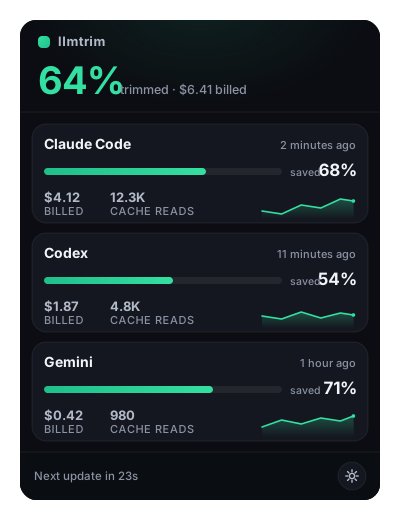
Desktop tray (menu bar / system tray)
Menu-bar / system-tray popover with the same savings numbers. Bundled in Homebrew, Scoop, and npm; setup can enable open-at-login. Open with llmtrim tray. On Linux desktops, interactive ensure can fetch the tray binary from the latest release (needs libwebkit2gtk-4.1 and libayatana-appindicator3).
Is this safe?
Same technique as mitmproxy, scoped to LLM API hosts only. setup changes three things; llmtrim uninstall reverses all three:
- Private CA in
~/.llmtrim/(name-constrained; cannot intercept your bank or email) - Shell env:
HTTPS_PROXY+ CA trust - Login service: daemon at login
No API keys stored (your tool's auth is forwarded). Prompts never touch disk; only anonymous token counts. Recoverable tool results stay in bounded daemon RAM for five hours by default and disappear on restart. Full threat model: SECURITY.md.
llmtrim ca
openssl x509 -in ~/.llmtrim/ca.pem -noout -text | grep -A3 "Name Constraints"
Day to day
llmtrim status     # savings + health  (aliases: monitor, gain)
llmtrim update     # new release, restart daemon, refresh integrations
llmtrim ensure     # match the recommended install state on this machine
| Situation | Command |
|---|---|
| Watch savings | llmtrim status |
After npm / brew / cargo upgrade | llmtrim ensure (or f in status) |
| Diagnose | llmtrim doctor · repair with doctor --fix |
| Pause / resume proxy | llmtrim stop · llmtrim start |
| Force one session through llmtrim | llmtrim wrap claude |
| Remove everything | llmtrim uninstall |
After setup, update, or ensure, owned Claude Code /sub stays in sync with the binary.
Time series: llmtrim status --daily · --weekly · --monthly · --json · --csv.
In action
An agent ran a build. The tool returned 58 lines; two were errors. All 58 would have been billed.
4,662 chars → 978 (−79%). Errors stay verbatim. Repeated INFO lines fold into a template plus the values (lossless when the range is regular).
# before (noise + signal)
[2026-06-13T10:02:00Z] INFO  compiling module core::worker::task_0 (incremental)
… 28 more near-identical INFO lines …
[2026-06-13T10:02:31Z] ERROR src/worker/pool.rs:214: mismatched types: expected `usize`, found `i64`
… 25 more INFO lines …
[2026-06-13T10:03:01Z] ERROR src/net/conn.rs:88: cannot borrow `buf` as mutable more than once
[2026-06-13T10:03:02Z] INFO  build failed, 2 errors

# after (errors verbatim; INFO folded losslessly)
[{}] INFO compiling module core::worker::task_{} (incremental) [×30: (10:02:00Z..10:02:29Z step 1s; 0..29)]
[2026-06-13T10:02:31Z] ERROR src/worker/pool.rs:214: mismatched types: expected `usize`, found `i64`
[{}] INFO compiling module core::net::conn_{} (incremental) [×25: 10:02:32Z..10:02:56Z; 0..24]
[2026-06-13T10:03:01Z] ERROR src/net/conn.rs:88: cannot borrow `buf` as mutable more than once
[2026-06-13T10:03:02Z] INFO  build failed, 2 errors
Try it on a request body of your own:
echo '{"model":"gpt-4o","messages":[...]}' | llmtrim compress --provider openai
Log folding is one stage. Others kick in on different waste:
| Waste | What happens |
|---|---|
| Build logs, diffs, grep dumps | Keep errors / changes / matches; fold the rest |
| Long pasted context | Keep chunks relevant to the question |
| Source code | Keep useful bodies; rest → signatures |
| Tool schemas every turn | Trim + keep the cache prefix stable |
| Huge JSON arrays | Compact table (TOON) or sample |
| Verbose model replies | Ask for terser output where safe |
[!IMPORTANT] Compression cannot raise your bill or break a request. Each stage is re-measured with the provider's real tokenizer and undone if it does not save tokens. If the provider rejects the compressed body, the original is resent. Worst case is zero savings.
Existing prompt-cache prefixes (cache_control) are left alone. First-arrival recoverable shaping (llmtrim recall r_…) is off by default; live-zone tool-output windowing still runs, and a re-run of the same tool ships in full. To skip shaping for a command (verbatim stdout, including a terminal trailer), set toolout_passthrough = ["*gpt.sh*"] or prefix the command with LLMTRIM_TOOL_OUTPUT=passthrough. Lines starting with LLMTRIM_KEEP: survive windowing even when the rest is clipped.
All 10 compressors
Stages run in savings order. Nothing under a cache_control marker is rewritten.
Reviews
No reviews yet — be the first to share how it worked for you.
Frequently Asked Questions about Llmtrim
Related MCP servers
Add a badge to your READMEShow it’s listed — live SVG, Markdown or HTML.
AllMCPs Directory Badge
Showcase your server listing on GitHub or your project documentation. Embed this dynamic SVG badge to highlight official listing status and live engagement.
[](https://allmcps.com/mcp/llmtrim)<a href="https://allmcps.com/mcp/llmtrim"><img src="https://allmcps.com/api/badge/llmtrim?style=directory" alt="Llmtrim on AllMCPs" /></a>