AllMCPs
BrowseBestCategoriesStackCompareToolsGuidesBlog Log in Submit MCP

Stay in the loop

Get new MCP servers and top picks in your inbox.

AllMCPs

The open directory for discovering and installing Model Context Protocol servers.

Explore

  • Browse servers
  • Best MCP servers
  • Categories
  • MCP clients
  • Agent prompts
  • Stack Builder
  • Compare servers
  • Tags index
  • Submit a server
  • Pricing

Learn

  • Guides hub
  • What is MCP?
  • Install guide
  • Troubleshooting
  • Security
  • Blog
  • Blog RSS

Tools

  • All tools
  • Config generator
  • Config validator
  • MCP playground
  • OpenAPI β†’ MCP
  • Badge generator

For agents

  • API docs
  • Trust & traffic
  • llms.txt β†— (opens in a new tab)
  • Catalog JSON β†— (opens in a new tab)
  • Remote MCP β†— (opens in a new tab)

Company

  • About
  • Contact
  • X (@AllMCPs) β†— (opens in a new tab)
  • GitHub β†— (opens in a new tab)
  • Terms
  • Privacy
AllMCPs VerifiedAllMCPs VerifiedFeatured on Nick LaunchesFeatured on Nick LaunchesLaunch Llama NewsletterLaunch Llama NewsletterVerified DR - allmcps.comVerified DR - allmcps.comFeatured on SaaSGrowFeatured on SaaSGrowFeatured on Twelve ToolsFeatured on Twelve ToolsFeatured on Saaspa.geFeatured on Saaspa.geFeatured on Findly.toolsFeatured on Findly.toolsFeatured on Startup FameFeatured on Startup FameFeatured on LaunchKiwiFeatured on LaunchKiwiFeatured on ScrollLaunchFeatured on ScrollLaunchFeatured on DailyPingsFeatured on DailyPingsFazier badgeFazier badgeFeatured on NewTool.siteFeatured on NewTool.siteFeatured on saasfame.comFeatured on saasfame.comDR Checker - Domain RatingDR Checker - Domain RatingListed on Turbo0Listed on Turbo0Launched on LaunchBoard - Product Launch PlatformLaunched on LaunchBoard - Product Launch PlatformList on SimilarlabsList on Similarlabshttps://codetrendy.comhttps://codetrendy.comListed on DevTool.ioFeatured on BuildlistFeatured on BuildlistAllMCPs VerifiedAllMCPs VerifiedFeatured on Nick LaunchesFeatured on Nick LaunchesLaunch Llama NewsletterLaunch Llama NewsletterVerified DR - allmcps.comVerified DR - allmcps.comFeatured on SaaSGrowFeatured on SaaSGrowFeatured on Twelve ToolsFeatured on Twelve ToolsFeatured on Saaspa.geFeatured on Saaspa.geFeatured on Findly.toolsFeatured on Findly.toolsFeatured on Startup FameFeatured on Startup FameFeatured on LaunchKiwiFeatured on LaunchKiwiFeatured on ScrollLaunchFeatured on ScrollLaunchFeatured on DailyPingsFeatured on DailyPingsFazier badgeFazier badgeFeatured on NewTool.siteFeatured on NewTool.siteFeatured on saasfame.comFeatured on saasfame.comDR Checker - Domain RatingDR Checker - Domain RatingListed on Turbo0Listed on Turbo0Launched on LaunchBoard - Product Launch PlatformLaunched on LaunchBoard - Product Launch PlatformList on SimilarlabsList on Similarlabshttps://codetrendy.comhttps://codetrendy.comListed on DevTool.ioFeatured on BuildlistFeatured on Buildlist
Β© 2026 Jackalope Digital LLC. All rights reserved.
  1. Home
  2. 🎯 Marketing
  3. Llmscout
L
Health: Not checked yetWe have not completed a health check for this listing yet.Last checked 8/11/2026, 12:12:21 AM

Llmscout

Enrichment pendingWe haven’t run our AI enrichment pass on this listing yet, so the overview, use cases, and FAQ below may be sparse or missing. We work through the catalog over time β€” check back soon.
View Repository

Zero-config SEO and GEO checker: 21 technical-SEO and generative-engine checks for a live site.

Quick Install

Automated & IDE Setup

Copy the AI prompt to install this server into Claude Code, Cursor, or another agent β€” or use 1-click editor setup below.

Add to CursorAdd to VS Code
Manual Client & Custom JSON ConfigExpand JSON β–Ύ

Install Config Generator

Choose your client
claude_desktop_config.json
{
  "mcpServers": {
    "llmscout": {
      "command": "npx",
      "args": [
        "-y",
        "llmscout"
      ]
    }
  }
}

πŸ’‘ Paste into ~/Library/Application Support/Claude/claude_desktop_config.json (macOS) or %APPDATA%\Claude\claude_desktop_config.json (Windows)

Install Directory Badge Claim listing Alternatives🎯 More in Marketing

Documentation Overview

LLMScout

CI npm version PyPI version License: MIT

Install β€’ Quickstart β€’ CLI reference β€’ Comparison β€’ FAQ β€’ Contributing

Runs 21 technical-SEO and GEO (generative-engine-optimization) checks against your site, in pure TypeScript or pure Python, with zero Python interpreter, zero headless browser, and zero external toolchain either way.
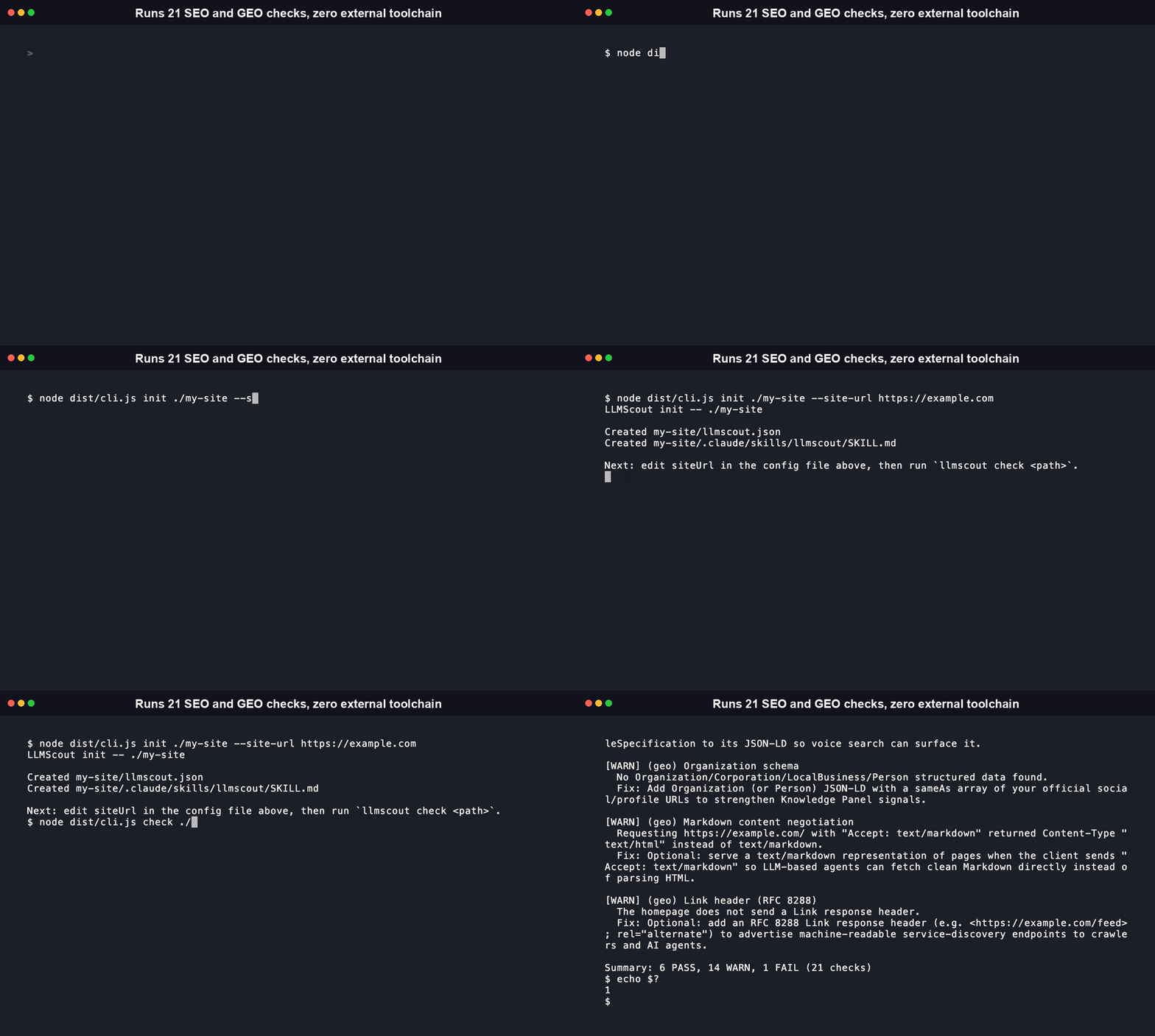
Installing llmscout-cli with npm, then running llmscout init and llmscout check against a live site, with the resulting PASS/WARN/FAIL check output in the terminal

Install

LLMScout ships as two independent, complementary distributions. Both run the same 21 checks with the same PASS/WARN/FAIL verdicts, so pick whichever fits your toolchain.

Node/TypeScript (npm):

Terminal
npm install -g llmscout-cli
llmscout init ./my-site --site-url https://example.com
llmscout check ./my-site

The CLI targets Node 18+ (declared in package.json engines). The two runtime dependencies are cheerio (HTML parsing) and commander (argument parsing): there is no Python interpreter, no pip install, and no Playwright/Chromium download anywhere in the npm install.

[!NOTE] The npm install pulls in undici as a transitive dependency of cheerio. npm audit has flagged a high-severity advisory against it in the past; package.json's overrides block pins undici (and js-yaml/nanoid) to patched ranges to close it. Run npm audit after install to confirm your resolved tree is clean.

Python (PyPI):

Terminal
pip install llmscout-cli
llmscout init ./my-site --site-url https://example.com
llmscout check ./my-site

Zero runtime dependencies -- HTML parsing and HTTP fetching both use only the Python standard library. See python/README.md for the full Python-specific guide.

Then, in any project you want to check:

bash
llmscout init .

That scaffolds a llmscout.json config and a small Claude Code skill file into the target directory. Set your site URL and run llmscout check ..

Quickstart

Scaffold a config and run a check against a live site:

bash
llmscout init ./my-site --site-url https://example.com
llmscout check ./my-site

Real output from llmscout check against https://example.com:

Code
LLMScout check -- https://example.com

[PASS] (technical) Title tag
  Title "Example Domain" is 14 characters, within the recommended 10-60 range.

[WARN] (technical) Meta description
  No meta description found.
  Fix: Add <meta name="description" content="..."> with 50-160 characters summarizing the page.

[WARN] (technical) Canonical tag
  No <link rel="canonical"> tag found.
  Fix: Add a canonical link tag pointing at the preferred URL for this page.

[FAIL] (technical) robots.txt
  robots.txt was not reachable at https://example.com/robots.txt (HTTP 404).
  Fix: Add a robots.txt file at your site root, even a permissive one, so crawlers and agents have explicit directives.

[WARN] (technical) sitemap.xml
  No sitemap was reachable (tried: https://example.com/sitemap.xml).
  Fix: Add a sitemap.xml at your site root, or point to one with a Sitemap: directive in robots.txt, to help search engines discover pages.

[PASS] (technical) Heading structure
  Exactly one <h1> and no skipped heading levels detected.

[PASS] (technical) Image alt coverage
  No <img> tags found on the page.

[WARN] (technical) Open Graph tags
  No Open Graph tags found.
  Fix: Add Open Graph meta tags (og:title, og:description, og:image, og:url) so shared links render rich previews on social platforms.

[WARN] (technical) Twitter/X Card tags
  No twitter:card meta tag found.
  Fix: Add <meta name="twitter:card" content="summary_large_image"> (or another valid card type) so links render rich previews on X/Twitter.

[WARN] (technical) Meta robots directives
  No meta robots directives found; default Google Search snippet/preview limits will apply.
  Fix: Add <meta name="robots" content="max-snippet:-1, max-image-preview:large, max-video-preview:-1"> to control search snippet appearance.

[PASS] (technical) Image weight
  No <img> tags with an http(s) src to measure.

[PASS] (technical) Redirect chain
  The homepage resolved with no redirects.

[WARN] (geo) Structured data (JSON-LD)
  No JSON-LD structured data found.
  Fix: Add schema.org JSON-LD markup (e.g. Organization, WebSite, or Article) so generative engines can understand the page's entities.

[WARN] (geo) llms.txt
  No llms.txt found at https://example.com/llms.txt.
  Fix: Optional: add an llms.txt at your site root summarizing the site for LLM-based agents (see llmstxt.org).

[WARN] (geo) AI crawler directives
  robots.txt is unreachable, so AI-crawler directives could not be determined.
  Fix: Add a reachable robots.txt if you want to state an explicit policy for AI crawlers (GPTBot, OAI-SearchBot, ClaudeBot, Claude-SearchBot, PerplexityBot, Google-Extended, Applebot-Extended).

[WARN] (geo) FAQ schema
  No FAQPage structured data found.
  Fix: If this page has an FAQ section, mark it up with FAQPage JSON-LD so generative engines can surface individual answers.

[PASS] (geo) Content extraction friendliness
  Found 1 heading(s) and 1 structured text block(s); content appears reasonably extractable. (Heuristic: cannot assess semantic quality or JS-rendered content.)

[WARN] (geo) Speakable schema
  No Speakable structured data found.
  Fix: If this page has content suited for voice assistants, add a "speakable" SpeakableSpecification to its JSON-LD so voice search can surface it.

[WARN] (geo) Organization schema
  No Organization/Corporation/LocalBusiness/Person structured data found.
  Fix: Add Organization (or Person) JSON-LD with a sameAs array of your official social/profile URLs to strengthen Knowledge Panel signals.

[WARN] (geo) Markdown content negotiation
  Requesting https://example.com/ with "Accept: text/markdown" returned Content-Type "text/html" instead of text/markdown.
  Fix: Optional: serve a text/markdown representation of pages when the client sends "Accept: text/markdown" so LLM-based agents can fetch clean Markdown directly instead of parsing HTML.

[WARN] (geo) Link header (RFC 8288)
  The homepage does not send a Link response header.
  Fix: Optional: add an RFC 8288 Link response header (e.g. <https://example.com/feed>; rel="alternate") to advertise machine-readable service-discovery endpoints to crawlers and AI agents.

Summary: 6 PASS, 14 WARN, 1 FAIL (21 checks)

The same run with --json:

bash
llmscout --json check ./my-site
config.json
{
  "siteUrl": "https://example.com",
  "summary": {
    "pass": 6,
    "warn": 14,
    "fail": 1,
    "total": 21
  },
  "results": [
    {
      "id": "title",
      "name": "Title tag",
      "category": "technical",
      "status": "PASS",
      "message": "Title \"Example Domain\" is 14 characters, within the recommended 10-60 range."
    }
  ]
}
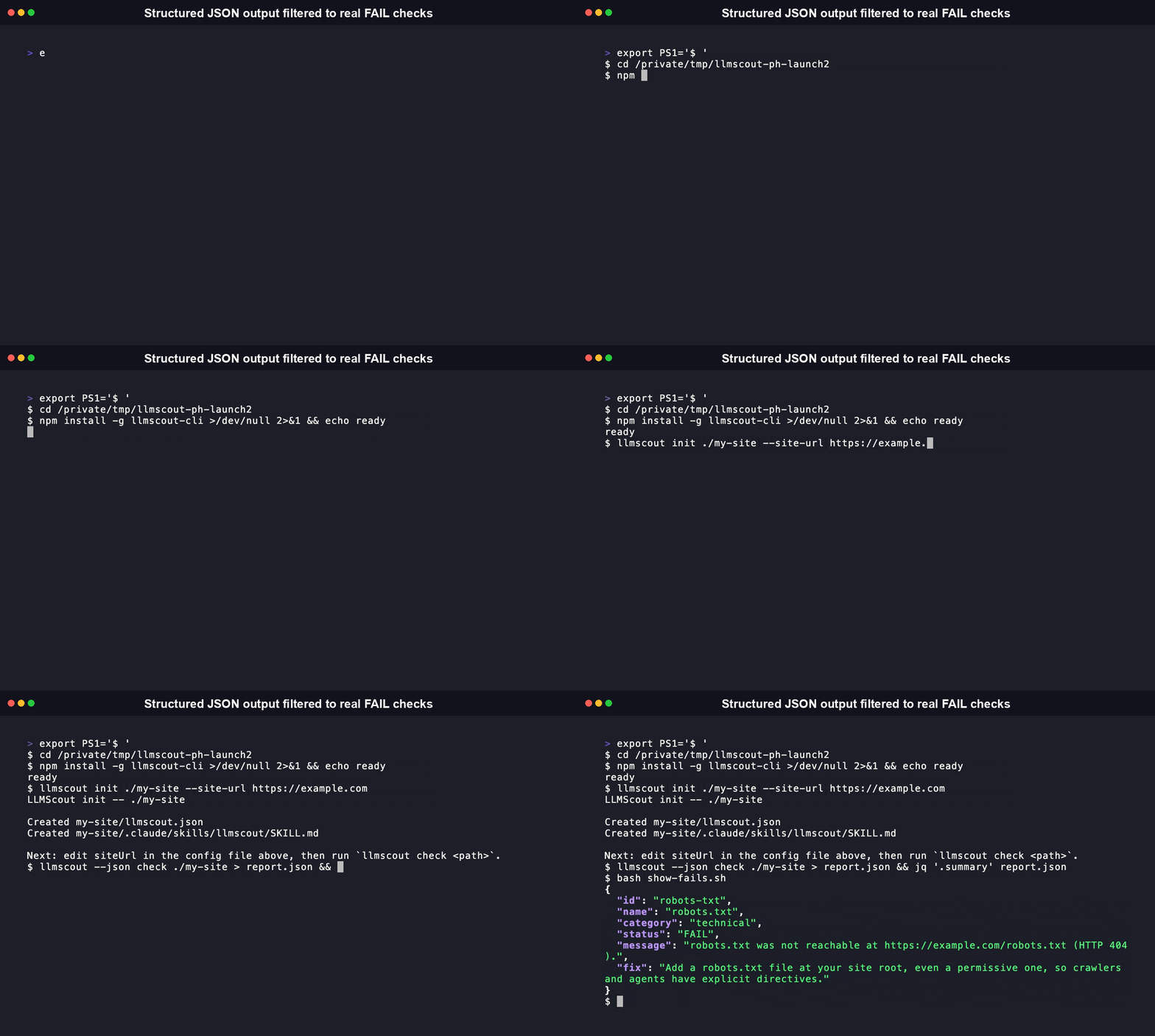
Running llmscout --json check to produce structured JSON output with per-check id, status, message, and fix fields plus a summary object

check exits 0 when no check FAILs, 1 when at least one check FAILs (WARN alone does not fail the run), and 2 on a usage error such as a missing or misconfigured llmscout.json.

Features

  • 21 checks across two categories. 12 technical-SEO checks and 9 GEO checks, listed by name in The 21 checks.
  • Zero external toolchain, either language. child_process is never imported anywhere in the TypeScript source; the Python port has zero runtime dependencies. Checks run inside the process instead of shelling out to Python scripts or a headless browser.
  • Cross-platform by construction. No python3-versus-py -3 shelling and no relative-path script resolution, so the same install runs identically on Windows, macOS, and Linux.
  • Hardened fetch. The single fetch wrapper (src/fetch-utils.ts) rejects any non-http(s) scheme, blocks loopback/private/link-local hosts, follows redirects manually one hop at a time, and bounds the chain at 5 hops and the response body at 10 MiB.
  • Fleet mode with per-site reports. llmscout fleet manifest.json runs the full suite across many local client-repo paths in one invocation, and --out-dir writes one auto-named report file per site -- built for agencies checking many client sites at once.
  • Structured output. Every command accepts a global --json flag for machine-readable output, so an agent invoking the CLI can parse results programmatically.
  • A real, configurable User-Agent. Sends a genuine browser User-Agent by default (some SSR frameworks and CDNs reject bot-style strings outright) and a --user-agent flag to override it.
  • Well tested. 248 TypeScript tests and 233 Python tests, both reproducible locally with npm test / npm run test:coverage and pytest. The Python distribution has zero runtime dependencies, so there is nothing for a dependency audit to flag. On the npm side, npm audit currently reports one high-severity advisory in undici, a transitive dependency pulled in by cheerio, not in this project's own code.

Why GEO checks matter right now

Search traffic is genuinely shifting toward AI-mediated answers, and the shift is recent and well measured, not a hypothetical:

  • Google's own AI Overviews are already cutting click-through. Ahrefs measured position-1 CTR on AI-Overview-triggering keywords fall from 7.3% (December 2023) to 1.6% (December 2025) -- a 58% average CTR reduction across the study. (Ahrefs, December 2025) Semrush's independent 10-million-keyword analysis found organic CTR drops 61% and paid CTR drops 68% when an AI Overview appears on the results page. (Semrush)
  • ChatGPT itself is now a real, measurable traffic source. Search Engine Land's analysis of 6.77 million sessions found ChatGPT accounts for 92% of all AI-assistant referral traffic, converting at 7.1% -- close to paid search's 7.8%. (Search Engine Land)
  • AI crawlers are not one crawler anymore. Between May 2024 and May 2025, GPTBot's share of AI-crawler traffic rose from 5% to 30%. OpenAI and Anthropic have since split their bots into training crawlers (GPTBot, ClaudeBot) and separate, independently blockable search/retrieval crawlers (OAI-SearchBot, Claude-SearchBot). (Cloudflare Radar, "From Googlebot to GPTBot") LLMScout's ai-crawler-directives check reports on all seven of the current major training and search bots (GPTBot, OAI-SearchBot, ClaudeBot, Claude-SearchBot, PerplexityBot, Google-Extended, Applebot-Extended) separately, since blocking a company's training bot has no effect on whether its assistant can still retrieve and cite your page live through its own search bot.
  • Markdown-native delivery is a real, emerging practice, not a fad. Cloudflare documents HTTP content negotiation (Accept: text/markdown) as a standards-based way to serve agents a lighter, cleaner representation of a page -- their own benchmark saw an 80% token reduction on one blog post. (Cloudflare, "Markdown for Agents") Worth being honest about the current state: independent analysis across 300,000 domains found that in practice, no major AI crawler currently sends the Accept: text/markdown header to actually negotiate it yet -- they discover Markdown only via direct links. (Dries Buytaert) LLMScout's markdown-negotiation check reports on this without pretending the ecosystem is further along than it is.
  • Not every signal in this space is settled, and LLMScout does not pretend otherwise. llms.txt is a real, community-driven convention (created September 2024, adopted by roughly 8-10% of top sites as of mid-2026, including Anthropic, Stripe, Cloudflare, and Vercel) -- but Google's own Gary Illyes has stated publicly that Google does not support it and has no plans to, comparing it to the deprecated keywords meta tag. (Search Engine Journal) LLMScout's llms-txt check reports its presence as informational, never as a required pass -- the tool's job is to report what is actually configured, not to prescribe a policy the evidence doesn't yet support.
  • Google removed FAQ rich results from Search entirely on May 7, 2026. (Search Engine Journal) FAQPage schema itself is not deprecated -- it remains valid markup other engines and AI assistants can still parse for direct-answer extraction -- so LLMScout's faq-schema check still reports on it, just without implying it earns a Google SERP rich result anymore.

The 21 checks

Each check reports PASS, WARN, or FAIL, with a fix suggestion for anything that is not a clean PASS. A WARN is a missed optimization, not a broken page, and never fails the run on its own.

Technical SEO (12)

Check (id)What it verifies
Title tag (title)A <title> exists and is within 10-60 characters.
Meta description (meta-description)A <meta name="description"> exists and is within 50-160 characters.
Canonical tag (canonical)A <link rel="canonical"> exists and its href is a valid URL (relative hrefs are resolved, not penalized).
robots.txt (robots-txt)/robots.txt is reachable and contains at least one User-agent directive.
sitemap.xml (sitemap-xml)/sitemap.xml is reachable and valid, with a Sitemap: directive in robots.txt checked as a fallback location. A response that looks like a CDN challenge page (e.g. Cloudflare bot management) gets a distinct message instead of a generic "malformed sitemap" one.
Heading structure (heading-structure)Exactly one <h1>, and no skipped heading levels (for example an <h1> followed directly by an <h3>).
Image alt coverage (image-alt)<img> tags have an alt attribute (an intentional alt="" for decorative images counts as covered).
Open Graph tags (open-graph)og:title, og:description, og:image, and og:url meta tags are present, for rich link previews on social platforms.
Twitter/X Card tags (twitter-card)A valid twitter:card meta tag and its required companion fields are present.
Meta robots directives (robots-meta-directives)Advanced snippet-control directives (max-snippet, max-image-preview, max-video-preview) are set, and flags an outright noindex.
Image weight (image-weight)Each image's actual byte size (via a HEAD request), flagging oversized images that slow page load.
Redirect chain (redirect-chain)The homepage's full redirect chain, warning on long chains and failing if the chain dead-ends in an error status.

GEO / generative engine optimization (9)

Check (id)What it verifies
Structured data (structured-data)JSON-LD <script type="application/ld+json"> blocks exist and parse as valid JSON.
llms.txt (llms-txt)An /llms.txt is present at the site root (an emerging, non-standardized convention -- see Why GEO checks matter right now; absence is informational).
AI crawler directives (ai-crawler-directives)Reports the robots.txt allow/disallow state for GPTBot, OAI-SearchBot, ClaudeBot, Claude-SearchBot, PerplexityBot, Google-Extended, and Applebot-Extended. This is a report of what is configured, never a recommendation to allow or block.
FAQ schema (faq-schema)FAQPage JSON-LD is present (informational; only relevant to pages that actually have an FAQ -- see the note on Google's May 2026 rich-result deprecation above).
Content extraction friendliness (content-extraction)Heuristic: the page has heading/paragraph structure an engine can chunk, rather than one large unstructured block. It cannot see content that only appears after client-side JavaScript, by design.
Speakable schema (speakable-schema)A SpeakableSpecification is present in JSON-LD, for voice-assistant answer eligibility.
Organization schema (organization-schema)Organization/Person JSON-LD with a sameAs array of official profile URLs is present, for Knowledge Panel signals.
Markdown content negotiation (markdown-negotiation)Whether the site serves a text/markdown representation when requested via Accept: text/markdown content negotiation.
Link header (link-header)Whether the homepage response sends an RFC 8288 Link header for machine-readable service discovery.

You can run only one category by editing the checks block in llmscout.json ({ "checks": { "technical": true, "geo": false } }).

CLI reference

Transcribed from the tool's own --help output.

Code
$ llmscout --help
Usage: llmscout [options] [command]

Zero-config, cross-platform SEO and GEO checks for local projects, with no
Python or headless-browser dependency.

Options:
  -V, --version                  output the version number
  --json                         output structured JSON instead of
                                 human-readable text (default: false)
  --user-agent <string>          override the default User-Agent header sent on
                                 outbound fetches
  -h, --help                     display help for command

Commands:
  init [options] <path>          Scaffold a LLMScout setup (llmscout.json + a
                                 Claude Code skill file) into a target
                                 directory
  check [options] <path>         Run SEO/GEO checks against a local project's
                                 configured site
  fleet [options] <config.json>  Run the full check suite against every site
                                 listed in a fleet manifest
  help [command]                 display help for command
CommandArgumentOptionsPurpose
init<path> target directory--site-url <url> set siteUrl immediatelyScaffold llmscout.json plus a Claude Code skill file. Idempotent: existing files are left untouched.
check<path> project directory containing llmscout.json--out-dir <dir> also write an auto-named report file for this site; (global --json, --user-agent)Run the selected checks against the configured siteUrl.
fleet<config.json> fleet manifest--out-dir <dir> also write one auto-named report file per site, named from the manifest's name field; (global --json, --user-agent)Run the full suite against every site in the manifest.

--json, --user-agent, -V/--version, and -h/--help are the only global options.

Exit codes

CodeMeaning
0init succeeded, or check/fleet completed with no FAIL.
1check: at least one check FAILed. fleet: at least one site FAILed or errored.
2Usage error: invalid URL scheme, missing/unreadable/invalid llmscout.json, blank siteUrl, missing manifest, or any other configuration error.

MCP Server

LLMScout ships a Model Context Protocol server so an AI agent (Claude, Cursor, or any MCP-compatible client) can run SEO/GEO checks against a live site directly, without a human invoking the CLI by hand.

Install the extra:

Terminal
pip install "llmscout-cli[mcp]"

Add it to your MCP client's config (for Claude Desktop, claude_desktop_config.json):

config.json
{
  "mcpServers": {
    "llmscout": {
      "command": "uvx",
      "args": ["--from", "llmscout-cli", "llmscout-mcp"]
    }
  }
}

The server exposes one tool, run, that shells out to the published llmscout npm binary with the given subcommand and arguments plus --json, and returns the parsed JSON result:

Code
run(["check", "./my-site", "--site-url", "https://example.com"])

Transport is stdio, so there is nothing to host: the MCP client spawns the server as a local subprocess. Source: python/src/llmscout/mcp_server.py.

Fleet mode

Running cat fleet.json to show a two-site manifest, then llmscout fleet ./fleet.json checking both sites and printing a per-site PASS/FAIL summary

fleet is aimed at agencies or teams that maintain several client sites side by side as local repos. You declare each site in one manifest and check them all in a single command:

config.json
{
  "sites": [
    { "name": "client-a", "path": "./clients/client-a" },
    { "name": "client-b", "path": "./clients/client-b" }
  ]
}
bash
llmscout fleet ./fleet.json
Code
LLMScout fleet report

[FAIL] client-a (/abs/path/clients/client-a) -- 6 PASS, 14 WARN, 1 FAIL
[PASS] client-b (/abs/path/clients/client-b) -- 8 PASS, 13 WARN, 0 FAIL

Fleet summary: 1 site(s) passed, 1 site(s) failed, 0 site(s) errored (2 total).

Add --out-dir ./reports and each site's result is also written to its own auto-named file (client-a.txt, client-b.txt, or .json with --json) -- instead of one combined stdout dump, an agency running this across many client sites gets one distinguishable report per client. Each manifest entry's path resolves against the manifest file's own directory, not the process working directory, so the same manifest works no matter where you invoke it from. Everything is local filesystem access, with no SSH and no remote-execution surface.

Library API reference

Both distributions are also genuinely importable libraries, not just CLIs. The exports below are real (grepped from src/index.ts and python/src/llmscout/__init__.py), and the examples are tested against the published packages, not written from memory.

TypeScript (llmscout-cli on npm):

server.ts
import { loadSite, runChecks, ALL_CHECKS } from "llmscout-cli";

const ctx = await loadSite("https://example.com");
const results = await runChecks(ALL_CHECKS, ctx);
console.log(results[0].status, results[0].name);
// "PASS" "Title tag"
ExportSignatureWhat it does
loadSite(rawSiteUrl: string, fetchFn?: FetchFn) => Promise<CheckContext>Validates the URL, fetches the site's resources, and builds a CheckContext in one call. What check and fleet both call internally.
fetchSiteResources(siteUrl: URL, fetchFn?: FetchFn) => Promise<SiteResources>Lower-level: fetches the homepage plus robots.txt/sitemap.xml/llms.txt in parallel, without building a CheckContext.
buildCheckContext(resources: SiteResources, fetchFn?: FetchFn) => CheckContextBuilds a CheckContext from resources you already fetched (parses the homepage once with cheerio).
runChecks(checks: Check[], ctx: CheckContext) => Promise<CheckResult[]>Runs a list of checks against one context. A check that throws becomes a FAIL result instead of aborting the run.
hasFailure(results: CheckResult[]) => booleantrue if any result's status is "FAIL".
ALL_CHECKS / TECHNICAL_CHECKS / GEO_CHECKSCheck[]The full check suite, or just one of the two categories.
initProject(targetPath: string, opts?: { siteUrl?: string }) => InitResultScaffolds llmscout.json and the Claude Code skill file. Idempotent.
loadFleetManifest / runFleetsee src/fleet.tsLoad a fleet manifest and run the suite across every site in it.
safeFetch / assertHttpUrlsee src/fetch-utils.tsThe hardened fetch wrapper described in Features, exported for reuse in a custom check.

Types: Check, CheckContext, CheckResult, CheckStatus ("PASS" \| "FAIL" \| "WARN"), CheckCategory ("technical" \| "geo"), SiteResources, LLMScoutConfig, FleetManifest. No generated API docs site exists yet; this table and the source's own TSDoc comments are the reference.

Python (llmscout-cli on PyPI):

server.ts
from llmscout import load_site, run_checks, ALL_CHECKS

ctx = load_site("https://example.com")
results = run_checks(ALL_CHECKS, ctx)
print(results[0].status, results[0].name)
# PASS Title tag

The Python package mirrors the TypeScript one function-for-function: load_site, run_checks, has_failure, ALL_CHECKS/TECHNICAL_CHECKS/GEO_CHECKS, init_project, load_fleet_manifest/run_fleet, safe_fetch/assert_http_url, load_config/default_config/select_checks, plus the Check, CheckContext, CheckResult, and SiteResources types. Full list in python/src/llmscout/__init__.py's __all__. No generated Sphinx docs exist yet; the module docstring (import llmscout; help(llmscout)) and this table are the reference.

Comparison

Every cell below is drawn from a verifiable source (a repo file, a package manifest, or an open issue), cited under the table. "Checker" means the tool audits an existing live site; "generator" means it emits SEO/GEO asset files for you to publish.

LLMScoutclaude-seo (AgriciDaniel)geo-seo-claude (zubair-trabzada)geo-optimizer-skill (Auriti-Labs)
Requires PythonNoYes (Python 3.10+)YesYes (Python 3.9+)
Requires Playwright / headless browserNoOptional (Chromium auto-installed by install.sh for SPA rendering)Optional, for some checksNot required for core function
Installnpm / PyPI (deps: cheerio+commander or none)git clone + install.sh / install.ps1, or Claude Code /plugingit clone + install.sh / install-win.shpip install or uvx
Cross-platform / Windows out of the boxYes (no shelling, no path resolution)Ships a Windows install.ps1, but fresh-install/Windows/path failures are a recurring pattern: issues #137, #138, #139Windows install pain is a recurring pattern here too: issues #69, #21, #3pip/uv are cross-platform; not verified further
AI-crawler bot coverage7 bots, training and search crawlers tracked separately (GPTBot/OAI-SearchBot, ClaudeBot/Claude-SearchBot, PerplexityBot, Google-Extended, Applebot-Extended)Not a dedicated checkNot a dedicated checkNot verified
Markdown content negotiation checkYes (markdown-negotiation)NoNoNo
RoleCheckerCheckerChecker + report generatorChecker
CoverageTechnical + GEO (21 checks)Technical + GEO (broad)GEO-focusedTechnical + GEO
LicenseMITMITNot verifiedMIT

Sources: LLMScout, from this repo's package.json, src/fetch-utils.ts, src/checks/index.ts, and the absence of child_process in src/. claude-seo, from its README install section (Python 3.10+, install.sh/install.ps1, /plugin), its MIT license, and open issues #137/#138/#139. geo-seo-claude, from its README and its own issue tracker (Windows install pain issues #69, #21, #3, all cited above). geo-optimizer-skill, from its README (Python 3.9+, pip install geo-optimizer-skill / uvx, MIT, CLI with audit/fix commands).

Hosted analytics products such as Profound, Peec, and Evertune are a different category (paid, hosted GEO-tracking dashboards, not installable OSS checkers) and are intentionally not in this table.

What is LLMScout, and why does it exist

LLMScout is an independent, open-source command-line tool that checks a website for 21 technical-SEO and generative-engine-optimization issues. It ships as two genuinely independent, feature-equivalent distributions: a TypeScript/Node CLI with two runtime dependencies (cheerio, commander) and zero external interpreter or browser, and a Python CLI with zero runtime dependencies at all. Neither child_process (TypeScript) nor a subprocess call (Python) appears anywhere in either implementation's checks.

It exists to replace the install flow of an existing project, AgriciDaniel/claude-seo, for one specific class of problem. That project is a Claude Code SEO/GEO skill that carries out its checks by shelling out to Python scripts (Playwright-based rendering, pip-installed dependencies) from skill instructions. That external-toolchain-plus-path-resolution chain is the root cause behind a recurring pattern of install/Windows/path bugs filed against it, including three issues (since closed, but each documenting the architectural failure mode this project exists to avoid): #137 (a fresh /plugin install provisions neither the Python dependencies nor Playwright Chromium), #138 (skill instructions hardcode python3, which does not exist on a stock Windows install), and #139 (skills call scripts/*.py through a relative path that does not resolve when the scripts live under the plugin root). The same class of pain shows up independently in zubair-trabzada/geo-seo-claude, another actively used Claude Code GEO skill (issues #69, #21, #3) -- the failure mode is architectural, not specific to one project.

LLMScout is not a fork of either project. It shares no code with them, has a different name, and reimplements the equivalent checks from scratch. The design choice that matters is what it does not do: because the checks run inside the host process rather than by launching an external interpreter and a headless browser, the entire failure class behind those bugs does not exist here. There is no interpreter to provision, no pip install to run beyond the package itself, no browser binary to download, and no relative script path to resolve, so a fresh install behaves the same on every platform. The direct cost of that choice is that the content-extraction check is a static-HTML heuristic and cannot evaluate content that only appears after client-side JavaScript renders. The check documents this limitation in its own output.

Beyond the install-fix wedge, LLMScout's checks track the concrete, evidence-backed direction the GEO space has actually moved since mid-2025 -- see Why GEO checks matter right now for the cited sources behind that claim, including the training-versus-search AI crawler split, Markdown content negotiation, and Google's own documented FAQ-rich-result deprecation.

LLMScout was freshly renamed from its original name, SeoFleet. Both distributions are being republished under the new package name (llmscout-cli on both npm and PyPI) -- see Install for both paths, and the badges above for live version status.

FAQ

Does LLMScout require Python? No. The npm distribution is pure TypeScript/Node with two dependencies (cheerio, commander). There is no pip install step and no Python interpreter involved at any point in that path.

Does it use Playwright or a headless browser? No, in either distribution. Both fetch HTML over http(s) and parse it (cheerio in TypeScript, the standard library in Python). There is no Chromium download and no subprocess call anywhere in either implementation's checks. The trade-off is that the content-extraction check reads static HTML only and cannot see JavaScript-rendered content. It says so in its own result message.

What does "zero-config" mean here, concretely? llmscout init <path> writes a working llmscout.json and a Claude Code skill file with no prompts. The one value you must supply is your live site URL (via --site-url or by editing the file), because the tool cannot infer a project's public URL from its local files. After that, llmscout check <path> runs with no further configuration; all 21 checks run by default.

Why does LLMScout track training crawlers and search crawlers separately? Because OpenAI and Anthropic actually run them as separate, independently blockable user agents now. Blocking GPTBot (training) has no effect on whether OAI-SearchBot can still retrieve and cite your page live in a ChatGPT answer, and the same split applies to ClaudeBot versus Claude-SearchBot. Reporting them together would hide a real, actionable distinction.

Does LLMScout tell me to add an llms.txt? No, it only reports whether one exists. llms.txt is a real, growing convention, but Google has stated publicly it does not support it -- see Why GEO checks matter right now for the source. LLMScout reports facts a site owner can act on; it does not take a position on an unsettled question.

Why not just fix claude-seo or geo-seo-claude directly instead of building a separate tool? Their install/Windows bugs share a single root cause: checks are performed by shelling out to an external interpreter-plus-browser toolchain from skill instructions. Patching each symptom leaves that architecture in place. LLMScout removes the architecture instead: with no external toolchain, that class of install and path failure cannot recur. It is an independent reimplementation, not a patch.

Can I run it against many sites at once? Yes. llmscout fleet manifest.json runs the full suite against every site in a local JSON manifest in one invocation, and --out-dir writes one auto-named report file per site instead of one combined stdout dump -- built for agencies checking many client sites.

Can an agent or script consume the output? Yes. Pass the global --json flag to any command for structured JSON, including per-check id, status, message, and fix fields, plus a summary object. Exit codes are stable: 0 clean, 1 at least one FAIL, 2 a usage/config error.

Is there a Python version? Yes -- pip install llmscout-cli installs a genuine, independent Python port (not a wrapper around the Node binary), with zero runtime dependencies. It runs the same 21 checks with the same PASS/WARN/FAIL verdicts as this npm package. See python/README.md.

Can I use LLMScout commercially, or in a closed-source project? Yes. Both distributions are MIT licensed (see LICENSE): you can use, modify, and redistribute LLMScout in commercial and closed-source work, with no royalty and no obligation to open-source anything it checks. The only requirement is keeping the copyright notice and license text if you redistribute the source itself.

Contributing

See CONTRIBUTING.md for the full guide, covering both the TypeScript and Python codebases. Useful commands for this package:

Terminal
npm install
npm run build       # tsc build to dist/
npm run typecheck   # tsc --noEmit
npm test            # vitest run (248 tests)
npm run test:coverage
npm run lint        # eslint src test

CI (.github/workflows/ci.yml) runs lint, typecheck, build, coverage, and npm audit --audit-level=high on every push and pull request to main. Issues and pull requests are welcome at https://github.com/RudrenduPaul/LLMScout/issues.

Adding a 22nd check is intentionally small: implement the Check interface (src/types.ts) in a new file under src/checks/, then register it in src/checks/index.ts (and the Python equivalent under python/src/llmscout/checks/, per CONTRIBUTING.md).

License

MIT. See LICENSE.

Related MCP Servers

View all in Marketing View all alternatives
  • Crawlie logoCrawlie

    Technical SEO + GEO (AI-search) site audits: hosted crawls, prioritized fixes, report diffs.

    🎯 Marketing0 views
    Compare vs Crawlie β†’
  • M
    Mcp Server

    Scan any URL for 20 SEO checks; get a 0-100 score with prioritized fix recommendations.

    🎯 Marketing1 views
    Compare vs Mcp Server β†’
  • Facebook Ads Mcp Server logoFacebook Ads Mcp Server

    MCP server acting as an interface to the Facebook Ads, enabling programmatic access to Facebook Ads data and management features.

    🎯 Marketing0 views
    Compare vs Facebook Ads Mcp Server β†’
  • S
    Seo Checker Ai Mcp

    Seo Checker Ai automation via MCP. Includes analyze title, check meta description, validate ...

    🎯 Marketing0 views
    Compare vs Seo Checker Ai Mcp β†’

Frequently Asked Questions about Llmscout

Add the following block to your claude_desktop_config.json under mcpServers: "mcpServers": { "llmscout": { "command": "npx", "args": ["-y", "llmscout"] } }

AllMCPs Directory Badge

Full Badge Customizer

Showcase your server listing on GitHub or your project documentation. Embed this dynamic SVG badge to highlight official listing status and live engagement.

Badge Style:
Live Dynamic SVG PreviewLlmscout AllMCPs Directory Badge
Markdown (GitHub README)
[![AllMCPs](https://allmcps.com/api/badge/llmscout?style=directory)](https://allmcps.com/mcp/llmscout)
HTML Embed
<a href="https://allmcps.com/mcp/llmscout"><img src="https://allmcps.com/api/badge/llmscout?style=directory" alt="Llmscout on AllMCPs" /></a>

Technical Specs & Signals

Category🎯Marketing
More technical detailsExpand β–Ύ
TransportSTDIO
RuntimeNode.js
Views0
Unique ViewsTotal visits recorded for this listing page on AllMCPs.
Installs0
Installs & Copy ActionsTotal times users copied install commands or configuration snippets for this server.
27Quality signal: Emerging Β· 27/100How this signal is calculated β–Ύ
Server availabilityNot measured

Not scored for repo-hosted servers β€” we can't reach the running server, only its GitHub page. Hosted MCP endpoints are health-checked live.

Verified ownership8/20
Documentation & tools11/30
Adoption & activity1/15
Community engagement0/10

A guidance signal from public completeness & health data β€” not a user rating. New listings start lower and rise as they add docs, get verified, and grow adoption. Signals we can't observe for a listing are skipped, not counted against it.

β˜… FeaturedAllMCPs Server logo

AllMCPs Server

The official MCP server for AllMCPs.com - submit and manage tools directly from your AI. The open directory for MCP servers. Connect Claude, Cursor, Windsurf, and AI agents to databases, tools, files, and APIs. Explore 3,181+ servers. AllMCPs is the premier, open directory for discovering, evaluating, and installing Model Context Protocol (MCP) servers to equip AI agents and LLMs with real-world superpowers.

Explore Server β†’

Own this project?

This directory is pre-filled from public sources. Claim via GitHub README, site badge, or DNS TXT to get the verified badge and attach your website.

Free dofollow backlink: after claiming, verify your product site and place a dofollow AllMCPs badge β€” we recheck it stays live.

Claim & get free dofollow

Share & Embed

Add our SVG badge (dark/light directory styles) or embeddable widget to your site.

Explore more

More in 🎯 Marketing β†’Best MCP servers for Marketing & SEO β†’Alternatives to Llmscout β†’Install in Claude DesktopInstall in CursorInstall in VS Code