LineBreak Gate & Spec Bridge README
The full upstream README, mirrored here for reference. Install config, tool schemas, adoption signals, and an original overview live on the LineBreak Gate & Spec Bridge listing page.
linebreak-gate — the LineBreak security gate at the git/CI boundary
See it run
A real pull request, blocked for real: the gate is a required check, so the merge button goes gray until the CVE is fixed or a named human records an override.
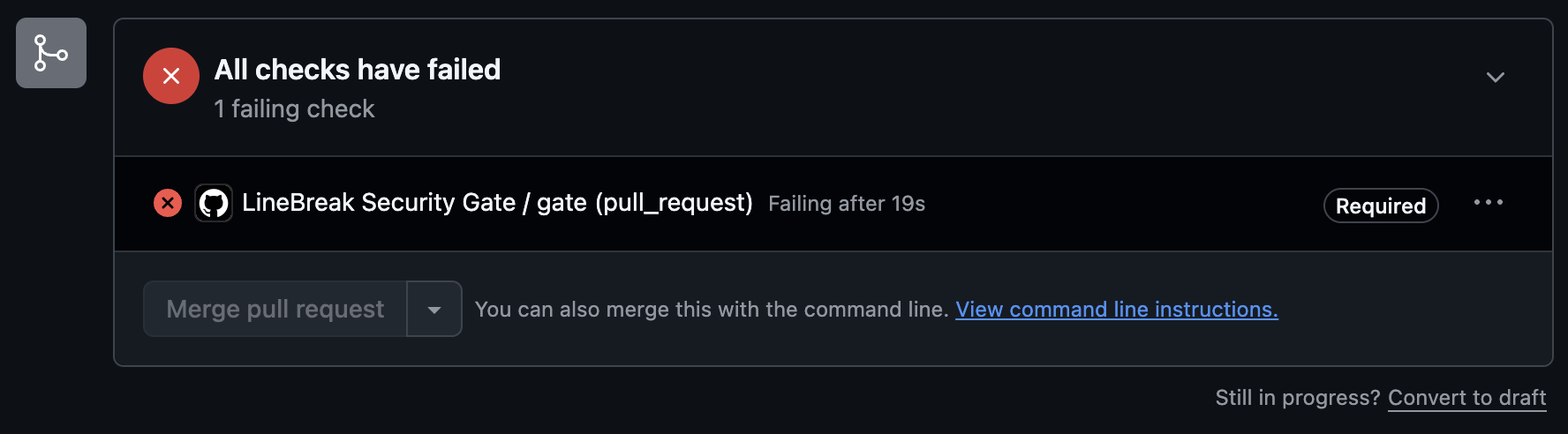
See it live — a public PR you can open right now →
A real recording, no mock: the scan blocks a critical CVE fail-closed, the pin gets fixed, the gate opens.

The spec loop: a named human approves the criteria, check blocks until the manual criterion carries a sign-off, then everything passes.

Blocks merges that carry known vulnerabilities. One tool, two detectors — dependency scanning is free; the AI review is the Pro upgrade:
- Dependency CVE scan — free, no key — osv-scanner
across every ecosystem (npm, PyPI, Go, Cargo, Maven, …), with an
npm auditfallback for npm projects (npm-only coverage and no installed-version data — the GitHub Action fails closed if osv-scanner can't be installed instead of degrading to it). - AI SAST — Pro — an LLM security review of first-party source (injection,
broken auth, secret exposure, SSRF, unsafe deserialization, crypto misuse)
with adversarial verification, enabled by
LINEBREAK_LICENSE_KEY(hosted, uses credits) orANTHROPIC_API_KEY(your own key, takes precedence). Without a key the dependency scan still runs and this pass is skipped with a notice.
The gate blocks and can propose; it never auto-clears on an agent's say-so. A human approves the fix or records an override — with a reason and an approver — in a git-committed audit file.
This is the same scanner core that powers the rest of LineBreak's in-product security gate (the desktop backend imports this package), but it is fully standalone: a team that has never touched anything else from LineBreak can add the gate to their repo and get real enforcement.
Contributing & license. This repo is the published source of
linebreak-gate(Apache-2.0): every release lands here and on PyPI from our CI, and every change passed our own gate first — CVE scan and human-approved criteria, the same discipline we sell. Bug reports and feature requests: open an issue or discussion here; we read everything. Direct PRs to this repo can't be merged (releases flow through our review pipeline), so start with an issue and we'll take it from there.
Quickstart — GitHub Actions
The action runs linebreak-gate scan, always runs report, posts one PR
comment (updated in place on every push, never spammed), uploads the JSON
report + audit artifacts as a workflow artifact, and fails the check per the
scan's exit code.
Make it a real boundary: require the check
A CI job that can be ignored is a dashboard, not a gate. In your repo:
Settings → Branches → Branch protection rules → your default branch →
"Require status checks to pass before merging" → add the gate job (the
name of the job that runs this action). From then on a PR carrying a critical
CVE cannot be merged through the GitHub UI.
Quickstart — any other CI (GitLab example)
The CLI is a plain Python package with strict exit codes — 0 pass, 1
blocking findings, 2 tool/config error (fail closed: a scanner crash
fails the pipeline, it is never a clean pass). Any CI that respects exit codes
gets the same enforcement:
Mark the job as required (no allow_failure) and protect the branch.
Bitbucket Pipelines y Azure DevOps
The same gate on Bitbucket Pipelines and Azure DevOps: linebreak-gate ci
runs scan + check, posts the PR comment and the build status through the
provider's API, and exits 0/1/2. This section is in Spanish for the teams
piloting it; the step-by-step runbook is docs/RUNBOOK_BITBUCKET_AZURE.md
in the monorepo.
La compuerta es la misma en cualquier CI. El comando linebreak-gate ci hace
en un solo paso lo que la Action de GitHub hace en varios: corre el escaneo de
dependencias y la revisión de código con IA (si hay llave), evalúa los
criterios de aceptación aprobados con el alcance correcto (por historia en el
pull request, todo el paquete en la liberación), deja la evidencia en
.linebreak/ci-out/ (report.txt, criteria.txt, report.json,
comment.md y los registros de auditoría) para publicarla como artefacto,
publica un comentario en el pull request (actualizado en cada corrida,
nunca repetido) y un estado de build, y termina con el código 0 (pasa), 1
(bloquea) o 2 (error de herramienta: la compuerta queda cerrada). El
comentario tiene el mismo contenido que el de GitHub.
Sin credenciales de API, el veredicto se imprime igual, el comentario y el estado se omiten con un aviso, y el código de salida sigue bloqueando el pipeline. La compuerta nunca se abre por no poder comentar.
linebreak-gate init detecta el proveedor por el remoto de git y escribe el
archivo que corresponde; --provider bitbucket|azure|all lo elige a mano.
Los dos archivos que genera son exactamente los de abajo.
Bitbucket Pipelines
Variables del repositorio (Repository settings > Pipelines > Repository variables, marcadas como secured):
LINEBREAK_LICENSE_KEY: opcional hoy; requerida cuando se active la exigencia de licencia.ANTHROPIC_API_KEY: habilita la revisión de código con IA; sin ella corre solo el escaneo de dependencias, con aviso.BITBUCKET_ACCESS_TOKEN: token de acceso del repositorio (Repository settings > Access tokens) con permisospullrequest:writeyrepository:write. Es lo que permite el comentario y el estado de build. Alternativa:BITBUCKET_USERNAME+BITBUCKET_APP_PASSWORD.
Protección de rama equivalente a "required check" (Repository settings >
Branch restrictions, rama main): el merge check "Check the last commit for
at least 1 successful build and no failed builds". Los merge checks son parte
de Bitbucket Cloud Premium; con el plan Standard el build rojo se ve en el
pull request y en el estado LineBreak gate, pero no impide el merge por sí
solo (se apoya en revisores obligatorios).
Azure DevOps (Azure Repos + Azure Pipelines)
Cuatro pasos manuales, en este orden:
- Crear el pipeline desde
azure-pipelines.yml(Pipelines > New pipeline > Azure Repos Git > Existing YAML) y agregar las variables secretasLINEBREAK_LICENSE_KEYyANTHROPIC_API_KEY(Edit > Variables). Una variable que no existe queda como el texto literal$(NOMBRE); la compuerta la trata como no definida. - Project settings > Repos > Repositories > el repositorio > Security: dar a
la identidad
<proyecto> Build Service (<organización>)el permiso Contribute to pull requests. Sin eso, el comentario y el estado fallan con 403 (y el pipeline sigue bloqueando por código de salida). - Repos > Branches >
main> Branch policies > Build validation: agregar este pipeline como Required, disparo Automatic. Esa política es la que deja el botón Complete apagado mientras el build esté rojo. - Opcional: en la misma página, Status checks: exigir el estado
linebreak/gateque la compuerta publica en cada pull request.
En Azure Repos el disparador pr: del YAML no aplica: la política de Build
validation es la que corre el pipeline en cada pull request. pr: queda para
repositorios alojados en GitHub o Bitbucket y construidos desde Azure
Pipelines (en ese caso el comentario debe publicarse en ese proveedor; la API
de PR de Azure DevOps no aplica y la compuerta lo dice).
Imagen Docker: dos caminos
-
Imagen base de Python +
pip install(las plantillas de arriba). Funciona hoy sin publicar nada; descargaosv-scannerdesde GitHub en cada corrida (si el runner no tiene salida a internet, usar el camino 2). -
Imagen de CI de la compuerta, construida desde
Dockerfile.cien este directorio y publicada en un registro que el workspace o la organización pueda leer:En Bitbucket:
image: <registro>/linebreak-gate-ci:1y se quitan las líneas decurlypip installdel script. En Azure: un container job (container: <registro>/linebreak-gate-ci:1bajopool) y se quita el paso de instalación. La imagen traeosv-scanner,git,bashycurl, corre como root y no defineENTRYPOINT: los tres son requisitos de Bitbucket Pipelines y de los container jobs de Azure.El
Dockerfilesin sufijo es la imagen del servidor MCP (entrypointlinebreak-gate mcp, usuario sin privilegios, sinosv-scanner) y no sirve para CI.
El comando
--story auto toma la historia del nombre de rama feat/<id> o story/<id>
(con sufijo permitido) cuando es una historia aprobada, y si no evalúa solo
las historias iniciadas. --manual auto es warn en un pull request y
block en cualquier otra corrida; --stage auto es pr en un pull request y
release en el resto. Los proveedores detectados son GitHub Actions, GitLab
CI, Bitbucket Pipelines y Azure Pipelines; en GitHub el comentario lo sigue
publicando la Action.
The spec loop — author, approve, serve over MCP, enforce
The gate also enforces approved acceptance criteria, and the whole loop is tool-agnostic — no LineBreak account, no desktop app, no server:
linebreak-gate mcp serves the approved bundle (.linebreak/spec/) over
MCP (stdio) to Claude Code, Cursor, Codex, or any MCP client. Six tools:
list_stories, get_story (criteria as agent context BEFORE code is
written), next_story, set_story_status, check_story (the same
evaluation engine CI runs, scoped to one story), and spec_status (approval +
offline signature state). Git is the transport — no network, no account,
works on a bare clone — and nothing in the bridge can write, edit, or
invalidate an approved criterion: criteria change only by editing the draft
and re-approving, with a human on the record.
spec approve prints what it is about to approve (and every statement that
changed, before and after) and refuses a draft that is not the one on the
remote; --local approves the copy on disk knowingly.
Then linebreak-gate check enforces the same criteria in CI: machine checks
run for real, manual criteria block until a recorded sign-off. A tests
criterion that executed zero tests fails, and a check can declare what it
expects to observe (expect: {output, exit}); the section "Integrity" of
docs/CRITERIA_ENFORCEMENT.md in the repository has the details. Guided first
run with the why of every step:
linebreakapp.com/en/start.
CLI
-
initsets a repo up in one command: writes the pipeline file for the repo's CI provider (GitHub Actions workflow,bitbucket-pipelines.ymlorazure-pipelines.yml, detected from the git remote or chosen with--provider; never clobbers an existing one without--force), optionally writes.linebreak/gate.yml, offers to store the secrets via the GitHub CLI and to require thegatecheck — and prints the exact settings links for anything it can't do for you. -
ciis the whole run for CI providers without a native Action (Bitbucket Pipelines, Azure DevOps): scan, scoped check, evidence directory, PR comment and build status through the provider's API, exit with the worse code. See the Bitbucket / Azure section above. -
scanruns both detectors, writes git-native audit artifacts under.linebreak/audit/, and exits 0/1/2. -
reportrenders the recorded scan: counts by severity and every finding with CVE id, CVSS, advisory link, and override status.--format jsonfor machines. -
overriderecords a human-approved acknowledgment of one exact finding — the package + installed version + CVE tuple. A different CVE, a bumped version, or a new finding still blocks.--reasonand--approverare required; the record lands in the artifact's approval trail. Commit the updated.linebreak/audit/*.jsonso CI sees it.--expires YYYY-MM-DD(or--days N) bounds the acceptance in time: past that date the finding blocks again asexpired_riskuntil the acceptance is renewed or the finding is fixed (see Riesgos aceptados y tickets). -
checkevaluates the approved acceptance criteria (.linebreak/spec/, landed byspec approve) against the working tree:build/tests/commandrun for real,manualrequires a recorded sign-off. Exit 0 all satisfied (or no bundle — a clean no-op), 1 blocking (fail or needs-signoff), 2 tool/config/bundle error (fail closed). Writes.linebreak/audit/criteria.json. Scope flags (see Check scope):--story <id>(repeatable) evaluates only those stories,--started-onlyevaluates only stories with a started local state,--manual warnreports missing sign-offs without blocking,--stage prskips criteria markedcheck.when: release(listed as release-only, not evaluated; the default--stage releaseevaluates them). The summary and the JSON state the scope. -
signoffrecords an attributed human sign-off for onemanualcriterion under.linebreak/spec/signoffs/(additive;--approverand--noterequired). It binds to the criterion as approved — editing the criterion and re-approving the spec makes prior sign-offs stale. Commit the record. -
override --criterionrecords a human-approved override for one failed machine criterion in.linebreak/audit/criteria.json— same philosophy as CVE overrides: possible, always attributed, stale once the criterion is edited. Other blocking criteria still block. -
spec new/spec approve— the tool-agnostic authoring path (see the spec-loop section above): scaffold a draft, fill it with any tool, land it as the approved bundle with an attributed human approval, committed. Unsigned local approvals are markedidentity_source: client; cryptographic signatures come from the governance service (license key). -
spec listprints the approved acceptance criteria bundle: each story, its criteria with check types, and the approver attribution. Read-only. Exit 0 on a valid bundle or when none exists; exit 2 on a malformed bundle (fail closed on structure).spec next/show/checkare the CLI twins of the MCP bridge tools.
Publish to the panel
linebreak-gate publish --to https://governance.example --project <id> sends
the recorded run (criteria, findings, sign-offs, overrides, attestation) to a
LineBreak governance service so executives and auditors see it in the panel.
The bearer comes from LINEBREAK_GOV_TOKEN (a token issued by that service),
else LINEBREAK_GOVERNANCE_TOKEN; --to defaults to
LINEBREAK_GOVERNANCE_BASE_URL and --project to LINEBREAK_GOV_PROJECT. Run
it after scan and check, as the last step of the job.
Publishing never blocks a change: a missing token, an unreachable service,
or a rejected body prints a warning and exits 0. The verdict was already given
by scan/check; publish only reports it. Under GitHub Actions the run_id
is derived from the run id and attempt, so re-running the step is idempotent
server-side. --dry-run prints the body without sending.
Governance credentials: one lookup
Every command that talks to the governance service (check for the panel's
sign-offs and the tracker configuration, signoff / override for the
verified identity, publish, report --from-governance) finds the service
URL, token and project the same way, the first that applies:
- environment variables (
LINEBREAK_GOVERNANCE_BASE_URL,LINEBREAK_GOVERNANCE_TOKEN,LINEBREAK_GOV_TOKEN,LINEBREAK_GOV_PROJECT); a set variable always wins; ~/.config/linebreak/governance.env($XDG_CONFIG_HOME/linebreak/when set);~/.config/linebreak/governance-local.env(a local instance);~/.linebreak/env, kept for compatibility with the desktop app.
Files are KEY=value lines (export and quotes allowed). Only the first file
that carries a token is used, whole: a URL from one file is never paired with a
token from another. LINEBREAK_GOV_CREDENTIALS=off turns the files off. In CI
there are no such files, so pipelines behave as before; on a workstation, a
token in one of them makes signoff and override record the verified
governance identity (and refuse if that token fails), exactly as the exported
variable does.
Read the published run: report --from-governance
The scan runs in CI; report alone only reads the scan recorded on this
machine. linebreak-gate report --from-governance --project <id> reads the
last run CI published instead (GET /v1/reports/projects/{id} for the list,
GET /v1/projects/{id}/gate-runs/{run_id} for the run): findings by severity
with their acceptances and KEV marks, the criteria counts and the verdict as
that run published it. --stage pr|release takes the last run of that stage,
--run-id a specific one, --format json the whole run. Read only; exit 2
when the service cannot be read, 0 otherwise (also when nothing was published
yet).
Badge
Show visitors the repo is gated. linebreak-gate badge prints a ready-to-paste
README snippet (no network calls — the shields.io static badge is fully encoded
in its URL); --format html|url for the tag or bare-URL variants:
Check scope: per story on PRs, full at release
A team that approves the whole sprint up front (the flow this gate promotes: spec approved before code) would otherwise see every PR blocked by criteria of stories nobody has started. The fix is scope, not a weaker gate:
- Scan always. The dependency and code scans run on every PR and on release, unchanged.
- Check the story on PRs.
linebreak-gate check --story <id>evaluates only that story's criteria (--storyrepeats);--story autotakes the story from afeat/<id>orstory/<id>branch, else started stories only.--started-onlyevaluates only stories whose local state isdoing,review, ordone(the statespec nextand the MCP bridge write); stories without a state are listed as not started and do not count. When no story is started at all (no state file, an unreadable one, or an external tracker without local states) the scope selects nothing and the check is exit 2, never a vacuous pass.--manual warnreportsmanualcriteria without a sign-off as pending instead of blocking, so a sign-off that belongs to the release does not hold a PR. - Check everything at release. The release job runs the full bundle with
--manual block(the default): every criterion of every story, everymanualcriterion signed off. Every run writes.linebreak/audit/criteria.jsonstamped with itsscopeandpending_signoffs, so a scoped or relaxed run is evidence of that run and can never be read as a full verdict (and CI never uploads a stale one).
The summary prints a scope: line (mode, stories evaluated, criteria counted,
manual policy, stage), a release-only (not evaluated at stage pr): line when
criteria were skipped, and one pending sign-off: line per missing sign-off;
the JSON carries the same under scope (including stage and
release_only) and pending_signoffs. An unknown --story id
is exit 2 (a scope that names nothing is a mistake, never a pass).
In the GitHub Action the same pattern is three inputs (stage is described below). story is all (every
story, the default), auto (infer the id from a feat/<id> or story/<id>
branch, a trailing slug allowed as in feat/<id>-add-login, when it is an
approved story; otherwise started stories only), or an explicit id. manual
is warn or block; left empty it is warn on pull_request and block on
every other event. The PR comment shows the resolved scope, the stories not
started, and the pending sign-offs.
Behavior change for existing @v1 users (1.11.0): the manual default on
pull_request events is now warn, so a manual criterion without a
sign-off no longer blocks a PR unless the workflow sets manual: block. Add
the release job below (or set manual: block on the PR job) to keep
sign-offs enforced.
Require the gate check on the default branch and the release-gate job
before publishing. Generic CI: the same two invocations of the CLI, with the
exit codes respected.
Release-only criteria: check.when: release
A criterion checked by a script against a shared staging environment fails
for every PR the moment staging regresses, including the PR that fixes it.
Mark it when: release in the spec:
With stage: pr on the PR job (check --stage pr) such criteria are not
evaluated: their checks never run, the report lists them as [release-only]
with their own count, and they are neither pass nor fail. The release job
(stage: release, the default) evaluates them as always, and a failing one
still blocks the release. The field is part of the criterion's content, so
adding it to an approved criterion re-arms that criterion's sign-offs and
overrides like any other edit.
Release in two phases: check.when: attestation and --phase
A criterion like "the release carries a signed attestation" is signed ON a
green release run, so the run that produces it cannot require it. Mark that
manual criterion when: attestation:
Then release in two runs: check --phase prepare (Action input phase: prepare) evaluates everything except that criterion, which shows as
[awaiting-attestation]; the approver signs it off against that run; check
(--phase verify, the default) enforces it like any manual criterion, and
that run is the release. Other manual criteria block in both phases.
Shared environments: check.resource and check.environment
Checks naming the same resource never overlap on one machine (an OS lock),
and a failed one is re-run once alone: passing alone is [collision] (not a
defect, not blocking), failing again is a failure "reproduced when re-run
alone". Across machines, serialize the jobs in CI or give every end-to-end run
its own disposable tenant. environment records the deployed version the
check measured and warns (never blocks) when it is not the evaluated commit:
behind, ahead, diverged, unreachable, or changed while the check ran.
Configuration — .linebreak/gate.yml
The gate's strictness is governance, so it lives in the repo — changing the threshold is itself a PR: visible, reviewable, attributable in git history.
Precedence: explicit --fail-on flag / Action input → .linebreak/gate.yml →
built-in default (critical). fail_on may live at the top level or under
security: (not both). An invalid config is a tool error (exit 2):
a broken governance file never silently falls back to a default.
Prioridad por explotación
Un CVSS alto dice cuánto daño haría una vulnerabilidad; no dice si alguien la está usando. Desde 1.13.2 la compuerta enriquece cada hallazgo de dependencias con dos fuentes públicas y ordena y bloquea por explotación real:
- KEV (catálogo de vulnerabilidades explotadas conocidas de CISA): "la están explotando hoy".
- EPSS (FIRST): probabilidad de explotación en los próximos 30 días, entre 0 y 1: "probable en 30 días".
Política
Un hallazgo bloquea por cualquiera de tres disparadores: severidad en o sobre
el piso, presencia en KEV (con block_kev) o EPSS en o sobre el umbral. El
motivo queda registrado en cada hallazgo (block_reason) y agregado en la
corrida (block_reasons) con exactamente dos valores, que el servicio de
gobierno lee por separado: kev (en el catálogo) y vulnerability (piso de
severidad o umbral EPSS). Cuando aplican los dos, gana kev. Un override
registrado con linebreak-gate override --finding <id> reconoce el hallazgo
exacto igual que siempre, cualquiera sea el motivo.
Orden y puntaje
El report, el veredicto y el JSON listan los hallazgos en este orden:
primero los que están en KEV, luego por EPSS de mayor a menor, luego por
severidad y CVSS. Un hallazgo sin puntaje EPSS (sin CVE, o un CVE que FIRST
aún no puntúa) va después de los puntuados, ordenado por severidad. Cada uno
muestra su etiqueta: explotada activamente (KEV), EPSS 0.93 o sin datos de explotación.
El risk_score sube con la explotación y nunca baja: un hallazgo en KEV vale
100 sin importar su severidad; el EPSS eleva el puntaje hasta su probabilidad
en porcentaje (un medium con EPSS 0.93 vale 93); la severidad es el piso
(critical 100, high 80, medium 50, low 20). Sin datos de explotación los
números son los de siempre.
Caché y modo sin red
Las dos fuentes se guardan en .linebreak/cache/ (la carpeta se ignora sola
en git; el registro de auditoría es .linebreak/audit/security.json, no la
caché). Con caché fresca no hay ninguna llamada de red. Con caché vencida se
consulta la red y, si falla, se usa la caché vencida y el reporte lo dice
(stale). Sin red y sin caché los campos epss y kev quedan vacíos
(null) y el reporte dice sin datos de explotación: el enriquecimiento
nunca convierte un escaneo en error ni cambia el veredicto que habría dado
sin datos. LINEBREAK_OFFLINE=1 salta la red (la caché sigue usándose), útil
en pipelines sin salida a internet; security.intel: false apaga todo.
En el artefacto, kev: true es "está en el catálogo", kev: false es "se
consultó el catálogo y no está" y kev: null es "no se pudo consultar" (o el
hallazgo no tiene CVE): para un auditor son tres hechos distintos. La corrida
registra además exploit_intel (fuente y versión del catálogo de esa
corrida) y verdict con sus block_reasons.
Fuentes: https://api.first.org/data/v1/epss (por lotes de CVE) y
https://www.cisa.gov/sites/default/files/feeds/known_exploited_vulnerabilities.json.
Ninguna requiere credenciales.
Roles e identidad de quien firma (.linebreak/roles.yml)
Sin este archivo, cualquiera puede correr signoff u override y el nombre
que queda en el registro es el que la persona escribió (identity_source: client). Con él, la compuerta sabe quién puede firmar qué:
signoffyoverrideregistran el rol con el que se firma:--role, o se infiere cuando la persona tiene exactamente un rol que lo permite. Si no tiene ninguno yrequire_rolesestá activo, el comando falla y dice qué rol haría falta. Aceptar un hallazgo de seguridad se limita por severidad.check,scanyreportvuelven a evaluar cada firma y cada override contra los roles vigentes. Un registro cuyo rol ya no existe, cuyo miembro salió, o que no cubre ese criterio, se rechaza con motivorole_deniedy una línea legible (role denied: <id> (<historia>): ...); bloquea aunque el check corra con--manual warn. El registro no se borra: queda como evidencia y una firma posterior autorizada lo reemplaza.- Identidad: además de
client, la compuerta reconocevcs(en CI toma el actor del proveedor:GITHUB_ACTOR,GITLAB_USER_EMAIL,BITBUCKET_STEP_TRIGGERER_UUID,BUILD_REQUESTEDFOREMAIL) ygovernance(conLINEBREAK_GOVERNANCE_BASE_URLyLINEBREAK_GOVERNANCE_TOKENconsultaGET /v1/mey usa esa identidad; un token configurado que falla detiene el comando, nunca cae en silencio a un nombre escrito). La identidad verificada manda; lo que se escribió en--approverse guarda comodeclared_approver. En la lista de miembros se puede poner un correo o la formaproveedor:login(github:luis-qa). policy.require_verified_identity: truehace que una firma conidentity_source: clientse registre como declarada pero no cuente: el comando lo avisa al firmar ycheckla rechaza con motivoidentity_unverified.- Sin archivo, o con ambas políticas en
false, nada cambia: nada se rechaza y los registros llevanrole: null. Un archivo malformado es error de configuración (exit 2), nunca una omisión silenciosa.
Audit records
Every scan and every override is recorded in .linebreak/audit/security.json
(dependencies) and .linebreak/audit/code.json (AI SAST) — the same versioned
document format the LineBreak tools write, carrying findings (CVE id,
CVSS, advisory link), scanner engine, timestamp, actor, and the approval trail
with each override's reason + approver, the role it was made under, and the
identity source (client, vcs, governance). Who relaxed the gate, and
when, is itself auditable.
Riesgos aceptados y tickets
Una excepción registrada con override era para siempre: la persona que
aceptó el riesgo se va y el riesgo se queda. Desde la versión 1.13.3 cada
aceptación puede (o debe) vencer, y cada excepción vive también en el gestor de
tickets del equipo, para que la trazabilidad quede en su herramienta y no solo
en LineBreak.
Vencimiento
-
--expires YYYY-MM-DDo--days Nfijan la fecha en que la aceptación deja de valer. Vale hasta ese día inclusive; al día siguiente el hallazgo (o el criterio) vuelve a bloquear con motivoexpired_risk. El informe dice qué hallazgo es, quién lo aceptó, cuándo venció y las dos salidas: renovar con otrooverrideo corregir. -
Con menos de 14 días por vencer,
scan,reportycheckavisan sin bloquear (expiring risk/expiring exception). -
La política vive en
.linebreak/gate.yml:Sin este bloque, las aceptaciones sin fecha siguen permitidas (el comportamiento anterior). La misma política aplica a hallazgos de seguridad y a excepciones de criterios.
-
Renovar es registrar un
overridenuevo sobre el mismo objetivo. La aceptación anterior no se pisa: queda en el historial del artefacto (.linebreak/audit/security.json,code.json,criteria.json) y la más reciente es la que rige. Cada entrada guardaexpires, yticketcuando hay gestor configurado. -
En
--format json,scan/reporttraenblock_reasons(vulnerability,expired_risk) y, por detector,expiredyexpiring;checktraeblock_reasons,expired_overridesyexpiring_overrides.
Tickets (Jira primero, GitHub Issues también)
Credenciales por entorno, nunca en el repositorio: JIRA_BASE_URL,
JIRA_EMAIL y JIRA_API_TOKEN para Jira (API REST v2, funciona en Cloud y en
Data Center); GITHUB_TOKEN para GitHub Issues.
Qué hace la compuerta cuando hay un tickets: configurado:
| Momento | Qué pasa en el gestor |
|---|---|
override acepta un hallazgo o excusa un criterio | Crea un ticket con el hallazgo o criterio, quién aceptó, motivo, vencimiento, repositorio, commit y enlace al registro de evidencia. La clave queda en la entrada de evidencia (ticket: "SEC-123"). Si ya existía, lo comenta y lo reabre (renovación). |
scan o check ven una aceptación vencida | Comenta el ticket y lo reabre si estaba cerrado. Un solo comentario por fecha de vencimiento, aunque el gate corra en cada push. |
El hallazgo desaparece del scan, o el criterio pasa por sí solo en un check completo | Comenta y cierra el ticket. |
Un scan en la rama principal encuentra un hallazgo que no estaba en el escaneo anterior guardado | Abre un ticket de atención (vulnerabilidad nueva sobre código ya liberado). |
Detalles que conviene saber:
- El gestor nunca bloquea el veredicto. Sin red, credenciales malas o un
proyecto que rechaza la incidencia: el veredicto es el que dicen los
artefactos, se imprime un aviso, el error queda en la evidencia
(
ticket_erroren la entrada) y la operación queda pendiente en.linebreak/audit/tickets.json.linebreak-gate tickets syncreintenta lo pendiente (exit 0 cuando no queda nada; exit 1 si algo sigue pendiente). - La idempotencia vive en el gestor. Cada ticket lleva las etiquetas
linebreak-target-<hash>ylinebreak-artifact-<security|code|criteria>; antes de crear, la compuerta busca por etiqueta. Así un runner de CI que no tiene el libro local nunca duplica tickets, y puede cerrar los de hallazgos corregidos. - "Nuevo" en la rama principal se mide contra el artefacto anterior en
.linebreak/audit/(el que estaba comprometido antes de reescribirlo). El primer scan de un repositorio no abre nada: no hay línea base. Solo cuentan hallazgos a la altura del umbralfail_ono por encima, y que no tengan ya un ticket. En GitHub Actions la rama se lee deGITHUB_REF_NAME; un pull request (GITHUB_HEAD_REF) nunca cuenta como rama principal. - Conviene comprometer
.linebreak/audit/tickets.jsonjunto con eloverride(igual quesecurity.json), para que el historial del ticket viaje con la evidencia.
Pricing
Free, forever: the dependency CVE scan and the whole spec loop — authoring, human approval, MCP serving, and CI enforcement. No key, no account.
Pro — $99/month per team (pricing):
cryptographically signed, tamper-evident approvals (Ed25519, verifiable
offline), required-key enforcement mode, and hosted AI code review with no
API key to manage. Buy on the pricing page — your LINEBREAK_LICENSE_KEY
arrives by email within seconds (it's the Action's license-key input).
Prefer your own model key? ANTHROPIC_API_KEY also enables the AI review;
Pro's hosted review is the zero-config path.
The gate runs open by default: it works without a key and prints a notice
when no LINEBREAK_LICENSE_KEY is set (suppressed for BYOK users). That's
freemium — the dependency scan runs free. Teams that want to require a valid
Pro key for the gate to run at all can opt into
LINEBREAK_ENTITLEMENTS_PROVIDER=remote, which checks the entitlement before
any scan and fails closed on a missing/invalid/revoked key, wrong plan, or
unreachable service — blocking the whole gate, dependency scan included.