MCP server for LINDAS — the Swiss administration's linked-data SPARQL knowledge graph (cube.link)
Quick Install
Automated & IDE SetupCopy the AI prompt to install this server into Claude Code, Cursor, or another agent — or use 1-click editor setup below.
Not yet automatically verified
We haven't yet run this listing's install command through our automated sandbox check. This isn't a red flag — we're steadily working through the catalog.
Manual Client & Custom JSON ConfigExpand JSON ▾
Client Config & Setup
Choose your client or environment
Target File:
💡 Paste the JSON block into your client's configuration file under mcpServers, then restart the application.
Documentation Overview
Part of the Swiss Public Data MCP Portfolio — a collection of open-source MCP servers connecting AI agents to Swiss public and open data. This is a private project. It is not affiliated with, endorsed by, or operated on behalf of any employer or public authority.
lindas-mcp



MCP server for LINDAS — the linked-data knowledge graph of the Swiss administration.
What LINDAS is
LINDAS (Linked Data Service) is the Swiss Confederation's SPARQL knowledge graph, run by the Federal Archives. Instead of tables, it publishes data as RDF triples: around 2000 statistical data cubes (cube.link) from federal offices, plus the geo-linked data that powers visualize.admin.ch.
Mnemonic: «I14Y is the library catalogue, LINDAS is the library itself.» i14y-mcp tells you a dataset exists. LINDAS holds the data and lets you query across all of it at once.
This server wraps LINDAS in guarded tools rather than exposing raw SPARQL, because the store rewards precise queries and times out on broad ones.
🎯 Anchor Demo Query
«Which forest-fire danger level currently applies, who publishes it, and under which licence?»
The codes come back as labels — «grosse Gefahr», not 4. And the licence is a
Fedlex URI you can resolve with fedlex-mcp.
Demo
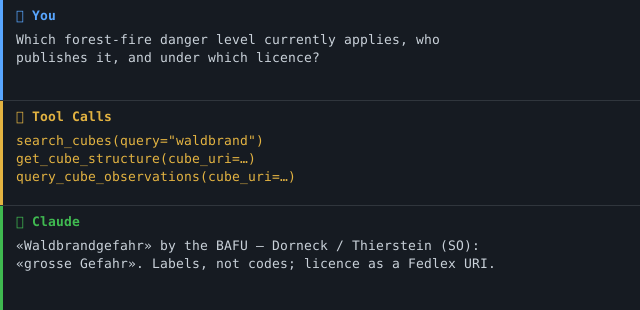
The two-phase access pattern
LINDAS cubes are self-describing but coded. Reading them well means two steps, which this server enforces:
- Structure first —
get_cube_structurereads the cube's SHACL shape: its dimensions (filterable axes), its measures (the numbers), and which dimensions carry code lists. - Data second —
query_cube_observationsreads the observations and resolves coded values to human labels using the structure from step 1.
Mnemonic: «LINDAS speaks in postcodes, not place names.» An observation says region
1805; the server turns that into «Alpennordhang» for you.
Architecture
The lindas/ package is deliberately layered so it can be lifted into other
LINDAS-backed servers unchanged. client.py knows only HTTP and SPARQL;
cube.py knows the cube.link vocabulary; the tools know only cube.py. Raw
SPARQL never reaches the agent except through the guarded run_sparql escape
hatch.
Architecture decision
Architecture A (live SPARQL only), with a strict vocabulary guardrail.
Verified live on 2026-07-21:
- The endpoint is stable, needs no authentication, and returns a clean HTTP 400 with a diagnostic on malformed queries.
- Blind scans (
SELECT *,COUNT(*)over the whole store) time out at 60–90 s; the same question anchored on?x a cube:Cubeanswers in ~2 s.
Consequences, baked into the tools:
- Every query template is anchored on a known class. No unbounded scans.
- Two-phase access is enforced; the agent never sees raw codes.
run_sparqlis capped at 500 rows and 30 s and marked as advanced.- The client timeout sits at 45 s, in front of the store's own 60–90 s abort.
Full probe report: docs/probe-lindas.md.
Tools
| Tool | Purpose |
|---|---|
search_cubes | Find cubes by topic. Entry point. Deduplicates versions. |
get_cube_structure | Phase 1: dimensions, measures, licence. |
query_cube_observations | Phase 2: data points with codes resolved to labels. |
list_publishers | Federal bodies publishing cubes, with counts. |
resolve_municipality | Name ↔ URI ↔ BFS number — the portfolio join key. |
run_sparql | Advanced escape hatch. Capped, guarded. |
api_status | Reachability check with cube count. |
All tools are annotated readOnlyHint: true.
Installation
Claude Desktop
Remote deployment
LINDAS_MCP_TRANSPORT accepts stdio (default), sse or streamable-http.
The SSE / streamable-http transport binds to HOST, default 127.0.0.1;
set HOST=0.0.0.0 explicitly to expose it (only behind a reverse proxy). For a
hosted HTTP deployment, set ALLOWED_ORIGINS to a comma-separated list of
browser origins — unset means no browser client is permitted at all, which
is the default. * is still accepted and logs a warning. LOG_LEVEL tunes the
JSON stderr logs.
Docker
The image runs as a non-root user, read-only, with resource limits and a
TCP health check (see Dockerfile and compose.yaml).
Join keys
LINDAS is a connector layer, and two of its identifiers make it composable with the rest of the portfolio:
| Key | Where | Joins to |
|---|---|---|
| BFS commune number | resolve_municipality → bfs_number | swiss-statistics-mcp, zurich-opendata-mcp |
| Fedlex URI | cube licence field | fedlex-mcp |
The Fedlex link is the quiet surprise: many cubes declare their licence as a
legal-basis URI (fedlex.data.admin.ch/eli/cc/...), so you can go from a data
point straight to the law that governs it.
Known limitations
Verified live on 2026-07-21.
- Broad SPARQL times out. The store aborts unanchored scans at 60–90 s.
The guarded tools avoid this;
run_sparqlwarns about it and caps runtime. - Observations are coded. Dimension values are URIs, not labels. The server
resolves them via each dimension's code list, but resolution costs one extra
query per coded dimension. Set
resolve_labels=Falseto skip it. - No server-side observation filtering by arbitrary value. LINDAS has no
cheap way to filter observations by a dimension value inside a cube, so
query_cube_observationsreads the first N observations. Analytical slicing belongs inrun_sparql. - Licences vary per cube and are declared as
dcterms:license, frequently a Fedlex URI rather than a plain name. Always surface thelicencefield. - Version handling is heuristic.
search_cubesdeduplicates by stripping the version suffix from the cube URI and keeping the highestschema:versionamong published cubes. Unusual URI shapes may not collapse cleanly; uselatest_only=Falseto inspect every version.
MCP Protocol Version
This server speaks two protocol eras over the same endpoint. The client's first request on a connection decides which one applies; a later claim from the other era is refused.
| Era | Revision | Who reaches it |
|---|---|---|
initialize handshake | 2024-11-05 … 2025-11-25 | What today's clients speak. The server answers with the revision asked for, or with the 2025-11-25 ceiling when the request asks for something newer. |
| Per-request envelope | 2026-07-28 | A request carrying the 2026-07-28 _meta envelope opens a modern connection. |
Both revisions are pinned in
tests/test_protocol_version.py and asserted
against the installed SDK, so a Dependabot bump of mcp cannot move either one
silently. The handshake ceiling is measured against a live initialize through
the assembled ASGI stack, not read off a constant name.
Note that the SDK's LATEST_PROTOCOL_VERSION is an alias for the modern
era, not for the handshake era — pinning against it alone would leave the era
that current clients actually negotiate free to drift.
Related MCP Servers
Reviews
No reviews yet — be the first to share how this listing worked for you.
Frequently Asked Questions about Lindas MCP
AllMCPs Directory Badge
Showcase your server listing on GitHub or your project documentation. Embed this dynamic SVG badge to highlight official listing status and live engagement.
Badge Style:
Live Dynamic SVG Preview
Markdown (GitHub README)
[](https://allmcps.com/mcp/lindas-mcp)HTML Embed
<a href="https://allmcps.com/mcp/lindas-mcp"><img src="https://allmcps.com/api/badge/lindas-mcp?style=directory" alt="Lindas MCP on AllMCPs" /></a>