MCP planning server for AI agents — plan management, full-text search, and task lifecycle
Quick Install
Automated & IDE SetupCopy the AI prompt to install this server into Claude Code, Cursor, or another agent — or use 1-click editor setup below.
Not yet automatically verified
We haven't yet run this listing's install command through our automated sandbox check. This isn't a red flag — we're steadily working through the catalog.
Manual Client & Custom JSON ConfigExpand JSON ▾
Client Config & Setup
Choose your client or environment
Target File:
💡 Paste the JSON block into your client's configuration file under mcpServers, then restart the application.
Documentation Overview
limps
Local Intelligent MCP Planning Server — A document and planning layer for AI assistants. No subscriptions, no cloud. Point limps at any folder (local, synced, or in git). One shared source of truth across Claude, Cursor, Codex, and any MCP-compatible tool.




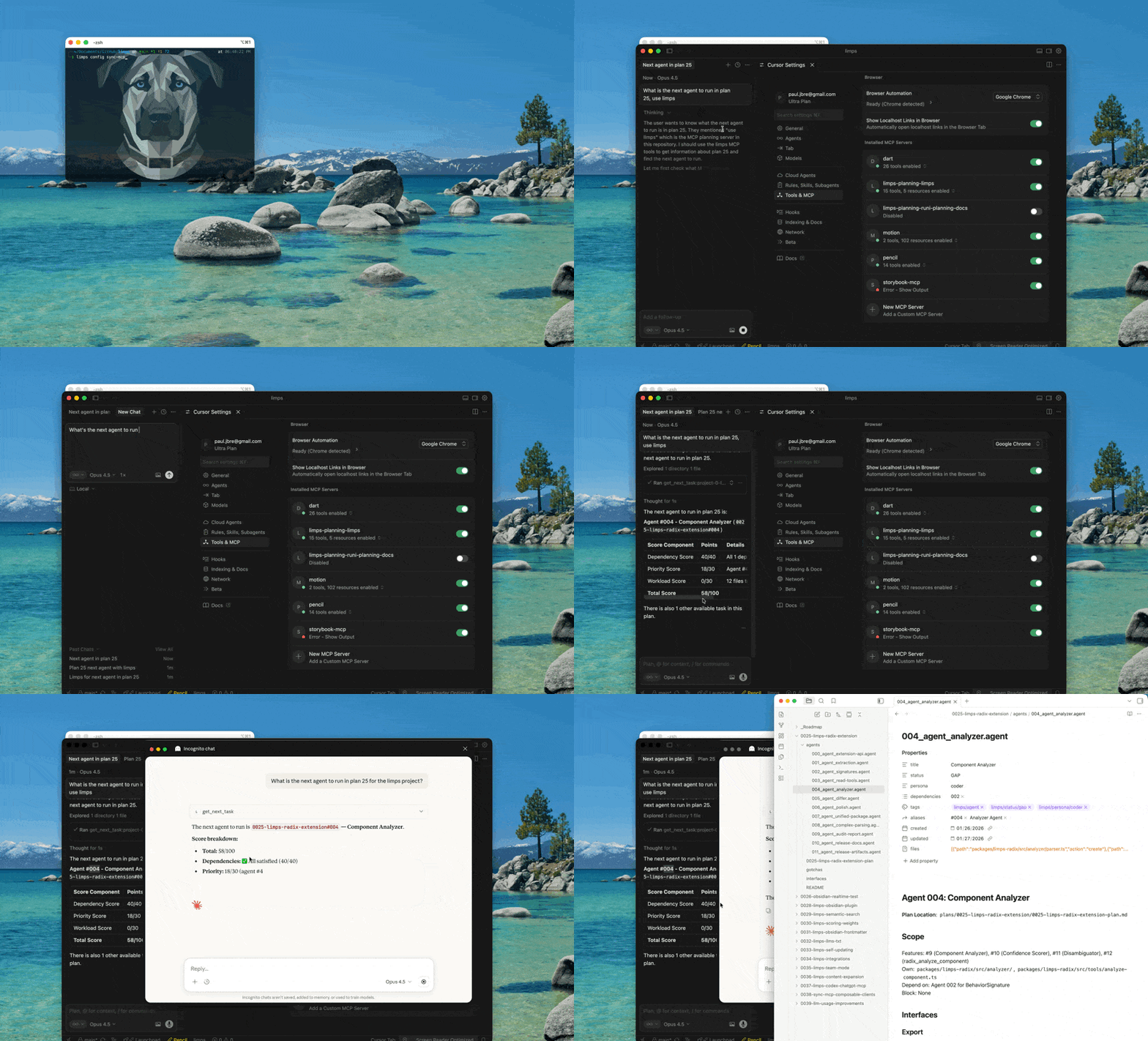
Table of Contents
- Quick Start
- Features
- How I Use limps
- Health & Automation
- How You Can Use It
- Why limps?
- Installation
- Upgrading from v2
- Project Setup
- Client Setup
- Transport
- Daemon Management
- CLI Commands
- Configuration
- Environment Variables
- Troubleshooting
- MCP Tools
- Skills & Commands
- Extensions
- Obsidian Compatibility
- Development
- Used in Production
- Creating a feature plan
- Deep Dive
- What is MCP?
- License
Quick Start
That's it. Your AI assistant now has access to your documents via HTTP transport. The folder can be anywhere—local, synced, or in a repo; limps does not require a git repository or a plans/ directory.
Tip: limps server status always includes system-wide daemon discovery. If a project config is found (or passed via --config), it also reconciles the configured project target against that global list.
Features
- Document CRUD + full-text search across any folder of Markdown files
- Plan + agent workflows with status tracking and task scoring
- Next-task suggestions with score breakdowns and bias tuning
- Sandboxed document processing via
process_doc(s)helpers - Multi-client support for Cursor, Claude, Codex, and more
- Extensions for domain-specific tooling (e.g., limps-headless)
- Knowledge graph — Entity extraction, hybrid retrieval, conflict detection, and graph-based suggestions
- Health automation — Staleness detection, code drift checks, status inference, and auto-fix proposals
- Advanced task scoring — Dependency-aware prioritization with per-plan/agent weight overrides
- MCP Registry — Published to the official MCP Registry (
registry.modelcontextprotocol.io)
What to know before you start
- Local only — Your data stays on disk (SQLite index + your files). No cloud, no subscription.
- Restart after changes — If you change the indexed folder or config, restart the MCP server (or rely on the file watcher) so the index and tools reflect the current state.
- Daemon management — The HTTP server runs as a background process. Use
limps server start,limps server stop, andlimps server statusto manage the daemon lifecycle. PID files are stored in OS-standard directories for system-wide awareness. - Sandboxed user code —
process_docandprocess_docsrun your JavaScript in a QuickJS sandbox with time and memory limits; no network or Node APIs. - One optional network call —
limps version --checkfetches from the npm registry to compare versions. All other commands (serve, init, list, search, create/update/delete docs, process_doc, etc.) do not contact the internet. Omitversion --checkif you want zero external calls.
How I Use limps
I use limps as a local planning layer across multiple AI tools, focused on create → read → update → closure for plans and tasks. The MCP server points at whatever directory I want (not necessarily a git repo), so any client reads and updates the same source of truth.
Typical flow:
- Point limps at a docs directory (any folder, local or synced).
- Use CLI + MCP tools to create plans/docs, read the current status, update tasks, and close work when done.
- Add the limps MCP entry to each client config so Cursor/Claude/Codex all see the same plans.
Commands and tools I use most often:
- Create:
limps init,create_plan,create_doc - Read:
list_plans,list_agents,list_docs,search_docs,get_plan_status - Update:
update_doc,update_task_status,manage_tags - Close:
update_task_status(e.g.,PASS),delete_docif needed - Analyze:
graph health,graph search,graph check,health check
Full lists are below in "CLI Commands" and "MCP Tools."
How You Can Use It
limps is designed to be generic and portable. Point it at any folder with Markdown files and use it from any MCP-compatible client. No git repo required. Not limited to planning—planning (plans, agents, task status) is one use case; the same layer gives you document CRUD, full-text search, and programmable processing on any indexed folder.
Common setups:
- Single project: One docs folder for a product.
- Multi-project: Each project gets its own
.limps/config.json; pass--configto target a specific one. - Shared team folder: Put plans in a shared location and review changes like code.
- Local-first: Keep everything on disk, no hosted service required.
Key ideas:
- Any folder — You choose the path; if there’s no
plans/subdir, the whole directory is indexed. Use generic tools (list_docs,search_docs,create_doc,update_doc,delete_doc,process_doc,process_docs) or plan-specific ones (create_plan,list_plans,list_agents,get_plan_status,update_task_status,get_next_task). - One source of truth — MCP tools give structured access; multiple clients share the same docs.
Why limps?
The problem: Each AI assistant maintains its own context. Planning documents, task status, and decisions get fragmented across Claude, Cursor, ChatGPT, and Copilot conversations.
The solution: limps provides a standardized MCP interface that any tool can access. Your docs live in one place—a folder you choose. Use git (or any sync) if you want version control; limps is not tied to a repository.
Installation
Upgrading from v2
v3 introduces major changes:
HTTP Transport (Breaking Change)
v3 uses HTTP transport exclusively. stdio transport has been removed.
Migration steps:
-
Start the HTTP daemon for each project:
-
Update MCP client configs — Replace stdio configs with HTTP transport:
Use
limps config printto generate the correct snippet.
Per-Project Configs (Breaking Change)
v3 removes the centralized project registry. If you previously used limps config add, config use, or the --project flag:
- Run
limps initin each project directory to create.limps/config.json. - Update MCP client configs — Replace
--project <name>with HTTP transport config (see above). - Remove environment variable —
LIMPS_PROJECTno longer exists. UseMCP_PLANNING_CONFIGto override config path.
Removed commands: config list, config use, config add, config remove, config set, config discover, config migrate, config sync-mcp, serve.
Replaced by: limps init + limps server start + limps config print.
Project Setup
Initialize a New Project
This creates .limps/config.json in the current directory and prints MCP client setup instructions.
You can also specify a path:
If the directory contains a plans/ subdirectory, limps uses it. Otherwise, it indexes the entire directory.
Multiple Projects
Each project has its own .limps/config.json. Use --config to target a specific project:
Client Setup
After running limps init, you need to add a limps entry to your MCP client's config file. Use limps config print to generate the correct snippet for your client, then paste it into the appropriate config file:
The output tells you exactly what JSON (or TOML) to add and where the config file lives.
Per-Client Examples
All clients connect to the HTTP daemon. Start the daemon first with limps server start, then configure your client.
Cursor
Add to .cursor/mcp.json in your project:
Related MCP Servers
Adoption & maintenance
Factual signals from GitHub, npm, and our automated checks — not a rating.
GitHub stars
10
Stargazers on the source repository.
Last commit
6mo ago
Most recent push to the default branch.
Reviews
No reviews yet — be the first to share how this listing worked for you.
Frequently Asked Questions about Limps
AllMCPs Directory Badge
Showcase your server listing on GitHub or your project documentation. Embed this dynamic SVG badge to highlight official listing status and live engagement.
Badge Style:
Live Dynamic SVG Preview
Markdown (GitHub README)
[](https://allmcps.com/mcp/limps)HTML Embed
<a href="https://allmcps.com/mcp/limps"><img src="https://allmcps.com/api/badge/limps?style=directory" alt="Limps on AllMCPs" /></a>Technical Specs & Signals
CategoryDeveloper Tools
37Quality signal: Fair · 37/100How this signal is calculated ▾
Server availabilityNot measured
Not scored for repo-hosted servers — we can't reach the running server, only its GitHub page. Hosted MCP endpoints are health-checked live.
Verified ownership10/20
Documentation & tools16/30
Adoption & activity2/15
Community engagement0/10
A guidance signal from public completeness & health data — not a user rating. New listings start lower and rise as they add docs, get verified, and grow adoption. Signals we can't observe for a listing are skipped, not counted against it.
Own this project?
This directory is pre-filled from public sources. Claim via GitHub README, site badge, or DNS TXT to unlock edit access and the Official badge and attach your website — proof is checked automatically, then reviewed by our team.
Free dofollow backlink: add your website and place the AllMCPs badge on it — no claim needed. We detect it automatically and keep it verified as long as the badge stays live.
Claim & get free dofollowShare & Embed
Add our SVG badge (dark/light directory styles) or embeddable widget to your site.