Connect AI to millions of laws and court cases with the Lawstronaut MCP.
Quick Install
Automated & IDE SetupCopy the AI prompt to install this server into Claude Code, Cursor, or another agent — or use 1-click editor setup below.
Manual Client & Custom JSON ConfigExpand JSON ▾
Client Config & Setup
Remote HTTPChoose your client or environment
Target File:
💡 Paste the JSON block into your client's configuration file under mcpServers, then restart the application.
Capabilities & Tool Schemas (62)
Inspect callable tools, capabilities, and parameters exposed to AI agents by Lawstronaut.
list_jurisdictionsList all jurisdictions (countries/states) in the Lawstronaut corpus — call first to get valid ISO codes for other tools
list_domainsList legal domains with optional name filter and pagination
domainFilter domains by name (string, optional)
limitNumber of results to return (number, optional)
offsetNumber of results to skip (number, optional)
list_subdomainsList subdomains for a domain ID — filter by name, paginate results
Documentation Overview

Lawstronaut MCP
Connect lawstronaut to Claude, ChatGPT, Cursor, and any AI agent that speaks the Model Context Protocol. Connect your AI to 50+ million laws and court cases!




Authentication . Setup · Tools
What is this?
Lawstronaut is the infrastructure layer that connects AI agents and software to millions of legal documents across 150+ jurisdictions, structured legal data, continuously updated, and ready to use via MCP.
Authentication
Production MCP server: https://mcp.lawstronaut.com
Transport: MCP over Streamable HTTP (POST /).
Public server card (tool listing, no auth):
https://mcp.lawstronaut.com/.well-known/mcp/server-card.json
Lawstronaut MCP supports Bearer token and OAuth 2.0 (client_id + client_secret). A paid subscription is required.
| Method | Best for | Tool listing | Tool calls |
|---|---|---|---|
| Bearer token | CLI, scripts, clients without OAuth | No auth required | Authorization: Bearer <token> |
| OAuth 2.0 | Cursor, VS Code, Claude, publishing platforms | No auth required | OAuth access token (auto-managed by client) |
Get client ID, secret, or bearer token
- Visit lawstronaut.com and purchase a subscription.
- Log in to the developer portal.
- Open MCP server access from the Home menu.
- Create a client ID + client secret (OAuth) or a bearer token.
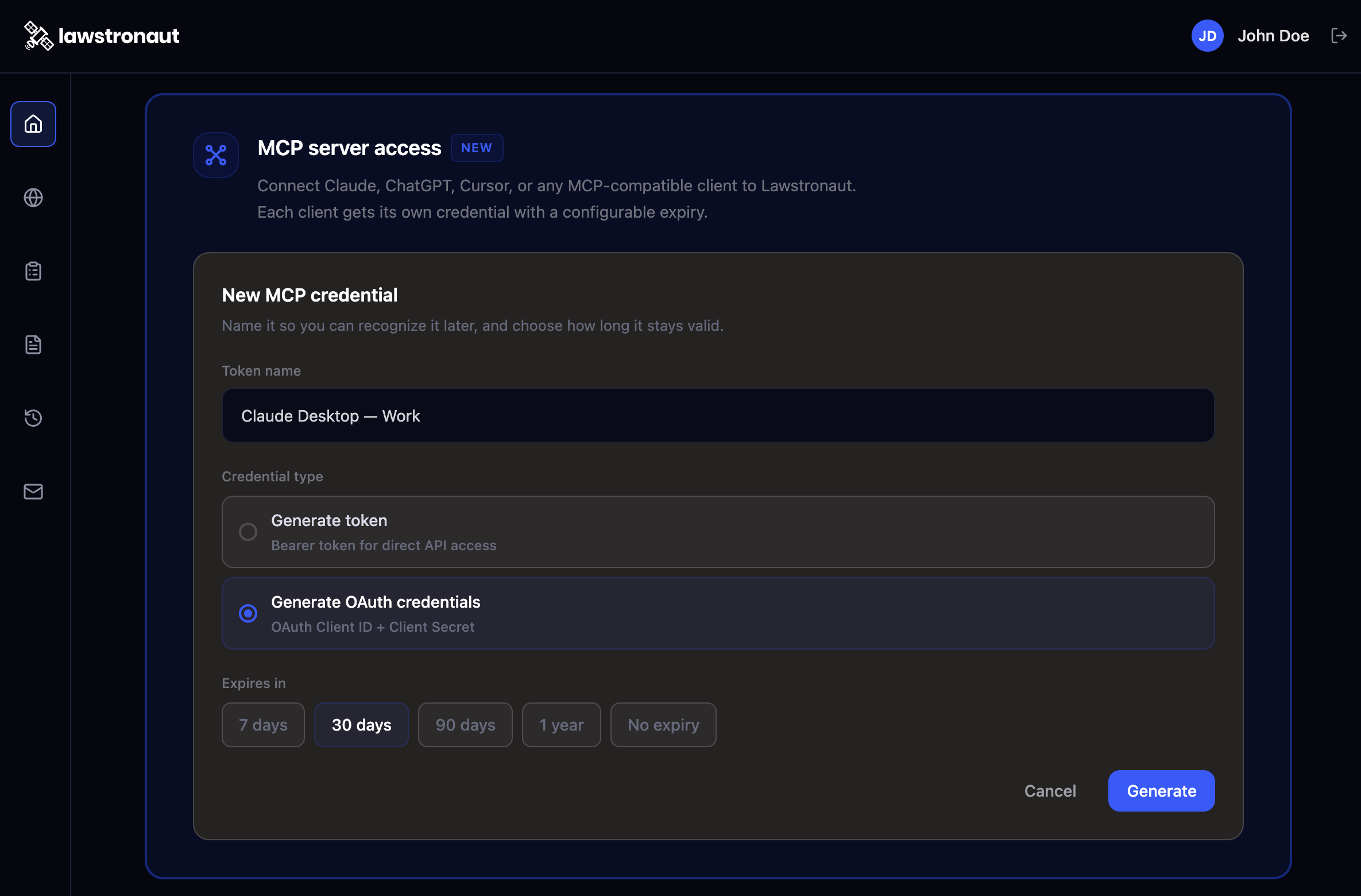
Option A — Bearer token
Use the bearer token from MCP server access:
Set it in your environment:
Example configs: cursor-mcp.json, vscode-mcp.json, claude-code.mcp.json.
Option B — OAuth 2.0 (client_id + client_secret)
Use the client_id and client_secret created under MCP server access in the developer portal.
| Endpoint | URL |
|---|---|
| MCP server | https://mcp.lawstronaut.com |
| Authorization | https://mcp.lawstronaut.com/oauth/authorize |
| Token | https://mcp.lawstronaut.com/oauth/token |
| OAuth discovery | https://mcp.lawstronaut.com/.well-known/oauth-authorization-server |
| Protected resource | https://mcp.lawstronaut.com/.well-known/oauth-protected-resource |
Flow: response_type=code → redirect with code → exchange at /oauth/token with grant_type=authorization_code, client_id, client_secret, code, and redirect_uri.
Clients that support MCP OAuth discovery only need the server URL — they handle the flow using your registered client_id / client_secret.
Example configs: cursor-mcp-oauth.json, vscode-mcp-oauth.json.
Setup
Pick your client, paste the config, and authenticate with your lawstronaut account. Most clients open a browser window for OAuth the first time an agent uses a lawstronaut tools.
Cursor
Bearer token
- Copy
cursor-mcp.jsonto.cursor/mcp.json(project) or~/.cursor/mcp.json(global). - Export
LAWSTRONAUT_MCP_BEARER_TOKEN. - Restart Cursor. Check Output → MCP Logs if connection fails.
OAuth
- Copy
cursor-mcp-oauth.jsonto.cursor/mcp.json. - Complete the OAuth sign-in when Cursor prompts you (uses your registered
client_id/client_secret).
Docs: Cursor MCP.
VS Code (GitHub Copilot agent / MCP)
Bearer token
- Copy
vscode-mcp.jsonto.vscode/mcp.json, or merge into your user MCP config. - Run MCP: List Servers and enter your bearer token when prompted.
OAuth
- Copy
vscode-mcp-oauth.jsonto.vscode/mcp.json. - Sign in through VS Code when prompted.
Docs: MCP configuration reference.
Claude Code (CLI)
Bearer token — CLI
Bearer token — project file
Copy claude-code.mcp.json to .mcp.json in your project root.
OAuth
Add the server URL only and complete OAuth when prompted:
Docs: Connect Claude Code to tools via MCP.
Claude Desktop (Anthropic app)
Claude Desktop is oriented toward stdio MCP servers. For this HTTP server, use Cursor, VS Code, or Claude Code, or any host that supports remote Streamable HTTP MCP.
Go to Customize, Connectors, click "+", Add Custom Connector, and fill the dialog:
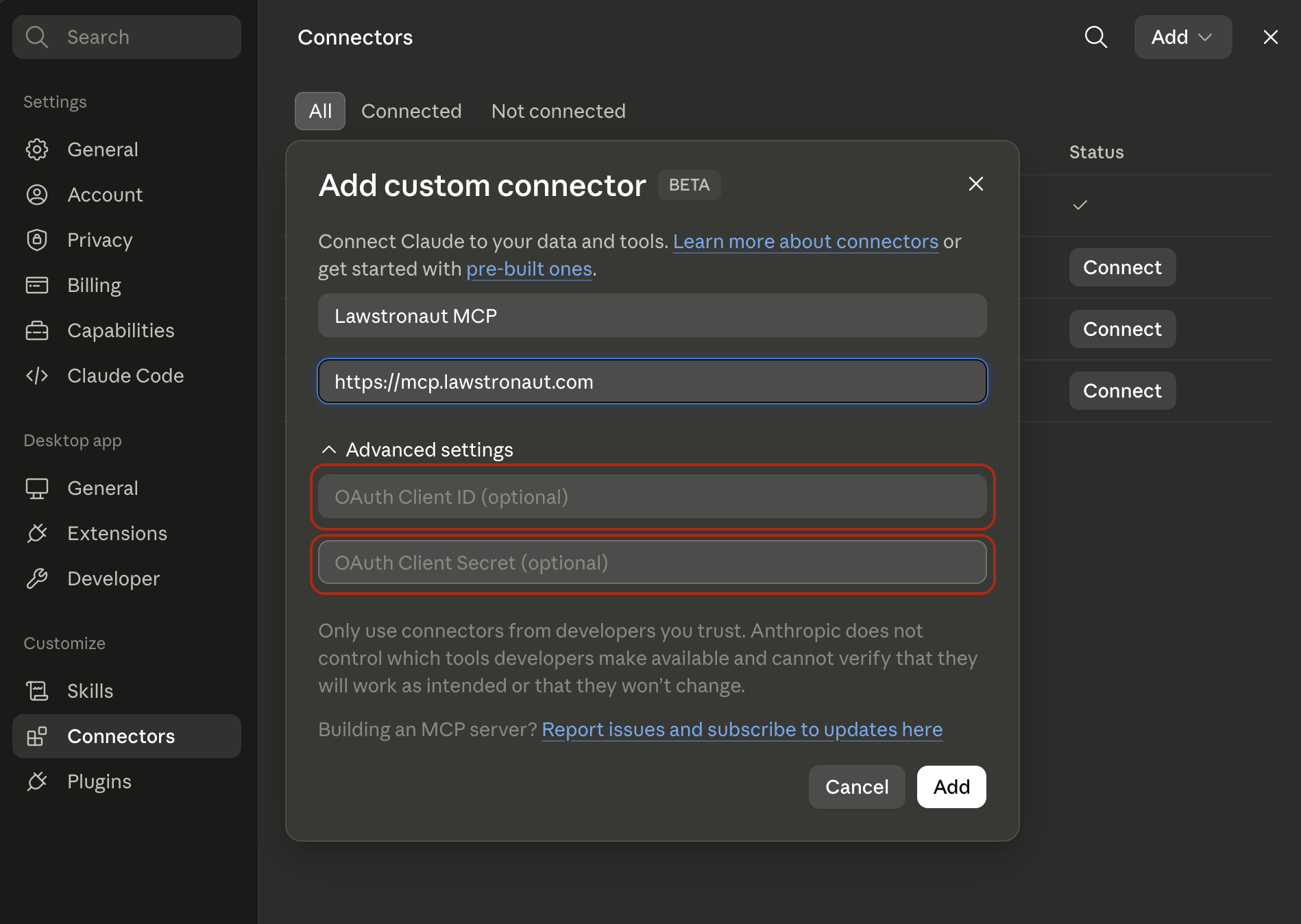
Other hosts (Continue, Zed, custom agents, etc.)
Any client that supports MCP Streamable HTTP can connect with:
- URL:
https://mcp.lawstronaut.com - Bearer:
Authorization: Bearer <token> - OAuth: use discovery at
/.well-known/oauth-authorization-serverwith yourclient_id/client_secret
Tools
-
list_jurisdictions - List all jurisdictions (countries/states) in the Lawstronaut corpus — call first to get valid ISO codes for other tools
-
list_domains - List legal domains with optional name filter and pagination
domain: Filter domains by name (string, optional)limit: Number of results to return (number, optional)offset: Number of results to skip (number, optional)
-
list_subdomains - List subdomains for a domain ID — filter by name, paginate results
domain_id: Filter by Domain ID (string, required)subdomain: Filter subdomains by name (string, optional)limit: Number of results to return (number, optional)offset: Number of results to skip (number, optional)
-
list_categories - List legal categories for a subdomain — filter by name, paginate results
subdomain_id: Filter by Subdomain ID (string, optional)category_name: Filter categories by name (string, optional)limit: Number of results to return (number, optional)offset: Number of results to skip (number, optional)
-
list_subcategories - List subcategories for a category ID — filter by name, paginate results
category_id: Filter by Category ID (string, required)subcategory_name: Filter subcategories by name (string, optional)limit: Number of results to return (number, optional)offset: Number of results to skip (number, optional)
-
list_law_types - List law types for a subcategory ID — filter by name, paginate results
subcategory_id: Filter by Subcategory ID (string, required)law_type: Filter law types by name (string, optional)limit: Number of results to return (number, optional)offset: Number of results to skip (number, optional)
-
list_portals - List legal portals for a jurisdiction — filter by name, language, or tag
iso: Filter by Jurisdiction ISO code (e.g. 'US') (string, required)name: Filter portals by name (string, optional)tag: Filter by tag (string, optional)lang: Filter by language (string, optional)
-
list_authority_types - List authority types for a jurisdiction — filter by portal or authority type
iso: Filter by Jurisdiction ISO code (e.g. 'US') (string, required)limit: Number of results to return (number, optional)offset: Number of results to skip (number, optional)portal_name: Filter by portal name (string, optional)authority_type: Filter by authority type (string, optional)
-
list_issuing_authorities - List issuing authorities for a jurisdiction — filter by portal or authority name
iso: Filter by Jurisdiction ISO code (e.g. 'US') (string, required)limit: Number of results to return (number, optional)offset: Number of results to skip (number, optional)portal_name: Filter by portal name (string, optional)issuing_authority: Filter by issuing authority (string, optional)
Related MCP Servers
Adoption & maintenance
Factual signals from GitHub, npm, and our automated checks — not a rating.
GitHub stars
2
Stargazers on the source repository.
Last commit
21d ago
Most recent push to the default branch.
Tools exposed
62
Callable tools this server registers over MCP.
Reviews
No reviews yet — be the first to share how this listing worked for you.
Frequently Asked Questions about Lawstronaut
AllMCPs Directory Badge
Showcase your server listing on GitHub or your project documentation. Embed this dynamic SVG badge to highlight official listing status and live engagement.
Badge Style:
Live Dynamic SVG Preview
Markdown (GitHub README)
[](https://allmcps.com/mcp/lawstronaut-2)HTML Embed
<a href="https://allmcps.com/mcp/lawstronaut-2"><img src="https://allmcps.com/api/badge/lawstronaut-2?style=directory" alt="Lawstronaut on AllMCPs" /></a>