linuxsystem-administrationsecurityauditcli
Linux administration MCP server using typed actions, approval receipts, signed audit logs, and rollback for atomic-host changes.
Quick Install
Automated & IDE SetupCopy the AI prompt to install this server into Claude Code, Cursor, or another agent — or use 1-click editor setup below.
We couldn’t automatically confirm this listing starts correctly
We ran the install command below but it didn't respond within our test window — this can mean a slow first-time install rather than a real problem.
npx -y sysknife-setupNo response to initialize.
This is an experimental automated check and can have false negatives — missing environment variables, a slow cold install, etc. It doesn’t necessarily mean something’s wrong. Last checked 1mo ago.
Manual Client & Custom JSON ConfigExpand JSON ▾
Client Config & Setup
Choose your client or environment
Target File:
💡 Paste the JSON block into your client's configuration file under mcpServers, then restart the application.
Overview
Use cases
Plan Linux administration tasks from chat
Review and approve typed system changes
Audit executed actions with signed history
Verify the integrity of audit records
Roll back failed rpm-ostree changes
Key features
189 typed system administration actions
Risk-rated execution plans
One-time TTL approval receipts
Ed25519-signed hash-chain audit log
Automatic rollback for atomic-host changes
Live execution output
Capabilities & Tool Schemas
Inspect callable tools, capabilities, and parameters exposed to AI agents by Sysknife.
Extracted Tool Capabilities
189 typed system administration actions
Risk-rated execution plans
One-time TTL approval receipts
Ed25519-signed hash-chain audit log
Automatic rollback for atomic-host changes
Live execution output
Documentation Overview

SysKnife
Your sysadmin co-pilot. Plan. Approve. Audit.




Distros



Install · How it works · Why not X? · Distro matrix · Roadmap · Contribute · Discuss
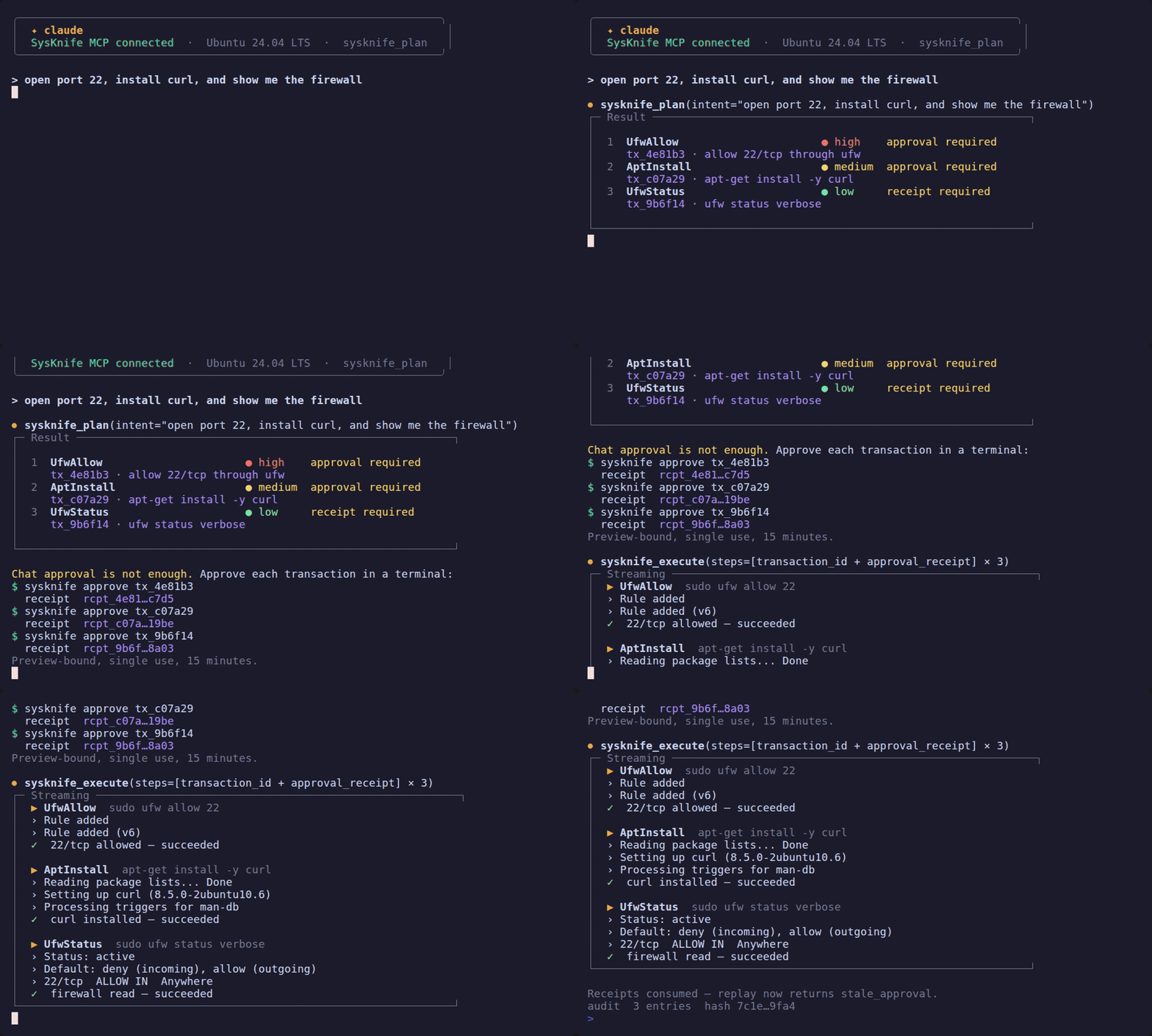
A deterministic reproduction of the Claude Code MCP flow on Ubuntu 24.04, rendered offline by
ubuntu-flow-mock.sh so it replays identically from a
fresh checkout. Every action name, risk level and command shown is the one the catalogue
carries. The same flow works in Cursor and Codex CLI.
On an atomic host the plan uses rpm-ostree instead:
the Fedora Atomic recording.
Looking for the standalone CLI? See the CLI guide.
Describe what you want in plain language. Review a typed plan with risk levels. Approve explicitly. Watch it execute with live output. Atomic-host changes (rpm-ostree) roll back automatically on failure. Every action is Ed25519-signed and audited.
The AI never supplies a command. Every action is a typed operation with a
formal risk level, and the daemon builds the command line itself from the
action's own definition — some actions do run through sh -c, but the shell
fragment is constructed by SysKnife, never by the model. The AI cannot touch
your system directly. A privileged daemon executes only what you approve, writes
a tamper-evident Ed25519-signed audit chain, and rolls back atomic-host
(rpm-ostree) changes automatically on failure.
Why typed actions and not a guarded shell? Red-team research (GuardFall) found that 10 of 11 AI agents bypass raw-string shell guards — an allowlist or regex is filtering a language rich enough to hide intent. SysKnife removes the shell string entirely: the model emits typed actions, and a public-key-verifiable audit chain records every one.
Install
The fastest path is the setup wizard. It installs the daemon and wires SysKnife into your AI IDE — Claude Code, Cursor, or Codex CLI — so you can plan and execute from chat.
Needs Node 22 or newer; older Node releases no longer receive security fixes.
On Ubuntu 22.04 apt install nodejs gives Node 12, which is too old; the installer
says so and how to get a current Node. No Rust
toolchain and no compile: it downloads verified prebuilt binaries.

What this does:
-
Downloads the prebuilt
sysknife+sysknife-daemonbinaries for your architecture (x86_64 / aarch64) from GitHub Releases, SHA-256-verifies each against the release checksum file — a mismatch aborts the install — and places them in~/.local/bin(no sudo). Pass--no-binaryto skip the download and build from source instead. -
Asks for your LLM provider, key, and model — OpenAI / Anthropic / Gemini / Ollama / Groq / DeepSeek / Mistral / xAI (Ollama needs no key). The key prompt is skipped when the matching env var is already set.
-
Asks which AI integration to wire up (or pick
--claude/--cursor/--codex/--all) and your daemon target(s) — socket, plus an optional vsock token for a remote VM. -
Writes the integration-specific MCP config (merging into any existing file, never clobbering) so the next chat session sees the
sysknife_*tools —sysknife_plan,sysknife_execute,sysknife_history,sysknife_doctor,sysknife_audit_verify, and distro-compatible direct read-only queries such assysknife_get_disk_usage— as first-class tools. -
Installs and starts the daemon as a service (last step) — a systemd user service by default (no sudo; kept alive across logout via linger). That service runs as you, so read-only actions work but mutating ones do not: installing packages or restarting services needs the system-level service, whose sudoers grants belong to the
sysknifesystem user. Pick the system service on any host where you intend to change something, and pass--daemon-mode=system|user|skipto choose without a prompt.--daemon-mode=systemdoes not install the system service from the wizard — it needs root-owned sudoers, polkit and helper policy thatsudo make installowns — so it prints the exact sequence and reports the daemon as not yet installed.To verify the download against a checksum list you trust independently of the release, set
SYSKNIFE_PINNED_SHA256SUMS=/path/to/sums; see SECURITY.md.
| Client | Files written |
|---|---|
| Claude Code | .mcp.json + .claude/hookify.*.local.md |
| Cursor | .cursor/mcp.json + .cursor/rules/sysknife.mdc |
| Codex CLI | ~/.codex/config.toml (appended) + AGENTS.md |
Then in your chat: ask for what you want and review the plan with risk pills.
Approve each transaction with sysknife approve <transaction-id> in a
terminal, return the one-time receipts, and watch it execute. The daemon, not
the prompt, enforces the receipt boundary.
Prefer the standalone CLI? Same engine, no IDE — see the CLI guide for
sysknife "...",--dry-run,--json, approval prompts, and audit-log inspection.
Manual install — Ubuntu 20.04+
Needs Rust stable and a C compiler (build-essential): the TLS and SQLite
dependencies build native code, so a rustup-only machine stops at
error: linker cc not found. cmake is not required. Budget 7 to 12
minutes for the ~400-crate build (6m56s on Ubuntu 24.04, 11m43s on 22.04).
Uninstall
Whichever way you installed, there is one command for it.
Related MCP Servers
Adoption & maintenance
Factual signals from GitHub, npm, and our automated checks — not a rating.
GitHub stars
12
Stargazers on the source repository.
npm downloads
1.1k
Package downloads in the last 30 days.
Last commit
1d ago
Most recent push to the default branch.
Install check
Inconclusive
Didn't respond in our test window — often a slow first install.
Directory activity
1 views
Config copies, upvotes, and views on AllMCPs.
Reviews
No reviews yet — be the first to share how this listing worked for you.
Frequently Asked Questions about Sysknife
AllMCPs Directory Badge
Showcase your server listing on GitHub or your project documentation. Embed this dynamic SVG badge to highlight official listing status and live engagement.
Badge Style:
Live Dynamic SVG Preview
Markdown (GitHub README)
[](https://allmcps.com/mcp/lacs-project-sysknife)HTML Embed
<a href="https://allmcps.com/mcp/lacs-project-sysknife"><img src="https://allmcps.com/api/badge/lacs-project-sysknife?style=directory" alt="Sysknife on AllMCPs" /></a>Technical Specs & Signals
CategoryCommand Line
PricingFree
12/12 checks healthy over the last 42d
57Quality signal: Good · 57/100How this signal is calculated ▾
Server availabilityNot measured
Not scored for repo-hosted servers — we can't reach the running server, only its GitHub page. Hosted MCP endpoints are health-checked live.
Verified ownership10/20
Documentation & tools24/30
Adoption & activity9/15
Community engagement0/10
A guidance signal from public completeness & health data — not a user rating. New listings start lower and rise as they add docs, get verified, and grow adoption. Signals we can't observe for a listing are skipped, not counted against it.
Supply-chain signal
No high-severity advisories surfaced by our automated scan.
Critical 0High 0Medium 0Low 0
Scanned 3d ago via OSV.dev · sysknife-setup (npm)
Own this project?
This directory is pre-filled from public sources. Claim via GitHub README, site badge, or DNS TXT to unlock edit access and the Official badge — proof is checked automatically, then reviewed by our team.
Free dofollow backlink: add your website and place the AllMCPs badge on it — no claim needed. We detect it automatically and keep it verified as long as the badge stays live.
Claim & get free dofollowShare & Embed
Add our SVG badge (dark/light directory styles) or embeddable widget to your site.