AllMCPs
BrowseBestCategoriesStackCompareToolsGuidesBlog
Log in Submit MCP

Stay in the loop

Get new MCP servers and top picks in your inbox.

AllMCPs

The open directory for discovering and installing Model Context Protocol servers.

AllMCPs on GitHub (opens in a new tab)
Launched onTiny Startupstinystartups.com
Explore
  • Browse servers
  • Best MCP servers
  • Categories
  • MCP clients
  • Agent prompts
  • Stack Builder
  • Compare servers
  • Random discovery New
  • Submit a server
  • Pricing & Boost Boost
Learn
  • Guides hub
  • What is MCP?
  • Install guide
  • Build an MCP server
  • Deploy an MCP server
  • Security guide
  • Troubleshooting
  • MCP for SEO & AEO
  • Protocol versioning
  • Transports: stdio vs HTTP
  • State of MCP (stats)
  • Blog & updates
Tools
  • All developer tools
  • Config generator
  • Config validator
  • Config auditor
  • MCP playground
  • Token calculator
  • OpenAPI β†’ MCP
  • Badge generator
For agents
  • REST API docs
  • Trust & traffic Live
  • Remote MCP server SSE β†— (opens in a new tab)
  • llms.txt β†— (opens in a new tab)
  • Catalog JSON β†— (opens in a new tab)
Company
  • About
  • Advertise Sponsor
  • Contact
  • GitHub β†— (opens in a new tab)
  • Terms
  • Privacy
AllMCPs VerifiedAllMCPs VerifiedFeatured on Nick LaunchesFeatured on Nick LaunchesLaunch Llama NewsletterLaunch Llama NewsletterVerified DR - allmcps.comVerified DR - allmcps.comFeatured on SaaSGrowFeatured on SaaSGrowFeatured on Twelve ToolsFeatured on Twelve ToolsFeatured on Saaspa.geFeatured on Saaspa.geFeatured on Findly.toolsFeatured on Findly.toolsFeatured on Startup FameFeatured on Startup FameFeatured on LaunchKiwiFeatured on LaunchKiwiFeatured on ScrollLaunchFeatured on ScrollLaunchFeatured on DailyPingsFeatured on DailyPingsFazier badgeFazier badgeFeatured on NewTool.siteFeatured on NewTool.siteFeatured on saasfame.comFeatured on saasfame.comDR Checker - Domain RatingDR Checker - Domain RatingListed on Turbo0Listed on Turbo0Launched on LaunchBoard - Product Launch PlatformLaunched on LaunchBoard - Product Launch PlatformList on SimilarlabsList on Similarlabshttps://codetrendy.comhttps://codetrendy.comListed on DevTool.ioFeatured on BuildlistFeatured on BuildlistLaunched on Tiny StartupsFeatured on ShowMeBestAIFeatured on ShowMeBestAIFind us on LaunchZoneFind us on LaunchZoneAllMCPs VerifiedAllMCPs VerifiedFeatured on Nick LaunchesFeatured on Nick LaunchesLaunch Llama NewsletterLaunch Llama NewsletterVerified DR - allmcps.comVerified DR - allmcps.comFeatured on SaaSGrowFeatured on SaaSGrowFeatured on Twelve ToolsFeatured on Twelve ToolsFeatured on Saaspa.geFeatured on Saaspa.geFeatured on Findly.toolsFeatured on Findly.toolsFeatured on Startup FameFeatured on Startup FameFeatured on LaunchKiwiFeatured on LaunchKiwiFeatured on ScrollLaunchFeatured on ScrollLaunchFeatured on DailyPingsFeatured on DailyPingsFazier badgeFazier badgeFeatured on NewTool.siteFeatured on NewTool.siteFeatured on saasfame.comFeatured on saasfame.comDR Checker - Domain RatingDR Checker - Domain RatingListed on Turbo0Listed on Turbo0Launched on LaunchBoard - Product Launch PlatformLaunched on LaunchBoard - Product Launch PlatformList on SimilarlabsList on Similarlabshttps://codetrendy.comhttps://codetrendy.comListed on DevTool.ioFeatured on BuildlistFeatured on BuildlistLaunched on Tiny StartupsFeatured on ShowMeBestAIFeatured on ShowMeBestAIFind us on LaunchZoneFind us on LaunchZone
Β© 2026 Jackalope Digital LLC. All rights reserved.
  1. Home
  2. 🧠 Knowledge & Memory
  3. Kybase
K
Health: Not checked yetWe have not completed a health check for this listing yet.No health check has run yet.

Kybase

User RatingsBe the first to rate and review this MCP server! Enrichment pendingWe haven’t run our AI enrichment pass on this listing yet, so the overview, use cases, and FAQ below may be sparse or missing. We work through the catalog over time β€” check back soon.
View RepositoryVisit Website

Self-hosted Markdown memory for AI agents: notes you can read and edit, with hybrid search.

Quick Install

Automated & IDE Setup

Copy the AI prompt to install this server into Claude Code, Cursor, or another agent β€” or use 1-click editor setup below.

One-click editor setup isn’t available for this listing yet β€” we don’t have a confirmed install command, and we’d rather show nothing than point your editor at the wrong package or host. Follow the project’s own setup instructions, linked above.

Manual Client & Custom JSON ConfigExpand JSON β–Ύ
No confirmed setup config for this listing yet. We only publish a config block when the install details come from the project itself β€” its README, its docs, or a verified owner. We haven’t found those for Kybase, and we’d rather show nothing than a guess you’d paste into your client. Follow the project’s own setup instructions for the current steps.
Install Directory Badge Claim listing Alternatives🧠 More in Knowledge & Memory

Documentation Overview

Kybase β€” self-hosted memory for AI agents: a markdown knowledge base you read and edit, and your agent never forgets. Next.js, PostgreSQL + pgvector, Ollama, MCP, one docker compose up.

CI Release Kybase MCP server – quality and maintenance score on Glama License MCP: Streamable HTTP private by default

Your AI forgets when the session ends. Kybase remembers.

Kybase gives Claude, Cursor, Windsurf and any other MCP-speaking agent a long-term memory you own: one Markdown knowledge base, running on your own machine, that every agent can search, read and update β€” and that you can open in a browser and edit by hand.

Self-hosted. Private by default. Plain Markdown. Yours.
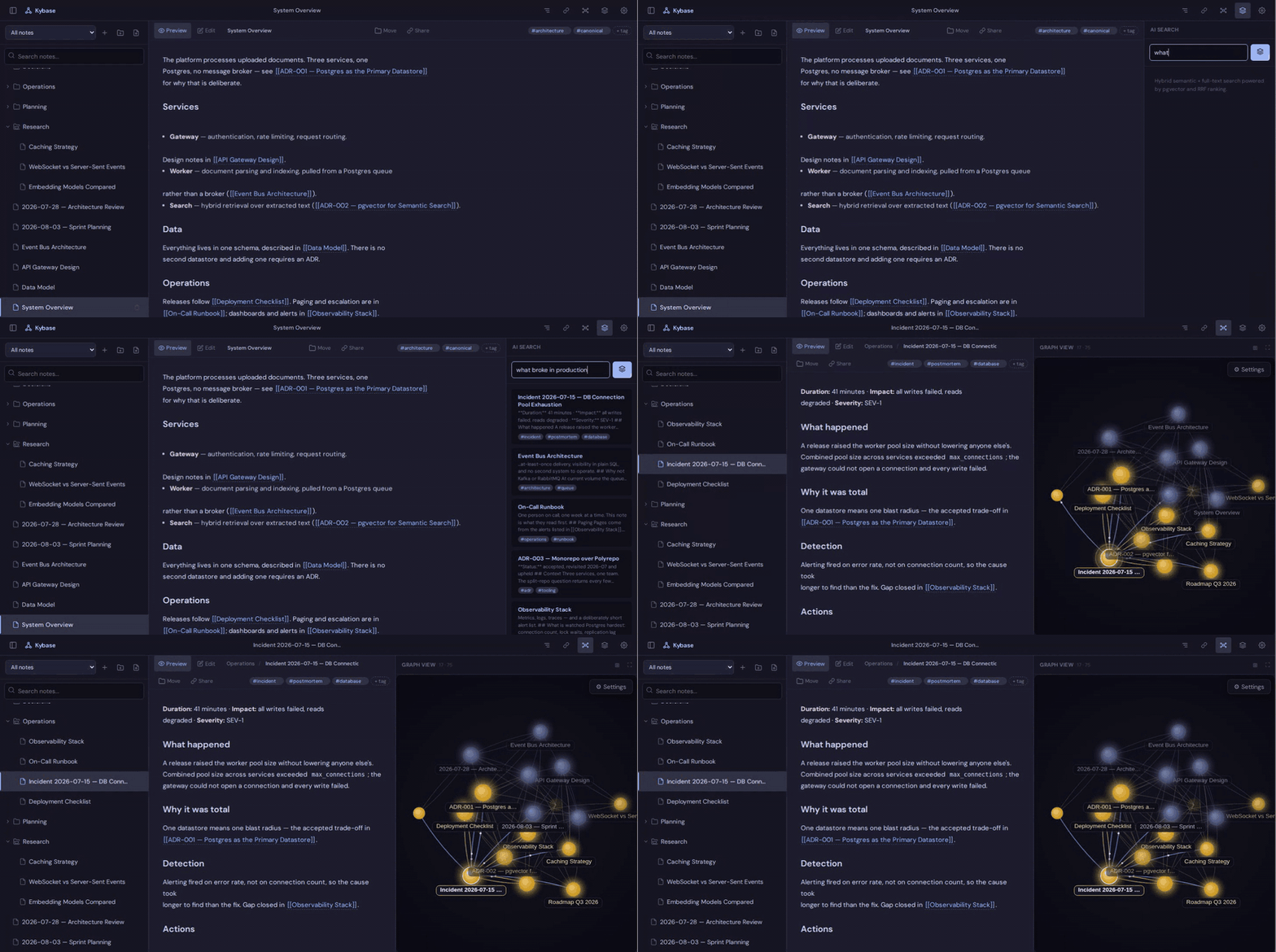
Kybase in use: a markdown note with wikilinks, the knowledge graph with wikilink and semantic edges, then a plain-language question β€” 'what broke in production' β€” returning the right incident note first, even though none of those words appear in it.

The problem Β· Quick start Β· Connect your agent Β· What you get Β· Settings Β· Sharing Β· Backups Β· Upgrading

The problem

You tell your agent how the staging deploy works. It helps, and the session ends.

Tomorrow you open a new one:

You: what did we decide about the staging database?

Agent: I don't have that context β€” could you tell me again?

So you explain it again. Then you switch editors, and explain it there too.

With Kybase, the knowledge lives outside the agent:

You: what did we decide about the staging database?

Agent: (searches Kybase) You moved staging to its own Postgres instance so migrations could be tested against real data first β€” that's in "Staging environment", under "Database".

New session, same memory. Different tool, same memory.

Quick start

One local agent

Nothing to install, no Docker, no database to run:

config.json
{
  "mcpServers": {
    "kybase": {
      "command": "npx",
      "args": ["-y", "kybase-mcp"]
    }
  }
}

Put that in your client's MCP config and restart it. Your notes live under ~/.kybase, and kybase-mcp export vault.zip gets them back out as plain Markdown at any time.

The full app

For the web UI, the graph view, share links, and several agents against one knowledge base:

macOS and Linux

bash
git clone https://github.com/Kyrzin/kybase.git
cd kybase
cp .env.example .env
sed -i.bak "s/^KYBASE_SECRET=$/KYBASE_SECRET=$(openssl rand -hex 32)/" .env
sed -i.bak "s/^POSTGRES_PASSWORD=$/POSTGRES_PASSWORD=$(openssl rand -hex 16)/" .env
rm -f .env.bak
docker compose pull && docker compose up -d

Windows (PowerShell) β€” no openssl or sed there, so the secrets are generated by .NET instead:

powershell
git clone https://github.com/Kyrzin/kybase.git
cd kybase
Copy-Item .env.example .env
$rng = [System.Security.Cryptography.RandomNumberGenerator]::Create()
$b = New-Object byte[] 32; $rng.GetBytes($b)
$secret = ($b | ForEach-Object { $_.ToString('x2') }) -join ''
$b = New-Object byte[] 16; $rng.GetBytes($b)
$pass = ($b | ForEach-Object { $_.ToString('x2') }) -join ''
(Get-Content .env) -replace '^KYBASE_SECRET=$', "KYBASE_SECRET=$secret" -replace '^POSTGRES_PASSWORD=$', "POSTGRES_PASSWORD=$pass" | Set-Content .env
docker compose pull
docker compose up -d

Either block generates the only two secrets you need and starts the stack. Open http://localhost:3000, log in with your KYBASE_SECRET β€” grep KYBASE_SECRET .env shows it, or Select-String KYBASE_SECRET .env on Windows β€” then connect an agent.

That installs the app and its database β€” around 1 GB. Notes and text search work right away.

Semantic search needs an embedding provider. Open Settings and pick one:

  • Google or OpenAI β€” paste an API key and you are done.

  • Ollama, on your own machine β€” start it once, then pick a model in Settings:

    Terminal
    docker compose --profile ollama up -d
    

    It is not in the default install because its image carries NVIDIA and AMD GPU runtimes whatever your hardware is β€” about 4 GB that someone using a cloud provider would never run. Starting it later touches nothing else: the app keeps running and no note is affected.

Connect your agent

Kybase speaks MCP over Streamable HTTP at /api/mcp, so any client that speaks it can connect.

Claude Code β€” .mcp.json in your project (or claude mcp add):

config.json
{
  "mcpServers": {
    "kybase": {
      "type": "http",
      "url": "https://your-domain/api/mcp",
      "headers": {
        "Authorization": "Bearer <KYBASE_SECRET>"
      }
    }
  }
}

That's it β€” the agent can now search your notes, read them, write new ones, update existing ones and link them together.

Other clients β€” Claude Desktop, claude.ai, Cursor, Windsurf

Claude Desktop β€” the same JSON shape, in claude_desktop_config.json (macOS: ~/Library/Application Support/Claude/claude_desktop_config.json, Windows: %APPDATA%\Claude\claude_desktop_config.json).

Cursor β€” the same shape without "type", in .cursor/mcp.json (project) or ~/.cursor/mcp.json (global).

Windsurf β€” ~/.codeium/windsurf/mcp_config.json, with serverUrl instead of url:

config.json
{
  "mcpServers": {
    "kybase": {
      "serverUrl": "https://your-domain/api/mcp",
      "headers": {
        "Authorization": "Bearer <KYBASE_SECRET>"
      }
    }
  }
}

claude.ai β€” Settings β†’ Connectors β†’ Add custom connector, same URL (the instance has to be reachable over HTTPS). No key to paste: the connector registers itself, sends you to your own instance to enter the key once, and gets its own revocable token β€” see Settings β†’ Connected clients in the web UI.

Clients that only speak stdio use the npx -y kybase-mcp block from Quick start, in the same file.

What you get

  • Markdown, not an opaque memory blob β€” every note is plain text; read it, edit it, grep it, back it up with cp
  • One knowledge base, every agent β€” Claude, Cursor, Windsurf and the web UI all look at the same notes
  • Hybrid search β€” full-text and meaning-based search fused into one ranked result, so an agent finds the note whether it knows the exact wording or not
  • Section-level reads and writes β€” an agent reads or edits the part of a note it needs, not the whole file
  • Backlinks and a knowledge graph β€” [[wikilinks]] connect related notes automatically
  • Yours to take β€” Settings β†’ Export .zip gives plain Markdown with folders as directories, readable by any editor, Obsidian included. Import .zip merges one back.

Obsidian and Notion are built for a person reading and writing. Kybase is built for the loop between you ↔ your knowledge ↔ your agent: you edit in the browser, an agent searches and updates over MCP, and both are looking at the same Markdown. If the agent remembered something wrong, you open the note and fix the sentence.

Private by default

Kybase runs on your infrastructure. No SaaS account, no external memory service, no cloud database β€” your own Postgres, local embeddings through Ollama, and a secret you generate.

Cloud embedding providers are optional. Choosing one sends your notes' full text to that provider to compute embeddings; Ollama keeps everything on your machine.

How agents use it

text
search_notes("deployment steps for staging")
  β†’ hit includes section: "Rollback"
  β†’ get_note(section: "Rollback")
  β†’ agent reads just that section, not the whole note
  β†’ append_to_note(section: "Rollback", text: "...")

Search says which section of a note matched, not just which note. On a long note that can mean reading a fraction of the content β€” cheaper for every step after the first search, and it is how the agent writes back too.

The server ships with instructions that teach the agent to search before writing and to add [[wikilinks]] to related notes, so the graph grows as the agent works instead of filling up with orphans.

Settings

Everything else goes in .env, copied from .env.example, which documents each option. Only KYBASE_SECRET and POSTGRES_PASSWORD are required; KYBASE_PORT changes the host port, and KYBASE_TAG pins a version (e.g. 1.4) instead of tracking latest.

Embedding provider. Open Settings in the web UI, pick a provider (Ollama, Google or OpenAI), choose a model, add an API key if it needs one, and click Save & Apply. Switching re-embeds every note, and the database adapts to the new model's vector size on its own.

[!IMPORTANT] Ollama keeps everything on your machine. Google and OpenAI are convenience options: picking either sends your notes' full text to that provider.

Sharing notes

The Share button on a note creates a public read-only link β€” rendered Markdown, no login, wikilinks shown as plain text so nothing else in your vault is reachable. The link is the access: revoke links you no longer need under Settings β†’ Active share links.

Read the full README β†’View source on GitHub β†’

Related MCP Servers

View all in Knowledge & Memory View all alternatives
  • M
    Moxie Docs MCP
    β˜… Featured

    MCP & Agent Skills for Automated Documentation, and codebase conventions + context

    🧠 Knowledge & Memory33 views
    Compare vs Moxie Docs MCP β†’
  • S
    Scrivener MCP

    Connect Scrivener 3 writing projects to Claude and other AI assistants. 47 tools for document management, writing analysis, semantic search, character/plot memory, and content enhancement. Progressive skill loading, relationship engine with HMS triplets, and JS fallback for offline semantic search. npm i -g scrivener-mcp

    🧠 Knowledge & Memory16 views
    Compare vs Scrivener MCP β†’
  • I
    IWE

    Markdown knowledge base as agent memory. Runs against the notes directory it is started in.

    🧠 Knowledge & Memory1 views
    Compare vs IWE β†’
  • C
    Codebase Memory MCP

    Code-intelligence engine that indexes a repo into a persistent knowledge graph β€” functions, classes, call chains, HTTP routes, cross-service links. 159 languages via tree-sitter + Hybrid LSP, sub-ms structural queries, 99% fewer tokens than grep. Single static binary, zero dependencies, 100% local. npx codebase-memory-mcp

    🧠 Knowledge & Memory7 views
    Compare vs Codebase Memory MCP β†’

Reviews

No reviews yet β€” be the first to share how this listing worked for you.

Frequently Asked Questions about Kybase

We don't have a confirmed install command for Kybase yet, so we don't publish a generated one β€” a guessed package name would point at the wrong package or none at all. Follow the project's own README or setup instructions (https://github.com/Kyrzin/kybase) for the current steps.

AllMCPs Directory Badge

Full Badge Customizer

Showcase your server listing on GitHub or your project documentation. Embed this dynamic SVG badge to highlight official listing status and live engagement.

Badge Style:
Live Dynamic SVG PreviewKybase AllMCPs Directory Badge

Markdown (GitHub README)
[![AllMCPs](https://allmcps.com/api/badge/kybase?style=directory)](https://allmcps.com/mcp/kybase)
HTML Embed
<a href="https://allmcps.com/mcp/kybase"><img src="https://allmcps.com/api/badge/kybase?style=directory" alt="Kybase on AllMCPs" /></a>

Technical Specs & Signals

Category🧠Knowledge & Memory
More technical detailsExpand β–Ύ
Last updatedSep 28, 2026
Views0
Unique ViewsTotal visits recorded for this listing page on AllMCPs.
Installs0
Installs & Copy ActionsTotal times users copied install commands or configuration snippets for this server.
27Quality signal: Emerging Β· 27/100How this signal is calculated β–Ύ
Server availabilityNot measured

Not scored for repo-hosted servers β€” we can't reach the running server, only its GitHub page. Hosted MCP endpoints are health-checked live.

Verified ownership8/20
Documentation & tools11/30
Adoption & activity1/15
Community engagement0/10

A guidance signal from public completeness & health data β€” not a user rating. New listings start lower and rise as they add docs, get verified, and grow adoption. Signals we can't observe for a listing are skipped, not counted against it.

β˜… Featured
A

AllMCPs Server

The official MCP server for AllMCPs.com - submit and manage tools directly from your AI. The open directory for MCP servers. Connect Claude, Cursor, Windsurf, and AI agents to databases, tools, files, and APIs. Explore 10,000+ servers. AllMCPs is the premier, open directory for discovering, evaluating, and installing Model Context Protocol (MCP) servers to equip AI agents and LLMs with real-world superpowers.

Explore Server β†’

Own this project?

This directory is pre-filled from public sources. Claim via GitHub README, site badge, or DNS TXT to unlock edit access and the Official badge β€” proof is checked automatically, then reviewed by our team.

Free dofollow backlink: add your website and place the AllMCPs badge on it β€” no claim needed. We detect it automatically and keep it verified as long as the badge stays live.

Claim & get free dofollow

Share & Embed

Add our SVG badge (dark/light directory styles) or embeddable widget to your site.

Explore more

More in 🧠 Knowledge & Memory β†’Best MCP servers for Memory & Knowledge β†’Alternatives to Kybase β†’Install in Claude DesktopInstall in CursorInstall in VS CodeSetup guides for all 13 MCP clients