AllMCPs
BrowseBestCategoriesStackCompareToolsGuidesBlog
Log in Submit MCP

Stay in the loop

Get new MCP servers and top picks in your inbox.

AllMCPs

The open directory for discovering and installing Model Context Protocol servers.

AllMCPs on GitHub (opens in a new tab)
Launched onTiny Startupstinystartups.com
Explore
  • Browse servers
  • Best MCP servers
  • Categories
  • MCP clients
  • Agent prompts
  • Stack Builder
  • Compare servers
  • Random discovery New
  • Submit a server
  • Pricing & Boost Boost
Learn
  • Guides hub
  • What is MCP?
  • Install guide
  • Build an MCP server
  • Deploy an MCP server
  • Security guide
  • Troubleshooting
  • MCP for SEO & AEO
  • Protocol versioning
  • Transports: stdio vs HTTP
  • State of MCP (stats)
  • Blog & updates
Tools
  • All developer tools
  • Config generator
  • Config validator
  • Config auditor
  • MCP playground
  • Token calculator
  • OpenAPI → MCP
  • Badge generator
For agents
  • REST API docs
  • Trust & traffic Live
  • Remote MCP server SSE ↗ (opens in a new tab)
  • llms.txt ↗ (opens in a new tab)
  • Catalog JSON ↗ (opens in a new tab)
Company
  • About
  • Advertise Sponsor
  • Contact
  • GitHub ↗ (opens in a new tab)
  • Terms
  • Privacy
AllMCPs VerifiedAllMCPs VerifiedFeatured on Nick LaunchesFeatured on Nick LaunchesLaunch Llama NewsletterLaunch Llama NewsletterVerified DR - allmcps.comVerified DR - allmcps.comFeatured on SaaSGrowFeatured on SaaSGrowFeatured on Twelve ToolsFeatured on Twelve ToolsFeatured on Saaspa.geFeatured on Saaspa.geFeatured on Findly.toolsFeatured on Findly.toolsFeatured on Startup FameFeatured on Startup FameFeatured on LaunchKiwiFeatured on LaunchKiwiFeatured on ScrollLaunchFeatured on ScrollLaunchFeatured on DailyPingsFeatured on DailyPingsFazier badgeFazier badgeFeatured on NewTool.siteFeatured on NewTool.siteFeatured on saasfame.comFeatured on saasfame.comDR Checker - Domain RatingDR Checker - Domain RatingListed on Turbo0Listed on Turbo0Launched on LaunchBoard - Product Launch PlatformLaunched on LaunchBoard - Product Launch PlatformList on SimilarlabsList on Similarlabshttps://codetrendy.comhttps://codetrendy.comListed on DevTool.ioFeatured on BuildlistFeatured on BuildlistLaunched on Tiny StartupsFeatured on ShowMeBestAIFeatured on ShowMeBestAIFind us on LaunchZoneFind us on LaunchZoneAllMCPs VerifiedAllMCPs VerifiedFeatured on Nick LaunchesFeatured on Nick LaunchesLaunch Llama NewsletterLaunch Llama NewsletterVerified DR - allmcps.comVerified DR - allmcps.comFeatured on SaaSGrowFeatured on SaaSGrowFeatured on Twelve ToolsFeatured on Twelve ToolsFeatured on Saaspa.geFeatured on Saaspa.geFeatured on Findly.toolsFeatured on Findly.toolsFeatured on Startup FameFeatured on Startup FameFeatured on LaunchKiwiFeatured on LaunchKiwiFeatured on ScrollLaunchFeatured on ScrollLaunchFeatured on DailyPingsFeatured on DailyPingsFazier badgeFazier badgeFeatured on NewTool.siteFeatured on NewTool.siteFeatured on saasfame.comFeatured on saasfame.comDR Checker - Domain RatingDR Checker - Domain RatingListed on Turbo0Listed on Turbo0Launched on LaunchBoard - Product Launch PlatformLaunched on LaunchBoard - Product Launch PlatformList on SimilarlabsList on Similarlabshttps://codetrendy.comhttps://codetrendy.comListed on DevTool.ioFeatured on BuildlistFeatured on BuildlistLaunched on Tiny StartupsFeatured on ShowMeBestAIFeatured on ShowMeBestAIFind us on LaunchZoneFind us on LaunchZone
© 2026 Jackalope Digital LLC. All rights reserved.
  1. Home
  2. 💻 Developer Tools
  3. KeyboardExtAX
K
Health: Not checked yetWe have not completed a health check for this listing yet.No health check has run yet.

KeyboardExtAX

User RatingsBe the first to rate and review this MCP server! Enrichment pendingWe haven’t run our AI enrichment pass on this listing yet, so the overview, use cases, and FAQ below may be sparse or missing. We work through the catalog over time — check back soon.
View Repository

Accessibility snapshots and tap coordinates for active third-party iOS keyboards in Simulator.

Quick Install

Automated & IDE Setup

Copy the AI prompt to install this server into Claude Code, Cursor, or another agent — or use 1-click editor setup below.

One-click editor setup isn’t available for this listing yet — we don’t have a confirmed install command, and we’d rather show nothing than point your editor at the wrong package or host. Follow the project’s own setup instructions, linked above.

Manual Client & Custom JSON ConfigExpand JSON â–¾
No confirmed setup config for this listing yet. We only publish a config block when the install details come from the project itself — its README, its docs, or a verified owner. We haven’t found those for KeyboardExtAX, and we’d rather show nothing than a guess you’d paste into your client. Follow the project’s own setup instructions for the current steps.
Install Directory Badge Claim listing Alternatives💻 More in Developer Tools

Documentation Overview

KeyboardExtAX

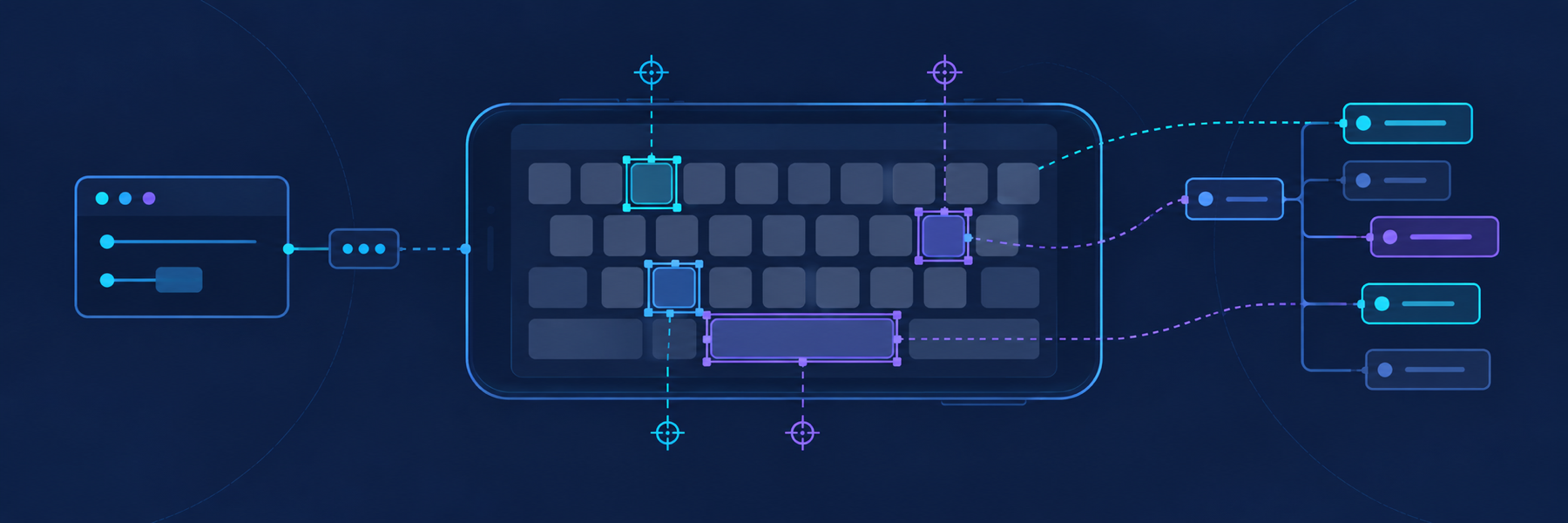
KeyboardExtAX accessibility snapshot illustration

Fast, read-only accessibility snapshots of active third-party iOS keyboard extensions in Simulator.

Why this project exists

A custom iOS keyboard runs in a separate app-extension process. When a client app presents that keyboard, ordinary UI automation usually sees the client application's accessibility tree but not the keyboard's useful descendants. The entire keyboard may appear as one opaque element.

That creates a practical automation gap:

  • screenshots can show the keyboard, but extracting reliable tap coordinates from pixels is slow and brittle;
  • the client application's accessibility snapshot does not necessarily expose the extension's keys and controls;
  • starting a new XCTest session for every query is expensive and can disturb keyboard focus;
  • XCTest element handles become stale whenever the keyboard changes layout;
  • automation agents should not need to manage test plans, ports, build products, or runner processes.

KeyboardExtAX fills that gap. It attaches XCTest directly to the already-running keyboard extension by bundle identifier, parses its accessibility hierarchy, and returns plain JSON with absolute logical coordinates. A persistent runner keeps warm snapshots fast, while a small controller owns building, caching, ports, and per-simulator lifecycle.

KeyboardExtAX observes only. Use a separate automation tool, such as XcodeBuildMCP, to launch apps, focus text fields, and perform gestures with the returned coordinates.

Quick start: MCP

Configure keyboard-ext-ax-mcp as a stdio MCP server. Most MCP clients use a configuration shaped like this:

config.json
{
  "mcpServers": {
    "KeyboardExtAX": {
      "command": "keyboard-ext-ax-mcp",
      "env": {
        "DEVELOPER_DIR": "/Applications/Xcode.app/Contents/Developer"
      }
    }
  }
}

If the MCP client does not inherit your shell PATH, replace the command with the absolute path printed by command -v keyboard-ext-ax-mcp.

The server exposes one tool:

text
keyboard_snapshot(
  simulator_id: "<SIMULATOR_UDID>",
  extension_bundle_id: "com.example.keyboard.extension",
  raw: false
)

Example input:

config.json
{
  "simulator_id": "2D78332B-A3C3-4CEE-962B-99EF531FD201",
  "extension_bundle_id": "com.example.keyboard.extension"
}

The result is returned as structured MCP content. The MCP layer delegates directly to the same controller used by the CLI, so build caching, sessions, errors, and output are identical.

Quick start: CLI

With the client text field focused and the requested keyboard visible:

sh
keyboard-ext-ax snapshot \
  --simulator <SIMULATOR_UDID> \
  --extension com.example.keyboard.extension

Add --output /tmp/keyboard.json to write the result to a file. Add --raw for the nested tree and XCTest diagnostics.

Scope and limitations

KeyboardExtAX currently supports:

  • macOS hosts;
  • iOS Simulator;
  • third-party keyboard extensions;
  • Xcode 26.5;
  • read-only accessibility snapshots.

It does not:

  • tap, swipe, or type;
  • launch or foreground the client app;
  • select or enable a keyboard for the user;
  • access physical iOS devices;
  • guarantee compatibility with widgets, Live Activities, or other extension types;
  • guarantee parser compatibility with untested Xcode versions.

The parser reads XCUIApplication.debugDescription. Its text format is not a documented compatibility contract, so each Xcode version must be validated before support is claimed.

Requirements

  • macOS
  • Xcode 26.5 with the desired iOS Simulator runtime installed
  • Python 3.10 or newer
  • A keyboard app and extension already installed in the target simulator
  • The keyboard enabled in Settings → General → Keyboard → Keyboards
  • A foreground client app with a focused text field

If multiple Xcode installations are present, select one with DEVELOPER_DIR or --developer-dir:

server.ts
export DEVELOPER_DIR=/Applications/Xcode.app/Contents/Developer

Installation

Homebrew (recommended)

sh
brew install nikitosina/tap/keyboard-ext-ax

PyPI with uv

Install both executables permanently:

sh
uv tool install keyboard-ext-ax

Or run the MCP server without a persistent installation:

sh
uvx keyboard-ext-ax mcp

From source

sh
git clone https://github.com/Nikitosina/KeyboardExtAX.git
cd KeyboardExtAX
python3 -m venv .venv
.venv/bin/python -m pip install -e .
source .venv/bin/activate

Every installation provides keyboard-ext-ax and keyboard-ext-ax-mcp. The MCP server can be started with either keyboard-ext-ax-mcp or keyboard-ext-ax mcp.

The bundled Xcode project is ready to use. XcodeGen is needed only when modifying keyboard_ext_ax/harness/project.yml.

Output

The default response is a compact, flat array:

config.json
{
  "ok": true,
  "snapshot_id": "9543E2AA-C4D9-4281-9645-7792F7953FE3",
  "simulator_udid": "2D78332B-A3C3-4CEE-962B-99EF531FD201",
  "extension_bundle_id": "com.example.keyboard.extension",
  "pid": 12345,
  "elapsed_ms": 103.4,
  "round_trip_ms": 106.1,
  "session_reused": true,
  "total_ms": 171.8,
  "elements": [
    {
      "ref": "0.0.3",
      "type": "Key",
      "identifier": "space",
      "label": "Space",
      "frame": {
        "x": 112,
        "y": 746,
        "width": 178,
        "height": 44
      },
      "center": {
        "x": 201,
        "y": 768
      },
      "tap_x": 201,
      "tap_y": 768
    }
  ]
}

Element fields

FieldMeaning
refStable path within this snapshot only. Refresh it after layout changes.
typeXCTest accessibility element type.
identifierAccessibility identifier, when provided by the extension.
labelAccessibility label, when provided by the extension.
frameAbsolute logical frame in Simulator coordinates.
centerExact floating-point frame center.
tap_x, tap_yRounded integer center, ready for a gesture tool.

Coordinates are Simulator logical coordinates, not screenshot pixels. Do not rescale them before passing them to XcodeBuildMCP for the same simulator.

Session management

sh
keyboard-ext-ax status
keyboard-ext-ax status --simulator <SIMULATOR_UDID>
keyboard-ext-ax stop --simulator <SIMULATOR_UDID>
keyboard-ext-ax stop --all

One runner is maintained per simulator. Multiple simulators can be queried concurrently. If a reused runner loses the extension process, KeyboardExtAX recycles it once and returns client_refocus_required.

Errors

Errors are JSON objects with stable codes.

CodeMeaningRecovery
client_refocus_requiredA new or restarted runner is ready.Refocus the client text field and repeat the request.
extension_not_activeXCTest could not attach after three attempts.Confirm that the requested extension—not the system keyboard—is visible, then retry.
runner_start_failedThe persistent XCTest runner did not become ready.Inspect the returned log and log_tail.
build_failedThe XCTest harness failed to build.Inspect the returned build log and verify the selected Xcode.
xcode_unavailableXcode could not be located or queried.Set DEVELOPER_DIR or pass --developer-dir.
extension_bundle_id_missingThe runner received no extension identifier.Supply extension_bundle_id.
snapshot_failedXCTest raised an unexpected snapshot error.Retry with raw: true and inspect diagnostics.

The CLI exits with:

  • 0 for success;
  • 2 for a normal snapshot-state error such as inactive extension;
  • 1 for lifecycle, build, or controller failures.

Architecture

text
MCP client / CLI
        │
        â–¼
KeyboardExtAXController
  ├─ build cache
  ├─ per-simulator lock and state
  ├─ free-port allocation
  └─ XCTest runner lifecycle
        │  JSON over loopback TCP
        â–¼
PersistentKeyboardExtAXTests
        │  XCUIApplication(bundleIdentifier:)
        â–¼
Active keyboard extension process
        │
        â–¼
Parsed tree → compact elements → MCP/CLI JSON

The host app included in this repository is XCTest scaffolding. Snapshot mode does not launch it and does not replace the consumer's foreground client app.

License

KeyboardExtAX is available under the MIT License.

Read the full README →View source on GitHub →

Related MCP Servers

View all in Developer Tools View all alternatives
  • O
    Openapi MCP Server

    Connect any HTTP/REST API server using an Open API spec (v3)

    💻 Developer Tools3 views
    Compare vs Openapi MCP Server →
  • C
    Claude Task Master

    AI-powered task management system for AI-driven development. Features PRD parsing, task expansion, multi-provider support (Claude, OpenAI, Gemini, Perplexity, xAI), and selective tool loading for optimized context usage.

    💻 Developer Tools8 views
    Compare vs Claude Task Master →
  • M
    MCP Server Docker

    Integrate with Docker to manage containers, images, volumes, and networks.

    💻 Developer Tools3 views
    Compare vs MCP Server Docker →
  • A
    Andrea9293 MCP

    Local-first document management and semantic search for AI coding agents

    💻 Developer Tools2 views
    Compare vs Andrea9293 MCP →

Reviews

No reviews yet — be the first to share how this listing worked for you.

Frequently Asked Questions about KeyboardExtAX

We don't have a confirmed install command for KeyboardExtAX yet, so we don't publish a generated one — a guessed package name would point at the wrong package or none at all. Follow the project's own README or setup instructions (https://github.com/Nikitosina/KeyboardExtAX) for the current steps.

AllMCPs Directory Badge

Full Badge Customizer

Showcase your server listing on GitHub or your project documentation. Embed this dynamic SVG badge to highlight official listing status and live engagement.

Badge Style:
Live Dynamic SVG PreviewKeyboardExtAX AllMCPs Directory Badge

Markdown (GitHub README)
[![AllMCPs](https://allmcps.com/api/badge/keyboardextax?style=directory)](https://allmcps.com/mcp/keyboardextax)
HTML Embed
<a href="https://allmcps.com/mcp/keyboardextax"><img src="https://allmcps.com/api/badge/keyboardextax?style=directory" alt="KeyboardExtAX on AllMCPs" /></a>

Technical Specs & Signals

Category💻Developer Tools
More technical detailsExpand â–¾
Last updatedSep 28, 2026
Views0
Unique ViewsTotal visits recorded for this listing page on AllMCPs.
Installs0
Installs & Copy ActionsTotal times users copied install commands or configuration snippets for this server.
27Quality signal: Emerging · 27/100How this signal is calculated ▾
Server availabilityNot measured

Not scored for repo-hosted servers — we can't reach the running server, only its GitHub page. Hosted MCP endpoints are health-checked live.

Verified ownership8/20
Documentation & tools11/30
Adoption & activity1/15
Community engagement0/10

A guidance signal from public completeness & health data — not a user rating. New listings start lower and rise as they add docs, get verified, and grow adoption. Signals we can't observe for a listing are skipped, not counted against it.

★ Featured
M

Moxie Docs MCP

MCP & Agent Skills for Automated Documentation, and codebase conventions + context

Explore Server →

Own this project?

This directory is pre-filled from public sources. Claim via GitHub README, site badge, or DNS TXT to unlock edit access and the Official badge and attach your website — proof is checked automatically, then reviewed by our team.

Free dofollow backlink: add your website and place the AllMCPs badge on it — no claim needed. We detect it automatically and keep it verified as long as the badge stays live.

Claim & get free dofollow

Share & Embed

Add our SVG badge (dark/light directory styles) or embeddable widget to your site.

Explore more

More in 💻 Developer Tools →Best MCP servers for Developers →Alternatives to KeyboardExtAX →Install in Claude DesktopInstall in CursorInstall in VS CodeSetup guides for all 13 MCP clients