Kelvia
Task manager your agent can fully operate: boards, tasks, sprints, roles, worklogs, day planner.
Install Kelvia
Pick your client, then add it in one click or paste the config.
~/Library/Application Support/Claude/claude_desktop_config.json{
"mcpServers": {
"kelvia": {
"command": "npx",
"args": [
"-y",
"kelvia-mcp"
]
}
}
}
Settings → Developer → Edit Config, merge this into mcpServers, then fully quit and reopen Claude Desktop.
Install not yet sandbox-tested— we haven't run this command through our automated sandbox yet. Not a red flag; we're working through the catalog.
Overview
Security & health
What it can reach and how reliably it runs — from our own checks, not the maintainer’s claims.
Recent health check succeeded.
Supply-chain signal
No high-severity advisories surfaced by our automated scan.
Scanned 5d ago via OSV.dev · kelvia-mcp (npm)
Adoption & maintenance
Factual signals from GitHub, npm, and our automated checks — not a rating.
From the project README
Kelvia MCP — task manager for coding agents




Kelvia is a shared task manager for people and coding agents. One concrete use: hand off an unfinished task from Claude Code to Codex. The guide includes a copyable repo-file handoff that works without Kelvia, then shows when a shared task helps. Through the Model Context Protocol, an agent can create and update tasks, move work across a Kanban board, comment, log time, run stages, and plan the day. Its changes stay visible and attributed in the same UI the human uses.
The server exposes 58 tools and works with Claude Code, Codex, Cursor, and other MCP clients. The hosted endpoint uses OAuth, so there is no API token to paste into the recommended setup. A local stdio mode is available for CI and clients without remote MCP support.
Try for free · MCP documentation · Hosted endpoint
Connect in one command
| Client | Command |
|---|---|
| Claude Code | claude mcp add --transport http --scope user kelvia https://mcp.kelvia.app/mcp |
| Codex | codex mcp add kelvia --url https://mcp.kelvia.app/mcp |
| Cursor | Add https://mcp.kelvia.app/mcp in Settings → Tools & MCP |
The first connection opens Kelvia in the browser for OAuth approval. After it
connects, ask the client: List my Kelvia boards.
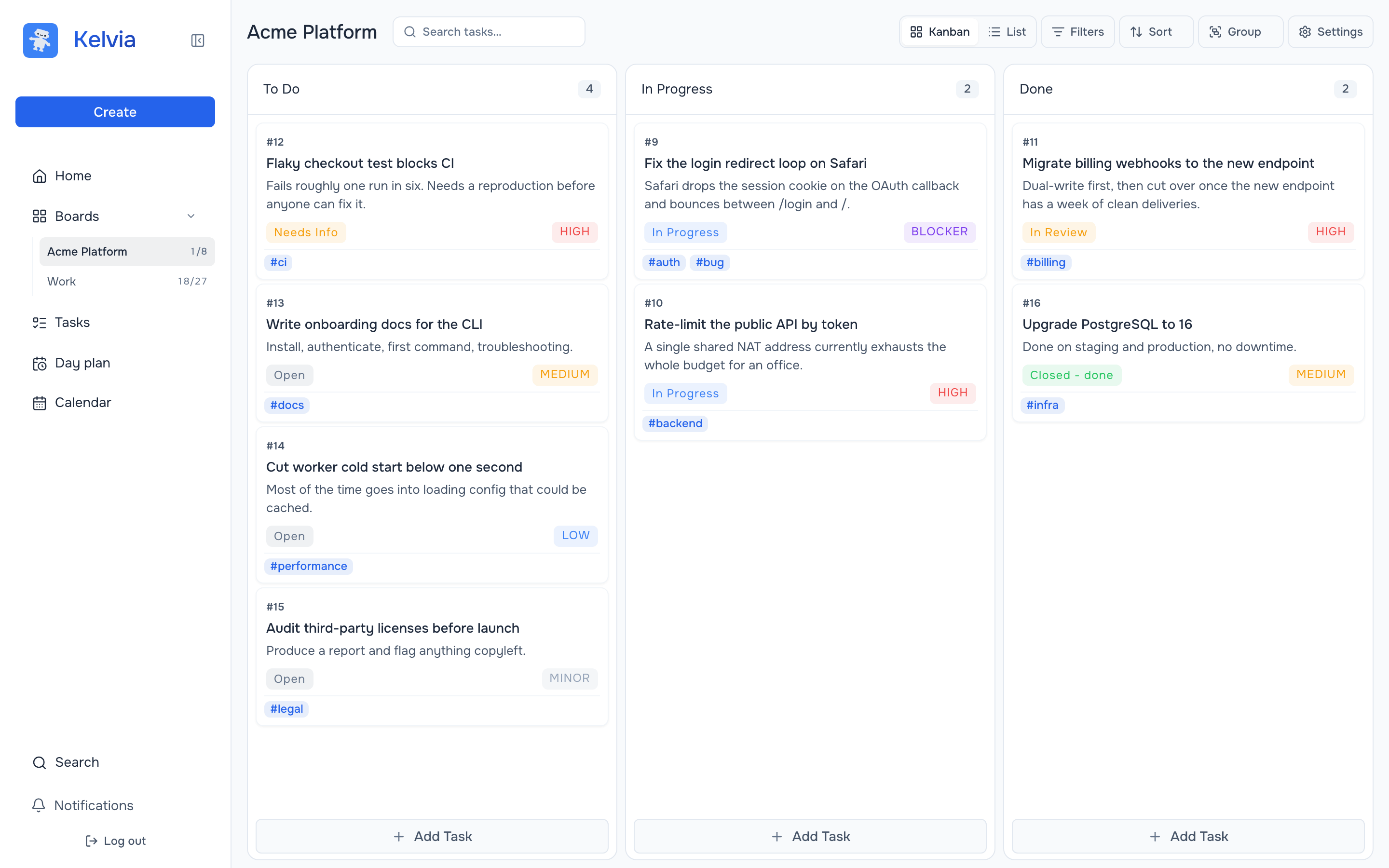
Why Kelvia MCP
- Complete workflow coverage — create and triage tasks, move work across a board, log time, run stages, and plan a day. Not a read-only bridge.
- Controlled write access — agent keys have read/create/edit/delete scopes intersected with the agent's role on each board.
- Visible agent activity — changes, comments, and worklogs appear in Kelvia; supported task changes can be reverted by a human in the app.
- Load only what you need — toolsets let a client publish one part of the product instead of all 58 tools.
- Modern remote auth — Streamable HTTP with OAuth 2.1 + PKCE, or a Bearer token when an explicit agent identity is required.
- A local option when you need one — stdio for clients without remote MCP support, for CI, and for keeping the key on one machine.
See it work
From the client side — one prompt, and the agent reads the board, decides what matters, files a follow-up task and comments on the blocker:
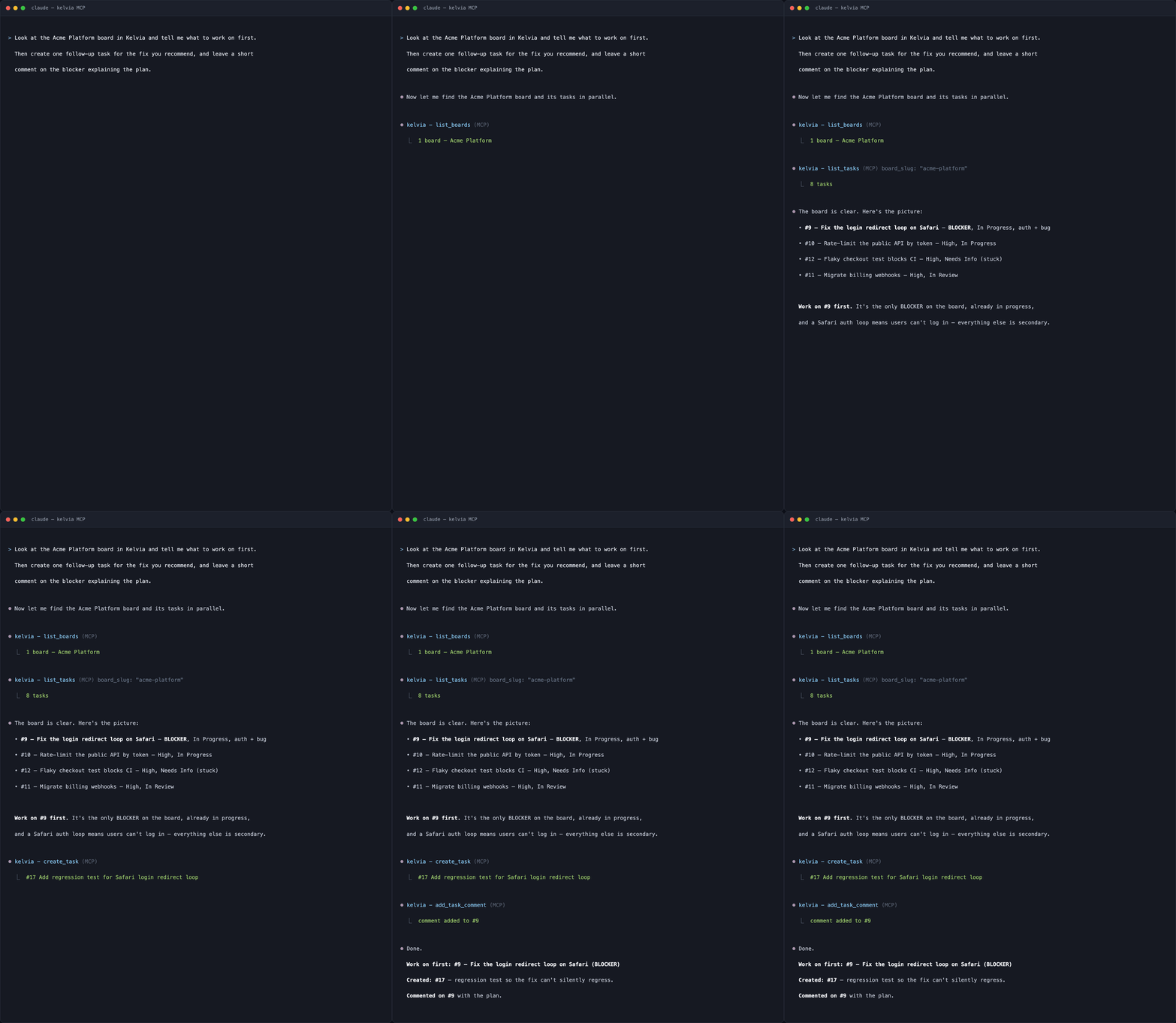
A real session against mcp.kelvia.app, typeset from its transcript.
create_task really did create #17, and add_task_comment really did comment
on #9 — which is what the rest of this section shows.
And from the product side. Everything below was created by an agent over this server — the board, the tasks, the discussion, and the logged time.
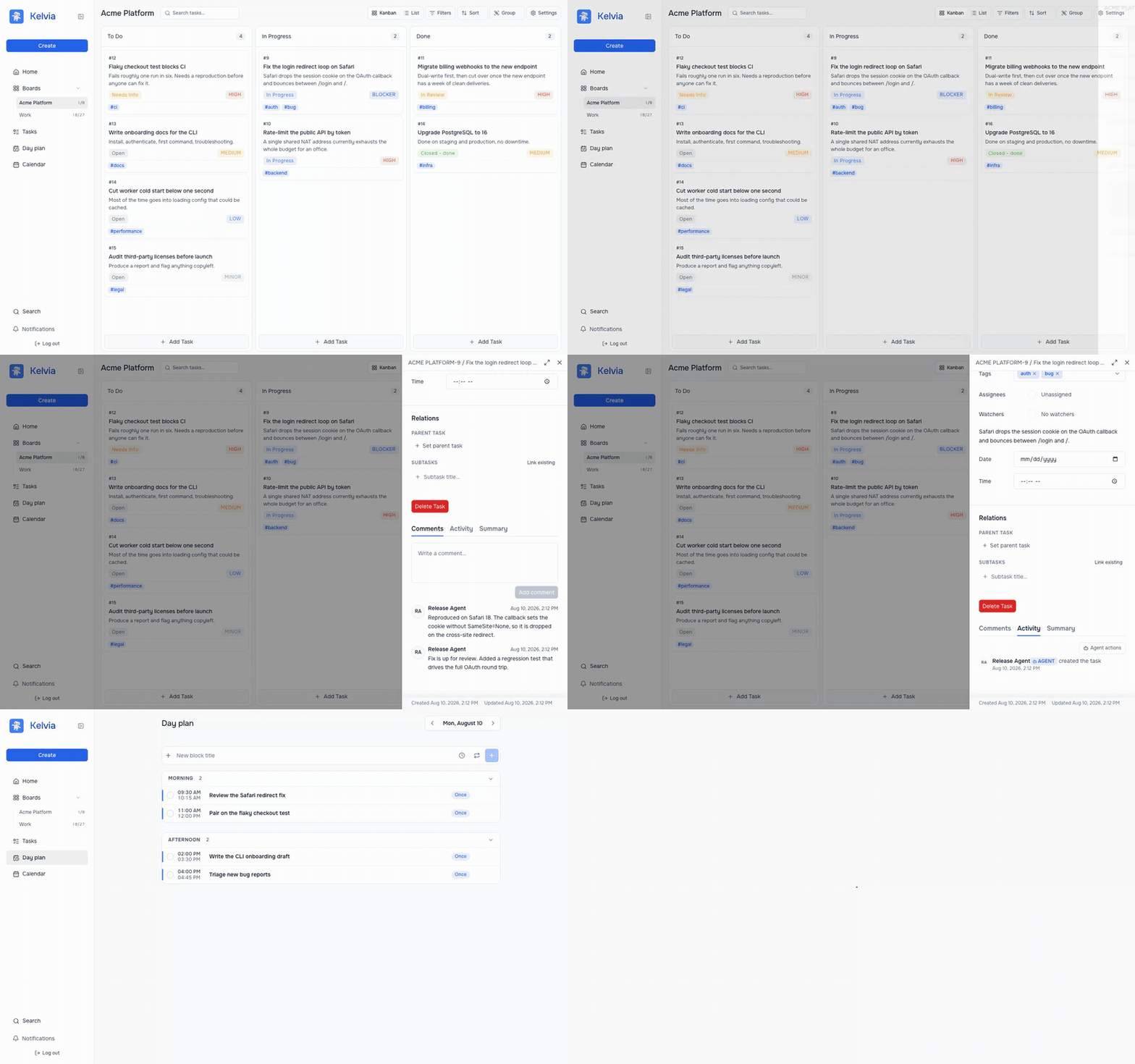
Every change an agent makes is attributed to it and filterable, so a human can review exactly what happened rather than trusting a summary:
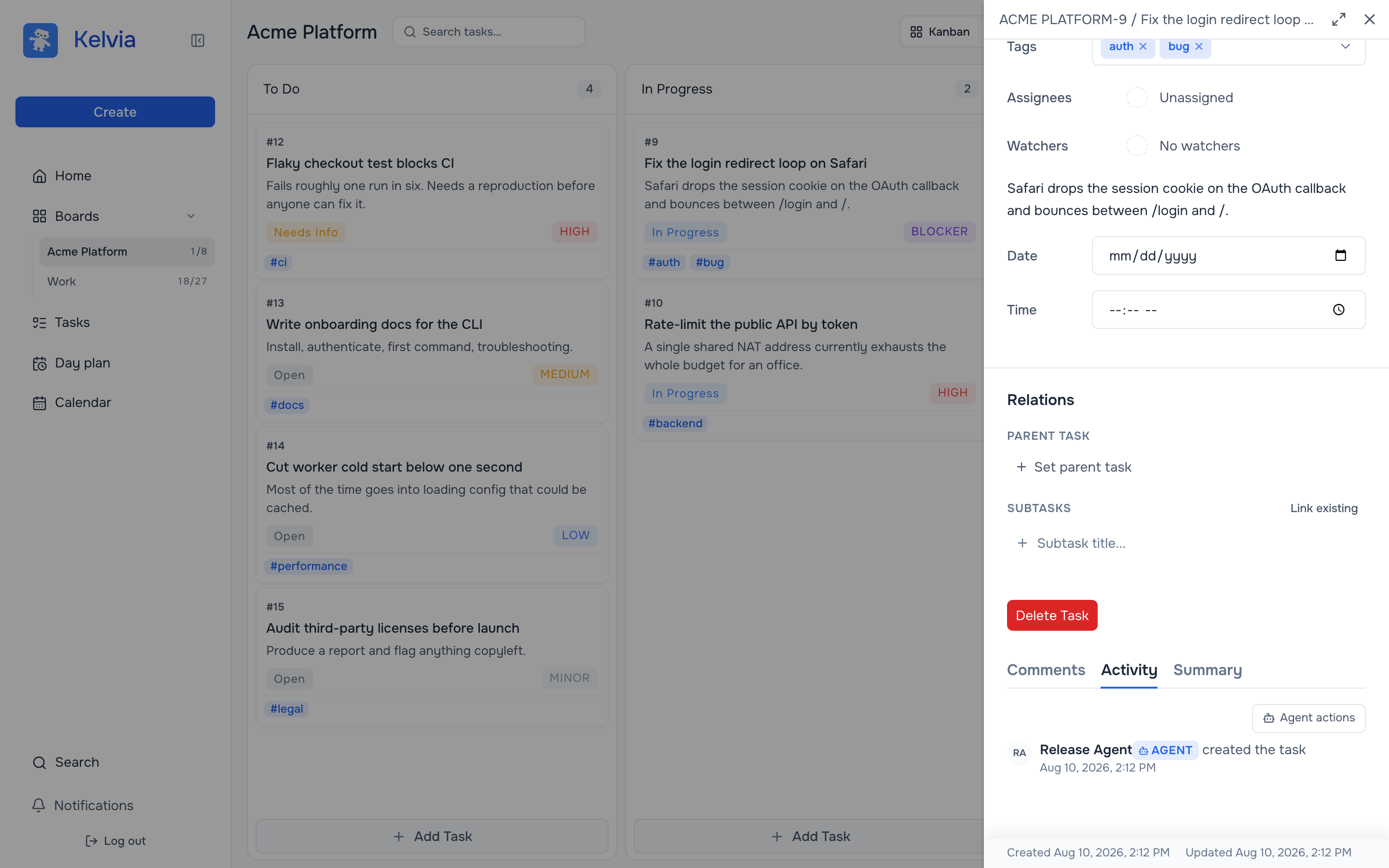
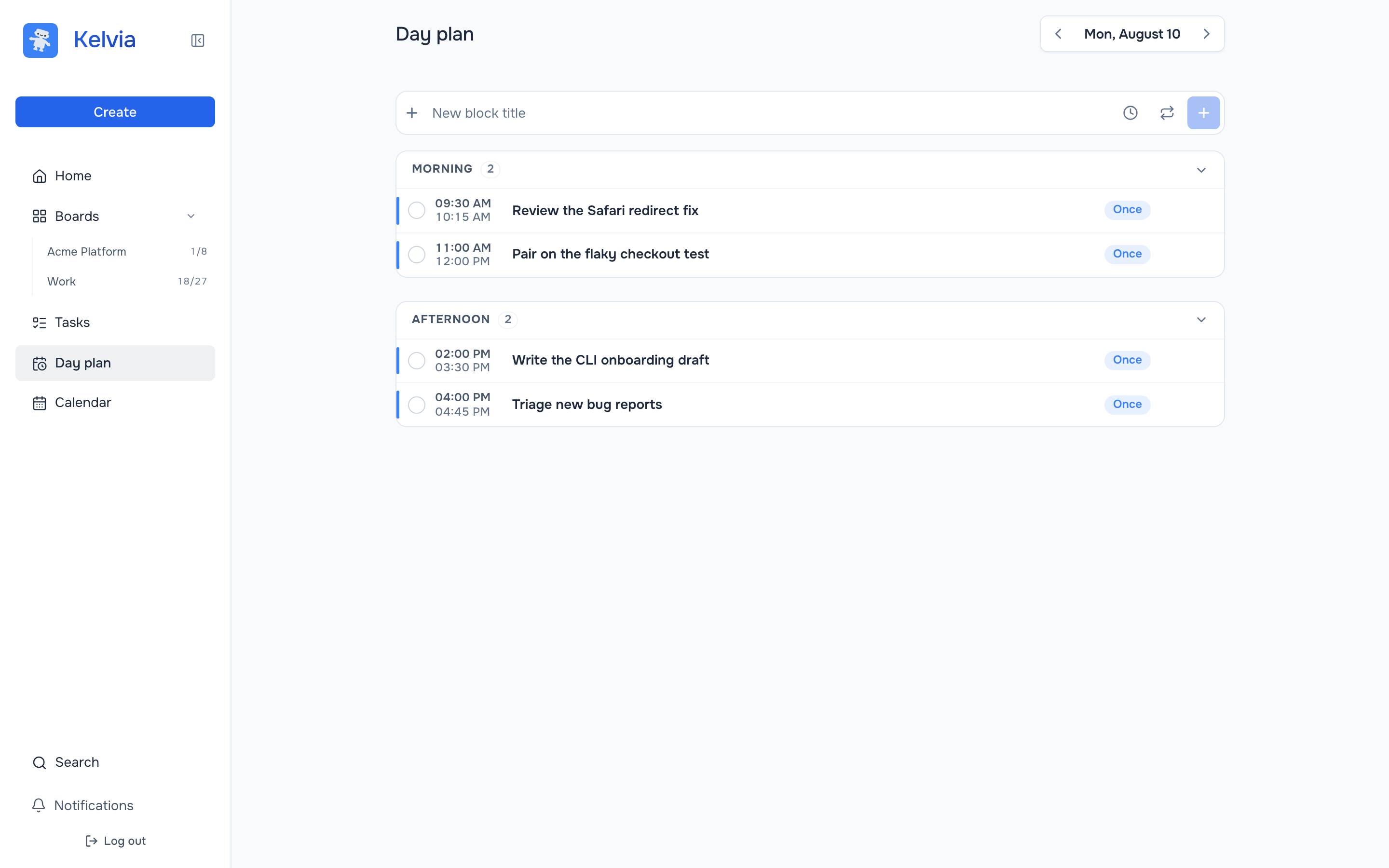
The personal day planner is part of the surface too, so an agent can block out the work it just triaged:
Hosted quick start (recommended)
The production endpoint is:
https://mcp.kelvia.app/mcp
OAuth is the default. The client opens Kelvia in a browser, you approve access, and the client stores and refreshes its OAuth credentials. No API token needs to be pasted into a configuration file.
Claude Code
claude mcp add --transport http --scope user kelvia https://mcp.kelvia.app/mcp
claude mcp list
Start Claude Code, enter /mcp, choose kelvia, and complete Authenticate in
the browser. After authentication, verify the connection with:
List my Kelvia boards.
Codex app, CLI, and IDE extension
codex mcp add kelvia --url https://mcp.kelvia.app/mcp
codex mcp login kelvia
codex mcp list
The Codex app, CLI, and IDE extension share the same MCP configuration on a
Codex host. In an interactive Codex session, use /mcp to inspect the server.
Equivalent ~/.codex/config.toml:
[mcp_servers.kelvia]
url = "https://mcp.kelvia.app/mcp"
auth = "oauth"
Cursor
Add the server globally in ~/.cursor/mcp.json, or per project in
.cursor/mcp.json:
{
  "mcpServers": {
    "kelvia": {
      "url": "https://mcp.kelvia.app/mcp"
    }
  }
}
Open Cursor Settings → Tools & MCP, enable kelvia, and select Connect to
complete OAuth in the browser. Ask Cursor to list your Kelvia boards after it
reports the server as connected.
Agent-key authentication
OAuth acts as the approving Kelvia user. Use an agent key instead when the connection needs its own identity, board membership, role, expiry, and granular read/create/edit/delete scopes.
Create one in Kelvia → Profile → Agents:
- Create an agent identity.
- Add it to only the required boards and choose its board role.
- Create a key with the minimum required scopes and an expiry date.
- Copy the
klv_…value when shown; Kelvia stores only its hash.
Codex with an agent key
Keep the token in the environment; Codex stores only the variable name:
export KELVIA_API_TOKEN='klv_your_agent_key'
codex mcp add kelvia --url https://mcp.kelvia.app/mcp \
  --bearer-token-env-var KELVIA_API_TOKEN
codex mcp list
Equivalent ~/.codex/config.toml:
[mcp_servers.kelvia]
url = "https://mcp.kelvia.app/mcp"
bearer_token_env_var = "KELVIA_API_TOKEN"
Claude Code with an agent key
Claude Code expands environment variables in MCP JSON. Single quotes below keep your shell from expanding the token into its command history:
export KELVIA_API_TOKEN='klv_your_agent_key'
claude mcp add-json --scope user kelvia \
  '{"type":"http","url":"https://mcp.kelvia.app/mcp","headers":{"Authorization":"Bearer ${KELVIA_API_TOKEN}"}}'
claude mcp list
Do not put tokens in URLs. The Streamable HTTP endpoint accepts authentication
only through the Authorization header.
Local stdio setup
Most people should use the hosted endpoint above. Running the server locally does not keep your tasks on your machine — they live in Kelvia either way, and the local process talks to the same API. What it changes is the path your credential takes, and which clients can connect.
Use stdio when one of these applies:
- Your client cannot do remote MCP or OAuth. The major clients can, but older versions, some IDE plugins, and locked-down machines where a browser redirect will not open, cannot.
- You are automating in CI, where nobody is around to approve an OAuth prompt. (An agent key against the hosted endpoint also works — this just removes a dependency.)
- Your key should not leave the machine. With the hosted endpoint your
token reaches
mcp.kelvia.appand stays in its memory for the session; over stdio it only ever goes to the Kelvia API.
Requirements: Node.js 20+.
Run the published package without installing anything:
npx kelvia-mcp
Or build from source (Node.js 20+ and pnpm 9+), then use an absolute path to
dist/index.js in client configuration:
git clone https://github.com/gonnagetapower/kelvia-mcp.git
cd kelvia-mcp
pnpm install
pnpm build
MCP Bundle for Claude Desktop
For local installation in Claude Desktop, build the MCP Bundle (.mcpb):
pnpm run bundle:mcpb
This produces build/kelvia-mcp-<version>.mcpb. Open that file in Claude
Desktop and enter a dedicated Kelvia agent key when prompted. The bundle is a
packaged form of the same local stdio server; for the hosted OAuth connection,
use the recommended quick start instead.
Claude Code (stdio)
claude mcp add --scope user \
  --env KELVIA_API_TOKEN=klv_your_agent_key \
  --transport stdio kelvia -- node /absolute/path/to/kelvia-mcp/dist/index.js
Codex (stdio)
codex mcp add kelvia \
  --env KELVIA_API_TOKEN=klv_your_agent_key \
  -- node /absolute/path/to/kelvia-mcp/dist/index.js
Cursor (stdio)
{
  "mcpServers": {
    "kelvia": {
      "command": "node",
      "args": ["/absolute/path/to/kelvia-mcp/dist/index.js"],
      "env": {
        "KELVIA_API_TOKEN": "klv_your_agent_key"
      }
    }
  }
}
Available tools
58 tools
Reviews
No reviews yet — be the first to share how it worked for you.
Frequently Asked Questions about Kelvia
Related MCP servers
Add a badge to your READMEShow it’s listed — live SVG, Markdown or HTML.
AllMCPs Directory Badge
Showcase your server listing on GitHub or your project documentation. Embed this dynamic SVG badge to highlight official listing status and live engagement.
[](https://allmcps.com/mcp/kelvia)<a href="https://allmcps.com/mcp/kelvia"><img src="https://allmcps.com/api/badge/kelvia?style=directory" alt="Kelvia on AllMCPs" /></a>