Hono Telescope
by jubstaaa
Debugging for Hono apps whose dashboard is also an MCP server: read the running application's recent exceptions with the request that produced them and that request's logs and queries, recent requests filtered by status or duration, one request in full, and the slowest queries. Read-only, five tools, zero runtime dependencies. npm i hono-telescope, then claude mcp add --transport http telescope http://localhost:3000/telescope/mcp.
Install Hono Telescope
Pick your client, then add it in one click or paste the config.
~/Library/Application Support/Claude/claude_desktop_config.json{
"mcpServers": {
"jubstaaa-hono-telescope": {
"command": "npx",
"args": [
"-y",
"hono-telescope"
]
}
}
}
Settings → Developer → Edit Config, merge this into mcpServers, then fully quit and reopen Claude Desktop.
We couldn’t confirm it starts correctly
We ran the install command but it didn't respond within our test window — this can mean a slow first-time install rather than a real problem.
npx -y hono-telescopeProcess exited before answering initialize.
This is an experimental automated check and can have false negatives — missing environment variables, a slow cold install, etc. It doesn’t necessarily mean something’s wrong. Last checked 8d ago.
Overview
Security & health
What it can reach and how reliably it runs — from our own checks, not the maintainer’s claims.
Recent health check succeeded.
Supply-chain signal
No high-severity advisories surfaced by our automated scan.
Scanned 12d ago via OSV.dev · hono-telescope (npm)
Adoption & maintenance
Factual signals from GitHub, npm, and our automated checks — not a rating.
From the project README
hono-telescope









A debugging tool for Hono applications, inspired by Laravel Telescope: a dashboard that shows you every request with the logs, queries, exceptions and outgoing calls that happened inside it.
The same endpoint is also an MCP server. Point Claude Code, Cursor or any MCP client at it and your coding agent reads the running application's telemetry directly — the actual exception, the request that produced it, and the queries that ran — instead of being handed a pasted stack trace. Nothing else in the Hono ecosystem does that.
Zero runtime dependencies. Works on Node.js and Bun.
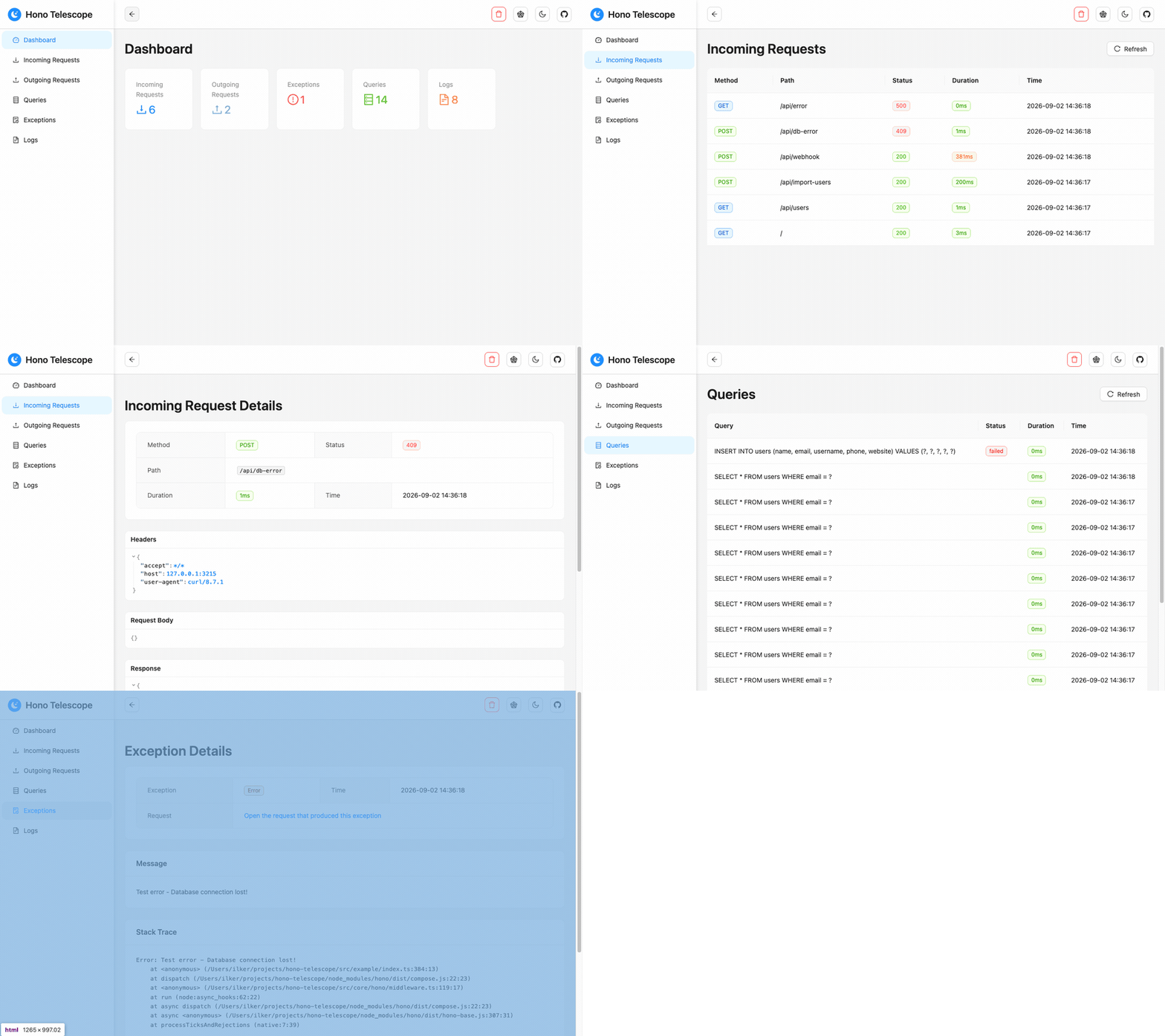
🌐 Live Demo
A hosted instance of the example app, running 1.0. No installation needed.
📊 Open the dashboard — API base: https://hono-telescope.ilkerbalcilar.com
Hit a few endpoints and watch the entries appear:
BASE=https://hono-telescope.ilkerbalcilar.com

curl $BASE/api/users                # incoming request + Bun SQLite queries
curl -X POST $BASE/api/import-users # outgoing fetch to JSONPlaceholder, plus inserts
curl -X POST $BASE/api/webhook      # outgoing POST whose payload is recorded, `token` redacted
curl -X POST $BASE/api/db-error     # UNIQUE violation, recorded as a failed query; 409, no exception
curl $BASE/api/mixed-clients-test   # the fetch call is captured, the axios call is not
curl $BASE/api/slow                 # 2s handler, to see the duration column
curl $BASE/api/error                # exception recorded as a child of its request
The demo runs with memoryStorage({ maxEntries: 500 }) and no dashboard auth, so entries are
public, capped at 500 and gone on restart. Don't send anything you wouldn't publish.
✨ Features
Currently Available:
- 📡 MCP Server - The dashboard endpoint doubles as a Model Context Protocol server, so an AI agent can read live requests, exceptions and queries with five read-only tools
- 🔍 HTTP Request Monitoring - Track incoming requests with headers, payloads and response bodies, and outgoing
fetchcalls with headers, payloads and responses - 🚨 Exception Tracking - Capture and monitor application errors with stack traces
- 📝 Log Monitoring - Monitor console logs with different severity levels
- 🗄️ Database Query Monitoring - Explicit per-client instrumentation for Prisma, Sequelize, MongoDB, and Bun SQLite with execution time
- 📊 Beautiful Dashboard - Modern React-based web interface with real-time updates
- 🎯 Zero Configuration - Works out of the box with sensible defaults
- 🏷️ Tagging System - Organize entries with custom tags and context
- 🔧 TypeScript Support - Full type definitions and type safety
- ⚡ High Performance - Minimal overhead with efficient memory management
- 🌐 Bun & Node.js - Works with both runtimes seamlessly
- 🗂️ Multiple Database Support - Integrates with popular database libraries
- ⚙️ Zero Runtime Dependencies - Depends only on Hono (peer dependency)
Planned Features (Roadmap):
- 💾 Data Export - Export monitored data in multiple formats (JSON, CSV)
- 🔔 Alerts & Notifications - Real-time alerts for errors and performance issues
- 📈 Analytics & Reporting - Advanced analytics and historical data analysis
- 🔐 Authentication & Authorization - Dashboard access control beyond basic auth
- 🌍 Multi-Tenancy Support - Support for multiple isolated projects
- 🧩 Plugin System - Extensible plugin architecture for custom integrations
- 🔄 Data Persistence - Optional database storage for long-term monitoring
📦 Installation
# Using npm
npm install hono-telescope

# Using yarn
yarn add hono-telescope

# Using pnpm
pnpm add hono-telescope

# Using bun
bun add hono-telescope
Quick Start
import { Hono } from 'hono';
import { createTelescope, memoryStorage } from 'hono-telescope';

const app = new Hono();
const telescope = createTelescope({ storage: memoryStorage({ maxEntries: 1000 }) });

app.use('*', telescope.middleware());
app.route('/telescope', telescope.dashboard());

export default app;
Visit /telescope. Telescope is on by default outside production and off inside it.
📋 Complete Example: See src/example/index.ts for a full working example with all Telescope features including database query monitoring, external request tracking, and error handling.
MCP Server
Telescope's dashboard doubles as an MCP server, so an AI coding agent can read the running application's telemetry instead of being handed pasted stack traces. There is nothing extra to mount — it is served from the dashboard you already mounted:
app.route('/telescope', telescope.dashboard()); // MCP is at /telescope/mcp
claude mcp add --transport http telescope http://localhost:3000/telescope/mcp
| Tool | What it answers |
|---|---|
recent_exceptions | What just failed — each exception with its request and that request's logs and queries |
recent_requests | Which requests ran; filter by minStatus, status, minDuration, uriContains |
request_detail | One request in full, untruncated, with every child entry |
slow_queries | The slowest recent queries and which request each ran in |
stats | How many entries of each type exist |
All five are read-only; there is no tool that clears or writes telemetry. minStatus: 400 is
the one worth remembering — a handler that returns an error status without throwing records no
exception, so that filter is the only way to find those failures.
The transport is the current Streamable HTTP revision (2026-07-28), with 2025-11-25 still
accepted for older clients. GET and DELETE answer 405: this revision has no SSE stream
and no sessions.
Clients that only speak stdio
Many editors cannot point an MCP client at a URL. The package ships a bridge for them: it reads one JSON-RPC message per line on stdin, forwards it to the endpoint your app already serves, and writes the reply back on stdout.
claude mcp add telescope -- npx -y hono-telescope mcp-stdio \
  --url http://localhost:3000/telescope/mcp
{
  "mcpServers": {
    "telescope": {
      "command": "npx",
      "args": ["-y", "hono-telescope", "mcp-stdio"],
      "env": { "TELESCOPE_URL": "http://localhost:3000/telescope/mcp" }
    }
  }
}
--url (or TELESCOPE_URL) is the only required option. For a dashboard behind
dashboard.auth, pass credentials as a header — --header is repeatable, and
TELESCOPE_HEADER takes one for clients that can only set environment variables:
npx -y hono-telescope mcp-stdio --url https://example.com/telescope/mcp \
  --header "Authorization: Basic $(printf 'user:pass' | base64)"
The bridge forwards; it does not implement the protocol a second time. Your app stays the only place that answers MCP, so the bridge adds no tools, no session state and no new dependency — and it needs the app to already be running.
The MCP endpoint exposes exactly what the dashboard exposes — request and response bodies, headers and SQL — to whatever agent you connect. It is covered by
dashboard.authand by the same production refusal: withenabled: trueunderNODE_ENV=production, mounting without credentials throws.
Configuration
import { createTelescope, memoryStorage, alsContext, consoleCollector } from 'hono-telescope';

const telescope = createTelescope({
  enabled: process.env.NODE_ENV !== 'production',
  storage: memoryStorage({ maxEntries: 1000 }),
  context: alsContext(),
  collectors: [consoleCollector()],
  dashboardPath: '/telescope',
  ignorePaths: ['/health'],
  ignoreStaticAssets: true,
  capture: {
    requestBody: true,
    responseBody: true,
    maxBodySize: 65536,
  },
  redact: {
    headers: ['authorization', 'cookie', 'set-cookie', 'x-api-key', 'proxy-authorization'],
    bodyKeys: ['password', 'token', 'secret', 'apikey', 'authorization'],
  },
  dashboard: {
    auth: { username: 'admin', password: 'telescope' },
  },
});
All options are optional — createTelescope() works with the defaults.
Reviews
No reviews yet — be the first to share how it worked for you.
Frequently Asked Questions about Hono Telescope
Related MCP servers
Add a badge to your READMEShow it’s listed — live SVG, Markdown or HTML.
AllMCPs Directory Badge
Showcase your server listing on GitHub or your project documentation. Embed this dynamic SVG badge to highlight official listing status and live engagement.
[](https://allmcps.com/mcp/jubstaaa-hono-telescope)<a href="https://allmcps.com/mcp/jubstaaa-hono-telescope"><img src="https://allmcps.com/api/badge/jubstaaa-hono-telescope?style=directory" alt="Hono Telescope on AllMCPs" /></a>