JoLink README
The full upstream README, mirrored here for reference. Install config, tool schemas, adoption signals, and an original overview live on the JoLink listing page.
joLink Runtime
English | 简体中文
A lightweight, headless Java IDE for AI coding agents.
Closing the loop for autonomous Java development.
Design principle: Everything exists to reduce uncertainty for the LLM.
joLink does not provide an editor UI. Instead, it exposes incremental compilation, testing, application startup and breakpoint debugging through MCP to the coding agent you already use—so it can run the code, inspect real state, and verify its own changes.
Persistent compilation state and HotSwap reduce repeated full rebuilds and JVM restarts. When tests, logs and endpoint responses are not enough, the agent can use breakpoints and inspect exception events, stack frames and variables.
Free and local. It does not require a joLink account, model API key, inference provider, or separate agent application.
Install
- Open a new chat in your coding agent.
- Click the copy button in the code block below, paste the entire prompt into that chat, and send it.
- If the agent reports that a reload is needed, reconnect MCP or restart the client as instructed, then open a new chat. Configuration complete but not yet loaded is not an installation failure. In the loaded chat, you can send:
The guide provides official client-specific locations and examples for Codex,
Claude Code, Cursor, VS Code/Copilot, CodeBuddy, Gemini CLI, OpenCode, Cline,
Roo Code, Windsurf and Kiro. All start MCP with uvx jolink-runtime@latest and use the same
English Skill; no plugin bundle or universal installer
is required. MCP performs the work; the Skill explains the workflows; the optional
global verification rule makes proportionate
Java verification part of implementation tasks across projects. The prompt above
explicitly enables it; remove that line if you only want MCP and the Skill.
The guide also covers uv setup, preserving configuration, reconnection and verification.
For Chinese instructions, use the Chinese installation guide.
Why joLink
Coding agents are good at reading and changing code, but they can become stuck in a loop of static assumptions:
joLink adds the missing runtime feedback loop:
This is useful when:
- the Java application is not running yet;
- a code change needs to be verified against real behavior;
- repeated patches have not solved the problem;
- endpoint results do not match the source-code interpretation;
- logs or tests are insufficient to explain the executed path;
- business naming is inconsistent and static search cannot find the relevant code;
- deeper runtime evidence such as breakpoints, stacks, or variables is needed.
The goal is not to use a debugger for every problem.
Start with the cheapest useful evidence:
Debug deeper only when necessary.
What it can do
joLink exposes four focused MCP tools:
java_application— project launch, compile-aware restart (HotSwap by default), stop, and attach;java_fast_test— selected Java tests, result details and cancellation, without an application launch;java_status— Java process discovery, compact status, on-demand details and logs;java_debugger— breakpoints, exception events, stacks, variables, and resume.
After editing a managed project, call java_application(action=restart).
It incrementally compiles changes in the existing JDT workspace and prefers
HotSwap; incompatible changes restart the JVM using those same compiled outputs.
Set hotswap=false to force process/application reinitialization. The result's
apply_method distinguishes HotSwap from a real restart. See
restart workflow.
Fast Test uses a Maven or Gradle Probe only when its small configuration cache is absent or changed. The exported test Build World and JDT workspace persist across MCP processes. JDT keeps main and test classes current and runs explicit JUnit 4/5 or TestNG tests in an isolated JVM:
java_status(status).fast_test stays compact. If compilation fails before run
returns, its reply includes compiler diagnostics directly. Errors that occur after
a timeout reply and failed-test details are available through result; follow
the summary's next_action or use its test_run_id, without rerunning tests.
Full compiler file lists are omitted. Only the active
and most recently completed test attempts are retained in the current MCP session;
an unavailable ID returns TEST_RUN_NOT_FOUND.
passed=false means the selected tests executed and found a failure; it is not
a Tool infrastructure error. Fast Test does not require or modify a running
application. The current JDT supports Java 8 through 26 source/target levels;
product regression covers 8, 11, 17 and 21, including separate main/test levels.
Target libraries and application/test JDKs still follow the project. Supported
build layouts include Maven jar projects, one
explicitly selected jar module in a standard Reactor, and Gradle Java builds
including multi-Project dependencies (tested with 7.4.2, 8.10 and 8.14).
Maven and Gradle multi-module launch and Fast Test resolve the selected
module's upstream dependencies into separate JDT projects in one Worker.
Unchanged modules reuse their output; JavaBuilder propagates changed APIs and
constants to affected downstream sources. Local module dependencies use current
workspace output rather than installed JARs; Maven also supports test-jar
dependencies. See Gradle multi-module flow and evidence.
Demo
From an unexpected API response to runtime investigation.
Reading source code tells an agent what might happen. Running the application and inspecting its state helps the agent check what actually happens.
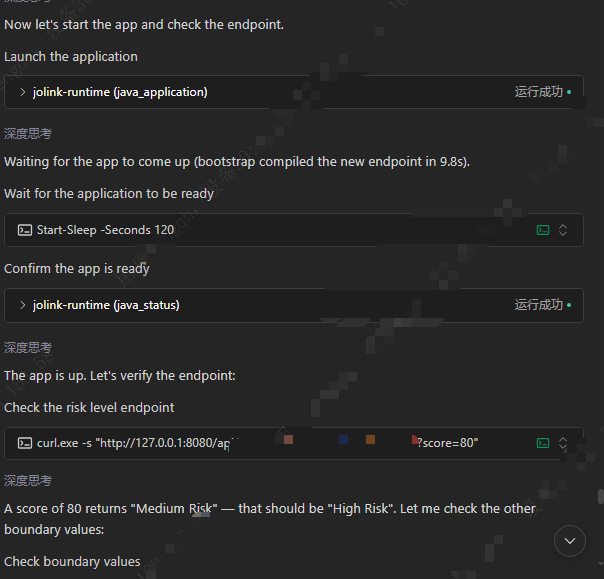
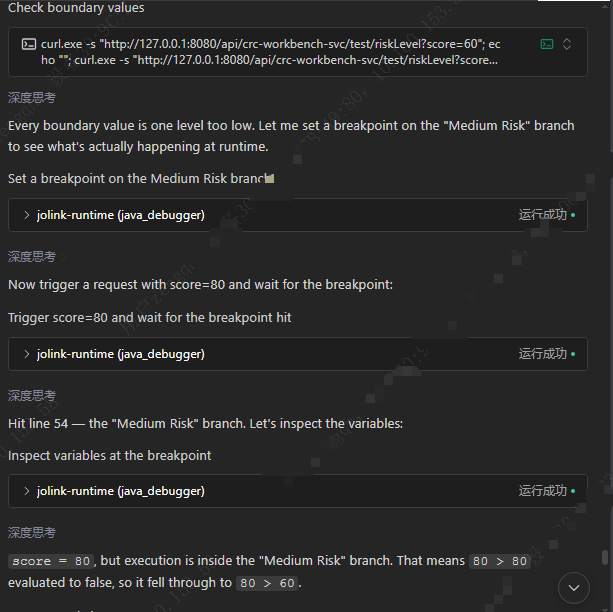
The screenshots below show a debugging example: an agent starts a Java application, checks an endpoint, notices an unexpected result, and uses joLink to investigate the execution path.
This is a constructed demonstration scenario, not a record of an actual business incident. Some sensitive information in the screenshots has been redacted for privacy.
1. Start the application and check the actual response
The agent uses java_application to launch the application and java_status
to check its state, then sends an HTTP request to a sample risk-scoring endpoint.
For score=80, the expected category is High Risk, but the agent reports
Medium Risk. It checks additional boundary values before investigating further.
2. Set a breakpoint and inspect runtime variables
The agent uses java_debugger to set a breakpoint on the Medium Risk branch,
triggers another request, and inspects the variables after the breakpoint is hit.
The conversation shows score=80 while execution is in the Medium Risk
branch. This gives the agent runtime evidence to investigate its
boundary-condition hypothesis, rather than relying only on source-code assumptions.
This example demonstrates application startup and runtime investigation. It is not a Fast Test performance benchmark; the screenshots cover the investigation stage, not the subsequent fix and re-verification.
Private diagnostics
joLink keeps stdout exclusively for MCP JSON-RPC. Python lifecycle logs and tracebacks are also written to a bounded private rotating file:
status does not return mcp.log paths or logging configuration, even with details=true.
Read the local file at the path above when diagnosing joLink itself. A diagnostic-file
failure never prevents the MCP server from starting. The file is limited to
4 MiB with three rotated backups; stdout remains untouched.
java_status(action=status) is a compact overview: readiness, process/debug state,
active operation and recent restart/Test summaries. Read java_status(action=status, details=true)
for current launch errors, full last_reload, compiler/cache settings and timings.
Completed launch/restart calls already return their own detailed result; the
flag is useful when an operation continued after the synchronous reply timeout.
Neither call reads or embeds build logs. Use java_status(action=logs, source=build)
for the current launch's build log, or omit source to read application output;
both accept tail. Restart summaries include a next_action pointing to details.
launch/restart replies include previous_startup_ms: the prior successful JVM
startup duration saved locally for the same launch, captured before
the new operation. It excludes Probe/JDT compilation. With ready_port it
measures startup through observed TCP readiness; otherwise it only measures JVM/
JDWP startup. HotSwap and failed startups do not replace this observation.
It is written once when startup succeeds to a small JSON file under the joLink
cache's startup-timings/ directory. Stop, a new conversation or an MCP restart
does not discard it. The next launch reads that file; no expiry, build-input
validation or repeated status writes are involved. An unseen launch returns
null. Treat it as a waiting reference, not a prediction or a readiness check.
Set JOLINK_LOG_LEVEL in the MCP server's environment and restart it:
WARNING (default) keeps warnings/errors only; INFO records JDT
cache/source/build/save summaries and native FULL fallback reasons;
DEBUG also retains detailed Worker output; ERROR keeps errors only;
OFF disables joLink diagnostic logging. Application logs and tool results are
unaffected. The Worker uses a fixed incremental propagation limit of 10 rounds.
See JDT build diagnostics.
The public actions are:
These actions support:
- launching a Java application as an owned JVM process;
- launching a Maven/Gradle project with
project_pathandmain_class, or optionally importing an IntelliJ IDEA Application/Spring Boot configuration, exporting its Build World without running Maven/Gradle compilation, compiling with JDT before JVM startup, and launching without packaging a fat JAR; - stopping or restarting an application after code changes;
- compiling detected edits in a persistent private JDT session and applying compatible loaded class definitions with HotSwap;
- inspecting application status and logs;
- attaching to an already-running local JVM;
- setting semantic breakpoints and exception watches;
- waiting for runtime events;
- inspecting threads, stack frames, and variables;
- resuming suspended execution;
- cleaning up debug state safely.
Current status
Current package version:
Status:
The first adapter targets local Java applications through JDWP.
The current MCP implementation includes:
- stdio transport;
- stdout reserved exclusively for MCP protocol messages;
- JSON
TextContentwith matchingstructuredContent; - Runtime
ok=falsemapped to MCPisError=true; - cancellable
wait_event; - optional two-phase waiting with
armandawait; - an optional loopback HTTP trigger started only after JDWP is armed, with a
one-call
blockingshortcut or explicitarm/await; - wait-scoped JDWP requests;
- ownership-aware shutdown;
- automatic cleanup and resume paths;
- persistent JDWP packet framing across short polling timeouts.
The current two-phase implementation is intended for controlled dogfood. Known cancellation, cleanup-preemption, handle-publication, and response delivery limitations are tracked in:
docs/stage-2.1.2-lifecycle-backlog.md
Do not use this alpha release for unattended production JVM debugging.
Requirements
- JDK 8 or newer
- uv
uv manages the Python environment automatically. A separate Python
installation is normally not required.
Confirm the requirements with:
Quick start
After the MCP server is connected, confirm that these tools are available:
Open a local Java project and ask the coding agent:
For a problem that has already survived multiple attempted fixes:
For deeper investigation:
joLink starts and observes the Java application. The coding agent may use its normal HTTP, terminal, browser, or testing tools to trigger the scenario.
For a method-body edit in an application launched with project_path, the
agent can avoid a full Maven rebuild/restart:
restart automatically detects and incrementally compiles source changes, then
uses HotSwap by default. Deleted/unloaded classes, generated resource changes or
explicit JVM rejection select a real restart using those already compiled outputs.
hotswap=false forces process reinitialization. No pending code changes restart
without compiling. Compilation errors leave the old process running. Lost
HotSwap replies remain unknown rather than being mistaken for explicit rejection.
The call waits up to timeout (maximum 30 seconds); if unfinished, it returns
restart_started plus the existing reload_id, observable through
active_operation and last_reload. apply_method distinguishes HotSwap from
process restart. Completed builds immediately save JDT state and source indexes
in the local persistent workspace. There are no extra class-output copies.
HotSwap does not rerun initialization or refresh Spring metadata; verify with a
fresh request. Breakpoints in redefined classes become stale and must be reset.
The locked JDT Worker is installed into a content-addressed user cache on
first use. Valid Eclipse bundles are reused from older joLink caches; missing
bundles are downloaded and verified, while the product Worker and Equinox
configuration ship inside the Python package. A changed build configuration or
unavailable session refreshes via the existing project launch path. Use
restart(hotswap=false) when startup/framework state must be recreated.
The product uses Eclipse 4.40 / JDT 3.46 with matching APT bundles. Its Worker
targets Java 17 bytecode and defaults to a private, pinned Temurin 21 runtime,
installed once in the user cache. Maven/Gradle and application/test JVMs keep
their project JDKs. JOLINK_WORKER_JAVA_HOME can select a corporate-provided
64-bit JDK 17+ instead. Old Lombok 1.18.20 compatibility issues remain recorded,
not silently fixed by replacing project dependencies. See
JDT 3.46 and private Worker JDK for offline setup
and actual compatibility results.
First-time JDK/Eclipse downloads use their pinned official URLs by default.
Set JOLINK_DOWNLOAD_MIRROR=cn to try TUNA, then the joLink mirror at
https://7355608.net/jolink/assets, then upstream on connection/transfer failure.
A custom mirror base URL uses that mirror followed by upstream; official
(or an empty value) uses upstream only. No IP/geolocation detection is performed.
Existing SHA256 checks and installed caches are unaffected. TUNA access was
blocked during local verification; selecting cn does not guarantee its availability.
See runtime mirror setup.
The imported IDEA Make/Build flag does not cause Maven or Gradle compilation. On the first launch, the Probe exports compiler/runtime facts and JDT performs FULL compilation. Later launches reuse the persisted Probe model and use saved source size/mtime to detect edits. Changes to tracked Maven/Gradle configuration refresh the model. Untracked external scripts and hidden inputs remain recorded in the compatibility follow-up; cache deletion is not a routine startup or installation step.
See JDT-first startup for the current single-module startup and cache behavior.
Typical workflow
A normal verification flow looks like this:
A deeper debugging flow looks like this:
For a local HTTP endpoint, blocking composes the existing
arm -> trigger -> await lifecycle into one call:
Use explicit arm followed by await when an external action must occur
between arming and observation. A terminal result consumes its wait_handle;
the handle observes Runtime events and is not an HTTP-response handle.
For an HTTP application launched by joLink, distinguish process/debugger startup from application TCP readiness:
For java_application(launch/restart) and java_fast_test, timeout limits the synchronous result wait, including
runtime preparation and compilation. It defaults to 30 seconds; larger values
are accepted but wait only 30 seconds. Zero returns after task submission.
The original task continues after this reply deadline. Test Runner execution
has a separate internal 300-second limit; timeout no longer configures it.
If still running, choose a waiting interval appropriate to the stage (for
example using sleep or PowerShell Start-Sleep), then query java_status.
Do not rapidly poll or resubmit the task. The old readiness-wait argument has
been removed, not retained as an alias.
Direct JAR/classpath launches still perform their existing process creation
and JDWP handshake before returning a task observation. timeout=0 skips the
additional readiness wait; it does not make that initial handshake asynchronous.
If the process is alive but the application port is not accepting connections,
the result remains successful with startup_state=starting; the process is
kept alive and next_action=status. Each later status call probes the stored
port again. startup_state=ready means only that the configured loopback TCP
port accepted a connection; it does not prove that every dependency, cache, or
business endpoint is healthy.
When ready_port is omitted, joLink reports startup_state=unverified rather
than claiming application readiness. An HTTP trigger remains allowed for
attached and otherwise unverified JVMs, but its result includes a warning.
When configured readiness is still starting, joLink rejects an HTTP trigger
without sending it.
Runtime safety
joLink 0.1.0a7 is designed for local, trusted development environments.
Current safety boundaries:
- MCP transport is stdio;
- JDWP access is limited to local JVMs;
- one joLink server controls one Java target at a time;
- a JVM launched by joLink is treated as an owned process;
- an owned JVM may be stopped by joLink;
- an externally started JVM is attached, resumed, and detached;
- an attached JVM is never intentionally terminated;
- raw JDWP requests are armed only while a waiter owns them; logical breakpoint and exception definitions persist until removed or cleaned up;
- built-in HTTP triggers accept only
http://127.0.0.1, do not use environment proxies or redirects, and never return the request URL, headers, body, or their raw values in validation errors; - a configured
ready_portmust be unused before launch and must differ from the JDWP port; the TCP probe is local and does not send an application request; response_headers_receivedreports only the HTTP status/response headers; joLink does not read or return the response body;- cancelling an HTTP client wait closes joLink's side of the connection but cannot guarantee that server-side business work has been undone;
- successful
cleanup_debug_stateincludes its own debug-state verification; a separate HTTP cleanup state may remainsettlingwithout delaying JVM cleanup; - after receiving a
suspension_id, the agent must callresumeorcleanup_debug_state.
Do not expose the JDWP port to an untrusted network.
Do not use the current alpha release for remote or production debugging.
Client notes
CodeBuddy
Some current CodeBuddy environments may initially display:
Use the host's tool-definition loading/search facility to obtain the actual schema.
Do not infer arguments from a tool name alone. The independently installed
jolink-java Skill provides a discovery and workflow entry point; it does not
replace the MCP connection or guarantee tool selection. Follow the
installation guide for the specific CodeBuddy surface (CLI, IDE or
editor plugin), rather than assuming their configuration files are interchangeable.
Development
Clone the repository and install development dependencies:
Run the default test suite:
Run the stdio server from the source checkout:
Equivalent module entry point:
A generic MCP client configuration can launch it directly from a checkout:
Tests
After changing joLink source, do not kill an MCP server and assume an existing host tool handle will reconnect. Start a fresh server from the current worktree through the real stdio protocol:
The client prints the Git commit, dirty-worktree state, source fingerprint,
Python executable, and stderr path before accepting JSONL tools/call
requests. Send {"command":"quit"} to close the client and trigger normal
server cleanup. This is the canonical interactive verification path for
uncommitted code; a Codex/IDE MCP connection should be established only after
the code under test is frozen.
The real subprocess acceptance test exercises the MCP stdio boundary:
It performs:
The heavier real MCP/JVM suite is opt-in locally:
The managed Temurin 21 Worker and Java 8 application lifecycle have standalone deep validators (Worker JDK and application/target JDK are different roles):
The canonical CI environment for the heavier suite is:
Contracts
See current documentation, product Java sources and builds, and historical research records. Archived experiment commands and limits are not the current product interface.
- MCP v0.1:
docs/mcp-contract-v0.1.md - Runtime lineage 2.4.0:
docs/runtime-lineage-contract-2.4.0.md
License
joLink's own code is MIT-licensed. Downloaded Eclipse/Temurin runtimes and installed Python dependencies retain their own licenses. See third-party notices and corresponding sources. Offline runtime kits must be accompanied by the matching source kit and notices.