multi-agentcoordinationworkflowfilesystemgovernance
MCP server for coordinating multi-agent work through governed Markdown files and filesystem-based lifecycle states.
Quick Install
Automated & IDE SetupCopy the AI prompt to install this server into Claude Code, Cursor, or another agent — or use 1-click editor setup below.
Automated check passed— started and listed 45 tools correctly (1mo ago).
Manual Client & Custom JSON ConfigExpand JSON ▾
Client Config & Setup
Choose your client or environment
Target File:
💡 Paste the JSON block into your client's configuration file under mcpServers, then restart the application.
Overview
Use cases
Coordinate tasks across multiple agents
Write reports, issues, and reviews
Manage claim, submit, and approval lifecycles
Initialize new FCoP project structures
Migrate existing FCoP projects to the v3 layout
Key features
45 MCP tools for coordination workflows
Filesystem-based coordination with no message broker or database
Structured Markdown files for agent work records
Lifecycle states stored under _lifecycle/
Append-only event history inside files
Project initialization and v2-to-v3 migration
Capabilities & Tool Schemas (45)
Inspect callable tools, capabilities, and parameters exposed to AI agents by FCoP.
set_project_dirPin the project root for this MCP session. Useful when the MCP process was spawned with the wrong working directory — typical symptom: ``unbound_report`` shows a project path like ``C:\Users\<you>`` instead of the workspace you actually opened in Cursor. Calling this tool once re-binds every subsequent tool call to the given directory, **without** editing ``mcp.json`` or restarting Cursor. Safe to call while UNBOUND — re-pointing at a directory is not a role-claim and writes nothing. It only mutates in-process state.
init_projectInitialize an FCoP project with a bundled preset team. Since 3.0.2 a fresh init produces the **v3 topology** (per spec §1.1): ``fcop/_lifecycle/{inbox,active,review,done,archive}/`` plus the retained v2 buckets ``reports/`` / ``issues/`` / ``shared/``. The superseded v2 buckets ``tasks/`` and ``log/`` are no longer created on fresh init (use ``python -m fcop migrate --to-v3`` to upgrade an existing v2 project). Writes ``fcop/fcop.json``, deposits ``LETTER-TO-ADMIN.md`` under ``fcop/``, creates the ``workspace/`` cage with a starter README (per Rule 7.5), deploys the team's three-layer docs to ``fcop/shared/`` (TEAM-README / TEAM-ROLES / TEAM-OPERATING-RULES + ``roles/{ROLE}.md``, both zh and en), and (per ADR-0006) deploys the bundled protocol rules to **four** locations so any agent host sees them: ``.cursor/rules/fcop-rules.mdc``, ``.cursor/rules/fcop-protocol.mdc``, ``AGENTS.md``, and ``CLAUDE.md``. Existing copies are archived to ``.fcop/migrations/<timestamp>/`` before being overwritten.
init_soloInitialize an FCoP project in **Solo mode** (one AI, no dispatch). Solo mode is for projects where a single agent works directly with ADMIN. Rule 0.b still applies: the agent uses files to split itself into *proposer* and *reviewer*, even though there is no second role. Since 3.0.2 fresh init produces the **v3 topology** (per spec §1.1): ``fcop/_lifecycle/{inbox,active,review,done,archive}/`` plus retained ``reports/`` / ``issues/`` / ``shared/``. Superseded v2 buckets (``tasks/``, ``log/``) are no longer created on fresh init. Beyond ``fcop.json`` and the canonical directories, this also deposits ``fcop/LETTER-TO-ADMIN.md`` (the user manual), creates the ``workspace/`` cage with a starter README (per Rule 7.5), deploys the bundled solo three-layer docs (TEAM-README / TEAM-ROLES / TEAM-OPERATING-RULES + ``roles/ME.md``, both zh and en) to ``docs/agents/shared/``, and (per ADR-0006) drops the bundled protocol rules into ``.cursor/rules/*.mdc`` + ``AGENTS.md`` + ``CLAUDE.md``. Existing copies are archived under ``.fcop/migrations/<timestamp>/`` before being overwritten.
create_custom_teamCreate an FCoP project with a custom roster of roles. Role codes can be anything — they become part of task filenames, e.g. ``TASK-20260423-001-BOSS-to-CODER.md``. Use ``validate_team_config`` first to catch illegal role codes without writing anything. Since 3.0.2 fresh init produces the **v3 topology** (per spec §1.1): ``fcop/_lifecycle/{inbox,active,review,done,archive}/`` plus retained ``reports/`` / ``issues/`` / ``shared/``. Superseded v2 buckets (``tasks/``, ``log/``) are no longer created on fresh init. Custom teams have **no bundled three-layer docs**, so ``fcop/shared/`` is left empty (apart from the project's own ``shared/README.md``). The recommended next step is to read the closest preset (``fcop://teams/<closest-preset>`` — see the ``teams/_data/README.md`` "Custom teams" section) and hand-author your own ``TEAM-README.md`` / ``TEAM-ROLES.md`` / ``TEAM-OPERATING-RULES.md`` + ``roles/{ROLE}.md`` based on it. The other init artifacts are deposited as usual: ``fcop/fcop.json``, ``LETTER-TO-ADMIN.md``, ``workspace/README.md``, plus the protocol rule files at ``.cursor/rules/*.mdc`` + ``AGENTS.md`` + ``CLAUDE.md`` (existing copies archived under ``.fcop/migrations/``).
validate_team_configDry-run validation for a custom team config. Use **before** ``create_custom_team`` to catch illegal role codes (Chinese characters, dashes, reserved names, duplicates) without writing anything to disk.
write_taskCreate a new task file (Cold Path dispatch or formal intake only). **Not Hot Path execution.** Use when ``ADMIN`` / ``leader`` assigns work, when Cold Path fan-out dispatches subtasks, or when you were explicitly told to land a formal task. Agents **must NOT** self-dispatch without an upstream requirement (Rule 0.a.2). Subtask linking: set ``thread_key`` for thread continuity; set ``parent`` to the upstream task ID (``parent:`` frontmatter — work derivation, distinct from ``references``). Do **not** emit ``parent_task_id`` as normative output (read-only legacy alias only). File ops: write ``TASK-*.md`` under ``_lifecycle/inbox/`` (v3) or ``fcop/tasks/`` (v2). Does **not** claim, finish, or archive. The library assigns a filename of the form ``TASK-YYYYMMDD-NNN-{SENDER}-to-{RECIPIENT}.md`` with FCoP-compliant YAML frontmatter + markdown body. In v3 the recipient ``claim_task``s from inbox.
Documentation Overview

FCoP — File-based Coordination Protocol
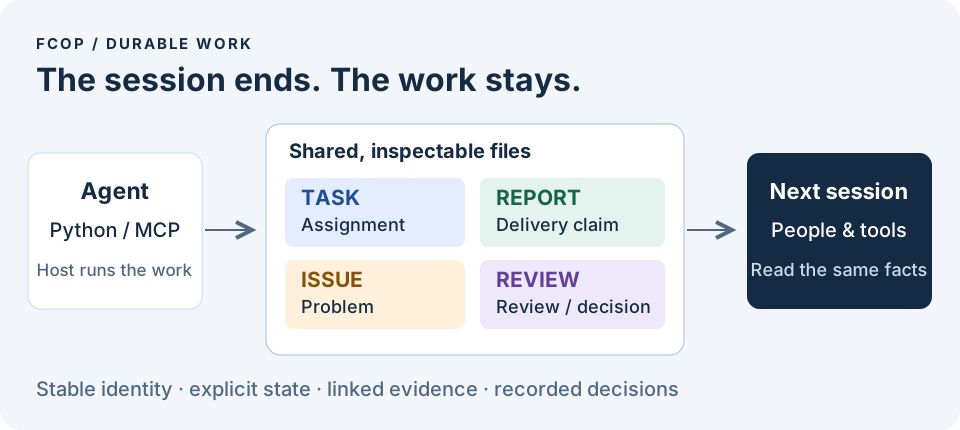
Keep agent work beyond the conversation.
Tasks, deliveries, issues and review decisions become durable files that people, tools and the next agent can inspect. A session can end without taking the work record with it.


Ask AI to install · Manual reference · Architecture series (中文) · Architecture · Papers & citation
Stable version: 4.0.2 — 4.0.2 release. This repository contains the open protocol, the fcop Python implementation and the optional fcop-mcp adapter. Python 3.10+; no model API key is needed for the local example.
Ask your AI to install FCoP
Paste this into Cursor Agent, Codex, or another coding agent with terminal and file access. The agent handles setup and checks the result.
The AI installation guide covers dependencies, client configuration and a real task check. If the client needs approval or a reload, the agent will identify that step. Manual Python/MCP instructions remain below for reference.
Why put work outside the model?
“I have finished” is a statement in a conversation. A teammate still needs to know which assignment was attempted, what was delivered, who reviewed it and what remains unresolved. Keeping those facts only in a chat makes a handoff depend on reconstructing that chat.
FCoP gives formal work a shared representation: Markdown files with structured metadata, stable identities, explicit relationships and recorded state transitions. An agent can write them, a human can open them, and a script can validate them. The filesystem reference implementation needs no database or message broker.
| Record | What it preserves | Why it matters |
|---|---|---|
| TASK | Assignment, participants and lifecycle | The next worker can locate the work and its current state. |
| REPORT | Delivery claim and evidence for an attempt | “Submitted” remains distinguishable from “accepted.” |
| ISSUE | A problem and its context | A blocker survives the session that discovered it. |
| REVIEW | Review, acceptance or authorization facts | Decisions can be checked against the work and evidence they concern. |
Persistence makes a claim inspectable; it does not make the claim true. FCoP checks protocol relationships and gates. Reviewers evaluate the substance of the delivered work, and the host Runtime supplies execution, scheduling and permissions.
Manual installation, Python/MCP examples and CLI reference (optional)
CLI setup, observation and diagnosis; MCP work
4.0.2 provides nine top-level commands: init, status, inspect,
validate, tools, doctor, version, spec and migrate.
Except explicit initialization and migration apply, commands are read-only;
the CLI does not provide task lifecycle write commands.
The fcop package alone sets up and observes workspaces. tools needs the
optional MCP package; when absent it returns a structured unavailable result,
without starting a server or installing packages.
CLI reference · 中文命令参考.
4.0.1 introduced create_branch, inspect_family and merge_branches;
4.0.2 preserves all 49 tools and their signatures. Core owns atomic convergence,
durable idempotency and recovery. Unfinished families return family_digest: null,
merge_ready: false and structured reasons. The caller supplies the semantic conclusion.
See the Branch merge contract and example / 中文合同.
Try it: create once, read from another client
In an activated Python 3.10+ virtual environment, install the published library:
Save this as demo.py and run python demo.py. It writes a real TASK, opens the workspace through a fresh Project instance, then retries the original request.
The example cleans up its temporary directory when it exits. Use your own project directory to retain the files. Retrying create_task with the same operation_id and normalized payload reuses its durable result; changing the payload is a conflict. This guarantee is specifically for task creation.
Continue with the 4.0 setup and version guide for a lasting workspace, lifecycle operations and the authorization needed to complete a task.
Give your agent the same operations through MCP
The optional adapter exposes FCoP to an MCP-capable client over stdio. Install it in the same activated environment:
Add this entry to the client's MCP configuration. Replace both absolute paths; on Windows the command ends in .venv/Scripts/fcop-mcp.exe.
Once connected, initialize a new workspace with init_solo(role_code="ME", protocol_version="4.0"). Use its workspace identity when calling create_task, then inspect the TASK with inspect_task(filename=task_id). Installing an MCP server alone does not initialize a workspace or start an agent team.
49 tools / 12 resources / 4 resource templates. The adapter routes to the same Python Core. Default initialization has no trusted authorization Profile: creation, claim and submission are available, but acceptance, rejection, reopening and archival need an explicitly adopted Profile and an issuer evaluator registered by the trusted host. A role name typed into a request cannot supply that authority.
MCP tool reference · Stable external Python example · Stable external MCP example. The full examples include an educational Profile; a real deployment must supply its own trust policy.
From a delivery claim to an accepted result
Each TASK follows an ordered lifecycle. In 4.0, entering active starts a new attempt, and submission links that attempt's REPORT. Acceptance then binds the review and authorization to the current evidence.
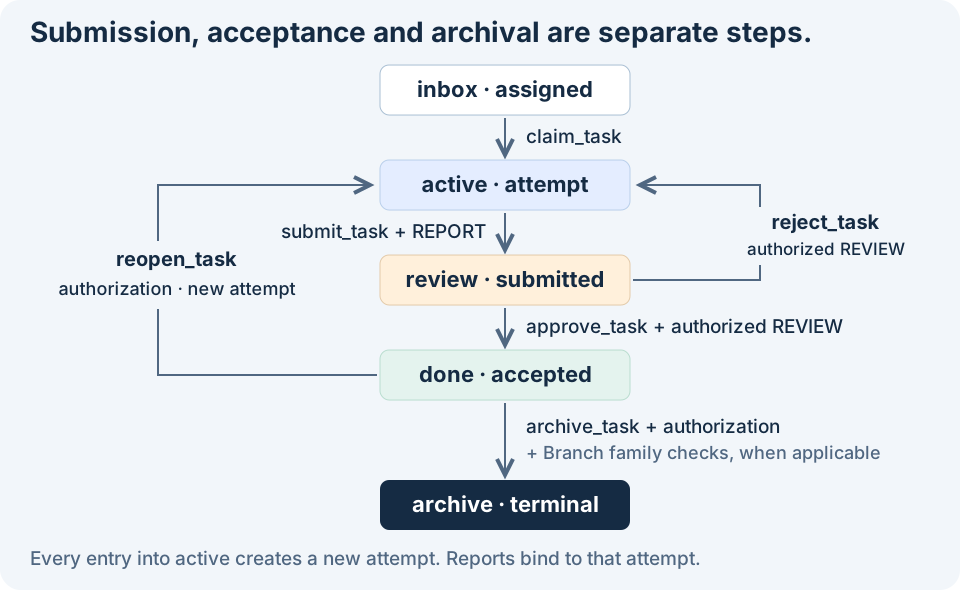
active → done is absent from 4.0. Reopening through reopen_task creates a new attempt for ordinary tasks as well as Branches. An old REPORT cannot satisfy a new attempt's submission gate. See the complete lifecycle and C1–C8 contracts · 中文规范.
Parallel work, with an explicit way to finish
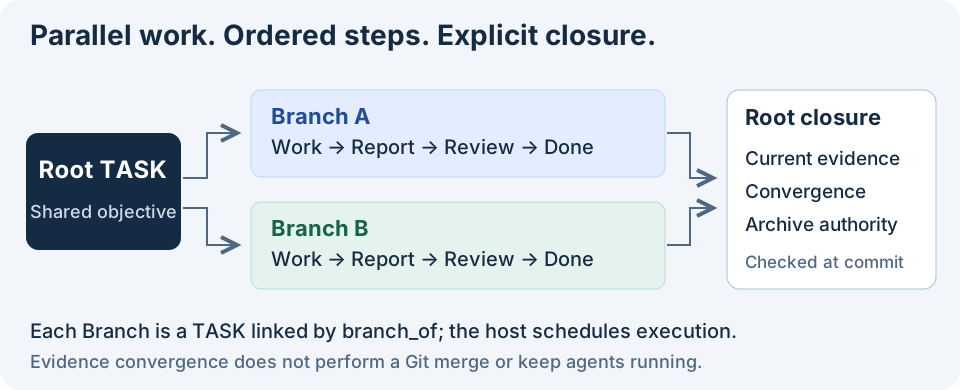
Multiple ordered workflows can advance concurrently. A Branch is an ordinary TASK linked to one Root by branch_of; sibling Branches keep their own attempts, reports and reviews. Your Runtime decides who runs them and when.
Related MCP Servers
Adoption & maintenance
Factual signals from GitHub, npm, and our automated checks — not a rating.
GitHub stars
2
Stargazers on the source repository.
Last commit
2d ago
Most recent push to the default branch.
Availability
100%
Our rolling endpoint + install checks that succeeded.
Install check
Passed
Our sandbox started it and listed its tools.
Tools exposed
45
Callable tools this server registers over MCP.
Directory activity
1 views
Config copies, upvotes, and views on AllMCPs.
Reviews
No reviews yet — be the first to share how this listing worked for you.
Frequently Asked Questions about FCoP
AllMCPs Directory Badge
Showcase your server listing on GitHub or your project documentation. Embed this dynamic SVG badge to highlight official listing status and live engagement.
Badge Style:
Live Dynamic SVG Preview
Markdown (GitHub README)
[](https://allmcps.com/mcp/joinwell52-ai-fcop)HTML Embed
<a href="https://allmcps.com/mcp/joinwell52-ai-fcop"><img src="https://allmcps.com/api/badge/joinwell52-ai-fcop?style=directory" alt="FCoP on AllMCPs" /></a>