Rustunnel README
The full upstream README, mirrored here for reference. Install config, tool schemas, adoption signals, and an original overview live on the Rustunnel listing page.
rustunnel





The open-source tunnel that scales with you. Don't pay for idle time. Secure, Rust-fast, and Pay-as-you-go.
Expose local services through a public server over encrypted WebSocket connections with TLS termination, HTTP/TCP proxying, a live dashboard, Prometheus metrics, and audit logging.
You can self-host or use our managed service.
Using an AI agent? rustunnel ships an MCP server — one-click setup for Cursor (then add your API token):

For Claude Code, Claude Desktop, Windsurf, and others, see the agent integration guide or the agent manual at rustunnel.com/agents.md.
Table of Contents
- Hosted service
- Architecture overview
- Requirements
- Local development setup
- Production deployment (Ubuntu / systemd)
- 1 — Install dependencies
- 2 — Build release binaries
- 3 — Create system user and directories
- 4 — Install the server binary
- 5 — Create the server config file
- 6 — TLS certificates (Let's Encrypt + Cloudflare)
- 7 — Set up systemd service
- 8 — Open firewall ports
- 9 — Verify the server is running
- Updating the server
- Docker deployment · full guide
- Client configuration
- Port reference
- Config file reference (server)
- REST API
- AI agent integration (MCP server)
- Monitoring
- Roadmap
- Contributing
- License
- Contact
Hosted service
You can use rustunnel without running your own server. We operate a global fleet of public edge servers that you can connect to immediately.
Available regions
| Region ID | Server | Location | Control plane | Status |
|---|---|---|---|---|
eu | eu.edge.rustunnel.com | Helsinki, FI | :4040 | Live |
us | us.edge.rustunnel.com | Hillsboro, OR | :4040 | Live |
ap | ap.edge.rustunnel.com | Singapore | :4040 | Live |
The client auto-selects the nearest region by default. Use --region <id> to connect to a specific one. The legacy address edge.rustunnel.com is a CNAME to eu.edge.rustunnel.com and will continue to work for backward compatibility.
Getting an auth token
Sign up for a free account at rustunnel.com — no waiting list, no manual approval.
- Create an account at rustunnel.com
- Go to Dashboard → API Keys and create a token
- Copy the token — it is shown only once
Plans:
| Plan | Price | Tunnels | Custom subdomains | TLS/HTTPS |
|---|---|---|---|---|
| Free | $0 | Up to 3 | — | ✓ |
| Pay-as-you-go | $3/mo minimum + $0.10/GB | Unlimited | ✓ | ✓ |
| Self-host | Free (run your own server) | Unlimited | ✓ | ✓ |
The free plan is a great way to get started. Upgrade to pay-as-you-go from your dashboard whenever you need custom subdomains or unlimited tunnels.
Quick start with the hosted server
Once you have a token, run the setup wizard:
Then expose a local service:
The client prints the public URL as soon as the tunnel is established:
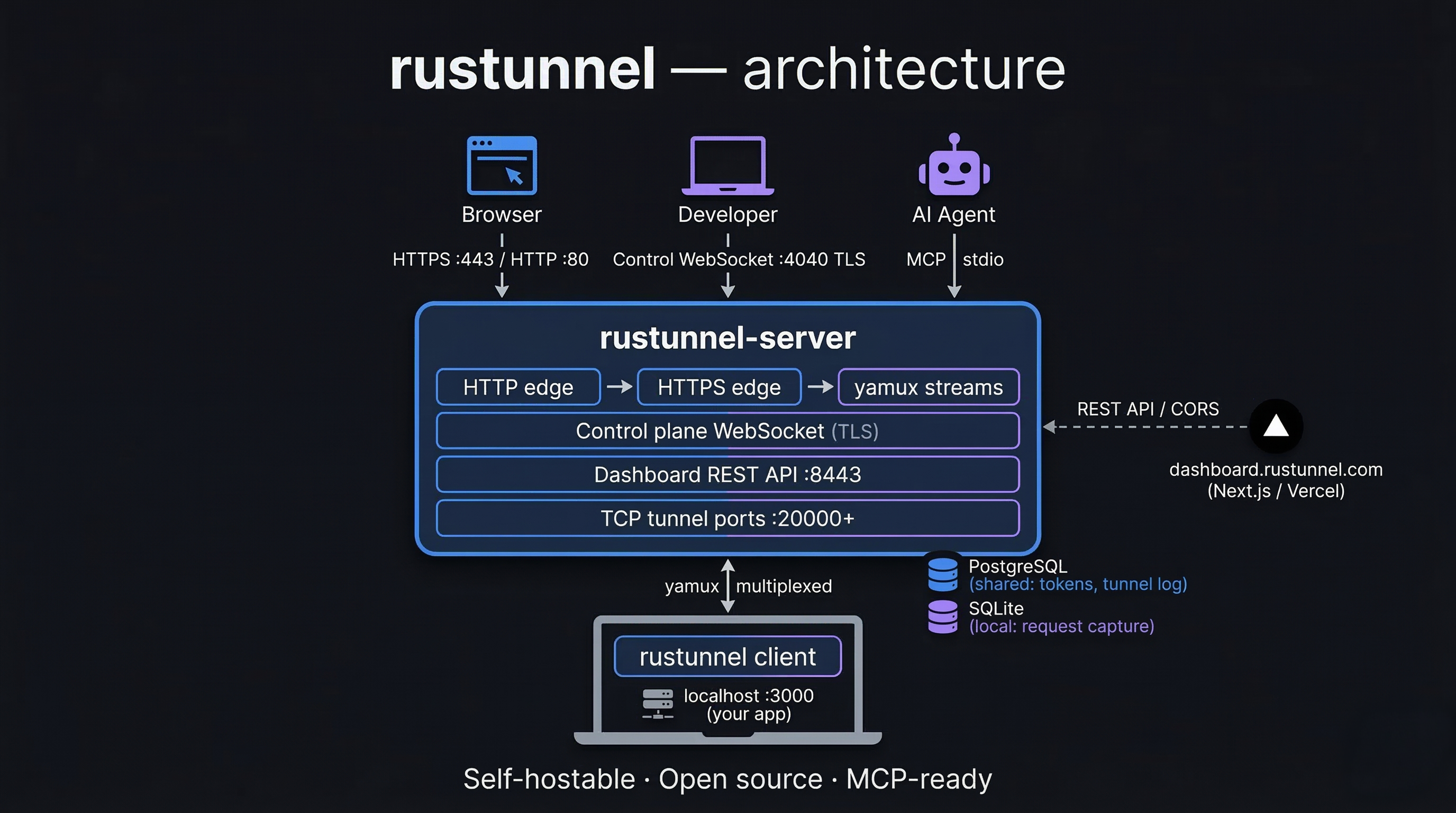
Architecture overview
Requirements
To build
| Requirement | Version | Notes |
|---|---|---|
| Rust toolchain | 1.76+ | Install via rustup |
pkg-config | any | Needed by reqwest (TLS) |
libssl-dev | any | On Debian/Ubuntu: apt install libssl-dev |
| Node.js + npm | 18+ | Only needed to rebuild the dashboard UI |
To run the server in production
| Requirement | Notes |
|---|---|
| Linux (Ubuntu 22.04+) | systemd service included |
| TLS certificate + private key | PEM format (Let's Encrypt recommended) |
| Public IP / DNS | Wildcard DNS *.tunnel.yourdomain.com → server IP required for HTTP tunnels |
Local development setup
Build
Run tests
The integration test suite spins up a real server on random ports and exercises auth, HTTP tunnels, TCP tunnels, and reconnection logic. It requires a running PostgreSQL instance.
make db-start runs deploy/docker-compose.dev-deps.yml which starts a Postgres 16 container on localhost:5432. The make test target injects TEST_DATABASE_URL automatically. If you run cargo test directly, export the variable first:
Run the server locally
Generate a self-signed certificate for local testing:
A ready-made local config is checked into the repository at deploy/local/server.toml.
It points to the self-signed cert paths above and has auth disabled for convenience.
Start the server with it directly:
Key settings in deploy/local/server.toml:
| Setting | Value |
|---|---|
| Domain | localhost |
| HTTP edge | :8080 |
| HTTPS edge | :8443 |
| Control plane | :4040 |
| Dashboard | :4041 |
| Auth token | dev-secret-change-me |
| Auth required | false |
| TLS cert | /tmp/rustunnel-dev/cert.pem |
| TLS key | /tmp/rustunnel-dev/key.pem |
| Database | /tmp/rustunnel-dev/rustunnel.db |
Run the client locally
With the server running, expose a local service (e.g. something on port 3000):
--insecureskips TLS certificate verification. Required when using a self-signed certificate locally. Never use this flag against a production server.
The client will print a public URL, for example:
Testing the HTTP tunnel locally
The tunnel URL uses a subdomain (e.g. http://abc123.localhost:8080).
Browsers won't resolve *.localhost subdomains by default, so you have two options:
Option A — curl with a Host header (no setup required)
Option B — wildcard DNS via dnsmasq (enables browser access)
Then visit http://abc123.localhost:8080 in the browser (include :8080 since the
local config uses port 8080, not port 80).
Git hooks
A pre-push hook is included in .githooks/ that mirrors the CI check step
(format check + Clippy). Run this once after cloning to activate it:
From that point on, every git push will automatically run:
If either check fails the push is aborted, keeping the remote branch green.
Production deployment (Ubuntu / systemd)
The steps below match a deployment where:
- Domain:
edge.rustunnel.com - Wildcard DNS:
*.edge.rustunnel.com → <server IP> - TLS certs: Let's Encrypt via Certbot + Cloudflare DNS challenge
1 — Install dependencies
Install Rust (as the build user, not root):
2 — Build release binaries
Binaries will be at:
target/release/rustunnel-servertarget/release/rustunnel
3 — Create system user and directories
4 — Install the server binary
Or use the Makefile target (runs build + install + systemd setup):
5 — Set up PostgreSQL
rustunnel requires PostgreSQL for shared state (tokens, tunnel history, audit log).
Create a dedicated database and user:
Tip: For managed PostgreSQL (e.g. AWS RDS, DigitalOcean Managed Database, Supabase) skip the
apt installstep above and just note the connection URL for the config in the next step.
Schema migrations run automatically when the server starts — no manual SQL needed.
6 — Create the server config file
Create /etc/rustunnel/server.toml with the content below.
Replace your-admin-token-here with a strong random secret (e.g. openssl rand -hex 32).
Secure the file:
7 — TLS certificates (Let's Encrypt + Cloudflare)
Create the Cloudflare credentials file:
Request a certificate covering the bare domain and the wildcard (required for HTTP subdomain tunnels):
Certbot writes the certificate to:
These paths are already set in the config above. Certbot sets up automatic renewal via a systemd timer.
rustunnel reads TLS certificates from disk at startup, so it must be restarted after each renewal. Add a Certbot deploy hook to do this automatically:
Allow the rustunnel service user to read the certificates:
8 — Set up systemd service
9 — Open firewall ports
10 — Verify the server is running
Port reminder: port 4040 is the control-plane WebSocket (clients connect here), not the dashboard. Hitting it with plain HTTP returns
HTTP/0.9which is expected. The dashboard is ondashboard_port— check yourserver.tomlif unsure.
Updating the server
Pull the latest code, rebuild, install, and restart in one command:
This runs git pull → cargo build --release → install → systemctl restart → systemctl status.
Docker deployment
A full Docker guide covering both local development (self-signed cert) and production VPS (Let's Encrypt) is available in docs/docker-deployment.md.
Pull the published image
Multi-arch images (linux/amd64 + linux/arm64) are published to GitHub
Container Registry on every stable release — no build required:
Quick reference (build from source)
Files
| File | Purpose |
|---|---|
deploy/Dockerfile | Multi-stage build: Node.js UI → Rust server → slim runtime |
deploy/docker-compose.yml | Production compose file |
deploy/docker-compose.local.yml | Local development compose file |
deploy/server.toml | Production server config template |
deploy/server.local.toml | Local development server config |
deploy/prometheus.yml | Prometheus scrape config |
Client configuration
Installation
Option 1 — Homebrew (macOS and Linux, recommended)
Homebrew installs pre-built binaries — no Rust toolchain required.
The formula is updated automatically on every release. This installs
both rustunnel (the CLI client) and rustunnel-mcp (the MCP server
for AI agent integration).
Option 2 — Pre-built binary
Download the archive for your platform from the
latest GitHub Release,
extract it, and move the rustunnel binary to a directory on your $PATH:
Available targets:
| Platform | Archive |
|---|---|
| macOS Apple Silicon | rustunnel-<version>-aarch64-apple-darwin.tar.gz |
| macOS Intel | rustunnel-<version>-x86_64-apple-darwin.tar.gz |
| Linux x86_64 (glibc) | rustunnel-<version>-x86_64-unknown-linux-gnu.tar.gz |
| Linux x86_64 (musl, static) | rustunnel-<version>-x86_64-unknown-linux-musl.tar.gz |
| Linux arm64 | rustunnel-<version>-aarch64-unknown-linux-gnu.tar.gz |
| Windows x86_64 | rustunnel-<version>-x86_64-pc-windows-msvc.zip |
Option 3 — Build from source
Requires Rust 1.76+.
Setup wizard
The easiest way to create your config file is the interactive setup wizard:
It prompts for your region and auth token, then writes ~/.rustunnel/config.yml with the correct server address and a commented tunnels: example section.
Pick a specific region (eu, us, ap) to connect directly, or auto (the default) to let the client probe all regions and pick the nearest. Choose self-hosted if you run your own server — the wizard will then prompt for your server address.
After running setup, use rustunnel start to connect with all tunnels defined in the config, or use rustunnel http <port> / rustunnel tcp <port> for one-off tunnels.
Quick start (CLI flags)
Machine-readable output (--json)
All tunnel-running commands (http, tcp, udp, p2p, start) and
token create accept a --json flag. With it, stdout emits NDJSON —
one JSON event object per line — instead of the human-readable startup
box, which makes the CLI easy to drive from scripts and AI agents:
Events:
| Event | When | Fields |
|---|---|---|
tunnel_ready | Tunnel registered and accepting traffic | protocol, public_url, public_addr (host:port, tcp/udp only), local_port, local_host, tunnel_id, name |
reconnecting | Connection dropped, retry scheduled | attempt, reason, delay_secs |
reconnected | Reconnect succeeded (fresh tunnel_ready events follow) | — |
error | Fatal error; process exits with code 1 | code (config/auth/tunnel/connection/protocol/io), message, hint |
token_created | token create --json succeeded | token, name, id |
Diagnostics still go to stderr, so stdout stays valid NDJSON. For the
http, tcp, udp, and p2p commands the auth token can also be
supplied via the RUSTUNNEL_TOKEN environment variable instead of
--token (start reads tokens from the config file).
Config file
Default location: ~/.rustunnel/config.yml
Start all tunnels from the config file:
Token management
Hosted service: manage tokens from the rustunnel.com dashboard under Dashboard → API Keys. You can create, label, and revoke tokens without any CLI commands.
Self-hosted: create additional tokens via the dashboard API:
Or via curl:
Port reference
| Port | Protocol | Purpose |
|---|---|---|
| 80 | TCP | HTTP edge — redirects to HTTPS; also ACME HTTP-01 challenge |
| 443 | TCP | HTTPS edge — TLS-terminated tunnel ingress |
| 4040 | TCP | Control-plane WebSocket — clients connect here |
| 8443 | TCP | Dashboard UI and REST API |
| 9090 | TCP | Prometheus metrics (/metrics) |
| 20000–20099 | TCP | TCP tunnel range (configurable via tcp_port_range) |
| 20100–20199 | UDP | UDP tunnel range (configurable via udp_port_range) |
Config file reference (server)
| Key | Type | Default | Description |
|---|---|---|---|
server.domain | string | — | Base domain for tunnel URLs |
server.http_port | u16 | — | HTTP edge port |
server.https_port | u16 | — | HTTPS edge port |
server.control_port | u16 | — | WebSocket control-plane port |
server.dashboard_port | u16 | 4040 | Dashboard port |
tls.cert_path | string | — | Path to TLS certificate (PEM) |
tls.key_path | string | — | Path to TLS private key (PEM) |
tls.acme_enabled | bool | false | Enable built-in ACME renewal |
tls.acme_email | string | "" | Contact email for ACME |
tls.acme_staging | bool | false | Use Let's Encrypt staging CA |
tls.acme_account_dir | string | /var/lib/rustunnel | ACME state directory |
tls.cloudflare_api_token | string | "" | Cloudflare DNS API token (prefer env var CLOUDFLARE_API_TOKEN) |
tls.cloudflare_zone_id | string | "" | Cloudflare Zone ID (prefer env var CLOUDFLARE_ZONE_ID) |
auth.admin_token | string | — | Master auth token |
auth.require_auth | bool | — | Reject unauthenticated clients |
auth.max_failed_auth_per_minute | int | 10 | Failed auth attempts allowed per source IP per minute before further attempts are rejected (control-plane handshake and dashboard API); 0 disables |
database.url | string | — | PostgreSQL connection URL (required) |
database.captured_path | string | /var/lib/rustunnel/captured.db | Per-region SQLite file for captured HTTP request bodies |
server.dashboard_origin | string | "" | Allowed CORS origin for the dashboard UI (e.g. http://localhost:3000) |
logging.level | string | — | trace / debug / info / warn / error |
logging.format | string | — | json or pretty |
logging.audit_log_path | string | null | Path for audit log (JSON-lines); omit to disable |
limits.max_tunnels_per_session | usize | — | Max tunnels per connected client |
limits.max_connections_per_tunnel | usize | — | Max concurrent connections per tunnel |
limits.rate_limit_rps | u32 | — | Per-tunnel request rate cap (req/s) |
limits.ip_rate_limit_rps | u32 | 100 | Per-source-IP rate cap (req/s); 0 = disabled |
limits.request_body_max_bytes | usize | — | Max proxied request body size (bytes) |
limits.tcp_port_range | [u16, u16] | — | Inclusive [low, high] TCP tunnel port range |
limits.udp_port_range | [u16, u16] | [0, 0] | Inclusive [low, high] UDP tunnel port range; [0, 0] disables UDP tunnels |
region.id | string | "default" | Region identifier recorded in tunnel history (e.g. "eu", "us", "ap") |
region.name | string | "Default" | Human-readable region name shown in the dashboard |
region.location | string | "" | Physical location label (e.g. "Helsinki, FI") |
Monitoring
A Prometheus metrics endpoint is available at :9090/metrics:
Start with the full monitoring stack (Prometheus + Grafana):
Production note: The default Grafana password is
changeme. Set theGRAFANA_PASSWORDenvironment variable before starting the stack in production:
REST API
The dashboard port exposes a REST API for programmatic access to tunnels, tokens, captured requests, and tunnel history. All endpoints (except the health check) require an Authorization: Bearer <token> header.
/api/tunnels, /api/groups, and their per-tunnel sub-resources are scoped by caller: the admin token sees everything; a user-scoped API token sees only its own tunnels and groups; tunnels the caller can't see return 404, never 403. See docs/api-reference.md § Visibility scope for the full rules.
Quick reference
| Method | Path | Description |
|---|---|---|
GET | /api/status | Health check (no auth) |
GET | /api/tunnels | List active tunnels |
GET | /api/tunnels/:id | Get a single tunnel |
DELETE | /api/tunnels/:id | Force-close a tunnel |
GET | /api/tunnels/:id/requests | Captured HTTP requests |
POST | /api/tunnels/:id/replay/:req_id | Fetch stored request for replay |
GET | /api/tokens | List API tokens |
POST | /api/tokens | Create an API token |
DELETE | /api/tokens/:id | Delete an API token |
GET | /api/history | Paginated tunnel history |
Full request/response schemas, query parameters, and examples are in docs/api-reference.md.
A machine-readable OpenAPI 3.0 spec is served at GET /api/openapi.json (no auth required).
AI agent integration (MCP server)
rustunnel ships a rustunnel-mcp binary that implements the
Model Context Protocol over stdio,
letting AI agents (Claude, GPT-4o, custom agents) open and manage tunnels
without any manual intervention.
Works with any MCP harness. For copy-paste config for Claude Code, Claude Desktop, Codex, Cursor, Windsurf, Cline, and custom agents — plus a one-command installer — see the Agent Integration Guide:
Quick setup (Claude Desktop — hosted server)
Set RUSTUNNEL_TOKEN once and the agent never has to pass a token on a tool call.
Available tools
| Tool | Description |
|---|---|
create_tunnel | Open a tunnel and return the public URL — HTTP/TCP/UDP, P2P, and load-balanced pools with health checks |
list_tunnels | List all active tunnels |
close_tunnel | Force-close a tunnel by ID |
list_regions | List available server regions |
get_connection_info | Return the CLI command for cloud/sandbox agents |
get_tunnel_history | Retrieve past tunnel activity |
Installation
Homebrew (macOS and Linux) — installs rustunnel-mcp alongside the CLI:
Build from source:
Full setup guide, configuration options, and workflow examples are in docs/mcp-server.md.
Claude Code plugin
The easiest way to use rustunnel with Claude Code. Install the plugin and it handles all MCP configuration automatically — just enter your token once and start asking Claude to expose ports.
The plugin prompts for your server address and API token at enable time, stores
them securely, and starts the MCP server in the background. No .mcp.json editing
or manual setup needed.
Plugin directory: plugins/claude-code/
Documentation: docs/claude-plugin.md
OpenClaw skill
rustunnel ships an OpenClaw skill that gives any OpenClaw-compatible AI agent first-class knowledge of rustunnel — config file format, authentication, tool signatures, and common workflows — without you having to explain it.
Skill file: skills/rustunnel/SKILL.md
What it covers:
| Topic | Details |
|---|---|
| Config file | Location (~/.rustunnel/config.yml), format, named tunnels |
| First-time setup | rustunnel setup wizard or manual config creation |
| MCP tools | create_tunnel, list_tunnels, close_tunnel, get_connection_info, get_tunnel_history |
| Workflows | Webhook testing, demo sharing, cloud sandbox (no subprocess), named tunnels |
| Security | Token handling, file permissions, HTTPS-only transport |
To load the skill in Claude Code:
Once loaded, you can ask the agent things like:
"Expose my local port 3000 as an HTTPS tunnel using rustunnel."
"List my active tunnels and close the one forwarding port 5432."
"Set up my rustunnel config file with my token."
The skill instructs the agent to read credentials from ~/.rustunnel/config.yml
automatically, so you won't be prompted for your token on every invocation.
Roadmap
A detailed list of shipped features and planned future work is maintained in docs/ROADMAP.md.
Contributing
Contributions are welcome! Please follow these steps:
- Fork the repository and create a feature branch from
main. - Run
make install-hooksonce after cloning to activate the pre-push quality gate. - Make your changes. Ensure
make check(fmt + Clippy) andmake testpass locally. - Open a Pull Request with a clear description of what changed and why.
- A maintainer will review and merge once CI is green.
Guidelines
- Keep PRs focused — one logical change per PR.
- Add or update tests for any new behaviour.
- Follow the existing code style;
cargo fmtis enforced by CI. - For larger changes or new features, open an issue first to discuss the approach.
License
This project is licensed under the GNU AGPLv3 License — see the LICENSE file for details.
Contact
João Henrique Machado Silva
- GitHub: @joaoh82
- Project: github.com/joaoh82/rustunnel
- Issues & feature requests: GitHub Issues