AllMCPs
BrowseBestCategoriesStackCompareToolsGuidesBlog
Log in Submit MCP

Stay in the loop

Get new MCP servers and top picks in your inbox.

AllMCPs

The open directory for discovering and installing Model Context Protocol servers.

AllMCPs on GitHub (opens in a new tab)
Launched onTiny Startupstinystartups.com
Explore
  • Browse servers
  • Best MCP servers
  • Categories
  • MCP clients
  • Agent prompts
  • Stack Builder
  • Compare servers
  • Random discovery New
  • Submit a server
  • Pricing & Boost Boost
Learn
  • Guides hub
  • What is MCP?
  • Install guide
  • Build an MCP server
  • Deploy an MCP server
  • Security guide
  • Troubleshooting
  • MCP for SEO & AEO
  • Protocol versioning
  • Blog & updates
Tools
  • All developer tools
  • Config generator
  • Config validator
  • Config auditor
  • MCP playground
  • Token calculator
  • OpenAPI β†’ MCP
  • Badge generator
For agents
  • REST API docs
  • Trust & traffic Live
  • Remote MCP server SSE β†— (opens in a new tab)
  • llms.txt β†— (opens in a new tab)
  • Catalog JSON β†— (opens in a new tab)
Company
  • About
  • Advertise Sponsor
  • Contact
  • GitHub β†— (opens in a new tab)
  • Terms
  • Privacy
AllMCPs VerifiedAllMCPs VerifiedFeatured on Nick LaunchesFeatured on Nick LaunchesLaunch Llama NewsletterLaunch Llama NewsletterVerified DR - allmcps.comVerified DR - allmcps.comFeatured on SaaSGrowFeatured on SaaSGrowFeatured on Twelve ToolsFeatured on Twelve ToolsFeatured on Saaspa.geFeatured on Saaspa.geFeatured on Findly.toolsFeatured on Findly.toolsFeatured on Startup FameFeatured on Startup FameFeatured on LaunchKiwiFeatured on LaunchKiwiFeatured on ScrollLaunchFeatured on ScrollLaunchFeatured on DailyPingsFeatured on DailyPingsFazier badgeFazier badgeFeatured on NewTool.siteFeatured on NewTool.siteFeatured on saasfame.comFeatured on saasfame.comDR Checker - Domain RatingDR Checker - Domain RatingListed on Turbo0Listed on Turbo0Launched on LaunchBoard - Product Launch PlatformLaunched on LaunchBoard - Product Launch PlatformList on SimilarlabsList on Similarlabshttps://codetrendy.comhttps://codetrendy.comListed on DevTool.ioFeatured on BuildlistFeatured on BuildlistLaunched on Tiny StartupsFeatured on ShowMeBestAIFeatured on ShowMeBestAIFind us on LaunchZoneFind us on LaunchZoneAllMCPs VerifiedAllMCPs VerifiedFeatured on Nick LaunchesFeatured on Nick LaunchesLaunch Llama NewsletterLaunch Llama NewsletterVerified DR - allmcps.comVerified DR - allmcps.comFeatured on SaaSGrowFeatured on SaaSGrowFeatured on Twelve ToolsFeatured on Twelve ToolsFeatured on Saaspa.geFeatured on Saaspa.geFeatured on Findly.toolsFeatured on Findly.toolsFeatured on Startup FameFeatured on Startup FameFeatured on LaunchKiwiFeatured on LaunchKiwiFeatured on ScrollLaunchFeatured on ScrollLaunchFeatured on DailyPingsFeatured on DailyPingsFazier badgeFazier badgeFeatured on NewTool.siteFeatured on NewTool.siteFeatured on saasfame.comFeatured on saasfame.comDR Checker - Domain RatingDR Checker - Domain RatingListed on Turbo0Listed on Turbo0Launched on LaunchBoard - Product Launch PlatformLaunched on LaunchBoard - Product Launch PlatformList on SimilarlabsList on Similarlabshttps://codetrendy.comhttps://codetrendy.comListed on DevTool.ioFeatured on BuildlistFeatured on BuildlistLaunched on Tiny StartupsFeatured on ShowMeBestAIFeatured on ShowMeBestAIFind us on LaunchZoneFind us on LaunchZone
Β© 2026 Jackalope Digital LLC. All rights reserved.
  1. Home
  2. πŸ’» Developer Tools
  3. Rustunnel
Rustunnel logo
Health: ActiveRecent health check succeeded.Last checked 9/9/2026, 3:34:36 PM

Rustunnel

User RatingsBe the first to rate and review this MCP server!
View Repository655 GitHub StarsTotal stargazers on GitHub for the source repository (655 stars).Visit Website
developer-toolstunnelinghttptcpudp

MCP server enabling AI agents to create and manage secure public tunnels for local HTTP, TCP, UDP services with custom subdomains and load balancing.

Quick Install

Automated & IDE Setup

Copy the AI prompt to install this server into Claude Code, Cursor, or another agent β€” or use 1-click editor setup below.

One-click editor setup isn’t available for this listing yet β€” we don’t have a confirmed install command, and we’d rather show nothing than point your editor at the wrong package or host. Follow the project’s own setup instructions, linked above.

Manual Client & Custom JSON ConfigExpand JSON β–Ύ
No confirmed setup config for this listing yet. We only publish a config block when the install details come from the project itself β€” its README, its docs, or a verified owner. We haven’t found those for joaoh82/rustunnel, and we’d rather show nothing than a guess you’d paste into your client. Follow the project’s own setup instructions for the current steps.
Install Tool Schemas (6) Directory Badge Claim listing AlternativesπŸ’» More in Developer Tools

Overview

This MCP server allows AI agents to expose local services such as webhooks, development servers, or game servers through public tunnels. It supports HTTP, TCP, UDP, and peer-to-peer tunnels with features like encrypted WebSocket connections, TLS termination, custom subdomains, region selection, and load-balanced pools. The server can be self-hosted or used via a managed cloud service, and pairs with the rustunnel CLI for client-side management. Use it when you need to securely share local services publicly or integrate tunnel management into AI workflows.

Use cases

β€’Expose local webhooks or dev servers publicly
β€’Create TCP tunnels for databases or internal services
β€’Set up UDP tunnels for game servers or real-time apps
β€’Manage tunnels with custom subdomains and regions
β€’Integrate tunnel control into AI agent workflows

Key features

β€’Supports HTTP, TCP, UDP, and peer-to-peer tunnels
β€’Encrypted WebSocket connections with TLS termination
β€’Custom subdomains and load-balanced tunnel pools
β€’Region selection with global edge servers
β€’Live dashboard, Prometheus metrics, and audit logging
β€’Self-hosted or managed cloud deployment options

Capabilities & Tool Schemas (6) ~86 tokensApproximate context cost of this server’s tool schemas (~4 chars/token), before any tool is called. Actual usage depends on your client and model.Self-reported Self-reportedParsed from the repository README, not verified against a live server β€” may be incomplete or out of date.

Inspect callable tools, capabilities, and parameters exposed to AI agents by Rustunnel.

create_tunnel

Open a tunnel and return the public URL β€” HTTP/TCP/UDP, P2P, and load-balanced pools with health checks

list_tunnels

List all active tunnels

close_tunnel

Force-close a tunnel by ID

list_regions

List available server regions

get_connection_info

Return the CLI command for cloud/sandbox agents

get_tunnel_history

Retrieve past tunnel activity

Documentation Overview

rustunnel

CI License: AGPLv3 Rust Listed on Skillselion

rustunnel logo

The open-source tunnel that scales with you. Don't pay for idle time. Secure, Rust-fast, and Pay-as-you-go.

Expose local services through a public server over encrypted WebSocket connections with TLS termination, HTTP/TCP proxying, a live dashboard, Prometheus metrics, and audit logging.

You can self-host or use our managed service.

Using an AI agent? rustunnel ships an MCP server β€” one-click setup for Cursor (then add your API token):

Add to Cursor

For Claude Code, Claude Desktop, Windsurf, and others, see the agent integration guide or the agent manual at rustunnel.com/agents.md.


Table of Contents

  • Hosted service
  • Architecture overview
  • Requirements
  • Local development setup
    • Build
    • Run tests
    • Run the server locally
    • Run the client locally
    • Git hooks
  • Production deployment (Ubuntu / systemd)
    • 1 β€” Install dependencies
    • 2 β€” Build release binaries
    • 3 β€” Create system user and directories
    • 4 β€” Install the server binary
    • 5 β€” Create the server config file
    • 6 β€” TLS certificates (Let's Encrypt + Cloudflare)
    • 7 β€” Set up systemd service
    • 8 β€” Open firewall ports
    • 9 β€” Verify the server is running
    • Updating the server
  • Docker deployment Β· full guide
  • Client configuration
    • Installation
    • Setup wizard
    • Quick start (CLI flags)
    • Machine-readable output (--json)
    • Config file
    • Token management
  • Port reference
  • Config file reference (server)
  • REST API
  • AI agent integration (MCP server)
    • OpenClaw skill
  • Monitoring
  • Roadmap
  • Contributing
  • License
  • Contact

Hosted service

You can use rustunnel without running your own server. We operate a global fleet of public edge servers that you can connect to immediately.

Available regions

Region IDServerLocationControl planeStatus
eueu.edge.rustunnel.comHelsinki, FI:4040Live
usus.edge.rustunnel.comHillsboro, OR:4040Live
apap.edge.rustunnel.comSingapore:4040Live

The client auto-selects the nearest region by default. Use --region <id> to connect to a specific one. The legacy address edge.rustunnel.com is a CNAME to eu.edge.rustunnel.com and will continue to work for backward compatibility.

Getting an auth token

Sign up for a free account at rustunnel.com β€” no waiting list, no manual approval.

  1. Create an account at rustunnel.com
  2. Go to Dashboard β†’ API Keys and create a token
  3. Copy the token β€” it is shown only once

Plans:

PlanPriceTunnelsCustom subdomainsTLS/HTTPS
Free$0Up to 3β€”βœ“
Pay-as-you-go$3/mo minimum + $0.10/GBUnlimitedβœ“βœ“
Self-hostFree (run your own server)Unlimitedβœ“βœ“

The free plan is a great way to get started. Upgrade to pay-as-you-go from your dashboard whenever you need custom subdomains or unlimited tunnels.

Quick start with the hosted server

Once you have a token, run the setup wizard:

bash
rustunnel setup
# Region [auto / eu / us / ap / self-hosted] (default: auto): (press Enter)
#   Selecting nearest region… eu 12ms Β· us 143ms Β· ap 311ms Β· β†’ eu (Helsinki, FI) 12ms
#   Server set to: eu.edge.rustunnel.com:4040
# Auth token: <paste your token>

Then expose a local service:

bash
# HTTP tunnel β€” auto-selects the nearest region
rustunnel http 3000

# Connect to a specific region
rustunnel http 3000 --region eu

# Custom subdomain
rustunnel http 3000 --subdomain myapp

# TCP tunnel β€” e.g. expose a local database
rustunnel tcp 5432

# UDP tunnel β€” e.g. expose a game server
rustunnel udp 27015

# P2P tunnel β€” expose a service to another rustunnel client
rustunnel p2p 27015 --name my-game --secret "shared-secret"

# P2P tunnel β€” connect to a peer's service
rustunnel p2p 8000 --target my-game --secret "shared-secret"

The client prints the public URL as soon as the tunnel is established:

Code
  Selecting nearest region… eu 12ms Β· us 143ms Β· ap 311ms β†’ eu (Helsinki, FI) 12ms
βœ“ tunnel open  https://abc123.eu.edge.rustunnel.com

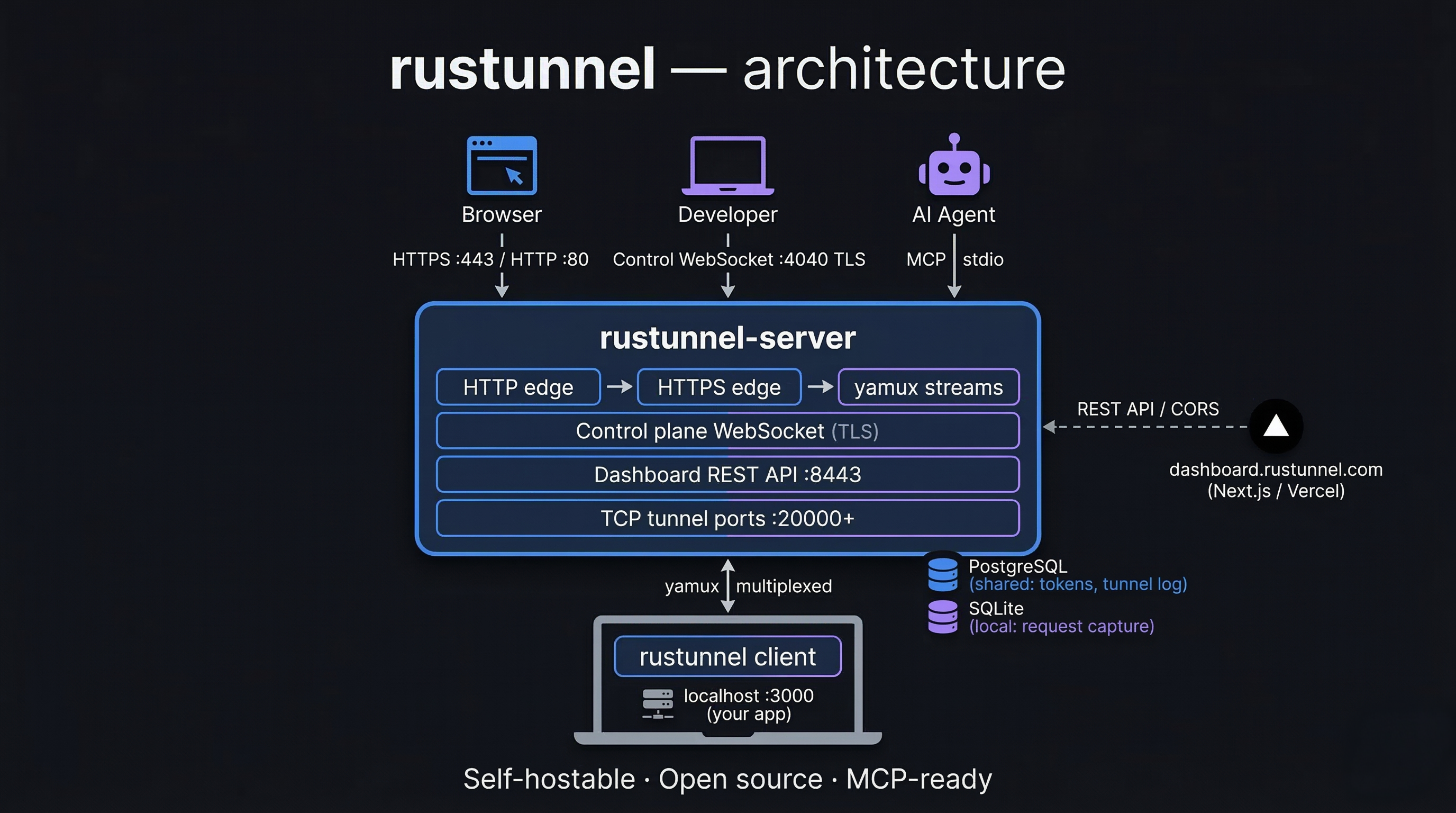
Architecture overview

rustunnel architecture

Code
                        β”Œβ”€β”€β”€β”€β”€β”€β”€β”€β”€β”€β”€β”€β”€β”€β”€β”€β”€β”€β”€β”€β”€β”€β”€β”€β”€β”€β”€β”€β”€β”€β”€β”€β”€β”€β”€β”€β”€β”€β”€β”€β”€β”€β”
                        β”‚           rustunnel-server               β”‚
                        β”‚                                          β”‚
Internet ──── :80 ─────▢│  HTTP edge (301 β†’ HTTPS)                 β”‚
Internet ──── :443 ────▢│  HTTPS edge  ──▢ yamux stream ──▢ client β”‚
Client ───── :4040 ────▢│  Control-plane WebSocket (TLS)           β”‚
Browser ──── :8443 ────▢│  Dashboard UI + REST API                 β”‚
Prometheus ─ :9090 ────▢│  Metrics endpoint                        β”‚
Internet ── :20000+ ───▢│  TCP tunnel ports (one per TCP tunnel)   β”‚
                        β””β”€β”€β”€β”€β”€β”€β”€β”€β”€β”€β”€β”€β”€β”€β”€β”€β”€β”€β”€β”€β”€β”€β”€β”€β”€β”€β”€β”€β”€β”€β”€β”€β”€β”€β”€β”€β”€β”€β”€β”€β”€β”€β”˜
                                          β”‚ yamux multiplexed streams
                                          β–Ό
                              β”Œβ”€β”€β”€β”€β”€β”€β”€β”€β”€β”€β”€β”€β”€β”€β”€β”€β”€β”€β”€β”€β”€β”
                              β”‚   rustunnel client   β”‚
                              β”‚  (developer laptop)  β”‚
                              β””β”€β”€β”€β”€β”€β”€β”€β”€β”€β”€β”¬β”€β”€β”€β”€β”€β”€β”€β”€β”€β”€β”˜
                                         β”‚ localhost
                                         β–Ό
                                β”Œβ”€β”€β”€β”€β”€β”€β”€β”€β”€β”€β”€β”€β”€β”€β”€β”€β”
                                β”‚  local service  β”‚
                                β”‚  e.g. :3000    β”‚
                                β””β”€β”€β”€β”€β”€β”€β”€β”€β”€β”€β”€β”€β”€β”€β”€β”€β”˜

Requirements

To build

RequirementVersionNotes
Rust toolchain1.76+Install via rustup
pkg-configanyNeeded by reqwest (TLS)
libssl-devanyOn Debian/Ubuntu: apt install libssl-dev
Node.js + npm18+Only needed to rebuild the dashboard UI

To run the server in production

RequirementNotes
Linux (Ubuntu 22.04+)systemd service included
TLS certificate + private keyPEM format (Let's Encrypt recommended)
Public IP / DNSWildcard DNS *.tunnel.yourdomain.com β†’ server IP required for HTTP tunnels

Local development setup

Build

bash
# Clone the repository
git clone https://github.com/joaoh82/rustunnel.git
cd rustunnel

# Compile all workspace crates (debug mode)
cargo build --workspace

# Or use the Makefile shortcut
make build

Run tests

The integration test suite spins up a real server on random ports and exercises auth, HTTP tunnels, TCP tunnels, and reconnection logic. It requires a running PostgreSQL instance.

bash
# Start the local PostgreSQL container (once per machine, persists across reboots)
make db-start

# Full suite (unit + integration)
make test

# With output visible
TEST_DATABASE_URL=postgres://rustunnel:test@localhost:5432/rustunnel_test \
  cargo test --workspace -- --nocapture

# Stop PostgreSQL when you no longer need it
make db-stop

make db-start runs deploy/docker-compose.dev-deps.yml which starts a Postgres 16 container on localhost:5432. The make test target injects TEST_DATABASE_URL automatically. If you run cargo test directly, export the variable first:

server.ts
export TEST_DATABASE_URL=postgres://rustunnel:test@localhost:5432/rustunnel_test

Run the server locally

Generate a self-signed certificate for local testing:

bash
mkdir -p /tmp/rustunnel-dev

openssl req -x509 -newkey rsa:2048 -keyout /tmp/rustunnel-dev/key.pem \
  -out /tmp/rustunnel-dev/cert.pem -days 365 -nodes \
  -subj "/CN=localhost"

A ready-made local config is checked into the repository at deploy/local/server.toml. It points to the self-signed cert paths above and has auth disabled for convenience. Start the server with it directly:

bash
cargo run -p rustunnel-server -- --config deploy/local/server.toml

Read the full README β†’View source on GitHub β†’

Related MCP Servers

View all in Developer Tools View all alternatives
  • Claude Task Master logoClaude Task Master

    AI-powered task management system for AI-driven development. Features PRD parsing, task expansion, multi-provider support (Claude, OpenAI, Gemini, Perplexity, xAI), and selective tool loading for optimized context usage.

    πŸ’» Developer Tools8 views
    Compare vs Claude Task Master β†’
  • Magic MCP logoMagic MCP

    Create crafted UI components inspired by the best 21st.dev design engineers.

    πŸ’» Developer Tools16 views
    Compare vs Magic MCP β†’
  • SaC β€” Software as Content logoSaC β€” Software as Content

    Give your AI agent the ability to respond with live, interactive apps that evolve.

    πŸ’» Developer Tools3 views
    Compare vs SaC β€” Software as Content β†’
  • Build logoBuild

    Structured build tool output (tsc, generic commands) as typed JSON diagnostics.

    πŸ’» Developer Tools4 views
    Compare vs Build β†’

Adoption & maintenance

Factual signals from GitHub, npm, and our automated checks β€” not a rating.

GitHub stars
655
Stargazers on the source repository.
Last commit
1mo ago
Most recent push to the default branch.
Tools exposed
6
Callable tools this server registers over MCP.
Directory activity
1 views
Config copies, upvotes, and views on AllMCPs.

Reviews

No reviews yet β€” be the first to share how this listing worked for you.

Frequently Asked Questions about Rustunnel

Yes, rustunnel offers a managed global fleet of public edge servers in multiple regions that you can connect to immediately.

AllMCPs Directory Badge

Full Badge Customizer

Showcase your server listing on GitHub or your project documentation. Embed this dynamic SVG badge to highlight official listing status and live engagement.

Badge Style:
Live Dynamic SVG PreviewRustunnel AllMCPs Directory Badge

Markdown (GitHub README)
[![AllMCPs](https://allmcps.com/api/badge/joaoh82-rustunnel?style=directory)](https://allmcps.com/mcp/joaoh82-rustunnel)
HTML Embed
<a href="https://allmcps.com/mcp/joaoh82-rustunnel"><img src="https://allmcps.com/api/badge/joaoh82-rustunnel?style=directory" alt="Rustunnel on AllMCPs" /></a>

Technical Specs & Signals

CategoryπŸ’»Developer Tools
PricingFreemium
More technical detailsExpand β–Ύ
AuthAPI key
LicenseAGPL-3.0
ClientsCursor, Claude Desktop, Windsurf
Last updatedAug 9, 2026
Views1
Unique ViewsTotal visits recorded for this listing page on AllMCPs.
Installs0
Installs & Copy ActionsTotal times users copied install commands or configuration snippets for this server.
GitHub stars655
GitHub Star CountTotal stargazers on GitHub representing community popularity (655 stars).
Last commit1mo ago
Last Repository CommitThe most recent commit or push recorded for this server's GitHub repository.Last commit on Jul 31, 2026
56Quality signal: Good Β· 56/100How this signal is calculated β–Ύ
Server availabilityNot measured

Not scored for repo-hosted servers β€” we can't reach the running server, only its GitHub page. Hosted MCP endpoints are health-checked live.

Verified ownership10/20
Documentation & tools24/30
Adoption & activity8/15
Community engagement0/10

A guidance signal from public completeness & health data β€” not a user rating. New listings start lower and rise as they add docs, get verified, and grow adoption. Signals we can't observe for a listing are skipped, not counted against it.

β˜… Spotlight Slot

Feature Your MCP Server

Get maximum visibility for your server across our directory, search results, and detail pages.

Spotlight Your Server

Own this project?

This directory is pre-filled from public sources. Claim via GitHub README, site badge, or DNS TXT to unlock edit access and the Official badge β€” proof is checked automatically, then reviewed by our team.

Free dofollow backlink: add your website and place the AllMCPs badge on it β€” no claim needed. We detect it automatically and keep it verified as long as the badge stays live.

Claim & get free dofollow

Share & Embed

Add our SVG badge (dark/light directory styles) or embeddable widget to your site.

Explore more

More in πŸ’» Developer Tools β†’Best MCP servers for Developers β†’Alternatives to Rustunnel β†’Install in Claude DesktopInstall in CursorInstall in VS Code