C
CDPM
Shares numbered, logged-in Chrome instances over CDP across multiple Claude Code sessions, with per-tab command queues. Local stdio server.
Install CDPM
Pick your client, then add it in one click or paste the config.
~/Library/Application Support/Claude/claude_desktop_config.json{
"mcpServers": {
"igelharine-cdpm": {
"command": "npx",
"args": [
"-y",
"cdpm-mcp"
]
}
}
}
Settings → Developer → Edit Config, merge this into mcpServers, then fully quit and reopen Claude Desktop.
Install not yet sandbox-tested— we haven't run this command through our automated sandbox yet. Not a red flag; we're working through the catalog.
Overview
From the project README
CDPM




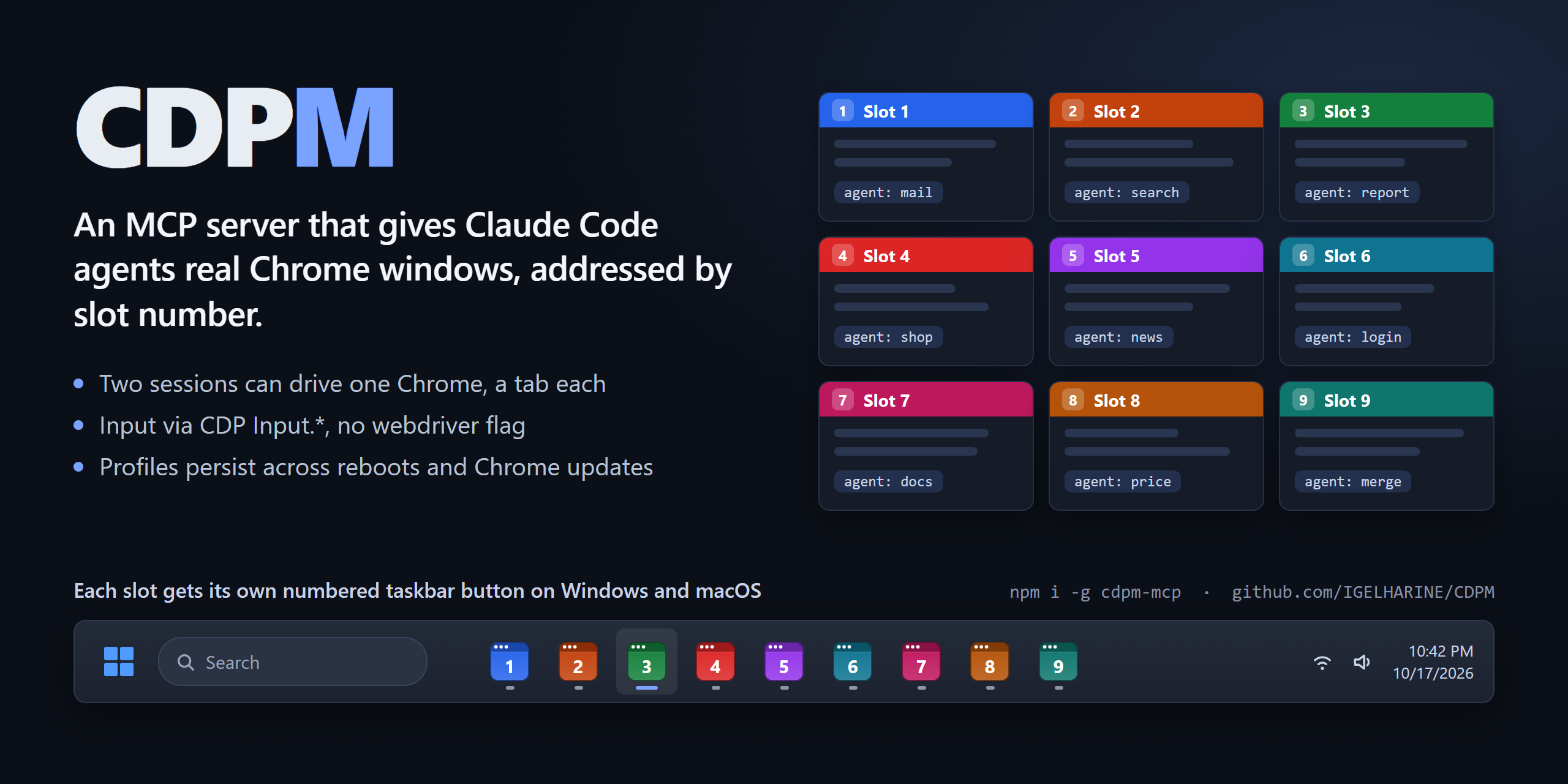
CDPM is an MCP server that keeps up to 30 Chrome instances ("slots") on fixed debugging ports and lets any number of Claude Code sessions and subagents drive them by number: "open slot 3", "log in on slot 1, then fill the form in slot 2". Each slot is an ordinary Chrome with its own profile, so logins stick between runs and the browser is the same one you would use by hand.
It grew out of running several Claude agents against logged-in web apps at once, where the hard parts were not clicking buttons but sharing browsers between sessions, keeping them alive, and noticing when Chrome itself got in the way.
Demo
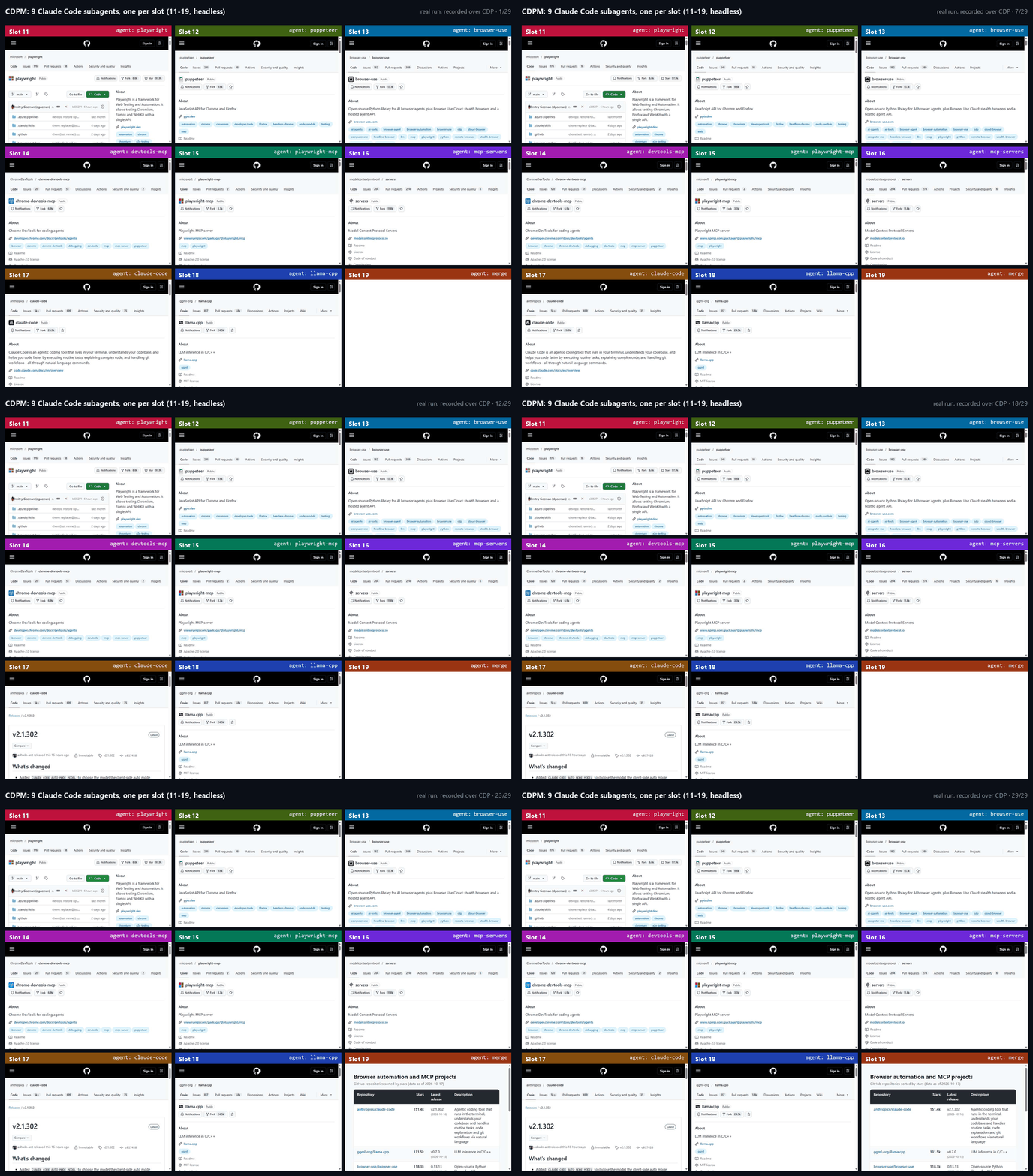
Nine subagents on slots 11-19 (headless). Slots 11-18 each read a GitHub repository page and send the numbers to slot 19 with slot_send; slot 19 waits on slot_inbox, writes a comparison table and opens it. Recorded over CDP from a real run: about 45 seconds of wall time, one frame per pass over the nine slots.
What is different
- Shared, numbered browsers. Slot N listens on port
14049 + Nand keeps its profile in its own folder. Sessions don't own a browser; they address a slot. Two sessions can work in the same slot on different tabs: commands are queued per tab, so two agents typing into one tab don't interleave. This is covered by an integration test and by a long test where three sessions share one slot for 600 rounds without memory, tab or lock-file growth. - Plain Chrome over CDP. No Playwright or Puppeteer. Clicks and keys are sent with
Input.dispatch*Event, so pages receive trusted events. Chrome is started without--enable-automation, sonavigator.webdriverstaysfalse. CDPM never callsRuntime.enable, and every script it runs to read the page lives in an isolated world the page cannot see; snapshots pierce shadow roots. That removes the usual automation fingerprints. It does not get you past rate limits or IP reputation: nine slots searching Google at the same moment will still get a CAPTCHA. - Survives the boring failures. Slots are started detached, so closing VS Code or Claude Code (even with a process-tree kill) leaves them running. After a reboot, CDPM re-attaches to whatever Chrome answers on the slot ports and re-checks its process ID before touching taskbar icons. If Chrome updates itself while a slot is running (on Windows the update swaps
chrome.exe, the old browser can no longer start renderers, and new tabs hang blank), CDPM restarts that slot on the new version and reopens its tabs. - Agents can coordinate.
slot_send/slot_inboxdeliver messages addressed by slot and agent name. They are stored on disk, so they survive a Chrome restart, and a waiting agent wakes as soon as one arrives. - Browser UI the page can't see. JavaScript dialogs are reported and answered with
browser_dialog. On Windows, permission bubbles ("access other apps and services on this device", notifications, location) are detected through UI Automation and answered withbrowser_permission. File pickers triggered by an agent's action are intercepted instead of opening OS windows; a print dialog the page opens is reported right away (the page itself is never modified).
Quick start
npm install -g cdpm-mcp
cdpm install
Restart Claude Code and ask for a slot, for example: "Open slot 1 with a window and go to github.com."
Compared with other browser MCP servers
| CDPM | Playwright MCP | Chrome DevTools MCP | |
|---|---|---|---|
| Browsers | up to 30 numbered slots shared by every session | one per server process | one per server process |
| Several sessions on one browser | yes: per-tab queues, ownership warnings | not a design goal | not a design goal |
| Logins kept between runs | yes, one profile per slot | yes, one persistent profile (--isolated for a fresh one) | yes, one persistent profile (--isolated for a fresh one) |
| Driven by | raw CDP | Playwright | Puppeteer |
| Messages between agents | built in | no | no |
| Per-slot taskbar icons | Windows taskbar, macOS Dock | no | no |
| Other browsers | Chrome only | Chromium, Firefox, WebKit | Chrome only |
The other two are good tools and the better choice if you need Firefox or WebKit (Playwright) or performance traces and DevTools panels (Chrome DevTools MCP). Their columns reflect their documentation as of October 2026.
Security
Slot ports listen on 127.0.0.1 only, but any process on this machine can connect to them and act with that slot's logged-in sessions. Treat a running slot like an unlocked browser: don't leave sensitive accounts logged in on slots while running software you don't trust. Closed slots keep their profiles on disk (cdpm purge N deletes one).
Details
- Pure CDP. No Playwright, no Puppeteer, no stealth patches. A normal Chrome with a debugging port, driven with real input events.
- Numbered slots. Slot N uses CDP port
14049 + N(slot 1 = 14050 … slot 30 = 14079) and its own profile folder. The range avoids the common default 9222; setCDPM_PORT_BASEto move it if something else uses those ports. Ports outside that range are not managed. - Starts only when asked. No tool ever starts a closed slot except
browser_launch. Without a number, the lowest free slot is used. - Slots outlive their caller. Closing CDPM, Claude Code or VS Code (even when it kills its whole process tree) does not close slot Chrome. Slots end only with
browser_close/cdpm closeor when you close that Chrome yourself. - One taskbar button per slot, with a browser-window icon in the slot color and the slot number, pre-corrected so the taskbar shows it pixel-sharp (drawn with the system font via GDI+, so no font files ship in the repo). The window title shows "3번" via Chrome's own window-name feature (pages can't see it).
- Built for many agents. Every tool takes
slotexplicitly, records who opened each tab and who touched it last, warns (without blocking) when you act on a tab someone else just used, and serializes concurrent commands on the same tab. - Agents can talk with
slot_send/slot_inbox; unread messages are also delivered at the top of every result. - Status line.
cdpm statuslineprints live slots as slot-colored numbers; each slot shows the title of the tab last acted on (no agent names; only blank/new tabs left shows just the number):CDPM 1 NAVER 2 Daum. It fits the terminal width (from ccstatusline): titles shrink first, then only numbers, then+Nfor the rest. A paused slot (slot_pause/cdpm pause) shows its number in dim gray instead of its slot color. A dimCDPM -when none are running. Ending a slot's Chrome yourself (closing its last window on Windows, Cmd+Q on macOS) removes it right away, and titles are read live. - English for the AI. Server instructions, tool descriptions and tool results are in English to save tokens; Claude is told to answer in the user's language. CLI output is in Korean.
- Leaves the user's PC alone. No window, viewport or zoom changes, and actions that would pop up OS windows are refused (see below).
Works on Windows 11 and macOS. Per-slot icons: taskbar on Windows, Dock on macOS (see "macOS" below). Linux is experimental: the code paths exist (Chrome lookup, data folder) but it has not been tested on a Linux machine, and there are no per-slot icons.
Requirements
- Node.js 22+
- Google Chrome (found automatically. Windows: registry
App Paths, then standard install folders. macOS:/Applications,~/Applications, then Spotlight. Linux:/usr/bin/google-chrome,google-chrome-stable,/opt/google/chrome/chrome)
Install
Asked to install this? (for Claude / AI agents) Do these steps in order.
- Check that Node.js 22+ and Google Chrome are installed. If not, tell the user and stop.
- Run
npm install -g cdpm-mcp@latest(also when already installed: this updates it).- Run
cdpm install(ifcdpmisn't found:node "$(npm root -g)/cdpm-mcp/dist/cli.js" install). It registers CDPM with Claude Code and sets up the status line, rules, subagent and permissions; an older git-clone registration is switched to the new location.- Do not launch any Chrome slot, ask questions, or explain internals. On success reply with exactly one line in the user's language, e.g. "CDPM installed. Restart Claude Code to use it." (version:
cdpm --version). If a step failed, say only which step and why.
npm install -g cdpm-mcp
cdpm install
cdpm install registers CDPM with Claude Code and sets up the status line, the parallel-work rule, the cdpm-browser subagent and the permission allow list in one go. Restart Claude Code afterwards.
Other MCP clients (Cursor, Claude Desktop, ...)
cdpm install only registers with Claude Code. For other clients add it to their mcpServers config (paths from npm root -g):
{
  "mcpServers": {
    "cdpm": {
      "command": "C:\\Program Files\\nodejs\\node.exe",
      "args": ["C:\\Users\\<you>\\AppData\\Roaming\\npm\\node_modules\\cdpm-mcp\\dist\\cli.js"]
    }
  }
}
On macOS: "command": "/opt/homebrew/opt/node/bin/node", "args": ["/opt/homebrew/lib/node_modules/cdpm-mcp/dist/cli.js"].
Tools28
What CDPM lets your agent do. Expand a tool for its parameters.
Security & health
What it can reach and how reliably it runs — from our own checks, not the maintainer’s claims.
ActiveLast checked Today
Recent health check succeeded.
Adoption & maintenance
Factual signals from GitHub, npm, and our automated checks — not a rating.
GitHub stars2Stargazers on the source repository.
npm downloads1.8kPackage downloads in the last 30 days.
Last commit2d agoMost recent push to the default branch.
Tools exposed28Callable tools this server registers over MCP.
Reviews
No reviews yet — be the first to share how it worked for you.
Frequently Asked Questions about CDPM
Add the following block to your claude_desktop_config.json under mcpServers: "mcpServers": { "cdpm": { "command": "npx", "args": ["-y","cdpm-mcp"] } }
Shares numbered, logged-in Chrome instances over CDP across multiple Claude Code sessions, with per-tab command queues. Local stdio server.
We don't have confirmed pricing for CDPM. Listing it on AllMCPs is free, but that says nothing about what the server itself costs — check the project's own site for current pricing.
Related MCP servers

Add a badge to your READMEShow it’s listed — live SVG, Markdown or HTML.
AllMCPs Directory Badge
Showcase your server listing on GitHub or your project documentation. Embed this dynamic SVG badge to highlight official listing status and live engagement.
Badge Style:
Live Dynamic SVG Preview
Markdown (GitHub README)
[](https://allmcps.com/mcp/igelharine-cdpm)HTML Embed
<a href="https://allmcps.com/mcp/igelharine-cdpm"><img src="https://allmcps.com/api/badge/igelharine-cdpm?style=directory" alt="CDPM on AllMCPs" /></a>