AllMCPs
BrowseBestCategoriesStackCompareToolsGuidesBlog
Log in Submit MCP

Stay in the loop

Get new MCP servers and top picks in your inbox.

AllMCPs

The open directory for discovering and installing Model Context Protocol servers.

AllMCPs on GitHub (opens in a new tab)
Launched onTiny Startupstinystartups.com
Explore
  • Browse servers
  • Best MCP servers
  • Categories
  • MCP clients
  • Agent prompts
  • Stack Builder
  • Compare servers
  • Random discovery New
  • Submit a server
  • Pricing & Boost Boost
Learn
  • Guides hub
  • What is MCP?
  • Install guide
  • Build an MCP server
  • Deploy an MCP server
  • Security guide
  • Troubleshooting
  • MCP for SEO & AEO
  • Protocol versioning
  • Blog & updates
Tools
  • All developer tools
  • Config generator
  • Config validator
  • Config auditor
  • MCP playground
  • Token calculator
  • OpenAPI β†’ MCP
  • Badge generator
For agents
  • REST API docs
  • Trust & traffic Live
  • Remote MCP server SSE β†— (opens in a new tab)
  • llms.txt β†— (opens in a new tab)
  • Catalog JSON β†— (opens in a new tab)
Company
  • About
  • Advertise Sponsor
  • Contact
  • GitHub β†— (opens in a new tab)
  • Terms
  • Privacy
AllMCPs VerifiedAllMCPs VerifiedFeatured on Nick LaunchesFeatured on Nick LaunchesLaunch Llama NewsletterLaunch Llama NewsletterVerified DR - allmcps.comVerified DR - allmcps.comFeatured on SaaSGrowFeatured on SaaSGrowFeatured on Twelve ToolsFeatured on Twelve ToolsFeatured on Saaspa.geFeatured on Saaspa.geFeatured on Findly.toolsFeatured on Findly.toolsFeatured on Startup FameFeatured on Startup FameFeatured on LaunchKiwiFeatured on LaunchKiwiFeatured on ScrollLaunchFeatured on ScrollLaunchFeatured on DailyPingsFeatured on DailyPingsFazier badgeFazier badgeFeatured on NewTool.siteFeatured on NewTool.siteFeatured on saasfame.comFeatured on saasfame.comDR Checker - Domain RatingDR Checker - Domain RatingListed on Turbo0Listed on Turbo0Launched on LaunchBoard - Product Launch PlatformLaunched on LaunchBoard - Product Launch PlatformList on SimilarlabsList on Similarlabshttps://codetrendy.comhttps://codetrendy.comListed on DevTool.ioFeatured on BuildlistFeatured on BuildlistLaunched on Tiny StartupsFeatured on ShowMeBestAIFeatured on ShowMeBestAIFind us on LaunchZoneFind us on LaunchZoneAllMCPs VerifiedAllMCPs VerifiedFeatured on Nick LaunchesFeatured on Nick LaunchesLaunch Llama NewsletterLaunch Llama NewsletterVerified DR - allmcps.comVerified DR - allmcps.comFeatured on SaaSGrowFeatured on SaaSGrowFeatured on Twelve ToolsFeatured on Twelve ToolsFeatured on Saaspa.geFeatured on Saaspa.geFeatured on Findly.toolsFeatured on Findly.toolsFeatured on Startup FameFeatured on Startup FameFeatured on LaunchKiwiFeatured on LaunchKiwiFeatured on ScrollLaunchFeatured on ScrollLaunchFeatured on DailyPingsFeatured on DailyPingsFazier badgeFazier badgeFeatured on NewTool.siteFeatured on NewTool.siteFeatured on saasfame.comFeatured on saasfame.comDR Checker - Domain RatingDR Checker - Domain RatingListed on Turbo0Listed on Turbo0Launched on LaunchBoard - Product Launch PlatformLaunched on LaunchBoard - Product Launch PlatformList on SimilarlabsList on Similarlabshttps://codetrendy.comhttps://codetrendy.comListed on DevTool.ioFeatured on BuildlistFeatured on BuildlistLaunched on Tiny StartupsFeatured on ShowMeBestAIFeatured on ShowMeBestAIFind us on LaunchZoneFind us on LaunchZone
Β© 2026 Jackalope Digital LLC. All rights reserved.
  1. Home
  2. πŸ’° Finance & Fintech
  3. HPSILab Quant Finance
HPSILab Quant Finance logo
Health: ActiveRecent health check succeeded.Last checked 9/7/2026, 8:22:14 PM

HPSILab Quant Finance

User RatingsBe the first to rate and review this MCP server! Enrichment pendingWe haven’t run our AI enrichment pass on this listing yet, so the overview, use cases, and FAQ below may be sparse or missing. We work through the catalog over time β€” check back soon.
View Repository1 GitHub StarsTotal stargazers on GitHub for the source repository (1 stars).Visit Website

HPSILab Quant finance MCP for US stocks, ETFs, options, Monte Carlo, backtesting, and risk analysis.

Quick Install

Automated & IDE Setup

Copy the AI prompt to install this server into Claude Code, Cursor, or another agent β€” or use 1-click editor setup below.

Add to CursorAdd to VS Code
Manual Client & Custom JSON ConfigExpand JSON β–Ύ

Client Config & Setup

Choose your client or environment
Target File:~/Library/Application Support/Claude/claude_desktop_config.json
claude_desktop_config.json
{
  "mcpServers": {
    "hpsilab-quant-finance": {
      "command": "npx",
      "args": [
        "-y",
        "hpsilab-quant-finance"
      ]
    }
  }
}

πŸ’‘ Paste the JSON block into your client's configuration file under mcpServers, then restart the application.

Install Directory Badge Claim listing AlternativesπŸ’° More in Finance & Fintech

Documentation Overview

HPSILab Quant Finance MCP Server for Stock & Options Analytics

PyPI CI License

HPSILab is an open-source Python quantitative finance MCP server for research on US equities, ETFs, and supported options. It brings stock signals, implied volatility, options analytics, Monte Carlo simulation, AI prediction, backtesting, and risk analysis into ChatGPT, Claude, Cursor, VS Code, and other MCP clients. Connect once, ask in natural language, and receive structured results that an assistant can compare and explain.

Research and educational use only. HPSILab does not provide investment advice and does not execute trades.

Get a Free API Key Β· Pricing Β· Tool reference Β· Client setup Β· Python SDK

Registry nameio.github.haiyunsky/hpsilab-quant-finance-mcp
Version0.10.0 β€” a source checkout reports 0.10.0+source
TransportsStreamable HTTP (hosted) Β· stdio (PyPI package)
Remote endpointhttps://hpsilab.com/mcp
Packagepip install -U hpsilab-quant-finance-mcp
AuthenticationBearer API key, or HPSILAB_API_KEY for stdio
Tools10 β€” nine financial research tools plus register_account

Connect: hosted Streamable HTTP

Recommended, and requires no local installation.

  1. Register a free account, sign in, and generate an API key from Settings.
  2. Add the server to your client's private configuration, replacing hpsi_your_key. Never commit a real key or paste one into chat.

The example below is Claude Code's .mcp.json; other clients use different configuration schemas, all covered in client setup.

config.json
{
  "mcpServers": {
    "hpsilab": {
      "type": "http",
      "url": "https://hpsilab.com/mcp",
      "headers": {
        "Authorization": "Bearer hpsi_your_key"
      }
    }
  }
}
  1. Verify the connection:
text
Use HPSILab to analyze AAPL. Separate observed metrics from interpretation,
identify conflicting signals, and finish with a concise risk summary.

All financial research tools require a valid API key. See authentication for key handling and rotation.

Connect: local stdio

For clients that require a local process:

Terminal
pip install -U hpsilab-quant-finance-mcp

This example uses the mcpServers schema supported by Claude and Cursor; VS Code and GitHub Copilot use a servers schema instead.

config.json
{
  "mcpServers": {
    "hpsilab": {
      "command": "hpsilab-quant-finance-mcp",
      "env": {
        "HPSILAB_API_KEY": "hpsi_your_key"
      }
    }
  }
}

Then verify it through the MCP client:

text
Use HPSILab to get the AI prediction for NVDA and summarize the model consensus.

The client discovers tools with MCP tools/list and invokes them with tools/call. See local setup and Python usage, which also covers calling the tool functions directly from Python.

Tools

Nine financial research tools, plus register_account. Tool names and parameter meanings are part of the public compatibility contract.

ToolWhat it returnsBehavior
analyze_stockAggregate directional and quantitative stock analysisRead-only
get_ai_predictionNext-session prediction, confidence, and model consensusRead-only
get_iv_radarIV level, rank, percentile, skew, and regimeRead-only
get_option_pressureMax pain, gamma walls, expected move, and pressure zonesRead-only
get_monte_carlo30-day simulated distribution and probabilitiesRead-only
get_equity_curveStrategy backtests and risk-adjusted performanceRead-only
get_pretrade_risk_scanPosition, exposure, correlation, and risk checksRead-only
generate_stock_imagesHosted stock and options chart artifactsCreates an artifact; not idempotent
generate_stock_research_reportStructured Markdown research report and timestampCreates an artifact; not idempotent
register_accountAccount credentials for the authenticated callerCreates an account and sends email; not idempotent

Research tools accept one exchange ticker such as NVDA, SPY, or BRK.B; company names are not accepted. Live results can change between calls. Artifact tools can consume quota and should not be retried automatically.

Full inputs, outputs, side effects, and tool-selection guidance are in docs/tools.md.

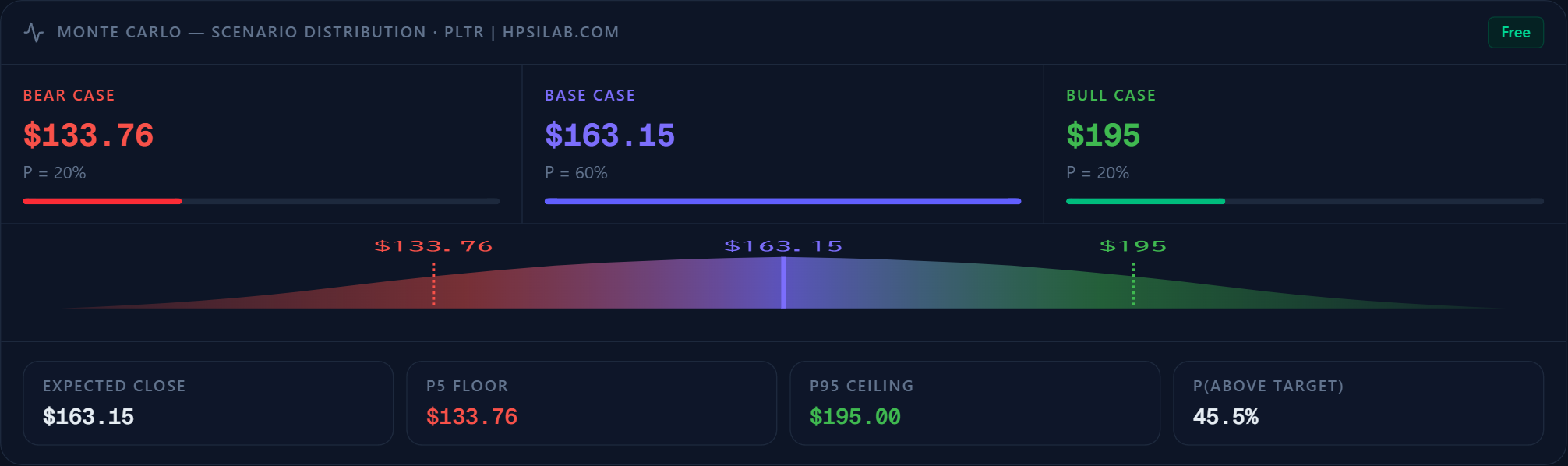
Monte Carlo research example
PLTR Monte Carlo scenario visualization

Example visualization of scenario-based Monte Carlo research output. Results depend on the selected inputs and model assumptions. See get_monte_carlo for tool details.

Copy-ready prompts

Claude

text
Use HPSILab to analyze NVDA. Summarize the directional signal, AI model
consensus, IV regime, options pressure, 30-day Monte Carlo range, and the
three most important risks. Distinguish tool data from interpretation.

Cursor

text
Use HPSILab's IV radar and option-pressure tools for SPY. Compare IV rank,
percentile, skew, expected move, max pain, gamma wall, and pressure zones.
Return a compact table and do not recommend a trade.

ChatGPT

text
Run the HPSILab pre-trade risk scan for TSLA. Explain every warning or failed
check, preserve unavailable fields as unavailable, and quote the returned
reason instead of guessing. Do not execute or recommend a trade.

Setup guidance covers ChatGPT, Claude, Cursor, VS Code, GitHub Copilot, Continue, and Kimi. See the client setup guide for each client's transport and configuration format.

Errors, retries, and limits

Every failure is a structured object with a stable error_code, never prose an agent has to pattern-match. Five refusals matter, because each has a different remedy:

error_codeMeaningWhat resolves it
api_key_requiredNo key is configuredRegistering. Nothing is sent downstream
rate_limitedCalling too fast (429)Waiting β€” next_actions carries the seconds
insufficient_creditsThe Credit balance is empty (402)Adding Credits, or registering for trial Credits
allowance_exhaustedThe free evaluation ceiling is spent (402)Registering, or verifying an email. Money does not lift it
settlement_unknownA payment whose outcome is unconfirmedReconciliation. Do not retry it and do not pay again

Without a key the package stops locally, before constructing the downstream client or sending a request:

config.json
{
  "error": "api_key_required",
  "message": "A free API key is required.",
  "register_url": "https://hpsilab.com/register",
  "docs_url": "https://hpsilab.com/developer/v2"
}

401 and 402 responses are never retried. A 429 is retried only when it carries a valid Retry-After. Read-only calls use a finite retry budget for timeouts and recoverable 500/502/503/504 responses; artifact-producing calls are not retried automatically. The package also applies one process-local safeguard of 10 requests per rolling minute per API key β€” burst protection, not a quota, since only the hosted service knows the balance and the plan.

Field-by-field payloads, the Credits circuit breaker, and the reasoning behind each remedy are in docs/authentication.md and docs/python-sdk.md.

Why HPSILab

HPSILab gives assistants typed inputs, structured outputs, ticker validation, machine-readable errors, and dedicated tools instead of invented metrics. It supports US-listed equities, ETFs, and supported options data; coverage and limits depend on the hosted service and plan.

Safety and license

HPSILab is for research and education only. Outputs may be incomplete, delayed, or wrong and are not investment, financial, or trading advice. The MCP server has no brokerage connectivity, order entry, or trade-execution capability.

Licensed under the MIT License. Contributions are welcome; read AGENTS.md and CONTRIBUTING.md before proposing public schema changes.

Read the full README β†’View source on GitHub β†’

Related MCP Servers

View all in Finance & Fintech View all alternatives
  • Stripe AI logoStripe AI

    MCP server integrating with Stripe - tools for customers, products, payments, and more.

    πŸ’° Finance & Fintech0 views
    Compare vs Stripe AI β†’
  • Agentrisk logoAgentrisk

    Pre-trade token risk scoring API for Base tokens, paid via x402.

    πŸ’° Finance & Fintech1 views
    Compare vs Agentrisk β†’
  • Brazilian Central Bank (BCB) MCP logoBrazilian Central Bank (BCB) MCP
    Verified

    MCP server for the Brazilian Central Bank (Banco Central do Brasil): SGS time series (Selic, IPCA, exchange rates, GDP and 139 curated, source-verified indicators), the Focus market-expectations survey and PTAX official exchange rates. 15 tools, 3 resources and 3 prompts, with provenance metadata on every response. Runs locally via npx (stdio) or through the hosted endpoint at https://bcb.sidneybissoli.com/mcp β€” no API key or signup required.

    πŸ’° Finance & Fintech7 views
    Compare vs Brazilian Central Bank (BCB) MCP β†’
  • Hera Agent Unity logoHera Agent Unity

    Control and verify a live Unity Editor through a local, low-token MCP server.

    πŸ’° Finance & Fintech0 views
    Compare vs Hera Agent Unity β†’

Reviews

No reviews yet β€” be the first to share how this listing worked for you.

Frequently Asked Questions about HPSILab Quant Finance

Add the following block to your claude_desktop_config.json under mcpServers: "mcpServers": { "hpsilab-quant-finance": { "command": "npx", "args": ["-y", "HPSILab Quant Finance"] } }

AllMCPs Directory Badge

Full Badge Customizer

Showcase your server listing on GitHub or your project documentation. Embed this dynamic SVG badge to highlight official listing status and live engagement.

Badge Style:
Live Dynamic SVG PreviewHPSILab Quant Finance AllMCPs Directory Badge

Markdown (GitHub README)
[![AllMCPs](https://allmcps.com/api/badge/hpsilab-quant-finance?style=directory)](https://allmcps.com/mcp/hpsilab-quant-finance)
HTML Embed
<a href="https://allmcps.com/mcp/hpsilab-quant-finance"><img src="https://allmcps.com/api/badge/hpsilab-quant-finance?style=directory" alt="HPSILab Quant Finance on AllMCPs" /></a>

Technical Specs & Signals

CategoryπŸ’°Finance & Fintech
More technical detailsExpand β–Ύ
TransportSTDIO
RuntimeNode.js
Last updatedSep 7, 2026
Views0
Unique ViewsTotal visits recorded for this listing page on AllMCPs.
Installs0
Installs & Copy ActionsTotal times users copied install commands or configuration snippets for this server.
GitHub stars1
GitHub Star CountTotal stargazers on GitHub representing community popularity (1 stars).
31Quality signal: Emerging Β· 31/100How this signal is calculated β–Ύ
Server availabilityNot measured

Not scored for repo-hosted servers β€” we can't reach the running server, only its GitHub page. Hosted MCP endpoints are health-checked live.

Verified ownership10/20
Documentation & tools12/30
Adoption & activity1/15
Community engagement0/10

A guidance signal from public completeness & health data β€” not a user rating. New listings start lower and rise as they add docs, get verified, and grow adoption. Signals we can't observe for a listing are skipped, not counted against it.

β˜… FeaturedAllMCPs Server logo

AllMCPs Server

The official MCP server for AllMCPs.com - submit and manage tools directly from your AI. The open directory for MCP servers. Connect Claude, Cursor, Windsurf, and AI agents to databases, tools, files, and APIs. Explore 10,000+ servers. AllMCPs is the premier, open directory for discovering, evaluating, and installing Model Context Protocol (MCP) servers to equip AI agents and LLMs with real-world superpowers.

Explore Server β†’

Own this project?

This directory is pre-filled from public sources. Claim via GitHub README, site badge, or DNS TXT to unlock edit access and the Official badge β€” proof is checked automatically, then reviewed by our team.

Free dofollow backlink: add your website and place the AllMCPs badge on it β€” no claim needed. We detect it automatically and keep it verified as long as the badge stays live.

Claim & get free dofollow

Share & Embed

Add our SVG badge (dark/light directory styles) or embeddable widget to your site.

Explore more

More in πŸ’° Finance & Fintech β†’Best MCP servers for Finance & Fintech β†’Alternatives to HPSILab Quant Finance β†’Install in Claude DesktopInstall in CursorInstall in VS Code
