Heroku Code MCP README
The full upstream README, mirrored here for reference. Install config, tool schemas, adoption signals, and an original overview live on the Heroku Code MCP listing page.

Heroku Code MCP
A compact MCP server for the Heroku Platform API using a Code Mode pattern:
search+execute+auth_status.
Heroku Code MCP gives agent clients a small, token-efficient control surface for Heroku operations. Pair it with Heroku Skills when you want workflow guidance, safety checks, and Heroku product context alongside live API tools.
Design references:
Quick Start
Default MCP URL: http://127.0.0.1:3000/mcp
Seed auth from the Heroku CLI:
Start the server:
Smoke test:
Before npm publication, the package can also run from GitHub:
Install in Agent Clients
 Claude Code
Install the companion plugin for skills plus MCP wiring:
Or add the running MCP server directly:
Claude Desktop
Use the HTTP endpoint directly when supported:
For Desktop builds that expect stdio servers, bridge through mcp-remote:
Build a .mcpb bundle with:
 Codex
Codex
Codex uses Heroku Plugin for skills and optional MCP wiring:
Enable heroku-plugin@heroku-plugin in the Codex Plugins tab, or add:
Run this MCP server on http://127.0.0.1:3333/mcp when you want live Heroku API tools through the plugin.
 Cursor
Add the MCP server to ~/.cursor/mcp.json or project-local .cursor/mcp.json:
Other MCP Clients
Use streamable HTTP:
Or bridge to stdio:
How It Works
| Tool | What it does | Why it exists |
|---|---|---|
auth_status | Reports whether the caller is authenticated with Heroku | Lets agents branch cleanly before API work |
search | Ranks Heroku operations from schema and docs context | Avoids exposing dozens of endpoint-shaped tools up front |
execute | Validates params/body and calls the selected Heroku operation | Gives one deterministic execution path |
Typical flow:
- Call
auth_status. - Call
searchwith natural language intent. - Choose one
operation_id. - Call
executewithpath_params,query_params, andbody. - For writes, run
dry_run=true, then replay withconfirm_write_tokenandALLOW_WRITES=true.
Examples:
Safety and Configuration
Mutations (POST, PATCH, PUT, DELETE) are blocked by default. To allow a write, set ALLOW_WRITES=true, request a dry run, and replay with the returned confirm_write_token. Sensitive headers and body fields are redacted.
Key env vars:
ALLOW_WRITESREQUEST_TIMEOUT_MSMAX_RETRIESCATALOG_CACHE_PATHREAD_CACHE_TTL_MSEXECUTE_MAX_BODY_BYTESEXECUTE_BODY_PREVIEW_CHARS
Full example: .env.example
Benchmarks
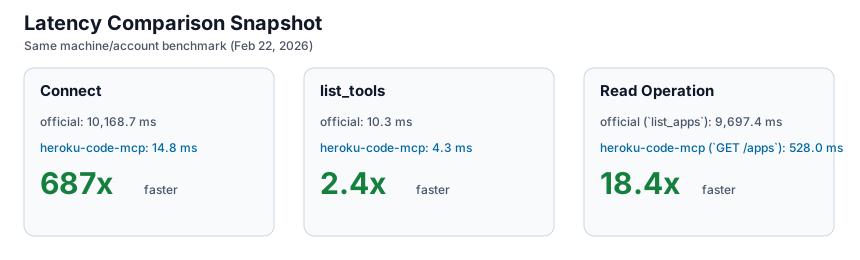
Benchmarks were captured on February 22, 2026 on the same machine and account for both implementations.
| Metric | heroku-code-mcp | official Heroku MCP | Delta |
|---|---|---|---|
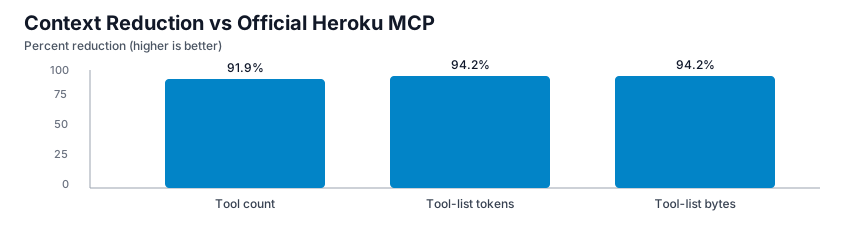
| Tool count | 3 | 37 | 91.9% lower |
| Tool-list payload bytes | 1,469 | 25,500 | 94.2% lower |
| Tool-list approx tokens | 368 | 6,375 | 94.2% lower |
| Connect avg | 14.8 ms | 10,168.7 ms | 687x faster |
list_tools avg | 4.3 ms | 10.3 ms | 2.4x faster |
| Read op avg | 528.0 ms (execute GET /apps) | 9,697.4 ms (list_apps) | 18.4x faster |
Charts:
Full methodology and artifacts live in BENCHMARKS.md and benchmarks/results/.
Development and Release
Validate locally:
This repo uses free GitHub Actions:
validate.ymlruns build, tests,server.jsonvalidation, and npm pack dry-run on PRs and pushes tomain.release.ymlruns onv*tags, builds the.mcpb, updates releaseserver.json, creates or updates the GitHub Release, and publishes to the MCP Registry through GitHub OIDC.- Dependabot checks npm and GitHub Actions dependencies weekly.
Publish manually when needed:
For CI-based npm publishing, configure npm trusted publishing for repo dsouzaAnush/heroku-code-mcp and workflow release.yml, then run the release workflow with publish_npm=true.
Repository Layout
src/schema/*: ingestion, operation normalization, and cachesrc/search/*: search index and rankingsrc/execute/*: validation and Heroku API executionsrc/auth/*: OAuth and encrypted token storagetests/*: catalog, search, and execute testsbenchmarks/results/*: benchmark artifactsserver.json: MCP Registry metadata
Brand and Troubleshooting
This repo includes the official Heroku wordmark and mark under assets. Use them according to the Heroku Brand Guidelines.
Common fixes:
- MCP Inspector connection error: confirm URL
http://127.0.0.1:3000/mcpand server health. AUTH_REQUIRED: seed a token or complete OAuth.- Write blocked: confirm
ALLOW_WRITES=trueand send the dry-run confirmation token. - Large response body: narrow query scope or lower output caps.