AllMCPs
BrowseBestCategoriesStackCompareToolsGuidesBlog
Log in Submit MCP

Stay in the loop

Get new MCP servers and top picks in your inbox.

AllMCPs

The open directory for discovering and installing Model Context Protocol servers.

AllMCPs on GitHub (opens in a new tab)
Launched onTiny Startupstinystartups.com
Explore
  • Browse servers
  • Best MCP servers
  • Categories
  • MCP clients
  • Agent prompts
  • Stack Builder
  • Compare servers
  • Random discovery New
  • Submit a server
  • Pricing & Boost Boost
Learn
  • Guides hub
  • What is MCP?
  • Install guide
  • Build an MCP server
  • Deploy an MCP server
  • Security guide
  • Troubleshooting
  • MCP for SEO & AEO
  • Protocol versioning
  • Blog & updates
Tools
  • All developer tools
  • Config generator
  • Config validator
  • Config auditor
  • MCP playground
  • Token calculator
  • OpenAPI → MCP
  • Badge generator
For agents
  • REST API docs
  • Trust & traffic Live
  • Remote MCP server SSE ↗ (opens in a new tab)
  • llms.txt ↗ (opens in a new tab)
  • Catalog JSON ↗ (opens in a new tab)
Company
  • About
  • Advertise Sponsor
  • Contact
  • GitHub ↗ (opens in a new tab)
  • Terms
  • Privacy
AllMCPs VerifiedAllMCPs VerifiedFeatured on Nick LaunchesFeatured on Nick LaunchesLaunch Llama NewsletterLaunch Llama NewsletterVerified DR - allmcps.comVerified DR - allmcps.comFeatured on SaaSGrowFeatured on SaaSGrowFeatured on Twelve ToolsFeatured on Twelve ToolsFeatured on Saaspa.geFeatured on Saaspa.geFeatured on Findly.toolsFeatured on Findly.toolsFeatured on Startup FameFeatured on Startup FameFeatured on LaunchKiwiFeatured on LaunchKiwiFeatured on ScrollLaunchFeatured on ScrollLaunchFeatured on DailyPingsFeatured on DailyPingsFazier badgeFazier badgeFeatured on NewTool.siteFeatured on NewTool.siteFeatured on saasfame.comFeatured on saasfame.comDR Checker - Domain RatingDR Checker - Domain RatingListed on Turbo0Listed on Turbo0Launched on LaunchBoard - Product Launch PlatformLaunched on LaunchBoard - Product Launch PlatformList on SimilarlabsList on Similarlabshttps://codetrendy.comhttps://codetrendy.comListed on DevTool.ioFeatured on BuildlistFeatured on BuildlistLaunched on Tiny StartupsFeatured on ShowMeBestAIFeatured on ShowMeBestAIFind us on LaunchZoneFind us on LaunchZoneAllMCPs VerifiedAllMCPs VerifiedFeatured on Nick LaunchesFeatured on Nick LaunchesLaunch Llama NewsletterLaunch Llama NewsletterVerified DR - allmcps.comVerified DR - allmcps.comFeatured on SaaSGrowFeatured on SaaSGrowFeatured on Twelve ToolsFeatured on Twelve ToolsFeatured on Saaspa.geFeatured on Saaspa.geFeatured on Findly.toolsFeatured on Findly.toolsFeatured on Startup FameFeatured on Startup FameFeatured on LaunchKiwiFeatured on LaunchKiwiFeatured on ScrollLaunchFeatured on ScrollLaunchFeatured on DailyPingsFeatured on DailyPingsFazier badgeFazier badgeFeatured on NewTool.siteFeatured on NewTool.siteFeatured on saasfame.comFeatured on saasfame.comDR Checker - Domain RatingDR Checker - Domain RatingListed on Turbo0Listed on Turbo0Launched on LaunchBoard - Product Launch PlatformLaunched on LaunchBoard - Product Launch PlatformList on SimilarlabsList on Similarlabshttps://codetrendy.comhttps://codetrendy.comListed on DevTool.ioFeatured on BuildlistFeatured on BuildlistLaunched on Tiny StartupsFeatured on ShowMeBestAIFeatured on ShowMeBestAIFind us on LaunchZoneFind us on LaunchZone
© 2026 Jackalope Digital LLC. All rights reserved.
  1. Home
  2. ☁️ Cloud Platforms
  3. Heroku Code MCP
Heroku Code MCP logo
Health: ActiveRecent health check succeeded.Last checked 9/7/2026, 7:44:14 PM

Heroku Code MCP

User RatingsBe the first to rate and review this MCP server! Enrichment pendingWe haven’t run our AI enrichment pass on this listing yet, so the overview, use cases, and FAQ below may be sparse or missing. We work through the catalog over time — check back soon.
View Repository1 GitHub StarsTotal stargazers on GitHub for the source repository (1 stars).Visit Website

Search and execute Heroku Platform API operations

Quick Install

Automated & IDE Setup

Copy the AI prompt to install this server into Claude Code, Cursor, or another agent — or use 1-click editor setup below.

Add to CursorAdd to VS Code
Not yet automatically verified

We haven't yet run this listing's install command through our automated sandbox check. This isn't a red flag — we're steadily working through the catalog.

Manual Client & Custom JSON ConfigExpand JSON ▾

Client Config & Setup

Choose your client or environment
Target File:~/Library/Application Support/Claude/claude_desktop_config.json
claude_desktop_config.json
{
  "mcpServers": {
    "heroku-code-mcp": {
      "command": "npx",
      "args": [
        "-y",
        "github"
      ]
    }
  }
}

💡 Paste the JSON block into your client's configuration file under mcpServers, then restart the application.

Install Directory Badge Claim listing Alternatives☁️ More in Cloud Platforms

Documentation Overview

Heroku

Heroku Code MCP

A compact MCP server for the Heroku Platform API using a Code Mode pattern: search + execute + auth_status.

Heroku Code MCP gives agent clients a small, token-efficient control surface for Heroku operations. Pair it with Heroku Skills when you want workflow guidance, safety checks, and Heroku product context alongside live API tools.

Design references:

  • Cloudflare Code Mode MCP
  • Anthropic: Building Effective Agents

Quick Start

Default MCP URL: http://127.0.0.1:3000/mcp

bash
git clone https://github.com/dsouzaAnush/heroku-code-mcp.git
cd heroku-code-mcp
npm install
npm run build
npm test

Seed auth from the Heroku CLI:

bash
heroku auth:whoami
npm run seed:token

Start the server:

bash
TOKEN_STORE_PATH=./data/tokens.integration.json \
TOKEN_ENCRYPTION_KEY_BASE64="<seed-output-key>" \
PORT=3000 HOST=127.0.0.1 npm run dev

Smoke test:

Terminal
curl -sS http://127.0.0.1:3000/healthz
MCP_URL=http://127.0.0.1:3000/mcp USER_ID=default npm run smoke:mcp

Before npm publication, the package can also run from GitHub:

bash
HOST=127.0.0.1 PORT=3333 \
TOKEN_STORE_PATH="$HOME/.heroku-code-mcp/tokens.json" \
TOKEN_ENCRYPTION_KEY_BASE64="<base64-32-byte-key>" \
WRITE_CONFIRMATION_SECRET="<random-secret>" \
npx -y github:dsouzaAnush/heroku-code-mcp

Install in Agent Clients

Claude Code Claude Code

Install the companion plugin for skills plus MCP wiring:

Terminal
claude plugin marketplace add dsouzaAnush/heroku-plugin
claude plugin install heroku@heroku-plugin
claude plugin enable heroku@heroku-plugin

Or add the running MCP server directly:

Terminal
claude mcp add \
  --transport http \
  --scope local \
  heroku-code-mcp \
  http://127.0.0.1:3000/mcp \
  --header "x-user-id: default"

Claude Desktop Claude Desktop

Use the HTTP endpoint directly when supported:

config.json
{
  "mcpServers": {
    "heroku-code-mcp": {
      "type": "http",
      "url": "http://127.0.0.1:3000/mcp",
      "headers": {
        "x-user-id": "default"
      }
    }
  }
}

For Desktop builds that expect stdio servers, bridge through mcp-remote:

config.json
{
  "mcpServers": {
    "heroku-code-mcp": {
      "command": "npx",
      "args": ["-y", "mcp-remote", "http://127.0.0.1:3000/mcp", "--allow-http", "--header", "x-user-id:default"]
    }
  }
}

Build a .mcpb bundle with:

Terminal
npm run build:mcpb

OpenAI Codex Codex

Codex uses Heroku Plugin for skills and optional MCP wiring:

bash
codex plugin marketplace add dsouzaAnush/heroku-plugin --ref main

Enable heroku-plugin@heroku-plugin in the Codex Plugins tab, or add:

toml
[plugins."heroku-plugin@heroku-plugin"]
enabled = true

Run this MCP server on http://127.0.0.1:3333/mcp when you want live Heroku API tools through the plugin.

Cursor Cursor

bash
git clone https://github.com/dsouzaAnush/heroku-plugin.git
cursor agent --plugin-dir heroku-plugin

Add the MCP server to ~/.cursor/mcp.json or project-local .cursor/mcp.json:

config.json
{
  "mcpServers": {
    "heroku-code-mcp": {
      "type": "streamable-http",
      "url": "http://127.0.0.1:3333/mcp",
      "headers": {
        "x-user-id": "default"
      }
    }
  }
}

Other MCP Clients

Use streamable HTTP:

config.json
{
  "mcpServers": {
    "heroku-code-mcp": {
      "transport": "streamable_http",
      "url": "http://127.0.0.1:3000/mcp",
      "headers": {
        "x-user-id": "default"
      }
    }
  }
}

Or bridge to stdio:

config.json
{
  "mcpServers": {
    "heroku-code-mcp": {
      "command": "npx",
      "args": ["-y", "mcp-remote", "http://127.0.0.1:3000/mcp", "--allow-http", "--header", "x-user-id:default"]
    }
  }
}

How It Works

ToolWhat it doesWhy it exists
auth_statusReports whether the caller is authenticated with HerokuLets agents branch cleanly before API work
searchRanks Heroku operations from schema and docs contextAvoids exposing dozens of endpoint-shaped tools up front
executeValidates params/body and calls the selected Heroku operationGives one deterministic execution path

Typical flow:

  1. Call auth_status.
  2. Call search with natural language intent.
  3. Choose one operation_id.
  4. Call execute with path_params, query_params, and body.
  5. For writes, run dry_run=true, then replay with confirm_write_token and ALLOW_WRITES=true.

Examples:

config.json
{
  "query": "list apps",
  "limit": 5
}
config.json
{
  "operation_id": "GET /apps"
}
config.json
{
  "operation_id": "PATCH /apps/{app_identity}",
  "path_params": {
    "app_identity": "my-app"
  },
  "body": {
    "maintenance": true
  },
  "dry_run": true
}

Safety and Configuration

Mutations (POST, PATCH, PUT, DELETE) are blocked by default. To allow a write, set ALLOW_WRITES=true, request a dry run, and replay with the returned confirm_write_token. Sensitive headers and body fields are redacted.

Key env vars:

  • ALLOW_WRITES
  • REQUEST_TIMEOUT_MS
  • MAX_RETRIES
  • CATALOG_CACHE_PATH
  • READ_CACHE_TTL_MS
  • EXECUTE_MAX_BODY_BYTES
  • EXECUTE_BODY_PREVIEW_CHARS

Full example: .env.example

Benchmarks

Benchmarks were captured on February 22, 2026 on the same machine and account for both implementations.

Metricheroku-code-mcpofficial Heroku MCPDelta
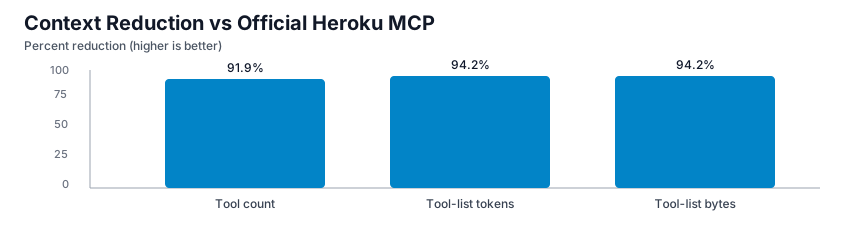
Tool count33791.9% lower
Tool-list payload bytes1,46925,50094.2% lower
Tool-list approx tokens3686,37594.2% lower
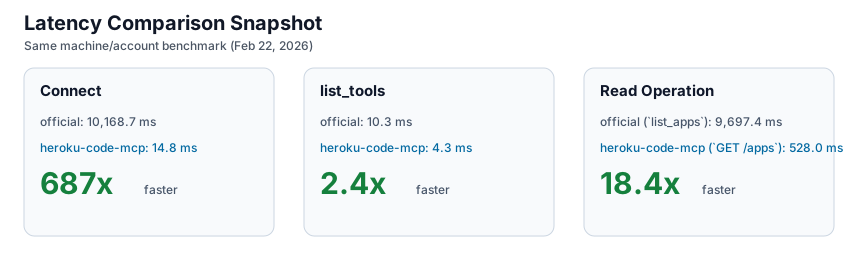
Connect avg14.8 ms10,168.7 ms687x faster
list_tools avg4.3 ms10.3 ms2.4x faster
Read op avg528.0 ms (execute GET /apps)9,697.4 ms (list_apps)18.4x faster

Charts:

  • Context reduction chart
  • Latency comparison chart

Full methodology and artifacts live in BENCHMARKS.md and benchmarks/results/.

Development and Release

Validate locally:

Terminal
npm run build
npm test
npm run validate:server
npm run publish:dry-run

This repo uses free GitHub Actions:

  • validate.yml runs build, tests, server.json validation, and npm pack dry-run on PRs and pushes to main.
  • release.yml runs on v* tags, builds the .mcpb, updates release server.json, creates or updates the GitHub Release, and publishes to the MCP Registry through GitHub OIDC.
  • Dependabot checks npm and GitHub Actions dependencies weekly.

Publish manually when needed:

Terminal
npm publish --access public
mcp-publisher login github
mcp-publisher publish server.json

For CI-based npm publishing, configure npm trusted publishing for repo dsouzaAnush/heroku-code-mcp and workflow release.yml, then run the release workflow with publish_npm=true.

Repository Layout

  • src/schema/*: ingestion, operation normalization, and cache
  • src/search/*: search index and ranking
  • src/execute/*: validation and Heroku API execution
  • src/auth/*: OAuth and encrypted token storage
  • tests/*: catalog, search, and execute tests
  • benchmarks/results/*: benchmark artifacts
  • server.json: MCP Registry metadata

Brand and Troubleshooting

This repo includes the official Heroku wordmark and mark under assets. Use them according to the Heroku Brand Guidelines.

Common fixes:

  • MCP Inspector connection error: confirm URL http://127.0.0.1:3000/mcp and server health.
  • AUTH_REQUIRED: seed a token or complete OAuth.
  • Write blocked: confirm ALLOW_WRITES=true and send the dry-run confirmation token.
  • Large response body: narrow query scope or lower output caps.

Read the full README →View source on GitHub →

Related MCP Servers

View all in Cloud Platforms View all alternatives
  • Labby logoLabby

    Local-first MCP gateway and homelab control plane with CLI, HTTP API, and web UI.

    ☁️ Cloud Platforms0 views
    Compare vs Labby →
  • Next Devtools MCP logoNext Devtools MCP
    Verified

    Official Next.js MCP server for coding agents. Provides runtime diagnostics, route inspection, dev server logs, docs search, and upgrade guides. Requires Next.js 16+ dev server for full runtime features.

    ☁️ Cloud Platforms5 views
    Compare vs Next Devtools MCP →
  • Ragstack logoRagstack

    Search, chat, upload, and scrape a serverless RAGStack knowledge base on AWS.

    ☁️ Cloud Platforms0 views
    Compare vs Ragstack →
  • Unraid RMCP logoUnraid RMCP

    Rust MCP server and CLI for Unraid GraphQL operations across NAS, Docker, VM, and storage workflows.

    ☁️ Cloud Platforms1 views
    Compare vs Unraid RMCP →

Reviews

No reviews yet — be the first to share how this listing worked for you.

Frequently Asked Questions about Heroku Code MCP

Add the following block to your claude_desktop_config.json under mcpServers: "mcpServers": { "heroku-code-mcp": { "command": "npx", "args": ["-y", "Heroku Code MCP"] } }

AllMCPs Directory Badge

Full Badge Customizer

Showcase your server listing on GitHub or your project documentation. Embed this dynamic SVG badge to highlight official listing status and live engagement.

Badge Style:
Live Dynamic SVG PreviewHeroku Code MCP AllMCPs Directory Badge
Markdown (GitHub README)
[![AllMCPs](https://allmcps.com/api/badge/heroku-code-mcp?style=directory)](https://allmcps.com/mcp/heroku-code-mcp)
HTML Embed
<a href="https://allmcps.com/mcp/heroku-code-mcp"><img src="https://allmcps.com/api/badge/heroku-code-mcp?style=directory" alt="Heroku Code MCP on AllMCPs" /></a>

Technical Specs & Signals

Category☁️Cloud Platforms
More technical detailsExpand ▾
TransportSTDIO
RuntimeNode.js
Last updatedSep 7, 2026
Views0
Unique ViewsTotal visits recorded for this listing page on AllMCPs.
Installs0
Installs & Copy ActionsTotal times users copied install commands or configuration snippets for this server.
GitHub stars1
GitHub Star CountTotal stargazers on GitHub representing community popularity (1 stars).
33Quality signal: Emerging · 33/100How this signal is calculated ▾
Server availabilityNot measured

Not scored for repo-hosted servers — we can't reach the running server, only its GitHub page. Hosted MCP endpoints are health-checked live.

Verified ownership10/20
Documentation & tools14/30
Adoption & activity1/15
Community engagement0/10

A guidance signal from public completeness & health data — not a user rating. New listings start lower and rise as they add docs, get verified, and grow adoption. Signals we can't observe for a listing are skipped, not counted against it.

★ Spotlight Slot

Feature Your MCP Server

Get maximum visibility for your server across our directory, search results, and detail pages.

Spotlight Your Server

Own this project?

This directory is pre-filled from public sources. Claim via GitHub README, site badge, or DNS TXT to unlock edit access and the Official badge — proof is checked automatically, then reviewed by our team.

Free dofollow backlink: add your website and place the AllMCPs badge on it — no claim needed. We detect it automatically and keep it verified as long as the badge stays live.

Claim & get free dofollow

Share & Embed

Add our SVG badge (dark/light directory styles) or embeddable widget to your site.

Explore more

More in ☁️ Cloud Platforms →Best MCP servers for Cloud Platforms →Alternatives to Heroku Code MCP →Install in Claude DesktopInstall in CursorInstall in VS Code