Triplyfy MCP README
The full upstream README, mirrored here for reference. Install config, tool schemas, adoption signals, and an original overview live on the Triplyfy MCP listing page.
Triplyfy MCP — Claude Desktop Setup
What it is
A remote MCP server that lets Claude plan, edit, and save your trips to Triplyfy.
What is Triplyfy?
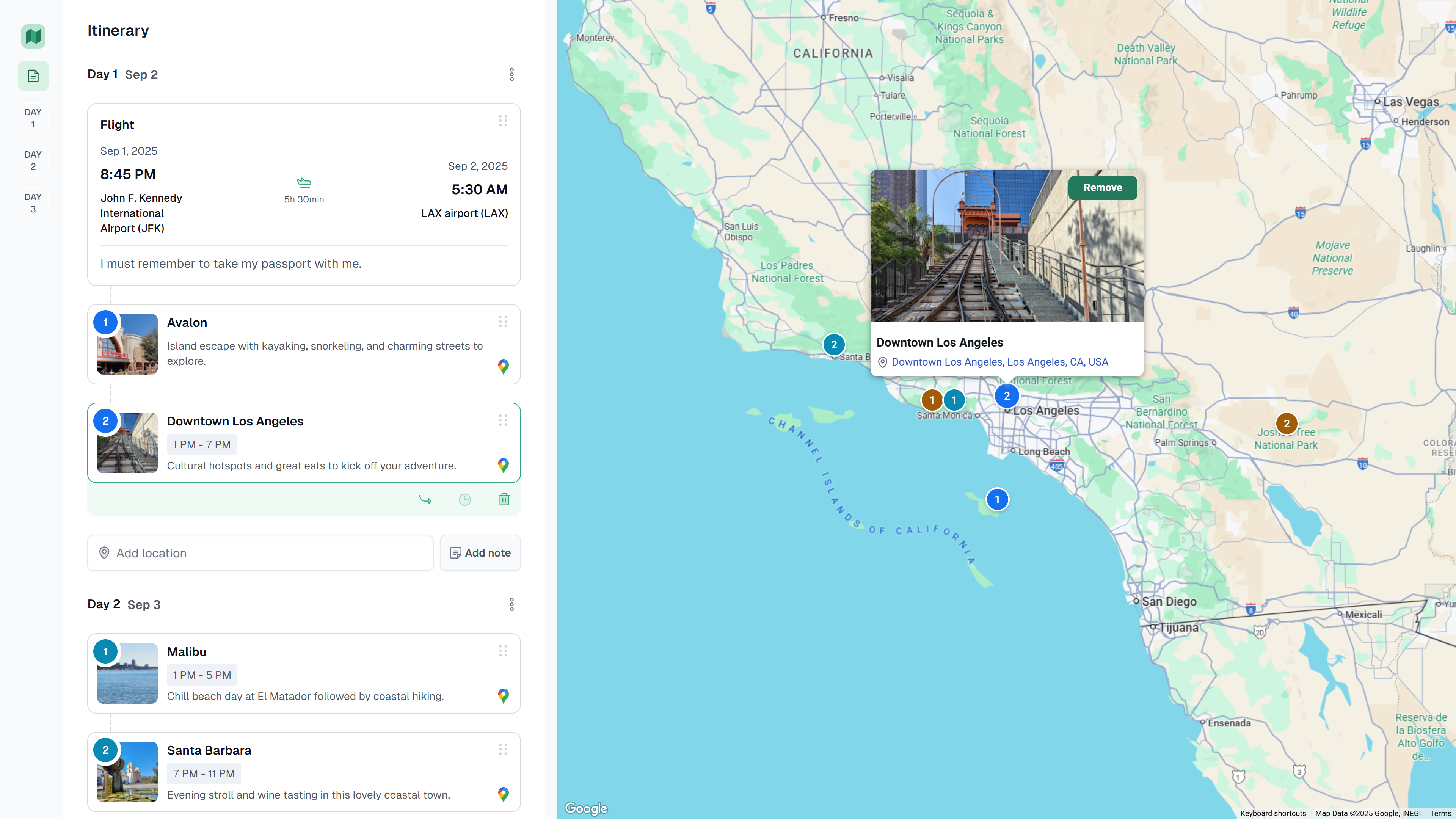
A simple trip‑planning app to create and share itineraries. View is public by link, editing requires Google sign‑in. Drag‑and‑drop places and notes across days, see everything on a map, and add flights.
How to install (Claude Desktop)
Open Claude Desktop → Settings → Developer → MCP Servers → Add server
- Name:
Triplyfy - MCP SSE endpoint:
https://triplyfy.com/mcp/sse
On first connect, you’ll be prompted to sign in with Google and approve access. No manual gateway run is required.
How it works
- Claude opens Google sign‑in (OAuth) on first connect.
- Claude exchanges a code for a Triplyfy session token (~30 days).
- The token only authenticates your requests from Claude to Triplyfy.
- The server performs only actions you ask (create/read/update trips, search flights).
Links & Contact
- Website: https://triplyfy.com/
- Email: kirill2003de@gmail.com