travelitinerariesflightsmaps
Remote MCP server for planning and managing Triplyfy itineraries, places, notes, maps, and flights through Claude.
Quick Install
Automated & IDE SetupCopy the AI prompt to install this server into Claude Code, Cursor, or another agent — or use 1-click editor setup below.
Manual Client & Custom JSON ConfigExpand JSON ▾
Client Config & Setup
Remote HTTPChoose your client or environment
Target File:
💡 Paste the JSON block into your client's configuration file under mcpServers, then restart the application.
Overview
Use cases
Create and edit Triplyfy itineraries
Organize places and notes across trip days
View trip plans on an interactive map
Search and save flights
Share completed itineraries by public link
Key features
Remote MCP server over SSE
Trip creation, reading, and updating
Place and note management
Interactive itinerary maps
Flight search and saving
Google OAuth sign-in
Capabilities & Tool Schemas
Inspect callable tools, capabilities, and parameters exposed to AI agents by Triplyfy MCP.
Extracted Tool Capabilities
Remote MCP server over SSE
Trip creation, reading, and updating
Place and note management
Interactive itinerary maps
Flight search and saving
Google OAuth sign-in
Documentation Overview
Triplyfy MCP — Claude Desktop Setup
What it is
A remote MCP server that lets Claude plan, edit, and save your trips to Triplyfy.
What is Triplyfy?
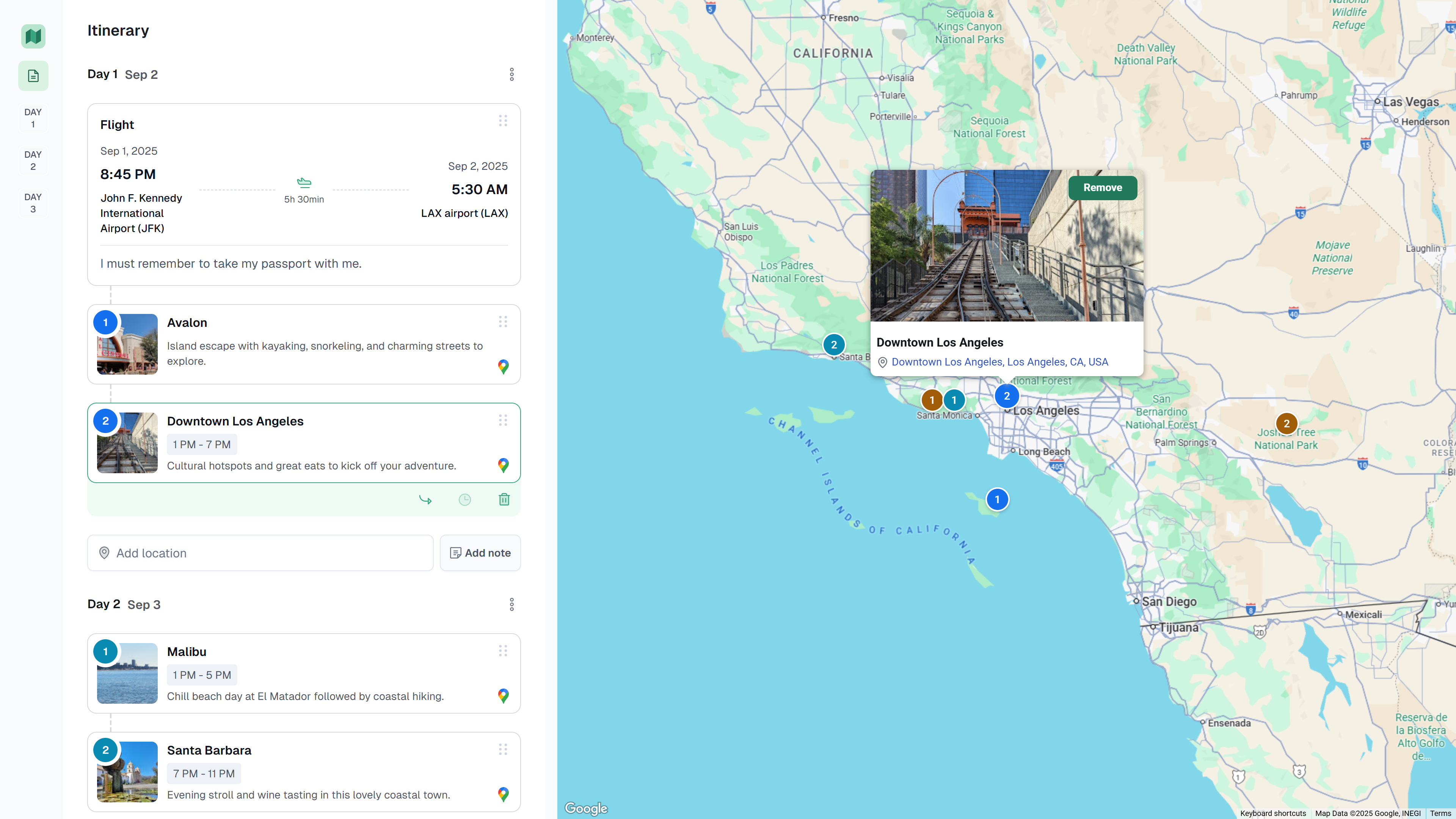
A simple trip‑planning app to create and share itineraries. View is public by link, editing requires Google sign‑in. Drag‑and‑drop places and notes across days, see everything on a map, and add flights.
How to install (Claude Desktop)
Open Claude Desktop → Settings → Developer → MCP Servers → Add server
- Name:
Triplyfy - MCP SSE endpoint:
https://triplyfy.com/mcp/sse
On first connect, you’ll be prompted to sign in with Google and approve access. No manual gateway run is required.
How it works
- Claude opens Google sign‑in (OAuth) on first connect.
- Claude exchanges a code for a Triplyfy session token (~30 days).
- The token only authenticates your requests from Claude to Triplyfy.
- The server performs only actions you ask (create/read/update trips, search flights).
Links & Contact
- Website: https://triplyfy.com/
- Email: kirill2003de@gmail.com
Related MCP Servers
Adoption & maintenance
Factual signals from GitHub, npm, and our automated checks — not a rating.
GitHub stars
4
Stargazers on the source repository.
Last commit
1y ago
Most recent push to the default branch.
Directory activity
2 views
Config copies, upvotes, and views on AllMCPs.
Reviews
No reviews yet — be the first to share how this listing worked for you.
Frequently Asked Questions about Triplyfy MCP
AllMCPs Directory Badge
Showcase your server listing on GitHub or your project documentation. Embed this dynamic SVG badge to highlight official listing status and live engagement.
Badge Style:
Live Dynamic SVG Preview
Markdown (GitHub README)
[](https://allmcps.com/mcp/helpful-ais-triplyfy-mcp)HTML Embed
<a href="https://allmcps.com/mcp/helpful-ais-triplyfy-mcp"><img src="https://allmcps.com/api/badge/helpful-ais-triplyfy-mcp?style=directory" alt="Triplyfy MCP on AllMCPs" /></a>