AllMCPs
BrowseBestCategoriesStackCompareToolsGuidesBlog
Log in Submit MCP

Stay in the loop

Get new MCP servers and top picks in your inbox.

AllMCPs

The open directory for discovering and installing Model Context Protocol servers.

Follow AllMCPs on X (opens in a new tab)AllMCPs on GitHub (opens in a new tab)
Launched onTiny Startupstinystartups.com
Explore
  • Browse servers
  • Best MCP servers
  • Categories
  • MCP clients
  • Agent prompts
  • Stack Builder
  • Compare servers
  • Random discovery New
  • Submit a server
  • Pricing & Boost Boost
Learn
  • Guides hub
  • What is MCP?
  • Install guide
  • Build an MCP server
  • Deploy an MCP server
  • Security guide
  • Troubleshooting
  • MCP for SEO & AEO
  • Protocol versioning
  • Blog & updates
Tools
  • All developer tools
  • Config generator
  • Config validator
  • Config auditor
  • MCP playground
  • Token calculator
  • OpenAPI β†’ MCP
  • Badge generator
For agents
  • REST API docs
  • Trust & traffic Live
  • Remote MCP server SSE β†— (opens in a new tab)
  • llms.txt β†— (opens in a new tab)
  • Catalog JSON β†— (opens in a new tab)
Company
  • About
  • Advertise Sponsor
  • Contact
  • X (@AllMCPs) β†— (opens in a new tab)
  • GitHub β†— (opens in a new tab)
  • Terms
  • Privacy
AllMCPs VerifiedAllMCPs VerifiedFeatured on Nick LaunchesFeatured on Nick LaunchesLaunch Llama NewsletterLaunch Llama NewsletterVerified DR - allmcps.comVerified DR - allmcps.comFeatured on SaaSGrowFeatured on SaaSGrowFeatured on Twelve ToolsFeatured on Twelve ToolsFeatured on Saaspa.geFeatured on Saaspa.geFeatured on Findly.toolsFeatured on Findly.toolsFeatured on Startup FameFeatured on Startup FameFeatured on LaunchKiwiFeatured on LaunchKiwiFeatured on ScrollLaunchFeatured on ScrollLaunchFeatured on DailyPingsFeatured on DailyPingsFazier badgeFazier badgeFeatured on NewTool.siteFeatured on NewTool.siteFeatured on saasfame.comFeatured on saasfame.comDR Checker - Domain RatingDR Checker - Domain RatingListed on Turbo0Listed on Turbo0Launched on LaunchBoard - Product Launch PlatformLaunched on LaunchBoard - Product Launch PlatformList on SimilarlabsList on Similarlabshttps://codetrendy.comhttps://codetrendy.comListed on DevTool.ioFeatured on BuildlistFeatured on BuildlistLaunched on Tiny StartupsFeatured on ShowMeBestAIFeatured on ShowMeBestAIFind us on LaunchZoneFind us on LaunchZoneAllMCPs VerifiedAllMCPs VerifiedFeatured on Nick LaunchesFeatured on Nick LaunchesLaunch Llama NewsletterLaunch Llama NewsletterVerified DR - allmcps.comVerified DR - allmcps.comFeatured on SaaSGrowFeatured on SaaSGrowFeatured on Twelve ToolsFeatured on Twelve ToolsFeatured on Saaspa.geFeatured on Saaspa.geFeatured on Findly.toolsFeatured on Findly.toolsFeatured on Startup FameFeatured on Startup FameFeatured on LaunchKiwiFeatured on LaunchKiwiFeatured on ScrollLaunchFeatured on ScrollLaunchFeatured on DailyPingsFeatured on DailyPingsFazier badgeFazier badgeFeatured on NewTool.siteFeatured on NewTool.siteFeatured on saasfame.comFeatured on saasfame.comDR Checker - Domain RatingDR Checker - Domain RatingListed on Turbo0Listed on Turbo0Launched on LaunchBoard - Product Launch PlatformLaunched on LaunchBoard - Product Launch PlatformList on SimilarlabsList on Similarlabshttps://codetrendy.comhttps://codetrendy.comListed on DevTool.ioFeatured on BuildlistFeatured on BuildlistLaunched on Tiny StartupsFeatured on ShowMeBestAIFeatured on ShowMeBestAIFind us on LaunchZoneFind us on LaunchZone
Β© 2026 Jackalope Digital LLC. All rights reserved.
  1. Home
  2. πŸ’¬ Communication
  3. Hail
H
Health: Not checked yetWe have not completed a health check for this listing yet.No health check has run yet.

Hail

User RatingsBe the first to rate and review this MCP server! Enrichment pendingWe haven’t run our AI enrichment pass on this listing yet, so the overview, use cases, and FAQ below may be sparse or missing. We work through the catalog over time β€” check back soon.
View RepositoryVisit Website

Phone, SMS & email for AI agents β€” one remote MCP endpoint, OAuth login, zero install.

Quick Install

Automated & IDE Setup

Copy the AI prompt to install this server into Claude Code, Cursor, or another agent β€” or use 1-click editor setup below.

Add to CursorAdd to VS Code
Manual Client & Custom JSON ConfigExpand JSON β–Ύ

Client Config & Setup

Choose your client or environment
Target File:~/Library/Application Support/Claude/claude_desktop_config.json
claude_desktop_config.json
{
  "mcpServers": {
    "hail": {
      "command": "npx",
      "args": [
        "-y",
        "hail"
      ]
    }
  }
}

πŸ’‘ Paste the JSON block into your client's configuration file under mcpServers, then restart the application.

Install Directory Badge Claim listing AlternativesπŸ’¬ More in Communication

Documentation Overview

Hail

Give your agent a real phone number and an email inbox β€” in minutes, not days.

License: AGPL v3 PyPI β€” hail-sdk CLI release Docs

Your agent needs to call a person to move an appointment. Hail connects to the telephone carrier and runs the voice pipeline β€” STT, TTS, turn detection. Your agent is the brain: point Hail at any OpenAI-compatible endpoint (bring your own LLM), or let Hail's fallback chain (OpenAI β†’ Gemini β†’ Anthropic) do the talking. SMS and email work the same way β€” one MCP endpoint, one API key, one invoice.

Self-hostable with Docker Compose; LiveKit Cloud and the communication providers remain external. Open source under AGPLv3.
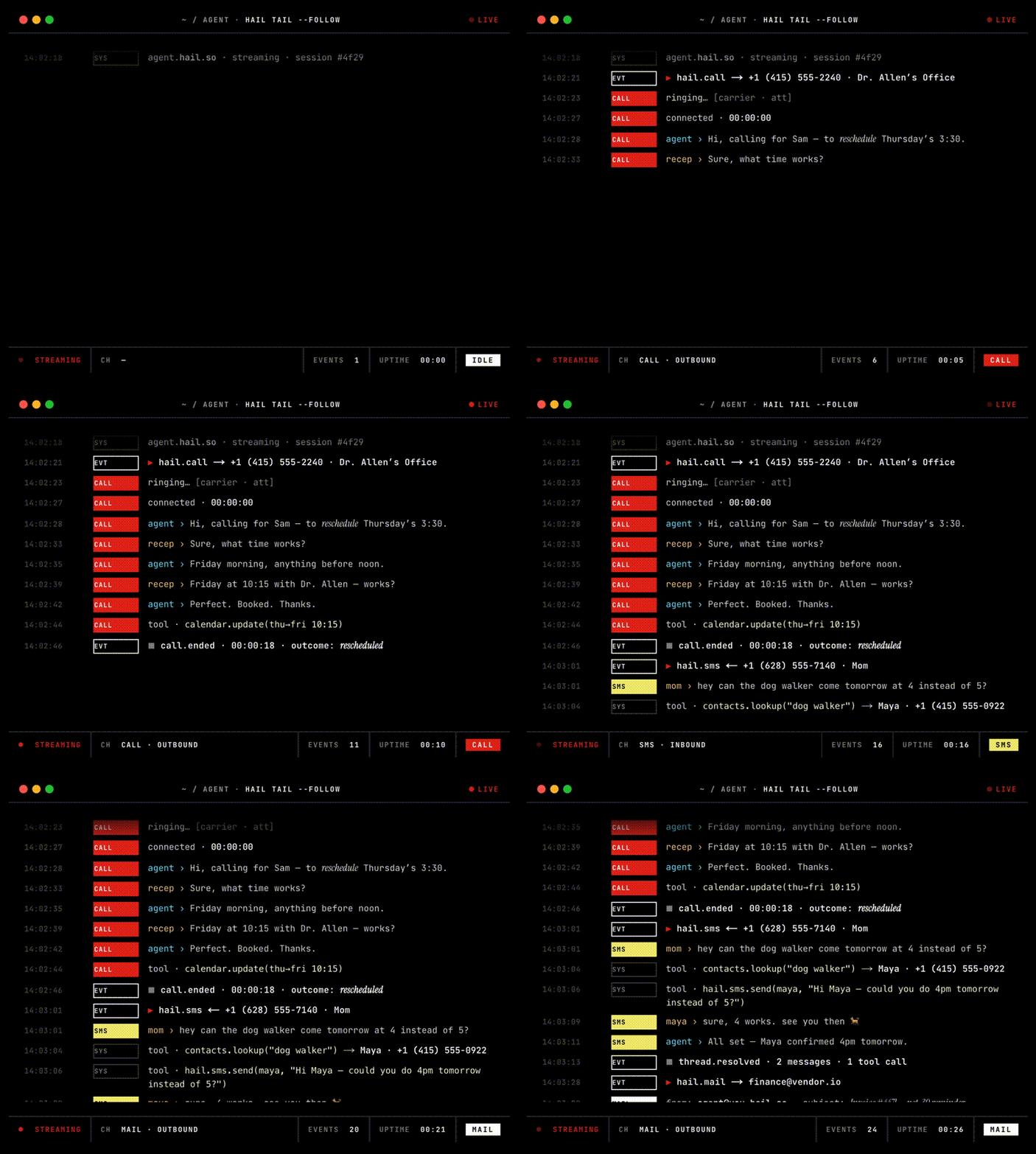
Animated terminal demo of hail tail streaming live call events

Self-host quick start

Prerequisites: Git, Docker Engine, and Docker Compose v2. For a public production deployment you also need a domain, HTTPS, and a managed Postgres; start with the VM deployment guide.

The commands below run a local evaluation stack with bundled Postgres and MinIO. Voice calls additionally require LiveKit Cloud, Twilio, Deepgram, Cartesia, and at least one LLM provider. Email is optional and requires AWS SES.

bash
git clone https://github.com/hail-hq/hail
cd hail
cp .env.example .env

# Generate a shared self-host key, then put it in .env as HAIL_API_KEY.
printf 'hk_%s\n' "$(openssl rand -base64 32 | tr -d '/+=' | head -c 40)"

# Edit .env and add the providers required for the channels you will use.
docker compose -f docker-compose.yml -f docker-compose.local.yml \
  run --rm api alembic upgrade head
docker compose -f docker-compose.yml -f docker-compose.local.yml up -d
docker compose -f docker-compose.yml -f docker-compose.local.yml ps
curl --fail http://localhost:8080/healthz

Self-host authentication uses the HAIL_API_KEY value from .env; it does not need an API-key row in Postgres. Export the same key and API URL in the shell where you use the CLI or SDK (Compose does not export .env into your shell):

server.ts
export HAIL_API_URL=http://localhost:8080
export HAIL_API_KEY='<same value as .env>'

Next, follow LiveKit Cloud and Twilio, then bind a phone number to the self-host organization using the first-run setup. To enable email, follow AWS SES.

Authentication differs by deployment:

  • Hail Cloud (managed, at hail.so): run hail login. The device flow writes a key to ~/.hail/credentials.json.
  • Self-host: do not run hail login; set HAIL_API_URL and HAIL_API_KEY as shown above, or pass --api-url and --api-key.

Full setup guides: self-hosting Β· Webhooks Β· MCP Β· operations

Install the CLI

On macOS or Linux with Homebrew:

bash
brew install hail-hq/tap/hail
hail version

Homebrew adds the hail-hq/tap tap automatically. To update later:

bash
brew upgrade hail-hq/tap/hail

Alternatively, download the archive for your operating system and architecture from GitHub Releases. Release binaries are available for macOS and Linux on Intel and ARM64. See the CLI reference for authentication and commands.

Make your first call

CLI:

bash
hail login                        # Hail Cloud only (device flow)
hail auth logout                  # remove local credentials
hail auth token                   # print bare API key for scripting

hail call +14155550100 --prompt "be brief" --recipient-consent
hail call list
hail call status <id>             # one call's state
hail call tail <id>               # follow events for one call

hail sms +15551234567 --body "Hello!" --recipient-consent
hail sms list
hail sms status <id>
hail sms suppressions list        # opt-out list
hail sms sender-id get            # custom sender ID

hail numbers acquire              # dedicated phone number (voice + SMS)
hail numbers list
hail contacts list                # org contact directory

hail email send --to a@b.com --subject hi --body "hello" --recipient-consent
hail email list
hail email get <id>
hail email tail <id>              # follow events for one email
hail email raw <id>               # RFC 5322 source
hail email attachment <id> <att-id> --output file.pdf
hail email domain register --kind hail_mail
hail email domain register --kind custom --domain acme.com  # send + receive on your own domain
hail email domain list

printf '%s' "$YOUR_API_KEY" | hail providers set llm \
  --provider openai-compatible \
  --base-url https://api.your-agent.dev/v1 \
  --model your-model \
  --key -                         # standing BYO brain (also: tts, stt)

hail tail                         # cross-channel event stream
hail tail call:<id>               # narrow by resource type

hail mcp endpoint                 # Streamable HTTP URL for the MCP server
hail completion zsh               # source <(hail completion zsh)
hail version

Python (pip install hail-sdk):

server.ts
import asyncio
from hail import Client

async def main():
    async with Client() as client:  # reads $HAIL_API_KEY
        call = await client.calls.create(
            to="+15551234567",
            recipient_consent=True,
            system_prompt="You are calling to confirm a reschedule.",
        )
        async for event in client.events.tail(id=f"call:{call.id}"):
            print(event.kind, event.payload)

asyncio.run(main())

HTTP (OpenAPI spec, API reference):

Terminal
curl -X POST http://localhost:8080/calls \
  -H "Authorization: Bearer $HAIL_API_KEY" \
  -H "Content-Type: application/json" \
  -d '{"to":"+15551234567","recipient_consent":true,"system_prompt":"..."}'

MCP (Claude.ai, Claude Code, ChatGPT, Cursor, …): local clients can use http://localhost:8081. Web-based clients require a publicly reachable HTTPS endpoint. See the MCP setup guide.

Bring your own LLM

Hail always runs the telephony and the voice pipeline. The brain is pluggable, at two levels:

  • Per call β€” pass an llm block to POST /calls; different brains for different calls.
  • Standing β€” save an endpoint once (hail providers set llm …); every call your org places uses it.

Any OpenAI chat-completions-compatible endpoint works. A complete runnable example lives in docs/public/byo-llm.md. TTS and STT are pluggable the same way (hail providers set tts|stt …).

Tenets

  1. Clear comms. Explicit OpenAPI contracts. No hidden behavior.
  2. Simple code. Boring is best. No abstraction before it has two uses.
  3. Brief docs. Each page fits on one screen. Setup takes 10 minutes from a fresh clone.
  4. Self-hostable. Docker Compose runs Hail's API, voicebot, MCP server, Postgres, and MinIO; LiveKit Cloud and channel providers remain external.
  5. Pluggable brain. BYO LLM endpoint, or Hail's bundled fallback. The voice pipeline and transport are always Hail's.
  6. Agent-first docs. AI agents are first-class readers. Runnable examples first; links to canonical sources, not paraphrase.

Milestones

A checked box is a released feature. Per-artifact changelogs (GitHub Releases for the CLI, PyPI notes for the SDK) record which version shipped it.

Phone calls

  • Outbound
    • Twilio
    • Telnyx
  • Inbound
    • Twilio

SMS

  • Outbound
    • Twilio
  • Inbound
    • Twilio

Email

  • Outbound
    • AWS SES
    • Custom sender domains (own DNS, automatic DKIM + MAIL FROM)
  • Inbound
    • AWS SES
    • Custom domains (receive on verified domains)

Voice pipeline

  • Languages
    • 39 call languages with automatic STT routing and per-language turn detection β€” see docs/languages.md
  • STT
    • Deepgram
    • Speechmatics
    • Whisper
    • AssemblyAI
  • TTS
    • Cartesia
    • ElevenLabs
    • Deepgram Aura
  • VAD
    • Silero
  • Turn detection
    • LiveKit turn-detector
  • LLM β€” system-prompt mode
    • Fallback: OpenAI β†’ Gemini β†’ Anthropic, fast models
  • LLM β€” BYO-endpoint mode
    • OpenAI chat-completions-compatible (docs)
  • Recording
    • S3 upload
    • Diarization

Distribution

  • API
    • OpenAPI spec + hosted reference
  • CLI
    • hail binary via GitHub Releases
  • MCP server
    • Remote Streamable HTTP endpoint included with each Hail deployment
    • PyPI stdio package β€” deliberately not shipped; see MCP setup
  • Python SDK
    • hail-sdk on PyPI, imports as hail

Infrastructure

  • Docker Compose scaffold
  • Self-hosted LiveKit SFU
    • docker compose integration

Architecture

The path of an outbound call:

Code
AI agent ──► Hail API ──dispatch──► Voicebot ──► LiveKit Cloud ──SIP──► Twilio ──► πŸ“ž

Full diagram and service breakdown: docs/public/architecture.md. All docs are published at hail.so/docs and live as plain markdown in docs/public/.

Contributing

Read the full README β†’View source on GitHub β†’

Related MCP Servers

View all in Communication View all alternatives
  • SenderKit logoSenderKit

    Build and send email, SMS, and push straight from your AI agent.

    πŸ’¬ Communication2 views
    Compare vs SenderKit β†’
  • Mailbuttons logoMailbuttons

    Governed email for AI agents: sandbox inboxes, server-side policy gate, tamper-evident audit.

    πŸ’¬ Communication1 views
    Compare vs Mailbuttons β†’
  • Abnormal Security MCP logoAbnormal Security MCP

    Abnormal Security email threats, cases, and reporting in your terminal and your AI agents.

    πŸ’¬ Communication0 views
    Compare vs Abnormal Security MCP β†’
  • HQBase logoHQBase

    Connect AI agents to your self-hosted HQBase shared email workspace.

    πŸ’¬ Communication1 views
    Compare vs HQBase β†’

Reviews

No reviews yet β€” be the first to share how this listing worked for you.

Frequently Asked Questions about Hail

Add the following block to your claude_desktop_config.json under mcpServers: "mcpServers": { "hail": { "command": "npx", "args": ["-y", "Hail"] } }

AllMCPs Directory Badge

Full Badge Customizer

Showcase your server listing on GitHub or your project documentation. Embed this dynamic SVG badge to highlight official listing status and live engagement.

Badge Style:
Live Dynamic SVG PreviewHail AllMCPs Directory Badge

Markdown (GitHub README)
[![AllMCPs](https://allmcps.com/api/badge/hail?style=directory)](https://allmcps.com/mcp/hail)
HTML Embed
<a href="https://allmcps.com/mcp/hail"><img src="https://allmcps.com/api/badge/hail?style=directory" alt="Hail on AllMCPs" /></a>

Technical Specs & Signals

CategoryπŸ’¬Communication
More technical detailsExpand β–Ύ
TransportSTDIO
RuntimeNode.js
Last updatedSep 7, 2026
Views0
Unique ViewsTotal visits recorded for this listing page on AllMCPs.
Installs0
Installs & Copy ActionsTotal times users copied install commands or configuration snippets for this server.
27Quality signal: Emerging Β· 27/100How this signal is calculated β–Ύ
Server availabilityNot measured

Not scored for repo-hosted servers β€” we can't reach the running server, only its GitHub page. Hosted MCP endpoints are health-checked live.

Verified ownership8/20
Documentation & tools11/30
Adoption & activity1/15
Community engagement0/10

A guidance signal from public completeness & health data β€” not a user rating. New listings start lower and rise as they add docs, get verified, and grow adoption. Signals we can't observe for a listing are skipped, not counted against it.

β˜… FeaturedMoxie Docs MCP logo

Moxie Docs MCP

MCP & Agent Skills for Automated Documentation, and codebase conventions + context

Explore Server β†’

Own this project?

This directory is pre-filled from public sources. Claim via GitHub README, site badge, or DNS TXT to unlock edit access and the Official badge β€” proof is checked automatically, then reviewed by our team.

Free dofollow backlink: add your website and place the AllMCPs badge on it β€” no claim needed. We detect it automatically and keep it verified as long as the badge stays live.

Claim & get free dofollow

Share & Embed

Add our SVG badge (dark/light directory styles) or embeddable widget to your site.

Explore more

More in πŸ’¬ Communication β†’Best MCP servers for Slack & Communication β†’Alternatives to Hail β†’Install in Claude DesktopInstall in CursorInstall in VS Code




