Shared context engine syncing GitHub, Notion, and decisions for unified AI context across MCP clients.
Quick Install
Automated & IDE SetupCopy the AI prompt to install this server into Claude Code, Cursor, or another agent — or use 1-click editor setup below.
Manual Client & Custom JSON ConfigExpand JSON ▾
Client Config & Setup
Remote HTTPChoose your client or environment
Target File:
💡 Paste the JSON block into your client's configuration file under mcpServers, then restart the application.
Overview
Use cases
Save project decisions once and recall them in multiple AI agents
Sync GitHub repositories and Notion pages into a unified searchable context
Provide consistent architecture and workflow context to AI sessions
Share team knowledge and preferences across AI workflows
Build AI applications with persistent, portable context via MCP or API
Key features
Context synchronization from GitHub repos, commits, pull requests, and issues
Context synchronization from selected Notion workspace pages and documents
Manual context saving via 'remember' commands
Unified, searchable project collections tagged by source
OAuth 2.1 PKCE authentication with AES-256 encryption
RFC 9728 compliant MCP server supporting multiple AI clients
Capabilities & Tool Schemas (13)
Inspect callable tools, capabilities, and parameters exposed to AI agents by Memxus Remote MCP.
rememberSave context — manual input, decisions, or notes; optional `project:<slug>` collection
recallSemantic search across memories; GitHub/Notion synced content via `project:<slug>` or tags
get_contextFormatted context block from GitHub, Notion, and saved decisions for agent prompts
list_memoriesBrowse memories by collection, tags, type, or visibility
get_memoryRetrieve full content and metadata by memory ID
list_collectionsList scopes; GitHub/Notion syncs appear under `project:<slug>
Documentation Overview
Memxus — Context Engineering
One context layer. Every AI.
Multiply your productivity by giving every AI the right context.
Memxus brings Context Engineering to your entire AI workflow.
Save your real decisions, preferences and work context once. Find them in seconds and give Claude, Cursor, ChatGPT, Gemini or any MCP client the exact context required for each task.
No repeated explanations. No starting from zero. Better answers, faster.
Glama MCP Server License: AGPL-3.0 Node 20+ Railway MCP Registry v1.2.1
Website · Docs · Connect your first AI
Watch the Memxus demo on YouTube
▶️ Watch the demo on YouTube · Demo page
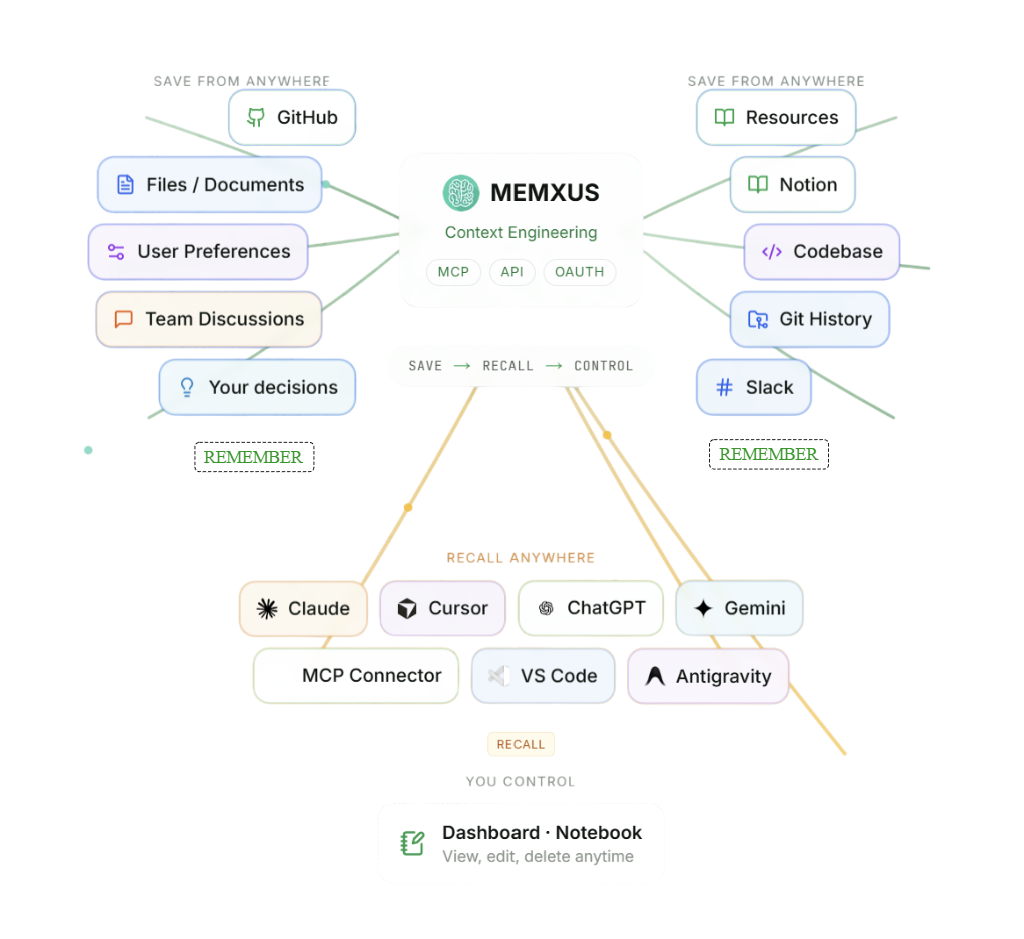
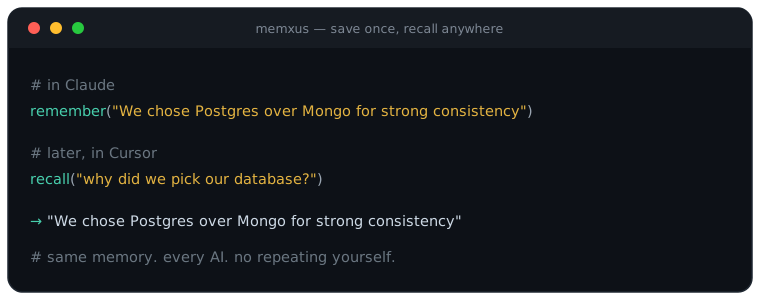
The problem
AI tools are powerful, but their productivity drops when they do not have the right context.
Claude does not know what Cursor knows. Cursor does not know what ChatGPT knows. Your project decisions, preferences, architecture and workflow context get repeated across every tool and every new conversation.
That creates unnecessary work:
- Re-explaining the same information
- Searching across repositories, documents and conversations
- Correcting answers based on missing context
- Repeating technical and product decisions
- Starting every AI task from zero
Memxus solves this through Context Engineering.
Save what matters once, find it in seconds and give every AI the exact context it needs for the task.
The result is less repetition, less back-and-forth, faster execution and better answers across your entire AI workflow.
Save a decision in Claude → recall it in Cursor → reuse it in ChatGPT.
Need deeper context? Connect GitHub and Notion whenever you are ready.
What is Memxus?
Memxus is a Context Engineering designed to multiply your productivity by giving every AI the right context.
It creates a shared context layer across Claude, Cursor, ChatGPT, Gemini and any MCP-compatible client.
The core workflow is simple:
rememberwhat mattersrecallit from any AI- find relevant context in seconds
- give each AI the information it needs to produce a better answer
Connect once with OAuth and your decisions, preferences and work context become portable across your entire AI workflow — without local setup, repeated explanations or copying and pasting between tools.
For deeper context, Memxus can also connect to real work sources such as GitHub and Notion. Repositories, documentation, commits, pull requests, issues and selected workspace pages become searchable alongside your manually saved context.
GitHub and Notion connectors are live in production. This deeper synchronization is optional: Memxus delivers value from the first saved decision.
Save once. Find it fast. Give every AI the right context. Work faster.
Why developers use Memxus
- Save once, recall in every AI — stop repeating your stack, decisions and preferences across Claude, Cursor and ChatGPT
- Ask once — no more hunting through 5 tools to remember why you chose X
- Keep project architecture and stack context available across Claude, Cursor, and ChatGPT
- Sync GitHub and Notion into unified project collections — one context per repo
- Stop pasting the same context into every new AI session
- Share team context across agents and workflows
- Build AI apps with persistent context through MCP or API
Real context from GitHub & Notion
Memxus reads your real work — not generic memory snippets. Synced content lands in a unified collection per project: project:<slug>.
What gets synced
| Source | Content indexed into context |
|---|---|
| GitHub | Repos, READMEs, commits, pull requests, issues |
| Notion | Selected workspace pages and docs |
| Manual | Decisions, preferences, and notes via remember |
How to connect
- Dashboard — dashboard.memxus.com/integrations (GitHub App + Notion OAuth)
- From chat (MCP) —
connect_source→check_connect_status→list_syncable_items→set_sync_selection
How to use synced context
Call recall or get_context with collection=project:<slug> (or let semantic search find it). GitHub/Notion content is tagged and searchable alongside manual memories.
Start saving in one message
After you connect Memxus to any AI, paste a line like this — Memxus calls remember and your context is available everywhere:
No GitHub/Notion sync needed to start. Sync later when you want deeper project context.
Optional — sync your whole stack: GitHub repos, Notion pages, files, docs and decisions become recallable context too.
Context Engine connector tools (4): connect GitHub/Notion from chat via MCP. Production advertises the 9 core tools; the 4 connector tools are enabled per account, so a newly connected client sees the core 9.
Connect in 1 second, one click
Claude Desktop (claude_desktop_config.json)
Cursor / VS Code
Or open directly in Glama Inspector →
[https://glama.ai/mcp/inspector?url=https://mcp.memxus.com/mcp](https://glama.ai/mcp/inspector?url=https://mcp.memxus.com/mcp)
For marketplace reviewers: see REVIEWER.md for OAuth and Bearer token setup.
Supported platforms
| Platform | Integration | Status |
|---|---|---|
| Claude Desktop / claude.ai | Remote MCP | ✅ Live |
| Cursor | Remote MCP | ✅ Live |
| VS Code / Copilot MCP | Remote MCP | ✅ Live |
| ChatGPT | Custom GPT / API | ✅ Live |
| Gemini | MCP-compatible workflow | ✅ Live |
| Telegram | Bot connector | ✅ Live |
| GitHub | Repo sync (commits, PRs, issues, README) | ✅ Live |
| Notion | Workspace page sync | ✅ Live |
| Discord | Bot connector | 🔜 Coming soon |
| Slack | Bot connector | 🔜 Coming soon |
| Any MCP-compatible client | Remote MCP | ✅ Live |
Available tools
Registry com.memxus/memxus v1.2.1 — 9 core tools always available, plus 4 connector tools for GitHub/Notion sync from chat.
Core tools (9)
| Tool | Description |
|---|---|
remember | Save context — manual input, decisions, or notes; optional project:<slug> collection |
recall | Semantic search across memories; GitHub/Notion synced content via project:<slug> or tags |
get_context | Formatted context block from GitHub, Notion, and saved decisions for agent prompts |
list_memories | Browse memories by collection, tags, type, or visibility |
get_memory | Retrieve full content and metadata by memory ID |
list_collections | List scopes; GitHub/Notion syncs appear under project:<slug> |
forget | Delete a memory permanently |
memory_stats | Stats by type and collection |
update | Patch or append existing memory content, tags, or type |
Context Engine connector tools (4) — v1.2.1
Related MCP Servers
Adoption & maintenance
Factual signals from GitHub, npm, and our automated checks — not a rating.
GitHub stars
3
Stargazers on the source repository.
Last commit
1mo ago
Most recent push to the default branch.
Tools exposed
13
Callable tools this server registers over MCP.
Directory activity
1 views
Config copies, upvotes, and views on AllMCPs.
Reviews
No reviews yet — be the first to share how this listing worked for you.
Frequently Asked Questions about Memxus Remote MCP
AllMCPs Directory Badge
Showcase your server listing on GitHub or your project documentation. Embed this dynamic SVG badge to highlight official listing status and live engagement.
Badge Style:
Live Dynamic SVG Preview
Markdown (GitHub README)
[](https://allmcps.com/mcp/gpitrella-memxus-remote-mcp)HTML Embed
<a href="https://allmcps.com/mcp/gpitrella-memxus-remote-mcp"><img src="https://allmcps.com/api/badge/gpitrella-memxus-remote-mcp?style=directory" alt="Memxus Remote MCP on AllMCPs" /></a>Technical Specs & Signals
CategoryKnowledge & Memory
11/11 checks healthy over the last 34d
55Quality signal: Good · 55/100How this signal is calculated ▾
Server availabilityNot measured
Not scored for repo-hosted servers — we can't reach the running server, only its GitHub page. Hosted MCP endpoints are health-checked live.
Verified ownership10/20
Documentation & tools28/30
Adoption & activity3/15
Community engagement0/10
A guidance signal from public completeness & health data — not a user rating. New listings start lower and rise as they add docs, get verified, and grow adoption. Signals we can't observe for a listing are skipped, not counted against it.
Own this project?
This directory is pre-filled from public sources. Claim via GitHub README, site badge, or DNS TXT to unlock edit access and the Official badge — proof is checked automatically, then reviewed by our team.
Free dofollow backlink: add your website and place the AllMCPs badge on it — no claim needed. We detect it automatically and keep it verified as long as the badge stays live.
Claim & get free dofollowShare & Embed
Add our SVG badge (dark/light directory styles) or embeddable widget to your site.