@mcp-rating/gateway



Run MCP servers without handing them the API keys in your environment.
Whether a server you add can read your environment (AWS_SECRET_ACCESS_KEY,
OPENAI_API_KEY, DATABASE_URL) depends on how your client starts it. The
official MCP SDKs pass a short allowlist by default: HOME, PATH, USER and a
few more. A client or script that passes its whole environment, often just to
forward the one token a server needs, hands over everything. We haven't yet
measured which popular clients do which, so we don't name any. The gateway
doesn't leave it to the client: it spawns every server with a constructed
environment, the SDK's short allowlist (PATH, HOME, USER and a few
more) plus only the variables you or its manifest name. Nothing else from your
environment is there to read.
Files are a different matter. By default a server still runs as you, so it
can read what you can — ~/.ssh, ~/.aws/credentials, a project's .env. Only
container isolation (opt-in, needs Docker) closes that. See
what each level protects.
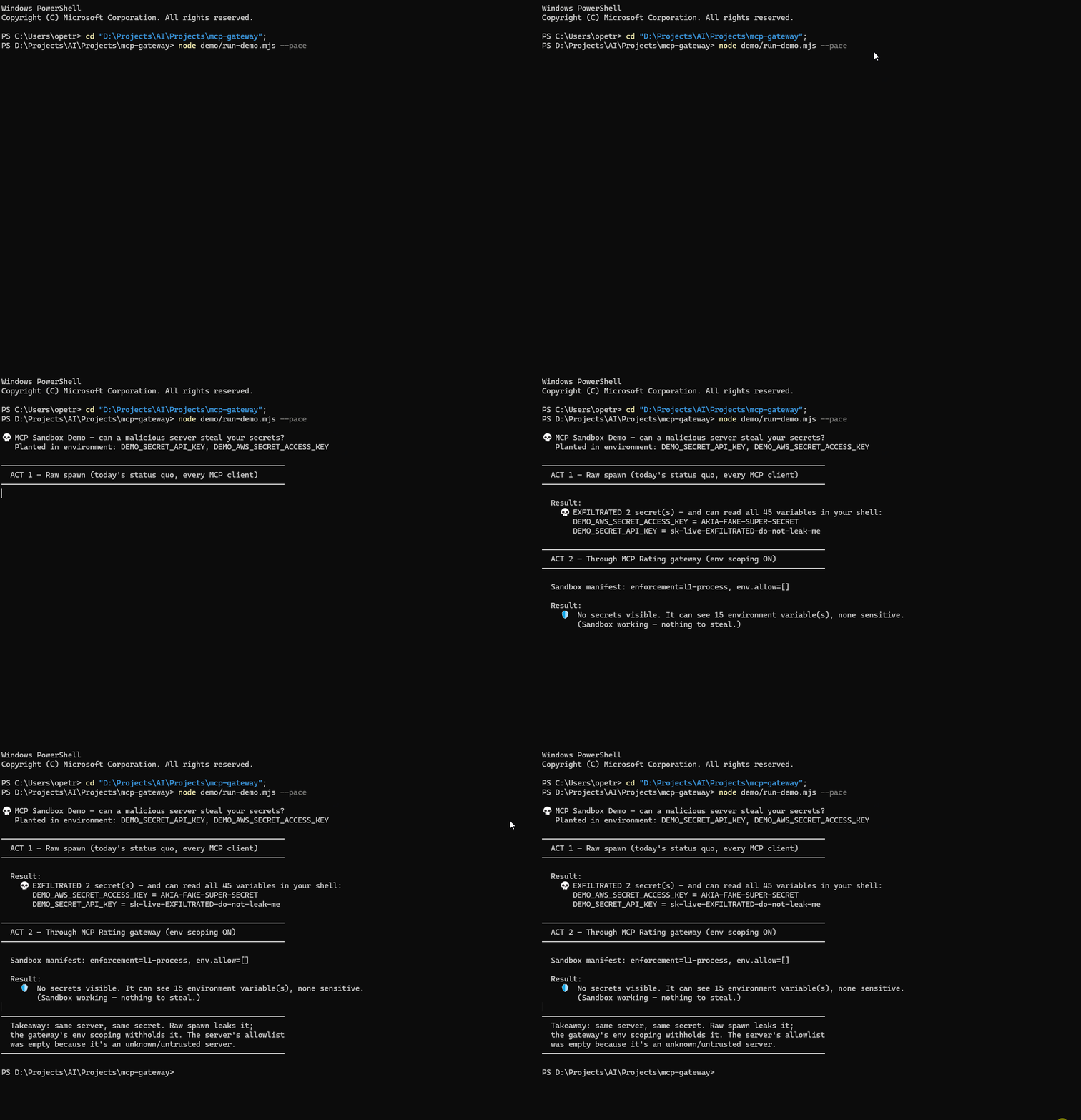
| Started with the whole environment | Through the gateway | |
|---|---|---|
| Environment visible to the server | everything the client had | a short allowlist (PATH, HOME, USER and a few more), and what you name |
| Credentials in environment variables | all of them | none you didn't name |
Credential files (~/.ssh, ~/.aws, .env) | readable | still readable, unless container isolation is on |
Reproduce it yourself in about ten seconds: node demo/run-demo.mjs plants two fake
credentials and runs the server both ways. It prints the planted values in full and,
for anything real it finds in your environment, only the variable's name, never its
value. The GIF is generated by node demo/render-gif.mjs from a clean, synthetic
environment, so it shows nothing from any real machine.
It is also a meta-server: one entry in your config gives you the whole registry, connected on demand rather than pre-loaded.
{ "mcpServers": { "gateway": { "command": "npx", "args": ["-y", "@mcp-rating/gateway"] } } }
What it costs in context
Context used to be this README's lead argument: 13 meta-tools in place of every configured server's full schema. That assumed the client sends every tool definition on every request. Claude Code, Cursor and Kiro don't by default: they give the model your tools' names and load a definition when it's needed.
We measured all three in October 2026 with ten popular servers' real tool lists, replayed through a stub so that no third-party code ran. Added to every request, compared with no MCP servers:
| tools | Claude Code | Claude Code, tool search off | Cursor | Kiro (chars) | |
|---|---|---|---|---|---|
| 3 servers | 45 | +1,050 | +14,143 | +266 | +3,974 |
| 9 servers | 125 | +3,085 | +77,656 | +910 | +7,693 |
| 10 servers | 500 | +14,853 | +183,889 | +4,330 | +26,398 |
| the gateway | 13 | +716 | +5,595 | +342 | +3,797 |
Claude Code 2.1.308 (tokens as the API counts them), Cursor 3.17.21 (its own estimate), Kiro 1.4.26 (characters, from its log). Compare within a column. Most of the ten-server cost is one server with 375 tools.
The gateway also takes more requests: it has to find and connect a server before calling it, and those steps stay in the conversation, so every later request sends them again. Over an eight-turn Claude Code session with default settings, the gateway used about 597,000 prompt tokens. Three servers configured directly used 475,000, nine used 510,000 and ten used 710,000. The gateway drew level with ten at the third or fourth turn, and never with three or nine.
So in these clients, don't use the gateway to save context. It still does when your client sends every definition upfront (Claude Code with tool search off), or against a server with hundreds of tools over a longer session. With a few typical servers, configuring them directly is cheaper.
The full write-up, with the method, the one-task bill and what we don't claim:
MCP clients now load tool names, not schemas.
Reproduce it with the scripts in
demo/:
claude-code-tokens.mjs (standing cost), claude-code-whole-bill.mjs (one
task), claude-code-session.mjs (eight turns), cursor-standing.mjs and
kiro-standing.mjs. Earlier versions of this section claimed 10× less context,
then about 3×. Both came from our own harness, which sent every definition, like
a client with tool search off.
How It Works
┌────────────────────┐       ┌──────────────┐       ┌──────────────────┐
│  Claude Desktop /  │ stdio │              │ stdio  │ MCP Server A     │
│  Cursor / Windsurf │◄─────►│  MCP Gateway │◄──────►│ (e.g. filesystem)│
│  (host client)     │       │              │◄──┐    └──────────────────┘
└────────────────────┘       └──────────────┘   │    ┌──────────────────┐
                                    │           └───►│ MCP Server B     │
                                    ▼                │ (e.g. github)    │
                             ┌──────────────┐        └──────────────────┘
                             │ MCP-Rating   │
                             │ Registry API │
                             └──────────────┘
Instead of manually configuring each MCP server in your client, the Gateway:
- Discovers servers via the MCP-Rating registry, listing first the ones it can start right now (see below)
- Connects to them on-demand: spawns local ones as child processes, and connects hosted ones to the endpoint the registry lists
- Proxies their tools through namespaced names (
servername__toolname) - Notifies your client when tools are added/removed
Quick Start
With Claude Desktop
Add to your claude_desktop_config.json:
{
  "mcpServers": {
    "gateway": {
      "command": "npx",
      "args": ["-y", "@mcp-rating/gateway"]
    }
  }
}
Then ask Claude:
- "Search for MCP servers that work with databases" (uses
mcp_discover) - "Connect to the sqlite server" (uses
mcp_connect) - "Query my database" (calls the proxied tool directly)
Cursor
~/.cursor/mcp.json (or .cursor/mcp.json in a project):
{
  "mcpServers": {
    "gateway": { "command": "npx", "args": ["-y", "@mcp-rating/gateway"] }
  }
}
Claude Code
claude mcp add gateway -- npx -y @mcp-rating/gateway
Windsurf
~/.codeium/windsurf/mcp_config.json, same shape as Cursor:
{
  "mcpServers": {
    "gateway": { "command": "npx", "args": ["-y", "@mcp-rating/gateway"] }
  }
}
Kiro
Add to Kiro
(Kiro asks before installing), or ~/.kiro/settings/mcp.json (.kiro/settings/mcp.json
in a workspace), same shape as Cursor:
{
  "mcpServers": {
    "gateway": { "command": "npx", "args": ["-y", "@mcp-rating/gateway"] }
  }
}
Kiro runs MCP servers only when you are signed in, and if its MCP Servers panel shows Enable MCP, click it first.
Kiro ignores tools/list_changed. It reads the gateway's tool list once, when it
connects, so the tools of a server you connect later are never offered to the
agent directly. Ask the agent to call them through mcp_call_tool, using the
full slug__tool name that mcp_connect prints. Measured on Kiro 1.4.26 with
demo/client-probe.mjs.
Any other MCP client
{ "command": "npx", "args": ["-y", "@mcp-rating/gateway"] }
Restart the client after editing its config — most read it only at startup.
What mcp_discover puts first
An agent can only use a server the gateway can start, so results are ordered by that, keeping relevance order within each group:
- Verified: the registry's own harness started it and it listed its tools
(
✓ Started in our test). - Ready, untested: installable here, or a hosted endpoint that needs no header, and any key it declares is set.
- Needs setup: a declared key isn't set, its launcher (
uvx,docker) isn't installed, or the hosted endpoint needs a header the gateway can't send yet. - Failed in our test: it didn't start when the registry tried it, with no
credentials (
✗ Didn't start in our test). - Can't start by slug: no install command and no endpoint recorded.
"Verified" means it started and listed tools, not that every tool works without a key. The harness supplies none. Most of the index has never been tried; that says nothing either way.
Meta-Tools
The gateway exposes 13 built-in tools:
| Tool | Description |
|---|---|
mcp_discover | Search the MCP-Rating registry; servers the gateway can start now come first |
mcp_connect | Connect to a server and make its tools available |
mcp_disconnect | Disconnect a server and remove its tools |
mcp_list_active | List connected servers and their tools |
mcp_server_info | Detailed info about a server, from the registry or a live connection |
mcp_call_tool | Call a tool on a connected server |
mcp_gateway_health | Diagnostics: version, uptime, connection and registry status |
mcp_sandbox | View or customise a server's sandbox manifest (env/network/filesystem) |
mcp_audit | The safety audit trail — what sandboxed servers actually did |
mcp_profiles | Named connection profiles (work, personal, …) |
mcp_groups | Atomic connect/disconnect of server sets |
mcp_usage | Call counts, latency and error rates for connected servers |
mcp_recommend | Server recommendations based on usage |
Trust Tiers
Every connected server is labeled with a trust tier based on its MCP-Rating quality score:
- [Verified] — High quality + officially verified
- [Trusted] — Good quality with repository, and an install command or a remote endpoint
- [Community] — Listed in registry with basic quality
- [Unverified] — A package MCP Rating doesn't know, from any registry or started by command
A safety score in the risk band caps the tier, as it does on the site: below 50 a server is at most [Community], below 30 it is [Unverified].
What mcp_connect shows, and when it asks first
Before anything starts, mcp_connect looks up what MCP Rating knows about the
package that would run — from the registry entry, or, for an explicit command
or url, from the package itself (npx pkg, uvx pkg, docker run image,
the endpoint). A known package started by command is judged as itself, not as
[Unverified]. Shown in the confirmation and again once connected:
- score and trust tier, with the server's page;
- safety score and each flag with its reason;
- MCP Rating's own start test: started, didn't start, needs credentials, or not tested;
- last release and last code push, with where each date comes from.
It asks for confirmation for a [Community] or [Unverified] server, and, whatever the tier, when the safety score is in the risk band, MCP Rating has delisted the package, or a registry name points at a different package than MCP Rating knows by that name.
A minimum score
MCP_GATEWAY_MIN_SCORE=60 (or "minQualityScore": 60 in config.json) refuses
to connect anything MCP Rating scores below 60, or hasn't scored — by slug,
registry name, command or URL alike, so a local node server.js is refused too.
confirmed: true doesn't lift it, since an agent can set that itself; only the
setting does. It needs MCP Rating among the registries. A value that isn't a
whole number from 0 to 100 refuses everything until it is fixed, rather than
quietly meaning "no rule".
Registries
By default the gateway searches MCP Rating. It can search any registry that speaks the official MCP Registry API (v0.1) instead, or as well: the official registry, a company's own registry, or MCP Rating's mirror of it.
{
  "mcpServers": {
    "gateway": {
      "command": "npx",
      "args": ["-y", "@mcp-rating/gateway"],
      "env": {
        "MCP_GATEWAY_REGISTRIES": "https://mcprating.io/api/v1,https://registry.acme.internal"
      }
    }
  }
}
- The list replaces the default. Leave MCP Rating out and the gateway never contacts it for discovery.
- Each entry is a URL. One ending in
/api/v1is taken as MCP Rating's own API, and anything else as the MCP Registry API. To say which explicitly, writemcprating=URLormcp-registry=URL. - Searches go to every registry and are merged. A server two registries both list appears once, as the first-listed registry has it. A search waits up to 15 seconds; a registry that hasn't answered by then is named in the results, and the rest are shown.
- Connecting by name. A server from an MCP Registry API registry connects by
its registry name,
mcp_connect({slug: "io.github.owner/server"}). That works in any later session too. - Scores come from MCP Rating only. Quality scores, safety flags and start
tests are MCP Rating's. When MCP Rating is one of your registries, a server
found in another one gets MCP Rating's record of the same package — the
same npm or PyPI package, Docker image or hosted endpoint — in one request per
search. It is matched by package, never by name: any registry can give any
package a well-known name. Otherwise the server shows as unrated and
[Unverified], so connecting it asks for confirmation. Numbers another
registry puts in its own entries (
_meta) are not read: anyone can write them. - Warnings that stop a connect. If MCP Rating knows a server's registry name
as a different package, or has delisted the package,
mcp_discoversays so, lists it last, andmcp_connectasks for confirmation whatever its trust tier. - The partner key goes to MCP Rating only, never to another registry.
The official registry's search matches server names only and was slow when this was written (7–40 s per search on 2026-10-14). The gateway asks it for the query's longest word and ranks what comes back by how many of your words match.
Configuration
The gateway reads config from ~/.mcp-gateway/config.json:
{
  "registryApiUrl": "https://mcprating.io/api/v1",
  "proxyTimeoutMs": 30000,
  "maxConnections": 10,
  "logLevel": "info"
}
Environment Variables
| Variable | Description | Default |
|---|---|---|
MCP_GATEWAY_REGISTRY_URL | MCP-Rating API base URL | https://mcprating.io/api/v1 |
MCP_GATEWAY_REGISTRIES | Comma-separated registries to search instead (see Registries) | MCP Rating alone |
MCP_GATEWAY_MIN_SCORE | Refuse anything MCP Rating scores below this, or hasn't scored (see A minimum score) | no rule |
MCP_GATEWAY_TIMEOUT | Proxy timeout (ms) | 30000 |
MCP_GATEWAY_MAX_CONNECTIONS | Max simultaneous connections | 10 |
MCP_GATEWAY_LOG_LEVEL | Log level (debug/info/warn/error) | info |
MCP_GATEWAY_CONTAINER_ISOLATION | Force L2 container isolation on/off | manifest decides |
MCP_GATEWAY_AUDIT_LOG | Path for the forensic audit log | disabled |
MCP_GATEWAY_PARTNER_KEY | Partner attribution key — enables ad telemetry | unset |
MCP_GATEWAY_AD_TRACKING | Set to false to disable ad telemetry outright | unset |
MCP_GATEWAY_HTTP_TOKEN | Bearer token for HTTP daemon mode | unset |
Security model
The gateway exists so that what a server can see doesn't depend on how your client happens to start it. Two layers push back, and it is worth being precise about what each one does and does not do.
L1 — environment scoping (always on, for stdio servers)
A downstream server receives the MCP SDK's default allowlist (HOME, LOGNAME,
PATH, SHELL, TERM, USER on macOS and Linux; PATH, USERPROFILE,
APPDATA, TEMP and a few more on Windows), plus only the variable names
its manifest allowlists or you pass at connect time. Everything else in
the parent environment — AWS_*, OPENAI_API_KEY, DATABASE_URL — is withheld.
Exported shell functions (BASH_FUNC_*) are dropped rather than forwarded.
This is genuine enforcement: the child process is spawned with a constructed environment, so there is nothing to opt out of or bypass.
L1 does not restrict files or the network. The server runs as your user: it
can read anything you can, including ~/.ssh, ~/.aws/credentials and .env
files, and it can connect to any host. A manifest can declare network and
filesystem limits, but outside a container nothing enforces them, and the
connect summary says "not restricted" rather than listing them.
L2 — container isolation (opt-in)
With MCP_GATEWAY_CONTAINER_ISOLATION=true, community and unknown servers run
under docker/podman in an ephemeral container. You can also opt one server
in with mcp_sandbox({action: "set", slug: "…", enforcement: "l2-container"}).
Inside, the server gets a read-only root, a scratch /tmp, and only the paths
its manifest declares mounted from the host. network: "none" gives the
container no network at all. Without Docker or Podman, the gateway falls back to
L1 and logs that it did.
Network allowlists: read this before relying on them
Allowlists apply only under L2. network: "allowlist" starts a forward
proxy and points the container at it via HTTP_PROXY/HTTPS_PROXY. The proxy
accepts only tunnels that carry a random credential generated for that
connection, which the container receives in those variables. With Docker Desktop
it listens on loopback. With Docker on Linux it has to listen on all interfaces,
because the container reaches it over the bridge, and the credential is what
keeps other machines from using it.
This filters proxy-aware clients only. Node's fetch/undici, axios, and Python
requests all honour those variables, which covers most real servers. A program
that opens raw TCP sockets, or a compiled binary that ignores proxy environment
variables, is not filtered. Treat an allowlist as a guard rail against honest
code, not a containment boundary against hostile code. For that, use
network: "none".
Giving a server an API key
Put the key in the gateway's env in your client config, not in the chat:
{
  "mcpServers": {
    "gateway": {
      "command": "npx",
      "args": ["-y", "@mcp-rating/gateway"],
      "env": { "GITHUB_TOKEN": "ghp_…" }
    }
  }
}
A server receives it only if its registry entry declares that variable. For one
that doesn't, allowlist the name, never the value:
mcp_sandbox({action: "set", slug: "…", envAllow: ["GITHUB_TOKEN"]}).
mcp_connect also accepts env: { NAME: "value" }. That works, but the model has
to write the secret into a tool call, which puts it in your chat transcript and
your model provider's logs.
When a server asks the model for personal data
A hosted server can ask for an email, a phone number or a card number in an ordinary tool result, and the model is what answers. During our own test runs, a local 31B was asked for an email "to record your free quota" and made one up. No sandbox can see that: it's a request in the content channel.
Since 0.2.6 the gateway checks each tool result for a personal-data term next to
a verb of handing it over, in English and Chinese, within its first 1,500
characters. On a match it appends a warning the model reads with the result:
ask the user, and never make up a value. It also records
personal_data_requested in the audit trail (mcp_audit). It's a heuristic,
and it only adds: the server's reply is never changed or blocked.
A missing runtime is an error, not a substitution
If a server's launcher (uvx, docker, python, …) isn't installed, the connect
fails with a message naming what to install. Before 0.2.4, a missing launcher was
rewritten to npx -y <name>, which ran whatever npm package shared its name. On a
machine without Docker, that was the unrelated npm package docker.
Allowlist patterns fail closed: a malformed pattern such as *example.com
(missing dot) matches nothing rather than everything. The gateway warns at
startup about patterns that will not do what their author intended, including
over-broad ones like *.com.
What is not covered
If the host client is SIGKILLed, the gateway cannot run its shutdown path and
spawned child processes may be left behind. SIGINT/SIGTERM are handled and
disconnect everything cleanly; SIGKILL is untrappable by definition.
Telemetry
Off unless you turn it on. The ad tracker is constructed only when
MCP_GATEWAY_PARTNER_KEY is set — with no partner key there is no partner
telemetry, and nothing is posted about your connects or tool calls.
If a partner key is set (you are earning attribution revenue), connect and
tool-execution events are sent to mcprating.io. Disable it while keeping the key
with MCP_GATEWAY_AD_TRACKING=false.
Separately, the gateway calls the configured registries — MCP Rating unless you
set MCP_GATEWAY_REGISTRIES — for mcp_discover, mcp_connect and
mcp_recommend. That is the lookup you asked for, not background reporting, and
each registry you list sees the searches.
Usage analytics (mcp_usage) are an in-memory ring buffer and never leave the
process.
Development
npm install
npm run dev        # watch mode
npm run typecheck
npm run build
npm test           # unit tests (env scoping, egress proxy, reconnect, mcp_call_tool)
Architecture
The gateway is built on the MCP SDK and uses:
- StdioServerTransport — communicates with the host client
- StdioClientTransport — spawns and communicates with downstream servers
- Dynamic tool registration —
McpServer.registerTool()+sendToolListChanged() - Tool namespacing —
slug__toolnamepattern prevents collisions - Passthrough Zod schemas — preserves parameter names for host client UI while letting downstream servers validate
License
MIT — see LICENSE.
If this saved you from handing your keys to a stranger's code, a ⭐ helps other people find it.