Gateway
Discover, judge and safely run any MCP server: 57k+ scored servers, sandboxed.
Install Gateway
Pick your client, then add it in one click or paste the config.
~/Library/Application Support/Claude/claude_desktop_config.json{
"mcpServers": {
"gateway-6": {
"command": "npx",
"args": [
"-y",
"@mcp-rating/gateway"
]
}
}
}
Settings → Developer → Edit Config, merge this into mcpServers, then fully quit and reopen Claude Desktop.
Install not yet sandbox-tested— we haven't run this command through our automated sandbox yet. Not a red flag; we're working through the catalog.
Overview
Security & health
What it can reach and how reliably it runs — from our own checks, not the maintainer’s claims.
Recent health check succeeded.
Supply-chain signal
No high-severity advisories surfaced by our automated scan.
Scanned 12d ago via OSV.dev · @mcp-rating/gateway (npm)
Adoption & maintenance
Factual signals from GitHub, npm, and our automated checks — not a rating.
From the project README
@mcp-rating/gateway



Run MCP servers without handing them the API keys in your environment.
Whether a server you add can read your environment (AWS_SECRET_ACCESS_KEY,
OPENAI_API_KEY, DATABASE_URL) depends on how your client starts it. The
official MCP SDKs pass a short allowlist by default: HOME, PATH, USER and a
few more. A client or script that passes its whole environment, often just to
forward the one token a server needs, hands over everything. We haven't yet
measured which popular clients do which, so we don't name any. The gateway
doesn't leave it to the client: it spawns every server with a constructed
environment, the SDK's short allowlist (PATH, HOME, USER and a few
more) plus only the variables you or its manifest name. Nothing else from your
environment is there to read.
Files are a different matter. By default a server still runs as you, so it
can read what you can — ~/.ssh, ~/.aws/credentials, a project's .env. Only
container isolation (opt-in, needs Docker) closes that. See
what each level protects.
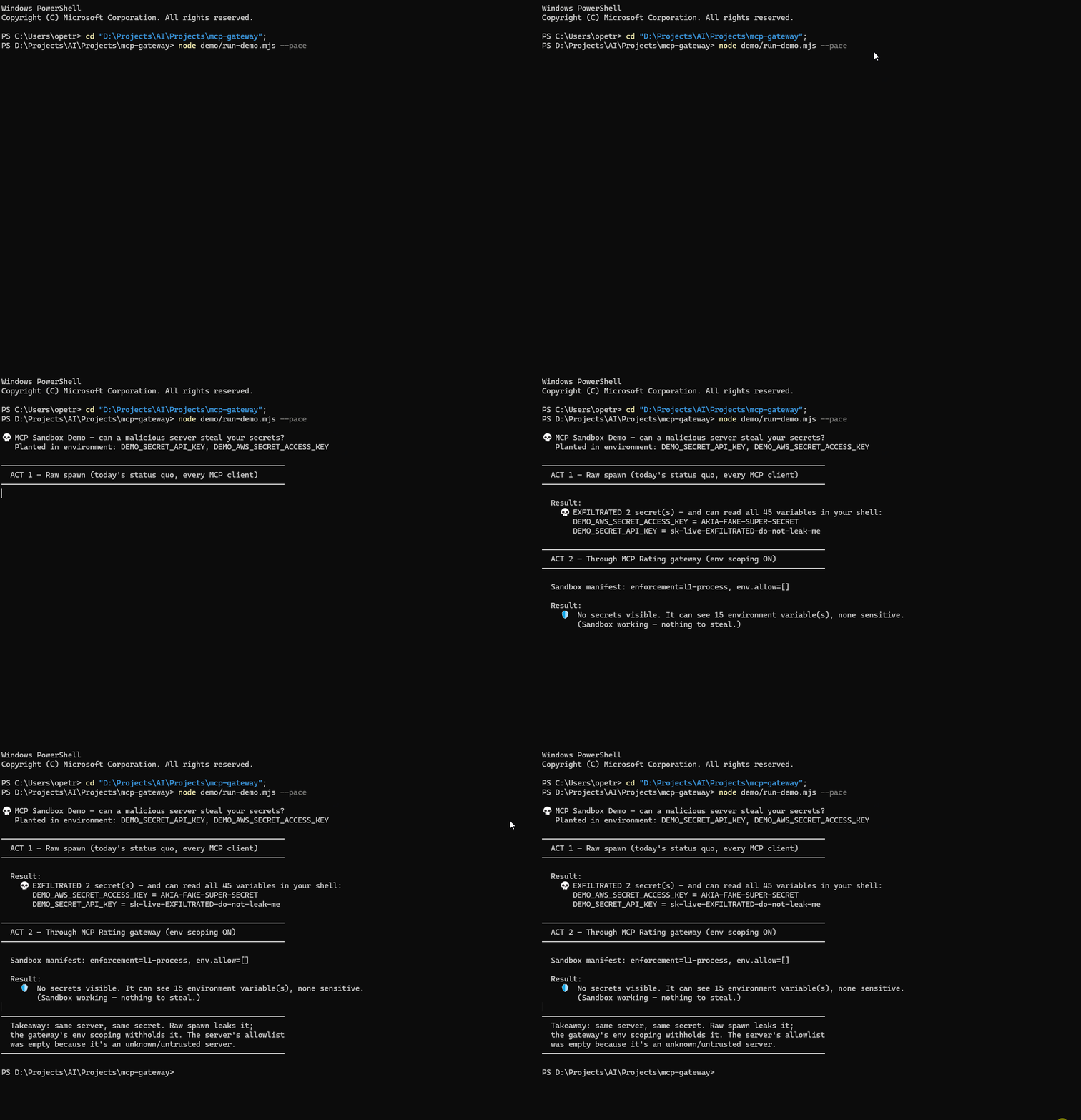
| Started with the whole environment | Through the gateway | |
|---|---|---|
| Environment visible to the server | everything the client had | a short allowlist (PATH, HOME, USER and a few more), and what you name |
| Credentials in environment variables | all of them | none you didn't name |
Credential files (~/.ssh, ~/.aws, .env) | readable | still readable, unless container isolation is on |
Reproduce it yourself in about ten seconds: node demo/run-demo.mjs plants two fake
credentials and runs the server both ways. It prints the planted values in full and,
for anything real it finds in your environment, only the variable's name, never its
value. The GIF is generated by node demo/render-gif.mjs from a clean, synthetic
environment, so it shows nothing from any real machine.
It is also a meta-server: one entry in your config gives you the whole registry, connected on demand rather than pre-loaded.
{ "mcpServers": { "gateway": { "command": "npx", "args": ["-y", "@mcp-rating/gateway"] } } }
What it costs in context
Context used to be this README's lead argument: 13 meta-tools in place of every configured server's full schema. That assumed the client sends every tool definition on every request. Claude Code, Cursor and Kiro don't by default: they give the model your tools' names and load a definition when it's needed.
We measured all three in October 2026 with ten popular servers' real tool lists, replayed through a stub so that no third-party code ran. Added to every request, compared with no MCP servers:
| tools | Claude Code | Claude Code, tool search off | Cursor | Kiro (chars) | |
|---|---|---|---|---|---|
| 3 servers | 45 | +1,050 | +14,143 | +266 | +3,974 |
| 9 servers | 125 | +3,085 | +77,656 | +910 | +7,693 |
| 10 servers | 500 | +14,853 | +183,889 | +4,330 | +26,398 |
| the gateway | 13 | +716 | +5,595 | +342 | +3,797 |
Claude Code 2.1.308 (tokens as the API counts them), Cursor 3.17.21 (its own estimate), Kiro 1.4.26 (characters, from its log). Compare within a column. Most of the ten-server cost is one server with 375 tools.
The gateway also takes more requests: it has to find and connect a server before calling it, and those steps stay in the conversation, so every later request sends them again. Over an eight-turn Claude Code session with default settings, the gateway used about 597,000 prompt tokens. Three servers configured directly used 475,000, nine used 510,000 and ten used 710,000. The gateway drew level with ten at the third or fourth turn, and never with three or nine.
So in these clients, don't use the gateway to save context. It still does when your client sends every definition upfront (Claude Code with tool search off), or against a server with hundreds of tools over a longer session. With a few typical servers, configuring them directly is cheaper.
The full write-up, with the method, the one-task bill and what we don't claim:
MCP clients now load tool names, not schemas.
Reproduce it with the scripts in
demo/:
claude-code-tokens.mjs (standing cost), claude-code-whole-bill.mjs (one
task), claude-code-session.mjs (eight turns), cursor-standing.mjs and
kiro-standing.mjs. Earlier versions of this section claimed 10× less context,
then about 3×. Both came from our own harness, which sent every definition, like
a client with tool search off.
How It Works
┌────────────────────┐       ┌──────────────┐       ┌──────────────────┐
│  Claude Desktop /  │ stdio │              │ stdio  │ MCP Server A     │
│  Cursor / Windsurf │◄─────►│  MCP Gateway │◄──────►│ (e.g. filesystem)│
│  (host client)     │       │              │◄──┐    └──────────────────┘
└────────────────────┘       └──────────────┘   │    ┌──────────────────┐
                                    │           └───►│ MCP Server B     │
                                    ▼                │ (e.g. github)    │
                             ┌──────────────┐        └──────────────────┘
                             │ MCP-Rating   │
                             │ Registry API │
                             └──────────────┘
Instead of manually configuring each MCP server in your client, the Gateway:
- Discovers servers via the MCP-Rating registry, listing first the ones it can start right now (see below)
- Connects to them on-demand: spawns local ones as child processes, and connects hosted ones to the endpoint the registry lists
- Proxies their tools through namespaced names (
servername__toolname) - Notifies your client when tools are added/removed
Quick Start
With Claude Desktop
Add to your claude_desktop_config.json:
{
  "mcpServers": {
    "gateway": {
      "command": "npx",
      "args": ["-y", "@mcp-rating/gateway"]
    }
  }
}
Then ask Claude:
- "Search for MCP servers that work with databases" (uses
mcp_discover) - "Connect to the sqlite server" (uses
mcp_connect) - "Query my database" (calls the proxied tool directly)
Cursor
~/.cursor/mcp.json (or .cursor/mcp.json in a project):
{
  "mcpServers": {
    "gateway": { "command": "npx", "args": ["-y", "@mcp-rating/gateway"] }
  }
}
Claude Code
claude mcp add gateway -- npx -y @mcp-rating/gateway
Windsurf
~/.codeium/windsurf/mcp_config.json, same shape as Cursor:
{
  "mcpServers": {
    "gateway": { "command": "npx", "args": ["-y", "@mcp-rating/gateway"] }
  }
}
Kiro
Add to Kiro
(Kiro asks before installing), or ~/.kiro/settings/mcp.json (.kiro/settings/mcp.json
in a workspace), same shape as Cursor:
{
  "mcpServers": {
    "gateway": { "command": "npx", "args": ["-y", "@mcp-rating/gateway"] }
  }
}
Kiro runs MCP servers only when you are signed in, and if its MCP Servers panel shows Enable MCP, click it first.
Kiro ignores tools/list_changed. It reads the gateway's tool list once, when it
connects, so the tools of a server you connect later are never offered to the
agent directly. Ask the agent to call them through mcp_call_tool, using the
full slug__tool name that mcp_connect prints. Measured on Kiro 1.4.26 with
demo/client-probe.mjs.
Any other MCP client
{ "command": "npx", "args": ["-y", "@mcp-rating/gateway"] }
Restart the client after editing its config — most read it only at startup.
What mcp_discover puts first
An agent can only use a server the gateway can start, so results are ordered by that, keeping relevance order within each group:
- Verified: the registry's own harness started it and it listed its tools
(
✓ Started in our test). - Ready, untested: installable here, or a hosted endpoint that needs no header, and any key it declares is set.
- Needs setup: a declared key isn't set, its launcher (
uvx,docker) isn't installed, or the hosted endpoint needs a header the gateway can't send yet. - Failed in our test: it didn't start when the registry tried it, with no
credentials (
✗ Didn't start in our test). - Can't start by slug: no install command and no endpoint recorded.
"Verified" means it started and listed tools, not that every tool works without a key. The harness supplies none. Most of the index has never been tried; that says nothing either way.
Meta-Tools
The gateway exposes 13 built-in tools:
Reviews
No reviews yet — be the first to share how it worked for you.
Frequently Asked Questions about Gateway
Related MCP servers
Add a badge to your READMEShow it’s listed — live SVG, Markdown or HTML.
AllMCPs Directory Badge
Showcase your server listing on GitHub or your project documentation. Embed this dynamic SVG badge to highlight official listing status and live engagement.
[](https://allmcps.com/mcp/gateway-6)<a href="https://allmcps.com/mcp/gateway-6"><img src="https://allmcps.com/api/badge/gateway-6?style=directory" alt="Gateway on AllMCPs" /></a>