GameWorld Painter
Plan a game world on layers seen from above — terrain height, ground types, zones, forests, roads, buildings, enemies, chests, notes — in the browser, and keep it as a plain folder of PNG and JSON files that your game's build scripts (or an AI agent) can read and write.
Open GameWorld Painter · Chrome or Edge on the desktop · no install, no account, the files stay on your disk.
What it does
-
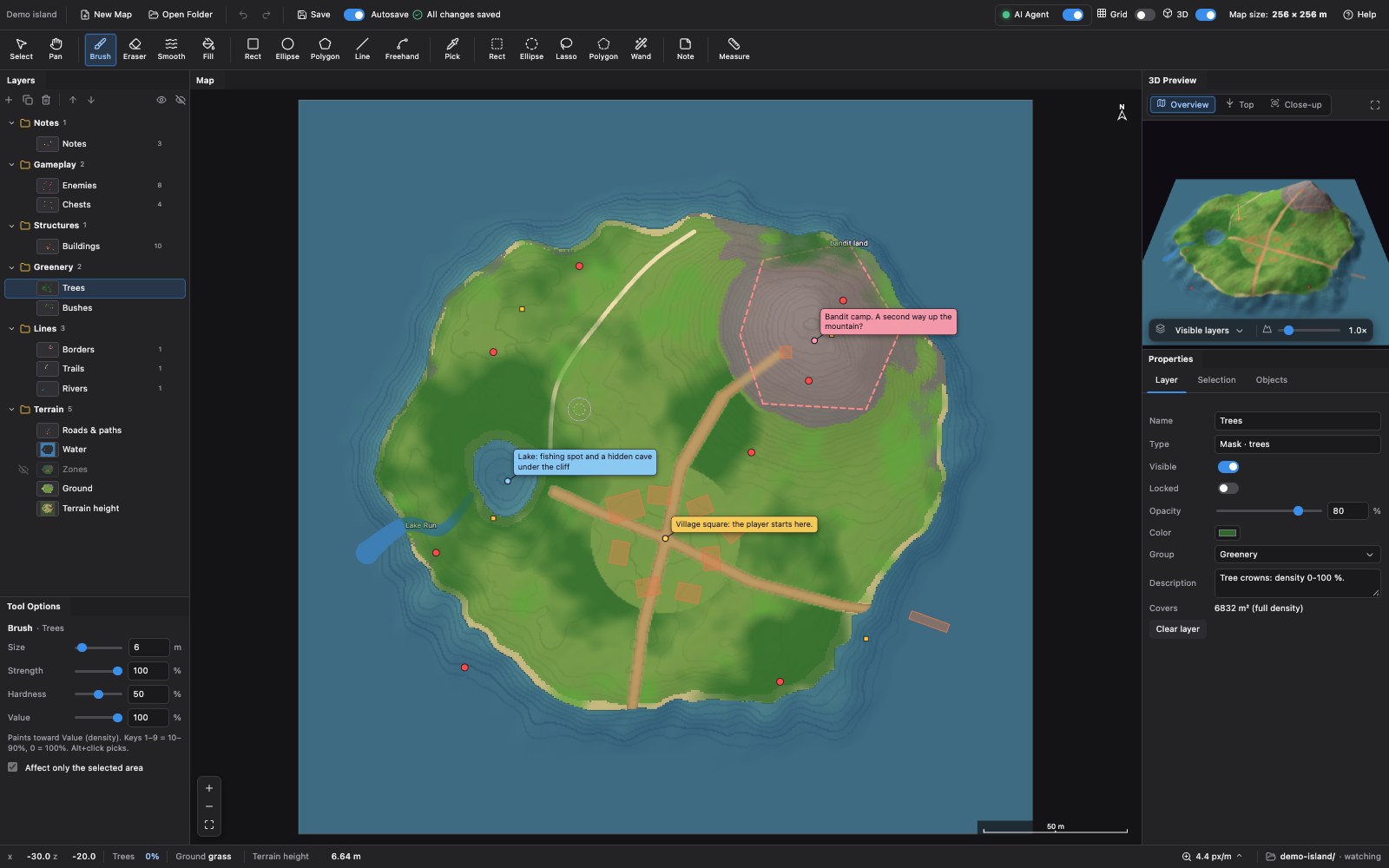
Layers of six kinds (and a picture layer for references):
- Masks — density 0–100 % per cell: trees, grass, water, roads…
- Categories — a class per cell: ground types, biomes, zones…
- Height — the terrain.
- Objects — placed things with a kind, position, rotation, footprint and properties: buildings, enemies, chests, spawn points, two-ended links such as shortcuts.
- Notes — text pinned to the map.
- Vector — roads, rivers, borders: smooth or straight lines through points, with a width that may change along them; closed ones are areas. Paint them into a mask, categories or height layer when they should become pixels.
Layers live in groups; they can be shown, hidden, locked, faded, reordered, renamed and described.
-
Painting: brush, eraser, smooth, flood fill, pick; shapes — rectangle, ellipse, polygon, line, freehand — filled or outlined, with soft edges; raise, lower and flatten the terrain.
-
Selection: rectangle, ellipse, lasso, polygon, magic wand; add, subtract, invert, grow, shrink. Painting stays inside the selection. Copy, cut, paste and drag cells around, turn and flip them.
-
Objects and notes: place, move, rotate, duplicate, copy and paste; edit properties; a filterable list of what is on a layer.
-
3D preview of the terrain with the visible layers draped over it, updated while you paint (WebGL2, with a software fallback).
-
Maps of any size and unit: width, height and cell size in meters, centimeters (Unreal), feet, inches (Source), pixels (2D) or plain units, so coordinates match your engine; resize or convert later; start new maps from a basic set of layers.
-
Files as the source of truth: autosave into the project folder, which the app also watches — changes made by scripts or AI agents appear within a second and merge with your unsaved work.
-
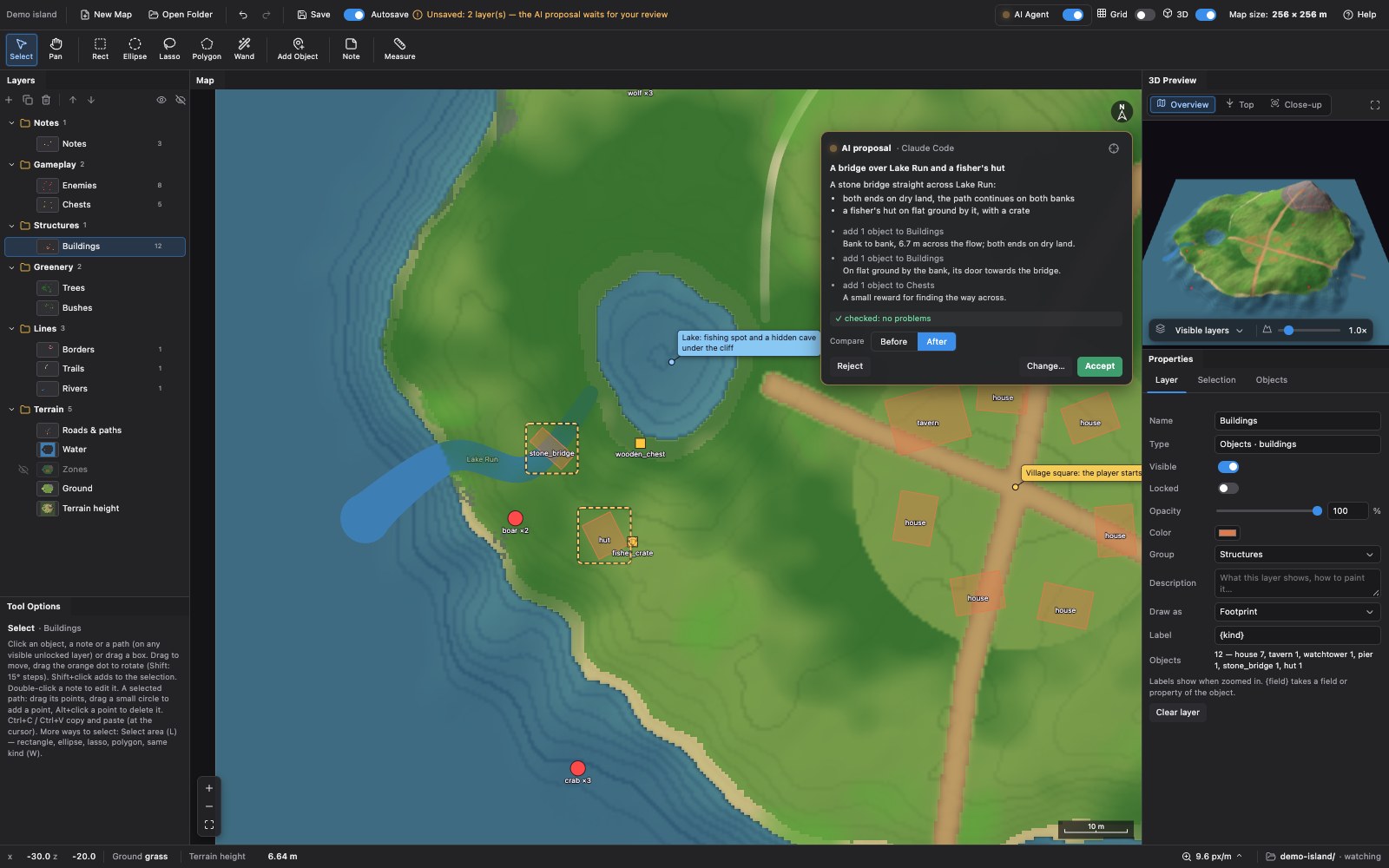
AI agents (Claude Code, Codex, GitHub Copilot, VS Code, Cursor, Gemini CLI…) work on the open map through a local MCP server: they look at it, measure it (open areas, walkability, routes, spacing) and change it in batches (scatter objects, paint, shape the terrain), each change one undo step. See AI agents.
-
Undo and redo, dockable panels, keyboard shortcuts.
Getting started
- Open https://aleserb.github.io/game-world-painter/ in Chrome or Edge.
- Click New map…, set the size and choose an empty folder for it (the folder dialog can make one) — or
Open folder… and pick an existing project folder (one with
metadata.json). Allow the page to edit the folder; the browser remembers it for the next visit. - Pick a layer on the left, a tool at the top, and paint. With Autosave on, every change is written to the folder a moment later.
To try it with a ready map, download examples/demo-island (for example in the repository
ZIP) and open that folder.
Press ? in the app for all the keyboard shortcuts.
Browsers
GameWorld Painter needs the File System Access API to read and write your folder: Chrome or Edge (or another Chromium browser) on the desktop. Firefox and Safari do not have it. The 3D preview uses WebGL2; without it (for example when the browser has turned the GPU off) it draws a simpler software view.
The project folder
my-world/
  metadata.json        the unit, the map rectangle and the list of layers with their settings
  layers/
    height.png         16-bit grayscale: height = offset + value × step
    ground.png         palette PNG: the index is the class
    trees.png          8-bit grayscale: 0–255 = density 0–100 %
    buildings.json     {"items": [{id, kind, x, z, yaw, w, d, …}, …]}
    rivers.json        {"items": [{id, kind, points: [[x, z, width?], …], closed?}, …]}
    notes.json
Every layer is an ordinary file, so anything that reads PNG and JSON can use the map: a game's import script, a level generator, a Python notebook. The full description is in docs/project-format.md.
Working with scripts and AI agents
The app checks the folder every second and loads what changed on the disk, merging it with your unsaved edits (per cell for rasters, per object for object layers). A script or an AI agent can therefore edit the layers while the map is open:
- Optionally create
edit.lockin the project folder while it works: the app keeps reading but does not write until the file is gone. - Write each file whole — best atomically: write
name.tmp, then rename it overname. - Remove
edit.lock. The changes show up within a second.
To add a layer, add its entry to metadata.json and write its file.
AI agents
For more than editing files, connect an agent to the app through the MCP server
game-world-painter-mcp on npm (the code is in mcp/;
Node.js 18+, no dependencies). The agent then gets tools to understand the map (an overview, images with a grid, facts about any
region, items with distances, open or hidden spots, walkability, routes, spacing and groups) and to change it
(scatter objects naturally, paint masks and categories with soft edges and noise, raise, flatten, smooth and slope
the terrain, add, change and delete items, create layers), with regions such as the selected area, the village
zone, 8 m around the roads, and their intersections. Before showing a change, the agent sees it — before and after
images with its objects outlined — and checks it: overlaps, objects in water or on roads, uneven ground, bridges
straight across the river with both ends on land (find_crossing finds where). get_project_path tells it where the map's files are on
disk, for work with scripts and other tools; open_map and create_map open a map by its path or make a new one —
the server opens the app in the browser if needed, and the app reads and writes that folder through the server.
- Add the server to your agent once, e.g.
claude mcp add --scope user game-world-painter -- npx -y game-world-painter-mcp(npx -y game-world-painter-mcp setupprints the command for each agent; details in mcp/README.md). - In the app, turn on AI Agent in the header: the LED turns green when an agent is connected, and its dialog shows the setup for each agent, the activity and the settings (read only, confirm deletions, review mode — on by default: each change of the agent is a proposal you accept, send back with a comment, or reject). The agent's changes show on a card at the top right of the map (drag it elsewhere), with its title, explanation and a comment per step.
- Point at what you mean: select objects (click, box, or the Select area tools — rectangle, ellipse, lasso, polygon, same kind) or an area; the agent sees the selection.
- Ask, e.g. “Place chests along the trails, at least 20 m apart”, “Make these houses ruins” or “Find where the player can get stuck and fix it”.
The agent skill in skills/game-world-painter teaches agents the workflow (install with
gh skill install aleserb/game-world-painter game-world-painter, or download it from the AI Agent dialog).
Development
There is no build step and no dependency to install: the app is index.html, style.css and the classic scripts
in js/ (it also runs from file://). Serve the folder with any static server, or just open index.html:
python3 -m http.server 8000 # then http://localhost:8000
| Path | |
|---|---|
index.html, style.css | The page |
js/app.js | Tools, panels, undo, saving and watching the folder |
js/layers.js | The layer types: drawing, files, merging |
js/units.js | Units of length: meters, centimeters, feet, inches, pixels |
js/raster.js | Shapes into cells, the selection mask, the magic wand |
js/view.js, js/view3d.js | The 2D map view, the 3D preview |
js/dock.js | The dockable panels |
js/png.js, js/folder.js, js/store.js | PNG encoding and decoding, the project folder, browser storage |
js/agent*.js | The AI agent: the connection to the MCP server, its tools (regions, analysis, edits), the dialog |
mcp/ | The MCP server (mcp/README.md); node --test mcp/test/*.test.mjs |
skills/game-world-painter/ | The agent skill |
vendor/ | Third-party libraries as plain scripts (see vendor/README.md) |
examples/ | The demo island and the script that builds it (python3 examples/make_demo.py) |
tests/smoke.mjs, tests/agent.mjs | End-to-end checks in headless Chrome: node tests/smoke.mjs, node tests/agent.mjs (the agent through the MCP server) (Node 22+) |
Pushes to main run the test and publish the app with GitHub Pages
(.github/workflows/pages.yml). See CONTRIBUTING.md.
License
MIT © Aleksandr Serbin. Third-party: Dockview (MIT) for the panels, Lucide (ISC) for the icons.