adobeedge-delivery-servicescontent-managementpublishinganalytics
Manage Adobe Edge Delivery Services sites through MCP tools for publishing, content, analytics, configuration, and redirects.
Quick Install
Automated & IDE SetupCopy the AI prompt to install this server into Claude Code, Cursor, or another agent — or use 1-click editor setup below.
Not yet automatically verified
We haven't yet run this listing's install command through our automated sandbox check. This isn't a red flag — we're steadily working through the catalog.
Manual Client & Custom JSON ConfigExpand JSON ▾
Client Config & Setup
Choose your client or environment
Target File:
💡 Paste the JSON block into your client's configuration file under mcpServers, then restart the application.
Overview
Use cases
Preview and publish individual pages
Bulk preview or publish site content
Search pages and inspect metadata or redirects
Review Core Web Vitals, 404s, and experiments
Read site configuration, logs, and sitemap data
Key features
20 tools for EDS publishing and content operations
Page preview, publishing, unpublishing, and cache purging
Page listing, search, metadata, sitemap, and redirect retrieval
Core Web Vitals, 404, and experiment queries
Browser-based Adobe sign-in with cached admin tokens
API-key authentication for CI and automation
Capabilities & Tool Schemas
Inspect callable tools, capabilities, and parameters exposed to AI agents by Eds MCP Server.
Extracted Tool Capabilities
20 tools for EDS publishing and content operations
Page preview, publishing, unpublishing, and cache purging
Page listing, search, metadata, sitemap, and redirect retrieval
Core Web Vitals, 404, and experiment queries
Browser-based Adobe sign-in with cached admin tokens
API-key authentication for CI and automation
Documentation Overview
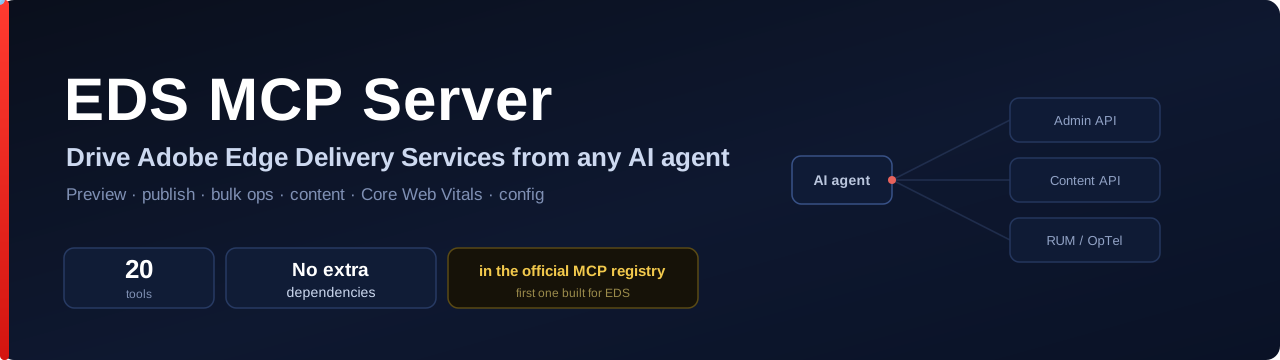





Let an AI agent run — and improve — your Adobe Edge Delivery site.
41 tools. No extra dependencies beyond the MCP SDK. Works with any EDS site. The first MCP server purpose-built for Edge Delivery Services.
Read your content → audit it → fix what's wrong → publish → undo any of it. One page or the whole site, in a single reversible operation. Preview before every write; undo after.
⚡ Do it in three lines
Then just ask your agent:
"Audit the whole site and show me what's hurting SEO." "Fix the meta description on every page that's missing one — preview first, then publish." "Actually, undo that whole batch." "Preview and publish the homepage."
That's it — no local AEM, no scripts, no glue code. Every write is previewable and reversible.
The loop that makes it different
It doesn't just drive your site — it improves it, safely. Point it at an EDS site and an agent can find what's wrong and repair it, one page or the whole site in a single batch that a single eds_da_rollback reverts. No other MCP server — including Adobe's own — does this end-to-end.
🧠 How it works
The agent calls tools; the server talks to the live EDS infrastructure. Read-only tools (content, sitemap, metadata) need no credentials at all.
🔑 One-click sign-in
No more pasting a fresh admin token every day:
Use Chrome or Firefox — Safari blocks the local callback (same as Adobe's AEM CLI).
EDS_API_KEYworks as the CI / fallback path.
🛠️ The 41 tools
Edge Delivery Services — publish, content, analytics
|
Publishing
|
Content
|
Analytics & config
|
Document Authoring (DA) — the authored source, not the rendered output
Nine tools reach a site's Document Authoring source directly (admin.da.live), the source of truth behind an EDS site. Requires EDS_DA_TOKEN.
|
Read
|
Write
|
Bulk ("clone") + safe writes
|
eds_da_export/eds_da_pushbring the efficiency ofaem content cloneto agents: export a whole DA subtree in one call, operate on it, and push the batch back in one call — no local checkout, noaem-cli. Same model, network-native.Safe by default.
eds_da_pushtakesdryRun: trueto preview exactly what a bulk edit would do (create / update / unchanged, with line-diff counts) without writing a thing, andwithUndo: trueto make the write reversible — it returns anundoobject you hand toeds_da_rollbackto restore prior content and remove any docs the push created. Preview before writing, undo after: the difference between an impressive demo and something you'd point at a production site.
EDS_DA_TOKENis an Adobe IMS access token for Document Authoring — grab it from an authenticated da.live session (the IMSaccess_token). Document paths assume.htmlwhen no extension is given (index→index.html).
Content audit — find what's wrong, before you fix it
eds_audit_pageeds_audit_siteeds_audit_reporteds_audit_snapshoteds_audit_trendeds_audit_monitor
It tells you what's wrong.
eds_audit_sitesweeps the whole site (or a subtree) and returns a prioritized list of issues across SEO (missing titles/descriptions, no H1, blocked from indexing), accessibility (images without alt text, missing landmarks, unlabeled form inputs), freshness (pages not updated in over a year), sitemap coverage, and — with adomain— performance (Core Web Vitals) and 404s from Adobe's own real-user data.eds_audit_pagedoes the same for one page. Read-only and safe to run anytime.
eds_audit_reportturns that audit into a beautiful, client-ready HTML report — a Focus GTS Navigator letterhead, an executive summary, per-dimension health scores, a prioritized issue list with each suggested fix, and a Save-as-PDF button (uses your browser's own print — no dependency). Self-contained (no external assets), ready to open, host, or send to a stakeholder. Pass an optionalbrand(agency name, logo, accent, "prepared for" client) to white-label the letterhead.Track it over time.
eds_audit_snapshotrecords each audit's scores to a history sheet in your site's own content (private by default) and tells you the change since last time — "89, ▲7 since last week."eds_audit_trendturns that history into a shareable HTML sparkline of your score over time plus per-dimension movement. One snapshot is a mirror; the trend is the story.Watch it on autopilot.
eds_audit_monitoraudits, diffs against the last snapshot, and reports a status — ok / degraded / broken — and, when you give it awebhook, pings Slack/Discord the moment health breaks (a new critical, or a dimension fallen to poor). The server does the check + alert; you supply the schedule — a copy-paste scheduled GitHub Action or your agent runtime. Webhook is https-only and the payload carries no secrets.
Safe fixes — repair what the audit finds
eds_fix_metadataeds_bulk_fix_metadataeds_fix_redirecteds_fix_audit
It fixes what it finds — reversibly.
eds_fix_metadatarepairs a page's title, meta description and Open Graph image by editing its Document Authoring source, routed through the same dry-run + undo path as the write tools. The agent supplies the content (e.g. writes a fitting description); the tool writes it correctly and idempotently (merges into the page's Metadata block, never duplicates it). Passpublish: trueto preview + publish so the change goes live.
eds_bulk_fix_metadatadoes it across a whole site in one reversible operation — pass a list of{ path, metadata }, and it writes every changed page in a single batch that returns one undo reverting all of it. The full loop:eds_audit_site→ fix the batch → publish → re-audit to zero — with a single undo if anything looks off.
eds_fix_redirectcloses the 404 loop:eds_audit_sitesurfaces the broken links from real-user data, and this adds the 301 redirect rules (to the site'sredirectssheet) that fix them — one rule or many, idempotent, dry-run + undo. So the audit now has a fix for every major finding.
eds_fix_auditis the "fix it" button in agent form: after an audit, apply its fixable findings — metadata and redirects together — in one reversible batch. Findings the report marks ✦ Fixable carry a machine-readable fix; you supply the values (the tool never invents copy), and every change is pushed at once so a singleeds_da_rollbackundoes all of it.dryRunpreviews the whole plan;publish: truemakes it live.
🔌 Add it to your tool
Claude Code — one command
Related MCP Servers
Adoption & maintenance
Factual signals from GitHub, npm, and our automated checks — not a rating.
GitHub stars
3
Stargazers on the source repository.
npm downloads
2.4k
Package downloads in the last 30 days.
Last commit
25d ago
Most recent push to the default branch.
Directory activity
1 views
Config copies, upvotes, and views on AllMCPs.
Reviews
No reviews yet — be the first to share how this listing worked for you.
Frequently Asked Questions about Eds MCP Server
AllMCPs Directory Badge
Showcase your server listing on GitHub or your project documentation. Embed this dynamic SVG badge to highlight official listing status and live engagement.
Badge Style:
Live Dynamic SVG Preview
Markdown (GitHub README)
[](https://allmcps.com/mcp/focus-gts-eds-mcp-server)HTML Embed
<a href="https://allmcps.com/mcp/focus-gts-eds-mcp-server"><img src="https://allmcps.com/api/badge/focus-gts-eds-mcp-server?style=directory" alt="Eds MCP Server on AllMCPs" /></a>Technical Specs & Signals
CategoryCloud Platforms
PricingFree
11/11 checks healthy over the last 34d
56Quality signal: Good · 56/100How this signal is calculated ▾
Server availabilityNot measured
Not scored for repo-hosted servers — we can't reach the running server, only its GitHub page. Hosted MCP endpoints are health-checked live.
Verified ownership10/20
Documentation & tools24/30
Adoption & activity8/15
Community engagement0/10
A guidance signal from public completeness & health data — not a user rating. New listings start lower and rise as they add docs, get verified, and grow adoption. Signals we can't observe for a listing are skipped, not counted against it.
Supply-chain signal
No high-severity advisories surfaced by our automated scan.
Critical 0High 0Medium 0Low 0
Scanned 28d ago via OSV.dev · @focusgts/eds-mcp-server (npm)
Own this project?
This directory is pre-filled from public sources. Claim via GitHub README, site badge, or DNS TXT to unlock edit access and the Official badge — proof is checked automatically, then reviewed by our team.
Free dofollow backlink: add your website and place the AllMCPs badge on it — no claim needed. We detect it automatically and keep it verified as long as the badge stays live.
Claim & get free dofollowShare & Embed
Add our SVG badge (dark/light directory styles) or embeddable widget to your site.